Monday, July 31, 2006

July Recap: Improving Existing Products

This month Google didn't release too many products and focused on improving existing ones: Google Talk has the most requested features (file transfer and voicemail), Gmail lets you delete all spam and empty the trash, AdWords shows statistics for invalid clicks. Google Video adds new features and redesigns every month hoping to keep up with YouTube's growth. Google wants to attract more developers on its side and created a repository for open-source code. But this features are small compared to what we are about to see: GDrive, Google Office, improved Google Translate, Mobile Marketplace and many others. Is this the quiet before the storm?

Innovation

Google Accessible Search
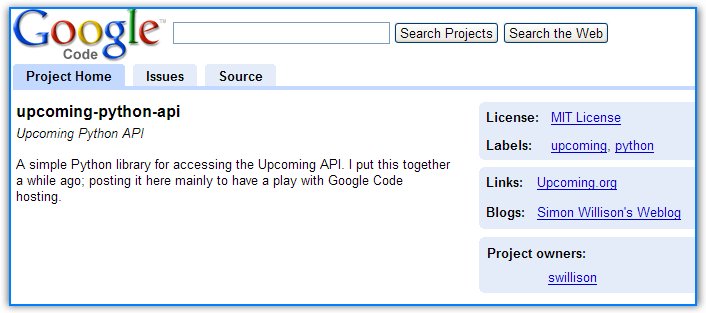
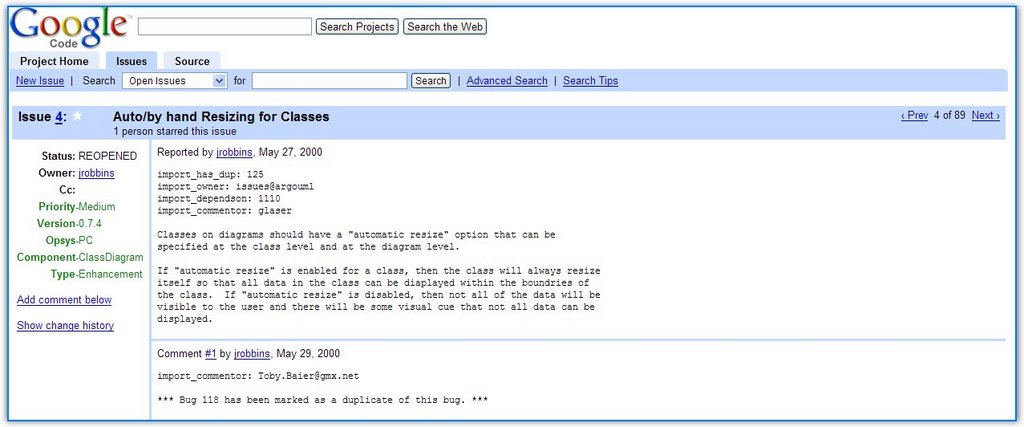
Open-source project hosting (not yet Sourceforge)

Consolidation

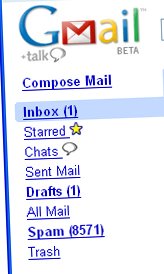
Gmail has new features: select all spam, apply filters to old mail and select every mail from a search
Google Maps improves zoom
Google Video has international versions
Link to a specific part of a Google Video
Updated OneBox for Google Local
Live traffic information on Google Maps Mobile
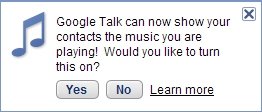
Google Talk adds voicemail and file transfer

Advertising

Google is more open about click-fraud
AdSense for Radio coming soon


Future

Internal GDrive homepage leaked
More unreleased services
Google design experiments recap (another homepage design)

Words and numbers

Google is officially an English word
Search numbers are OK,
financial results are great,
numbers for the other services are not OK.

Product of the month: Google Video.


Most popular original article: If Google didn't exist.

Labels:

Find Brief Facts On Google


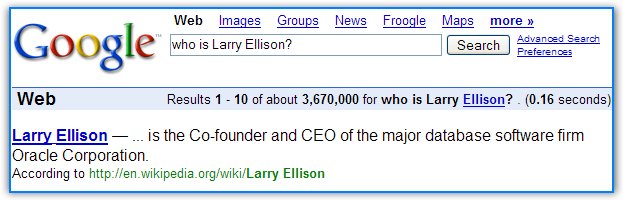
If you want to find a short description of a company, or a person, or a product, Google can help you be a little more knowledgeable with a simple search:

who is Larry Ellison?
who is Coca-Cola?
who is iPod?
who is Windows 95?

If you type a query that starts with "who is", Google will show the first words from the most relevant Wikipedia entry.

Queries that start with "what is" return more elaborated definitions and are more appropriate for finding the meaning of a word.

If you want to find information about the location of a company, of a country or a sight, type "where is... ?":

where is Google?
where is Romania?
where is Taj-Mahal?

There's also information about events. You can query Google about holidays using "when is...?":

when is mother's day?
when is Easter?

In this type of query, define is the same as what is, while info and about are the same as who is, so you can just type info oracle or about tarantino.

YubNub - Online Command-line

yubnub
I wrote in Google as a Command-Line that "a single search box can be more powerful than more disparate search boxes". YubNub is an online command-line that have everything a Linux junkie would want: man for each command (manual), ls (a list of all the commands), parameters, the ability to create a new command. "But what's a command?", you'll ask me. A command can be anything: a search with Google, weather information, view source of a web page, go to an entry in the PHP manual, find who owns a domain and a lot more.

YubNub translates a URL like http://whois.domaintools.com/google.com
into a simple command: whois google.com.

It's easier to use a command like this instead of keeping bookmarks or searching using Google. Many browsers include the ability to create shortcuts for search engines, but YubNub brings this approach to a new level. You can invoke a command multiple times by typing one line.

multi gim rose ginger searches Google Images for rose and ginger and shows the results in two frames so it's easy to compare them.

Type guess le vieux caffe to find the language of an expression (in this case French).

There is a big list of commands: here are just a few and everyone has a man entry, so you can find a description, parameters info and other details.

YubNub transforms any useful service into an alias, an easy to remember command, so you can keep your old-fashioned habits on the web. May the command-line force be with you!

Is Blogger Neglected?

I came across a news from last year that explained Blogger's plans for the future:

"Google is also considering the creation of an enterprise Blogger version, as well as letting users limit access to their blogs by creating private groups, said Biz Stone, Blogger senior specialist.

Although Blogger currently allows users to post text and photos to their blogs via any e-mail program, Google is looking into a tighter integration with Gmail, Stone said.

Although users can password protect their Blogger blogs with third-party software or services, Blogger currently doesn't offer native ways for users to limit access to their blogs. However, Google is mulling over the possibility of adding some native privacy features, such as the ability for users to create private groups and that way control who can view their blogs, Stone said."

Blogger's development seems to have slowed down since it was acquired by Google, and many of the features found in other popular blog platforms (like categories, inline comments, plugins) are not available in Blogger. There are also frequent problems with accessing the site. I wonder what was the real reason for acquiring Blogger: the team or the fact that Blogger is a publishing platform well-suited for AdSense?

This is Google's statement from 2003: "Google recently acquired Pyra Labs, developers of Blogger - a self-service weblog publishing tool used by more than one million people. We're thrilled about the many synergies and future opportunities between our two companies. Blogs are a global self-publishing phenomenon that connect Internet users with dynamic, diverse points of view while also enabling comment and participation. In the coming weeks, we will report additional details. Blogger users can expect to see no immediate changes to the service."

Labels:

How To Create A Good Site (Video)

There's a new trend at Google: let's create videos where we answer questions and upload them on Google Video. While this is a more personal approach, there must be a way to include the transcript along with the video. The text is searchable so you can find it later on and it's easier to reference it.

In this video, Google's Matt Cutts explains how to create a good site that ranks well on Google. To summarize the tips: make sure the site is crawlable and it has interesting content.

Labels:

Sunday, July 30, 2006

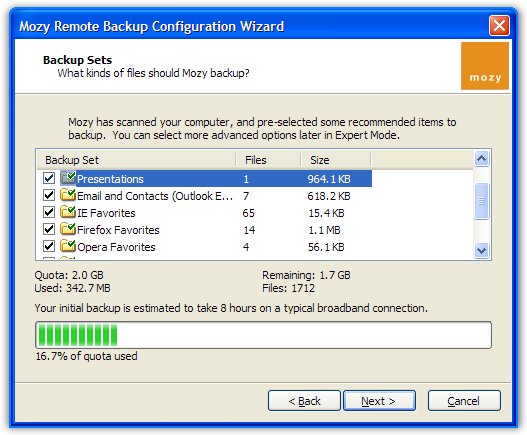
Mozy - Free Remote Backup Tool


Mozy is a remote backup tool for Windows that gives you 2GB space to automatically synchronize your folders online. Mozy encrypts data with 448-bit Blowfish encryption, and transfers them using 128-bit SSL, so it's secure. You can schedule daily or weekly backups or you can let the automatic backup happen (Mozy backups your folders only if the computer is idle for a certain number of minutes, by default - 30 minutes).

If you don't have NTFS as a file system, Mozy can't perform backup for opened files, so you might consider closing all the applications while Mozy backups the files.

My only complaint is about restoring files: you can select the files you want to restore online, but the interface is pretty stiff. You're limited to 5 restores a month and you get the restored files by email. It would be nice if you could manage restoring files using the same local client.

On Google News


Google News
is Google's way to create an online newspaper by automatically selecting the most important news from news sites all over the world and trying to provide an objective view. You can read the homepage, go to a specific section or search for a topic.

When did it start?
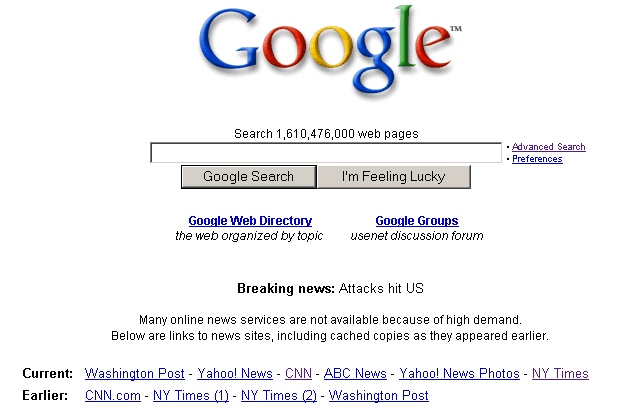
Google News started with one Googler who tried to manage the flood of information after the terrorist attack from September 11th 2001. You can see in the screenshot below a small draft of Google News - Google's homepage after 9/11:
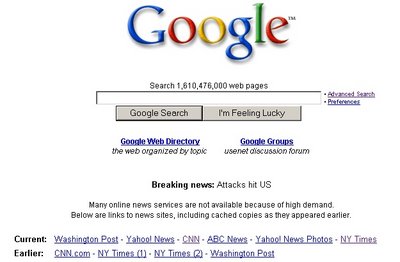


There was a such a big demand of information after the attack, that many news sites were down or very slow. On 9/11, news-related Google searches were 60 times greater than the number of news-related searches conducted the previous day. In 2001, Nostradamus and CNN were the top gaining queries of the year.

Who created Google News?
Krishna Bharat, Google's principal scientist from that time, realized he could create a tool that clusters related stories, so he could find different perspectives on the same subject.

When was Google News released?
After he created the news portal, he shared it with his colleagues and most of them liked it. Google lauched the first beta of Google News in the spring of 2002.

Why is Google News useful?
Krishna Bharat says: "I want this to be a force for a democracy. I want us to be an honest broker, and I want newspapers featured on our site to get traffic from us. [..] One of the things that makes us objective is we show all points of view. Even if you disagree with one, we give you both - the majority and the minority point of view."

Does everyone see the same news?
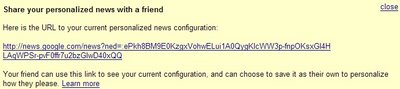
At first, the news were the same for everyone. Now Google personalizes the news if you are logged in. You'll see a section of personalized news based on what type of news you usually read. You can share this personalized news with you friends by sending a unique URL found at the bottom of the Google News homepage.


How does Google rank the news?
Google shows news from more than 4500 manually-reviewed sources. Google News pages are created algorithmically, by showing only the most important news. For each subject, Google tries to remove duplicate stories and show fresh news. Google also takes into account the traffic of the site, the number of editors, breadth of coverage, average story length, number of citations to the story and other factors.

Google News Report is a tool that tries to approximate these factors and shows the top scoring stories from the last eight hours, from today, from this month, and this year. There's also a top of the sources: Forbes, Reuters and NY Times are the top 3 sources this month, according to this unofficial hierarchy.

Can my site be a source for Google News?
It's not very easy to become a source, but Search Engine Roundtable has some tips. You can ask Google to include you site at this page.

Related:
Top 10 funny Google News
Google News out of beta
Google News includes financial information

WinRAR Free Today

Note: the offer to get a free copy of WinRAR was only available on July 30 2006.

WinRAR's team was so happy that WinRAR has won the "best overall utility" award from Shareware Industry Awards Foundations, that they decided to offer non-upgradeable free licenses for WinRAR 3.51 this Sunday.

The only problem is that many people want to get the free license key, so their server is very slow. If the page doesn't load, try again. You may need to reload the page 10 times or more.


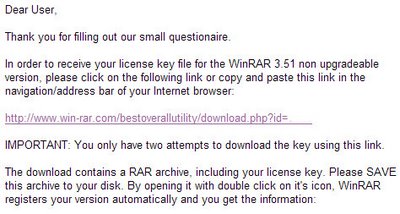
This is the link where you can fill some details about you and get a free license for the best Windows data compression utility. You'll get a mail that starts like this:


Download WinRAR 3.51 from here (1 MB), install it and then open the archive rarkey.rar that you've downloaded by clicking on the link from the mail. Now you have a great software for free.
Saturday, July 29, 2006

Vista's Speech Recognition Demo (Video)

Via Slashdot, this video shows a demo of Windows Vista's improved speech recognition capabilities. As Microsoft says, "speech Recognition in Windows Vista empowers you to interact with your computer by voice. It allows you to significantly limit your use of mouse and keyboard while maintaining or increasing productivity. You can dictate documents and e-mail messages in mainstream applications, fill out forms on the web using voice commands, and seamlessly manage Windows Vista and applications by saying what you see."

Yahoo Messenger 8 Released

Yahoo has released a new version of its popular instant messenger, more oriented towards developers.

You can find more about the new features and download the new version from my small review. Also find out how to add contacts from the MSN network and chat with them (the voice feature is not available).

In case you don't like the Flash ad from the main window, read my updated post about removing the ad.

Yahoo boasted to TechCrunch about its features and showed this chart:


MSN could show the market share from May:


Google Talk wouldn't show anything and let the future (features) decide what application is the best.

Labels: ,

Google Is Your Default Search

The latest version of Google Toolbar for IE has a strange new feature: keep Google as the default search engine. There's an exe that runs by default at the startup and monitors if another software (like MSN Toolbar) tries to change Google's settings.

Here's the setting from the toolbar (enabled by default):


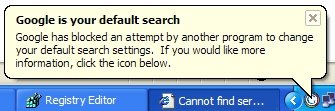
That's how the notifier reacts if Windows Live Toolbar sets MSN as the default search engine:


Here's a screenshot that shows the entry in Task Manager and the startup key from the Registry (click to enlarge):


This is the content of a text file that explains the feature:
GoogleToolbarNotifier is a companion to the Google Toolbar. This executable is necessary to enable the Search Settings Notifier feature of the Toolbar. This feature lets you keep Google as your default search engine and prevents this setting (and others as we add new features) from being changed without your consent.

To enable or disable this feature, please click the "Settings" button on your Toolbar and choose "Options." In the "More" section, check or un-check the box next to "Search with Google." As long as this feature remains enabled, GoogleToolbarNotifier.exe will run silently in the background.

This is most likely a reaction to Microsoft's intention to set MSN as the default search engine in IE7 and to other toolbars (Yahoo Toolbar, Windows Live Toolbar) that change IE's search engine by default. Winamp has a similar software that monitors if other players try to change its file associations. The setting can be changed by the user.

Update: Even if you disable "Search with Google" from the toolbar, and kill GoogleToolbarNotifier.exe, everytime you load IE, Google Toolbar launches GoogleToolbarNotifier.exe once again. The only way to get rid of the notifier is to delete the folder C:\Program Files\Google\GoogleToolbarNotifier. I think Google has started to become a little evil. The description above clearly states that the exe will run "as long as this feature remains enabled".

Update 2: Benjamin Lewis from Google says it's a bug.
"The fact that GoogleToolbarNotifier.exe remains in memory after disabling the feature is a bug – thank you for reporting it. We're working on it right now and should have it fixed shortly. As long as the feature is disabled the .exe doesn’t actually do anything, it just remains in memory (not that this makes it less of a problem)."

Update 3: The bug has been removed.

Labels:

Friday, July 28, 2006

Google Toolbar 4 Out Of Beta

Google Toolbar 4 for Internet Explorer is out of beta. The most interesting features of this release are: custom buttons (a better version of Firefox's live bookmarks), integration of Google Bookmarks and a better search box that includes spelling corrections, suggestions and queries history.


After downloading the toolbar, you can add Google Operating System as a custom button so you can easily find the latest posts and search the archive for older posts. Other custom buttons can be found in the gallery, including buttons for Gmail, weather, Slashdot and other search engines.

{ Via Google Blog. }

Labels:

Spam Art


While most people think spam is something unpleasant, Alex Dragulescu, a visual artist (he studied film, photography, art history, computer animation and programming) uses the characters found in spam messages to create virtual spam plants.

CNet explains how he created this form of art: "For the Spam Plants, he parsed the data within junk e-mail--including subject lines, headers and footers--to detect relationships between that data. Then he visually represents those relationships.

For example, the program draws on the numeric address of an e-mail sender and matches those numbers to a color chart, from 0 to 225. It needs three numbers to define a color, such as teal, so the program breaks down the IP address to three numbers so it can determine the color of the plant. The time a message is sent also plays a role. If it's sent in the early morning, the plant is smaller, or the time might stunt the plant's ability to grow, Dragulescu said.

The size of the message might determine how bushy the plant is. Certain keywords, such as Nigerian might trigger more branches."

Alex Dragulescu has many projects connected to the Internet: spam architecture (that translates "various patterns, keywords and rhythms found in the text into three-dimensional modeling gestures"), blogbot ("a software agent in development that generates experimental graphic novels based on text harvested from web blogs"), algorithms of the absurd ("heap sort algorithm as a hidden structure and illustration of the desire for efficiency and the modes of production of the capitalist system").

It's really interesting to see how close art and technology can be and how easy is to transform ugliness into something beautiful and revealing. "Spam is a random piece of literature, it has unseen effects, it changes all the time. And it's led me to see text differently," says Alex Dragulescu.

Labels: ,

Google Time Portal - More Unreleased Services


Tony Ruscoe found some new Google services while trying to log in to sandbox.google.com. It seems that Sandbox accounts are another kind of Google Accounts, used by those who test new Google services. Tony explains how to create a Sandbox account, although you can't actually test the products.

Here are the not-yet-released services :

Google Events - http://www.google.com/events
Examples of events already hosted are: Doodle 4 Google, ACM World Finals.

Google Guess - this might be a new kind of search more AI-based

Google Online Assessment - http://www.google.com/goaexam - an online skill assessment tool?

Google Real Estate Search - homes for sale, mortgage calculators (extension of Google Base?)

Google RS2 - this might be related to the new version of Google Translate

Mobile Marketplace
An interesting article that explains the term gives some hints: "For example, consumers can design their own clothes and accessories (including jewelry) online. Soon, they'll be able to virtually try on clothes or rings and e-mail the images to family, friends, and strangers for feedback before deciding whether to buy."

Google Workplace - this may be the name for Google Office

You can create a Sandbox account at: https://sandbox.google.com/accounts/NewAccount.

To see the names of the services and add them to your account, you can go to these links: ev, guess, goa, re, rs2, mmp, wf that follow this pattern: https://sandbox.google.com/accounts/Login?service=[code] and click "Continue" for each one. Then if you go to My Account, you'll see a list similar to the one in the screenshot. You can use this new Google Account only if you log in at sandbox.google.com.

Of course you can't log in to the services you've just added. Only Google testers can do that. But it's interesting to see what the future may bring.

Update: Google fixed this, so you can't perform the actions described in this post anymore.

Related:
Other secret products
Evidence of Google Office for Businesses
Old Google homepage still live

Google Checkout Update Soon

Google Checkout seems to have some problems. Kirby Witmer complained about them...

I placed an order with Buy.com on July 7, 2006. No problem, very slick. I received an e-mail from both Google and Buy.com thanking me for my order. Days came and went, and I kept checking the status of the order and always it said “In progress”. It was an in-stock item as far as I know, and Buy.com has always been very prompt in my experiences with them, so this was strange. So finally, on July 11th I sent an e-mail using the send message to seller wizard in Google Checkout. No response. Not even an automated reply.

... and got a lot of presents from Google (USB sticks, mouse, pens and many other promotional materials).

Someone from Google Checkout promises on Google Groups that the service will be improved and updated soon:

Hi everyone,

Things have been very busy here at Google Checkout and we're excited
about all the interest.

The first thing I'd like to talk about is orders in "Reviewing." I know
there's frustration about the delays due to the order review process.
So you understand the background here, Google Checkout is committed to
fighting fraud and minimizing the risk that both buyers and sellers
face when processing transactions over the internet. At times it may
seem we are overly cautious, especially when an order from someone you
know personally is being held up. We are working as fast as possible to
fix this issue. The good news is that we have some upcoming changes
which will both speed up the review process and make it more effective
at filtering out the bad guys.

GoogleCheckoutPro

Labels:

Thursday, July 27, 2006

Google Talk Adds Voicemail And File Transfer

The latest version of Google Talk includes three features that will make many users happy:

File transfer
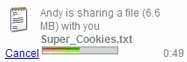
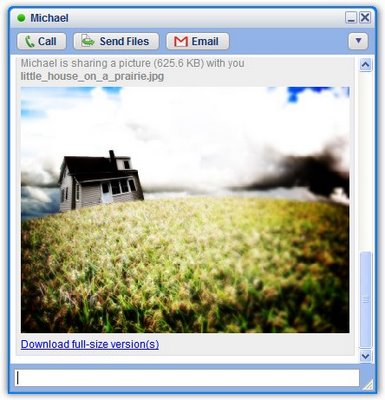
Send files and folders to your friends. There is no restriction on the file type or size. You can send files using drag and drop in a chat window or by clicking on "Send files". If you share a photo, Google Talk will show a thumbnail so you know how it will look while chatting about it. You can also share folders.


Voicemail
You can think of voicemail as an offline message. If a friend can't answer the call, you can still leave him a message of up to 10 minutes. Or you can directly send a voicemail if you feel it's more appropriate.


The person will receive an email that includes your voicemail as an MP3 attachment or embedded in an MP3 player (24k, 11025Hz Mono):


You can search all the voicemails in Gmail by adding label:voicemail to the query.

Music status
Show your contacts what music are you listening. It works with Winamp, Windows Media Player, iTunes and Yahoo Music Engine.


You need to download Google Talk from this testing location, as the new version (Google Talk 1.0.0.95) hasn't yet been released.

Update:
Download Google Talk 1.0.0.96 from Google Talk's site.

Labels:

Host Open-Source Projects On Google


Google has just released at OSCON a service for open-source community, Project Hosting, that has some basic features:

* Project workspaces with simple membership controls
* Version control via Subversion
* Issue tracking
* Mailing lists at groups.google.com

"The goal of hosting on Google Code is to promote healthy open source development by offering hosted tools that most open source projects can't afford." This is the reason why Google chose to offer this service only for open-source projects.

An example of project is Chris DiBona's Goopy, a Python library that brings functional programming aspects to Python. You can find many other open-source code from Google on the site. There's also a demo that shows most of the features of the service.


Google Project Hosting doesn't have all the features of SourceForge (no webpage hosting, no download feature), so many developers will use both sites. Each project has 100 MB quota and has to store some metadata (description, tags, links). It's easy to add issues and to search for them using advanced criteria (status, priority, label) - that's one of the strongest points of the service. The code management can be done with Subversion, a version control system similar to CVS.

NewsForge found out more from Google:
Greg Stein says, "We really like SourceForge, and we don't want to hurt SourceForge" or take away projects. Instead, Stein says that the goal is to see what Google can do with the Google infrastructure, to provide an alternative for open source projects.

Chris DiBona says that it's a "direct result of Greg concentrating on what open source projects need. Most bugtrackers are informed by what corporations" and large projects need, whereas Google's offering is just about what open source developers need.

DiBona and Stein describe the project as ideal for smaller open source projects, rather than larger projects with more complex needs, such as Apache or GNOME. However, they also say that larger projects are welcome.

Google Office Live?

Garry Price from Ask.com found some interesting recently registered Google domains:

HOSTEDBYGOOGLE.COM (also .net, .org)
GOOGLE-HOSTED-SERVICES.COM (also .info, .org)
GMAIL-FOR-YOUR-DOMAIN.ORG (also .net, .info)
Your-company-site.com
Your-online-site.com

Do you see a trend here? They are just some domains, but because Google bought so many variations on the same theme, one can infer that Google prepares for a hosted service for businesses. Think Office Live.

Microsoft Office Live provides companies with its a free domain name, Web site, and e-mail accounts.

Additionally, Office Live offers

* business management applications, such as customer, project, and document management tools

* Web site managed and maintained by Microsoft where you can work together and share information with employees, customers, suppliers, and contractors.

Google could develop a business version of Writely, Google Spreadsheets, integrate them with Gmail for Domains, Google Calendar and a corporate Google Pages. Google could also offer some discount for an enterprise search solution like Google Mini and some discount for AdWords / Google Checkout. Google could offer basic hosting free, but advertising-supported, and advanced version, at a competitive price.

Related:
Google OneBox for Enterprise
Google Checkout review
Schmidt: "Office is not the business we're in"

How Google Could Push the ODF Alliance


Sebastian Moser is a young Austrian software engineer that is especially interested in what's going on behind the scenes at Google and other web companies.


This month, Google joined the ODF Alliance, which led to speculations about what they want to achieve with this step. It is logical that they will support the OpenDocument file formats in their products through importing & exporting (Writely, Google Spreadsheets) and previewing them in Gmail.

But Google's support could go further and could, in fact, solve the main problem that hinders the OpenDocument format from spreading widely: the distribution.

As long as ODF files can't be opened on most computers, there won't be a big market for it, and OpenOffice.org/StarOffice customers will continue to export all their files to *.doc. This is where Google could step in.

Their toolbar, which is available for both Internet Explorer and Mozilla Firefox, has a very big user base and a market share in the toolbar-space of almost 50%. Google could use the toolbar to deliver an ODF-plug-in for Microsoft Word, which installs silently in the background and gives users the ability to open and save ODF-files in Microsoft Office without thinking about the format.

The advantage for the ODF-alliance is clear, and Google could profit from that in different ways:

  • Toolbar installations: The ODF-support could be another killer-feature for their toolbar, leading to more and more people installing the toolbar, which is responsible for a large amount of Google's revenues.
  • Smoothing the way for Google's own products: An open file format doesn't only help alternative Office applications, but also Google's own business. Although Microsoft's Open XML is fully documented, Google should and could never trust a company that has control over a file format and is at the same time one of the biggest competitors.
    So, having a wide-spread, real open file format could make it much easier for Google to create a widely-used Web Office.
  • Beating Microsoft: The struggle between Google and Microsoft has long become to a personal game between Eric Schmidt and Steve Ballmer, with Google currently being more successful than Microsoft.
We'll see what will come out in the end, probably I'm completely wrong. But anyway, let me know what you think about it.

Map Of Beauty


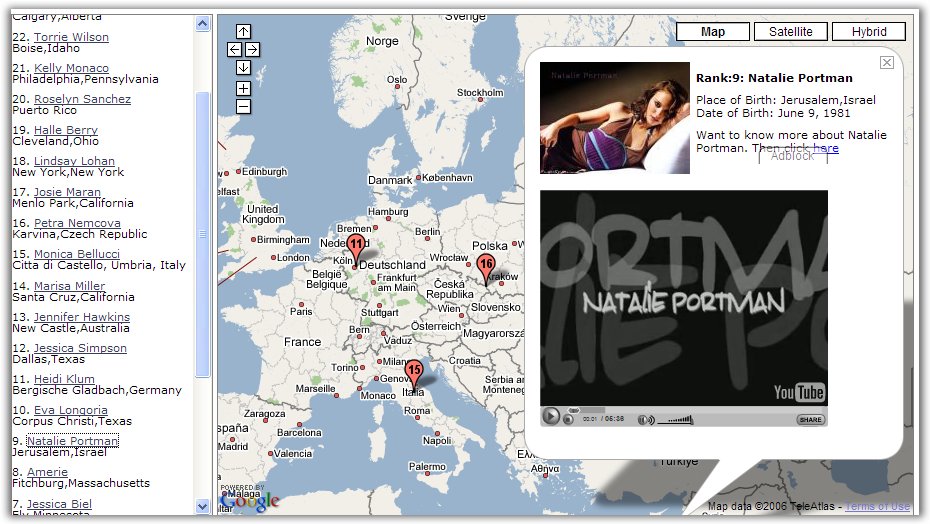
Virender Ajmani has created a mashup between Google Maps, Youtube videos and pictures of the 99 women from AskMen's Top 99 Women 2006. Beauty is subjective, so I'll let you decide if the top is fair, or if it's just the result of media exposure.

In the screenshot, Natalie Portman - ranked number 9.

Labels:

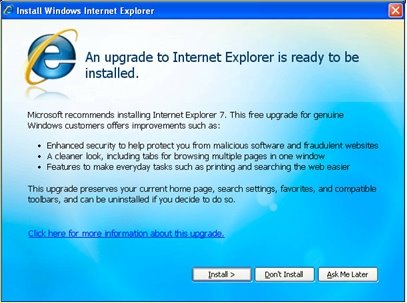
Internet Explorer 7 Will Be An Automatic Update


IEBlog informs that Internet Explorer will be distributed as a high-priority update via Automatic Updates "shortly after the final version is released for Windows XP, planned for the fourth quarter of this year". Internet Explorer 7 has Windows Genuine Advantage built-in so it won't install if the license of Windows XP is not valid (and sometimes even if it is). Although Microsoft will notify users about the new version of IE, most will probably just press "Install", so at the end of the year IE7's market share will be higher that IE6's share. This will be a problem for many companies whose sites will suddenly stop working: many webmasters don't test the sites in IE7 and the customers will upgrade from IE6 to IE7.

Microsoft will also release a IE7-blocker for corporate users that don't want to install the new version of IE. Most businesses will just sit and wait a couple of months to see if the new browsers has security problems or other major flaws.

I don't recommend to have Automatic Updates activated because Microsoft uses this feature to install all kinds of software, including the spyware Windows Genuine Advantage.

Related:
IE7 Beta 2 Standalone version (no installation needed, doesn't require WGA)
Update Windows from Firefox and Opera
What's new in IE7

Webzari - Visual Site Explorer


Webzari is a way to see the most important web pages that link to a site and the most important pages from a site. Webzari has been created by Yahoo Korea and it's a visual version of Yahoo's Site Explorer. The Flash represents each page as a planet: the bigger is the planet, the more important is the page. The yellow planets are sites from Korea, the purple planets are international. If you click on a planet, you can either visit the site or focus on that site.

It's important to note that the data is not very accurate: I couldn't find many important sites in Yahoo's list of backlinks, but you can discover many interesting sites along the way.

Webzari has loud sounds. If you want to mute them and other Flash content, you can use Flash Mute. Language is not a barrier to use the site.

{ Via Yahoo Search Blog. }

Labels: ,

Wednesday, July 26, 2006

Old Google Homepages Still Live

David Bloom found some interesting pages on Google's servers. You can compare them to archive.org's version.

These URLs:
google.com//////
google.com/intl/en//////
google.com/intl/en/intl/en/
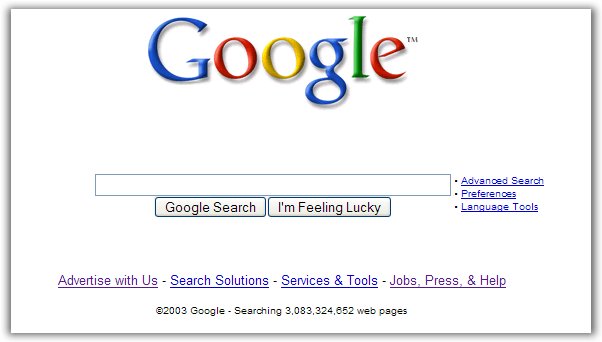
...will take you to an old Google homepage (copyright 2003).

And this URL:
google.com/intl///////
...will take you to an even older homepage (copyright 2001).


The page from 2003 doesn't have any link to other Google services like Image Search or Groups, so it's not the actual Google homepage from that time. The page from 2001 is Google's homepage.

Update: Google fixed this and no link seems to work anymore.

DM2 - Take Control Of Your Windows

DM2 is a brilliant application for Windows that improves the user interface with a lot of useful features:

* virtual desktops (if you have too many open documents, you deserve a fresh new desktop)
* minimize any window to system tray
* minimize a window to a floating icon on your desktop (not to the taskbar or systray)
* make any window "always on top"
* hide a window completely
* change the opacity of a window
* change the priority of the process that created the window
* add favorite locations to open / save dialogs

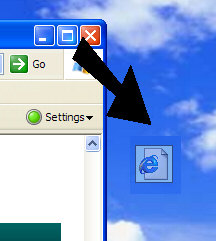
For example, you can right-click on the maximize button in the right-top corner of the window to transform a window into a floating icon. The icon occupies little space and it's always available. If you right-click on the floating icon, you can preview the window and restore it. Similarly, if you right-click on the close button, the window disappears completely. You can restore it from the Windows Manager section of DM2.

The application doesn't have an installer, so you can extract the files into a folder or copy them to your USB drive. Another impressive thing: the ZIP archive has only 135 KB. DM2 is open-source and it's free for noncommercial use.

Update: if you can't find the download link, here it is. Visit more often SourceForge and it won't seem that difficult to find your way.

Related:
The most powerful Windows application (Total Commander)
Convert your Windows into a beautiful Mac OSX

Labels:

Writely, Advanced Rich-Text Editor


I've just used Writely a little and I have to say that Google Spreadsheets is much more advanced. Writely reminded me a lot about creating a rich-text editor. I did that some time ago, and while it was fairly easy to do, you have to deal with different types of editors for Internet Explorer and Mozilla, which have a lot of bugs - sometimes they work, sometimes they don't. Mozilla also implements restrictions for copy-paste, so you can't do that using the code.

You must remember a rich-text editor from your mail account or your blog posting form. Gmail has one, but I've never written a complex document in Gmail.

Writely is a rich-text editor that allows you to import HTML, OpenOffice and Word documents, and to export them as HTML, Word, OpenOffice and PDF. I couldn't test the import feature, but a fairly simple document is exported well in Word.

The problem with Writely is that it's very limiting. Writely doesn't know about pagination, headers, page borders, page orientation. If you insert an image, it's very difficult to align it. If you delete a table, there's no undo. The list of fonts is small, even if you have a lot of fonts on your computer. You can't define styles to make your document consistent. The list of keyboard shortcuts is limited by the conflict with browser's own shortcuts. Because Writely runs in the browser, you can't select non-contiguous text. Writely also disables the contextual menu of my browser and replace it with its own menu. It replaces Firefox's copy item with its copy, that doesn't work because of the security limitations. I also can't use the spell-checking facility from Firefox 2 or search text on the web by using the menu. Writely crashed Firefox twice, although I was just writing this simple text. There's no search facility, just a "replace all" feature that doesn't have an undo.

Writely does something very well: it stores your documents online so you can share them with your friends. It also allows collaboration, more people can edit the same document at once. Google Spreadsheets is better: you can chat with the people that work on the same document as you. Writely automatically saves the documents every minute so you don't have to use recovery features like in Word.

But Writely is just an advanced rich-text editor, while Word (or OpenOffice, AbiWord) is a word-processing application.

Related:
New invitations for Writely
Google Spreadsheets
Make diagrams online with Gliffy

Labels:

New Invitations For Writely


Writely's transition to Google's servers takes longer than expected, if we consider that the company was acquired in March. Writely team has announced they've started to send another batch of invitations to those who have submitted their emails. "If all goes well, we should have everyone in before summer ends."

If you don't want to wait until Writely sends the invitation, there are sites that promise to give you one.

It's interesting to note that the famous file that included the list of features of GDrive was found on writely.com. Is that a sign that Writely will be a part of the GDrive project, along with Google Spreadsheets?

Hide Spam Counter In Gmail


If you receive a lot of spam in Gmail, you may not like to see the growing number of spam messages. It's easy to hide the spam counter - just create a new filter with the following details:

Has the words: is:spam
Check Delete it.
Check Also apply filter to * conversations below.

All the spam messages will be moved to trash, where you can check for false positives. Alternatively, you could set the filter to mark the messages as read instead of deleting them.

Related:
New Gmail features
Encrypt Gmail traffic

Labels:

Google Is More Open About Click Fraud

After a lot of pressure from advertisers and media, after a blogger from ZDNet has spread the idea that Google lets click fraud happen, after the release of many researches that show click fraud rate is increasing, after many lawsuits and settlements, Google started to become more transparent.

First they agreed to receive an independent report that examines their detection methods, policies and practices. This report shows that Google uses three ways to detect invalid clicks:
Anomaly-based (or Deviation-from-the-norm-based). According to this approach, one may not know what invalid clicks are. However, one can know what constitutes "normal" clicking activities, assuming that abnormal activities are relatively infrequent and do not distort the statistics of the normal activities. Then invalid clicks are those that significantly deviate (mainly in the statistical sense) from the established norms. For example, if a normal average clicking frequency on an ad is 4 clicks per week and if someone clicks on it 100 times per week, then this is an abnormally large clicking activity.

Rule-based. Each rule has one or several conditions in its antecedent and is of the form "IF Condition1 AND Condition2 AND … AND ConditionK hold THEN Click X is Invalid (or respectively Valid)." An example of such a rule is "IF Doubleclick occurred THEN the second click is Invalid."

Classifier-based
. A click is invalid if a data mining classifier labels it as "invalid." This labeling is done based on the past data about valid and invalid clicking activities used for "training" the classifier to decide which clicks are (in)valid.

Google has built the following four "lines of defense" against invalid clicks: pre-filtering, online filtering, automated offline detection and manual offline detection, in that order. Google deploys different detection methods in each of these stages: the rule-based and anomaly-based approaches in the pre-filtering and the filtering stages, the combination of all the three approaches in the automated offline detection stage, and the anomaly-based approach in the offline manual inspection stage.

The reports also shows that it's hard to define invalid clicks and to establish rules that precisely delimit them, but Google is constantly improving their detection system.

Another proof of transparency is a new feature of AdWords: advertisers can now see the number of invalid clicks found by Google. Advertisers are not charged for the invalid clicks and they can only see aggregate information about these clicks. Google doesn't disclose information about the IPs of the invalid clicks or the reason why they are invalid.

"The metrics of invalid clicks and invalid clicks rate will show virtually all the invalid clicks affecting an account. These clicks are filtered in real-time by our systems before advertisers are charged for them. The resulting data will of course differ from one advertiser to the next," says Shuman Ghosemajumder, Business Product Manager for Trust & Safety at Google.

Labels:

Tuesday, July 25, 2006

Ajax Timeline


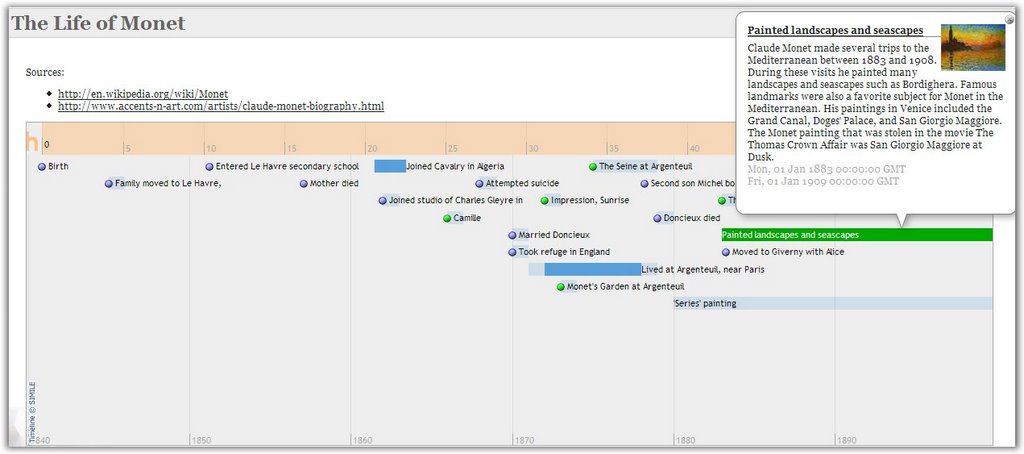
This timeline is similar to a Google Map: it imports data from an XML file, so it's easy to visualize temporal information, like the evolution of a company, a person or an event. There is also a step-by-step guide that helps you create a timeline.

The widget was created by Simile (Semantic Interoperability of Metadata and Information in unLike Environments), a group that develops open source tools related to Semantic Web. You can find other interesting tools at their website.

Labels:

Break Into Your Google Account


I propose a little experiment. Log off your Google Account and try to imagine you're a different person. You're a friend who found the password by accident. Then log on the same Google Account and try to find interesting information about you in your Gmail, Search history, Google Calendar, Google Reader and other services. You could use this page for reference. Try not to think about what you know is there.

How would you describe yourself by looking only at the data? Can you find anything that would embarrass you if it were public?

If you Google yourself, most of the data you find in the search results is hard (if not impossible) to destroy. If you search your private data, anything can be deleted. Would you delete anything if you knew someone would break into your account?

{ Photo by Tom Chambers. }

Related:
Crack Windows password
Reset Windows password
Gmail account deleted

New Google Service For Open Source Projects

Greg Stein from Google wrote am intentionally cryptic message on Google Code Blog:
I've been working with a great team for a while now to produce a new Google Service for the Open Source community -- in fact, we're putting the final touches on it as I write this blog post.

Come to my OSCON talk on Thursday the 27th, at 1:45pm, to learn more!

OSCON is O'Reilly Open Source Convention, an annual conference on open source software, such as Linux, Apache, MySQL, Perl, PHP and Python. Greg Stein has worked for many open source projects like WebDAV, Python and Apache and now works for Google.

It will be interesting to see the new Google project that might be a search engine for code like Krugle, a repository for open source code that allows collaboration and has a version control system or an API based on GData that expands Google Web Search API. Or it might be something else.

Google has contributed a lot to the open source community by releasing patches to WINE, to the Linux kernel and by developing APIs for many services. One thing will definitely remain proprietary code: Google search engine.

Live Traffic Information On Your Mobile Phone

maps-directions

According to Reuters, Google Maps for mobile phones will include starting today live information about the traffic for 30 major metropolitan areas in the US. You just have to select your destination, and Google Maps will show the route with color flags for different conditions of the traffic (red, yellow and green).

Google Maps for Mobile can be accessed at http://google.com/gmm on your Java-enabled mobile phone. After downloading the software, go to the desired location within the application and select "show traffic" in the menu.

You can also check the demo.

Another new feature is that you can store your favorite locations, so you can access faster frequently used routes.

Related:
Edit your mobile personalized homepage
Real-time maps of the world
View geographic data on Google Maps

Labels:

Monday, July 24, 2006

Google Pages You've Never Seen (Part two)


Explore Google World from 2003."Work is hard and you need a break. A sun-soaked vacation is just the ticket, but where to begin? With Google there's a world of helpful, time-saving features right at your fingertips."

How to build a better query - useful tips.

Valentine's Day 2001
A Java applet that shows a heart and writes "I love you" in more languages. That was before designing logos for holidays and special events.

20 years of Usenet - including first mentions of Microsoft, Sun, Cisco, Madonna, Britney Spears, Mac OSX and Google.

Statistics about html elements' usage. An average web page uses 19 tags.

In 2003 Google searched 3 billion documents. Now Google has more than 24 billion documents in the index. Also see why size isn't important.

Google ranks #1 in NPD search & portal scorecard measuring loyalty and satisfaction (in 2000).

Google Voice Search - search on Google by voice with a simple telephone call.

Google Keyboard Shortcuts - navigate search results without using your mouse.

Google Compute - put your computer to work advancing scientific knowledge when it's not helping you.

Site-flavored search - Enter the URL of a site, and Google will try to infer a profile for the site based on its content.

AdSense for Paper - Google has placed targeted ads in two magazines on behalf of AdWords advertisers.

Dilbert and the Google Doodle. The first and last Dilbert cartoon on Google.

Britney Spears spelling corrections. The data shows some of the misspellings detected by Google's spelling correction system for the query [ britney spears ], and how many different users spelled her name that way. The most common misspelling is "brittany spears".

Google searches related to 9/11. Also Google's condolences.

Google can help your business make more money: promo for AdSense, AdWords and Froogle.

AdWords 2004 - a presentation about AdWords with nice greyscale pictures from Googleplex.

Librarian Center - a newsletter with search tips for librarians.

This page used to be displayed when searching for "jew" because the first results were anti-jew sites and people were disturbed.

Looking for Picasa? What about Urchin?

Also:
Google pages you've never seen (part one)

Credits for some of the links: Neil Patel and Cristian Mezei.

Labels:

Google Design Experiments Recap

Another design experiment for Google homepage includes a link to Google Video, and removes the links to Google Groups and Froogle. If you click on "more", a new layer shows links to Books, Froogle, Groups and Google Scholar. This is one of the the many UI experiments made by Google in the last year. You can see a selection of the most interesting designs that were visible for a very small part of the Google users (the small descriptions are mine).

Less is more


Let's copy Ask.com. Nobody will notice


Green bars


Octopus


Comprehensive clutter
google-serp-2

google-serp-1


Sitemap Search

Search box invasion

Labels: ,

Better Search in Google Notebook


I don't use Google Notebook too much (I prefer text files), but I've noticed that this small tool has improved the search feature. If you had searched your notebooks until now, you would've found only the notebooks that contain your search terms. Now you can find all the notes that match your keywords.

It would be more useful if you could see the highlighted keywords in the notebook too and if the search allowed advanced operators. When it was launched, Google Notebook didn't have a search feature for public notebooks.

Related:
10 feature requests for Google Notebook
Remove 'Note this' from Google search results

Labels:

Circular List of Desires

43 things is a site where you can make a list of goals and compare it with other people's goals. It's really strange to see people's desires. I've made made up a simple game (Circular list of desires), in which you start with an aim, search for it on 43things.com, go to its page, scroll down to the bottom of the page and click on the goal written with the biggest font. Repeat the process until you get the goal fro the start and remove the duplicate goals. This way, you'll create a list of related random goals.

To live instead of exist (starting goal)

Love without fear
go on a road trip with no predetermined destination
write a novel
be more confident
travel around the world
Learn to play the guitar
Learn Japanese
Save money
drink more water
Make new friends
graduate from college
learn to drive
Skydive
Buy a House
be happy
eat healthier
download the oc season 2 for free
make a difference
decide what the hell I would like to do with the rest of my life
wake up when my alarm clock goes off
get another tattoo
take more photographs
Learn to cook
hack and find out passwords
see the northern lights

{ Photo by Duane Romanell. }

Is Consistency Better Than Innovation?

New York Times has an interesting article titled "In the Race With Google, It's Consistency vs. Wow" that talks about how different Google and Yahoo have evolved. Yahoo creates new products that integrate with the existing ones, doesn't innovate too much to keep its conservative userbase and it's more down-to-earth. Google launches many exciting products, likes to come up with disruptive ideas and it adjusts gradually to people's needs. Remember that Gmail needed almost two years for a delete button.

"Our philosophy is that being part of the Yahoo network is a huge advantage and a huge competitive differentiator," said Ash Patel, Yahoo's chief product officer. "When we build a product that takes advantage of the Yahoo network, it doesn't feel like an orphan."

"There is a tradeoff between integration and speed," Google's Alan Eustace said. "We are living and dying by being an innovative, fast-moving company."

Toni Schneider, a former product development executive at Yahoo:
"Yahoo has lost its appetite for experimentation. They used to be a lot more like Google, where someone would come up with a cool idea and run with it. While Yahoo's processes have become too bureaucratic, it is still attracting an audience. Google's products may be more innovative, but at the end of the day, Yahoo is pretty good at nailing what the user really wants."

Google vs Yahoo (June 2006, US)
Sunday, July 23, 2006

3D Linux

This is a video that shows SuSE 10.1 using Xgl, a technology based on OpenGL. The result is amazing: the desktop looks like a never-ending cube.


From Wikipedia: "Xgl is an X server architecture, started by David Reveman, layered on top of OpenGL via glitz. It takes advantage of modern graphics cards via their OpenGL drivers, supporting hardware acceleration of all X, OpenGL and XVideo applications and graphical effects by a compositing window manager such as Compiz. As of May 2006, the Xgl X Server (and related components including the Compiz compositing manager and associated graphical config tools) ships as a non-default in one major Linux distribution, SuSE 10.1, and is included in Frugalware Linux. Xgl can be set up fairly easily for Ubuntu 6.06 (Dapper) because of unofficially distributed binary packages. Xgl is also available as an overlayed package in Gentoo Linux.

Xgl technology requires good OpenGL performance, along with several unique features of recent 3D cards, and presently these can only be accessed using binary-only (proprietary) kernel modules for ATI and Nvidia cards (technically the drivers use a binary-only component coupled to open source code elsewhere). There are some open source drivers for these cards but they allow 2D only, or allow primitive OpenGL 3D capabilities."

10 Useful Firefox Tips

1. Change the refresh for live bookmarks
Type about:config, create a new integer value browser.bookmarks.livemark_refresh_seconds and enter the number of seconds for the update interval (default:3600).

2. Change the way Firefox handles keywords typed in the address bar. If you don't type a URL, Firefox sends you to the first result for your query.
Type about:config, write keyword.URL in the Filter, and change the value to
http://www.google.com/search?ie=UTF-8&sourceid=navclient&gfns=1&q=
If your query has a clear match (like [slashdot], [stanford]), the functionality will remain. If you enter a general query (like [pizza recipes]), you're sent to the results page.

3. Change the source editor.
Type about:config and edit these values.
view_source.editor.external - open the source with an external application (default: false, change to true)
view_source.editor.path - the path to a text editor like Notepad, Notepad2, NoteTab.

4. Hold down Ctrl when you click on "View image" in the contextual menu to open the image in a new tab. The same trick works for bookmarks, history items, home button, links and can also be done by clicking on the middle button.

5. Move bookmark folders by pressing Shift while using drag&drop.

6. Delete an item from the address bar's history by selecting it with the arrow keys and pressing Shift+Delete.

7. If Adobe Reader crashes your browser go to tools->options->downloads->view and edit actions. Select PDF, change action and choose "Save them on my computer". You can do the same with other file types (like MP3, WMA, MPG).

8. Type / to search in the current page and Ctrl+K to search the web (bring focus to the search box).

9. Duplicate a tab by clicking on the address bar and typing Alt+Enter.

10. Improve memory management.

Also see:
Firefox 2.0 Beta 1 review
Other great tips from Mozilla.

Labels:

10 Google Video Tips

1. If you don't have a broadband connection or if you want to view a long video, click the play button and then click pause. When the video finishes loading (the progress bar becomes gray), you can watch it without any interruption.

2. Check "Smooth video" to let Google Video interpolate video frames.

3. Click "Full screen" if you don't want to see the right sidebar.

4. Download the video as an AVI file using a bookmarklet. If you download the file using Google Video Player, you can rename the GVI file to AVI and play it with applications like Media Player Classic or MPlayer. Google Videos are encoded with DivX.

5. Convert your downloaded Google Video to other video format: WMV, MOV, 3GP, or extract the audio using a SUPER, a free software.

6. You can bookmark a video starting with a certain frame. Just append the current time to the URL as shown here.

7. If you embed a Google Video in your blog, it's useful to know that you can change the dimensions of the video. Change style="width:400px; height:326px;" with a more appropriate width and height in the code obtained from Google Video.

8. View the most popular videos in your country. For most countries, you can view just one video, but if you are in the US, UK, France, Germany, Netherlands etc. you have a more extensive list.

9. If you have seen a video, and you want to see it again, but you don't remember too much about it, there's always Search History (next to "My Account" link at the top of the page) that includes all the videos watched while you were logged in your Google Account. You can search the videos or restrict the list to a certain date.

10. Use keyboard shortcuts to save time:

* spacebar to pause/resume a video
* M to mute a video
* F to view it full screen
* right arrow for video forward, left arrow to rewind

Labels: ,

Saturday, July 22, 2006

Embed MP3 Files Into Your Website

You have an MP3 file (a podcast, a song of your band, a lecture) and you want to share it with the visitors of your site. You can just put a link to the MP3 and let people download it or you can include it as an object and let the browser play it with a plug-in like QuickTime (and most of the times also crash the browser). Most people want to preview the audio and not wait until it downloads completely. You can play a partial MP3 file in audio player, but many people aren't aware of that.

But there's another away: a Flash player that allows you to pause and rewind the MP3. It's like an audio version of Google Video or YouTube, with the difference that the file is hosted on your server (or on another server). While there are many solutions based on Flash, this is the one I like the most. It's a modified version of Odeo player, that's used to play podcasts on odeo.com:


You just have to replace [MP3 file address] with the actual address.

Here you can see how it looks (in this audio, Marissa Mayer talks about innovation at Google):


Related:
Create your own MP3 server
How to make Winamp sound better
Play and convert any multimedia file

Google Blog Search Bug (Find Posts from a Blog)


Google Blog Search has a strange bug: it returns only one result for queries that restrict the search space to a site (like this search). Even if you select "More results", you click "Next" or add more keywords to the query, Google Blog Search returns only one result. Is this the version of "I'm Feeling Lucky" for searching blogs?

Let's Kill iPod and iTunes


NO to DRM
Apple's iPod has almost 80 percent of the US music player market, while iTunes has 70 percent of US digital music sales. Other online music stores cannot sell music files encoded with Apple's DRM, and competing devices cannot play these files. With such a dominance, the rest of the competitors had to do something to increase their sales.

Microsoft decided to build their own music player. "Under the Zune brand, we will deliver a family of hardware and software products, the first of which will be available this year," said Chris Stephenson, general manager of market for entertainment and services at Microsoft. "We see a great opportunity to bring together technology and community to allow consumers to explore and discover music together." And, of course, a great opportunity to increase their small sales. Microsoft also has MSN Music Store and Urge, an online music store in partnership with MTV, that sell music for PlaysForSure devices like Zen Vision in WMA format and protected with Microsoft's DRM.

On the other hand, Yahoo thought it would be better to sell MP3s without DRM, not because they care too much about the consumer, but because they want to sell music to iPod users. Their first test is a Jessica Simpson MP3 that costs $1.99 and supports "customization": you can hear your name in the song. They basically do a digital watermarking to prevent file-sharing. The song will include watermarks that store information about the buyer, that's useful if the MP3 is found on a P2P network or on a site. What does Yahoo say? "As you know, we've been publicly trying to convince record labels that they should be selling MP3s for a while now. Our position is simple: DRM doesn't add any value for the artist, label (who are selling DRM-free music every day — the Compact Disc), or consumer, the only people it adds value to are the technology companies who are interested in locking consumers to a particular technology platform. We've also been saying that DRM has a cost. It's very expensive for companies like Yahoo! to implement. We'd much rather have our engineers building better personalization, recommendations, playlisting applications, community apps, etc, instead of complex provisioning systems which at the end of the day allow you to burn a CD and take the DRM back off, anyway!"

Files downloaded from Apple's music store come with Apple's DRM - called FairPlay (isn't that ironic?). Songs are encoded using FairPlay-encrypted 128 kbit/s AAC streams in an MP4 wrapper. Let's see the restrictions of FairPlay:
* number of machines allowed to use purchased music within 24 hours: 5
* number of times you can CDs of the same playlist: 7
* only iPod and a small number of Motorola phones (Motorola ROKR E1, Motorola RAZR V3i) can play the files.

One workaround to the DRM is to burn the file to a CD. Another way is to use Hymn, a software that removes FairPlay. "The purpose of the Hymn Project is to allow you to exercise your fair-use rights under copyright law. The various software provided on this web site allows you to free your iTunes Music Store purchases (protected AAC / .m4p) from their DRM restrictions with no loss of sound quality."

Michael Gartenberg, from Jupiter Research, says that "Microsoft is clearly going to face a battle here. It is going to be hard for them to create the same level of cachet that Apple has with the iPod."

Yahoo's project has its own restrictions: "You may transfer a Permanent Download an unlimited number of times to compatible portable devices that adhere to the Usage Rules and security requirements. Once you have transferred a Permanent Download to a compatible portable device, you agree not to copy, distribute, or transfer it from that device to any other media or device." Another issue is that the fingerprints added in the song may raise privacy concerns.

The problem of DRM is far from being solved and the solutions provided by companies like Yahoo and Microsoft aren't going to solve it. I'll conclude with Moby's opinions about file-sharing and an original campaign of David Berlind, ZDNet Executive Editor :

my thoughts on file-sharing?
well, as i've said before i'm happy and flattered if anyone makes the effort to listen to my music, regardless of the medium by which it's delivered.
i'm glad that the apple i-store exists, because that seems like a potentially healthy way of dealing with this situation, by offering downloads for a fairly reasonable price.
and in general i do not support the efforts of the riaa regarding file-sharing.
i didn't support them when they cracked down on internet radio (which really wasn't even their stated domain). and i don't support them now that they're cracking down on people who've engaged in file-sharing.
i know for a fact that a lot of people first heard my music by downloading it from napster or kazaa. and for this reason i'll always be glad that napster and kazaa have existed.
i'm sure that this is not a very popular thing for me to say, but it's the truth. i believe that we're moving towards some sort of resolution, though.
and i hope for happy endings for all involved: record companies, musicians, music lovers, record stores, file-sharing sites, etc. everyone just needs to bend a little bit and the situation will be remedied (i.e-supporting your local record store, supporting things like apple's i-store, charging less for cd's, recognizing that file-sharing has served a great promotional value for record companies, musicians not expecting to get rich from selling music, etc).
and the riaa certainly shouldn't prosecute people for listening to music. i can understand prosecuting people who copy and sell cd's, but i can't understand prosecuting someone because they love music and have a few illegally downloaded songs on their hard-drive.
thanks,
moby


Labels:

Friday, July 21, 2006

Google Base Has Rich-Text Editor


Google Base has added a rich-text editor for the descriptions of individual items. You can also enter any valid HTML code, except for iframes and forms. As the rendering code is similar to Google Pages and Google Notebook, you can copy-paste the description from your site.

Also, the RSS feed for search results has more visibility. Google Base is one of the 6 Google sites that exports search results to feeds, along with Google News, Google Video, Blog Search, Google Bookmarks, Search History.

Google Base is a database of structured information, which is easier to index and rank than regular web pages.

There are two kinds of items you can post on Google Base:
* commercial listings, that expire in 7-30 days (jobs, products, cars, services)
* non-commercial listings, that don't expire (articles, podcasts, reviews)

Some of the items are listed in Google Search as OneBox results, especially for targeted queries (like [jobs in ny]).

Labels:

Meaning of Parameters in a Google Query

A typical Google search URL from Firefox might look like this:

http://www.google.com/search?q=tools&ie=utf-8&oe=utf-8
&rls=org.mozilla:en-US:official&hl=en-US&client=firefox-a


Although this is a very simple search, Google adds a lot of parameters (marked with bold) to identify the source of the query, the language of the interface and the encodings. You'll obtain the same results if you type:
http://www.google.com/search?q=tools

Let's see some of the most common parameters in a Google query:

Languages

ie = encoding of the input (default: utf-8)
oe = encoding of the output, the results (default: utf-8)
hl = language of the interface (default:en, you can try xx-bork or xx-hacker)
lr= language of results (default:en)

Source


sourceid = type of the source (ie7, opera, navclient, navclient-ff - navclient is used for Google software like the toolbar)
client = similar to sourceid (safari, firefox-a)
rls = version of the client, the language (example: rls=GGLD,GGLD:2003-35,GGLD:en for Google Desktop)

Results

q, as_q= query, what you type in the search box
start=number of the first result from the page (starts from 0)
num=number of results in a page
filter= 0 or 1 (hide duplicate results)

Advanced search

as_epq=exact phrase (instead of typing quotes in the query, you can use this parameter)
as_filetype= file format (example:as_filetype=pdf)
as_ft=include / exclude a file format defined with as_filetype (values: i, e)
as_qdr=date of the results (values: m3, m6, y - last 3 or 6 months, a year)
as_nlo= find numbers greater than
as_nhi= find numbers lower than (example: as_nlo=7&as_nhi=9 to search integers from 7 to 9 - alternatively, you could type 7..9 in the query)
as_occt=where can appear the words in the page (some values: any, body, url, title)
as_sitesearch= restrict to a site (example: as_sitesearch=cnn.com)
as_dt=include / exclude a domain (values: i, e)
as_rights= type of the license (for Creative Commons licenses)
safe= safe search (values: active, off)

Using these parameters you can understand better a Google query URL from your site stats and can create an advanced query without using Advanced Search dialog:

http://www.google.com/search?as_epq=matrix+1..3&num=25&hl=en&as_qdr=m3

searches for "matrix 1", or "matrix 2" or "matrix 3" in the sites updated in the past 3 months and returns 25 results.

{ Idea by Corsin Camichel. }

Google News Includes More Financial Information


Last month, Marissa Mayer gave an interview to Business Week. Among other things, she talked about Google News:

"When I look at Google News, where I know we have a user base that is very concerned with current events and likes to see multiple viewpoints, that feels like a really good place to integrate in something like Blog Search and/or Finance."

Half of the prediction came true today. Business section of Google News now includes some basic information about the market (Dow, Nasdaq, S&P 500 index, NYSE) and the most recent stocks viewed on Google Finance.


The stock section has the same autocomplete function integrated in the search box like as Google Finance and it's useful if you enter the first letters of the name of a company.

Marissa also said that Google will integrate videos into Google News.

Related:
Top 10 funny Google News
Google Finance review
Google's financial results for second quarter

Labels:

New in AdSense: Site Crawler Diagnostics


There's a new tab in AdSense: Site Diagnostics. The page includes information about Google crawler's errors when accessing a page to determine its content. Using the site diagnostic section, you can see the errors encountered by Google, when they happened, and what you can do to troubleshoot them in order to allow Google's bot crawl the specific pages. Some of the problems are: robots.txt files that forbid access to web spiders, servers down, HTML errors.

Related:
Google Sitemaps show Google's penalties for your site
Hacking Google
GoogleBot can destroy sites

Conference Call Highlights

In their Q2 2006 earnings conference call, Google focused on talking about their effort to improve the quality of the ads, localize more products and increase the usage of Google product.

Some of the most interesting answers to investors' questions:

{ Google Checkout }

Brin:
Studies show that about 63% of users abandon their shopping cart before they complete the buying process. Google Checkout significantly improves and simplifies this process, while also benefiting merchants by delivering higher click-throughs, conversions, and ROI.

Schmidt:
Checkout is really a mechanism that allows people to more quickly buy products they want to buy. Roughly speaking, it remembers who you are, it provides a level of anonymity, and all of our testing indicates that people are much more likely to purchase from our advertisers if they have enabled Google Checkout.

{ Partnerships }

Schmidt:
On the philosophy around our partnerships, we've typically given the majority of the value, if you will, to the advertiser, to the partner who brings the end user. So typically, in the structure we help drive, the majority of the revenue -- and the shares are pretty high -- goes to companies like AOL and Ask Jeeves and so forth. We get tremendous benefit, though from that, because then those advertisers are part of our overall advertiser network and so our Google.com property gets that benefit.

{ AdSense for radio }

Schmidt:
We are in the process of introducing AdSense for radio, which is essentially the integration of the dMarc Console and management tools into our advertising network. The dMarc team itself is fully integrated. We're expanding it both in engineering and sales. We're also doing it worldwide, not just in the U.S. There's a number of very, very interesting deals being negotiated. They're on an integration schedule of about three months from now, so every week there are more milestones, and they're working very hard.

{ Mobile }

Omid Kordestani:
On mobile devices, the usage model is about finding information rather than browsing, and obviously, also the network of advertisers, which is very much global and strong. We can easily adapt that model to the mobile devices and make that network of advertisers flow into these different platforms.

Full transcript at Seeking Alpha.
Thursday, July 20, 2006

Edit Your Mobile Personalized Homepage


You can access your personalized homepage on your mobile phone (at google.com/ig), but only a small set of modules work (feeds, Google Reader). Now you can edit your mobile personalized homepage, change the order of the modules and remove the ones that aren't useful when you're not at your desktop.

At the bottom of the page, there is a funny note: "Google does not actually make your phone stretch beyond its physical proportions, but can make your phone much more powerful."

Related:
More Google on your mobile phone
Mobile Google Calendar
Google Maps Mobile

Labels: ,

Google's Financial Results for Q2

"Google grew at an impressive pace during a seasonally slower quarter. [...] Our strong performance results from our clear focus on increasing the quality of user experience, particularly in search and ads," says Eric Schmidt, Google's CEO.

Google reported revenues of $2.46 billion for the second quarter, an increase of 77% compared to the second quarter of 2005 and an increase of 9% compared to the first quarter of 2006. The net income increased to $721.1 million, or $2.33 a share, from $342.8 million, or $1.19 a share, a year earlier.

Here you can see the advertising revenues (in thousands):


Three Months Ended
June 30,

Six Months Ended
June 30,

2005
2006 2005
2006
Advertising revenues:
Google web sites
$737,172
$1,432,461
$1,394,169
$2,729,778
Google Network web sites
630,242
996,567
1,214,357
1,924,942
Total advertising revenues
1,367,414
2,429,028
2,608,526
4,654,720
Licensing and other revenues
17,081
26,963
32,485
55,026
Revenues
$ 1,384,495
$ 2,455,991
$ 2,641,011
$ 4,709,746


58% of the income is from the US, and 17% comes from the UK.

In their conference call, Google's representatives have given some idea about their plans:

* they'll launch AdSense for radio in 3 months worldwide

* they'll test mobile ads, first in Asia (Japan)

* increase the presence in countries where Google isn't the leader: China, Russia, Korea

* more partners for distribution and content

More at Google's press release. Conference Call transcript.

Google Accessible Search


Google has released a new version of their search engine, more accessible for blind people and visually impaired, reports ZDNet. Google Accessible Search, available at labs.google.com/accessible ranks higher the pages easier to digest, that have few visual distractions and work well with text-to-speech plug-ins. The page doesn't have ads, images, JavaScript or other new features like OneBox results.

"If you are listening to the page (via screen reader software), a lot of information can prevent you from finding what you are looking for," says T.V. Raman, who works for Google Accessible Search.

The new service is also useful for webmasters to test how accessible are their sites. As you can see, google.com is not accessible enough to rank high when searching for "Google" (see the screenshot) - google.com is ranked #73. That means, the results are more accessible, but also less relevant. At least, for now.

Also see:
Plain old Google search
Web Content Accessibility Guidelines (W3C Recommendation)

Plain Old Google Search


I was complaining earlier that Google homepage has too many links. Cristian Mezei found the perfect solution - a Google page that has:

* no links for Images, Maps, Groups, News, Video
* no links for account settings, account history
* no ads
* no Google Oneboxes
* no spelling suggestions
* no related queries
* no number of results
* no definitions
* no cached links
* no advanced search, preferences
* no tracking: the URLs of the search results are direct links, not redirects

Just plain old Google. Don't be fooled by the "Search our site" buttons or "Searched About Google pages for..." message. This page searches the entire web, but it was meant to search only the google.com domain.

Here is the secret link: Plain Old Google. Or just add &output=googleabout at the end of any Google search URL.

Labels:

Remove 'Note This' From Google Search Results

You've installed Google Notebook extension, you've used it for a week, and then decided you don't like. Then you've uninstalled the extension. But there's only one thing left: the "Note this" link from the search results that lets you add a note with the snippet you've selected.


How to remove the 'Note this' link in Firefox?

Copy this CSS code:

@-moz-document domain(google.com){
span.bl{
display: none !important;
}
}


Add the code to userContent.css in your Firefox profile. The file doesn't exist by default, so you should create it in C:/ Documents and Settings/ (Username)/ Application Data /Mozilla/ Firefox/ Profiles/ (profile name)/ chrome. Then restart the browser to see the effect.

For Opera 9, copy this code:

span.bl{
display: none !important;
}


Paste it in a blank CSS file. Go to google.com, right-click and select "Edit site preferences", go to "Display" tab and choose as a style sheet the file you've just created.

Labels:

Google Video - Link to a Part of the Video

If you want to bookmark or share a long video, there's always the problem that no one will have the patience to watch the whole thing. So it's a good idea to tell when the good part starts (go to the minute 34 for the funny question). Now it's easy to create a direct link to that part of the video.

This is the normal link to the video about Google UI:
http://video.google.com/videoplay?docid=-6459171443654125383

This is the link to 18min 12sec:
http://video.google.com/videoplay?docid=-6459171443654125383#18m12s

Just append #, followed by the time (you can use h for hour, m for minute, s for second). It's like an anchor to a certain part of the page.

You can use this to divide a video into more sections (for example, a TV show). Of course, it would be nicer if the video authors could divide long videos into meaningful chunks.

If we're talking about UI, Google Video has been redesigned once again: more sections are featured on the homepage (popular videos, World Cup, music videos, sports, education, movie trailers, TV shows, AOL videos, and - of course - Paris Hilton, who has 4 links to her video, including two consecutive links) and there's a new sidebar on the right that includes the Top 10 videos and some videos from the "Free Today" section.

Paris Hilton on Google Video
Another redesign for Google Video
Related:
Download Google Videos as AVI files
Google Video's expansion
Google Maps + YouTube = Video Maps

Labels:

Wednesday, July 19, 2006

The Elegiac Yahoo


Yahoo is insecure (they ask for user's feedback directly)


Yahoo disappoints

Yahoo reported second-quarter sales of $1.12 billion, up 28 percent from $875 million a year ago. Analysts were expecting Yahoo to post sales of $1.14 billion.

Better search? Later

Yahoo has a new search technology, codenamed Panama. They've tested it and decided not to launch it in Q3 as planned, but at the end of the year. Yahoo wants to beat Google by integrating its social networks and tools. Until then, the numbers aren't too pretty.

Yahoo doesn't want DRM anymore (it's too expensive)

"Our position is simple: DRM doesn't add any value for the artist, label (who are selling DRM-free music every day - the Compact Disc), or consumer, the only people it adds value to are the technology companies who are interested in locking consumers to a particular technology platform. We’ve also been saying that DRM has a cost. It's very expensive for companies like Yahoo! to implement," says Jan C. Rogers, while promoting a new song by a singer named Jessica Simpson that has a new unique feature: you can have your name in it. In the song.

Tomorrow is soon

Tomorrow at 1:30 PM PT Google will announce the financial results for Q2: the previews are optimistic.

User Experience at Google (Video)

Jen Fitzpatrick manages Google's user experience team, which is responsible for the user interface design and usability analysis of Google's many products. In this video, she talks about the simplicity of Google's homepage, how Google teams decide to add new features, how they came up with "did you mean...?" spell-checker. There are also many funny stories: when Google first launched Gmail Chat, the small pop-up window looked so unfamiliar that people didn't know how to send a message. A great video from the TechTalks series.

Labels: ,

Encrypt Gmail Traffic

By default, Gmail uses a secure connection (SSL) to check your credentials (username and password), but after that it redirects to a http connection.

Gmail encodes with gzip all the sent/ received data to transfer it faster, but this can be easily unzipped if a network sniffer monitors the traffic.

The https protocol uses more resources on both ends to encrypt and decrypt the traffic, so that's why Google didn't make it the default option.

If you want to encrypt your connection to Gmail, there is a simple option: bookmark https://mail.google.com, and use it instead of gmail.com or install a Firefox extension called Customize Google. The extension also switches Google Calendar to a SSL connection.


This is an useful trick for many sites, including meebo.com or box.net.

Updated: replaced https://www.gmail.com with https://mail.google.com to prevent a warning about the domain name in Firefox.

Related:
Create encrypted volumes
Do you trust your computer?
New features in Gmail

Labels: ,

The Man Behind Google's Logos

Dennis Hwang, the man behind the famous Google logos created for special occasions, talks to CNN.

"It's always a fun kind of challenge to incorporate the logo into the design."

Some logos are just funny (like the New Years' logos), others have a message (like the logo for the Earth Day), while a small part of them are simply brilliant (Braille logo). Dennis Hwang's creative logos have been expressing Google's playful spirit. For Piet Mondrian's birthday, Hwang transformed the Google logo to emulate the artist's signature style of using colorful blocks. For Claude Monet's birthday, the logo has been turned into a dreamy watercolor, complete with floating lily pads.

While he sometimes made people happy (like when he made a logo for National Library Day), some webmasters were unhappy to see their site down because of the huge traffic generated by Google. If you click on the special logo, you'll be sent to the search results for a query related to that event, like "national library day". The first result for that query, that usually had 1000-2000 visitors a day, suddenly has a couple of millions curios visitors.

"It didn't cause any server problems or anything. It just took me a while to track down what was happening. You sort of come in, you turn on your server and look at your stats and they're wildly inflated, so you then have to do some detective work," says a site owner.

Dennis Hwang's favorite logos are those celebrating the birthdays of Michelangelo, Picasso, and Van Gogh.

Here's the complete list of logos.

Related:
If a logo changes every day, is it still a logo?
Google removes Joan Miró doodle
Another interview with Dennis

Labels:

US Search Market Share in June 2006

According to comScore, Google continues to increase its US market share, reaching to 44.7%. MSN Search and Ask are the only major search engines that have a downward trend. It's interesting to note that Americans conducted 6.4 billion searches in June, that is almost 40 searches per Internet user.

Pirates on Google Earth


Google Earth invites you to be a part of the marketing system of Hollywood and buy a ticket to "Pirates of the Caribbean: Dead Man's Chest". Don't expect too much: only the maps of the Pirate Island, some wallpapers, the tralier, a remix by DJ Tiësto and a riddle. Don't get carried away by the charm of Johnny Depp.

Note that the KML file wasn't created by Google.

Labels:

Tuesday, July 18, 2006

WinSnap - Create Professional Screenshots

WinSnap is a small utility for taking screenshots with smoothing shadows, coloring effects and canvas transformations like rotation and scaling. The free utility can capture non-rectangular Windows forms (like Windows Media Player), but also the screen, active windows, client area or a specific region . WinSnap supports JPEG, PNG, TIFF, GIF and BMP for exporting and can create thumbnails. What's really nice is that the application uses the standard keyboard combinations (Print Screen, Alt + Print Screen for the active application) and adds similar shortcuts.


From now on, Google Operating System will have beautiful screenshots.

Google as a Command-Line


Simplicity is one of the most important qualities of Google's product. That's why I think Google's homepage should be extremely simple, without the options for image search, groups, maps or Froogle. You enter your query, press Google Search, and Google shows you the results and other services that may help you find the answer.

If you type "brazil photos", you are given the option to use Google Images and Google Maps. If you enter "shakira", you can view her profile on Google Music, videos on Google Video, buy her albums at Froogle and talk to her fans at Google Groups. If search for "george bush", you'll see Google News, Blog Search, Image Search and Google Video. For "binary search", Google Groups, Google Scholar and Google Books are helpful.

Services shown should depend on the query, so the homepage shouldn't display any service.


Another helpful addition might be shortcuts, similar to what Yahoo does. If you type "check mail", Gmail and Google Groups are relevant. Entering "dinner at the ritz Friday at 10PM", Google Calendar should help you add this event directly. If you say "search Gtalk tips in my bookmarks", an option to search in Google Bookmarks should be given. The ambiguity of searches like "mail Bill Gates" could be solved by showing each shortcut as an option.

A single search box can be more powerful than more disparate search boxes.

Related:
Google is a proxy
Design experiments in Google homepage and SERPs

Firefox Myths Buster

There are many people that think Firefox is the perfect browser. This site explains some of the Firefox myths and gives answers, mostly from official sources. While some claims are inaccurate or biased (like "The security of any browser is irrelevant to if it is part of the operating system", "ActiveX gets a bad rap as the cause of all of Internet Explorer's security woes. But it's just not so"), I think it's an interesting read.


Firefox has lower system requirements than Internet Explorer 6 - false
Firefox is the fastest web browser - false
Firefox is the most secure web browser - false
Firefox's memory leak is a bug - false

Also see:
Reduce memory usage in Firefox
Firefox 2.0 Beta 1 available
10 features you'll only find in Opera

India Blocks BlogSpot And Other Domains

The Unreachable
BoingBoing and many other sites report that Indian government had decided to ban a number of blogs because some terrorist organizations use them to communicate.

"India's Department of Telecommunications (DoT) passed an order to ISPs Friday to block several websites. The list is confidential. Indian ISPs have been slowly coming into compliance. SpectraNet, MTNL, Reliance, and as of Monday afternoon, Airtel. State-backed BSNL and VSNL have not started yet but likely will soon. The known list of blocked domains is *.blogspot.com, *.typepad.com and geocities.com/*."

Here's a big list of ways to bypass the ban, including Google Translate, proxy servers, TOR and pkblogs.com. I recommend adding the feed to a feed reader.

I still have some readers from India (the percent of visitors dropped from 4% to 2%), so that means not all the ISPs have blocked BlogSpot.com. Obviously, blocking sites is not the solution to stop terrorism, as there are always ways to circumvent the ban and other means of communication.

Malware Search Engine

Do you remember the post about Google indexing EXE files? Since then many things have happened. Websense, a company that develops web security solutions, has created a tool to identify malicious binaries in Google's index (Mining for malcode with Google - not a permalink).

"Our results show that we were able to collect thousands of pieces of malicious binaries, mostly posted to newsgroups with false names that would normally trick a user, we found many on forum sites, as well as regular personal, educational, compromised, and underground sites. We also found several pieces of spyware on poker and casino sites. We found variants of the Bagel, and Mytob worms, various trojans, and many other malicious binaries. While we do not believe that the fact that Google is indexing binary file contents is a large threat this is further evidence of rise in websites being used as an method of storing and distributing malicious code."


As Websense didn't release the tool, H. D. Moore, creator of Metasploit (a tool for penetration testing, exploit development, and vulnerability research), went on his own and developed a Malware search engine. You just have to type the name of a virus and you can find the queries that produce malware as search results. Some examples: MyDoom, Klez, BadTrans and other worms and trojans. H. D. Moore used some Ruby scripts and Google API to search for almost 300 malware signatures.

Google indexes some headers and sections from the binary, which tell the dynamic linker how to map the file into memory. They start like this:
"WINDOWS EXECUTABLE
32bit for Windows 95 and Windows NT
Technical File Information:
Image File Header
Signature: 00004550
Machine: Intel 386
Number of Sections: 0003
Time Date Stamp: 3b7dc821
Symbols Pointer: 00000000"

When performing a query with Malware Search or directly with Google, click "View as HTML" to see what was indexed by Google. If you click on the title, you'll download the (potentially) dangerous file. This is not a very big issue, because the queries that trigger EXE files are not too common.

Labels:

Monday, July 17, 2006

Resource-Intensive Google Queries


Google made a difference when produced search results in less than second. While that required a lot of parallel processing, the results compensated for the trouble.

Some of the resource-intensive queries are those that include advanced operators (like site:, inurl:). Other factors are: personalized search, OneBox results or strange queries that require access to the supplemental index.

In 1999, the average search took approximately 3 seconds. Now most of the searches take less than 0.4 seconds. But I could find a simple query that took 4.22 seconds, admittedly for the second page of results. I wonder what was the problem (it was something temporary, if I repeat the search - it takes 0.28 seconds). Can you find other resource-intensive Google queries?

3D Search - Real-time Travel Guide

GeoVector, a company specialized in pointing based search solutions, has created a new technology for mobile phones: 3D search. Using a GPS sensor, you just have to point to a building or a sight, and the search engine will give information about your point of interest. The system is useful if you visit a city and you want to know more about the things around you.

"This innovative new technology allows users to obtain information by selecting objects on a map displayed in 3D on the screen of their mobile phone. This 3D map, generated via GPS technology and a built-in compass, creates an intuitive means for the user to interact with the world around them."

Here's an example of 3D search in action.

{ From SEW. }

Underground Software

All your friends use Skype, but you've found an application much better than Skype. You ask you coworkers why they still use Windows Explorer to go to a specific folder. Nobody wants to listen when you say that the Start Menu is useless or that you spend most of your time using the command-line.

If you use a software with little or no awareness and you're proud of that, tell the world about it. Don't forget to mention why you think it's special. It doesn't have to be a Windows software, but it would be nice if it were free.

Some of my underground software:
FreeRAM XP Pro - optimize your RAM
Super - convert multimedia files
Total Commander - Windows Explorer is nothing

Labels:

Google Talk's Head Start

Many journalists feel pity for Google Talk. While MSN Messenger has more 200 million users, Google Talk has only 3 million users (according to a comScore research in May). It may seem a very small number, but don't forget that Google Talk users are only a subset of those who use Gmail and Google Talk doesn't have all the features you can find in MSN Messenger (now Windows Live Messenger). The problem with instant messengers is that if your friend use MSN network, you have to use that network.

Google Talk has a lot of advantages: it uses an open protocol (XMPP / Jabber), it's a light application and it doesn't have great expectations, so you won't find ads or unrelated features. But Google Talk it's the first step to a complete VoIP offering that will include: voice mail, PC to phone calls, and other VoIP features.

For now, the only new thing about Google Talk is the release of three Plantronics co-branded headsets:
* Audio 310: Analog, Over-the-head mono headset
* Audio 330: Analog, Over-the head stereo headset w/ inline
* CS50 Wireless: USB, 200 foot range
The headsets are available at the Google Store.

Related:
Google Talk tips
Nokia 770 includes Google Talk
Meebo - the best online IM

Labels:

Sunday, July 16, 2006

Google is a Proxy

Wikipedia defines a proxy server as "a computer that offers a computer network service to allow clients to make indirect network connections to other network services. A client connects to the proxy server, then requests a connection, file, or other resource available on a different server. The proxy provides the resource either by connecting to the specified server or by serving it from a cache." Wordnet has a more general meaning: "a person authorized to act for another".

Google is a supercomputer that performs a set of actions for its users or on behalf of its users.

Google is a proxy for the web

* find information on the web
* view the cached page that contains the information, even if the site is unavailable
* view the page on the mobile phone, even if it's not suited for that medium
* view Office documents, PDF files, PostScript files, even if you don't have Microsoft Office, Adobe Reader or GhostScript
* Google Web Accelerator fetches web pages in advance to improve the speed of your web browsing

Google is a proxy for businesses

* with Google Checkout, you don't have to worry about disclosing sensitive information about your bank account to untrustful merchants
* through Click-to-Call, you can talk to companies free and anonymously using Google proxy
* you can sell products even if you don't have a site, using Google Base and Google Checkout

Google is a proxy for your life

* Google Desktop keeps track of all the web pages you visit and all documents you had on your computer. So it's a great complement for your memory
* Google News shows the news through different lenses so you don't lose your critical thinking
* Blogger is a mirror of things that were important for you. I use this blog as a complex bookmarking system for great software, interesting websites and news that made a difference
* your conversations are searchable through Gmail, Google Chat and Google Talk. Everything you say can be used. It's more accurate than your pictures.

New Google Local Search Front-end

Google tries to push local search by showing a new kind of OneBox results. If you search for San Francisco mortgage broker, Google shows the address of a mortgage broker, a map that locates the business and a link where you can find other similar local businesses. Although you can't find too many queries that show this OneBox, it's likely that this will be the new front-end for Google Local.

Local search is a growing business as many people try to find better products and services in their neighborhood. Local advertising is much more targeted so it's more relevant to the potential buyer. "We're working hard to integrate local search and local advertising. Most of the business that people are involved in is local. Most of the things you buy on a daily basis are from local businesses, and that business is probably larger than the current advertising business because they're generally undeserved." said Eric Schmidt two years ago. "The longer term goal is to have businesses give us very timely local information. So, for example, they'll say we have too much of this or too much of that product, and we want to have a sale. The goal is to have the computers arrange that real time and send out targeted advertising to interested parties nearby." (from a Fortune interview).

Here's the new interface:


... and the old one:


This is YellowPages.com, a popular online directory of businesses:


The map seems like a catchy feature: it's not that useful as a static feature, but it gives a good hint that the OneBox result it's more relevant than the rest of the results.

{ Via Blogoscoped. }

Labels:

Preloadr - Online Image Editor


Preloadr is a simple image editing web application that works with your Flickr account. Using the Flickr API, Preloadr imports your images and lets you apply effects like: sharpening, color correction, blur, auto contrast, granulation or grayscale transformation. You can also rotate the picture, crop it, apply a zoom factor, change opacity, add text. You can create and manage layers, set basic properties, enable or disable them. It's nice that you have undo /redo options at every step and the filters are applied pretty fast. After finishing processing the photo, you can save it as a new image in your Flickr account or replace the original image if you have a Flickr Pro account.

All in all, you won't find advanced Adobe Photoshop options and tools (or Gimp if you want a free Photoshop), but Preloadr is a great way to retouch your photos online.

Related:
Picasa Web Albums
Use camera phones for OCR
Saturday, July 15, 2006

Firefox 2.0 Includes Google Toolbar

The new version of Firefox, namely Firefox 2.0 Beta 1, takes most of its new features from Google Toolbar for Firefox. And that's no surprise as the lead Firefox engineer, Ben Goodger, works at Google.

Let's see:

* Google Suggest in the search box. The Firefox implementation doesn't include your bookmarks and the results from the search history, but it's basically the same feature.

* Anti-phishing protection. Although not enabled by default, Firefox uses the same Google Safe Browsing technology from Google Toolbar. Previously that was a standalone extension. "By combining advanced algorithms with reports about misleading pages from a number of sources, Safe Browsing is often able to automatically warn you when you encounter a page that's trying to trick you into disclosing personal information."

* Subscribe to feeds. Like in Google Toolbar, you can subscribe to feeds using Live Bookmarks or a feed reader like Bloglines.

* Spell checking. The differences between Google Toolbar's SpellCheck and Firefox's new feature are that in Firefox every misspelled word is underlined automatically and Firefox uses a local dictionary, while Google queries their server. Google's dictionary is much more comprehensive and it's dynamically updated, but Firefox makes the feature more useful by integrating it in the normal use.

With all these features included in Firefox 2.0 by default, there's little reason to install Google Toolbar. I wonder if this is the final aim of any plug-in / extension: being integrated in the application by default?

Labels:

Solve a Google Ranking Problem

Here's an interesting SEO problem you can solve at Your SEO Plan. The site offers you multiple-choice questions that guide you step by step in solving the mistery.

"Your friend mentions to you that she’s disappointed with her website’s performance in the search engines. The site isn’t ranking well and she doesn’t know why. It’s a comment you hear a lot, but you’re surprised to hear it from her. Her restaurant, Providence, is one of the hottest places to dine in Los Angeles.

Of course, your friend is a restaurant owner, not a web marketer, but still... with great press and a huge clientele, shouldn't the website be doing well without much of an effort from the restaurant management? You decide to investigate, using your SEO skills."

Also see:
New PageRank update
PageRank overlay tool
SEO for Firefox

Labels:

New PageRank Update


It's happening again: Google (re)calculates PageRank for the pages in the index. From what I've seen, only new pages get a PageRank, those that already have one don't get an update. At least for the moment. Google will definitely update PR for all the pages, but they've started with the new pages first as they have fewer backlinks.

A great site where you can check the PageRank of a page is Live PR. The site shows you the rank from many Google data centers and it uses Ajax for that.

Although the value of PageRank for webmasters has been decreasing, a PageRank update it's still an exciting event. The last major update was in February.

Google Relieves Headaches

Al Scillitani wrote an open letter to Google and post it on Andy Beal's blog:

Dear Google,

My head hurts. Almost everytime I log into an adwords account something has changed. I knew when I decided to enter the search marketing field over 5 years ago things would continually change. I found search engine optimization and paid search to be to interesting. I knew it would be a challenge to keep up with changes, but this is crazy. [...]

O.K. "Googler's," I will try to keep up with your changes and try to help others use your new features, tools, and formats through articles and step by step guides, but I want some acetaminophen. Please send it to 3200 Atlantic Avenue Ste 100, Raleigh, NC 27604 Attention Al Scillitani.

What did Google do? They sent him acetaminophen.


Google continues to amaze me. Even though they are a huge company, they obviously found my article on Marketing Pilgrim, got some acetaminophen, wrote a letter, and mailed it to me. This may not have taken much of their time, but I am sure it is the small things, like this, that make their employees love working there.

So Google didn't lose its sense of humour and it responded spontaneously. Acetaminophen is a medicine used to relieve pain and it's available without a prescription, being sold under different names like Panadol or Bayer Select Maximum Strength Headache Pain Relief Formula. While they didn't solve the problem of "the many AdWords changes", it's a sign that Google listens to people. At least to some people.

A Collection Of Funny Source Code

Funny things seen in source code and documentation is a page that contains:

Some funny stories

Once I had a junior programmer writing VB code that needed to know the day of the week. He decided to write his own code, and read something like:

if (day = 1) or (day = 8) or (day = 15) or (day = 22) or (day = 29) then
weekday = "Monday"
elseif (day = 2) or (day = 9) or (day = 16) or (day = 23) or (day = 30) then
weekday = "Tuesday"
...

Trying to be educational I asked him for his opinion about his own code, and he said that he would simply modify it every month.


... and some angry comments

// Either the app is exiting or the world is coming to an end.
// Take your pick.

// I'd trade my office mate for a layout manager.

/* PB, is this right? -- AW */

// Everything is shamelessly stolen and rewritten.
// Feel the consequences of GPL ;-)


... and some hilarious errors

% tar cvf foo.tar
tar: Cowardly refusing to create an empty archive

In the middle of something innocuous, an angry message box appeared:

Dammit, Darin! I told you not to call me!


// TODO: Don't forget to write something funny and add a warning that some jokes (replace with: a lot of jokes) may be hard to understand for non-programmers.

// This text was posted by an automated script.
Friday, July 14, 2006

So This Is Goodbye

[ The content of this post has been removed. ]
Thursday, July 13, 2006

The Profile of a Search Engine User

Firefox 2 includes in its search box Google Suggest and Yahoo LiveSearch. So when you type the first letters of a word, you'll get suggestions from popular searches. It's interesting to compare the userbase of the two search engines by looking at users' queries.

Python is an animal, but also a programming language.


Google users seem to search for specific models of mobile phones, while Yahoo users want general information.


Google users know a simple trick: to find information about a film, type [imdb title-of-the-film]. Yahoo users search for general information.


While those who search for Firefox on Yahoo seem to be interested in finding more information or downloading the browser, Google users try to tweak the browser. As they already have it.


Everybody wants to download music and instant messengers, but Google users are more sophisticated and also like Java, download accelerators and Download Festival, a three day rock/metal/punk festival held annually in England.


Conclusions? Google users are more tech-savvy, more informed and search for specific details. Yahoo users are more interested in media, are more prone to security problems (they search for "free ipod"), and don't know how to find information quickly, so they are usually more distracted.

Also see:
10 powerful uses for Google Suggest
Google users are wealthier

Labels:

Google Audio Ads - One Step Closer


TechToolBlog reports that Google started to send surveys about the new AdSense Audio initiative. Google AdSense Audio would enable people with a $200 budget to break into radio advertising, making targeted and area advertising via radio, IPTV and podcast more effective and viable for smaller businesses.

Google intends to put advertisers in touch with production agencies that create radio ads. That would be something new for Google, since the text ads didn't require a professional company to write the copy.

This technology tries to "simplify the sales process, scheduling, delivery and reporting of radio advertising". It also provides targeted advertising and easier to implement local ads.

Related:
AdSense Audio: Advertising For Radios
GPS Google ads on radio

Labels:

Apple and Google Have the Most Loyal Users

MacNN reports that three studies conducted last year confirm that Apple, Google and Symantec are the high-tech companies with the most loyal customers.

"Apple, whose score far outranks its closest competitor, is well known for its passionate and dedicated customer base. Google's high Net Promoter Score establishes it as a clear leader in the emerging market of online services, with corresponding strong performance in share price," says Dr. Laura Brooks, vicepresident of Satmetrix Systems, the institute that conducted the studies.

Apple and Google are similar in many ways: simplicity, innovation, listening to their users. An interesting comment about Mac users:

"When we buy a Mac it is not just buying a computer. It's like contributing to a cause that we back up and support. To integrate computers around our lives and not the other way around. [...] Mac users even recognize each other miles away. Apple has a culture, a language, and a fashion."

Windows Live Messenger And Yahoo Messenger Are Interoperable


Microsoft and Yahoo have started testing the interoperability between their IM clients: Windows Live Messenger and Yahoo Messenger 8. That means you can add MSN contacts to Yahoo Messenger and the reverse, send messages, view personal status messages, share emoticons, view offline messages.

You can join the beta by going to http://messenger.yahoo.com for Yahoo Messenger and here for Windows Live Messenger (use Internet Explorer).

There are other instant messengers that allow you to login on multiple IM networks simultaneously (for example, Gaim as a desktop client and Meebo from your browser), but this is the first real step in the interoperability of IM networks. The resulting IM network will have 350 million accounts. The next step will be the interoperability between Google Talk and AIM.

Related:
Windows Live Messenger review
Yahoo Messenger 8 review
Remove ads from Yahoo Messenger

Labels: ,

Wednesday, July 12, 2006

Google - Behind The Screen

A wonderful documentary (47 mins) created by Ijsbrand van Veelen features some interesting discussions with Marissa Mayer, Vint Cerf, Ian Brown (Open Rights Group), Brewster Kahle (founder of Internet Archive) and some Google engineers. They talk about PageRank, targeted advertising, life at Google, user privacy, machine translation, the story of "Don't be evil", book search, the danger of Google's monopoly, Google Earth. The video is really well-made, it tries to be objective by showing different opinions on the same subject, even though it's more inclined towards conspiracy theories.

Marissa Mayer says Google collects information about users' activity to improve the quality of search results, not to create a profile for each user. They need to store it for an indefinite period of time as there are services that require a huge quantity of data to process, like the spell checking feature on Google Search.

The documentary puts tough questions like: "How can you convince people that Google isn't a Big Brother company?", "Can we see how do you scan the books?", "Should the digitization of books be made by a company like Google who may require fees to query the database for a research project?", "What happens if a search engine becomes dominant?".


The conclusion of the documentary? Google shouldn't be let to become a monopoly, they shouldn't be the only source of information, they shouldn't become the Ministry of Truth. Although Google's neutrality and unbiased results are a proof that it deserves our trust, it's always the best to diversify the sources of information.


And here's the full video:

Firefox 2.0 Beta 1 Available


The first beta of Firefox 2.0, codenamed Bon Echo, is now available. The most interesting features of the new version are: inline spell checking - Firefox underlines the errors and suggests alternatives, the new search bar integrates Google Suggest (and also a similar feature for Yahoo) and lets you manage search engines much easier, session restore - if the browser crashes, it will open the previous tabs when you restart.


Firefox 2.0 gathers extensions and themes under one name: add-ons, so it's easier to manage and update them. The new version includes an anti-phishing feature previously available in Google Toolbar, although by default Firefox uses a local list of malicious sites and doesn't connect to Google.

Now it's easier to subscribe to feeds by clicking on the orange icon from the address bar. You also have the option to subscribe using a different feed reader (the options are: a desktop feed reader like Outlook, IGoogle, MyYahoo and Bloglines). If you use another online feed reader, open a new tab, type about:config and enter "browser.content" in the Filter box. Now you can replace Bloglines with your feed reader: double-click on the title and on the URL and enter the new values. For NewsGator, you should enter: http://www.newsgator.com/ngs/subscriber/subext.aspx?url=%s .


If you close some tabs by mistake, you can go to History / Recently Closed Tabs and choose the tab you want to reopen. Another option is to right-click on a tab and select "Undo Close Tab".

To test Firefox 2.0 Beta 1:

* you don't have to uninstall your current version of Firefox. The application installs itself in a different directory and you won't lose the stable version.

* most extensions will be incompatible with the new build, so you have to add Nightly Tools Extension after installing Firefox 2.0 Beta 1. Restart the browser, go to Tools / Add-ons and click on "Make all extensions compatible". Restart again. (Too many restarts, but that's how Firefox works.)

Here are the direct links for download:
Windows (5.4MB) | Mac (17MB) | Linux (8.9MB) | Non-English

Common Errors In English

Paul Brians, a professor of English, has compiled an extensive list of common errors in English usage. Although some may think he is too picky when he makes distinction between classic and classical or imply and infer, it's worth reading his explanations and even printing the list (if you want to print it, check this text file). There is also a book version of the site.

Some tech errors:

* A hard drive and a hard disk are much the same thing; but when it comes to removable computer media, the drive is the machinery that turns and reads the disk. Be sure not to ask for a drive when all you need is a disk.

* On the World Wide Web, a "home page" is normally the first page a person entering a site encounters, often functioning as a sort of table of contents for the other pages. People sometimes create special pages within their sites introducing a particular topic, and these are also informally called "home pages" (as in "The Emily Dickinson Home Page"); but it is a sure sign of a Web novice to refer to all Web pages as home pages. Spelling "homepage" as a single word is common on the Web, but distinctly more casual than "home page."

* In electronics, a jack is a female part into which one inserts a plug, the male part. People get confused because "Jack" is a male name. The cyberpunk term (from William Gibson's Neuromancer) "jack in" should logically be "plug in," but we're stuck with this form in the science fiction realm.

Google Maps Humiliates Valletta


The Register discovered that Google Maps doesn't know the location of Valletta, the capital of Malta. Google shows the location of the historic fortress city, in the Mediterranean Sea. Google Earth doesn't know the exact location either. Maybe Google Maps should have a collaborative tool to let the users report errors on the map.

On a brighter note, Google Maps improves zoom.

* Explanation for the title: the official name the Order of Saint John gave to the city was Humilissima Civitas Valletta - a city bound to humility. (from Wikipedia)

New Google Patents On Ads And Local Search

Search Engine Watch found 12 Google patent applications published last week, mostly related to advertising, local search and automatic information extraction. Here are some of the most interesting patents:

Associating features with web pages automatically is a way to target ads to a specified page based on the most relevant keywords / concepts on a page. If a page is categorized into the science domain and very few people click on the page when it appears in search results for queries related to science, or spend only a couple of seconds on that page, it means the topic wasn't wisely chosen.

"The present invention permits features, such as keywords or topics, to be associated with entities, such as Web pages or categories. [..] Such associations may be used for a variety or reasons, such as, for example, targeting ads, suggesting targeting features for an advertisement for presentation to advertisers, automatically generating targeting criteria for an advertisement, etc.

The feature score may be a function of a user action with respect to the document. For example, if the user selected the document when it was rendered on a search results page to a query, features from the query would be scored higher than if the document were not selected. As another example, if the user competed a transaction at a document when it was rendered on a search results page to a query, features from the query would be scored higher than if the no conversion took place on the document."

Personalized transportation route - a system that uses a GPS device to locate your car and transportation flow data to deliver information about the best route you should follow to go to a certain address.

"The method comprises gathering a plurality of past location indicators over time for a wireless client device, determining a future travel objective using the plurality of previously-gathered location indicators, obtaining transportation flow data for an area proximate to the determined driving objective, and generating a suggested route for the travel objective using the transportation flow data. Information for the suggested route may also be transmitted to the wireless device, and may be transmitted at a predetermined time of day."

Determining local relevance of a document when there's no information about addresses or other local references is a difficult task. The patent describes some signals used to replace this information, like anchor texts in pages that link to the site, partial addresses or the frequency of occurrence of words for an area. Another important task is to determine the authoritativeness of a document for a specified location. "For example, a document corresponding to the home page of a restaurant at the location may be considered more authoritative for the location than a document corresponding to a review of the restaurant."

Labels:

Google Video's Dreams Of Expansion


Noticing the growth of YouTube, Google Video started an expansion plan meant to increase its audience. And what can increase the site's traffic better than viral videos posted in blogs or spread by email?

So now in Google Video you can see a huge button that reads "Email - Blog - Post to MySpace". After all, "MySpace accounted for 4.46 percent of all U.S. Internet visits for the week ending July 8, pushing it past Yahoo Mail for the first time and outpacing the home pages for Yahoo, Google and Microsoft's MSN Hotmail" as FOX News reports.

Now that the US market problem has been partially solved, Google can have a competitive advantage if it localizes Google Video. So they built versions in German, Spanish, French, Italian, Dutch, and Polish. Of course, most videos have descriptions in English, but some people will feel a little more comfortable seeing some content particularly targeted to their country.

Folksonomy fans now have labels, even though not always (see the screenshot). Unlike YouTube, users can download better quality videos and don't have restrictions regarding video's length or size. Google Video has partnerships with big content producers and delivers some premium videos for free.

So the future sounds better for Google Video.

Labels:

Tuesday, July 11, 2006

Google Maps Improves Zoom

Zoom in Google Earth Google Maps added two more ways to perform zoom, in addition to the plus / minus keys and the slider:

* left double-click to zoom-in one level, right double-click to zoom out
* zoom using your mouse wheel

Another new feature is a smoother transition when you zoom. Google uses some animation to emulate Google Earth's continuous zoom. This requires a broadband connection, or else you won't notice the difference. The feature is also available only on Windows if you use Firefox or Internet Explorer.

I wonder how close is the moment when Google Earth moves online.

Related:
Google Maps + Photos = Panoramia
View geographic data on Google Maps
Change the world with Google Earth 4

Labels:

Gliffy - Diagrams Made Easy

Gliffy is a web application that allows you to create diagrams and layouts online, share them with your coworkers and publish them on the web. Gliffy was developed in Flash and is more responsive than Ajax applications like Google Spreadsheets. So what can you create with Gliffy?

* Flow charts
* Workflow documents
* Class Diagrams
* Network Diagrams (like in this diagram)
* Database schemas
* Website layouts/wireframes
* Room plans

You can export the diagrams in SVG, JPEG and PNG formats, so it's easy to publish them on a web page or to import them in a more powerful tool like Microsoft Visio. Gliffy keeps track of all the revisions of a diagram, so it's easy to revert to earlier versions.

You won't find too many templates like in Microsoft Visio, you can't incorporate too much data in the diagrams, there aren't UML diagrams, but Gliffy is a useful tool for those who don't need all these features. Besides, unlike Microsoft Visio, Gliffy is free and seems a perfect fit for Google Office package.

Phishing Attack On Gmail

Virus experts from Sophos have reported a strange email sent to Gmail users that claims they have won $500 from Google. The email is a part of a phishing attack that intends to obtain details about users' bank account. When people click on the link included in the email, they are sent to a page that says there has been a problem with the payment and asks a membership fee of $8.60.

Here is the email:

You won $500! Gmail congratulates you!
CONGRATULATIONS!
YOU WON $500!
Gmail gives members random cash prizes. Today, your account is randomly selected as the one of 12 top winners accounts who will get cash prizes from us. Please click the link below and follow instructions on our web site. Your money will be paid directly to your e-gold, PayPal, StormPay or MoneyBookers account.

If you get an email similar to this one, click on "More options" and then on "Report phishing". Google didn't organize such a contest and phishers rely on people's ignorance and greed.

Related stories:
Gmail account deleted
Yahoo Mail Beta vs Gmail

Labels:

New in Gmail: Select All Messages


When you select all the messages from the inbox or from another view (search, all mail, sent mail), Gmail gives you the option to select all the messages from that view, not only the first 50 or 100 that are displayed. If you want to delete all the emails that contain "Peter", you can search for "Peter", select all and click on the link "Select all conversations that match this search". This is extremely useful, especially if you have many emails. Until now you had to select the messages from each page and repeat the same action, which was time consuming.

Unlike desktop applications or Yahoo Mail Beta, Gmail doesn't show all the emails from a view. Its design is similar to Google Search: you can view at most 100 messages at a time. This is a big issue when you try to apply a new label to all the messages that match a criteria, or when you try to archive all the inbox emails from a person.


Like the other new features, the new link will be available to everybody in the days to come. An improvement to this feature might be to let the users select read / unread messages from all the pages of a view.

Other new features in Gmail:
Delete all spam
Apply filters to old emails

Labels:

Monday, July 10, 2006

10 Effortless Ways For Google To Get Attention

What can Google do to make everyone talk about Google? It can launch a product, have a press release, hire someone famous, or do something much simpler, that will guarantee one or two days of blog discussions, Digg comments and Slashdot declamatory opinions:

1. Create a new entry in robots.txt. Garrett Rogers will notice that.

2. Post a blog entry and remove it in a couple of minutes. Some Bloglines users will notice it and spread the word.

3. Buy a new domain, something like googletravel.com. I can see the blog titles: "Google Travel - Sky is the Limit".

4. Add a comment in Google Video's code about global warming. There's always someone checking the latest version of the code.

5. Change the arrows from the navigation of Google search.

6. Push a new design for a small number of users.

7. Put a strange link at the bottom of Google News. The link will go to a secret Google project.

8. Let Google's Eric Case create a new blog on BlogSpot: googlemusic.blogspot.com and link it from his profile.

9. Change the font of the top message from Google Cache.

10. Remove the beta label from a product like Google Toolbar 4.

On Limits

Imagine a world without limits: no bandwidth limits, no speed limits, no time limits, no copyright limits. You can finish your projects when do you like, use any artwork that supports your ideas, drive your car without speed restrictions. Drive using the speed of your imagination. No physical restrictions, nothing that limits your actions.

Do you think you'll be a better man, you'll create more? If you have access to all the books ever written, will you use it? Will it make you feel more powerful? Or this will diminish your desire to explore, as everything is already there. Knowledge will put pressure on you and you'll stop wanting to improve. Because everything has already been said, everything has already been discovered.

While trying to overcome restrictions, your brain is more active. Salvador Dali was forcing himself to paint in painful situations (such as wearing very tight shoes), to create better pieces of art.

If you can do anything, you'll most likely do nothing.

Box.net - 1GB Of Free Online Storage


Box.net is a service that allows you to have 1GB of free online storage without ads. You can have 5GB for $5 a month or 15GB for $10 month. The only limitations of the free account are:
* no public sharing. You can share files only with other Box.net users. You don't get a public direct link to your files, only a placeholder page.
* 10MB file size limit.
* no phone support.

Box.net has a simple interface, works from most browsers, lets you upload multiple files at once and synchronizes your files. You can use a SSL connection to secure your transfers. Files can have tags and can be searched by name.

You can use the online storage from Box.net or from Goowy, a "web operating system" that features a mail client, IM, RSS reader and a slick calendar. Netvibes and other personalized homepages also let you access your files. Box.net has even a Firefox extension.

Related:
GDrive homepage accidentally public
Sunday, July 09, 2006

GDrive Is On The Way


Corsin Camichel discovered something strange: the page http://writely.com/index.html (not available anymore, but you can see the screenshot and a mirror), showed an introduction to GDrive, code-named Platypus, a Google service that allows you to store files online. The links sent you to pages from Google's intranet, but the page listed the features of the product, which are quite impressive:

* Backup. If you lose your computer, grab a new one and reinstall Platypus. Your files will be on your new machine in minutes.
* Sync. Keep all your machines synchronized, even if they run different operating systems.
* VPN-less access. Not at a Google computer? View your files on the web at http://troutboard.com/p.
* Collaborate. Create shared spaces to which multiple Googlers can write.
* Disconnected access. On the plane? VPN broken? All your files are still accessible.
* Publish. All of the files you store on Platypus are automatically accessible from the (corporate) web.
* Share. Other Googlers can mount your Platypus folders and open your files in read-only mode.
* Local IO speeds. Open and save as quickly as you could if you were accessing them from your C: drive.


The text marked with italic is commented in the source code. Most likely, GDrive is only available to Google employees, at least for now.

GDrive also has a desktop client for Windows, Mac and Linux that works a file manager. GDrive wants to be a free alternative to a network-attached storage. Your files will be accessible via an Internet connection, rather than being only on your computer.

It's very difficult to understand how this page got on Writely's site, but it was an accident. Hopefully, Google will manage launch the rumored GDrive, the online storage system with unlimited space. This will be one of the biggest projects ever made by Google and will require a great deal of computing resources.

Google talked about GDrive in March at Google's Analyst Day. Here's a quote from the leaked presentation:
With infinite storage, we can house all user files, including: emails, web history, pictures, bookmarks, etc and make it accessible from anywhere (any device, any platform, etc).

We already have efforts in this direction in terms of GDrive, GDS, Lighthouse, but all of them face bandwidth and storage constraints today. For example: Firefox team is working on server side stored state but they want to store only URLs rather than complete web pages for storage reasons. This theme will help us make the client less important (thin client, thick server model) which suits our strength vis-a-vis Microsoft and is also of great value to the user.

As we move toward the "Store 100%" reality, the online copy of your data will become your Golden Copy and your local-machine copy serves more like a cache. An important implication of this theme is that we can make your online copy more secure than it would be on your own machine.

Related:
Infinite storage, bandwidth and CPU
Google acquires Writely

Labels:

Krugle - Search Open Source Code


Krugle is a search engine for code. You can find code in C++, Java, Perl, Python, SQL, Ruby, XML and more, view it syntax highlighted, locate the library in the structure of the program, save it and share it with others. Krugle is useful for those who learn a programming language and need some help with basic functions or instructions, but it's also a good resource for advanced programmers that can find information on APIs, libraries, sample code and documentation.

The interface uses tabs, so you can have more than one open file. The license of the code and its origin is clearly labeled.

My only complaint is the relevancy of the search which is not very good: I had a hard time finding some C code for binary search using Krugle. Also the name is too similar to Google.

Not Every End Is The Goal


"Not every end is the goal. The end of a melody is not its goal, and yet if a melody has not reached its end, it has not reached its goal." (Nietzsche)

{ Photos: AFP. }

Google OneBox Results

On top of the organic results (and sometimes at the bottom), Google shows OneBox results for queries that can be answered instantly or when a direct link can be offered.

There are several kinds of OneBox results:

1. Music search. Enter the name of an artist or band, and you'll get information, albums and reviews.


2. Movie search. Google aggregates movie reviews and, if you live in the US, Google also offers movie showtimes for the theaters near you.


3. News search. If there is a news related to your query, you'll find it on top of the results.

4. Stock quotes. If you enter a ticker symbol, you'll get live quotes and information from Google Finance, Yahoo Finance and other sites.


5. Weather. Type "weather new york" to see a four-day forecast for New York. This feature is also available outside of the US, but not worldwide.


6. Travel. Type "jfk airport" to find the conditions at the JFK airport in New York. You can also check the status of a flight (n199ua) or buy plane tickets (Madrid to Oslo).


7. Maps. Enter an address and you'll see a link to Google Maps.


8. Local businesses. You can search for something like "pizza in NY" to get information about local businesses.


9. Images. Type "images" or "pics" at the end of a query, and three images will be displayed at the top of the results. Example: "Hawaii images". There are also queries that trigger OneBox results, without including these words, like "autumn", because they are popular queries at Google Image Search.


10. Shopping. If you type a product (like "microwave"), the first three results from Froogle are displayed (sometimes Google displays less than three results). You can trigger this OneBox by adding "price", "froogle" to your query.


11. Other verticals via Google Base: cars, jobs, dating. If you type "jobs in California", Google will offer you a list of positions and then further restrictions regarding the distance from the job, job type, industry and a map that shows the location of each job.


12. Google Books and Google Scholar. To get these OneBox results, you need to match the title of a book available at Google Books or of a scholar paper. You can also trigger them by adding "books" or "papers" at the end of a query.


13. News Archive. This OneBox is displayed at the bottom of the search results and contains results from Google News Archive. You can trigger this OneBox by entering historical events like "moon landing" or by adding a year at the end of the query.


14. Google Groups. You'll see this OneBox if you enter technical queries, like an error in Microsoft Office 2007 or a bug from a C++ compiler.


15. Blog Search. Discover recent blog posts that match your query. It might help to add "blog" to your query to trigger this OneBox that shows up at the bottom of the page.


16. Search history. This rare OneBox shows you web pages relevant to your search, that you've already visited using Google search. To see this OneBox you need to be logged in and to use Google Personalized Search.


17. Desktop search. If you have Google Desktop, Google will insert the results from the search with Google Desktop.


18. Definitions. Type "define relevancy" and you'll get a definition of "relevancy".


19. Questions. You can find the answer to simple factual questions like "Albert Einstein birthday", "France population" and more.


20. Patents. Type "patent [patent number]" to find information from US Patent Database (for example: patent 7158961).


21. Local time. Type "time in Canberra" to get the current local time.


22. Phone numbers. Type "Adriana Miguel ny" to obtain the phone number of Adriana Miguel from New York. Read more about reverse phonebook lookup.


Related:
Google OneBox for enterprise
Google Calculator

Labels:

Spyware Companies And Their Evil Money

Business Week has a story about Direct Revenue, a spyware company from New York that has installed its malicious software on more than 100 million computers. The spyware software produced by Direct Revenue is bundled in free software like screensavers, smilies, file sharing tools. Once installed, the program monitors users' internet usage and delivers targeted pop-ups.

"Spyware rakes in an estimated $2 billion a year in revenue, or about 11 percent of all Internet ad business, says the research firm IT-Harvest. Direct Revenue's direct customers have included such giants as Delta Air Lines and Cingular Wireless. It has sold millions of dollars of advertising passed along by Yahoo." Other customers: Travelocity, Priceline.com, Vonage.

The spyware produced by the company is very difficult to uninstall and can sometimes disable other companies' spyware. It's funny to see that even Direct Revenue's investors fell prey to their software. "Disaster ensued, as Aurora paralyzed thousands of computers. Branko Krmpotic, the managing director of Technology Investment Capital Corp. (TICC), which had invested $6.7 million in Direct Revenue, also caught the Aurora bug and couldn't kill it, according to e-mails. Eventually, Direct Revenue had to send its customer support director to fix Krmpotic's machine. After receiving complaints about Aurora, Insight Venture, another major investor, told the company to remove Insight's name from the Direct Revenue Web site."

While the company stopped delivering lethal software like Aurora, it continues to infect many computers of non-tech-savvy users and receive threatening mails like this: "If I ever meet anyone from your company, I will kill you."

{ Via Slashdot. }
Saturday, July 08, 2006

New In Gmail: Apply Filters To Old Emails


Until now, Gmail allowed users to set filters only for the future emails. Now when you create a filter or update one, Gmail allows you to apply it to old emails (see Also apply filter to 160 conversations below in the screenshot). That's a very useful feature. How could you use it?

1. You change your mail account and you want to send all your emails from the Gmail account to your new one. Set a filter without any restriction and forward all the emails. That might also be useful to backup your emails.

2. Forward more emails at once to a friend. Create a temporary label, set the label to the emails you want to forward, create a temporary filter that forwards the emails to your friend. And that's it. Don't forget to delete the filter after that.

3. You want to archive all your emails.

4. Delete all the emails from your ex-girlfriend.

5. Set the label "jobs" to all the emails that contain job in the subject.

6. Merge two labels (A, B). Set the label B to all the emails that have label A. Just type "label:A" in the "Has the words" input box and choose "apply the label B".

7. Filter your sent emails. Include "label:sent" in the "Has the words" input box.

You can think of many other nifty applications for this new feature.

Like the Delete All Spam link, this feature is not yet available to all the Gmail users.

More Gmail:
5 fast ways to check your Gmail account
Check multiple Gmail accounts

Labels:

Dig Deeper Into The Sites You Visit

Every site is a part of a big network of similar sites, every site has its fans and detractors, its rise and fall. If you read an article, you may want to know different perspectives.

I've selected 5 sites that provide an interesting background for web pages and I've created a multi-bookmarklet you can use while browsing the web.


The links give you information from:
Sphere - finds blog posts that relate to what you're reading
StumbleUpon - the greatest site-discovery tool on the web collects reviews
Similicio.us - finds similar sites based on people's bookmarks on del.icio.us
Netcraft - information about site domains, uptime and hosting
Alexa - traffic estimation based on Alexa Toolbar data

Here are the bookmarklets:

More about the subject

Site reviews

Similar sites

Site information

Traffic estimation


How to add the bookmarklets:

Firefox
* Go to Bookmars/ Organize Bookmarks.
* Select "Bookmarks Toolbar" from the left tree.
* Create a new folder called "Dig deeper".
* Go to View/ Toolbars and make sure Bookmarks Toolbar is checked.
* Drag and drop the links to the URL folder from the toolbar.

Opera
* Go to Bookmars/ Manage Bookmarks.
* Create a new folder called "Dig deeper" and select "Show on personal toolbar".
* Go to View/ Toolbars and make sure Personal toolbar is checked.
* For each link, right-click and select "Bookmark this link" and choose the URL folder as a target.

Internet Explorer
* Go to Favorites/ Organize Favorites.
* Select the folder "Links" (or "Favorites" in IE7) from the right tree.
* Create a new folder called "Dig deeper".
* Go to View/ Toolbars and make sure Links is checked.
* Drag and drop the links to the URL folder from the toolbar.
Friday, July 07, 2006

How Google Works

A must-read article from Baseline talks about a lecture of Google's Douglas Merrill given to a crowd of chief information officers.

Some tidbits:
"We're about not ever accepting that the way something has been done in the past is necessarily the best way to do it today," Merrill says.

Among other things, that means that Google often doesn't deploy standard business applications on standard hardware. Instead, it may use the same text parsing technology that drives its search engine to extract application input from an e-mail, rather than a conventional user interface based on data entry forms. Instead of deploying an application to a conventional server, Merrill may deploy it to a proprietary server-clustering infrastructure that runs across its worldwide data centers.

"We say our mission is to organize information and make it universally accessible and useful," Merrill says. "We had to figure out how to apply that internally as well."

Consider how Google handles project management. Every week, every Google technologist receives an automatically generated e-mail message asking, essentially, what did you do this week and what do you plan to do next week? This homegrown project management system parses the answer it gets back and extracts information to be used for follow-up. So, next week, Merrill explains, the system will ask, "Last week, you said you would do these six things. Did you get them done?"

Google Medical Scrapbook - The Real Google Health?

VC Ratings has information about a new Google service, Google Medical Scrapbook, a health vertical that will manage medical information.

"The plan, as it stands now, calls for there to be four different directories for each different type of user. The prospect of listing a separate directory for medical devices seems to have been scrapped. Users will be able to log in with their own account information and do things such as add a new medical provider, check their medical records or pay their bills.

The product would also provide information about hospitals such as the frequency that a hospital performs a specific type of procedure or which hospitals perform which procedures most often."

Google has already launched Google Co-op, a service that lets you add refinements for search queries. People can label web pages relevant to their areas of expertise, like health or travel. If you search for [AIDS], you'll find some links at the top of the page that let make your query more specific.

Google Medical Scrapbook seems to be more useful, but also more difficult to develop.

Here's the login for the service, that doesn't work, for the moment.

{ Via Inside Google. }

Google Was Initially An Annotation System

Here are some great quotes from 2003 in which Larry Page explains a little about his original intentions, why it was important to become a profitable business and how Google made hardware acquisitions. If you look back, it seems difficult to believe that Google had a hard time finding investors.

"Google has been profitable since the first quarter of 2001. Why did we make becoming profitable such a priority? It's good that we did, because we might well be gone if we hadn't. The real reason is that we became profitable in the first quarter of 2001 because Sergey Brin made it a priority. You see, Sergey would try to go out on dates. He would call up women. And to impress them he would say, 'I'm the president of a money-losing dot-com.' But in Palo Alto in 2000, a huge number of people were presidents of money-losing dot-coms. And so they would not call him back. And he thought, 'If only I were president of a money-making dot-com, things would be very different...'"

"It wasn't that we intended to build a search engine. We built a ranking system to deal with annotations. We wanted to annotate the web - build a system so that after you'd viewed a page you could click and see what smart comments other people had about it. But how do you decide who gets to annotate Yahoo? We needed to figure out how to choose which annotations people should look at, which meant that we needed to figure out which other sites contained comments we should classify as authoritative. Hence PageRank.

"Only later did we realize that PageRank was much more useful for search than for annotation..."

"Our original hardware acquisition strategy was non-standard. We would go out and wait on the loading dock and beg for computers. When new computers arrived at Stanford we would go up to the people taking delivery and say, 'Surely you don't need all ten of these computers. Surely you can give us one. We have a really interesting research project..'"

Quotes from Semi-Daily Journal (ignore the spam).

Labels:

Google Checkout Not Allowed On eBay

AuctionBytes discovered that eBay bans sellers from using Google Checkout to request payment. One of their official reasons is that Google Checkout doesn't have a "substantial historical track record of providing safe and reliable financial and/or banking related services." Google says they had a lot of experience from AdWords and Video Store payments. It's interesting to note that eBay accepts "PayPal, credit cards including MasterCard/Visa /Amex/Discover, debit cards and bank electronic payments online for eBay purchases". Google Checkout is just like using the credit card, but through a Google proxy (that removes personal information and helps you if you don't trust an online store).

In a related note, Reuters reports that PayPal President Jeff Jordan will leave the company in the following months "to spend more time with his family". He must've come with a better reason than that.

While eBay tries to face the increasing competition with anti-competitive practices, Google has a much more relaxed attitude and says "We want to work with everybody".

Related:
Google Checkout review
Former PayPal engineer predicts Google's end

Labels:

Thursday, July 06, 2006

5 Different Stories About Google's Name

Now that google is an English word, we can't help wondering where does the spelling come from. There are many explanations, but here are 5 of the most credible versions.

1. "We chose our system name, Google, because it is a common spelling of googol."

[ Anatomy of a Search Engine, the paper that describes PageRank. ]


2. "Googol is the mathematical term for a 1 followed by 100 zeros. The term was coined by Milton Sirotta, nephew of American mathematician Edward Kasner, and was popularized in the book, "Mathematics and the Imagination" by Kasner and James Newman. Google's play on the term reflects the company's mission to organize the immense amount of information available on the web."

[ Google's Corporate site now ]


3. " 10^100 (a gigantic number) is a googol, but we liked the spelling "Google" better. We picked the name "Google" because our goal is to make huge quantities of information available to everyone. And it sounds cool and has only six letters. "

[ Google's Corporate page in 1999 ]


4. As Larry Page, the co-founder of Google.com narrates:
"Lucas Pereira: 'You idiots, you spelled [Googol] wrong!' But this was good, because google.com was available and googol.com was not. Now most people spell 'Googol' 'Google', so it worked out OK in the end."

[ Probably the correct version. ]


5. "The original founders were going for 'Googol', but ended up with 'Google' due to a spelling mistake on a check that investors wrote to the founders."

[ Wikipedia's opinion ]

{ Inspired by a discourteous commentary. }

Labels:

TrueCrypt - Create Encrypted Volumes Easily


TrueCrypt is a free software that creates on-th-fly encrypted volumes. You can create a file and mount it to a disk drive or you can create a partition. TrueCrypt encrypts and decrypts data without your intervention. The data is stored encrypted and the files are decrypted in RAM.

When you boot your operating system, TrueCrypt will ask you the password, in order to mount the volume and use it. If your encrypted container is a file, you can burn it on a CD or copy it to an USB drive, along with TrueCrypt, to use it on another computer (note that you need admin privileges).

The software uses many encryption algorithms, including AES, Blowfish, Triple DES, Twofish and various combinations, but you can stick to AES.

So why is this useful? If you deal with sensitive documents, confidential information or you just need to hide some files from unauthorized access, TrueCrypt is handy. Even if someone has direct access to your disk, he can't tell the file or partition is encrypted and if he knows the volume is encrypted, he can't access it without knowing the password (if the password is strong, it may take years or even centuries until the code is found).
The software is available for Windows 2000/ XP and Linux and it's open source.

Labels: ,

I Do Not Wish To Search The Web

Where do you go when you don't want to search the web? Let's ask Google about that. I'm sure it can find a great site to spend your evening in a fun way.


So the first result is Google UK, "the local version of this pre-eminent search engine". Quite humble, isn't it?

{ From the useless-but-funny department. }

Google Is Officially An English Word

Oxford English Dictionary, the most comprehensive dictionary of the English language, has added "google" to its latest revision. You can find the entry by searching for "google" in this page. The verb "google" has been used in the recent years with the meaning "search (something) on the web", even though you use other search engine than Google.

Google comes from the word googol, which means 10100, and was coined by Milton Sirotta, nephew of American mathematician Edward Kasner. Larry Page and Sergey Brin didn't know the proper spelling of the word, so they've used Google to illustrate the huge quantity of information available, but not yet searchable.

Probably the first reference to Google was a cartoon called "Barney Google and Snuffy Smith" that was first published in 1919 by Billy DeBeck.

Update: Google is also listed in the latest edition of the Merriam-Webster Dictionary. The Age speculates that Google will have a hard time defending its trademark. "If you can bring evidence to show that such a word has general currency, then anyone can use it," says Susan Butle, an Australian publisher.

The Utopian Google Offices


The architecture magazin Metropolis takes a look at Googleplex redesign, how architect Clive Wilkinson managed to create a friendly atmosphere using glass and open space, and how the new design reflects Google's culture.

"Corin Anderson does not work like most of the world: his office is a glass tent, which he shares with two other people. His desk hides behind a complex Rube Goldberg-esque maze, built by Anderson out of a toy called the Chaos Tower, a sort of theme park for marbles. Each day he sits in the midst of figurines, Legos, and stuffed animals, eyes fixed on his computer screen and earphones strapped on, for hours at a stretch."

Designing the building wasn't an easy task, as the designers and the engineers had different ideas. Larry and Sergey were more preoccupied about air flow than the aesthetics.

"The architects came up with a list of 13 different zones and arranged them from hot ("clubhouse": pool table and lounge area) to cold (closed workrooms), depending on the level of interaction they encourage. Each floor of the building was divided into five or six flexible neighborhoods separated by "landmarks," the shared public spaces that are the center of Google life. There are kitchens full of snacks, lounges with pool tables and comfortable seating, and libraries of stacked plywood box shelves filled with books and games that Googlers have brought in from home and based on, Wilkinson says, the idea of the village library as the repository of thought."

The article ends with an interesting conclusion about Google's future:

"Google may not be able to keep information entirely free, but it can still try to create a workplace utopia - a world beyond worlds where everyone is smart, and invention and necessity coexist. The impulse is both beautiful and endlessly arrogant, an adolescent's willful dream. Any utopia in the end is a form of benevolent dictatorship. [...] But the company is being forced into maturity - by the IPO, by the fact that Web pages that don't appear on Google might as well not exist, and by its sheer size, power, and influence."

If a utopia becomes the dictatorship of our dreams, it ends by destroying itself. So the more you allow a utopia to morph into something real, the more you give it the chance to survive, even in an altered form. And that means compromise.

Related:
More about Google campus
Wednesday, July 05, 2006

Hello, I'm A Windows XP OSX


I've always had a secret desire to own a Mac. Of course, I didn't do anything to get one, but today I've made my first step: I've installed FlyakiteOSX (mirror), which is an application that transforms Windows XP in a Mac OSX. Like magic. The package is more than a simple skin, it makes subtle changes:

* Command Console looks like the Terminal
* every folder can have a different color
* Spotlight clone with Google Desktop
* new effects for icons and folders
* shadows for windows and taskbar
* new cursors, screen savers, boot screen, wallpaper, Jaguar sounds
* new look for Internet Explorer, Outlook Explorer, Office

If you go to the site, you'll see a small version of an online Mac OSX desktop. The setup has about 30MB, but the result is a beautiful new operating system that makes your work on your computer more enjoyable.

{ If you didn't get the title, these ads will help you. }

Labels:

eBay Uses Google Checkout

They don't use it because they like Google Checkout or they want to promote it, but eBay probably felt their AdWords ads would be less competitive if they don't use it. And, besides, Buy.com has the funny logo. eBay continues to have meaningless ads that use templates. If you search for [ebay buy.com] on Google, the first result has this description:

Buy Buy.com, Vintage Sports Memorabilia items on eBay.

Related:
Everything for sale on eBay
Google Checkout

Labels:

SEO for Firefox - More Data About Search Results


Here's a Firefox extension that does something really useful: it gives information about each result in a Google search or a Yahoo search. SEO for Firefox lists for each result: site's PageRank, the number of del.icio.us bookmarks, the number of backlinks, Alexa rank, domain age and other interesting data. The extension can be customized to show only some of the values. Although the information is valuable, if not for individual values, at least as a whole - the extension can slow down the page load.

Labels: ,

Search History Trends

Chart of daily search activity
There's a new module for Google Personalized Homepage - Search History Trends that shows the same information you could've find in the Trends section of Search History, but it's more accessible. What you can see: top searches, most visited sites (from Google searches), top gaining queries related to your searches, your daily search activity.

This module it's useful because it allows you to visit your favorite sites or search your favorite queries without looking in your huge list of bookmarks. And you can find what's new in your community just by looking at the related searches.

The trends are also available for the last week, last month and last year. A chart that shows the trends for each query would be a nice addition.

Related:
Google Trends competition
Google uses community to improve the quality of search

Labels:

Tuesday, July 04, 2006

10 Powerful Uses For Google Suggest


Google Suggest is a Google experiment that autocompletes your search with popular queries as you type. Use the arrow keys to navigate the results.

Where can you find Google Suggest?

1. At Google Suggest site.

2. You can install Customize Google extension to use this site instead of the standard Google.

3. In Google Toolbar 4 (IE) and Google Toolbar 2 for Firefox.

4. In Firefox 2.0 (Bon Echo).

Other flavours of Google Suggest

1. News Suggest

2. Financial Suggest (enabled by default)

Why would you use it?

1. Use Google Suggest to get the correct spelling for a word. Type the first letters of a word or write the whole word and if you see it in the list of suggestions, then your spelling is OK. Otherwise, delete some letters from the end of the word.

2. Use Google Suggest to find words you don't remember. You know it starts with "exq" and it means "extremely beautiful", but you don't know the word. It's exquisite.

3. Find popular songs of an artist or band. Type [name of the artist] lyrics and you'll see a list of songs, with the most popular at the top.

4. Find the greatest mobile phones. Just type [mobile phone manufacturer] and a list of models pops in. If you type Nokia, you'll find: 6230, 6600, 6260, 6630, 7610 and others. This is useful when buying a new phone.

5. Find popular car models. Do the same as above: type [car brand] and you'll get a list of models. For Porsche, the most popular models are: 911, Cayenne and Carrera GT.

6. Find popular movies. Most people that want to find a movie review go to IMDB. To do that, search for imdb + title of the movie. To find popular movies, just type imdb and optionally a letter or two. If you type [imdb m], the first title will be "Million Dollar Baby".

7. Find if your site is popular. No one knows why, but many people type URL addresses in the search box. So if your site is download.com or linux.org, you'll find in the Suggest list.

8. You have a commercial software. But is it so good that people try to find cracks to use it for free? If you type [photoshop c], you'll see "photoshop cs crack".

9. Want to go back in time? Type a year in the search box and find popular events from that year, great cars, TV shows. In 1949 film noir was popular.

10. Autocomplete code. It's useful if you use a simple text editor that doesn't autocomplete standard values. If you don't remember the values of the display attribute in CSS, type [css display] and you'll get your answer. It may be display:none, display:inline or display:block. You get the answer instantly without reading a manual or even searching with Google.

Labels:

Google Fights For Net Neutrality

Reuters reports that "Google warned on Tuesday it will not hesitate to file anti-trust complaints in the United States if high-speed Internet providers abuse the market power they could receive from U.S. legislators."

"My company, along with many others believes that the Internet should stay open and accessible to everyone equally," Google's Vint Cerf said.

"The days of unfettered, unlimited and free access to any site on the world wide web, what I call net neutrality, are being threatened," said Senator Ron Wyden. "Those who own the pipes, the giant cable and phone companies, want to discriminate on which sites you can access."

So what is net neutrality? The idea that no one owns the Internet, there is no centralization, no fast lanes. Broadband carriers want to control what sites are better served to get money from the site owners. Carriers want content providers who have bandwidth-intensive Internet traffic to pay a premium fee. Here is a video that illustrates the concept:


Google Shows Debug Parameters

Someone at DigitalPoint forum has found a mysterious data dump in the Google cache of a page. You can see a lot of interesting parameters and values about the processing time, latency, number of queries, supplemental results. We can think at the server-side Google like a command-line utility that has adjustable parameters (resolve unreachable server, use the new anti-spam algorithm, don't use the new PageRank called IndyRank). Google has a debugging version of the client interface that probably came up by accident:

pacemaker-alarm-delay-in-ms-overall-sum 2341989
pacemaker-alarm-delay-in-ms-total-count 7776761
cpu-utilization 1.28
cpu-speed 2800000000
timedout-queries_total 14227
num-docinfo_total 10680907
avg-latency-ms_total 3545152552
num-docinfo_total 10680907
num-docinfo-disk_total 2200918
queries_total 1229799558
e_supplemental=150000
–pagerank_cutoff_decrease_per_round=100
–pagerank_cutoff_increase_per_round=500
–parents=12,13,14,15,16,17,18,19,20,21,22,23
–pass_country_to_leaves –phil_max_doc_activation=0.5
–port_base=32311 –production –rewrite_noncompositional_compounds –rpc_resolve_unreachable_servers –scale_prvec4_to_prvec –sections_to_retrieve=body+url+compactanchors –servlets=ascorer –supplemental_tier_section=body+url+compactanchors –threaded_logging –nouse_compressed_urls –use_domain_match –nouse_experimental_indyrank –use_experimental_spamscore –use_gwd
–use_query_classifier –use_spamscore –using_borg

World In The News


What countries make the news? What's the relation between different locations of the world? Buzztracker watches Google News, tries to geotarget each news and creates a top. You can find a very well organized archive from 2004 to the present. You'll see that very few locations are featured in the news every day: Washington, Baghdad, Gaza.

Azstarnet offers another service that puts world news on the map and also shows some information about each country.

Newsmap is a mashup between Google Maps and Yahoo News that shows realtime news for each country in the world. Just click on a country, and preview the news. You can also get local news.

Tour de France 2006

The 93rd edition of Tour de France has started last Saturday and it's fun to watch even if you're not in France or you don't like cycling events.

View Tour de France's program in Google Calendar
Enjoy a virtual Tour de France in Google Earth
If you don't have Google Earth, you can watch the videos.
Live stream of a Dutch TV.
Overall standings and information about the teams on Wikipedia.
Monday, July 03, 2006

Google Video Presents Wimbledon 2006


Wimbledon, the oldest tennis championship, is featured on Google Video. You can view match highlights, press conferences and comments from this year's tournament and also moments from classic Wimbledon matches that include Pete Sampras, Goran Ivanisevic, Bjorn Borg, Steffi Graf and John McEnroe. Most classic videos are not free.

Everything For Sale On eBay

Here's a selection of great eBay ads that used to be seen on Google.com a couple of years ago. As you can see there's nothing you can't find on eBay. No matter how fancy was your query, eBay ad just copied it in its template.

5. Dead people, carefully selected by eBay.


4. Brains. Maybe they'll come up with better ads.


3. What would you pay for happiness?


2. For difficult problems that require professional help.


1. Nothing's pure on eBay. Even nuns are for sale.


Also see:
Top 10 funny Google News
Google News Has "Ads By Google"

If Google Didn't Exist...

* our mail account would still have 2MB or 4MB of storage and we would be happy about that.

* we would find a mail by manually reviewing each subject and sender.

* we would pay for software like Picasa, Keyhole (now Google Earth), Sketchup.

* many startups would not exist without Google AdSense, so there would be less innovation.

* Opera would still be shareware and ad-supported.

* our homepage would be a portal, or about:blank.

* our search engines would be cluttered, would mix ads with organic results and wouldn't care about the users.

* we wouldn't look for a search bar in every site.

* we would think beta software is just for the testers and it's dangerous.

* technology news would be less exciting.

How To Deal With External Links

Webmasters use different tactics to link to external sources. Some do everything they can to keep visitors hostages (like Netscape), others want to send them as fast as possible to the right external link (like Google). Here are some of the ways to deal with external links:

Approach #1: The web is mine.

Open the link in a frame that contains a link to your site (or a back button) and ads. Users will thank you for the half of the screen where they can still browse the external site.

Approach #2: You can always go back.

Open external links in a new window (Firefox may open them in a new tab). When the user closes the new window, he'll see your site and will happily continue to browse it.

Approach #3: What are external links?

Don't put any external links. People should stay on your site. They don't need to know your news source and if they really want to know, there's always Google search.

Approach #4: Internet works without hyperlinks.

Include the external site, but without linking it. Visitors can always copy the link and paste it in their address bar, especially if the URL occupies multiple lines.

Approach #5: Nothing lasts forever.

If I find a news on cnn.com, I'll link just to the homepage, not to the article. If people visit my site tomorrow, when the news won't be on CNN's homepage anymore, they can always use search to find it. There's a word "permalink" invented for blogs... But who cares about blogs?

Approach #6: External links are dangerous.

Let's put a big disclaimer that says: "external links may contain viruses, trojan horses and worms, factual errors and we can't guarantee the validity of the information provided". Let's mark the links with "nofollow" so we don't decrease our PageRank.

Of course, you can also use normal links, without "nofollow", and let your visitors learn more information about the subject of your article.

Google - Cheap Is Better Than Expensive

The original Google storage, created by Larry Page and Sergey Brin using Lego pieces
New York Times has an article about Google's innovations in hardware and software that deals with a large number of computers. Google uses cheap computers, that have a high rate of disk failure, so they had to use data redundancy and make multiple copies of the data. They had to build a reliable software to overcome the unreliability of their hardware.

"Google is as much about infrastructure as it is about the search engine," said Martin Reynolds, an analyst from Gartner Group. "They are building an enormous computing resource on a scale that is almost unimaginable." Google is the world's fourth-largest maker of computer servers, after Dell, Hewlett-Packard and I.B.M.

"We don't think our competitors can deploy systems cheaper, faster or at scale," said Alan Eustace, Google's vice president for research and systems engineering. "That will give us a two-, three-, five-year lead."

Google has created some powerful tools for their servers:

* MapReduce, that divides a problem to be handled by thousands of processors simultaneously

* Google File System, a scalable distributed file system for large distributed data-intensive applications, that keeps back-up copies of data in several places. Google File System stores data efficiently.

* Google Work Queue, a job scheduling tool for servers.

Google uses servers with Opteron chip from AMD as they are more power-efficient, but it wants more. "Google's next step is to build high-performance silicon," said Mark Stahlman, an independent technology analyst.

Related:
Google's secret data center
Google's strengths
Infinite bandwidth, storage and CPU power
Sunday, July 02, 2006

AdSense Audio: Advertising For Radios


Zachary Applegate made a visit to Google's Irvine California office and discovered some new things about the upcoming AdSense Audio for radio advertising.

"They demonstrated the product and gave an overview of how they are able to dynamically generate and change commercial content according to demographic and what is currently going on in the geographic area of radio stations.

Google AdSense Audio would enable people with a $200 budget to break into radio advertising, making targeted and area advertising via radio, IPTV and podcast more effective and viable for smaller businesses."

It will be interesting to watch if Google's plunge into traditional media advertising is successful. After the failure of Google AdSense for Print, Google will try to create a better offer for radios. This way, we'll hear a greater variety of ads that are better targeted and more useful. Like the online AdSense, this would be very helpful for local / small businesses.

Related:
GPS Google ads on radio
Google Interactive TV

Labels:

Google Desktop May Break Your Internet Connection

Google Desktop is a particular case of Google software: it has a lot of bugs and unresolved issues. I renamed once a file from the subdirectory of Application Data and Windows failed to boot. Google Desktop has another problem: it sometimes breaks your network connection. Here's Google's fix for that:
If your internet connection breaks after you uninstall Google Desktop, there are several steps you can take to solve the problem:

1. Open your C:\Program Files\ Google\Google Desktop folder.
2. In this folder, you'll see a small program called "Troubleshoot Network." Double-click the icon to run this program.
3. Follow the instructions to restore your network connection.

If this folder doesn't exist on your computer, or if this doesn't solve the problem, please try the following:

1. Reboot your computer.
2. Run the lspfix.zip program offered at http://www.cexx.org/lspfix.htm

The situation is not rare, since they have an application that deals with that. It's interesting to see they ask you to download a file when your Internet connection doesn't work.

{ Via Digg. }

Related:
Thank your for downloading Gmail Notifier. Please uninstall it
How do you recognize a Google software?
Google Desktop is Google Operating System's kernel

Labels:

Vibe Streamer - Create Your MP3 Server


Vibe Streamer is a fun way to share your music with your friends. Although it's basically a file server, you don't have to spend too much time with configurations.

You can add groups to have different settings and other kind of shared music for each group: your co-workers, your friends, your family. After adding groups, you should create usernames and passwords for each person who will listen to your music. If you create an account that will be used by more than one person, change "Max number of users" in settings. Then add your shared directories, select your IP address and start the server. You can now invite your friends to visit http://your-ip-address:8081, replacing your-ip-address with your IP. They can browser the directories, choose the music they like and play it as a stream.

Vibe Streamer's client is a web page that works with any browser, but the server is only available for Windows. Another limitation is that you can share only MP3 files. As all you do is stream the content of the files, your friends won't get the raw MP3s, so you're not doing anything illegal.

Remember to keep the server functioning in order to let your friends listen to the music.

Related:
Play and convert any multimedia file
How to make Winamp sound better

Labels:

Saturday, July 01, 2006

Have Fun With Google

55 Ways To Have Fun With Google by Philipp Lenssen is a book about the not-so-serious side of a search engine. Some people think it's all about complicated algorithms, server farms and smart people.

But search engines are more than that: you can find if your date is a criminal, Bono's birth place, tasty recipes or webcams from all over the world. A search engine can help you write poetry, tell to the world what do you think about you president, and find how was World Wide Web announced by its inventor on Usenet.

And if the search engine we're talking about is Google, who became an English word, we can create an entire dictionary of Google words: Googlewhack, Googledrome, Googleplex, Googlehack, Froogle, Googler, Googlejuice, PageRank, Googlebot, Googledance, Googlebomb.

The whole dictionary, explained in a friendly way, and some wisely chosen games and stories - in a book you can read in your summer holiday.

You can find more about the book at its official homepage, where you can preview the full content for free and buy the print version.

A book recommended by Google Operating System.

Delete All Spam In Gmail


Gmail has a great spam filter, but the spam is hard to delete. And that's a problem if you get hundreds of spam messages every day. Gmail is rolling out a new link called "Delete all spam messages now" so you don't have to repeatedly select all messages and delete them. If you don't see the link yet, you'll find there in the next days. You can see it in the screenshot above, that also shows the previous design.

Clicking on the link gives this message:


Don't forget that Gmail allows you to create an infinite number of bulk addresses like myemailaddress+walmart@gmail.com. You should use them when creating accounts for different services or forums. If you see spam coming to that address, set a filter that moves all that messages to Spam.

Update: there's also a link that allows you to empty the trash.

Labels:

Update Windows From Firefox And Opera

Many people that use Firefox or Opera, open Internet Explorer just to go to Windows Update to patch the security holes of their operating system (and, of course, create other security problems). In the last months, Windows Update site is very hard to use, it requires to have some Windows services like Automatic Updates and BITS set to automatic, it forces you to install a piece of spyware called Windows Genunine Advantage that will deactivate your OS if it thinks your copy isn't licensed (not yet, but Microsoft intends to do so).

But there's another way: WindizUpdate is a site that allows you to install Windows updates using Firefox and Opera. It installs a plug-in that detects what updates you need to install, downloads the setup for each update and installs them. It may not be official, but:

* updates are downloaded from Microsoft's site
* it doesn't collect personal identifiable information
* it doesn't require Windows Genunine Advantage and it doesn't install it
* you don't have to use Internet Explorer, neither the ActiveX for Windows Update
* you don't get dialogs that prompt you to restart the computer

If you still don't trust the site, you can find a forum where you can post questions or read other people's problems, without creating an account.

There are other ways to install the updates for Windows, but this is a great alternative to Microsoft's Windows Update.

Netvibes - Best Personalized Homepage

Netvibes

Netvibes is a personalized homepage, similar to IGoogle or My Yahoo, that allows you to access your favorite services and read the news relevant to you. Nothing new, you'll say.

Despite being a French startup without too many resources, Netvibes is simply the best personalized homepage. The interface is extremely clean, you can organize your page in tabs, each module can be collapsed, you can import your feeds from an OPML file and manage them using keyboard shortcuts. Another great thing is that you can preview the content of a news by hovering over the link.

The feeds update in real time, so you'll never miss a news. Netvibes' modules take less space and look much better than Google's modules. Netvibes has a directory of modules called ecosystem, where you can find modules to add to your page and even entire tabs (collections of related modules). You can add tags and post comments for each module, to help other users and give feedback to the developers.

What can you add to Netvibes? RSS/Atom feeds, podcasts, iCal calendars, Gmail messages, notes, ToDo lists, search, weather forecast, Writely documents, bookmarks, and user-created modules.

Netvibes stores your settings in a cookie, so you can use it even when you're not registered.


*clicking on the image, you'll add the feed of this blog to Netvibes