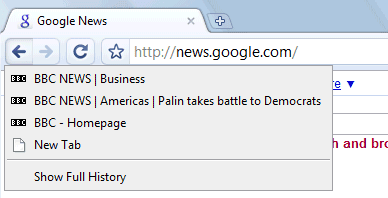
1. Show the list of recently visited pages from the current tab: right-click on the "Back" button. This also works for the "Forward" button.
2. Undo closing a tab: press Ctrl+Shift+T or open a new tab and check the "Recently closed tabs" section.
3. Focus on the default search option in the address bar: type ? before entering your query.
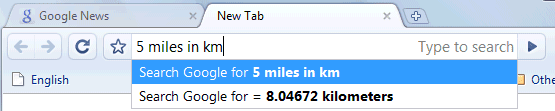
4. Perform simple calculations and unit conversions using Google Calculator by simply typing the expression in Google Chrome's address bar (or "omnibox"). To copy the answer, select the suggestion.
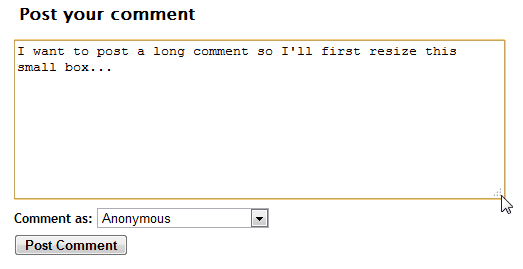
5. If you need more space in a textarea, resize it by dragging the lower right corner.
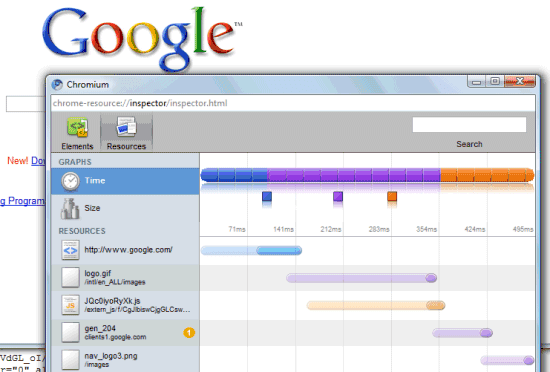
6. Monitor the resources used by a web page - right click inside the page, select "Inspect element", switch to the "Resources" tab and reload the web page. You'll see a list of images, scripts and objects loaded from the web page and you can sort them by size or by loading time.
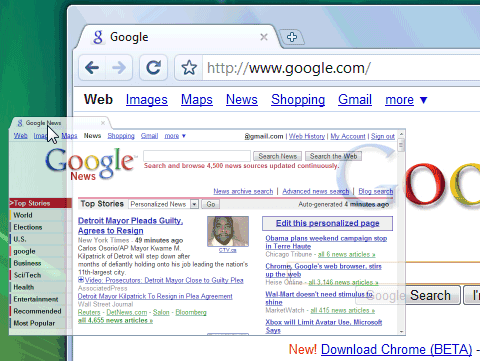
7. Detach a tab and open it in a new window - just drag the tab outside the active window. You can also add it back to the original window using drag and drop.
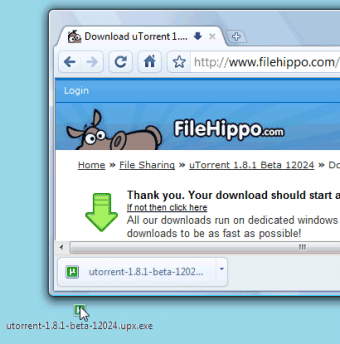
8. After downloading a file, you can copy it to the desktop or to any other folder by using drag and drop directly from Google Chrome.
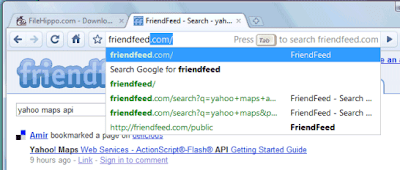
9. If the search engine of a site supports OpenSearch, you can add it to Google Chrome's search box by simply visiting the site and performing a search. The domain name automatically becomes a keyword and you should only type the first letters from the URL until you see "press Tab to search example.com". Then press Tab and type your query.
You can also manually add search engines, by right-clicking on the address bar and selecting "Edit search engines". Here's one example, where you can see that you need to find the URL for the search results page and replace the query with %s:
Name - Wikipedia
Keyword - wiki (that's what you need to type in the address bar)
URL - http://en.wikipedia.org/wiki/Special:Search?search=%s
You can also use the keywords for other kinds of services: for translating web pages, for bookmarking pages online or simply as aliases for web pages (omit "%s" from the URL).
Name - Google Translate (English)
Keyword - trans
URL - http://translate.google.com/translate?u=%s
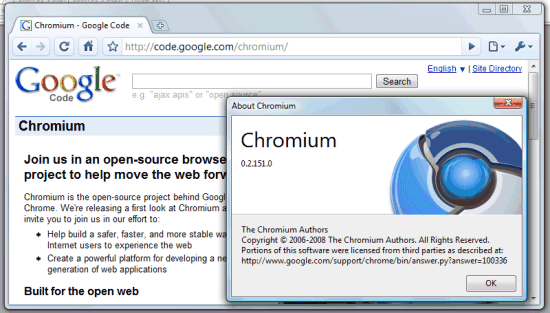
10. Do you want Google Chrome without Google's branding and with an open source license (BSD license)? Check Chromium, the open source project created for Google Chrome. You can install the latest snapshots for Windows or download the code and build it in Windows, Mac, Linux.
To install Chromium in Windows, go to the most recent directory from this page (it should be at the top) and download mini_installer.exe. Note that these snapshots could be less stable than the version available at google.com/chrome and you may need to manually update Chromium.

why does it not have autosuggestion for searching, i am using the url box as search box as well. thanx
ReplyDeleteIt is the only browser I got excited about. But... I wish I can preserve my privacy by not displaying "Recent Bookmarks" when I open a new tab. I searched and can not find a solution. I do think this is really bad and I can not believe nothing has been done about it yet. I have upgraded twice with no change.
ReplyDeleteWhen are we going to have a google bookmarks integration like in the google toolbar for IE or Firefox?
ReplyDeleteJust a simple combo to access our stored bookmarks and easyly add a new one.
Unless you guys don't believe in your own bookmark service, and that's sad.
Why do I keep getting that annoying "Oops, this link appears to be broken" so frequently when all I have to do is reload and the page appears.
ReplyDeleteAnd then there's the all-too-frequent "Web page unavailable" which is also usually fixed by a simple reload.
Something wrong with the software.
Dragging a removable tab to the extreme left, bottom and right hand side of the screen will cut your window size by half
ReplyDeleteonly the first impression I have been using chrome interested.
ReplyDeleteMoreover, in the ease percarian content. And access is also faster.
Hopefully chrome can rival IE, Firefox, Safari. Moreover, the OS will be released Chrome.
Always successful.
How do i turn java on with google chrome?
ReplyDeletei just ran ccleaner on my computer and i guess it accidently deleted javascript and/or adobe flash, so i went to redownload both of those and it still says on youtube that i either don't have it installed, or it's not turned on, i'm just guess it's not turned on, so could someone give me some tips? is there a special version for chrome now that i have to download?
I've seen screen shots of chrome with small icon only bookmark buttons, but I can't figure out how to change them from the large ones with text.. Any ideas?
ReplyDeleteJust to come back to basic will it be better just to imtegrate goole toolbar to google chrome or is ther incompatibiliter with two product from the same company i thought it was only Microsoft who had that kind of problem??!!
ReplyDeleteTo erase, hide, and/or customize Recently Added, Recently Closed, and Most Viewed pages:
ReplyDelete1. Uninstall Google Chrome
2. With another browser, go to http://www.google.com/landing/chrome/beta/
3. Download Google Chrome Beta (version 3.0.195.17)
4. Install Google Chrome Beta with the options you prefer
5. With Google Chrome Beta, go to http://www.google.com/support/chrome/bin/answer.py?hl=en&answer=154450
6. Follow the Google Chrome Help instructions to customize your New Tab settings
Your New Tabs will no longer display recent activity, such as pages viewed or bookmarked.
How do I restore the recent bookmark bar so many people find annoying; I like it.
ReplyDelete@Gavroche:
ReplyDeleteBy going back to the previous layout for the new tab page. Edit a Chrome shortcut (right-click, select Properies, find the Target field) by appending a space followed by --old-new-tab-page to the Target field.
I just switched to Google Chrome, and now I can't get to my toolbars that I used to have! What should I do?
ReplyDelete@imaperson:
ReplyDelete1. Decide what's more important: having a fast and reliable browser or using your toolbars.
2. Google Chrome's dev builds already support extensions, so your favorite toolbars will probably be available for Chrome in the coming months.
That's likely because Google isn't Anti-Competitive.
ReplyDeleteI think Google Chrome is the window of windows window of opportunity window. New Folder Other Bookmarks Cats Are Cats. WINDOW WINDOW WINDOW!!!!
ReplyDeletei love google chrome i think its the best its way faster and alot more intresting and you can change the background so cool love it!!!!!!!!!!!!!!!!!!!!!!!!!!!!!!!!!!!!!!!!!!!!!!!!!!!!!!!!!!!!!!!!!!!!!!!
ReplyDeleteWow you can make this box HUGE!!!!!!!!!!!
ReplyDeleteIts nice but I don't understand why they have pictures on the themes when you can't see them,or is there something I'm missing? Is there a way to see them??
ReplyDeleteI do not know how to adjust webpage window size with google chrome. Is there any button for zoom in or out?
ReplyDeleteto have the bookmarks toolbar, go to the settings (little wrench on the right hand side) and select always show bookmarks bar.
ReplyDeleteI tried chrome a couple of times - running XP Pro - but javascript is perminantly turned off - every site displays the usual 'Please eneble javascript' message. Strange, considering how long chrome's been around.
ReplyDeletegoogle chrome is the best browser, very light ;)
ReplyDeleteWho ever came up with the page hogging, very annoying download bar?? How do you shut the damn thing off. Half the time when you do the pages doesn't reclaim the space either.
ReplyDeletePLEASE make it so that google bookmarks can be used on chrome!!!!!!!!!!!!!!!!
ReplyDeleteTip #2 is a lifesaver. Thanks!
ReplyDeleteI'm now getting a really un-useful Missing Plugin message when trying to view a PDF in Chrome V5. Having to use another browser to view PDFs five or six time a day is almost making me move back to Firefox permanently.
ReplyDeletePDF plugin does not work with message "missing plugin" and Chrome can't correctly open PDF files by external application (the link to file for external application is broken).
ReplyDeleteThere is also way how to run windows applications on Chrome OS.. see tryvps.com
ReplyDeleteI found the answer to the problem here! :D
ReplyDeletehttp://www.youtube.com/watch?v=ZxBcZufDXzs
Just copy the URL into your web-browser! :D
Where do you add RSS feeds?
ReplyDeletemac os x 10.6.5 chrome 8.0.552.215
ReplyDeletestill can't get pogo.com games to work (looks like about 2 years since last posting)
also have regular issues with web forms (check ups documents and forms center for example)
How do i stop chrome forever for opening this malicious link "http://soft.jajaca.com/lib.zip"
ReplyDeleteHow i simply ban this link to open?
100 Google Chrome Tips - FREE EBOOK http://chromestory.com/2011/06/free-ebook-for-chrome-book-users/
ReplyDeleteGood post bro.Its really explain us How can we use Google chrome smoothly.but i have a problem.can we set chrome for auto updates.Is any way to do that.
ReplyDelete