Unlike other webmail services, Gmail has never provided too many customization options and users had to rely on themes created for third-party extensions like Stylish, which usually slowed down Gmail and weren't resilient to code changes.

Gmail's help center provides an interesting tidbit about the new themes: "In some cases, you can also customize by location. Some themes change during the day, and we use the location information you provide to correctly time these changes with your local sunrise, sunset, and/or weather. If you select one of these themes, you'll see a Country/Region drop-down menu appear."
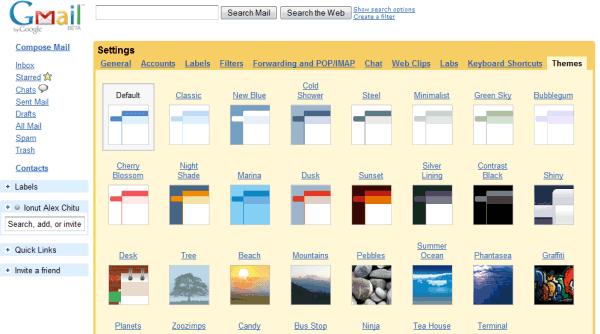
Gmail also adjusted the default theme, but you can always go back to the previous theme by selecting "Classic" in the settings page. I can't decide between Contrast Black, Cherry Blossom, Graffiti and Ninja. What's your favorite theme?
{ Thanks, Niranjan and Pascal . }

Hi am not getting the themes setting in my gmail account, kindly fix out my problem
ReplyDeletegMail is handling my domain's email addresses. so I have my email addresses in this format: mynames@mydomain.com - but i couldn't find this theme setting on my settings page. that'd look so amazing :)
ReplyDeletemy question: does this theme thing not exist but for only real GMAIL accounts??
--thanks
iM
Well im not finding theme in my account
ReplyDeleteThemes seem to not work in Opera. In the settings menu of Gmail, there only exist
ReplyDeleteGeneralAccounts Labels Filters Forwarding and POP/IMAP Chat Web Clips
Is this as intended?
When would themes be supported for Opera?
Thanks,
Dmitry
I was able to set up Gmail themes in my Opera browser at home, but not at work. Why? Different versions of the same browser?
ReplyDeleteOkay....... When im on my dads computer the themes are there. But when i go home to my moms and get on the themes are NOT there!!!!! Why, it is making me mad. Now i picked a backround at my dads but it doesnt come up at my moms. And when i was at my friends the themes were there and we were on my account and my backround was there. I changed it and the back round didnt save on my moms but it saved on anyother computer i was on. and it is nothing to do with my moms computer. i alredy had Dave lok at it.
ReplyDeleteIt seems like google has gone and REMOVED the THEMES TAB!!!
ReplyDeleteWe can't get out themes any more, I'm not sure why. I used to have a theme set, but now... Nothing!
i only can see theme option in my setting if i use mozilla firefox. Try that.
ReplyDeletei like this feature
ReplyDeletecan i have also this feature in my
https://mail.google.com/a/daffodildb.com account
Hi people. I was wondering do you think they're going to come up with costamizeable themes. I think they should.
ReplyDeleteCan u please tell me where is the themes tab located coz i am not able to find it in settings. Also the labs tab is missing coz i wish to turn on the messaging feature!
ReplyDeletei can't find the themes tab under settings how long do i have to wait for it i live in cairo plz tell me
ReplyDeleteI am not seeing my Themes options too ... :(
ReplyDeleteHello these themes are vey nice but I want to create my own gmail theme with my husband's photos İt will be surprise for him but I can't manage it Can you help me? nalantur@gmail.com
ReplyDeletehow come I have a theme on a certain computer, but its normail on another one?!
ReplyDeletethe theme option shows up on only one out of three computers in my house. does that make sense?
ReplyDeleteLove the dynamic themes that change with weather (base on your location setting) and time of day. I hope you create more of these as well as some holiday ones.
ReplyDeletei am sorry but i just cant find the themes!its not there on my setting page.please help me setting it..
ReplyDeleteIf you don't find the themes, then it's very likely that you use Internet Explorer 6 or an old version of a different browser. Update to Internet Explorer 7 or use a better browser like Firefox or Opera.
ReplyDeletehey there is no option for themes in settings,can u send me that option,i am interested................
ReplyDeleteOne of my gmail accounts has themes and the other doesn't. Is this still being rolled out?
ReplyDeletei think we need more themes!!! these are lame!!!!
ReplyDeletesooooooooooo lame!! omg!!! isnt there any others available???
fifi
um.i think that google should come up with nwe theams because the old ones are getting well old also i really like them and think they make gmail pop!
ReplyDeleteummmmmmmmmmmmmmmmmmmmmmmmm.........................hello make theams that are like awsome!! these are great but hello nwe ones please!!!!!!!!!!!!!!!!!!!!!! aneway maby like sufing ar shoping ones just MAKE MORE its not an oppion!!!!!!
ReplyDeleteI'm a huge fan of the location specific/weather specific themes! how do we author our own that can take advantage of this data?
ReplyDeleteI still couldn't find my themes
ReplyDeletehurry up please! :)
If you want to enable Gmail Themes you have to go to Settings (on top), there you will find General, Accounts, Labels etc and the last one is Themes. If you cannot see it probably your web browser is too old andodesn't support it. So get new version Good luck!!
ReplyDeletewow. and i thought every gmail user can spell good!
ReplyDeleteI think ninja is the best
ReplyDeletehello this is good thanks
ReplyDeleteMy favorite one is tea house
ReplyDeleteIf you cannot find the themes tab, Gmail theses may not be compatable with your browser.
ReplyDeleteI think that it's fabulous!!! I just changed my theme, but I didn't find one I really liked. They should add a yellow layout and a purple layout. A lot of the themes were blue, and I don't like the color blue.
ReplyDeleteMight there be any reason why I had had the themes added 3 times and then removed? I love the themes and eagerly try them out each time, but then they are removed.
ReplyDeleteI understand that these must be selectively rolled out, but I wonder what the criteria is for removing it. You can't complain with free, but I've had my gmail account since 2004 and I've never been "jerked around" quite like this :-(
i dont have themes ..
ReplyDeleteI use opera, chrome, IE, firefox. and cant find themes.
ReplyDeleteThis is really awesome ,but i wonder if they are going to make more of them does anyone know??
ReplyDeletei dont have themes in my settings page
ReplyDeleteits very nice and cool themes i love to use this themes.
ReplyDeleteI had themes at one time, but now I don't have that tab. What the heck is up with that?
ReplyDeletehow do we get themes
ReplyDeleteTo use themes, you will need to be using the newer version of Gmail on Internet Explorer 7.0+, Mozilla Firefox 2.0+, Safari 3.0+, or Google Chrome.
ReplyDeleteYou *won't* be able to select or change your Gmail theme at this time if :
- if you're using the older version of Gmail on any of the above browsers
- you're using Internet Explorer 6.0, or other browsers and versions that aren't included above
- if you're a Google Apps user
If you don't see the 'Themes' tab in your Gmail Settings, you won't be able to set themes in Gmail at this time.
U guys r SSSSOOOOOO crazi. I cannot find out how to change my theme. I am so tired of the same theme everyday on my account. By the way, I got an account last week.(I'm a starter!!!!)
ReplyDeleteI only have one gmail account and I have themes on every computer I use except one (and of course it's my computer at home)! Is there something I need to turn off/on in order for the themes to show up on my other computer?
ReplyDeleteNevermind... I actually just read the comment two above mine and I guess that's the problem. Thanks, and sorry I didn't read beforehand!
ReplyDeleteGmail Themes aren't yet compatible with all of our supported browsers. Themes are only available in Internet Explorer 7.0+, Firefox 2.0+ or Safari 3.0+, and Google Chrome. You won't see a 'Themes' tab in your Settings if you're not using the newer version of Gmail on the browsers listed above. Please note that Themes are not available if you're using Internet Explorer 6.0
ReplyDeletewhat if i don't get a option for changing the theme in gmail account
ReplyDeleteI have a work gmail that does not have a themes tab in the settings, and a personal gmail that does have it. should i ask my IT guys to get themes enabled on my work account?
ReplyDelete"Choose your own colors" should have an "import" option .. so people can easily share- or build theme repositories until such time as google provides the exchange facility
ReplyDeleteHOW TO CHANGE YOUR GMAIL THEME:
ReplyDelete1. GO TO SETTINGS ON THE TOP RIGHT HAND CORNER
2. CLICK ON "THEMES" ON ONE OF THE TABS (IT SHOULD B THE LAST ONE)
3. PICK UR THEME!
a month back, i used to modify gmail by themesa but now i culd'nt find the themes tab in my settings.
ReplyDeleteI think some of the back rounds are good and other no!
ReplyDeletein my Gmail Account - themes tab is not there in settings. what should i do for enable that?????????
ReplyDeleteI still dont have my htemes enabled!
ReplyDeleteand it is April 2009!
Where is the themes tab? I am on a XP computer-does that affect the theme outcome?
ReplyDeletehey! aren't you guys making more themes?
ReplyDeleteit is a cool feature (that yahoo lacks) and I love it....just for this theme function, I've stopped pop download...and let's not get into that...I love gmail...and I rest the case...
but, the same themes? come on! I bet the themes are easy to make (they are great...but they surely don't consume a hell lotta time like other major upgrades) so why aren't you making any? Please make more themes...pretty please....with sugar on top ^_^
@amp: it's on settings
ReplyDeletecount from the left...it's the 9th one
from the right, it's the first
I'm telling you, you just can't miss it...it's written "Themes" clearly....
@smita: what are you waiting for?
ReplyDeleteget "Google Chrome"
and follow the instructions above...enable the themes....
I need to set a wonderful theam to my mail box.
ReplyDeleteANY BODY WHO DONT FIND THEMES TAB UNDER STATUS:
ReplyDeleteCheck your browsers some dont support themes.
I looooooovvvveeee the the new themes. I was so excited to see the changes through the day like the tea house. i want the fox to do more through the week i love how he changes through out the day!!!! I hope there is more to come.
ReplyDeleteTea House is the best!!!
ReplyDeletesorry i didn't find themes in settings please do needful for me my account name is ritrash1008@gmail.com
ReplyDeleteGmail ROCKS!!!!!!!
ReplyDeleteMy Gmail not see the themes Options Please add my Gmail themes options
ReplyDeletei could not find the Themes Tab under Settings, Pls help me.in some pcs it shows, but in my notebook it doesn't.plz help me
ReplyDeleteWhy after all these months, do I not have access to themes? What am I, a step child?
ReplyDeletebut I cant find where to enable themes, no tab called themes is in my settings
ReplyDeletethey are good, but i want more, they need to design hundreds. Tea house is by far the best one though
ReplyDeleteyou dont have metallica or acdc or rage against the machine
ReplyDeletePeanuts are really good when you throw them at people who have some sort of neurological disease.
ReplyDeleteI am unable to find how to enable the themes. This feature seems not being enabled for me....!!!
ReplyDelete:(
I still don't have them either...... What a load...
ReplyDeletewhere is the theme tab cuz i cant find it anywhere and im dying to knw how to change the background
ReplyDeletehey, where I get that from Gmail?
ReplyDeleteI cant find
some1 helps me, thanks so much...
um i luv the themes but i wish tht there were ones tht i u could like mke or sumthing!!!! do yall agree???
ReplyDeleteYou have to have Internet Explorer 7.0, Firefox 2.0 and Safari 2.0 or greater to see your themes tab. Hope this helps.
ReplyDeletehow can i set the theme
ReplyDeletei cant change the colour of my gmail homepage
ReplyDeletehow can i get naruto themes
ReplyDeleteWhen will Gmail themes come to Google Apps?
ReplyDeleteI wonder, when new Gmail themes will come to the Google Apps?
i wish the tree theme would change at night as well - even a background of stars and the moon would be nice.
ReplyDeletei'm not any of the above anonymous people but i agree, is there like a different version of gmail that has these themes? please answer
ReplyDelete@Anonymous:
ReplyDeleteWhat browser do you use?
weird I just sent one comment and I find a new tab called THEMES! it probably got there before. which brings me to another question, how did that tab just appear there?
ReplyDeleteThis theme is very systematic and suitable for use.
ReplyDeletei still haven't got the tab yet!!!
ReplyDeleteis this normal?
I am unable to find how to enable the themes.
ReplyDeleteI think they should have animal themes for gmail
ReplyDeletei dont knowi waited 4 months for themes and the same old thing pops up on my gmail i click on setting and the last thing it has is some webcam thing i need help and fast before i go to sleep loooking at my boooring gmail white screen!!!!
ReplyDeleteI STILL don't have themes in my Gmail. I've used Gmail since the beginning, too, and am feeling rather annoyed that people I introduced to Gmail have the themes and I don't. What's going on???
ReplyDeleteI have themes on my old personal mail account but not on my new gmail-powered jamaeon.com account. Anyone know when I'll get themes?
ReplyDeletethere is no such tab on my setting...
ReplyDeletei had themes like a day ago, now its gone and i cant put it back. can i fix this?
ReplyDeletemy theme is random, but first it used to be ninja.. its sooooooo cute!!
ReplyDeleteNeed Christmas-themes!!!
ReplyDeletei heard frm a friend that there was a twilight theme for gmail. can any1 tell me how i cld access it??
ReplyDeletemy favorite is the "bus stop" because at around night, sometimes it shows the bus stop in rain..and a scuba diver peeks out from a puddle! and also..commonly its day theme is there, and a business guy is there waiting,an old man reading a newspaper, and old lady, a guy in gym clothes and a girl on a giraffe! the business guy and the girl is always there, even in rain.in the rain, the business man is soaking wet and the girl is holding a bunch of cupcakes! i used to have the "candy" one but i like the personality of the "bus stop"....thank you
ReplyDeletethere isn't a twilight theme, unfortunately
ReplyDeletethere is no such option in settings how this enable in my account my other friend using it regulrly
ReplyDeleteI am not able to view the themes tab under the Settings option. Please help..
ReplyDeletewhat can we do to bring the theme tab in setting menu, it isn't there?
ReplyDeleteUpgrade from Internet Explorer 6 and use a better browser. You have many options: Firefox, Chrome, Safari, Opera and even Internet Explorer 8.
ReplyDeleteI've had one for like a year and it was there earlier but now its gone and i dont know how to get it back? what should I do? I even had a theme on my backround and now its gone. I dont know what happened?
ReplyDeleteOn one of my computers it lets me change the theme but on my other computer you cant. WHY???
ReplyDeleteANONYMOUS
i think being able to change the theme is brilliant but think there should be an option to make your own themes with pictures of your own or artwork you have created yourself
ReplyDeleteCool and unforgetable
ReplyDeleteLove it I like making my own!!♥
i could not able to see the themes option in my gmail settings
ReplyDeleteWhy can't I create my own themes. Not really lame ones with only colors. I'm talking pictures, patterns, anything. Google, I have three words for you.
ReplyDeleteStep It Up
I've been using the "Night Shade" theme for a very long time.
ReplyDeleteThe active label or folder has always been shown in dark blue or black over an orange background. All of a sudden today the foreground color for the active folder (e.g., Inbox) changed from dark blue (or black) to WHITE. Why is that?
WHERE are ANY THEMES for gmail? I know there used to be some in the settings area but aren't there anymore. Where can i find them, please?
ReplyDeleteSetting, Themes tab. Make sure you use a recent browser and you're not using Internet Explorer 6.
ReplyDeletei am using new version of gmail but still not able to see tab page of google themes, so please help me
ReplyDeleteRegards,
Divakar
If any one knows any other source for Gmail themes besides these given by the Google
ReplyDeleteIt will be good if gmail uploads some more themes...bored off with the same themes...
ReplyDeleteThank you.
i can't find the theme,where the theme??
ReplyDeletehow to apply g mail themes
ReplyDeletei could not find themes under settings so help me
ReplyDeleteHIGH SCORE IS THE BEST!!!!
ReplyDeleteyeah, where are the gmail xmas themes. My whole house is christmasized except my gmail sitting there on the computer open all day. it doesn't look very christmassy
ReplyDeletei have been searching the internet for how to add my own themes without downloading some program i dont know, i read that a version of google chrome already has this feature ( old version i assume because im running the latest one ) does anyone know which version allows for adding own themes ?
ReplyDeleteim thinking of just deleting the lastest version and downloading the oldest version but i still want the fastest google chrome browser possible
please let me know what everyone thinks :)
@Scott:
ReplyDeleteThe support for themes has been added a long time ago and it's still available in the latest version of Google Chrome. To install a theme, go to the Themes Gallery. If you don't longer remember the link, go to the Options dialog, click "Personal Stuff" and then "Get themes".
lol i luv the ninja theme its cute!
ReplyDeletecan i make my own theme for Gmail
ReplyDeleteI cant find tab theme in my setting. Can you tell me please?
ReplyDelete_______________
www.raduong.com
I'm using gmail with domain of my company. But i can't find the tab them in my setting. Can you tell me please?
ReplyDelete_______________
www.raduong.com
I liked the mario theme the best! (Yes I got a mario theme)
ReplyDeleteTea garden sounds boring (that's just my opinion) I acually got it with my gmail! as soon as I created my account they (the Gmail team) sent me an email saying I could customize! I choose mario because I'm a game freak!
but is it possible to have PICTURE of your own as your gmail theme?
ReplyDeleteYou can upload your own background image if you go to Settings > Themes and select "Create your own theme".
ReplyDeleteto GeoJono: Bus Stop theme changes with weather too
ReplyDeleteall of these themes are ... ****
ReplyDeleteWhat's the deal with the Beach theme and the &%@#! umbrella?
ReplyDeleteHuge umbrella. Sometimes shows water, mostly shows the freakin' umbrella.
How do I disable themes? I don,t have "Classic" in the settings page
ReplyDeleteWhere are the holiday themes?? DUH...that's right NO ONE IN THE FREE FRIGGIN WORLD wanted those. Better to leave them out. MORONS. Gmail SUCKS!
ReplyDeleteI really enjoy these themes, thugh after a while i get tired of them and so do many other people I know. I would love to reccomend a few new ones including some holiday themes. (Halloween, Christmas, ect.)
ReplyDeleteEvery one with theme problems! heres how you find them. Go to the little gear pcture at the top of the screen go about 11 spaces left their it says THEMES.
ReplyDeleteHello..., Can you help me.
ReplyDeleteI can not find THEME tab in Gmail settings. For your information I am using Gmail Apps for Business. Thanks!
these themes are totally awesome
ReplyDeletei want to set a nice themes for gmail not above themes...
ReplyDeleteAnuraag -
ReplyDeleteMy options for theme is not coming.
Please help me.............