An unofficial blog that watches Google's attempts to move your operating system online since 2005. Not affiliated with Google.

Send your tips to gostips@gmail.com.

May 16, 2007

New Text View in Google Maps

The integration with maps in Google Local lets you visualize the results and choose one easier, but there are situations when you want to see the full description for all the relevant local businesses, like in a normal Google search.

Google Maps has a new text view that focuses more on results and less on the map. You get thumbnails, snippets from reviews and direct links to reviews for each search result. The map is static and lies almost unnoticed in the top right corner of the window.

This new view is similar to what you see if you disable JavaScript in Google Maps, but the addition of the snippets makes it more valuable and brings it in line with Yahoo Local.


{ via Greg Sterling }

Gmail's PowerPoint Viewer

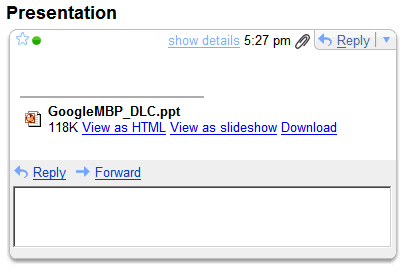
The Spanish blog Dirson found a new feature in Gmail that lets you view the attached PowerPoint presentations as a slideshow. Until now you could only download the attachment or view it as stripped-down HTML file.

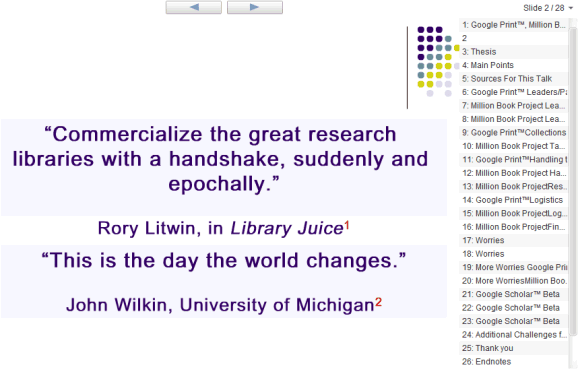
It's interesting to see this new feature, not long before Google launches the promised presentation tool for Google Docs. The slideshow included in Gmail uses Flash, while most Google tools use AJAX, and seems inspired by Picasa Web Albums.

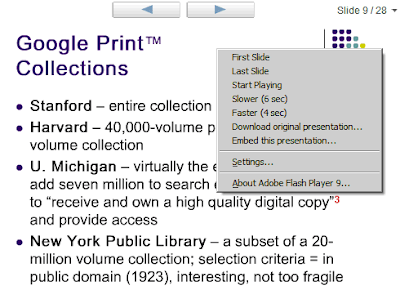
Among the features, there's an interesting "embed this presentation" that should let you include a presentation into a site. But it's not functional yet.


By default, you have to manually advance to the next slide, but there's an option to start the slideshow.


If you have PPT/PPS attachments in your Gmail account (do a search for filename:.ppt OR filename:.pps), you could try to see if you have this feature by looking for a link that says "View as slideshow" next to a PowerPoint attachment.

Update (June 12): The feature is now available for everyone. The presentation embedding option has been removed, although it could be reincluded when Google launches its full-featured presentation app, in the coming weeks.

Google Video Shows Inline Previews

If you do a search on Google Video, which now is a video search engine and returns content from YouTube and Google Video, you'll notice an option to watch each video result on the same page, in a small player. This is a good way to preview the content before watching it in full view.

If you have a slow or unreliable Internet connection, you can open more videos at the same time and pause all of them, so that you can watch the videos without interruptions.

Google tested the video PlusBox in the web results, but probably realized that it's more appropriate to use it in Google Video.

May 15, 2007

Google Local OneBox Becomes a Search Result

Google's OneBox results (you know, those little boxes from the top of the page that show links to results from Google News, Google Maps etc.) slowly move inside the search results. We first saw these with news and now local results descend in Google's SERP.

Google aims to consolidate the main search results and to build an universal search engine that ranks all flavors of content. As Larry Page mentioned in January, "we are working on integrating different types of results -- video, images, news, books and so on -- all in one place. We are now blending book results into the main index and we will add more going forward. We are excited about providing a truly seamless user experience in search."

For the moment, Google only assesses the importance of the results from the OneBox, but the next step should be removing the OneBox and integrating the results. While it may seem that Google compares oranges and apples, when you search for Travis, you may want to see web pages, videos and their next concerts on a nice map. Like in an encyclopedia page built on the spot and custom-tailored to each user.

Informational Voyeurism

It's very cool to see things as they happen. Google has at Googleplex a big display that shows live queries from all the world, but they didn't make it available online for privacy reasons. But there's an alternative: Dogpile, a small metasearch engine, shows unedited real-time Web searches.

To see all the recent Flickr photos that also have geographical information, there's Flickrvision. All the photos are placed on a Google map and they change very quickly. It's an addictive way to learn about diversity, people and to destroy the artificial borders between countries.


If you have a site and want a real-time view of your visitors, Clicky has a "spy" feature "that shows you actions on your web site as they are happening, delayed no more than five seconds" (here's a demo). You'll spend hours finding who visits your site and why.

Digg Spy is another prime example of live view of a site: see all the submissions, diggs, buries and comments from Digg. Gianni Milanesi even tried to reverse engineer the system and provides the code for a simple Digg Spy clone.

To visualize the blogosphere activity, Twingly Screensaver uses a lot of graphical resources, but is cool enough to let you focus on a region.

All these tools show live data and the feeling of immediacy makes them almost hypnotic. You don't see the big the picture, but you're flooded with surprising details that capture your attention.

May 14, 2007

Stereotypes Revealed by Google's Spell Checker

Google's automated spell checker is useful and most of the times accurate, but lately some people noticed that the spell checker corrects queries like "she invented" / "she created" / "she discovered" with "he invented" / "he created" / "he discovered". Google analyzes people's queries to come up with the suggestions, so one of the explanation could be that the masculine versions are more frequently used.

Chicago Tribune got an official response from Google: "Google develops its own spell-checking algorithms based on sophisticated machine learning methods, using cues from aggregated user input, Web documents, and many other sources. The algorithm provides a 'best-guess' alternative suggestion that we think might improve the search results, and is completely generated without human input. It can be thought of as a suggestion offer, rather than a definitive answer."

Google's Browser Address Error Redirector

Google has partnerships with computer hardware makers like Dell or Gateway to set the default search and the homepage to Google on new computers. By default, if you type a non-existent address in Internet Explorer's address bar, you're sent to a special Microsoft homepage that suggests some related links. Google decided this is a lucrative feature, so they install a Browser Address Error Redirector that replaces Microsoft's redirects. Here's the explanation:
This page was generated because of one of these two reasons:
* The web address you typed did not resolve correctly.
* You typed a keyword query in the browser address bar.

This page is meant to provide you with helpful related content, including web search results and paid advertisements, based on the meaning of the web address/keyword query that you typed. This program can be uninstalled from the Control Panel Add/Remove Programs. Look for the application named "Browser Address Error Redirector". Older versions may be called "GoogleAFE".

If you type linux.om in the address bar, you're sent to this page that has 5 big ads at the top and links to high-paying keywords.


Google is the same company that makes money by placing ads on parked domains. "AdSense for domains allows domain name registrars and large domain name holders to unlock the value in their parked page inventory. AdSense for domains delivers targeted, conceptually related advertisements to parked domain pages by using Google's semantic technology to analyze and understand the meaning of the domain names."

{ Thanks, Tim. }

Shortcuts for Special Gmail Labels

In Gmail every built-in view (e.g.: inbox, trash, read mail) is actually a label. So if you want to view all the unread messages from the inbox, you could search for: label:inbox label:unread.

You can combine these built-in labels with your labels and create interesting queries. But these queries can become long and hard to write. Fortunately, you can replace label with l and everything with still work fine. The previous query will become: l:inbox l:unread.

If you still think the query is too long, Gmail has shortcuts for the special labels.

^b chats
^f sent mail
^i inbox
^k trash
^r draft
^s spam
^t starred messages
^u unread mail

That means our query could become: l:^i l:^u. What about all the unread messages that aren't in the inbox? Search for: -l:^i l:^u.

May 13, 2007

Google Categories

Photo licensed as Creative Commons by Google Blogoscoped.

Last month, Google started to test a new way to present search results that groups the pages by category and displays the top two results from each category. For example, if you search for a movie, you could see reviews, news, blogs, encyclopedia pages, stores. Each category can be expanded.

Google already shows refinements for a small list of topics like: health, computer games, travel, cars and photo equipments. "Topics are specific search areas that Google is developing with the help of expert contributors. Contributors to topics annotate websites that they think are especially useful, relevant, or authoritative to a topic with pre-defined category labels." But not only experts can contribute. You can select the topics that interest you and use Google Marker to annotate sites as you browse the web.

Google also has a list of general labels and those labels were used to categorize search results in the experimental view from last month. To annotate pages with the general labels, you can create a custom search engine and add labels from the list. I made a custom search engine to test the quality of the labels and I noticed that in many cases the labels didn't describe well the content of the page.

Many people enter very broad queries (like "Vista") and search engines try to guide them to the right results using refinements. One way to refine a query is by adding another word that eliminates the ambiguity (for example, "Vista reviews"), but this is not always the best idea because someone could review Windows Vista without including the word "review(s)" in the page. Having a list of pages that offer reviews could save the day.

Hakia, a semantic search engine that will officially launch this year, uses categories for general queries, like iPod or Italy, but they appear to be dynamically generated and look more like an encyclopedia entry.

It seems that Google Co-op's secret mission was to rebuild at a larger scale Google Directory (ODP), which also organized the web by topic into categories. One thing is for sure: this year, Google's interface will undergo radical transformations.

Related:
New ways to visualize search results
SearchMash

Google Gadgets in Your Search Results

Google Subscribed Links are a way to build your own OneBox results, by defining direct answers for a list of queries. For example, you could check the status of a flight or find a book if you know the ISBN by entering a simple query.


Now the subscribed links can have a richer interface by including Google gadgets. You can't add inline gadgets or built-in gadgets like the preview of Gmail's inbox, but the good news is that your gadget can access the query and display something relevant.

A good example of gadget that's now included in a subscribed link is Google Translate. After subscribing to the gadget, you can translate some text directly from Google's search box. A query like [translate "I love you" to German] will trigger a direct answer.


This could be used to show search results from other search engines, the latest posts from a blog, solve complicated equations, show relevant photos from your Flickr albums and more.