An unofficial blog that watches Google's attempts to move your operating system online since 2005. Not affiliated with Google.

Send your tips to gostips@gmail.com.

September 7, 2010

Search Chromium's Source Code

Google Code Search has a special version for searching Chromium's source code. Chromium is the open source project that powers Google Chrome, Chrome Frame, Flock.

Code Search adds search suggestions, cross-reference detection, a find feature that lets you search inside a file, an option that lets you find a file by name, links to Subversion and related files.


Google's search engine for source code has a new homepage that shows all the advanced search options:

Google's Particles Doodle

Google's homepage shows another animated doodle, but this time Google doesn't offer any information about the doodle. The homepage animates some particles which are used to create the Google logo.

It's very likely that the interactive doodle celebrates Google's 12th birthday. Google usually celebrates its birthday on September 7th or September 27th, depending on the year. "Google opened its doors in September 1998. The exact date when we celebrate our birthday has moved around over the years, depending on when people feel like having cake."

Happy Birthday, Google!


Update (via Blogoscoped Forum): Google says that the animated doodle didn't celebrate an important event. It was fast, fun and interactive, just like Google.

September 5, 2010

Next Week's Google Search Event

Did you know that Google has an Experimental Happiness team? One of the engineers that are part of this team is Othar Hansson, who is a tech lead for rich snippets and a member of Google's Search UI Group.

Did you know that Google has a search czar? His name is Ben Gomes. "I think of Ben as our diplomat," said Marissa Mayer, Google's vice president of search products and user experience. "It's Google; it's search. There's a lot of big personalities; there's a lot of opinions, and Ben is the reasonable one that can help build the bridges. When we look back, there was a point where Larry and Sergey really felt like we needed to name a search czar. And there was only one natural choice -- this was back in 2002 -- and that was Ben." According to Mercury News, "Gomes is responsible for shaping the automatic suggestions users get as they begin typing a query, and the few lines of text and links they get back, which Google calls [snippets]".

Did you know that Google still has more engineers working on search than any other product? Johanna Wright says that "other initiatives, such as Google TV and Android, help move search beyond the desktop and laptop paradigm on to other hardware." Johanna Wright is the "Director of Product Management responsible for Web Search. She oversees the development of Google's search user interface and features and was the initial product lead on Universal Search."

Did you know that Google's first female engineer was Marissa Mayer? She's now Vice President for Search Products and User Experience.

Marissa Mayer, Johanna Wright, Ben Gomes and Othar Hansson will speak next Wednesday at a special event about the evolution of Google search. Most likely, Google will also launch some new features and a new interface.

Google has recently started to test an interface that shows the results as you type the query. The new interface could be launched next week. Shark SEO says that the new UI is especially useful for long-tail searches. "From finding out the best way to deal with MySQL/PHP queries and finding the right Excel formulas, it was just astonishingly, brilliantly useful – it saved me time and led to me finding the right results much faster."

Google Chrome Latest Version

The nice thing about Google Chrome's auto-update feature is that almost all users are running the latest version of the software. This is really important for web developers, who no longer have to worry that a large number of users haven't upgraded from Chrome 2 or Chrome 3. It's not necessary to test a site in multiple versions of Google Chrome and it's safe to use features added in the latest version of the browser.

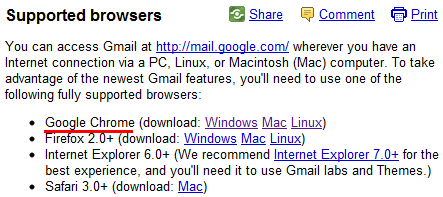
Gmail's help center lists the supported browsers and includes the minimum version number required next to each browser, except Google Chrome.


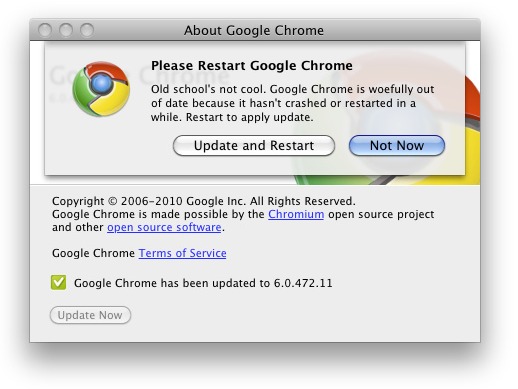
Unfortunately, even if Chrome installs the latest version, you can't use it until you restart the browser. Google started to add a little orange dot next to the wrench icon and show messages like: "Old school's not cool. Google Chrome is woefully out of date because it hasn't crashed or restarted in a while. Restart Chrome to apply update."


{ The second screenshot is licensed as Creative Commons by Chris Messina. }

September 3, 2010

Better Google Snippets for Movie Sites

Google's snippets for sites like IMDb and Rotten Tomatoes include more information: movie directors and featured cast members. Google links to the corresponding page for each director and actor, so you can quickly find information about Alfred Hitchcock even if you only remember that he directed The Birds.


Google already shows rich snippets for reviews, events, recipes, people profiles, but web developers need to add structured HTML content using microformats, HTML5 microdata or RDFa. Even if IMDb doesn't use any of the three formats, Google still manages to extract useful information.

September 2, 2010

What's New in Google Chrome 6?

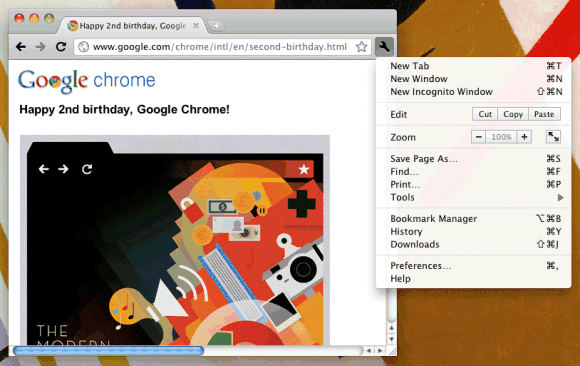
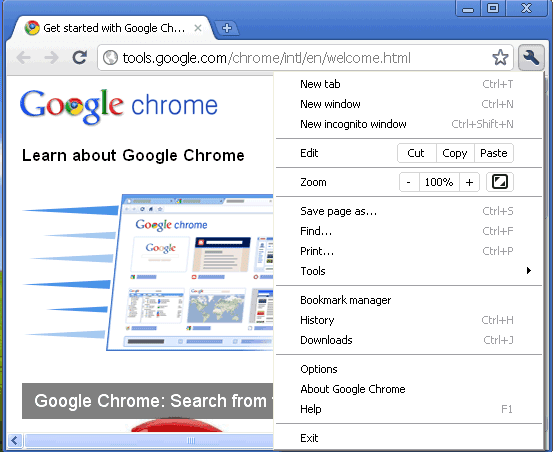
Google released the first stable build for Chrome 6. The new version has a simplified user interface: there's a single menu, the "go" button has been removed, the browser no longer shows "http://" in the address bar, the bookmark button has been moved to the right and the toolbar has a new color scheme.


Chrome 6 adds support for form autofill and you can now synchronize autofill data and extensions (extension settings aren't yet synchronized). Extension sync is probably the coolest new feature in Chrome 6 because you can take your extensions with you, not matter what computer your are using.


Another new feature is the support for WebM videos. "WebM is an open, royalty-free, media file format designed for the web," which is already supported by software like Opera, VLC, Winamp and by YouTube. Watch this video in Chrome 6 or switch to YouTube's HTML5 player.

There's also a feature that's disabled by default (probably because it's buggy): the built-in PDF viewer. You can enable it by typing chrome://plugins/ in the address bar and clicking "Enable" next to "Chrome PDF Viewer".

Some other changes:

* Chrome has a new shortcut for toggling the bookmarks bar (Ctrl+Shift+B);

* if you mouse over a link to a page that has a long URL, Chrome will show the entire address in the status bar after about 3 seconds;

* Chrome's extension manager (chrome://extensions/) links to the extension gallery pages.

Google automatically updates the browser to the new version, but you can manually check for updates by selecting "About Google Chrome" from the unified menu. If that doesn't work, download Chrome 6 from google.com/chrome.

Happy 2nd birthday, Google Chrome!

Google Tests a New Navigation Bar

Google tests a tweaked user interface for the navigation bar. The experiment removes link underlining, changes the background color when you mouse over a link from the navigation bar and adds an icon for the settings menu.


September 1, 2010

Chrome Extension for Google OS Blog

Jay Wang developed a Google Chrome extension for this blog. The extension lets you read all the posts, it keeps track of the posts you've read and it notifies you when there's a new post. The search feature lets you find posts from this blog and from Google's official blogs.


Jay Wang's extension is a great combination between Firefox's live bookmarks and Google Reader, so it might eventually be used to subscribe to any site.

{ Thanks, Jay. }

August 31, 2010

Google Buys SocialDeck

Google acquired yet another social gaming company: SocialDeck. The start-up had an interesting idea: creating a platform for playing games on any device. "SocialDeck was founded in 2008 with the vision of enabling 'anywhere, anytime, anyone' gaming. The company has launched several titles for the iPhone, Facebook, and BlackBerry using its social gaming platform technology, which enables simultaneous game play across multiple mobile devices and social networks," explains SocialDeck's site.

It should be obvious that Google doesn't buy companies like SocialDeck to develop games. Most likely, Google wants to create a platform for social gaming that will enable users to play the same game on an Android device, on an iPhone, on a computer, on a Chrome OS tablet, in Google Me or any other social network that uses Google's platform.

Here's an overview of SocialDeck's gaming platform:


{ via Inside Social Games }

August 30, 2010

Gmail Priority Inbox

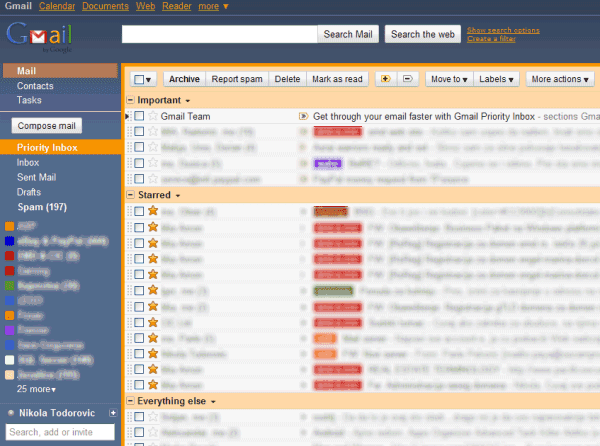
Last year, I posted about a new Gmail feature that will prioritize important messages. This feature will be available soon and it's called Priority Inbox.

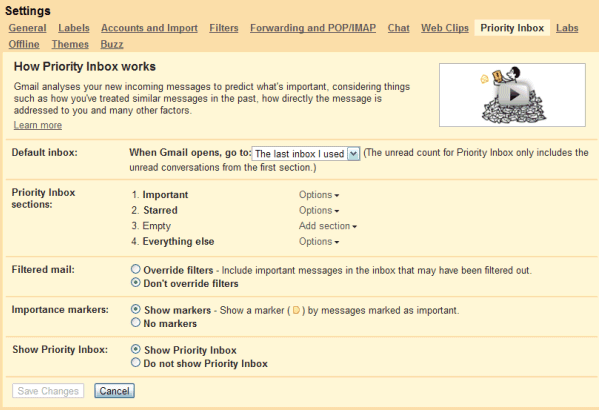
"Priority Inbox is a new view of your inbox that automatically helps you focus on your most important messages. Gmail has always kept spam messages out of your inbox, and now we've improved Gmail's filter to help you see the emails that matter faster without requiring you to set up complex rules. Priority Inbox splits your inbox into three sections: Important and unread, Starred, and Everything else. Messages are automatically categorized as they arrive in your inbox. Gmail uses a variety of signals to predict which messages are important, including the people you email most and which messages you open and reply to (these are likely more important than the ones you skip over)."


Gmail also adds two buttons that let you classify messages as important or unimportant, just like the "Mark as spam" and "Not spam" buttons. Unlike spam filtering, finding important messages is more difficult because you can't use information from other accounts to classify messages.

Google has to build a personalized classifier for each Gmail user and it needs a lot of messages. "Email importance ranking works best for people who receive a lot of email," explains Google. Google takes into account implicit signals like: the messages from people you frequently email are important, if a message includes words frequently used in other messages you usually read then it's probably important, the messages you star are probably more important than the messages you archive without opening. There are also explicit signals: click on the important/unimportant buttons, create filters to mark messages as important.

Priority Inbox will be available in Gmail and Google Apps over the next week, but you'll only see it in Google Apps if the administrator has enabled "pre-release features".


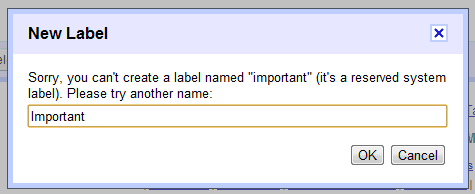
Tidbit: Gmail uses the "important" label to classify messages, so that's the reason why you can't create a label named "important".


{ Thanks, Niranjan, Tillmann and Nikola. }