An unofficial blog that watches Google's attempts to move your operating system online since 2005. Not affiliated with Google.

Send your tips to gostips@gmail.com.
Showing posts with label Google Update. Show all posts

August 31, 2011

Chrome's Most Important Feature

Ben Goodger, a former Mozilla developer who now works at Google on the Chrome team, thinks that autoupdate is one of the most important Chrome features.
Autoupdate is one of Chrome's killer features. It is magical because it continuously updates an entire development platform invisibly, frequently. Supporting it has driven how we structure our development processes. It was also one of Chrome's first features. Delving back into project history long before we launched publicly in 2008, the autoupdate project was one of the very first we started working on. The idea was to give people a blank window with an autoupdater. If they installed that, over time the blank window would grow into a browser. And today, some five years after our autoupdater started updating a mostly blank window that could barely load webpages, it is now an engine for delivering an incredibly sophisticated web technology platform onto our users' computers, which in turn allows web app developers to build amazing new online experiences. I have never seen such an effective platform update mechanism before.

Chrome automatically updates in the background and makes sure that it always has the latest features and bug fixes. You don't longer have to worry about version numbers, the list of features from the latest release and you can no longer decide that it's a bad idea to upgrade to the new version because of an annoying change. Extensions also update in the background and you're always using the most recent versions. That's a great thing for developers, who don't have to support legacy Chrome versions and spend so much time testing their sites and extensions. It's also a great thing for users, who can rely on a secure browser that has the latest security fixes and it's better protected against malware. They can also use the latest Web apps without having to worry about updating their browser.

Chrome's rapid release cycle works well because of the autoupdater. Annoying users with notifications about the new releases makes people delay updating their browser. Some of them will find ways to disable the updater and will continue to use an old version of the browser. Ben Goodger thinks that making the updater invisible is very important:
Chrome's autoupdate system is deceptively simple. I say "deceptively" because as a user it appears completely invisible, but really there are a lot of sophisticated technologies and processes that support it. The key point here is "completely invisible." We have made numerous improvements to the autoupdater over the course of Chrome's life, including one major change a while ago when we sped up the frequency of our releases from once per quarter to one every six weeks. But from a user perspective Chrome is still well.. Chrome.

I'll expand on invisible, because it's important:

The Chrome autoupdater works quietly in the background, never notifying you. If there's an update, it'll download it and prepare it so that the next time you start the browser it's the latest version. Sort of like how the next time you load GMail it's the latest version.

I think the autoupdater is the most important Chrome feature because it's the enabler for the other features. Ever since it was released back in 2008, Chrome has constantly improved, supporting new Web technologies, adding new features to the interface, new APIs for extensions and cutting-edge security features. Without a powerful autoupdater, many Chrome users would still have an outdated version and wouldn't be able to use them. Sometimes, removing choice can dramatically improve a software.

{ via François }
January 26, 2010

Offline Installer for Google Earth

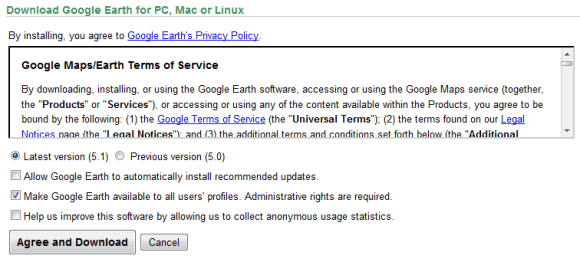
Downloading Google Earth is more complicated than it should be. At least if you want to download only Google Earth and save the installer for a future use. By default, Google downloads a small setup file that installs Google Earth, Google Chrome and Google Updater. Even if you disable the option "Include Google Chrome, a fast new browser for Windows and Mac", you'll still download a Web installer.

Here's how to download the standalone installer for Google Earth:

1. Go to Google Earth's homepage and click on "Download Google Earth".

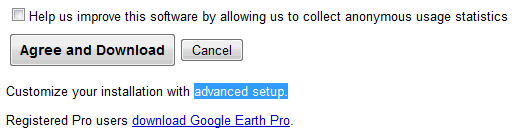
2. At the bottom of the page, there's a small message: "Customize your installation with advanced setup." Click on "advanced setup".


3. Disable this option: "Allow Google Earth to automatically install recommended updates."


4. Click on "Agree and download" and you'll get the offline installer. The direct download link for the Windows version is: http://dl.google.com/earth/client/advanced/current/GoogleEarthWin.exe.

The advanced setup page offers two other interesting options: installing Google Earth for all user accounts and the full setup for Google Earth 5.0.

Google Chrome should add a similar page that lets you download the standalone installer and a version that installs the software for all user accounts. This page still offers the standalone setup, but it's an old version. Right now, Google Pack is the only option to install Chrome for multiple user accounts.

{ Thanks, Brian. }

July 2, 2009

Google Update Always Running in the Background? Not Anymore

Google Open Source Blog informs that Google Update, the software used by Google Chrome and other applications for automatic updates, no longer runs in the background. "Until now, Google Update would always run in the background, functioning primarily as a reliable scheduler performing update checks at periodic time intervals. With today's release, Google Update now uses the Windows Task Scheduler to only run at periodic intervals."

I've checked the Task Scheduler and I've found that Google Update runs every hour. You can change how often it runs and even disable the task, but I'm not sure if other Google applications change your settings. "If this task is disabled or stopped, your Google software will not be kept up to date, meaning security vulnerabilities that may arise cannot be fixed and features may not work. This task uninstalls itself when there is no Google software using it," explains Google.

Since Google Chrome is regularly updated, it's not a good idea to disable the updater, thinking that you'll install the new versions manually.


The first good news is that you'll no longer see googleupdate.exe in the list of processes when you open the Task Manager. The second good news is that Google Update's team listens to users and constantly improves the software: Google Update is now open source and administrators can disable it using the Local Group Policy Editor.

May 15, 2009

How to Customize or Disable Google Update

For regular users, having a silent application that constantly updates the browser is a good thing. There's no annoying interface that interrupts you to ask your permission before updating the application and you no longer have to manually check for updates. Unfortunately, Google Chrome's automatic updater is not a great feature if you have limited bandwidth or in an enterprise environment, since you can't customize it.

Now you can use the Group Policy Editor from Windows or add some Registry keys to customize Google Update. Google Update for Enterprise explains how you can import an administrative template in the Local Group Policy Editor (gpedit.msc) and change the auto-update check period or even disable the auto-updater.


You can configure separate policies for different Google applications, allow only manual updates and even prevent the applications from installing on your computer.

If your operating doesn't include a policy editor (Windows XP Home, Windows Vista Home), edit the Registry directly. Just create the following key:

HKEY_LOCAL_MACHINE\SOFTWARE\Policies\Google\Update

and add two DWORD values:

AutoUpdateCheckPeriodMinutes - auto-update check interval (for example: 1440 to check for updates once a day)
DisableAutoUpdateChecksCheckboxValue - 1, if you want to disable the auto-updater; 0, if you want to enable it.

"We work hard to keep our users safe and secure when using our applications, and we believe that making sure users have the latest software available using automatic updates is a key component of that. However, we realize that there are situations where automatic updates may not be desirable so we wanted to provide the ability to control updates when necessary," says David Dorwin, from the Google Update Team.

May 11, 2009

Google Chrome Has the Most Effective Updater

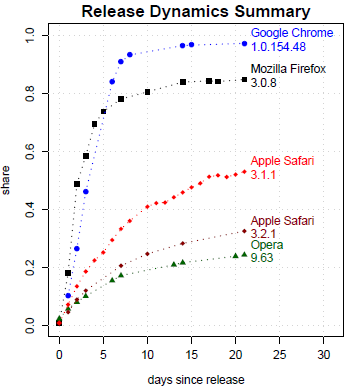
A paper published last week titled "Why Silent Updates Boost Security" showed that Google Chrome is the browser that has the most effective updating mechanism. Google Chrome's updater works automatically, it requires no user interaction and it can't be disabled from the interface. The report shows that 97% of the Chrome users had the latest version of the browser 21 days after its release, compared to 85% for Firefox and 53% for Safari.


"Google Chrome checks for updates every five hours. It is using the recently open sourced Google update component code-named Omaha, which keeps polling for updates even when Google Chrome is not running. (...) Once a new update is found to be available on the server, the client automatically downloads and installs it in the background without prompting the user. The new version of Google Chrome gets applied at the next restart of the browser. At the time of this writing, in April 2009, the user was not even prompted to restart the browser after a new update was ready. Given that the whole update process happens without any user interruption, Google Chrome is said to have a "silent update" mechanism. As of April 2009, the user could not disable update checks."

Other browsers don't include auto-updating mechanisms (Opera) or they have updating features that require user's consent (Firefox). Internet Explorer wasn't included in the report because its user-agent omits the minor version number and the results were compiled from Google's traffic logs.

Roger Halbheer, who works for Microsoft, has a more balanced view. "Silently installing components without even giving me the option to choose is not acceptable today for me – but I want to have the option to do it if I want."

Google Updater, the software that automatically updates Google applications like Chrome, Google Earth Plugin or Google Gears, needs to be more transparent and more flexible. Users need to be informed more clearly that the software updates silently and they need to have an option that disables the updater or makes the polling less frequent. What happens if the latest version of Google Chrome constantly crashes on your computer? You could install an older version, but Chrome will automatically update to the most recent version.

April 12, 2009

Google Update, Open Sourced

It doesn't have an interface, it's always running in the background, ready to silently update your Google software: Google Update is the service that makes Google's desktop applications behave more like the constantly updated web applications. Unfortunately, the service has many bugs, it can't be disabled unless you uninstall all the applications that use it and there are some privacy issues:

"When GoogleUpdate communicates with Google servers, it sends IDs of GoogleUpdate-managed applications on your computer and general usage information for these applications. GoogleUpdate also uses its own, randomly-generated unique ID number to accurately count total users. This information includes version numbers, languages, operating system, and other install or update-related details, such as whether or not the applications have been run."

Some people are concerned that Google collects even more information. To show that these worries are misguided, Google decided to open source the updater, code-named Omaha.
Since Google Update is always running on your system, there's no simple way to stop it, and since it's a fundamental part of the Google software that needs it, it's not explicitly installed. Some users can be surprised to find this program running, and at Google, we don't like disappointing our users. We've been working hard to address these concerns, and releasing the source code for Omaha is our attempt to make the purpose of Google Update totally transparent. Obviously, we understand that not everyone is both willing and able to read through our code, but we hope that those of you who do will confirm for the rest that Google Update's functionality serves well to keep your software up to date.

A software that's always up-to-date prevents malware from exploiting the already solved security issues, makes it easier to report bugs and it's constantly improving, but Google should provide an interface that lets you control how often the service checks for updates and even disable it. Some power users think that the always-running updater is "a violation of my control as a user, a potential security threat, and an unwanted burden on my system and network resources, which are already stretched."

March 1, 2009

Standalone Offline Installer for Google Chrome

When you download the setup for Google Chrome's site, you're only downloading the installer for Google Updater. The updater downloads Google Chrome's full setup and then installs the software. Here's an excerpt from a Squid report:

12/29/2008-13:42:29 http://dl.google.com/update2/1.2.131.27/GoogleUpdateSetup.exe
12/29/2008-13:42:29 http://dl.google.com/update2/1.2.131.27/clickonce_bootstrap.exe
12/29/2008-13:42:35 http://cache.pack.google.com/chrome/install/154.36/chrome_installer.exe

But sometimes you can't install the auto-updating software or you need to perform an offline install of the software. To solve these issues, Google Chrome started to offer a standalone installer.

Google notes that "the version of Google Chrome available from the link below may not auto-update to future browser releases, meaning you could miss important security fixes and feature improvements. If you install Google Chrome using the link below, bookmark this page and check back periodically to manually download newer releases." When I installed Chrome using the offline setup, Google added the auto-updating service.

October 2, 2008

The Invisible GoogleUpdate.exe

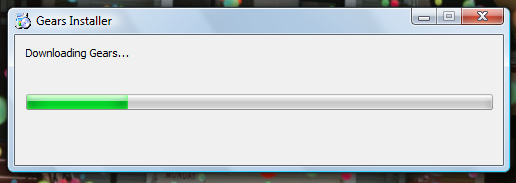
Most of the recently released Google software uses live installers that download the required files from Google's servers and enable an auto-updater. Whether you want to install Chrome, Gears, Lively or Google Earth's plug-in, Google first downloads a small setup file that needs an Internet connection to obtain the software.


The most important reason why Google doesn't provide offline installers for these applications is the auto-update software, which has a separate development cycle. Instead of integrating an auto-update feature in all the applications, like in Picasa, Google Desktop or Google Toolbar, Google decided to create an independent tool that deals with keeping Google software up-to-date.

"GoogleUpdate.exe is a software component that acts as a meta-installer and auto-updater in many downloadable Google applications, including Google Chrome. It keeps your programs updated with the latest features. More importantly, GoogleUpdate allows your Google applications to be rapidly updated if security flaws are discovered," details Google.

Web applications can be easily updated and everyone gets the latest version, but desktop software needs to be updated manually or by the software itself. Google chose to automatically update most of its applications, in many cases without providing an option to disable the updates and without informing the user when a new version is installed.

GoogleUpdate automatically runs in the background when you start your computer and it connects to Google's servers every few hours to check if there are updates and to report some usage data.

"When GoogleUpdate communicates with Google servers, it sends IDs of GoogleUpdate-managed applications on your computer and general usage information for these applications. GoogleUpdate also uses its own, randomly-generated unique ID number to accurately count total users. This information includes version numbers, languages, operating system, and other install or update-related details, such as whether or not the applications have been run."

GoogleUpdate is installed as a system service, which can be disabled from the services console, but there's no transparent option to uninstall it. It also installs the GoogleOneClick plug-in for Firefox, IE, Chrome that allows Google to launch the updater directly from a web page. If you kill GoogleUpdate.exe from the task manager, a scheduled task will reopen the service when your computer is idle. Google says that the service is uninstalled a few hours after you uninstall the last application that uses it. "Google Update Service uninstalls itself when there is no Google software using it. It may take a few hours after uninstalling Google software for Google Update to uninstall."

To make things even more difficult for those who manually remove the updater, "you may find that your Google programs no longer function properly and, in many cases, you may see GoogleUpdate return automatically".

Even if the software's intentions are noble, it's unfortunate that Google doesn't inform users about the updater and it doesn't provide an option to disable GoogleUpdate or to ask before downloading updates.

April 15, 2008

Google Updater, the New Installer for Google Software

Last year, I posted that Google intends to install all its applications through Google Updater, the central component of Google Pack. At that time, a small number of people were redirected to the integrated installer, but this behavior has now become a standard practice.

Because some of the files from Google Earth were corrupted, I had to uninstall it. When I went to Google Earth's download page, Google informed me that I have to install Google Earth with Google Updater.


Google Pack's help center gives some reasons why it's convenient to use the Updater, but most of them help Google promote other software. "The Google Updater makes the software installation process more convenient in several ways. First, it installs software easily with just a few clicks. Also, once the Google Updater is installed, you can choose to have a system tray icon notify you when new software becomes available. Finally, the Google Updater provides you with a central place from which you can download more Google software, as well as other software we think you'll enjoy." (my emphasis)

Probably the only reason why I use my computer is to install Google software and this updater finally helps me get things done. If I want to install Google Earth, it's obvious that I should be informed if Google launches other applications and I should be able to install them with a single click. Hopefully, in the next iterations of the Updater, the click will be eliminated and the new software will be installed automatically after analyzing my interests.


I installed Google Earth using the updater and the setup was launched in the background, with the default settings. Google Updater is installed as a system service that starts automatically, places an icon in the system tray and constantly pings Google to see if there are any updates for the Google software installed on your computer. By default, the application installs the updates automatically and can be uninstalled.


Google still offers the chance to install applications without the updater, but the page that points to the direct links is too difficult to find and has an inappropriate title. I'll repost the links here, for convenience.

Google Earth for Windows:
http://earth.google.com/tour/thanks-win4.html

Google Desktop for Windows:
http://desktop.google.com/index.html?rd=f

Google Toolbar 4 for IE:
http://toolbar.google.com/service/tbdl?hl=en&tbdata=T4

This practice is not Windows-only. Google's Mac software is installed only with the updater. "Google Updater is the installer for Google products on the Mac. You can use Google Updater to see which Google software you have installed and to see other Google applications you might be interested in. Google Updater helps keep your software up-to-date by installing updates when they become available. And you can use Google Updater to uninstall Google Software." Probably the most outrageous part from the Mac FAQ is the answer to the question: how do I uninstall Google Updater? "To uninstall Google Updater, you first have to uninstall other Google software on your computer. You can't uninstall Google Updater while you have Google software on your computer because we need it there to keep your software up-to-date."

Maybe Google should focus less on "we" and more on "you". Most Google software already has an option to auto-update and this could be easily added to the applications that don't have it. If the installers are too confusing, Google could simplify them and remove the unnecessary steps. I don't want to imagine what would happen if each application installed a system service for auto-update and used your network connection to constantly check for new updates.

Update: Apparently, I was lucky to install Google Earth in Firefox. If you use Internet Explorer, Google adds the options to install Google Toolbar and to set Google as the default search engine. Both options are enabled by default, so a standard Google Earth installation bundles Google Updater, Google Toolbar and changes your default search engine in Internet Explorer. This is way too much.

March 6, 2007

Google Forces You to Install Google Pack

If you try to download Google Desktop, you'll see something strange: you have to download Google Updater, an executable available that's a part of Google Pack, the collection of Google software and third-party applications launched last year.

"The Google Updater is the program that downloads and installs all the software in the Google Pack. You can use the Google Updater to monitor the status of your installation, run software that's been installed, or uninstall software. A Google Updater icon will appear in your system tray and will display notifications when new software is available."

So if you try to download Google Desktop, you're forced to download Google Pack, or at least Google Pack's core, which is Google Updater. You can look at Google Updater like an equivalent of the "Add or remove programs" included in Windows. Unlike the application manager from Windows, Google Updater monitors the applications for new versions and is configured to automatically update the applications.

It seems that Google tries to centralize the way you install and manage Google software, so I wouldn't be surprised if you'll be forced to install the Updater for any Google software in the near future. Like Google Toolbar, which is a way to push new services and feature, Google Pack and the updater are a way to push new software from Google and its partners (there's a "Show new software" link that sends you to a page that lists software from Google Pack you don't have on your computer).

Note: In case you don't see the text below when you go to Google Desktop, this is the page where you should've been redirected. There's a workaround if you want to download only Google Desktop: this link.


Update: This is a new version of Google Pack (2.0 beta) that will be used to install individual Google products. Even if the download pages are not changed for everyone yet, Google Toolbar for IE and Google Earth for Windows will be installed in the same way.

December 3, 2006

Google Updater Service

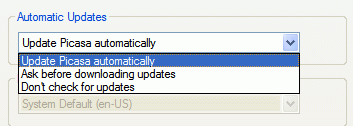
The latest version of Picasa* includes something very interesting: a Windows service called Google Updater, set to start automatically. The new service is connected to Picasa, which has new options. Before this version, Picasa had an option to check for new updates and let you manually install the new version.


There are also new keys in the Registry:


Although there's no information about the new service, it seems that Google wants to create a centralized update system, similar to Windows Updates, that will be installed with each Google software.

Google Updater is also a program that installs and updates the software for Google Pack, but this one has a GUI.

* Picasa 2.6, Build 35.83 (beta)
- changelog: mostly an update for Vista
- download here