An unofficial blog that watches Google's attempts to move your operating system online since 2005. Not affiliated with Google.

Send your tips to gostips@gmail.com.

August 12, 2008

Easier Way to Create Forms in Google Docs

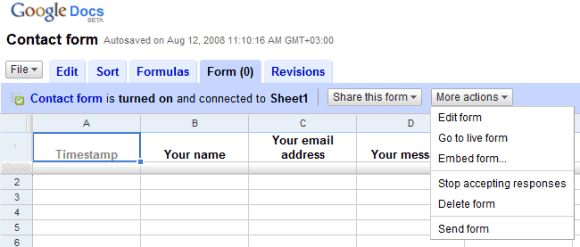
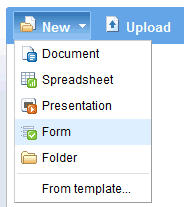
You can now create forms directly from the New menu of Google Docs homepage.


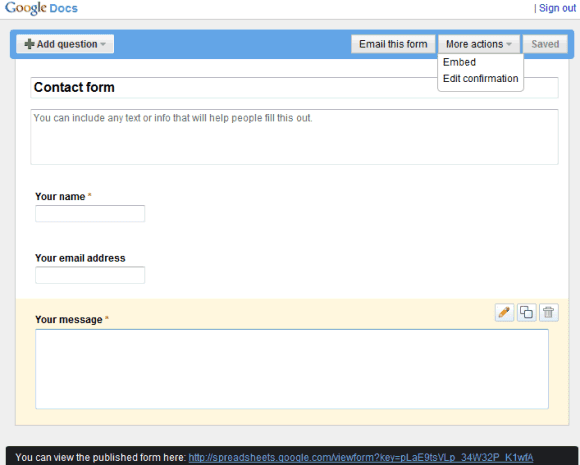
After selecting the Form option, Google opens a wizard that lets you add questions, email or embed the form.


The form saves all the changes automatically and you can now reorder the questions using drag-and-drop.

What I don't like is that Google doesn't link to the spreadsheet which includes the form, so you have to find the spreadsheet by going back to the documents list. The relation between forms and spreadsheet is confusing and it would be nice to detach the forms from spreadsheets and use the forms as one of the many possible data sources, along with feeds, CSV files published on the web, financial data etc.

August 11, 2008

Gmail's Temporary Error

Gmail is currently down for many users and it shows a 502 error message:

"We're sorry, but your Gmail account is currently experiencing errors. You won't be able to use your account while these errors last, but don't worry, your account data and messages are safe. Our engineers are working to resolve this issue. Please try accessing your account again in a few minutes."
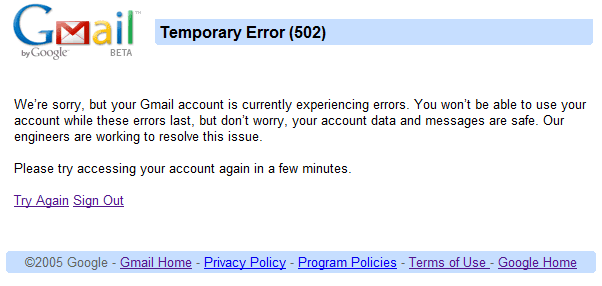

Some Gmail accounts can still be accessed using other interfaces: basic HTML, mobile version or IMAP, but you can't receive or send messages.

The problem seems to be widespread, since many people are reporting it on Twitter and Gmail's group. "Gmail Temporary Error (502). Last time I saw something like that from Gmail was 2004," says José. "All my Gmail accounts are down. 502 Temporary Error. for nearly an hour already," complains Jonas. "bitful is all grrr because Gmail throws a 502 (temporary error) and wonders if the cloud can be trusted after all."

Gmail Guide says that "the Gmail team is currently aware of a subset of users being affected by the 502 error on login. (...) Engineers have pinpointed the issue causing the 502 errors and it looks as if users should start to regain normal functioning of their account."

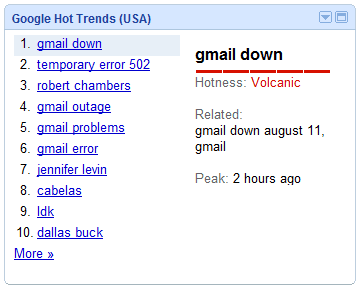
Update: After more than an hour, Gmail is back, but the outage is in Google Hot Trends.

TechCrunch has more information from Google:

"Since about 2 p.m. Pacific Time today, many Gmail users have been unable to access their email. We are very sorry for this interruption in service. The issue is being caused by a temporary outage in the contacts system used by Gmail which is preventing Gmail from loading properly. We are starting to roll out a fix now and hope to have the problem resolved as quickly as possible. Even though you may not be able to get to your inbox right now, your mail is safe, including new incoming messages."
Google Maps, Before the Redesign

For those that hate the most recent Google Maps redesign and miss some of the features that were removed (the multiple search boxes, reordering destinations, collapsing directions), there's a link for the previous interface: http://maps.google.com/maps?f=d&view=text. The explanation is that Google didn't update the interface for the "text view", an option that minimizes the map and focuses on the search results.


This is just a temporary workaround until Google adds the missing features.

{ via Google Maps Group }

Update: you can now reorder destinations in the standard interface.

August 10, 2008

Add a Table of Contents to Google Docs and More

Basic features like table of contents, footnotes or thesaurus are still missing from Google Docs. Some of the features are already implemented and they're ready to be added to the interface.

(Update: If you have Google Gears, temporarily disable it for Google Docs by removing docs.google.com from the list of allowed sites in Google Gears Settings.)

For example, to generate a table of contents from the headings of a document, just paste this code in the address bar:

javascript:mr("TocSettings");

You should see a dialog that lets you choose the numbering style.


There's also an option to insert a HTML snippet without editing the HTML code. The dialog can be invoked by pasting in the address bar:

javascript:dy();

A word processor is more useful if you can easily access a dictionary, an encyclopedia and other sources of information. Select some text from a document and paste the following lines to show information from:

Encyclopædia Britannica
javascript:MC=NC();GC("encyclopedia");

Merriam-Webster's Online Dictionary
javascript:MC=NC();GC("dictionary");

Merriam-Webster's Online Thesaurus
javascript:MC=NC();GC("thesaurus");


Hopefully, these features will soon be added in the interface.

Google Search Insights

Google Trends is useful if you want to compare the popularity of two or more search terms, but it can't generate lists with popular search terms from a category, like in Google Zeitgeist. You need to provide the search terms and adjust them until you found the most popular keywords, but this is time consuming and ineffective.

Google Insights for Search categorizes searches and shows popular queries from a category like Telecommunications, popular queries from a certain country or from a specific date range. You can use it to find answers to questions like:

* what are the most popular cars in the US this year?
* what are the top searches in France for the past 30 days?
* which file sharing services were the most popular in 2007?
* what was the distribution of the Google searches for iPhone in the US last month?
* what are the top searches related to Google this year?


The service has been created with the advertisers in mind and has many potential business uses: examining seasonality, comparing synonyms, finding regions that are interested in a certain product.

To group multiple keywords, separate them using +. To compare two or more keywords, click on "Add search term" or separate the keywords using a comma.

August 9, 2008

Restrict Google Video Results to Embeddable Videos

Google Video has a new option: restrict the search results to videos that can be embedded in a web page. This is especially useful for the TV view that plays videos without opening new pages. Google shows a small "play" icon next to the videos that are playable inline.


In other related news, Google Video tests an autocomplete feature that shows popular queries from YouTube [sic]. As previously reported, YouTube Suggest has been launched in May after more than a month of public testing.


Google and the Summer Games 2008

Google uses a clever way to promote some of its tools that let you find the latest information about the Beijing 2008 Olympic Games. The homepage doodle links to a search that triggers a special OneBox for medal count.


Google's OneBox includes a link to an iGoogle gadget that shows schedules, results, and medal counts. There's also a Google News section for the Summer Games.

Other searches that trigger Google OneBoxes: sport, olympic sport (e.g.: olympic boxing or simply boxing), olympic country (e.g.: olympic china). The OneBoxes are also available on Google's mobile search site, where you can search for similar keywords or use a list of sports.


When you search for [summer games], there's an ad that asks you to "stay up to date on the summer games using Google". The ad links to a page that promotes the iGoogle gadget mentioned above, a YouTube channel with news from Associated Press, NY Times, EuroNews and a Google Maps mashup that shows the locations of the Olympics events.

Google Blogoscoped points to a Chinese version of the landing page, which promotes more Google services, including the new Google SMS Alerts (English translation). The new service, available only in Chinese, sends free text messages with information about weather, medal counts and results.

Google Page Creator to Be Closed

This year, Google discontinued a lot of services: Browser Sync, Hello, Send to SMS and Send to Phone extension. Another Google Labs experiment is about to be discontinued: Page Creator, a simple way to create web pages without knowing HTML. Google Page Creator's rich text editor is now included in many other Google services, but Google decided to focus on the more powerful Google Sites.
We are no longer accepting new sign-ups for Page Creator because we have shifted our focus to developing Google Sites, which offers many of the capabilities of Page Creator along with new features like site-level navigation, site-level headers, control over who can see and edit your site, and rich embeddings like calendars, videos, and Google docs. If you are currently a Page Creator user, you can continue to use Page Creator and your pages will automatically be transitioned to Google Sites later this year.

It's not clear if Google will also move the files uploaded to Page Creator, so you can continue to use them. "For migrated sites we will automatically redirect your googlepages.com URL to the appropriate sites.google.com URL to ensure your visitors aren't lost due to the transition. In addition, we will be providing a means for you to download your site so that you can easily export it to other services if you choose to do so," explains Google.

Instead of having two overlapping services, Google decided to develop only one of them. "By concentrating our work on one product we hope to ultimately create a superior product than if we maintained the two products separately."


I'm not sure if Google Sites is a good replacement for Page Creator, since the interface is more complicated and there are many limitations: you can't add JavaScript code, embedded objects or iframes, it's more difficult to upload files and to setup a simple site.

{ via Google Blogoscoped }

August 2, 2008

A Week Without Google

What would you miss the most if your ISP blocked all Google services for a week? Among other things, the search engine would no longer work, Gmail's web interface wouldn't load, YouTube videos would be blocked, web pages would load slower because the Analytics tracking code would no longer work, all the Google Maps mashups would be completely useless for you.


Fortunately, you don't have stay a week without Google, but this blog takes a break for a week.

Replacing Desktop Software with Web Applications

Note: This blog takes a break for a week. If you find something interesting related to Google, send a mail to the address from the sidebar.

Web applications aren't, in most cases, real replacements for desktop software. Google Docs or Zoho will never be as fast, as powerful or as easy to use as Microsoft Office or OpenOffice, but their other strengths could convince some people to use them.

On the other hand, Gmail and Google Reader could easily replace many desktop email clients and feed readers, as most of the time when you read your mail or news you're online.

Browsers' limitations, security risks, latency, the lack of offline access are serious problems that won't be solved too soon and will continue to prevent many web applications to become real alternatives for their desktop relatives.

Did you replace a desktop application with a web app that has a similar functionality? What desktop applications do you think will become obsolete in 5 years?

(Originally published in August 2007)