An unofficial blog that watches Google's attempts to move your operating system online since 2005. Not affiliated with Google.

Send your tips to gostips@gmail.com.

February 1, 2010

Star Google News Stories

Google News added a new feature that lets you star news stories. If you click on a star next to a Google News cluster, you'll add it to the Starred section and Google will notify you when it finds related articles.

"When you star a story in Google News, it's one way to let us know that you're interested in that subject. When there are significant updates, we will alert you by putting the headline in bold so you can get more information," mentions Google News blog.

For some reason, Google doesn't add the starred news stories to Google Bookmarks and there's no option to star a news cluster after you open it. Another issue is that the Starred section only includes the most recent 20 starred stories.

I don't know if this is best way to use this feature, but you could star news stories to read them later. If you don't already use Instapaper or Read It Later, starring Google News clusters is a great way to save them for later.

Google's False Advertising

Google claims that you can store "up to 8,192,000 photos from a 5MP camera" if you buy 16 TB of storage. There's also a promotion that offers a free Eye-Fi card if you buy $50 or more of storage.


Apparently, you can't store 8,192,000 photos, at least not in Picasa Web Albums. Google's photo service has some strange limitations: a photo album can include up to 1,000 photos and a Picasa Web account can only have 1,000 albums. That means you'll be able to upload less than 1,000,000 photos, especially if you think that not all albums will include 1,000 photos.

Dave, a reader of this blog, is concerned: "Many people are upset that they purchased additional storage capacity from Google only to learn later that although they have plenty of free space, they have easily maxed out the 1000 files allowed by Google. Here is one of several threads on the Picasa help forum that discusses this issue. As someone who is/was considering purchasing extra storage space from Google in order to upload more pictures to Picasa Web Albums, I am a little concerned about this."

Of course, Google might say that the photos can also be stored using Google Docs or Gmail. Picasa Web Albums has to remove the limitations, improve photo uploading and the way you organize photos. Why do you have to upload photos to an album when Gmail and Google Docs use labels to organize messages and files?

{ Thanks, Dave. }

Update (February 28th): Google no longer shows the misleading message if you select 2 TB or more.

Google Video Finds Playlists

Google's video search engine started to index playlists from YouTube and other video sites. Playlists are mixed with standard video search results, but you'll probably find them on the first search results pages if they're relevant.

It's interesting to note that Google's algorithms detect groups of videos even if they aren't called playlists.


"Our intent is to represent the video content of the internet fairly and accurately. We don't give special ranking preference to videos hosted by YouTube or Google Video, nor do we manipulate search results in any way. We believe strongly in allowing the democracy of the Web to determine the inclusion and ranking of videos in our search results. After determining the content of the video using our spidering technology, Google then combines sophisticated text-matching techniques to find videos that are both important and relevant to your search. Our technology examines dozens of aspects of the video's content (including number of hits and rating) to determine if it's a good match for your query," explains Google.

Google Translate Adds Haitian Creole

Google's translation service added support for Haitian Creole, the most popular language in Haiti. "Haitian Creole language, often called simply Creole or Kreyòl, is a language spoken in Haiti by about eight million people, which is about 80% of the entire population, and via emigration, by about one million speakers residing in the Bahamas, Cuba, Canada, Cayman Islands, Dominican Republic, French Guiana, Guadeloupe, Belize, Puerto Rico, and United States," mentions Wikipedia.

It's an early release labeled as "alpha", so the translation quality isn't very high.


A week ago, Microsoft Translator added support for Haitian Creole. "In the current crisis in Haiti there are a number of initiatives to rapidly build software to assist in humanitarian aid. Responding to community requests for a machine translation (MT) system to translate between English and Haitian Creole, our team has been hard at work over the last few days. I am glad to announce that an experimental Haitian Creole MT system is now publicly available via several services and APIs powered by Microsoft Translator technologies. We will continue working on improving the system, but we hope meanwhile that in spite of the experimental nature – it will be of use in the relief efforts."

I used both Microsoft Translator and Google Translate to translate an article from VOA News. Google's translation (on the right) is much better:

January 27, 2010

Google Chrome's Content Filtering

A recent Chromium build added some new options that let you filter content from web pages. A new dialog titled "Content Settings" adds new features for managing cookies, JavaScript content, images, plug-ins and pop-ups.

For example, you can enable an option that clears cookies when you close the browser, a feature that's available in many other browsers. Other features let you disable images, JavaScript or plug-ins for a list of sites. If these settings are exposed via an API, developers will be able to build extensions like NoScript.


I tried to enable some of the new features, but they didn't work in the most recent Chromium build (revision 37221).

January 26, 2010

Offline Installer for Google Earth

Downloading Google Earth is more complicated than it should be. At least if you want to download only Google Earth and save the installer for a future use. By default, Google downloads a small setup file that installs Google Earth, Google Chrome and Google Updater. Even if you disable the option "Include Google Chrome, a fast new browser for Windows and Mac", you'll still download a Web installer.

Here's how to download the standalone installer for Google Earth:

1. Go to Google Earth's homepage and click on "Download Google Earth".

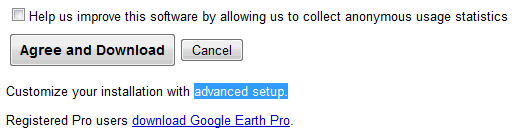
2. At the bottom of the page, there's a small message: "Customize your installation with advanced setup." Click on "advanced setup".


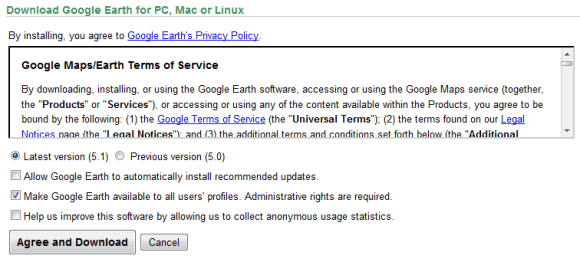
3. Disable this option: "Allow Google Earth to automatically install recommended updates."


4. Click on "Agree and download" and you'll get the offline installer. The direct download link for the Windows version is: http://dl.google.com/earth/client/advanced/current/GoogleEarthWin.exe.

The advanced setup page offers two other interesting options: installing Google Earth for all user accounts and the full setup for Google Earth 5.0.

Google Chrome should add a similar page that lets you download the standalone installer and a version that installs the software for all user accounts. This page still offers the standalone setup, but it's an old version. Right now, Google Pack is the only option to install Chrome for multiple user accounts.

{ Thanks, Brian. }

Google Docs Grid View

Now that you can use Google Docs to store files, you'll upload a lot of files from your computer and treat Google Docs as an online version of Windows Explorer (or any other file manager). Unlike Windows Explorer, Google Docs had a single view for displaying files: the details view.

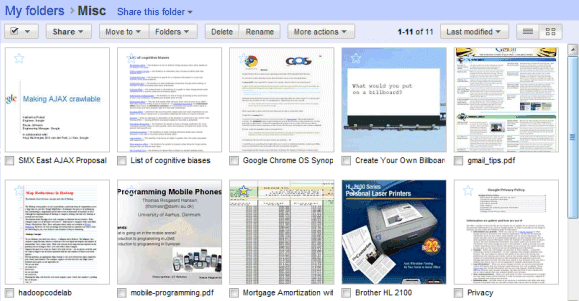
If you don't like to see the date when a file was last modified or the number of collaborators, you can switch to the new thumbnail view. Google Docs generates thumbnails for documents, spreadsheets, presentations, photos and PDF files, while showing standard icons for other file types.


"We recently finished rolling out the upload and store any file feature, so everyone should now be able to upload, store, and share any file in Google Docs. We also increased the maximum file size based on your feedback, so you can now uploads files up to 1 GB in size," mentions Google Docs Blog.

Of course, there are many other improvements that would make Google Docs more useful: increasing the free quota to at least 10 GB, adding support for any file type to the API and making it easier to access your files by mapping Google Docs as a network drive.

Tip: you can use the new grid view for shared folders by adding &layout=grid to the URL. Here's an example.

{ Thanks, Pascal. }

10 Must-Have Google Chrome Extensions

The Windows version of Google Chrome 4 is out of beta and you can finally try the features that were previously available in Chrome's beta and dev channels. Google will automatically update the browser to the latest version (4.0.249.78), but you can also click on the wrench button, select "About" and manually update the browser.

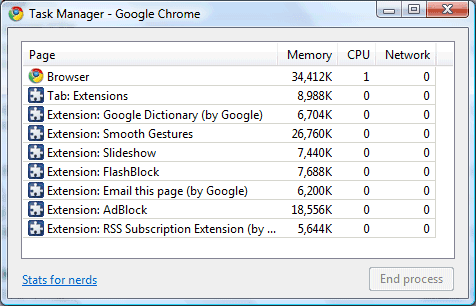
The most important feature released in Google Chrome 4 is the support for extensions. Chrome extensions are easier to create than Firefox extensions because they're nothing more than web pages that use Chrome's APIs. That's why you can install or disable extensions without having to restart the browser, that's why extensions use separate processes and this is one of the reasons why Chrome extensions are more limited and don't have a consistent interface.

Google Chrome has built-in support for user scripts, so you don't need to install an extension like Greasemonkey. Chrome can convert user scripts into extensions, so many Chrome extensions are just glorified Greasemonkey scripts.

To install an extension, visit Google Chrome's extension gallery and pick one of the 1,861 extensions that are currently available. Here are some of the most useful extensions that add missing features to Google Chrome:

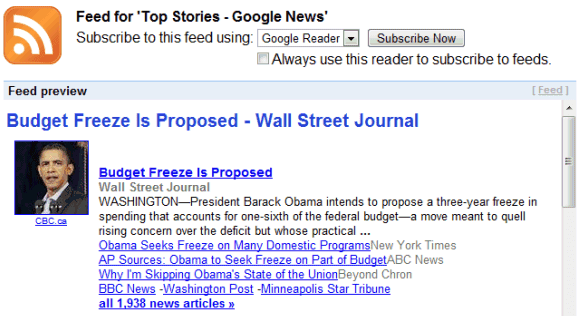
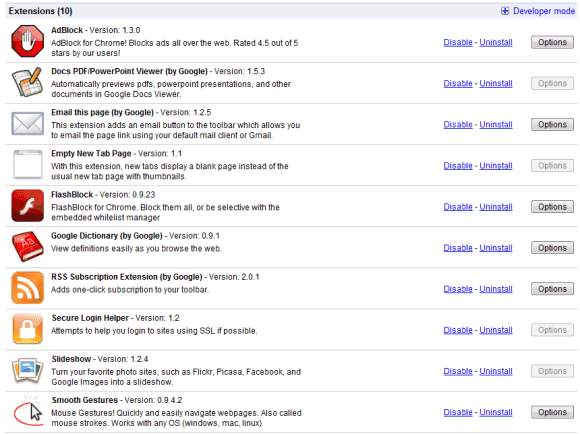
1. RSS Subscription Extension. Detecting and previewing feeds is a standard feature in most browser, but not in Google Chrome. This extension shows an orange icon in the Omnibox when it detects feeds and lets you subscribe to one of the feeds using your favorite feed reader. You can select one of the popular feed reader that are available by default (Google Reader, iGoogle, Bloglines and My Yahoo) or you can add another feed reader.


2. Email this page. Firefox's contextual menu has an option called "send link" that lets you send a link to the current page using your favorite mail client. This extension has a similar functionality, but it only lets you pick the default mail client and Gmail.

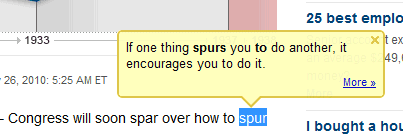
3. Google Dictionary shows the definition of a word when you double-click on it. It only support monolingual dictionaries and a small number of languages, but it's useful if you want to find the definition of a word without opening a new page.


4. Docs PDF/PowerPoint Viewer - a simple extension that detects the links to PDF, PPT and TIFF files and opens the files in Google Docs, so you can view them without installing additional software.

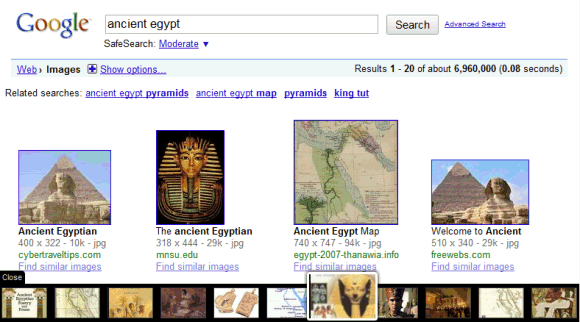
5. Slideshow - a great way to view the images from sites like Flickr, Picasa Web Albums, Facebook, and Google Images in a slideshow.


6. Empty New Tab Page - a simple extension that replaces Chrome's new tab page with a blank page.

7. FlashBlock disables Flash content for all web pages and replaces it with a placeholder. Click on the placeholder and you'll enable the Flash element. This way, you'll no longer see Flash ads, annoying Flash animations and other unnecessary objects that slow down your browser.

8. AdBlock hides ads using frequently-updated filter lists. You can whitelist domains and subdomains using Ctrl+Shift+L.

9. Secure Login Helper redirects you to the HTTPS login pages for sites like Twitter, Facebook and Twitter.

10. Smooth gestures - use mouse gesture to perform actions like going back one page, going to the top of a page or opening the last close tab. Mouse gestures are intuitive and you can customize them.


If you found other great Chrome extensions, mention them in a comment.

Track Page Changes Using Google Reader

Not all web pages offer feeds and sometimes it's useful to monitor web pages and find the latest information. A great service that offer this feature is Page2Rss, which provides a feed for each monitored web page.

A similar feature is now available in Google Reader and it's cleverly integrated: click on "Add subscription", type the address of a web page and Google Reader will automatically generate a feed if it can't detect one.


"We provide short snippets of page changes to help you quickly decide if the page is worth revisiting and we're working on improving the quality of these snippets," says Brian Shih.

"Reader may not always detect updates to your content. Currently, only English-language content in HTML format is supported. In addition, updates to content in frames are not detected; nor are updates to content that requires sign-in to view," mentions a help center article, which also informs that webmasters can prevent Google from monitoring web pages by using the features that block Googlebot from crawling or caching web pages. This suggests that Google Reader's page monitoring uses data from Google's search index and the changes may not be detected quickly if the web page is not popular or it doesn't change often.

Since I rarely visit Google's homepage, generating a feed for google.com or for other international Google homepages is a great way to track all the doodles and the promotional messages.


For now, Page2RSS offers more features (posts have better titles, you can view a cached version of the page), but Google Reader is more reliable. For example, Page2RSS doesn't show the latest changes for google.com.

Tip: to find the URL of the feed generated by Google, click on "show details" and you'll find a URL like:

http://www.google.com/notificationservice/webchanges/webfeeds/11009120664050806769

January 21, 2010

YouTube Music Discovery

YouTube's Labs added an interesting service with a very long name: YouTube Music Discovery Project and Playlist Creation Tool. Let's just call it YouTube Music Discovery.

Type the name of an artist and YouTube generates a playlist that includes music from the artist you've entered and from similar artists. For example, I entered "Bjork" and YouTube added music from Radiohead, Air, Massive Attack and Aphex Twin. After the playlist is generated, you can remove some of the songs, add new songs, save the playlist or watch all the videos.


Playlists are far from perfect: there are too many songs from the same artists, there are few obscure songs and the transition between songs is not always smooth. YouTube Music Discovery Project won't replace Pandora or Last.fm radios, but it's a simple way to find music from your favorite artists and to discover similar artists.

"A search for Pearl Jam results in a playlist stocked with Eddie Vedder & Co., plus videos by fellow Seattle grunge all-stars like Nirvana and Soundgarden and ’90s rockers like Smashing Pumpkins and Black Crowes. Not much for discovery as the vast majority of Pearl Jam fans are already well aware of these other bands, but the Pearl Jam list might introduce fans to the handful of obscure Screaming Trees music videos that YouTube suggests," notices Rolling Stone.

A similar feature is available for the existing YouTube playlists: click on "Recommend videos based on this playlist" and YouTube suggests 8 related videos.