Google Chrome was released more than two years ago and it's the browser of choice for many people. Despite having won hearts for its speed and elegance, Google Chrome does have some minor flaws that you might want to fix. Here are some of them:
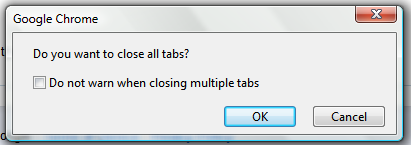
1. No confirmation when closing multiple tabs
Google Chrome does't show a warning when you close a window with multiple tabs. If you accidentally close Chrome windows, you can install Chrome Toolbox. The next time you close many tabs, you'll at least get a warning.
2. Basic history page
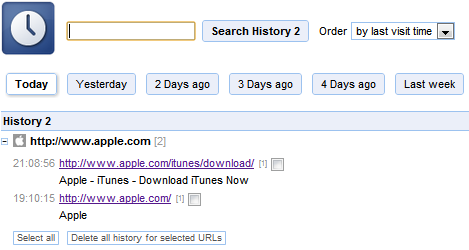
Google Chrome's history page is pretty basic and you can't restrict the list to a certain time interval.
The History 2 extension comes to the rescue by allowing you to sort web pages based on the day/week you visited them. History 2 allows you to delete multiple items from your history page at the click of a button – something that's not possible by default.
3. Missing image properties
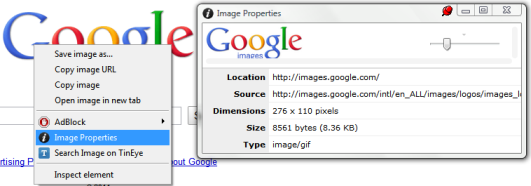
There's no way to quickly examine an image when you're in Chrome. Fortunately, you can install Image Properties Context Menu, an extension that lets you right-click on an image and find information about the image size, location, dimensions and more.
4. No support for feeds
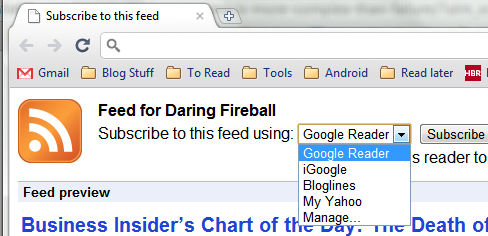
Chrome simply doesn't recognize RSS feeds and all you get is a page with gibberish text. If you install the RSS Subscription extension developed by Google, you can quickly subscribe to any feed using Google Reader, iGoogle, Bloglines or My Yahoo.
5. You can't send a web page by email
While other popular browsers allow you to quickly send any web page you're viewing by email, such an option is nowhere to be found in Google Chrome.
Worry not, because you can create a simple Javascript bookmarklet to open your default email program with the current URL. If Gmail is what you use, you can alternatively install the Send from Gmail extension to send the web page to Gmail.
6. No session manger
Closing Google Chrome and reopening it does not restore previously opened tabs. In order to do that, go to the Options dialog and enable Reopen tabs that were open last.
If you want advanced session saving options like the ability to create multiple sessions, try the Session Buddy addon for Google Chrome.
7. You can't switch to a tab from the Omnibox
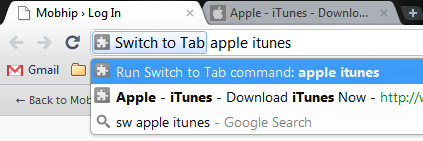
Firefox 4 lets you switch to any open tab by typing relevant words into the address bar. If you'd like to see a similar feature in Chrome, install the Switch To Tab extension.
The next time you have too many open tabs, just type sw <TAB> followed by some words from the page. Hitting Enter switches to the tab that's listed as the first match.
Have you ever wanted to switch from Chrome to another browser because of a missing feature? Did you mange to find a workaround or an extension that adds the missing feature?
Shankar is a blogger and an engineering student from India who writes tech tips at KillerTechTips.com. His latest articles helped users block Facebook and improve productivity in Google Chrome. This post was inspired by an article written by Amit Agarwal.

Thanks, many good tips here!
ReplyDeleteFor flaws 2 and 6: if you accidentally close more than one tab, a special link for restoring the session will appear on the home page under the "Recently Closed" section, named something like "14 tabs". This is a bit quirky after getting used to Firefox or Opera's session manager, but once you get used to it it's actually quite useful. No more restoring a 10+ tab session if you just want to show a link.
ReplyDeleteYou can even restore the session AFTER you've started a new browsing session.
Love the switch to tab extension.
ReplyDeleteI personally installed History2, Switch to Tab and Image Properties. Already had the session management enabled.
nice:) I miss one thing (I could not find any addon)
ReplyDeletectrl + tab to switch between the last used panels and not phased out progressively as they go behind, there is a solution? thanks:)
Excuse my English~gtranstale
is there a way to have the address bar search by site title. I can't memorize the address names for every site.
ReplyDeletein FF if you type the title of the page, it populates the address bar if it's in history.
@zlogic That's right, but actually choosing to reopen tabs in the Preferences/Options dialog saves you a few seconds. Automagic :)
ReplyDeleteOn annoyance 1 "No confirmation when closing multiple tabs", I didn't find it much of an annoyance as a intuitive keyboard short-cut CTRL-SHIFT-T gets back the entire window of closed tabs.
ReplyDeleteThat said, I'm very much a keyboard person, and when trying to find the equivalent mouse action, I realised that it wasn't intuitive. I took some time before I found the feature by right-clicking the tab bar.
Perhaps the placement of an "Undo" button on the tab bar beside the existing "+" would help.
Biggest one - no option to install it where I want it and stop it from messing with my OS...
ReplyDeleteAnon, you can install a portable version. Then you can install it wherever you want and it won't "mess with your OS"
ReplyDeleteI am using 11.0.672.2 dev build on a Macbook with Trackpad, and a diagonal, three-finger swipe shows all open tabs. You can navigate through tab thumbnails with Tab key and there is also a close button that appears on upper left hand corner of the thumbnail. Don't know if this is a commonly known feature.
ReplyDeleteAbout the session manager, definitely install Session Buddy. You probably won't use it often, but when you'll want to, it will count.
ReplyDeleteMy biggest Chrome annoyance is when I click a bookmark, and it replaces the contents of a pinned tab.
ReplyDeleteI pin Gmail tab so it will stay on Gmail permanently, not so it will go away any time I click a bookmark. I have found no fix for this except to click bookmarks with the middle mouse button, which I often forget to do.
I would be happy if pinned tabs could be protected, or if there were an option to always open bookmarks in a new tab.
Switching all my accounts to Gmail and Chrome apps
ReplyDelete0xc 00000 5a error have do alot of research to fix this but no luck. get unresponsive page and page crashes after a long delay ??
In the new beta version 10, they removed right-click to open an embedded iframe to a new tab. I really don't like iframes...
ReplyDeleteI find it annoying that there's no Google Toolbar for Chrome. I often want to look at page caches, and there's no way to do that #FAIL
ReplyDeletewell; let's see; someone opens a browser and signs in. I come along and open gmail and sign in by switching users. I then go to the web, or igoogle, and sign in there as well. I then decide to go to the app store and install say, coolpix or something; I go to the application to find that it is not my application; it belongs to the first 'someone' who signed in...so; I erase the appliction, close and reopen the browser and start all over again...I guess I should have searched all the tabs before hand to make sure no one else was signed in???
ReplyDeleteI consider the lack of download API is the most irritation. The download bar in Chrome is annoying.
ReplyDelete1. it cannot disappear automatically
2. lack of controls and detail info
3. so far there is no way to improve that by extension
How about a good password tool? Great browser, but here still behind, even IE... :(
ReplyDeleteThe Foxish Live RSS extension fixed the one big gap for me in Chrome, relative to Firefox -- the ability to define a folder on your bookmark bar as dynamically driven from RSS. This is my preferred way to consume RSS feeds, especially from Del.icio.us.
ReplyDeleteMy biggest annoyance is the download bar not disappearing once the file(s) have completed.
ReplyDeleteChrome (a good browser) little by little obtains the features that Opera has been putting in for a while, as well as speed, standards compliance, integrated reader, email, bittorrent client, stackable tabs, session management, bookmark sync, widgets, extensions, yada yada..
ReplyDeleteChrome is on my machine for infrequent site compatibility issues, and while much, much better than IE, it's there only for the unusual sites. If I had to choose one, it would be Opera.
Sort of sucks that Opera creativity gets stolen by the rest of the browsers.
... I'm still missing the "Go" button (IE) or a little arrow in the address bar (Firefox)... it's good to have an option to op-in or out.
ReplyDelete@Shankar Ganesh
ReplyDeleteIs there any extension that allows to restart Chrome browser?
Great list.
ReplyDeleteNeither of the solutions for problem 5 seem to work in Chrome 10 beta sadly.
I think the links themselves may be correct, it's just that Chrome has decided to make it IMPOSSIBLE to use the os/desktop defined "default mail handler". The Chrome developers must think they're working for Microsoft, and have decided THEY know better than YOU how mailto links should be handled. But since the link does nothing more than open a new browser window that doesn't go anywhere, they didn't even get THAT right (again, just like Microsoft).
Delete@"Mildly Interesting": I'm on the latest Chrome build. I did try the Javascript bookmarklet and it worked beautifully. So did the 'Send from Gmail' addon. Not sure what's happening at your end.
ReplyDeleteMay be you can contact the developer of the extension to file a bug report?
@Venkat: The closest I found is this one: https://chrome.google.com/extensions/detail/ghcmiphoepcihlmphakgmpapfpldlleg It doesn't actually restart the browser, but it opens a new window and closes the existing one. Kinda what you're looking for.
Let me know how it works for you.
print preview?!
ReplyDeleteAlso, autocomplete in the address/search bar is annoying sometimes. If I search for < milk jug > , then I type < milk > , I have to press backspace to erase the jug in < milk jug > which automatically comes up before I press enter to search.
ReplyDeletedid any solution google made for google toolbar for chrome ?i really need it on chrome to handle my google bookmark... if not, i will still with firefox :)
ReplyDeleteI am really missing password and cookie protection tools. I would really like some decent encryption using a master key on that.
ReplyDeleteWow! Very detailed article on how to do some tweak in Chrome. Very helpful indeed.
ReplyDeleteThanks
The biggest annoyance for me is the download bar, it doesn't automatically disapear. Chrome makers have to give users the choice (like, autoclose, open in tab, etc.).
ReplyDeleteI'm back to Firefox since no solution is given.
Thanks!
ReplyDelete#8: No option to disable tabbed browsing.
You want to fix Chrome's problems? Just install IE9 and never look back :-)
ReplyDeleteFor the RSS Feeds, all you need to do is to drag the orange RSS feeder icon into the omni box. This will display a page to subscribe to the RSS Feed.
ReplyDeleteOne you haven't mentioned is the tap slash to search feature that we got so used to in ff. There is a type-ahead find extension for those of us who instinctively press / to search.
ReplyDelete@Cakalaky That happens only after you've installed some extension that adds RSS support. Not by default. Please double check :-)
ReplyDelete@Shankar Ganesh - I am in the Dev release of Chrome. However, I have been able to do this RSS function without an extension for some time now. On this page, scroll to the top right and find the section "Subscribe", find the orange RSS icon. Left click and hold on to it, then drag the icon to the Omnibox and release left click. When you drag the icon to the Omnibox you will see the RSS icon with your mouse pointer and a plus box will appear. Once you do this you will be redirected to this page http://feeds.feedburner.com/GoogleOperatingSystem
ReplyDeleteOnce I found out about this trick, I uninstalled any RSS extensions that I had and I am still able to do this function. - I hope this helps.
@Cakalaky I'm using the Dev channel on Windows. When I checked this thing you're talking about, it worked. I apologize for having not checked this before.
ReplyDeleteHowever, when I type in natural XML/RSS URLS like this one http://www.huffingtonpost.com/feeds/verticals/entertainment/index.xml, Google Chrome simply doesn't recognize that it's an RSS feed.
@Shankar Ganesh - No problem. I see what you are saying with that link. Yea, with something like that then you would need an RSS extension.
ReplyDeletewhat about when you copy paste a url from the address bar, it silently copies the http:// and the / at the end! Grr!
ReplyDelete@Skeffling: I hate that, too! Take http://googlesystem.blogspot.com/, if you double click googlesystem in the Omnibox, Chrome also copies the . [dot]!
ReplyDeleteOne annoying thing about Chrome that I don't like is the way to exit full screen mode. Unlike other browsers, well, IE9, you have to hit a small spot on the window to exit full screen mode.
#1 and #4 are not an issue if you know a trick. Right click the window chrome (the empty space above/ to the right of the tabs) and select "reopen closed tabs". This also appears on the New Tab page under "Recently Closed". The hotkey is Ctrl+Shift+T.
ReplyDeletewell google chrome is getting better and better everyday, i never used google chrome but when i start using it, it really make my work very easy ,i can surf the internet very swiftly, and now these tool bar, really make my work very easier
ReplyDeleteYes chrome is faster than any other browser but not as efficient as firefox mozilla.And i usually switch from chrome.
ReplyDeleteAnd thanks buddy for sharing this extensions...i have installed all and hope this will enhance my surfing experience.
ReplyDelete@jasonvaritekfan You can always hit the F11 key again to exit the full screen mode
ReplyDelete@bukzor Yes, but these extensions save some frustration, don't they?
@Shankar Ganesh: I know but I think if the way to exit full screen mode worked like in IE9, it would mean just moving the cursor to the top of the screen, and not just the center of it.
ReplyDeletemy biggest problem with chrome is very frequent crashes and starting it up afterwards. it is crazy, when blank page is not responding and chrome suggesting to kill it.
ReplyDeleteit happends EVERYTIME for EVERY versions of the chrome.
danke my man!
ReplyDeleteChrome Toolbox is really nice, it is worth installing just to be able to see all the shortcuts in one place (I discovered a few new ones that are useful). Saving form data is better done automatically using Lazarus.
ReplyDeleteHow about an extension to move Extensions from being buried within the Tools menu?
ReplyDeleteMy biggest gripe with Chrome is its inability to open a download without saving it before.
ReplyDeletehave u found out how to do this yet? im lookin into it too...
DeleteI have always found the "mail a copy of this webpage" function in browsers quite puzzling. WTF? Why would anyone ever want to do that? As opposed to mailing a link?
ReplyDeleteThe nearest thing I ever actually do is mailing a screenshot when reporting a bug in a web app. But that's entirely different business.
Link underlining. Can't stand it, and can't turn it off,
ReplyDeleteAwesome guide, just started using Chrome, decided to make the move from fire fox
ReplyDeleteThe nearest thing I ever actually do is mailing a screenshot when reporting a bug in a web app. But that's entirely different business.
ReplyDeleteSession Buddy is outdated and doesn't seem to be under development.
ReplyDeleteCheck the website at the Chrome Store:
https://chrome.google.com/webstore/detail/edacconm aakjimmfgnblocblbcdcpbko
> Updated: Thursday, July 22, 2010
I'd recommend FreshStart as it is updated regularly and offers more features:
https://chrome.google.com/webstore/detail/nmidkjogcjnnlfimjcedenagjfacpobb
> Updated: Wednesday, February 09, 2011
Re: item #6
ReplyDeleteThere *is* a session manager, and in the same breath, you even tell us how to enable it. How does that title make any sense?
I totally agree. I can't believe that Chrome doesn't have built-in RSS support or an easy way to view image details.
ReplyDeleteIt's a no-brainer.
Why do we have to have a search box smack in the middle of the home page, tried everywhich way to get rid of it with no luck. (by the way that is on XP, install chrome in Linux and it (searchbox) disappears).
ReplyDeleteThe time out issue has been filed as a bug here:http://code.google.com/p/chromium/is...sort=&id=76230 You can add comments or simply "vote it up" to have the issue resolved. The more of us who comment and vote, the greater the chance they will actually do something about it.
ReplyDeleteMy biggest annoyance is to not be able to open not save, that's not addressed here. Is there a solution?
ReplyDeleteChrome still depends on internet explorer for connectivity settings.
ReplyDeleteopen any downloaded files without save???
ReplyDeleteis there any remedy for that?
When trying to take a poll or vote in a poll the buttons(choices) are missing. I've found that if I open the setting for a few minutes they magically show up. It's very annoying. HELP!
ReplyDeleteThe image optimiser is the worst thing I have ever downloaded. Every time I happen to hover over a picture it shows 3 boxes and is beginning to annoy me to no end. I even went to uninstall it but it's still there
ReplyDeleteIt all looks rather complicated to me igoogle was simple and easy to use i for one will be using a different search engine when the switchover accurs
ReplyDeleteSweet tips. Thanks, for the info!
ReplyDeleteChrome is still hands down the best browser on the market today as far as I'm concerned. The debugging tools for developers is by far the most useful. I had to use Firefox the other day and was SHOCKED to see how slow it is now! What happened? Firefox used to be blindingly fast!
ReplyDeleteYou forgot the one biggest annoyance chrome has and any other modern browsers: Open without saving.
ReplyDeleteI open IE for those scenarios (e.g. downloading subtitles. Saving the ZIP file container will just collect unnecessary redundancy) It looks like IE is going on the same path. let's hope not.
is there a software that warns you before you close a single Google Tab , I use it at work and it sucks like hell because I always forget to exit the cloud based software and I just click X and I end up fucking up the software ! JESUS CHRIST !
ReplyDeleteThe Google Chrome symbol has attached itself to my downloaded winzip files from Autodesk 123D Make (from the Chrome store)and now I can not open them, they just make copies of themselves. I tried tech help from HP but that didn't work. I uninstalled Chrome but that didn't work. Can anyone help me out with this? There are no real people at Google, only robots who can't answer questions that are not already programed in their chip infested brains. My email is billw@rock.com thanks
ReplyDeleteI've been very impressed with Google Chrome since the last few updates. It works well on my mac and it looks like many of the annoyances described here have been addressed. Looking at my website visitor stats I see that 27% of my visitors are suing chrome which makes it number 2 browser of choice (after IE) for my website visitors.
ReplyDeleteMy beef with Chrome is that it won't allow me to copy/paste search results from Google Calendars. I us Google Calendars for contractor scheduling, and the search feature allows me to copy a list of dates & times to paste directly into the contract. I installed a copy of Firefox specifically so I can continue this practice, as Chrome won't allow me to select & copy. Bummer!
ReplyDeleteMy biggest gripe is not being able to leave a comment on a blogger site.
ReplyDeleteI can not install the Chrome Toolbox. It notified the installation is complete. but then it is automatically removed.
ReplyDeleteI'm having the same issue. Does anyone have a solution?
DeleteYou forgot all the annoyances I had after buying a new chromebook until I spent nearly a week figuring them all out.
ReplyDelete1. If your homepage is google.com like mine there was a misunderstanding what google instant prediction is. Fooling with the setting for a day seemed to change nothing.
Finally found a solution to this and the annoying autocomplete feature by resetting my home page and start page to http://www.google.com/webhp?complete=0&hl=en
2. Google pages were being redirected to https sites...who knew?
3 Some settings don't appear when logged in as a guest.
4. Some settings don't stick until you log out.
5. The grey bar appears at the bottom out of nowhere with Advertising Business About Privacy Terms Settings
6. The black bar with the text for links appears out of nowhere...until you spend hours figuring it out. It looks like this:
Google+ Search Images Maps Play YouTube News Gmail More
The New Tab always appears on startup without the google logo if your browser was closed unless you log out of the chromebook after closing the browser and log back in.
I searched and searched on the internet for a solution to the The black bar problem without success. Finally I found the cause and the solution:
Cause: google chrome is started, then a New tab is selected by clicking on a new tab... then the Home button is pressed.
This causes the black bar to appear.
To remove it click settings in the lower right of the screen, then search settings, scroll down and save. (no need to change anything ...just save This causes the black bar to go away until next time you click a new tab then home button.