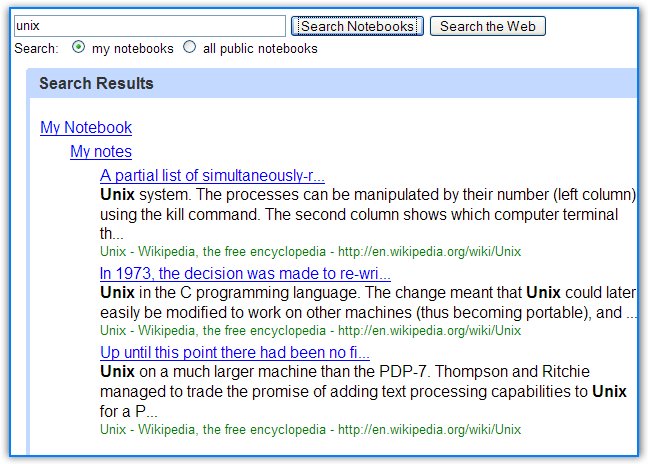
I don't use Google Notebook too much (I prefer text files), but I've noticed that this small tool has improved the search feature. If you had searched your notebooks until now, you would've found only the notebooks that contain your search terms. Now you can find all the notes that match your keywords.
It would be more useful if you could see the highlighted keywords in the notebook too and if the search allowed advanced operators. When it was launched, Google Notebook didn't have a search feature for public notebooks.
43 things is a site where you can make a list of goals and compare it with other people's goals. It's really strange to see people's desires. I've made made up a simple game (Circular list of desires), in which you start with an aim, search for it on 43things.com, go to its page, scroll down to the bottom of the page and click on the goal written with the biggest font. Repeat the process until you get the goal fro the start and remove the duplicate goals. This way, you'll create a list of related random goals.
To live instead of exist (starting goal)
Love without fear go on a road trip with no predetermined destination write a novel be more confident travel around the world Learn to play the guitar Learn Japanese Save money drink more water Make new friends graduate from college learn to drive Skydive Buy a House be happy eat healthier download the oc season 2 for free make a difference decide what the hell I would like to do with the rest of my life wake up when my alarm clock goes off get another tattoo take more photographs Learn to cook hack and find out passwords see the northern lights
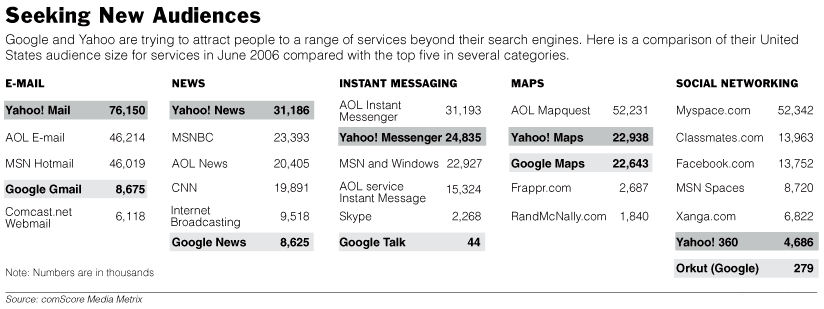
New York Times has an interesting article titled "In the Race With Google, It's Consistency vs. Wow" that talks about how different Google and Yahoo have evolved. Yahoo creates new products that integrate with the existing ones, doesn't innovate too much to keep its conservative userbase and it's more down-to-earth. Google launches many exciting products, likes to come up with disruptive ideas and it adjusts gradually to people's needs. Remember that Gmail needed almost two years for a delete button.
"Our philosophy is that being part of the Yahoo network is a huge advantage and a huge competitive differentiator," said Ash Patel, Yahoo's chief product officer. "When we build a product that takes advantage of the Yahoo network, it doesn't feel like an orphan."
"There is a tradeoff between integration and speed," Google's Alan Eustace said. "We are living and dying by being an innovative, fast-moving company."
Toni Schneider, a former product development executive at Yahoo: "Yahoo has lost its appetite for experimentation. They used to be a lot more like Google, where someone would come up with a cool idea and run with it. While Yahoo's processes have become too bureaucratic, it is still attracting an audience. Google's products may be more innovative, but at the end of the day, Yahoo is pretty good at nailing what the user really wants."
This is a video that shows SuSE 10.1 using Xgl, a technology based on OpenGL. The result is amazing: the desktop looks like a never-ending cube.
From Wikipedia: "Xgl is an X server architecture, started by David Reveman, layered on top of OpenGL via glitz. It takes advantage of modern graphics cards via their OpenGL drivers, supporting hardware acceleration of all X, OpenGL and XVideo applications and graphical effects by a compositing window manager such as Compiz. As of May 2006, the Xgl X Server (and related components including the Compiz compositing manager and associated graphical config tools) ships as a non-default in one major Linux distribution, SuSE 10.1, and is included in Frugalware Linux. Xgl can be set up fairly easily for Ubuntu 6.06 (Dapper) because of unofficially distributed binary packages. Xgl is also available as an overlayed package in Gentoo Linux.
Xgl technology requires good OpenGL performance, along with several unique features of recent 3D cards, and presently these can only be accessed using binary-only (proprietary) kernel modules for ATI and Nvidia cards (technically the drivers use a binary-only component coupled to open source code elsewhere). There are some open source drivers for these cards but they allow 2D only, or allow primitive OpenGL 3D capabilities."
1. Change the refresh for live bookmarks Type about:config, create a new integer value browser.bookmarks.livemark_refresh_seconds and enter the number of seconds for the update interval (default:3600).
2. Change the way Firefox handles keywords typed in the address bar. If you don't type a URL, Firefox sends you to the first result for your query. Type about:config, write keyword.URL in the Filter, and change the value to http://www.google.com/search?ie=UTF-8&sourceid=navclient&gfns=1&q= If your query has a clear match (like [slashdot], [stanford]), the functionality will remain. If you enter a general query (like [pizza recipes]), you're sent to the results page.
3. Change the source editor. Type about:config and edit these values. view_source.editor.external - open the source with an external application (default: false, change to true) view_source.editor.path - the path to a text editor like Notepad, Notepad2, NoteTab.
4. Hold down Ctrl when you click on "View image" in the contextual menu to open the image in a new tab. The same trick works for bookmarks, history items, home button, links and can also be done by clicking on the middle button.
5. Move bookmark folders by pressing Shift while using drag&drop.
6. Delete an item from the address bar's history by selecting it with the arrow keys and pressing Shift+Delete.
7. If Adobe Reader crashes your browser go to tools->options->downloads->view and edit actions. Select PDF, change action and choose "Save them on my computer". You can do the same with other file types (like MP3, WMA, MPG).
8. Type / to search in the current page and Ctrl+K to search the web (bring focus to the search box).
9. Duplicate a tab by clicking on the address bar and typing Alt+Enter.
1. If you don't have a broadband connection or if you want to view a long video, click the play button and then click pause. When the video finishes loading (the progress bar becomes gray), you can watch it without any interruption.
2. Check "Smooth video" to let Google Video interpolate video frames.
3. Click "Full screen" if you don't want to see the right sidebar.
4. Download the video as an AVI file using a bookmarklet. If you download the file using Google Video Player, you can rename the GVI file to AVI and play it with applications like Media Player Classic or MPlayer. Google Videos are encoded with DivX.
5. Convert your downloaded Google Video to other video format: WMV, MOV, 3GP, or extract the audio using a SUPER, a free software.
6. You can bookmark a video starting with a certain frame. Just append the current time to the URL as shown here.
7. If you embed a Google Video in your blog, it's useful to know that you can change the dimensions of the video. Change style="width:400px; height:326px;" with a more appropriate width and height in the code obtained from Google Video.
8. View the most popular videos in your country. For most countries, you can view just one video, but if you are in the US, UK, France, Germany, Netherlands etc. you have a more extensive list.
9. If you have seen a video, and you want to see it again, but you don't remember too much about it, there's always Search History (next to "My Account" link at the top of the page) that includes all the videos watched while you were logged in your Google Account. You can search the videos or restrict the list to a certain date.
10. Use keyboard shortcuts to save time:
* spacebar to pause/resume a video * M to mute a video * F to view it full screen * right arrow for video forward, left arrow to rewind
You have an MP3 file (a podcast, a song of your band, a lecture) and you want to share it with the visitors of your site. You can just put a link to the MP3 and let people download it or you can include it as an object and let the browser play it with a plug-in like QuickTime (and most of the times also crash the browser). Most people want to preview the audio and not wait until it downloads completely. You can play a partial MP3 file in audio player, but many people aren't aware of that.
But there's another away: a Flash player that allows you to pause and rewind the MP3. It's like an audio version of Google Video or YouTube, with the difference that the file is hosted on your server (or on another server). While there are many solutions based on Flash, this is the one I like the most. It's a modified version of Odeo player, that's used to play podcasts on odeo.com:
You just have to replace [MP3 file address] with the actual address.
Here you can see how it looks (in this audio, Marissa Mayer talks about innovation at Google):
Update (April 28th, 2010): Odeo.com is down and the player no longer works. "Odeo will be down for maintenance and site improvements. We will restore service as soon as possible. Sorry for the inconvenience," says the site. Another player you can try until odeo.com is back online is Google Reader's player.
Google Blog Search has a strange bug: it returns only one result for queries that restrict the search space to a site (like this search). Even if you select "More results", you click "Next" or add more keywords to the query, Google Blog Search returns only one result. Is this the version of "I'm Feeling Lucky" for searching blogs?
Apple's iPod has almost 80 percent of the US music player market, while iTunes has 70 percent of US digital music sales. Other online music stores cannot sell music files encoded with Apple's DRM, and competing devices cannot play these files. With such a dominance, the rest of the competitors had to do something to increase their sales.
Microsoft decided to build their own music player. "Under the Zune brand, we will deliver a family of hardware and software products, the first of which will be available this year," said Chris Stephenson, general manager of market for entertainment and services at Microsoft. "We see a great opportunity to bring together technology and community to allow consumers to explore and discover music together." And, of course, a great opportunity to increase their small sales. Microsoft also has MSN Music Store and Urge, an online music store in partnership with MTV, that sell music for PlaysForSure devices like Zen Vision in WMA format and protected with Microsoft's DRM.
On the other hand, Yahoo thought it would be better to sell MP3s without DRM, not because they care too much about the consumer, but because they want to sell music to iPod users. Their first test is a Jessica Simpson MP3 that costs $1.99 and supports "customization": you can hear your name in the song. They basically do a digital watermarking to prevent file-sharing. The song will include watermarks that store information about the buyer, that's useful if the MP3 is found on a P2P network or on a site. What does Yahoo say? "As you know, we've been publicly trying to convince record labels that they should be selling MP3s for a while now. Our position is simple: DRM doesn't add any value for the artist, label (who are selling DRM-free music every day — the Compact Disc), or consumer, the only people it adds value to are the technology companies who are interested in locking consumers to a particular technology platform. We've also been saying that DRM has a cost. It's very expensive for companies like Yahoo! to implement. We'd much rather have our engineers building better personalization, recommendations, playlisting applications, community apps, etc, instead of complex provisioning systems which at the end of the day allow you to burn a CD and take the DRM back off, anyway!"
Files downloaded from Apple's music store come with Apple's DRM - called FairPlay (isn't that ironic?). Songs are encoded using FairPlay-encrypted 128 kbit/s AAC streams in an MP4 wrapper. Let's see the restrictions of FairPlay: * number of machines allowed to use purchased music within 24 hours: 5 * number of times you can CDs of the same playlist: 7 * only iPod and a small number of Motorola phones (Motorola ROKR E1, Motorola RAZR V3i) can play the files.
One workaround to the DRM is to burn the file to a CD. Another way is to use Hymn, a software that removes FairPlay. "The purpose of the Hymn Project is to allow you to exercise your fair-use rights under copyright law. The various software provided on this web site allows you to free your iTunes Music Store purchases (protected AAC / .m4p) from their DRM restrictions with no loss of sound quality."
Michael Gartenberg, from Jupiter Research, says that "Microsoft is clearly going to face a battle here. It is going to be hard for them to create the same level of cachet that Apple has with the iPod."
Yahoo's project has its own restrictions: "You may transfer a Permanent Download an unlimited number of times to compatible portable devices that adhere to the Usage Rules and security requirements. Once you have transferred a Permanent Download to a compatible portable device, you agree not to copy, distribute, or transfer it from that device to any other media or device." Another issue is that the fingerprints added in the song may raise privacy concerns.
The problem of DRM is far from being solved and the solutions provided by companies like Yahoo and Microsoft aren't going to solve it. I'll conclude with Moby's opinions about file-sharing and an original campaign of David Berlind, ZDNet Executive Editor :
my thoughts on file-sharing? well, as i've said before i'm happy and flattered if anyone makes the effort to listen to my music, regardless of the medium by which it's delivered. i'm glad that the apple i-store exists, because that seems like a potentially healthy way of dealing with this situation, by offering downloads for a fairly reasonable price. and in general i do not support the efforts of the riaa regarding file-sharing. i didn't support them when they cracked down on internet radio (which really wasn't even their stated domain). and i don't support them now that they're cracking down on people who've engaged in file-sharing. i know for a fact that a lot of people first heard my music by downloading it from napster or kazaa. and for this reason i'll always be glad that napster and kazaa have existed. i'm sure that this is not a very popular thing for me to say, but it's the truth. i believe that we're moving towards some sort of resolution, though. and i hope for happy endings for all involved: record companies, musicians, music lovers, record stores, file-sharing sites, etc. everyone just needs to bend a little bit and the situation will be remedied (i.e-supporting your local record store, supporting things like apple's i-store, charging less for cd's, recognizing that file-sharing has served a great promotional value for record companies, musicians not expecting to get rich from selling music, etc). and the riaa certainly shouldn't prosecute people for listening to music. i can understand prosecuting people who copy and sell cd's, but i can't understand prosecuting someone because they love music and have a few illegally downloaded songs on their hard-drive. thanks, moby
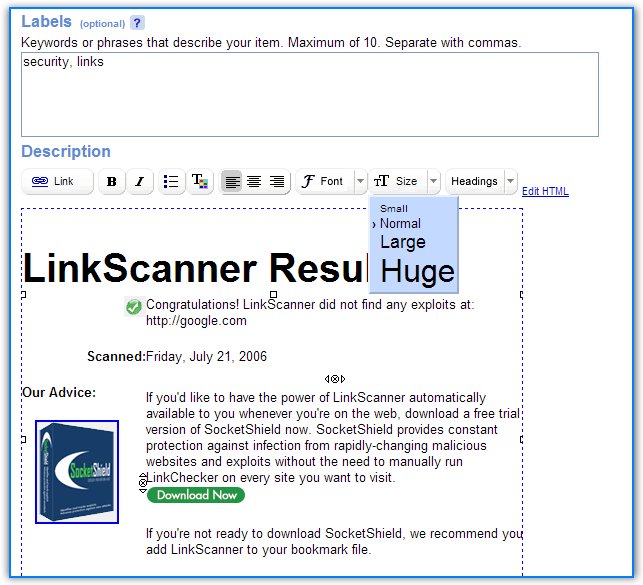
Google Base has added a rich-text editor for the descriptions of individual items. You can also enter any valid HTML code, except for iframes and forms. As the rendering code is similar to Google Pages and Google Notebook, you can copy-paste the description from your site.
Also, the RSS feed for search results has more visibility. Google Base is one of the 6 Google sites that exports search results to feeds, along with Google News, Google Video, Blog Search, Google Bookmarks, Search History.
Google Base is a database of structured information, which is easier to index and rank than regular web pages.
There are two kinds of items you can post on Google Base: * commercial listings, that expire in 7-30 days (jobs, products, cars, services) * non-commercial listings, that don't expire (articles, podcasts, reviews)
Some of the items are listed in Google Search as OneBox results, especially for targeted queries (like [jobs in ny]).

 1. Change the refresh for live bookmarks