If you want to save videos from Google Video in Windows and Mac OSX, you only have the option to download them as MP4 files, in a lower quality that's suitable for the iPod and PSP. Google removed the option to save the videos in a higher quality after closing the video store and discontinuing Google Video Player. But you can still save the videos as AVI files using a bookmarklet (a bookmark that only contains JavaScript code), as described below.
Make sure the link toolbar is visible in your browser. You can enable it if you go to the View menu in your browser, click on Toolbars and check:
* Bookmarks Toolbar in Firefox
* Personal Bar in Opera
* Links in Internet Explorer
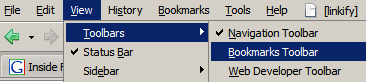
For Firefox and Opera, drag and drop the link below to the toolbar. For Internet Explorer, right-click on the link, select "Add to Favorites", ignore the security warning and choose "Links" from the list of folders (Internet Explorer no longer supports dragging bookmarklets).
Download Google Video
The link toolbar should look like this:
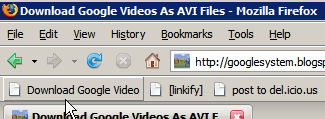
Next time when you see a video you like on Google Video, click on the bookmarklet and save the video. Note that this only works for videos hosted at Google Video, not for YouTube or other third-party sites that are available from Google Video.
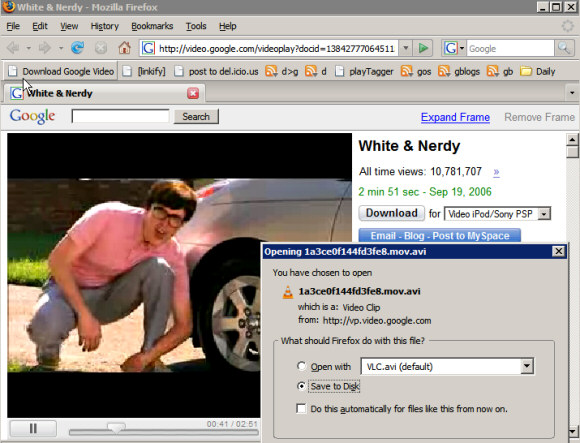
Because Google adds a non-standard header to the videos, not all players can render them. Some good applications that ignore the headers and play Google videos are Media Player Classic (Windows), VideoLan (Windows/Mac/Linux), MPlayer (Windows/Mac/Linux). If you want to remove the special header, so you can play the videos with Windows Media Player, try this small tool.

Thanks a lot
ReplyDeleteI've been downloading them for months, opening the .gvp file and copying the video URL to my download manager. This is so much easier, thanks!
ReplyDeleteThe files are encoded as MPEG 4. You should try Media Player Classic.
ReplyDeleteThis is lame. I clicked the link (called a bookmarklet) in the article and all I get is a message that says:
ReplyDelete"Go to Google Video to download videos as AVI"
Besides I know what a bookmark is, but never heard of bookmarklet.
Can anybody help with better explainations in this article?
Thanks.
You should go first to Google Video, search for a video, click on a result and then click on the bookmarklet.
ReplyDeleteHere, go to this video, and click on the bookmarklet. Does it work?
I went to the Google video (via the link). The video started playing. Then I clicked the bookmarklet link and did not get the download. Instead just got a pop-up message as before "Go to Google Video to download videos as AVI"... And the Google video was playing at the same time. I think maybe this is not a cross-platform solution? I tried with Windows + Fedora 4 and Firefox, IE, Opera. All say the same thing. I phoned a friend up, and he got the same result using Windows on both IE and Firefox...
ReplyDeleteCan anyone shed light on this? I'm sure other people out there may have the same issue?
Hi..., I tried downloading 2 different videos.. wouldn't play.. Windows Media Player says "Missing codec" ?
ReplyDeleteOk i had the Same problem first..then i reread everything from the top and got it to work.
ReplyDeleteFirst, Bookmark that "Bookmarklet".
Second goto Google videos and select a video you like. For example..
http://video.google.com/videoplay?docid=
515642196227308929&q=russian+climbing&pl=true
Third, Once the video starts streaming, Click on your new bookmarklet..
You will get a small box that pops up and asks you to save it as an AVI.
Hope that helps.
Bookmark the Applet.
ReplyDeleteGoto google Video and select a video.
Once video starts playing click your new bookmark and a save as box will appear.
Works great, WinXPP and Firefox latest version.
The download button provided by google doesn't actually download the file. It provides a stub (like a link) which allows you to play the file in GVP. You still need internet access.
ReplyDeleteIf you want a bookmarklet for FLV and MP4 also, plus one that supports Break.com, Putfile, Metacafe, YouTube, Myspace and Dailymotion, check out this page:
ReplyDeletehttp://1024k.de/bookmarklets/video-bookmarklets.html
Actually, downloading video files from Google Video is extremely easy for Windows users, and there's no need of no bookmarklet or nothing -- not even the Google Video Player.
ReplyDelete1. Get to the video you want to download.
2. Click on Download Video; this will probably ask you to download the Google Video Player, which you will not accept.
3. A download link for the .GVP file will appear, click on it and download the .GVP streamer file.
4. Open the .GVP file in any text editor, preferably one that supports UNIX-formatted, ANSI-encoded text.
5. You will see that the file contains several plain text fields, i.e. GVP version, duration, title, description, and the most important of them all: url. Copy the value of the URL field and paste it into your browser -- it'll automatically ask you to download the source file, no matter the format it was uploaded in (i.e. MP4, AVI, MPG, MOV, et cetera).
Update your Divx codes (just google divx codec) and it will solve the problem
ReplyDeletecheck out the links in the comments here for more help with internet video. Super is an awesome free app for converting video files...
ReplyDeleteVideoDownloader extension
Great tips. The bookmarklet tip works and the instructions by DominicanZero work. Now I believe these are flash videos aren't they? How come they're saving as avi? Not that I have anything against .avi or anything but I opened it up in Divx player and the video was very washed out compared to the one on the page. Does anyone know what are the reasons for this?
ReplyDeleteI downloaded the .AVI and I tried downloading the newest DivX codecs but the damn .avi still won't play in Windows Media Player! I NEED to use the avi for a Windows Movie Maker project. Help me!!!
ReplyDeleteThe program reviewed here will help you.
ReplyDeleteTry to encode the AVI to WMV. Media Player will play the WMV file.
Man
ReplyDeleteI'm serious: you're a hero to thousands.
Sorry for my bad english (and it it's not bad, sorry for my apologies)
Brazilian Greetings
thanks a bunch, there were a few things i wanted to download and this worked great.
ReplyDeleteI dont want to download a google video , just get audio. I am trying to watch the interviews with television pioneers on the Archive of American Television.I get picture but no audio. I have countless players including Google and have audio seemingly everywhere but on these google videos. Am I missing a codec? Is there a logical explanation? Am I a Fool?. Any help please.
ReplyDeleteUse ffdshow for divx3 videos.
ReplyDeleteffdshow.sf.net
About the whole not playing in windows media player thing... although the avi file uses the standard divx codec, Google changed up the headers so it trips Windows Media Player. I wrote a small program that strips the extra information and reorders the headers.
ReplyDeleteGoogle Group link.
My blog post with a description of the program is at:
http://blog.jlramirez.info/jlrconcepts.php
A 6MB .gvp file is approximately what size in .avi ?
ReplyDeleteNice! Works great! I wish I knew how it worked. :) Thanks.
ReplyDeleteif you cant get it to work, first go to the page of the video you want to download... then paste the code (righ click, slecet copy) from the "bookmarklet" into the address bar of that page, you should have a download pop up.....
ReplyDeletei dont think its really an avi though, just a google GVI file with the extension changed to avi... i can only get it to play in the google video player...
still a useful trick as i can now donwload directly thru internet explorer
Nice! i always want to do this so that i can burn video to dvd-r. thanks
ReplyDeleteOk, I get that they're mpeg4 encoded. I also understand how the bookmarklet works. What I don't understand is that it won't play in Windows Media Player. I've got DivX6 which is backwards compatible w/ DivX5 and DivX4. When I drop an avi from google video onto gspot , it reports the file as 'DivX 4 (OpenDivX)' and that 'Codec(s) are Installed'. This says to me that WMP should have no issue with playing the file. what gives?
ReplyDeleteThis was excellent advice! Just what I needed. Many thanks -- and now I know what a "bookmarklet" is... kind of. :)
ReplyDeleteCan someone please convert this gvp for me so i can play it in Windows Media Player. I tried everything on this forum, but nothing worked, sorry i aint a computer guru like all you guys here.... can someone help me. Here`s the link:
ReplyDeletehttp://video.google.com/videoplay?docid=-5140493079085653369&q=A350+vs+787
I am very happy about this service providing by Google, Thanks a lot to Google, I hope no one can beat google services,Excellent service keep it up.
ReplyDeletehelp! I downloaded a google video converted to .avi, but, like some of the people above, it won't play in windows media player. I can't download media classic, because I need it to play in standard Windows Media Player. I've already downloaded a Divx codec pack, no joy. What else can I do?
ReplyDeleteOr you could simply choose "Download for iPod Video" and get the actual MP4. Done deal. Is MP4 not supported on Windows? Quicktime is free.
ReplyDeleteI ask because I've uploaded thousands of clips to Google in MP4 format specifically for customers to be able to pull them locally and keep them.
Thanks!!! I used the bookmarklet :)
ReplyDeletei can get it to download as avi using the bookmarklet or that copy and paste way. . .
ReplyDeletebut when the file`s downloaded it doesn`t play
somebody please help me
"C00D1199: Cannot play the file
Error ID = 0xC00D1199, Condition ID = 0x00000000"
Download Media Player Classic, like mentioned in the post.
ReplyDeleteo.k, i have dld it, but i cant see it in wmp..
ReplyDeleteo.k, no worries...but can i burn it with nero 6 ? does anyone know !?
Awesome program!!! If you want to actually edit or convert some of the video you find on Google, just go to this forum and it shows the way to do it. And if anyone has a better program than SUPER (because there area few things I don't really like about it), please e-mail me at kentdoddsproductions[at]gmail.com
ReplyDelete-Kent
FOR THOSE OF YOU HAVING PROBLEMS PLAYING:
ReplyDelete- I reccomend using Media Player Classic
- You need an MPEG4 Codec (I reccomend a codec pack like K-Lite, Godian Knot, etc)
If you have done the two previous steps, and still can't play videos (output filter not found or something of the sort), do this (in Media Player Classic):
- View menu
- Options
- Internal Filters (on the left)
- Under Source Filters (on the right):
- check AVI (and maybe MP4)
- restart MPlayer and try opening your movie again
How do you bookmark something? I am new to this whole concept and i would really appreciate it if someone could fill me in.
ReplyDeleteSome videos will not let you download them at all, in any format. That is why you get the "Go to Google Video to download videos as AVI" on some of them.
ReplyDeleteAnswer to the questions, What are bookmarklets? and How do I make a bookmarklet in Internet Explorer?
ReplyDelete1. What is a bookmarklet?
A bookmarklet is a page that runs a javascript that does something cool that you want done.
You save that page as a bookmark (in Mozilla based browsers) or as a favorite in Internet Explorer.
Then, when you click on the bookmark or favorite link, it runs the script for you.
2. How to save a bookmarklet in Internet Explorer:
First you need to know that newer versions of Internet Explorer aren't really happy about bookmarklets and won't let you drag and drop them as in the past and won't let you run some. But this one will work.
Here's how to save it:
a) Rightclick on the link to the bookmarklet in the article above. Choose "Open in New Window."
b) Internet Explorer will pop up a warning. Tell it to go away.
c) Click on Favorites in your menu bar, and add the bookmarklet page to your Favorites menu. Give it a name you like, such as Download Google Movies."
How to use it?
When you find a movie you like, go to Favorites and click on the bookmarklet link. It will run the script and you should be taken to a download dialogue. You probably know what to do from there...
Hope that helps,
kwc
kwc
Quoted for truth:
ReplyDeleteFOR THOSE OF YOU HAVING PROBLEMS PLAYING:
- I reccomend using Media Player Classic
- You need an MPEG4 Codec (I reccomend a codec pack like K-Lite, Godian Knot, etc)
If you have done the two previous steps, and still can't play videos (output filter not found or something of the sort), do this (in Media Player Classic):
- View menu
- Options
- Internal Filters (on the left)
- Under Source Filters (on the right):
- check AVI (and maybe MP4)
- restart MPlayer and try opening your movie again
Nice one easy when you get your head round it maybe a pick of the link on the toolbar might settle this for all.
ReplyDeleteI guess saying http://yonkis.com/mediaflash/unmillon.htm
ReplyDeletewouldn't be enough :)
So one more THANK YOU!
Thanks! DominicanZero's way works great, plays flawless in the BS Player & VLC Player, with sound!
ReplyDeleteI downloaded the videos. I opened with window media player and it said it cannot play this file. Can anyone solve this for me, thanks!!!
ReplyDeleteI can download now ,Thanks a lot to Google, I hope no one can beat google services,Excellent service keep it up ,I am very happy about this service providing by Google,
ReplyDeleteThanks heaps for the tips. Some great vids to download and not have to use the google player. You say that the flv and mp4 files are a better quality than the avis, is there any way of using the script to download either of those formats. Thanks in advance
ReplyDeleteMagicman
This is absolutly great! Thank you SO much! I found a video I wanted to download that I just couldn't seem to find anywhere for download. Thank you so much again!
ReplyDeleteTo open the downloaded avi , all you have to do is right click on the file and open it with Google Video Player.,,,,,,,,,,,,,,, it works fine with me
ReplyDeleteRegards
M G
Great tip indeed! Thanks a lot!!
ReplyDeleteGreat tips. Thank you everyone and a big thank you to DominicanZero.
ReplyDeleteAll it was, was just cut and paste. Using MS Word as the text editor for the .GVP file worked for me. Here how I did it and I'm the worst computer guy if there was ever one.
- Download the .GVP file (super quick, less than a second).
- Now open that file with MS Word.
- Copy the URL and paste it to your browser and hit enter.
- You will be asked to "Run" or "Save" the program. Save it and once the download is complete then it will play normally.
Sorry if this sounds idiotic to some but this worked for me. Thanks again everyone.
JetJock
LOL @ the user saying "this is lame, all I get is a message saying go to google video"
ReplyDeletewhen I click the link. Thats because YOU are lame dude, you don't click the link, just
bookmark it, then go to it so the code is in your address bar. Copy that code, paste
it into notepad, save that as a text file, making sure the code is all on one line
(turn off WordWrap in Notepad!) there it is, now just go to google video and paste that
code into the address bar and hit go... voila - you get the dialog box to save the
AVI file, whoever made this java workaround deserves a medal, its great!!
Whats all this rubish about needing windozzz, I just tryed it on Mac OS X and it works fine.
ReplyDeleteVideos play fine in VLC and Quicktime.
Anybody got one of these bookmarklet things for YouTube?
Run *NIX, then Google gives you a direct .avi download link
ReplyDeleteThanks every one who posted information about how to save the google videos...
ReplyDeleteYou guys are great
Thank you
Before I download a video in .avi, i want to know if you can use the video in .avi format on a creative zen vision:M.
ReplyDeleteAlso, im not the biggest computer expert and the instructions to download arent exactly clear to me. If anyone can explain what to do in non computer language that would be great.
And is it safe for the computer?
I use SaveTube to save youtube videos. Hope this helps :)
ReplyDeleteif ya wanna make ure life real easy, first just go here http://javimoya.com/blog/youtube_en.php it is a plugin for firefox that allows saving of vids from lots of sites including google and youtube. then either use jet audio fre version plays google vids and flv player for the flv files or download vlc for all play, its all free and easy :) i like easy, its like lazy
ReplyDeleteI've been using this one to download the FLVs.
ReplyDeletethanks a lot dude....i had downloaded two files in .avi format from google videos....but they were not playing in real player or winamp or win media player.........but when i searched for the solution to this problem and visited ur blog...then according to ur advice i downloaded win media classic.....and for my surprise its working fine without any problem ....thanks man ;)
ReplyDeleteThis link was working fine for me for a while... but all of a sudden, it stopped working, and when I go to a video and then click the link, the pop-up tells me to go to google video, even though I am already there.
ReplyDeleteOther video downloading apps are not as good, because they download the lower quality .flv files, and not the high quality .avi files.
Does anyone know what the problem is? COuld google have caught on and changed something?
Brilliant, I've spent days trying to get this video and all I needed was a bookmarklet!!! Thanks!
ReplyDeleteIf the avi file cannot be played by any player, do this:
ReplyDelete1-Convert the avi file to another file format with the program SUPER, download here: http://gpl.download.free.fr/AD93AFC5EB9F4D9DBA9FDE/SUPERsetup.exe
Its absoluty free and it isnt a demo.
Here there is a tutorial who was explaining to them like to use the program: http://videodownloader.net/help/vd02.htm
2-Finally play the converted video with the player that you wish (I recommend winanmp), enjoy it!! :D
Turns out that videos downloaded from Google Video actually have a slightly modified header that prevents them from playing in Windows Media Player or anything that relies on the Windows Media Player engine.
ReplyDeleteI was looking for a program that would simplify the whole header modification thing. Didn’t want to be going through notepad or a hex editor every time I downloaded a video.
I came by the Naevius GVI converter and tried the demo… it’s a rip off program, it uses VirtualDub to actually do the converting, but from what I’ve read, it’s only about clipping that header. On top of that, Naevuis is charging $20 after the trial expiration… that’s crazy.
Anyways, then I found a program called GVideoFix. It seems to be doing the header clipping thing because it does the “converting” super quick and doesn’t use VirtualDub or anything like that.
What caught my interest was the extra features you get by buying the *GOLD*. I was a bit weary though, no trial version of those features is included, you kind of have to trust it; but hey, at least it's not $20, it's a bit more reasonable. I bit the bullet and paid for it and I can say the features work. It associates with gvp and gvi files so everything becomes one-click converting and one-click download/convert from Google website. The developer is really helpful in responding on the support forums and he told me that the next version (I think it's 2.5) is going to have batch downloading features for Google Video and it'll be a free upgrade for those that have already purchased the extra features.
I found the program at: http://www.jlrconcepts.com. Just my two cents, if I come by anything else I'll let you guys know.
Not true, Peter. It works fine, just that there are videos that can't be downloaded (you must pay for them or their author decided to disable downloads). You must see the blue "Download" button in the sidebar to know if a video can be downloaded.
ReplyDeleteThese people are stupid for those who do not know how to read here is a simple explanation on how to use the code properly.
ReplyDelete1. search for your video
2. copy the code into your address bar
3. wait for the dialog box that asks you where to place the file
for us to be hassle free we can bookmark the code
example: I want to bookmark a website, I will bookmark the address. http://www.website.com
instead we bookmark the code, javascript:if(document.getElementById('macdownloadlink')!=null) {window.location.href=document.getElementById('macdownloadlink')} else{alert('Go to Google Video to download videos as AVI.')};
now when we have chosen a video, we won't be copying and paste all over again instead we are going to click our bookmark with the code.
does the job.
no more converting.
About the GVP file..
The real google videos are in avi format or mpeg4,
what google does is they put in their own header but underneath it is the real avi code nothing less nothing more.
it is like a pillow with a pooh design enclosed by a pillowcase with a tazmanian design.
this is how the old google video files are
GOOGLE VIDEO HEADER
¯¯¯¯¯¯¯¯¯¯¯¯¯¯¯¯¯¯¯
AVI MPEG HEADER
___________________
AVI MPEG VIDEO CODE
now with their new encryption
GOOGLE (AVI MPEG HEADER) VIDEO HEADER
¯¯¯¯¯¯¯¯¯¯¯¯¯¯¯¯¯¯¯¯¯¯¯¯¯¯¯¯¯¯¯¯¯¯¯¯¯
AVI MPEG VIDEO CODE
the original avi mpeg header is encrypted inside the google header..
FRIENDLY WARNING / BEWARE
ReplyDeleteIn the Comments section above, someone posted a link to a Firefox Plugin Extension to download videos from Google to Youtube and on and on.
The link they gave was:
http://javimoya.com/blog/youtube_en.php
That Firefox extention is ADWARE and I would be very WARY about downloading it!
The actual name of the plugin is:
VideoDownload 1.1.1
Note 1: That program has NO privacy terms.
Note 2: You might have a later version than 1.1.1 installed if you DID download this ADWARE plugin.
To remove it in Firefox, go to:
Tools >
Extensions >
> select the plugin
> click Uninstall
Then, run AdAware or whatever program you use to clean Spyware.
Hope this helps.
first of all, there is alot of redundant questions on this blog, read the entire blog before posting a question.
ReplyDeletei see the same thing over and over, such as "why won't the .avi play in windows media player" when the post directly above states that google videos will not play in windows media player, unless you remove the header that prevents wmp from playing... read the entire blog!!!
also alot of false information such as .mp4 being better quality than .avi
quality/filesize is directly related to the codec used and the bitrate at which it is encoded, not the container.
also that .mp4 and .avi are a "format" which they are NOT! .mp4 and .avi are "file extentions", and also "a/v containers" NOT A FORMAT
.mp4 and .avi have there own compliant a/v codecs, see doom9.org goto the glossary section and read it.
also alot of posts telling people to convert .avis to another format, all google .avis are playable in media player classic, there is no need to convert(recompress or reencode is the proper term). recompessing results in loss of quality and possibly increased file size. if the .avi is not playable in media player classic, then you don't have the proper codecs installed. use AVIcodec to see what codecs are used.
to get google .avis to play in windows media player and all other media players, open the file with VirtualDub (available in downloads section of doom9.org ) , in vdub goto video> check direct stream copy (not full processing) then goto file> save as, this will copy the avi without the header that prevents wmp and other players from playing.
PLEASE READ THE ENTIRE BLOG BEFORE POSTING QUESTIONS!!
dreadycarpenter
first of all, there is alot of redundant questions on this blog, read the entire blog before posting a question.
ReplyDeleteYou're overreacting. This post was edited a month ago to include better information. I also answered the question about gvi files not playing in WMP, because many people were asking.
I wouldn't say it's redundant. I created this post a long time ago to show you a simple way to download the videos from Google. Without installing extensions or visiting external sites (it's not necessary to do that).
People had the videos, but couldn't play them in their favorite player because Google decided to add a non-standard header. While you can use Media Player Classic or VLC to play those videos, Windows Media Player refuses to play gvi files. So you need to remove Google's header in order to play the files in almost any player (assuming you have the DivX codec).
1: what exactly am i overreacting about? my post mentions absolutly nothing about ".gvi files", only .mp4 and .avi
ReplyDelete2: definition of redundant: The exact same data stored in more than one location.
such as 12 counts of the question "why won't .avi play in windows media player" within this blog
3: google.avis are not restricted to the divx codec, playback requires only the .avi compliant codec at which it was encoded.
as google videos are uploaded from users, the codec needed depends on what the user had encoded with.
definition of Codec: encoder/decoder
dreadycarpenter
I'm really sorry, but you said: "alot of redundant questions on this blog, read the entire blog" and you wanted to say "read the entire blog POST". There's a little difference.
ReplyDeleteMea culpa.
That Gave My School presentation something to look at. thanks!!!!
ReplyDeleteConnecting served reformed Please and thank you
ReplyDeleteeasy et wonderful, thanks
ReplyDeleteI dont get It can you help me???? eslibecerra@hotmail.com
ReplyDeleteplease help
Thanks Alot.
ReplyDeleteIt is appreciated.
well I got two questions:
ReplyDeletefirst how we can resume a download.
second between avi and mp4 which one has the highest quality?
thanks
1. How to resume a download?
ReplyDeleteUse a download manager that integrates with your browser. I recommend the free FlashGet.
2. Between avi and mp4 which one has the highest quality?
The AVI. The MP4 has a fixed resolution (300x240), while the AVI has the original resolution.
ah...
ReplyDeleteit is not working when I try to resume the download with flashget
it simply restart the download from the scratch and dose not continue from where it left.
You're right. I hadn't tested this before, but you can't resume the download because Google doesn't support this feature.
ReplyDeletethanks anyway
ReplyDeleteDoes this work using IE7 under Vista? I installed the bookmarklet as instructed, but nothing happens when I click it while watching a Google video. If I click while NOT on a Google video page, I get the appropriate error message - otherwise it just doesn't seem to work.
ReplyDeleteDudes, nyone heard of VCL player, this what Google Video player is based up on.. use it to play the videos downloaded.
ReplyDeleteI need a video for a school project, but none of them will work with MOvie Maker! What can I do? I've tried multiple methods of downloading and none of them have worked. The project is due soon. Please tell me if you have an answer.
ReplyDeleteFor the previous comment:
ReplyDelete- Download the video (using the bookmarklet)
- Strip Google's header using this small application
- If you get an error when importing the video into Movie Maker, you may need to download some codecs. Install ffdshow and make sure "ffdshow MPEG-4 Video Decoder" is enabled in Tools/Options/Compatibility (Movie Maker).
I just want to jump in and post my success. I tried the bookmarklet and that worked fine, and I used the VLC media player to view, but still couldn't watch in Windows Media (never tried classic). I followed JLM's advice posted last year and downloaded his program which is very easy and simple to use. However, when trying to view video in Windows Media I only got sound, and upon his advice on his support page, I then installed DivX and now everything works great. Thanks!
ReplyDeletehttp://www.jlrconcepts.com/
http://www.divx.com/divx/windows/
I need some help here:
ReplyDeleteI downloaded this one video off youtube for the purpose of importing it into my windows movie maker program. It all worked out fine i converted it into avi format and it plays fine on windows movie maker, but when i try to import it into windows movie maker it says:
"The required codec was not downloaded automatically because the Download codecs automatically check box is not selected in the Options dialog box."
what does that mean and what do i do about it?
See the last phrase from this comment. I fixed the issue by enabling a MPEG-4 codec in Movie Maker's options (it may be DivX, ffdshow).
ReplyDeletekwc it worked it actually worked thanks man i've been trying to figure it out for so long
ReplyDeleteCan any body tell how to play the files saved in google player. Always it says it will play after one day. What should i do to play them ir save them to play later
ReplyDeleteThanks much!
ReplyDeleteExcellent solution. I used to download via Google player...and it is not ideal.
ReplyDeletecheers
I always use the "iPod/sonyPSP" option to get an MP4. I can use this on my computer. Ionut, have you ever used Super to encode Audio and video files?: http://www.erightsoft.com/SUPER.html
ReplyDeleteIts my favourite. Its hard to find the download page so i will put it here: http://updat.free.fr/9ABEA2F2BD850403098DB4FF/SUPERsetup.exe
Im sorry for being so thick but I have opened the Google file in word and found the start of the url code but how do i know where it ends? I have tried several variaions but not getting any where. Im not getting asked to download it when i paste into explorer so Im not getting it right.
ReplyDeletethanks
<< I have opened the Google file in word and found the start of the url code but how do i know where it ends? >>
ReplyDeleteYou downloaded the gvp file that's only a wrapper for the real video. A .gvp file looks like this:
# download the free Google Video Player from http://video.google.com/
gvp_version:1.1
url:http://vp.video.google.com/videodownload?(...)docid=383231378223541436
docid:383231378223541436
duration:3535169
title:Authors@Google: Steve Wozniak
description:Apple co-founder Steve Wozniak discusses his new book iWoz as part of the Authors@Google speaker series.
You should copy the long text similar to the one in bold and download that file. It starts after "url:" on the third line of the .gvp file and continues until the end of the line (I removed some characters because because the URL was too long).
thanks. It worked. :)
ReplyDeleteGOOD
ReplyDeleteFor those who cant see it with windows media player try to watch it in VLC player, its free..for me it worked..
ReplyDeleteI downloaded the AVI file and when I try to play it in Media Player I get the following message: "Windows Media Player cannot play the file. The Player might not support the file type or might not support the codec that was used to compress the file."
ReplyDeleteI also downloaed the DIVX program put that does not seem to help. When I try to use the video in my Sony Vegas Movie Studio I get the sound portion but no video portion.
What am I doing wrong. I need to get this video made before our Memorial Day Sunday Service!
Theodoros Plakadopoulos has signed up already. Yall might know him better as TPlay. He played himself 2 years over at UTEP. He was also one of the ones on the Greek Streetball team that handed AND1 its first international loss. .
ReplyDeleteHey
ReplyDeleteGo to the forum pagelink in kent dodds comment..[Kent Dodds said on August 21, 2006 10:31:00 AM PDT:] ...in the new forum page scroll down until u find the comment where it talks about 'GVideoFix'...and it gives u the link to download the programme
Download ur gvi..video... after installing GVideFIX (free programme) just add ur downloaded gvi to it...and it will do the rest for you... after its finished converting look for it in the folder u directed it to be saved in...and u should find the converted avi file of it... this works on normal windows media player...and then u can use other programs such as WinAVI video converter to change it into dvd file so u can burn it XD...
this was the easiest method for me...
thanks for all the other tips here though......
I have tired everything but its not working...
ReplyDelete1. To save the bookmarklet as bookmark, clicked bookmark when u want 2 downlaod particular video but when i clicked i m getting
" You are not visiting Google video or current video can't b downlaoded "
2. the guy who relpied on 8 june told abt downloading GVideoFix
I downloaded from the link( it was trail version) , after converting its not running on Windows media player
Error downlaoding codec..
but my friend who had Divx installed on his machine, the file is running on windows media player
I m not a computer expert so guys Help!!!!!!!1
Maverick9211
Google Video has recently changed the interface and broke the bookmarklet. I updated the code so it should work if you add it again.
ReplyDeleteSweet. It works again now. big thanks.
ReplyDeleteThank you for the lucid instucs; followed them and got what I wanted. Haven't tried the header fix yet and I do get the same error trying to play the avi in WMP 9.0, not that I would use that EVER in place of VLC or MPC 'cept I wanna send some of this stuff to less-than computer geeks. Anyway, they play fine in those two latter proggies so thanks so much and keep it up.
ReplyDeletethe video downloaded as .avi extension but still its opening...
ReplyDeleteMaveick9211
Hi.I just found a very easy way to convert the google videos to avi.
ReplyDelete1.Choose your video
2.Download as mp4 for ipod/psp
3.Use any program to convert mp4 to avi.I used Ultra mp4 video converter and it worked fine.I can play it even in Windows Media Player!So easy!
That's a very bad idea. Why convert the MP4 (which also has a poorer quality) into a AVI file when you can get the AVI directly?
ReplyDeleteUmm, there is NO "Download Google Video" link in Firefox Crash-O-Matic 2.0.0.4
ReplyDeleteAn Incredibly useful shortcut. Thank you so much
ReplyDeleteI is a great thread for info about downloading the videos from google. but I am having a different problem I'd appreciate if anyone can help me.thing is
ReplyDeleteI am in China and I can not even play google videos online.Every time I try to play a video I get the message
"Thanks for your interest in Google Video.
Currently, the playback feature of Google Video isn't available in your country.
We hope to make this feature available more widely in the future, and we really appreciate your patience."
So is there any solution for this problem If anyone know then mail me on challs442@hotmail.com
Thanks in advance.
take care.
A proxy should solve your problem. This site says it found a solution.
ReplyDeleteI am not able to understand as to what is a book marklet,...how do I download this video ?
ReplyDeleteYou can download google videoplayer and drag the movie in there and it plays normaly enjoy :)
ReplyDeleteits good ican download videos from google
ReplyDeleteMany thanks to DominicanZero for the instructions on how to save google videos as avi files. It works great. Thank you
ReplyDeleteFor some reason, the Applet won't drag to my Links bar (IE7) but the instructions provided by DominicanZero work fine (THANKS!).
ReplyDeleteThe only thing is, the URL is VERY long-- something maybe we should be warned about. And you can view it and separate it out if you're careful, using just Notepad.
Again thanks for these solutions! They're GREAT!
Since google video started to use a new frame; non of video downloading utilities (just like this) is not working... Is there any solution
ReplyDeleteI updated the code exactly the day Google Video added the frame. So delete your bookmarklet and add the new one from the post.
ReplyDeletesorry, i missed it...
ReplyDeletethanks for your interest, and for the code as well...
I want to burn them on dvd+r but i don't know how can someone help me?
ReplyDeleteI also want to download a file that is gvi or gvp how do I burn them on a cd?
ReplyDeletehow do I play it on windows media player?
ReplyDelete<< how do I burn them on a cd? >>
ReplyDeleteThe same way you burn any other file. Here's a way to do it using Windows XP's features. There are also many free and commercial software.
<< how do I play it on windows media player? >>
Read the post again.
Hi whenever i click my video google button when it's attached to Firefox an error shows up saying DDL loading error : SSLEAY32.dll
ReplyDeletePlease help me send me an email of what to do please
Tidas121@hotmail.com
I cant download videos more than 5 minutes or of more duration .. it starts downloading perfectly well and without completing the full download firefox tells me the download is completed .. i get the same thing no matter how many times i try ..
ReplyDeleteplz some one help me on this ..
related issue
ReplyDeleteIoften try to copy the video encrypted file and paste it onto my websites via a code.
However it will never work..anyone ideas.
Triend in IE7 and Mozilla
Nice work! but it doesn't wanna do this one:
ReplyDeleteF911
Can you help? I get the message saying 'You are not at Google Video or the current video cannot be downloaded'. I know the bookmarklet is probably not designed to get this video, I thought you might know another way ?
@Anbarasu
ReplyDeleteFor downloads that stop early, you can still download them with google video player and resume them.
Make a new text document and copy and paste this between Start:: and ::End
Start::
# download the free Google Video Player from http://video.google.com/
gvp_version:1.1
url:
docid:
duration:
title:
description:
::End
Now use keepvid to get the url of the video you want and copy the shortcut and paste it where it says url:
Copy and paste the docid number to where it says docid: (include the - if it has one)
Copy the len= number from the url and paste it where it says duration:
The title: is the title of the video and the description: is where the description from the video goes.
Save it as whatevername.gvp
Now when run it will create the .gvi file in the download folder for google videos as usual.
It worked for me when a video download kept stopping after 1 minute.
Thans man, I was looking for it for a while.There were a bunch of tutorials I really liked to have,but couldn't do anything
ReplyDeleteBINGO.
cheers!
it doesn't work for me. The diagrams are not clear enough. I have tried dragging until the cows come home and it still doesn't work
ReplyDeleteI suppose you're using Internet Explorer. I updated the post with better instructions for IE. If it still doesn't work, this troubleshooting guide (from this site) is pretty good:
ReplyDelete* I cannot see the Links Toolbar.
Go to the "View" menu and select "Toolbars." Check the Links toolbar option.
* I still cannot see the Links Toolbar.
Look to the right of the Address field for the Links toolbar. Drag "Links" down below the Address field.
* I cannot drag the Links Toolbar.
Go to the "View" menu and select "Toolbars." Uncheck the "Lock the Toolbars" option.
OK ... This is new that they won't let us download these vids anymore.
ReplyDeleteCan someone please tell us what we need to do to download them now?
Is there something, relatively understandable, for those of us with IE? Guess we need to learn a new method...can someone please help with this?
Thank You!!!
This small trick works in Internet Explorer as well. It's just one line of JavaScript code that finds the address of the AVI file and starts the download.
ReplyDeleteThe only difference between IE and other browsers is that you can't drag the link to the toolbar. You have to bookmark it.
Wow, I read and followed your instructions and they worked great. Thanks.
ReplyDeleteGoogle Video recompresses all videos into 320x240 resolution Adobe Flash files with a bitrate of 450 Kbps to ensure reliable streaming. The download resolution
ReplyDeleteis 480x360 at 800 Kbps. If you upload your video in any other aspect ratio, Google will apply a letterbox format to your content to fit within the 4:3 frame.
The specifications below are useful to get the best quality while keeping a reasonable file size:
- MPEG4 (mp3 or mp4 audio) at 2 mbps
- MPEG2 (mp3 or mp4 audio) at 5 mbps
- 30 frames per second
- 640x480 resolution
- 4:3 frame
- de-interlace
just dropped the bookmarklet into the address bar and the download option came up. it works! :)
ReplyDeleteit dont work....
ReplyDeleteI have been using
ReplyDeletehttp://keepvid.com/
It gives you the link to the video to save, but you still need Gvi2Avi to repair the header.
Impressive. Many thanks. Its been very annoying since vdownloader stopped being able to grab gvideos in avi.
ReplyDeleteHey this doesn't work any longer it just sends me to a blank page...
ReplyDeleteDog Dick Dead. Either fix this or pull your link from Wikipedia. You're wasting everyone's time.
ReplyDeleteI don't run Google Video, so I don't have what to fix. The links to the AVI version of the videos are still included in Google Video's pages, but many of them (all of them?) are broken.
ReplyDeleteThe reason for this could be that Google Video closed the store and stopped distributing the player that accepted the GVI (AVI) videos.
You can still download the videos as MP4 from the interface.
YOu should take this off. The "bookmark" link dosn't work any more.
ReplyDeleteI uploaded the videos to Google Videos then I lost those videos in my computer, I want to get those back. I contacted Google folks, they never respond my emails. MP4 doesn't work for me. How do I get wmv files back?
ReplyDeleteI am really going to try this and i hope this do help in MP4 Movies download.
ReplyDeleteGreat work keep it up great info
ReplyDeletefree Movies download 100%
I have found an excelent tools for converting my youtube movies convertmovies.org . mp3, mp4, avi, mov, wma, ipod supported. Great!
ReplyDeleteShot!
ReplyDelete"downloading is disabled or this is not a google video"
ReplyDelete