An unofficial blog that watches Google's attempts to move your operating system online since 2005. Not affiliated with Google.

Send your tips to gostips@gmail.com.

December 16, 2006

Google Russian Translator

Google Translate added a new language: Russian. Now you can translate text from English to Russian or from Russian to English. Google uses its statistical machine translation system that won many prizes.

Google News Russia has also been launched. The site aggregates 400 news sources. By combining the two services you can get an English version of Google News Russia. As you can see, the translation is not quite perfect.


In a presentation earlier this year, Google recognized that Russia is fast-growing internet market and it intends to launch more products in Russian. The most popular search engine in Russia is Yandex, that has twice the market share of Google.

Related:
Colorless green ideas sleep furiously

December 15, 2006

Google Apps of the Year

This is a personal top 10 of the best Google applications in 2006. I included both software and web applications, applications launched or updated this year, tools that make your life easier.

10. Picasa + New Picasa Web Albums
Picasa added many useful features this year (geotagging, nested folder view, better thumbnails), but the biggest update was its online extension. Picasa Web Albums is a place where you can upload your albums from Picasa and share them with your friends. While the space is not very generous (only 250 MB, upgradeable for a fee), Picasa Web Albums lets you add friends, has comments, tags and search. But, most of all, it's only for you and your friends.

9. Blogger Beta
The new Blogger, launched in August, brings dynamic serving, easier-to-manage templates, labels, but - most of all - a reliable platform and integration with Google by using Google Accounts. After being neglected a long period of time, overwhelmed by outages, Blogger has been given a new life.

8. Google Books + Google Scholar
A new interface for book search, PDF downloads for public domain books and a big effort to digitize books. Google Scholar now ranks recent papers by importance and lets you find papers in libraries.

7. New Google Calendar
After months of waiting, Google Calendar launched in April as a way "to keep track of all the events in your life, coordinate schedules with friends and family, and find new things to do". Google Calendar lets you share calendars or just events, get SMS notifications, search your calendar, other public calendars and public events. Unfortunately, there isn't an easy way to synchronize your calendar with Outlook or your mobile phone.

6. Google Reader
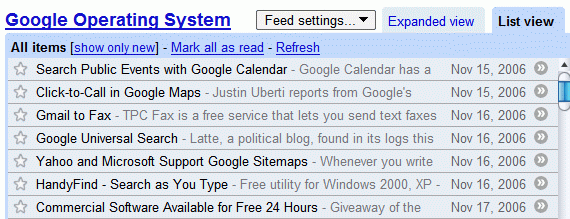
Google's feed reader changed its interface and became everybody's favorite. The new views (expanded view and list view) continue to support the idea of "river of news". Now you have more control over what you read, a way to tag posts and feeds, infinite scrolling and an easier to propagate your favorite articles. Google Reader still lacks search, but its big flexibility has the advantage of suiting everyone's needs.

5. Google Maps + Google Earth + New SketchUp
Google Maps added more imagery, a better zoom, more mobility, live traffic, and continued to be used in a lot mashups. Google Earth added support for Linux, included more featured content and drawing tools (for the free version). Google also acquired @LastSoftware, the creators of SketchUp, a powerful tool for creating, viewing, and modifying 3D models. SketchUp now has a free version.

4. New Google Docs & Spreadsheets
After buying Writely, an online word processor, and a spreadsheet application, Google created the foundation of an office suite. The applications, that weren't meant to replace desktop office suite, made it easy to collaborate with other people and stored your files online, so you can access them from anywhere. In October, the two applications merged and became Google Docs & Spreadsheets. Google targets consumers, organizations and small businesses that don't use all the features of a full-fledged office suite, but need an efficient solution for their daily tasks.

3. Google Video + New YouTube
Google Video has shifted its mission from searching TV shows captions to searching all the videos in the world, one by one (including user-generated videos). The video store wasn't successful, but Google Video continued to add features: popular videos, uploading videos online, ratings, comments, labels. But most of them were added a long time after they were included in YouTube, its major rival. Adding Google Video to Google's homepage didn't help it too much, so Google bought YouTube, that has a huge community of loyal users and much more videos. The video ads could help Google monetize the recently acquired website, assuming that Google solves the copyright infringement problems.

2. Gmail
Gmail didn't get out of beta this year, but it added two mobile versions (a Java client and a web page), integrated Google Talk, a delete button, feeds, an MP3 player and an option to fetch mail from POP3 accounts. Gmail is the link between Google's collaborative applications and could influence the adoption of Google Docs, Google Calendar and Google Reader.

1. Google Web Search
Google did many interface experiments , tweaked its algorithms, added more OneBox results, more direct answers, malware warnings. Google Co-op, a collaborative effort to improve search results by using experts, is also a platform for developing custom search engines. A unified search engine, somewhat anticipated by the SearchMash experiment, is something to watch in the year to come.

Microsoft and AOL Release Top Searches of 2006

Microsoft released the top searches in 2006 on MSN Search and Live.com. Unlike Yahoo, whose list included mostly pop singers, the top search query on MSN/Live.com was "Ronaldinho". "Harry Potter" is at number 5, while Rebelde, a Mexican TV series, is at number 9. The top 10 gainers from last year starts with 3 football players: Bebo, Kaká and Zidane.

AOL, that uses Google for web search, also released the top searches. From what I've seen, AOL is the most honest, as it's the only search engine that has a top like this:
  1. weather
  2. dictionary
  3. dogs
  4. American Idol
  5. maps
  6. cars
  7. gamers
  8. tattoo
  9. horoscopes
  10. lyrics
I'm pretty sure the top doesn't include certain sensitive queries like "Google", "Yahoo" or "MySpace", as it should. But it's a step ahead.

If we don't like AOL's top, we can always mine the 36 million search queries released by the company in August and find a more accurate top.

Chronological Feeds, New in Google Reader


"A blog is a website where entries are made in journal style and displayed in a reverse chronological order." (Wikipedia) It's easy to read the latest posts, but it's not too easy to read everything in chronological order, like in most books.

Google Reader offers a partial solution through a new option that sorts posts from oldest to newest. You can find it for each feed, in "Feed settings". If you also click on "show all", Google Reader shows the posts from the last 30 days.

Are Google Kids Happy?

Aaron Swartz wrote a small article about Google and its corporate culture: The Goog Life: how Google keeps employees by treating them like kids.

I was talking with a friend the other day about that perennial subject of conversation in the Valley, Google. And finally she gave me the clue that made the whole place make sense. "It's about infantilizing people," she explained. "Give them free food, do their laundry, let them sit on bouncy brightly-colored balls. Do everything so that they never have to grow up and learn how to live life on their own."

And here's how he describes Google:
Not a whole lot has changed since the last time I visited Google. (...) But the two blatant changes to the campus are a large, terribly fake-looking replica of SpaceShipOne hanging in the middle of the main building and a replica dinosaur skeleton standing outside. "It's as if this place is being decorated by seven-year-olds," a friend comments. It also reminds me of Robert Reich's comment about Newt Gingrich: "His office is adorned with figurines of dinosaurs, as you might find in the bedrooms of little boys who dream of one day being huge and powerful."


SpaceShipOne, the first private-venture craft to attempt to leave the earth's atmosphere and enter space.

The author thinks Google's secrecy is just a way to keep the image of omnipotence.
"It's always frightening when you see how the sausage actually gets made," explains a product manager. And that's exactly what the secrecy is supposed to prevent. The rest of the world sees Google as this impenetrable edifice with all the mysteries of the world inside while the select few inside the walls know the truth -- there is no there there -- and are bound together by this burden.

Keeping employees happy means understanding their needs, hobbies, making them feel at home when they work. If being a child means not having worries, dreaming and playing a lot, maybe Googlers are still kids. More often than not, dreams move the world forward.

Some insightful reactions from Googlers:
"Google is a place that it's easy to be passionate about. Without seeming immodest, the work we do there has helped to change the world, and (I hope) will continue to do so in the future. It's a place where I can show up and end up working with some profoundly smart people -- selected not just for the 'smart' trait, but also the 'get things done' trait: good company if you're the sort of person interested in changing things. It's also, and maybe most importantly, a place where the people running the show have a profound commitment to Doing the Right Thing." (Brandon)

"The point of being onsite is not so managers can babysit you, its so that you can have the opportunity to interact with some of the most brilliant minds that the industry has to offer. The fact that I'm able to consult with the world's authority on many of the technologies that I work with makes my work all the more better in the end. At Google, anyone could come in with an idea, and if it is a truly good idea can get the support of the largest, most robust computing infrastructure in the world. Who decides whether an idea is viable? The community of Google employees, not one manager or top exec. Thats a pretty sweet deal for an entrepreneurial spirited person if you ask me." (?)


Also read:
Google Toy Factory
The utopian Google offices

Register Domains from Google Apps

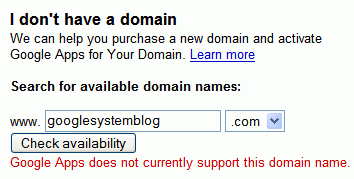
Google Apps for Your Domain added an option to buy a domain from eNom and GoDaddy.com for $10 a year. You can only buy .com, .org, .net, .biz, .info domains using Google Checkout.

"When you register a new domain as part of the sign-up process for Google Apps for Your Domain, we'll work with our partners behind the scenes and automatically configure everything so it works with all of the services available through Google Apps for Your Domain right out of the gate. We also give you full control of your domain settings, so you can use your domain for other services not provided by Google," explains the press release.

While the idea is OK, you can buy domains cheaper than $10 per year. It's interesting to note that Google is a domain registrar since 2005, although it has never used this status to sell domains.

December 14, 2006

Multipoint Directions in Google Maps

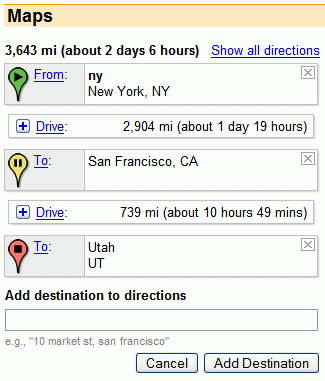
Now you can get inaccurate directions for more destinations in Google Maps. If you're undecided and you want to compare more possible destinations, this may be useful. Each list of directions can be collapsed.

The flashy Yahoo Maps already had this feature and also a way to see reverse directions.


{ Thank you, Dan. }

One Interface for Handling Online and Offline Files

The new Google Toolbar for Firefox lets you view documents and spreadsheets online, no matter if the files are on the web or on your hard disk. Picasa Web Albums hosts videos uploaded using Picasa, without the trouble of using Google Videos. Gmail has a player for MP3 attachments. The new Google Book Search includes a PDF reader, even though you can't use it for your files yet.

What if all these file types and many others were treated the same even if they're online or offline? You wouldn't need special programs to perform basic tasks, you might get advanced features available only in commercial applications (like OCR). You could share your files easily, edit them collaboratively and always have the latest version.

What if a small add-on like Google Toolbar could transfer all the processing burden to an Internet operating system? The Docs & Spreadsheets integration with Google Toolbar might just be the beginning.

December 13, 2006

Picasa Web Albums Gets Search, Tags, Videos

Picasa Web Albums has many new features.

* Uploading videos. Until today, only users that paid for extra storage could upload videos. Now anyone can do that, but only using Picasa. Another option is to use Google Video to upload unlisted videos.

* Prints. You can now order prints for your photos, but number of options is small.

* Tags. Picasa Web Albums lets you tag your photos. You'll find the option in the sidebar.

* Search. You can search your photos, a certain gallery and your friends' public photos. Google indexes captions, tags, album titles, album descriptions, and album locations.

If Google adds ratings, date search and photo editing, I can say Picasa Web Albums is almost perfect.


Google Patent Search

Google Patent Search is a new tool that searches the full text of the U.S. patents. "Google Patent Search covers the entire collection of patents made available by the USPTO — from patents issued in the 1790s through those issued in the middle of 2006."

The application has a similar interface for browsing PDFs with Google Book Search. You can search within a patent, view citations and references. There's also an advanced search that lets you enter a patent number, a title, an inventor, an assignee and issue/filing dates.