
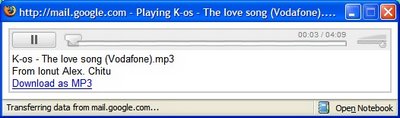
Gmail has a built-in player for MP3 attachments. If you receive emails that include MP3 files (maybe a podcast or a public domain recording), you can listen them directly from Gmail.
This is feature was initially used only for the voicemails sent from Google Talk. Google uses a Flash player, similar to the one from Google Video.
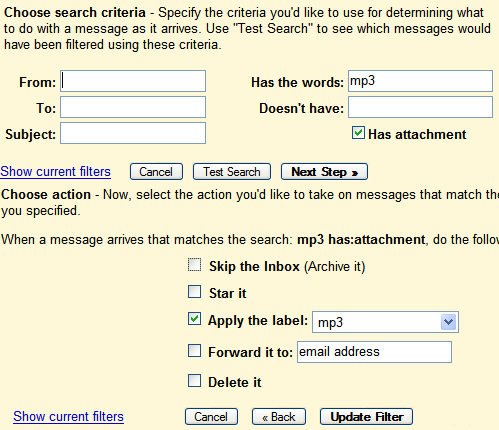
You can create a new filter for MP3 files, so it's easier to find them. You need to add a new label.
{ Thank you, Chance McClain. }

Great tip! Thanks
ReplyDeleteIt would be nice if it could play .wav files too as that is how Vonage sends out thier voicemails.
ReplyDeleteSending wav files is like including bmp files on a web page. It's too big and not necessary. For voicemail, an MP3 file encoded at 32kbit/s, 22KHz, mono is more appropriate. Google's voicemails have 24kbit/s, 11KHz, mono.
ReplyDeleteYes we all know MP3 is more efficient than WAV.
ReplyDeleteHowever, that does not change the fact that Vonage sends their voicemails in WAV format.
So, again, what we need is a player for WAV files too.
I know MP3 is the best, small size than the WAV and very clear. But that doesn't mean that there are no other sound files types!! There are WMA and RM even if the real is the worst from the quality but it's the smallest and for that it's popular.
ReplyDeleteGo Go Gmail :), I hope it add more support for others sound in the future
Can i sned wav files w/ gmail? i need to email a song in ttrack-for-track format. Someone please help me. i keep getting an error message
ReplyDeleteYou can send wav files (and any other multimedia format), but the maximum sive of the file must be 10 MB (or a little bit more; 12-13 MB).
ReplyDeleteSo you may want to split the file or use other way to send it.
Well, it is way better than that...
ReplyDeleteIt can play any thing (if its the right format) by going to http://mail.google.com/mail/html/audio.swf?audioUrl=http://www.somewebsite.com/thisaudiofile.ogg
Also, it does video (but i think only FLV works - even then, the seeking is all screwed up)
http://mail.google.com/mail/html/audio.swf?videoUrl=http://www.somewebsite.com/thisvideo.flv
ay! go Gmail!
Has anybody hacked this into greasemonkey so that you get a little player next to WAV attachments?
ReplyDeleteHow do you upload an audio file to Blogger? I've read user groups & need it explained in simple, Kindergarten terms so that I can do it. Thanks from a New user.
ReplyDeleteThe ability to play wav files would definitely be useful. Many voicemail to email services use the .wav format.
ReplyDeleteI'm looking for a way to play WAV files on GMail, too. Any news?
ReplyDeleteSame here, I have vonage and they send wav files. It's a pain to download each like it was 1995!
ReplyDeleteI'm not smart enough to do this.... But is there a chance that someone could develop a gadget for Gmail to play, playlists.... I'll explain
ReplyDeleteCreate a label called "Playlist Summer 2009" and than set the gadget mp3 player to continuously play all songs labeled "Playlist Summer 2009"
It would of course come with the normal back, next, pause, play but you would only need to have one player open and have your music playing that is stored in your gmail account?
i wouldn't mind helping if someone is willing
cmisak (a ) gmail (dotty) com
I can't find this player. Is it a Flash program? If so, it would explain why it only plays MP3s. The Flash browser plugin will only play MP3, MPEG-MP4, Nellymoser and Speex (FLV) audio. It does not support WAV or AU or SND or any Windows Media (wmf) formats. A Silverlight-based plugin might work for Microsoft's formats.
ReplyDeleteThere's a greasemonkey script that will play WAV files with an embedded player within gmail: http://userscripts.org/scripts/show/22474
ReplyDeleteWAV files are sent by some ITSP's because they don't have to pay a royalty for encoding them in MP3, so suggesting providers change formats is probably not going to help here.
ReplyDeleteThe WAV script at userscripts.org works fine in firefox, but does not work in chrome.
I look forward to the day when chrome will see a WAV file and play it within the browser via embedded player of some sort, whether by script or some other function.
Still no news on this? MSN plays wavs directly in the email.
ReplyDeleteSo frustrating...
ReplyDeleteI really wish there was a WORKING Greasemonkey script for a WAV player. I tried this one, and it works one time out of TEN. Useless, pretty much... (http://userscripts.org/scripts/show/22474)
I am about to try the conversion freebie thing. You set up filter to forward your messages, and you get them back with converted attachments. Same subject, body, etc. Kinda cool idea. We'll see how THAT works out.
- Voicemail Conversions - iPhoneConvert http://sn.im/tz7me
You would think Google would update GMail by now!
Need to send wav file to recipients who can receive it. I can send but will they receive?
ReplyDelete.wav dosent work.
ReplyDelete