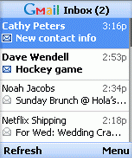
 Google launched a new version of Gmail Mobile, this time as a Java application. If you go to gmail.com/app, on your Java-enable mobile phone and download the small application, you'll be able to use Gmail, almost as easy as on your desktop. Some key features:
* Up to five times faster access and use, thanks to automatic pre-fetching of messages
* Drastically reduced clicks and scrolling to access email
* Fewer keystrokes for reading, composing, or searching mail
* Attachments, including files and photos, viewable and automatically resized to fit the user's phone
You should check the requirements, the most important being J2ME (Java) MIDP2. Gmail Mobile is also available from your browser if you go to gmail.com (or m.gmail.com) on your mobile phone, but you won't get these features.

Does not yet work with Hosted accounts. :-(
ReplyDeletehttp://mail.google.com/support/bin/answer.py?answer=52856&topic=10085
What about WM5?
ReplyDeletedoes not work in norway with Telenor.
ReplyDeleteNokia 6680
does anyone know the size of the application?
ReplyDeleteBest Regards
The answer is 112KB. Here's the direct link to the jar file, in case you want to download it onto your computer and send it to the phone.
ReplyDeletejust tried it with a SonyEricson K750i in Switzerland, on the Sunrise network... installation worked flawlessly and works just fine... I was thinking of purchasing a BBerry.. don't need it anymore
ReplyDeleteChristophe
It works on my E70, but its not really designed well for landscape mode as the labels for what the buttons do (eg menu, exit etc) are not rotated meaning that one of the labels is not next to a button and the other one is next to the wrong button.
ReplyDeleteOtherwise works well. Thanks!
Wow! Thanks for the tip... Movamail rocks. Fast and easy... I have my Yahoo, Gmail and POP running on it.
ReplyDeletethe application does not work on the Samsung SGH-D600E. please could you guys addapt it so that it works. thanx for the awsum service.
ReplyDeletedoes not work properly on my Samsung SGH-X700 (java MIDP 2.0). the installation worked successfully, but when I tried to send HTTP information then my phone suddenly restarted. it happened all the time. :(
ReplyDeleteby the way, it such a very nice application!!
ReplyDeleteYou may find something helpful on Google Groups.
ReplyDeletei've been there Mr. Alex, and i think samsung sgh x700 does not allow to check Gmail Verisign Class 3 public certificate. is there any chance Gmail only send HTTP information (not HTTPS)?
ReplyDeleteGoogle says these are the requirements:
ReplyDelete* Your Gmail language preference needs to be set to English (US).
* You must be using a J2ME (Java) MIDP2 device.
* You'll need a mobile data plan, and your phone needs to be configured for data access.
* Your phone needs the Verisign Class 3 public certificate with serial number 70:BA:E4:1D:10:D9:29:34:B6:38:CA:7B:03:CC:BA:BF.
Note: Not all phones allow you to check for this certificate.
Regarding https, the Gmail application requires a secure connection in order to connect to the Gmail server. Try to see if the mobile Gmail homepage http://m.gmail.com works for you.
Great App!!! In Holland it works fine and fast. I use it with a simple Tele2 Mobile provider on a SonyEricsson V/K600i. Very nice on holyday. It checks on command for mail :-) Simple user interface.
ReplyDeleteNot working with my hosted account
ReplyDeletemail.google.com/a/?????.com.
PLEASE HELP ME.
The version for Google Apps is available at: http://m.google.com/a, but only works with BlackBerries.
ReplyDeleteOf course, there's always the browser interface that works on your mobile phone too: http://mail.google.com/a/your-domain.com.
roll on the calendar one...
ReplyDeleteI have Samsung SGH D820, I downloaded the gmail app on my phone. Funny thing is that the app does not accept the first letter as Upper case in password field. Do they expect all passwords to be in lower case???
ReplyDeleteHi All,
ReplyDeleteThis is the error I get everytime I try to Launch the Application.
It was installed no problem.
It even lets me type my username & pass. But After that I recieve this error :
This program can't access Gmail until you grant it permission to send and receive data over the network.
I tried every thing that I could (maybe not)
I will be highly grateful to anyone who can help me with it...
Thankx in advance
kasbaba
Works great with Samsung X820, but got error message when trying to sign in on Samsung E-250 (midp2 too). Application starts, lets me input username and password, and then shows this strange error about some certificate. It does ask about sending data in https when singing in too (on X820 it dosn't). Mobile gmail using browser works fine.
ReplyDeletehow can i install applications on SAMSUNG SGH-D820
ReplyDeleteTo install Gmail's mobile application, just go to www.gmail.com/app on your mobile phone. You'll download a small app (around 100 KB) and then install it.
ReplyDeleteNeed Hosted Accounts Working
ReplyDeleteI've tried using it on a Samsung E380. Phone lets me install and start successfully, connects to the internet and then reboots. I suppose this has to do with the missing security certificate? Strange though, cause the version I downloaded was explicitly for Samsung phones. I guess Gmail will have to fix this on their part, don't think my phone is broken. m.gmail.com will have to work for now.
ReplyDeleteIt was difficult to download (did it from a direct link posted in this blog, thanks!) but now working perfectly on my Motorola L7 in Costa Rica, despite the local service provider lack of assitance.
ReplyDeleteAnother Samsung X700 user here. Installs fine, but the phone restarts when I open the applications. Seems like a compatibility problem with the Java engine on Samsung phones.
ReplyDeleteSamsung SGH-Z370 - installs ok, but each time I check an email it asks me about password. :^/
ReplyDeleteMake sure this option: "Always keep me signed in" is enabled in the settings.
ReplyDeleteStill not compatible with Samsung SGH-D600E... :-(
ReplyDeleteThe possible use of Gmail on Playstation Portable system would be great for many users, including me :)
ReplyDeleteIndeed, that works on PSP!!!
ReplyDeleteOn samsung x700 this application doesn't work fine. After logging in to google account it restart itself.
ReplyDeleteI can't get it to work on my AT&T 8125 and one of the google help pages sent me to download the "IBM Websphere Micro Environment for Java VM" but I wasn't sure which one to do as none of them showed my phone listed...do I just do the one for Windows Mobile 5.0 since that is what I have? I love this site though as it let me revert back to the version that does work on my phone!
ReplyDeletehey
ReplyDeleteThe new v1.5.0 is still not working on my SE J300i.
ReplyDeleteI'm located in Armenia.
After installation and the login page, it says:
"Sorry, Gmail for mobile will not work on your phone. Your phone doesn't have the appropriate certificate to communicate with the server. Try accessing Gmail for mobile on your mobile browser at http://mail.google.com"
Will continue using flurry ;-)
I'm getting this error: 'This program requires a data connection. Please contact your carrier, or visit the Gmail Mobile FAQ on your computer for more info.'
ReplyDeleteI tried looking up at http://www.google.com/support/mobile/bin/answer.py?answer=52876&topic=10143
but isn't of ,uch use.. my phone is a Sony Ericsson K750. The GPRS settings are fine, am able to access gmail in the browser, but then again, exiting the browser seems to disconnect from the GPRS.
My settings for the app under "permissions", are as follows:
Internet access : Ask Once
Messaging : Always ask
Automatic start: Ask Once
Local Connectivity : Ask once
Multimedia : Always Ask
Read User Data : Always ask
Write User data : Always ask
Note: These are NOT the default settings. I have changed a few during my R&D :)
Thanks
@Leela Vinod Kumar:
ReplyDeleteUse the Internet GPRS profile for Java apps.
Menu > Settings > Connectivity tab > Settings for Java > select a profile that contains Internet. If you can't find one, edit the active profile and choose HTTP instead of WAP in the Internet mode.
Oh! fish... thanks a trillion Ionut Alex Chitu.. worked like a charm.
ReplyDeleteI was using the older connection settings (rather didn't know there was this to change as well; Hutch is now Vodafone in India and didn't know I had to update changes here)
Its working now.. and Boy, that was quick.. thanks again.. :)
If you experience the certificate problem; using your wap browser, just go to:
ReplyDeletetinyurl.com/yhrayo
or if you feel like a typing exercise ;) go to:
www.verisign.com/cgi-bin/support/rootcert/getrootcert.cer
then install the certificate.
I ended up with a 'new' version 1.01 for E61.. I had 1.05 before! :-(
ReplyDeleteStill no attachments
I'm asking for the impossible, namely to let the Gmail Java application talk to Opera Mini.
ReplyDeleteIt would be great if a link in Gmail opens up in Opera Mini when you click on it.
At this stage, gmail closes down (no other way, I know) and opens the link in the phone's default browser (which kinda suck).
Wishful thinking ...
Ionut Alex Chitu,
ReplyDeleteI need some help. I have a Nokia 7610 with Vodafone GPRS (in India), and I cant find the connectivity tab for java applications.
Leela Vinod Kumar - you said that you could get Gmail to work on your Vodafone connection. Could you please help me? Just how did you remove the proxy settings?
I can download the gmail app, but cant get it to work. It works fine with Airtel though.
Help!
-Song
hey song, there's a specific setting in my SE K750 to have a different data comm (GPRS / MMS) setting for my Java apps, browsers, MMS and so on. I haven't looked up these in a nokia phone yet; I will let u know once after I have checked one out.
ReplyDeleteHere's the setting for my phone; see if its helpful to u...:
Menu > Settings > Connectivity tab > Settings for Java > select a profile that contains Internet.
I went to gmail.com/app to download gmail mobile application. I also entered my cell no. for downloading gmail software. BUT I NEVER GET ANY LINK OR SMS. ????????
ReplyDeleteI never get any link or sms for downloading gmail mobile application. My phone supports - I know this. Earlier it was working fine.
ReplyDeleteDirect links:
ReplyDeleteGmail Mobile 1.5 - http://gmail.com/app/v1.5.0/L1/gmail-g.jar
Gmail Mobile 1.1 -
http://gmail.com/app/v1.1.1/L1/gmail-g.jar
Still no help getting Gmail mobile working with a Samsung D900. Looks like a new handset is the simplest solution...
ReplyDeleteits not not working with nokia 6300 set. I downloaded the application but after giving userid and passwordc it run for long duration saying loading but never loads. do i need to install anything.
ReplyDeleteI have samsung SGH-D600E and I would like to downlaod mobile gmail onto my phone but it keep saying i dont have valid or supporting verisign certificate on my phne, like it keep saying http service error?? How do I get the requirements for gmail download? everytime i download it by com.www.m.gmail.com it keep going to gmail internet page like i read my email on my laptop. i even tries www.verisign.com/cgi-bin/support/rootcert/getrootcert.cer
ReplyDeleteon my phone and it said unsupported content type??? could you please help me out?
If you have the latest blackberry, you wouldn;t need it. The Curve uses a PUSH system that will deliver the mail directly to your phone (it will direct it to a folder). All you have to do on your BB is set-up an internet email, type in your email and password as you would go into gmail, and BB creates a folder of your email address.
ReplyDeleteYou will instantly receive emails.
I had to create a gmail account because Hotmail doesn't deliver mail to my blackberry. Hotmail Sucks because of it's limitations!
I works on my SE P910i,
ReplyDeletethanks
randomly its stopped working on both of my pones
ReplyDelete@Alex:
ReplyDeletewhats the two phones you've got?
sony erricson k800 and k850i the k800i has worked for the last 5 months then suddenly stopped. I got my new phone a few days ago and tried it on that and it still didnt work
ReplyDeleteDoes it support LG phones, for example LG KU800 or KG800?
ReplyDeleteI checked out the specs on gsmarena.com and these phones support Java apps which is all is required to run this one as well... Am guessing you should not have any troubles at all...
ReplyDeleteIn fact, correct me if I'm wrong, but, I don't think the LG handsets would have any issues with respect to the certificates.
just started working aggain must have been a network problem
ReplyDeleteNew version doesn't work with Motorola V525
ReplyDeleteCannot use the folder, "drafts".
ReplyDeleteThe mail I wrote and saved while I was using desktop cannot be sent by Gmail Mobile.
Yes, works in Norway with provider Telenor. But with an old Nokia 6670 I had to download the English version, although the menu text in the Nokia is in Norwegian. The NOKIA wouldn't run the Norwegian applet version. TnM GPRS MMS (01), because my phone is so old :-)
ReplyDeleteHi, I have been trying to install the GMail application on my N95 8GB, I download it from the official page(http://www.gmail.com/app) using my phone´s web browser, but when I start the installation process I revive the following warning message:
ReplyDeleteApplication is Untrusted and may be Harmful to your phone...
Then I click on view details, and I received the following message;
When you install an application the security of the application is checked during the installation. Your device can not verify the supplier of the application unless it has a digital signature or Certificate. Continue installation only if you are sure of the origin and contents of the application.
Well, since I am downloading it from the official Google site, then I think it is a trustable application, but I aborted the installation since it can not verify neither a digital signature or its certificate...
Is the Gmail Mobile application not signed by Google?
Have any of you had the same problem? Ant tips? Thanks. Tom
Are there plans to develop this application for other Smartphones and Pocket PC (with phone)?
ReplyDeleteIdahohal
I've got a samsung e250 (prehistoric I know) and I download the gmail java app fine.. and access it for the first time fine... But when I exit it I can't seem to relocate it on my phone? Maybe it's just me and having a blonde moment.. But yeah??? Where has it been stored? I've checked my apps folder, etc.. Still nothing.
ReplyDeleteI am using a Nokia 3110 Classic phone. I got packet data connection from Idea. But still gmail application is not working. it says ''This program requires a data connection. Please contact your carrier, or visit the Gmail Mobile FAQ on your computer for more info.'
ReplyDeletePlease suggest what to do.
Anil
Hello Anil,
ReplyDeleteIf you have multiple data comm settings, please choose the one that is currently active as default / preferred one and try
I am using Idea Fresh. I got the settings right by the Idea executive. but still the problem persist. I changed App Access settings as per the instruction in Gmail FAQ. Can anybody guess what would be the issue? I am able to access web pages using web browser also. but gmail application is not working.
ReplyDeleteThanks in advance
Anil
I am using a Nokia 6021 phone. I configured the settings as given in the excel file downloaded from Idea website. But still gmail application is not working. it says ''This program requires a data connection. Please contact your carrier, or visit the Gmail Mobile FAQ on your computer for more info.'
ReplyDeletePlease suggest what to do.
sarang
Haj.
ReplyDeleteI am having the same problem faced by Anil...
I am using a Nokia 3110 Classic phone. I got packet data connection from Ufone. But still gmail application is not working. it says ''This program requires a data connection. Please contact your carrier, or visit the Gmail Mobile FAQ on your computer for more info.'
can any one help me in this regard????
Thanx in advance
i cant send any attachment with this application,only text mails:(
ReplyDeleteI see the java requirement, and every time I try to download the app it gives me an error "This file cannot be viewed on the device."
ReplyDeleteAre these related? If so, how do I download the java component?
anyone have this working on a tmobile shadow
ReplyDelete@ Anonymous on November 6, 2007:
ReplyDeleteTHANK YOU THANK YOU THANK YOU! Only you managed to solve my problem! I had the sertificate problem after updating the firmware of my Nokia 5300, but now thanks to you all seems fine!! :)
I got Motorolla A780, and came across the same error, which almost everyone had..n that is "''This program requires a data connection. Please contact your carrier, or visit the Gmail Mobile FAQ on your computer for more info.'
ReplyDeletePlease help !
can we install a gtalk on mobile phone or smarthpone ?
ReplyDeleteI can't seem to find the attch button in the gmail mobile app; been like this for the past 2 weeks. Any solutions? Thanks
ReplyDeleteI am using w700i
ReplyDeleteI am getting this error after entering the user name and password.
'This program requires a data connection. Please contact your carrier, or visit the Gmail Mobile FAQ on your computer for more info.'
Can an one help on this?
Verisign certificate does not download on my samsung sgh-d600. it gives error "Unsupported content type"
ReplyDeleteShery from Pakistan
shery08@gmail.com
+923455381991
I'm having a problem with the gmail app on my bb8100, it was working just fine. i was even able to send and receive mail. as soon as i signed out, i couldnt log back in. i don't know what happened, i haven't changed any of the features.
ReplyDeletei have:
-tmobile
-APN: wap.voicestream.com
-unlimited texts
-bb feature enabler
someone please help
how can i install the application to my cell phone/??
ReplyDeleteAnswer me at Cheg23@gmail.com plzzz
Hi Guys,
ReplyDeleteOn my old HTC TyTN, I could still read my gmail on Gmail Mobile(font was just big enough), but on my HTC Touch Diamond, even the largest of the 2 settings, is not helping to make the font readable.
Will you improve this feature please?
I am using Nokia 5200. I am not able to use Gmail 2.0 on my mobile. When i enter the user name and password after opening the application and then select sign in, then it shows Loading yellow tag in Inbox for few seconds and then pops up error" This program requires a working data connection. Please check your signal strength". I previous version of gmail worked on my mobile and i have checked my connection as Oprah Mini browser and internet is working on my mobile perfectly. Please help!!!
ReplyDeleteI got Motorolla A780, and came across the same error, which almost everyone had..n that is "''This program requires a data connection. Please contact your carrier, or visit the Gmail Mobile FAQ on your computer for more info.'
ReplyDeleteCan only think that you now cannot download the application from the google/gmail website on your mobile phone, or even pc for that matter ....
ReplyDeleteDirect links for Gmail Mobile:
ReplyDeleteGmail 2.0: http://gmail.com/app/v2.0.6/L1/gmail-g.jar
Gmail 1.5: http://gmail.com/app/v1.5.0.1193/L1/gmail-g.jar
Gmail 1.1: http://gmail.com/app/v1.1.1/L1/gmail-g.jar
hi can any body tell me from where can i get gmail mobile application for Samsung SGH M610. Because the newer version is not working in this model
ReplyDeletesamsung users,, i ve got a solution for u here....
ReplyDeletewell just try download a *.jad file of gmail mobile rather *.jar(full application) file...
did u get me clear,,,
u have to download the *.jad file.....
so for that, surf thru the google wap site and download it frm der itself... m sure u ll get it installed...
I have the old 1.5 version of the Gmail App on my Sanyo KATANA II. I have not been able to update to the 2.0. What is the deal? I tried sending it my phone with the links to the .jar file, the .jar file itself. It wont download the file, and when I go to the gmail.com/app it takes me to the gmail page itself where I am signed in.
ReplyDeleteHELP! Please even?
i am getting problem after installing the java application...
ReplyDeletewhen i use the application, it ask me for http connetio, then it says that gmail is opening for the first time and it will take some time, i waited it for around 25-30 min but it didnt opened ((i have tried it 4-5 times)
Hello Mr. Alex Chitu, my name is Harry Hutajulu from Indonesia
ReplyDeleteI have problem with my mobile cell :
I'm getting this error: 'This program requires a data connection. Please contact your carrier, or visit the Gmail Mobile FAQ on your computer for more info.'
but isn't of ,uch use.. my phone is a Motorola V3x. The GPRS settings are fine, am able to access gmail in the browser, but then again, exiting the browser seems to disconnect from the GPRS.
Does not work with SE K790i, says data connection failed.
ReplyDeleteHi Guys!
ReplyDeleteDid anyone manage to get it to work on a Motorola Q9h? WM6.0 ?
Wiling.tan@gmail.com
On the ATT Quickfire I had to download the jar file and not the jad file to get it to work. I used the 2.0 url a few comments above. Once I did that everything worked just fine.
ReplyDeleteI had version 1.5.0.11Something installed in my Samsung sgh x576 and worked perfect. I had to restart the java apps and it was uninstalled. Now, when I try to download and install it, I’m not even able to download it, I click on the download link and it does nothing.
ReplyDeleteI managed to download it directly from http://gmail.com/app/v1.5.0.1193/L1/gmail-g.jar but it is not as good as it was before (ex: I have to enter mail direction and password always, and the bottom bar is not blue as it was but black). I suppose this happens because it is a "generic" Gmail 1.5.0.1193 version and not specially adapted for my Samsung sgh x576 as it was the previous version I had installed (downloaded from the official link).
How can I download and install the Gmail java app specially for my Samsung sgh x576 again??
It works well on my motorola v3x. have used it for a while, it was a great application.
ReplyDeleteDoes not work on my Samsung SGH-E200.
ReplyDeleteInstalls succeccfully, but when I try to run it, it returns
"JAVA Game Error" :-(
when gmail is accessed throgh motorola L7i it says "not enough memory" frequently. pls help
ReplyDeleteHi, I have LG KC550 and Gmail appliacation run perfect. But I have one "problem." I need Gmail Signed version. I download some Gmail versions via PC links and my mobile too. Any was signed. LG says " Enable Network acess... " every time when appliacation load data :(.
ReplyDeletePlease, help me!
... zdaaar@gmail.com ...
Thanks
For motorola v3x only managed to have it working with version 1.1, can download from the link below then copy to your phone card (via usb cable) the go to applications and install new:
ReplyDeletem.google.com/app/v1.1.0/L1/gmail-g.jar
I successfully installed it on my Nokia 5200, but then it says i have certificate problems and doesn't work(
ReplyDeleteNow I am using Blackberry version 7290. Please update *.jad file, I've downloaded *.jar file, but it can't run because don't have *.jad file.
ReplyDeletemany thanks,
vuongtc
This i like, and i will try it.. thanks OM Guugle :D
ReplyDeletei originally installed version 1 on my old e870 but i got e71 lately and i installed v2 on my nokia. however, i end up with having to sign in each time i use so i remove it and install v1 on my nokia and it wrks. no more hassle to sign in each time i use it!
ReplyDelete"Java game error" message is always received. I guess the newer version is incompatible with the Samsung SGH-D820 which I'm using right now.
ReplyDeleteThere were some problem while downloading and installing through mobile. But i downloaded it through direct link to PC and then run it on mobile, it works fine.
ReplyDeleteThanks for such good application.
Can anyone let me know why this won't work on the Sony Ericsson W302?
ReplyDeleteHi,
ReplyDeleteCan any body tell me how to use gmail in my Nokia 3110 Classic as I have downloaded & installed the gamil application in my phone but when I opening the gmail application than I am getting a process and its prompting " Please be patient while Gmail loads for the first time"
and the same msg I am getting since 2-3 days ...........
Kindly help me............I would highly appreciate you prompt response on this........
Thank you
Manoj s Negi
Hello,
ReplyDeleteDoes anyone have any view of the features and performance of the different gmail mobile versions?
1.0
1.1
1.5
2.0
2.0 crashed on me, taking three draft messages with it (!), so I switched to 1.5, but I recall Alex (webmaster) saying somewhere that the 1.5 has poor performance. Wondering if I should switch further down to 1.1...
Kind regards
John
(MWg Zinc II (great apart from that dinky keyboard), WM6.1)
If the message " please be patient untill gmail load for first time" shows whenever,it means you have problem with packet data access.or it may be more slower.fix it and try again..
ReplyDeletePlease give direct links for jar files for ver. 1.1 and 1.5 to download with a desktop browser. Thanks
ReplyDeleteHello: my Samsung S5600 has the apropriate Verisign certificate and Gamail mobile worked for several days but then it started to report the above error message
ReplyDeleteOf course, the certificate is still there
any ideas?
Thank you in advance
Raul
mobile page is not working correctly
ReplyDeleteFew days ago I experience the same "certificate problem"....
ReplyDeleteI've just checked today and it seems to be working properly again...
ReplyDeletei desperately want this app but what do i do if it dosent work ?!
ReplyDeleteit works fine on my frnds cells bt not on mine ! after i sign in i only hav time to see who has sent me mail then it automatically signs out and in a yellow box its wriien :
username and or password does not match
nothing wrong with that , plus ive done more than enough but it stil dosent work !
Help is required ,
i will be grateful to anyone who even has a clue on what to do !
regards,
Losing Hope.
it used to work but these days sth is wrong
ReplyDeleteMine says "Sorry the application does not work on your MTK..."
ReplyDeleteMy phone is the china type of balckberry tour.
Someone should please help me out
Hi there, I just bought the Beyond E-Tech D-8 but I can't use de application of gmail in my phone. The message I received is "Sorry the Gmail application does not work on your MTK. ..."
ReplyDeleteIs there something I can do or just try the web version?
Thanks for your time
Hello. I previously have used the gmail application on a Sony Ericsson k550i, but I cannot download the application on my newer c510a. I receive the message sony ericsson "the gmail application does not work on your c510." And advice on how to get the application onto this phone? Is Google working on making a compatible version? I assume the same version that runs on the k500i should work on the c510a as they are similar phones.
ReplyDeleteTHANKS!
odoylefm I have the same problem! Just opened my c510a and I can't use gmail. If you find a solution, please message me and I will do the same.
ReplyDeleteHi!
ReplyDeleteI cant sign in gmail mobile v2.0 on nokia E72. But it works fine on nokia E71 with same version. I've get the error message: username and password is not match (wrong)
This user/password is working corretly anywhere, on the E71 with gmail mobile v2.0 also.
Any help??
thx
Ghost
hi i am nandu solapur india i have a nokia n72 madel but i can not acces gmail on my phone
ReplyDeletepls kindly help me
It works on my Nokia 5530, but looks awful.
ReplyDeleteGot a build with FxTouchPhone enabled?
Any updated direct links? I could download this application using my phone browser (Samsung Corby pro) but the app does not seem to support landscape mode when I rotate my phone. And this obviously sucks.So I need to see if changing any settings in manifest file helps.
ReplyDeleteThanks
I have Samsung Corby Pro B5310 model. When i attempt to get gmail, I could login, but have no idea of how to save the settings as the google apps is not loading. Without this, i need to download every time when i exit :(. Can anyone help on how to install google apps ?
ReplyDeleteI'm getting this error: 'This program requires a data connection. Please contact your carrier, or visit the Gmail Mobile FAQ on your computer for more info.'
ReplyDeleteI tried looking up at http://www.google.com/support/mobile/bin/answer.py?answer=52876&topic=10143 but i not get proper answer
Works perfect on Sonny Ericsson Vivaz. Opens all attachments, even pdf files, although Adobe Reader license expired!
ReplyDeleteDuring sign in of the gmail browser that im using on my Nokia 3110 classic, it says "your phone does not have appropriate certificate to connect to the internet"...Pl. tell me which certificate do I install?
ReplyDeleteI have Samsung Corby Pro B5310 model. When i attempt to get gmail
ReplyDeletemaybe i'm the first samsung user who report this app to be working great!! using a samsung GT-S3310 and faced no problems with version 2.06 so far.. everything smooth and working.. thanks google...
ReplyDeleteIt works on my Nokia 5800
ReplyDeleteI don't know why in symphony ft30 showing imap4 server not responding.
ReplyDeleteIt works on my Nokia 5233
ReplyDeleteIt works with my black berry as well.
ReplyDeleteUseful this Gmail Mobile. because I do not subscribe to push mail.
ReplyDeleteHello, i had the gmail app on my n70 ..I recently formatted my phone. But now can't get gmail again ..Can somebody tell me how to get it specifically on Nokia N70..Plz help.
ReplyDeleteI am having the same issue. When I try to download the application through my browser instead of a download link i just see a "visit now" link which takes me back to the sign in page.
ReplyDeleteI want to download gmail application for samsung i900 omnia
ReplyDeletego where:
ReplyDeletehttp://translate.google.com/translate?sl=pt&tl=en&js=n&prev=_t&hl=pt-PT&ie=UTF-8&layout=2&eotf=1&u=http%3A%2F%2Fcromosdocosmos.blogspot.pt%2F2012%2F04%2Fgmail-para-symbian.html
i am using Nokia X2. Does this application work on that mobile?
ReplyDeleteDid this stop being supported? Mine (with a LG LX370) just hangs now.
ReplyDeletehai sir gmail is not working in my mobile applications.i can't know the problem how to solve it.
ReplyDeleteThank you for sharing this! Just what I’ve been searching for. Great info!
ReplyDeleteAndroid Apps Development Services