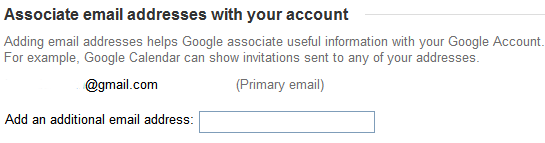
After you associate an email address with your account, Google sends a confirmation message to authenticate that the address is actually yours. An added benefit is that your other email addresses are connected to your account and Google can use this information: for example, Google Calendar shows you the invitations sent to any of the associated email addresses. You can also log in by using any of the additional email addresses.
{ Thanks, Anonymous. }
Related:
Alternate Google usernames

So is this going to help us own domain types to use calendar?
ReplyDeleteInteresting, I wonder if this is the answer/solution for Google Apps users?
ReplyDeleteIf you already have the email associated with your gmail account to allow gmail to send mail from it on your behalf, you cann't add it again here. If you add it here, it doesn't seem to appear there. Even on the same account.
ReplyDeleteI don't think the "send mail as" feature from Gmail has anything to do with this. Make sure that the email address you're trying to add is not associated with a Google Account (for example, all Gmail addresses are connected to a Google account).
ReplyDeleteI don't know if this will help the "domain types" (Jay, Alex), but I've recently discovered a somewhat similar solution, not adding addtional email addresses, but completely replacing the gmail login with the domain one, and now all my Apps, including Calendar work correctly.
ReplyDelete@boilingoil:
ReplyDeleteNo, Ionut is right. This is something different than the send-mail-as feature in gmail. This is linking an email address to your google account, not to your gmail account. (I know the difference is subtle.) Note though, that when you do one, google does not automatically do the other.
Now if google just had a way to consolidate all the various Google IDs I have into one usable one as I can't always remember which e-mail address I used to log in to which Google service (analytics, adwords, groups, etc..)
ReplyDeleteDoes this allow you to solve the googlegroups issue of not being able to post to a google group because the "sent email" is not the same email as the email subscribed to the group, even though google knows that you are the same email address?
ReplyDeleteAfter adding a new associate email
ReplyDelete- and verifying it
- it is essential to logout
- login
- before alternate address is available in "group settings" drop downs
YMMV
how can i create the dynamic virtual domain on the server.
ReplyDeleteI've successfully associated another e-mail address with my Google account, but I can't change settings in Groups or Alerts to have messages sent to my other e-mail account (not my Gmail account) -- it just doesn't appear as an option. Basically, I'd like to receive work-related Alerts and Group messages to my work e-mail account, and keep personal things to my Gmail.
ReplyDeleteAny suggestions on what to do?
@Natasha:
ReplyDeleteUse Gmail's filters to auto-forward the notifications to your work email.
1. For Google Alerts: create a filter that forwards all the messages sent from googlealerts-noreply@google.com to your work email.
2. For Google Groups: create a filter using list:"<googlegroups.com>" in the "Has the words" field.
Google Alerts 'says' that can send Alerts to Alt emails - BUT it will not show the alt emails in the drop list - so Alerts are not able to be sent to my alt emails / the Google statement that can use Alt emails for Alerts is Wrong - and no way to contact Google about it
ReplyDeleteAlerts used to have this capability - I did it all the time. But I moved jobs and assocaited my new email address and there is no way to use the new address in alerts.
ReplyDeleteThis is really frustrating Me!
ReplyDeleteWHY? did you shut me out. I was doing a training course with push button, I neally had it set up twice and when I went back to it it was gone so I had to start again, no NOT MY fault. I put in a search for externial keyword tool. You kept sending me let us help you, which I didn't take any notice of because I was doing a training. Why would I get you to help me when I was in a traing, it dose not make any sence to me. How did you think you could help me anyway. All you did was to lock me out. And send me a "sorry but your computer or network MAY be sending automated queries. To protect our users, we can't process your request right now. Well all it did was frustrate me because it stop my training. And that was nealy 3 hours ago.
Has anyone figured out how to get this functionality back?
ReplyDeleteI simply want to manage calendar actions for any email in my Google Account from ONE SINGLE calendar.
I came here searching on how to find the associated emails with my gmail id. Is there a way to find all the emails that were associated my email.
ReplyDeleteI'm looking for the same answer. Did you ever find it? Aloha
Deletei began to start questioning to Google, Co.
ReplyDeleteABSOLUTELY PHUKING useless here !!!!!
ReplyDeleteNice information, If you are looking for AOL Email Customer Care Number then call 24/7 Toll Free 1800-863-5563.
ReplyDeleteVisit here:
AOL Email Support
AOL Email Customer Service Number
AOL Email Customer Care
AOL Email Customer Support Number
AOL Email Support Number
AOL Email Customer Service
AOL Email Customer Support
AOL Email Technical Support
AOL Email Tech Support
AOL Email Customer Care Number
AOL Email Support Toll free Number
AOL mail Customer Service
AOL Support Email
AOL Mail Tech Support