An unofficial blog that watches Google's attempts to move your operating system online since 2005. Not affiliated with Google.

Send your tips to gostips@gmail.com.

October 31, 2008

Google Uses OCR to Index Scanned PDF Files

Google started to index to full text of "scanned" PDF files using a technique called OCR (optical character recognition). "Every day, people all over the world post scanned documents online -- everything from official government reports to obscure academic papers. These files usually contain images of text, rather than the text themselves. But all of these documents have one thing in common: someone somewhere thought they were they were valuable enough to share with the world," says Evin Levey.

The great thing about the new feature is that you won't notice it unless you look for it, but it improves the quality of Google's search results. Google doesn't mention how many of the 300 million indexed PDF files were converted into text, but you can see some examples if you search for: [repairing aluminium wiring], [Steady success in a volatile world] and click on "View as HTML".


Google sponsors an open-source OCR software called OCRopus and it's likely that Google used it for indexing PDF files from the web. "OCRopus is a state-of-the-art document analysis and OCR system, featuring pluggable layout analysis, pluggable character recognition, statistical natural language modeling, and multi-lingual capabilities. (...) It's initially intended for high-throughput, high-volume document conversion efforts. We expect that it will also be an excellent OCR system for many other applications."

SMS in Gmail Chat

Gmail is about to introduce a new Labs feature that will let you send SMS messages to your contacts from the US, announces InformationWeek. Google explains how it works:
You can send SMS messages to your contacts' mobile phones using Gmail Chat. To do so from Gmail:

1. Enter your contact's name in the 'Search or invite friends' box in Chat, and select Send SMS from the box of options that appears to the right of your contact's name. Or, if you already have a Chat window open for this contact, just click Video & more, and select Send SMS.
2. In the dialog box, enter a phone number in the 'Send SMS messages to this number' field. For now, this feature works only on United States phone numbers. If you're outside the US, you can still use it, but you won't see the SMS option in Chat until you enable it manually in the Chat settings page.
3. Click Save.
4. A Chat window appears. Just type your message as you would normally. When you hit Enter, the message will be sent to the phone number you entered.

If your contact replies, the text message response will appear as a reply in Chat. These conversations are stored in your Chat history just like regular chats (but keep in mind that you can’t go off the record while communicating via SMS).

The nice thing about Gmail SMS is that each user gets a virtual phone number that facilitates replying to messages. "To write back, reply to the message as you would any other text message, and your message appears as a Chat message in your friend's Gmail account. If you don't want to receive any SMS messages from Gmail, reply with the command STOP. If you'd like to block the person who sent you the message, but still be able to get Gmail SMS messages from other contacts, reply with the command BLOCK," informs Gmail's help center.

You probably noticed the reference to a new Gmail option called "Video & more", which suggests that Gmail could add video chat. I don't see the new feature, but InformationWeek mentions that it will be slowly rolled out to all Gmail users and it will only be enabled by default if you are in the US.

Yahoo Mail added a similar feature last year: "From my Yahoo! Mail window (and using my comfortably full-sized keyboard), I can type a note to my son, letting him know I'm on my way to his soccer practice, and send it straight to his phone. And he can send a text message right back to my email, letting me know where to meet him. The intuitive, chat-like interface makes it super easy, even if you're a novice at text messaging."
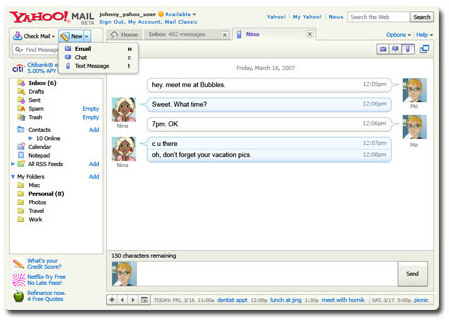

Even more than Yahoo Mail, Gmail wants to integrate all your communication channels, so it allows you to pull messages from other email accounts, chat with Google Talk and AIM users. The integration with GrandCentral is also bound to happen.

Update: The launch has been delayed. "We found a glitch. When you'd try to turn it on, it wouldn't fully enable. We thought about keeping it out there -- bugs and all -- but the experience wasn't that great. So, in the spirit of Labs, we've pulled SMS chat back to fix it, and we'll get it back out to you as soon as it's ready -- probably within 2 weeks, so stay tuned." AOL must be happy.

{ Thanks, Paul. }

October 29, 2008

Google SearchWiki

Google's experiment that allows users to vote and annotate search results is back and this time it has a name: Google SearchWiki. Justin Hileman is one of the lucky people who has access to the experimental feature: "Things are a bit smoother this time. Moving results is a nice, polished animation. I can't wait for more community features to show up."


Garett Rogers noticed some new messages related to SearchWiki in Google's translation console. Google describes the service as a way to "customize your search results with your rankings, deletions, and notes — plus, see how other people using Google have tailored their searches". You can promote or demote search results, add new web pages to your search results, post comments and read other people's comments. It's not clear whether user votes influence the overall ranking algorithm, but it's likely that this is not the case.


SearchWiki is not yet available to all users, but you can see a small trace by appending "&swm=2" to the URL of a search results page: an inappropriate header for "all SearchWiki notes".

The new feature is a more transparent way to personalize search results; this time, Google allows users to decide which search results are the most relevant and to share those findings with other users. Instead of bookmarking the results or saving them in Google Notebook, you can make them more visible on a search results page and find them when you search later. Unfortunately, Google's interface will become cluttered unless Google decides to hide the new options until you click on a link like "Edit the search results".

Further reading:
* Help page for the initial experiment from last year
* Edit search results FAQ

{ Screenshot courtesy of Keith Dsouza. }

October 28, 2008

More Data About Feeds in Google Reader

Google Reader shows more information about your subscriptions. Click on a feed from the navigation sidebar (or type g, then u, followed by the first letters of the title) and you should see the most recent posts from that feed. If you click on "show details", Google Reader has a lot of interesting data: the number of posts per week, the number of subscribers and a histogram of the feed's activity in the past 30 days.

The most interesting thing is that you can see how many posts you've read and when do you usually read the posts from a feed.


{ via FlowingData }

Feeds for Google Alerts

Google Alerts has a new option: you can now subscribe to feeds instead of receiving periodic email messages. Google Alerts notifies you if there are new pages in the list of top results for a certain query. You can subscribe to alerts for web search, Google News, blog search, Google Groups and Google Video.

Google Groups and Google Web Search are the only search engines from the ones mentioned above that don't provide feeds for the results. In fact, Google is the only major search engine that doesn't offer feeds for search results.

The new feature from Google Alerts is useful, but Google should've provided an option to subscribe to feeds for each search result. Right now, the feeds from Google Alerts have cryptic addresses like:

http://www.google.com/alerts/feeds/LONG_NUMBER/ANOTHER_LONG_NUMBER

and you can only generate feeds from Google Alerts.


Note that you have to log in to a Google account if you want to get feeds for your alerts.

YouTube Highlights Previously Viewed Videos

If you are logged in, YouTube saves a list of all the videos you watch, but there's no interface that displays them. When you perform a search, YouTube shows a label next to the videos you've previously viewed.


Google shows a similar label next to the search results you've already visited from Google search and you can find the number of visits and the date of the most recent visit. The difference is that Google shows your search history and makes it searchable.

Gmail Modes


If you can't access Gmail, try some of these URLs:

Safe mode - http://mail.google.com/mail/?labs=0. It disables the experimental features from Gmail Labs, just in case some of them are buggy. You can remove some of the features from Gmail's settings page.

Secure mode - https://mail.google.com/. It encrypts the traffic between your computer and Gmail's servers. Use it from public computers, Wi-Fi networks or to bypass some proxies and web accelerators. There's a Gmail setting that redirects the standard version to the secure mode ("Always use https").

Older version - http://mail.google.com/mail/?ui=1. This version has been replaced in October 2007 by a rearchitectured Gmail, but the old version is a little bit faster.

Basic mode - http://mail.google.com/mail/?ui=html. It's the version that doesn't use JavaScript, so it loads faster and it works well with older browsers. Unfortunately, many Gmail features are missing (contacts autocomplete, chat, spell checker, rich formatting) and each click loads a new page. If you like this version, click on "Set basic HTML as default view" at the top of the page.

Mobile mode - http://mail.google.com/mail/?ui=mobile or http://m.gmail.com. This is a simplified Gmail interface for mobile phones that has even less feature than the basic mode. Use it if no other Gmail mode works for you.

iPhone mode - http://mail.google.com/mail/x/gdlakb-/gp/. A more user-friendly mobile version for iPhone and other mobile phones that use WebKit-based browsers.

iGoogle gadget - http://www.google.com/ig/gmailmax. This is the canvas view for the updated Gmail gadget which can be found in the new iGoogle. Some people found that this interface bypasses most corporate filters that prevent them from accessing Gmail at work.

"No browser checking" mode - http://mail.google.com/mail?nocheckbrowser. If you use a cutting-edge new browser and Gmail serves you the basic HTML mode, try this URL to bypass browser detection.

Google Gadgets in Gmail

People spend a lot of time in email applications, so it makes sense to have links to other applications and useful information next to the email. Some would like to see their bookmarks, others would find useful to have their agenda and the list of to-do items.

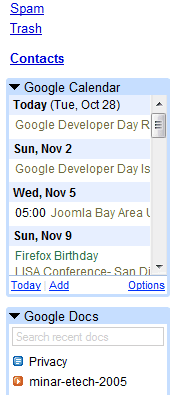
Gmail Labs lets you add two gadgets in the left sidebar: Google Calendar and Google Docs, so you can add events, see your agenda and open recently-edited documents. There's also an experimental feature that lets you add any gadget by entering the address of its XML file, but I couldn't find gadgets that work and look well.

"We realize this isn't very user friendly right now; it's a sandbox mainly aimed at developers who want to play around with gadgets in Gmail. We're not tied to the left-nav as a primary way to extend Gmail -- in fact we think it is relatively limited and doesn't offer scalable real estate. There are also some downsides to the iframe-style Gadgets we're using today -- they can sometimes slow down the page. We're fanatical about speed, so we'll be keeping a close eye on performance," says Dan Pupius.

To make room for the gadgets, you could try these experimental features from Gmail Labs: Right-side chat, Right-side labels (move Gmail Chat and the list of labels in a right sidebar) and Navbar drag and drop (reorder containers).

{ Thanks, roody. }

October 27, 2008

Street View for Spain

Spain is the fifth country from Google Street View's map. You can now view street-level images for the biggest 4 Spanish cities: Madrid, Barcelona, Valencia and Seville.

Unlike the previous launches, I was able to find low-quality photographs in less than two minutes, right next to the Royal Palace of Madrid.


Here's Street View's coverage map so far:


{ via Google Blogoscoped }

New Default Groups for Google Contacts

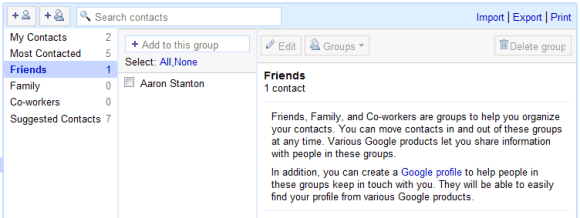
Gmail added three new built-in contact groups. "Friends, Family, and Co-workers are groups to help you organize your contacts. You can move contacts in and out of these groups at any time. Various Google products let you share information with people in these groups. In addition, you can create a Google profile to help people in these groups keep in touch with you. They will be able to easily find your profile from various Google products."

iGoogle is one of the services that will use these groups for managing your shared activities. One size doesn't fit all, so separating your contacts could simplify the way you share and receive information.


If you don't like the new groups, the bad news is that you can't delete them. Try to ignore them, but keep in mind that they'll be useful at some point.

Google has three other default contact groups: My Contacts (manually-added contacts), Suggested Contacts (email addresses collected from your conversations) and Most Contacted (20 frequently-used email addresses). Google no longer automatically adds email addresses to My Contacts. "Only contacts that you've edited, imported or added to a group will remain in My Contacts. This will provide everyone with a clean slate and, we hope, a better point for syncing contacts with mobile devices."

{ Thanks, Roody. }