An unofficial blog that watches Google's attempts to move your operating system online since 2005. Not affiliated with Google.

Send your tips to gostips@gmail.com.
Showing posts with label Google Local. Show all posts

July 28, 2015

Popular Times Added to Google's Local Search Cards

Google has a new feature for local search cards. When you search for restaurants, stores, museums and other places, you can now see the busiest times of the day or week. The new "popular times" section shows when it's a good time to go to a certain place and when it's best to avoid it because it's too crowded.


"Now, you can avoid the wait and see the busiest times of the week at millions of places and businesses around the world directly from Google Search. For example, just search for "Blue Bottle Williamsburg", tap on the title and see how busy it gets throughout the day," informs Google.


For now, it seems that this feature is only available in the mobile interface. Google says that the data is based on historical visits, so I assume it uses Location History and other location services for mobile devices. Google Maps has a similar feature that shows typical traffic.

December 2, 2013

More Search Results in the New Google Maps

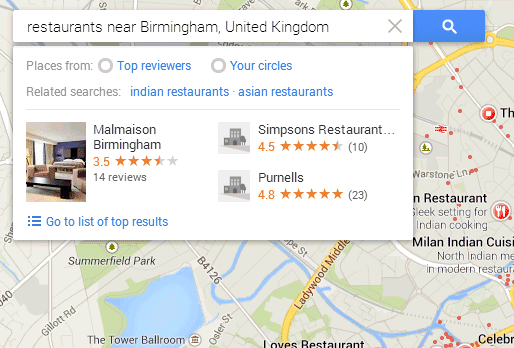
The new Google Maps for desktop updated the local search card and now shows the top 3 results instead of only one. You can still go to the list of top results or check the results from the map, but the card is more convenient. Google is the king of search, so people expect to find a hierarchy. The list of top results is one click away, but many people will never find it.


{ via Jérôme }

January 13, 2011

Google Places for iPhone

Why build a local search app for iPhone when the Maps app already lets you find businesses and local attractions? Apple's Maps app doesn't use all the information that's available about businesses, doesn't show photos, reviews and other details. That's one of the reasons why Google decided to build an iPhone app called Google Places.

"We realize the importance of finding places you'll love while you're out and about, no matter what mobile device you use. And Places with Hotpot not only helps you find places near where you are, it gives you the best places to go for you by personalizing your search results," explains Google.

The application integrates with Google Hotpot and uses your ratings and your friends' ratings to recommend other places. Google Places encourages users to rate businesses and to post reviews in order to get better search results and that's an interesting proposition. What's missing from the app is a list of business you've previously rated and the Hotpot feed that's now available on Google Maps.


Geo services are one of the key Google assets and it's very likely that Google will use them to create a stealth social network. Google Maps is probably the best mapping service and one of the most popular local search engines, so the social layer will have an important user base. Unlike Google Buzz, Hotpot doesn't have privacy issues yet and it doesn't feel like a different app because it's properly integrated with Google Maps.

Google Places for iOS can be installed from the Apple App Store and it's only available in English.

November 16, 2010

Google Hotpot: Local Recommendations from Friends

Google launched a new service called Hotpot that promises to improve local search results using recommendations from your friends. "With Hotpot, we're making local search results for places on Google more personal, relevant and trustworthy," explains Google.

To get useful recommendations, you first need to share your ratings with your friends, but Hotpot's main problem is that it's not connected to any social network. When you first visit the service, Google asks you to enter a nickname for Google Places and to send invitations to some of your Gmail contacts. You're creating a new contacts group in a standalone application, instead of using an existing list of friends.


Google Hotpot is mostly useful when you try to find a place using Google's local search engine. Google personalizes the results by promoting the local businesses recommended by your friends.


Unfortunately, Hotpot is a completely unnecessary service, considering that you could already review places and that the reviews were already public. Google Maps was one of the first Google services that integrated with Google Profiles, so sharing your ratings with your friends was the obvious next step. Google Reader did that in 2007, but many users were unhappy because their favorite posts were automatically shared with Google Talk contacts and some of those contacts were automatically added by Google. Two years later, Google Buzz made the same mistake by automatically subscribing users to the list of Google Talk friends.

Google will never develop successful social services until users are able to create a list of friends that could be used in multiple services. To avoid the backslash from the Google Buzz launch, Google Hotpot asks you to manually add friends, but maintaining separate lists of friends is cumbersome.

October 25, 2010

A New Interface for Google Local Search

Google Maps was the only specialized search engine from Google's sidebar that didn't have a consistent interface for search results. When you clicked on "Maps" in the sidebar, you were sent to Google Maps, a service that has a completely different interface.

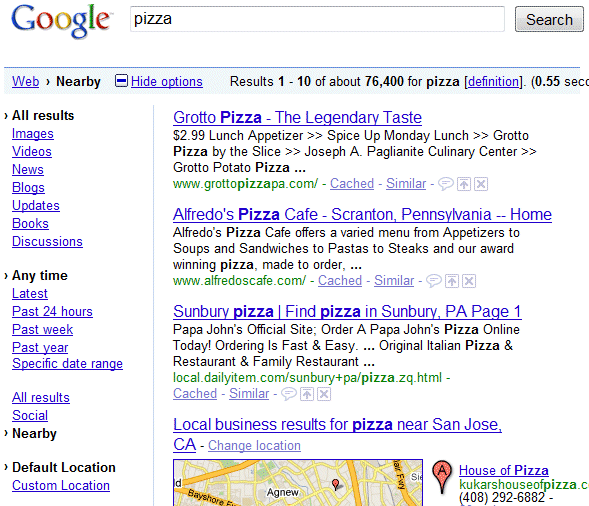
Google experiments with adding a "Places" option to the menu. The main difference is that local search results are displayed inside the regular Google search interface and users no longer have to visit Google Maps


In 2005, Google merged two distinct services: Google Maps and Google Local. "Google announced the official launch of Google Local, merging the technologies behind Google Local and Google Maps. No longer in beta in the U.S. and Canada, users can visit http://maps.google.com/maps to find local search and mapping information in one place," informed Google at that time. Google Local was renamed as Google Maps after a few months. Since then, Google launched a mobile interface for local search results, a large OneBox for local results, place pages for businesses and now a separate desktop interface for local search. Back to the roots.

February 26, 2010

Google Adds Local Search Filter

Google's crowded "search options" sidebar has a new feature: restricting the results to sites related to nearby businesses. Google already determines your location and it shows results appropriated for your location, but now you can see only local search results.

There are 3 filters that help you restrict the results to a city, a region or a state. If Google can't find your location or you want to find results for a different location, click on "custom location" and enter a city.


Google Blog says that this feature is useful because the search engine no longer has to match your keywords to find a location.
Location has become an important part of the way we search. If you're a foodie looking for restaurant details, food blogs or the closest farmer's market, location can be vital to helping you find the right information. Starting today, we've added the ability to refine your searches with the "Nearby" tool in the Search Options panel. One of the really helpful things about this tool is that it works geographically — not just with keywords — so you don't have to worry about adding "Minneapolis" to your query and missing webpages that only say "St. Paul" or "Twin Cities."

The local search filter for web pages is not new: it used to available in Google Maps and as a Google Search experiment.

May 4, 2009

First Google Latitude Applications

Google Latitude started as a service that managed to obtain your location and shared it with a group of people, who also revealed their locations. The service was available as part of the mobile Google Maps application or as an iGoogle gadget.

To make the information stored in Google Latitude more useful, you can now display it on a web page, in a feed or add it as a constantly-updated Google Talk status. The location can be added to a badge and embedded on any web page, but there's also an option to get a list of the most recent locations as a KML or JSON feed. Since you may not want to share your precise location, Google Latitude has an option to display the city-level location.


If you only want to share your location with the Google Talk contacts, enable the new location status. The feature "automatically updates your status message with your current city's name as you move".

It's interesting to notice that the two new features are actually applications and it's likely that Google Latitude will implement an API that could be used by other location-based services, much like Yahoo's Fire Eagle. "They are two separate apps, so you can select which one(s) you'd like to use and customize exactly how you'd like to share your Latitude location. (...) Both apps adhere to the same terms and conditions -- you must explicitly opt in to the application and of course, you can always disable an app by going back to the app's page," explains Google.

"Apps use the same location as the Google Latitude location tied to your Google Account. While Latitude is enabled and updating your location from your mobile phone or iGoogle where available, your apps will show your most recently updated location. If you simply stop updating your location from your phone or computer by closing iGoogle, letting your phone run out of battery, turn your phone off, etc., your last updated or manually set location will still be visible in your other apps, even if it's old," informs the help center.

The location from Google Latitude, which is obtained from a variety of sources (GPS, cell towers, WiFi location), could be used in many applications: better local results in Google Search, easier to use GOOG-411, viewing your routes in Google Maps, customized geo-alerts and probably other useful-but-somewhat-creepy services.

February 18, 2009

More Local Search Results in Google Maps

Google Maps shows more local search results: instead of showing only the first 10 results, you can explore the most relevant 1000 local businesses in a single view.

"Ever wish you could see more than just ten local search results at once? Us too. So we've added a search layer for local search results that activates when there are more relevant results than we can show on one page. Instead of just plotting the first page of business results on our map, we plot more of them as small circles. You can click on the circles to get more information about the businesses they represent. The top ten results will still appear in the left-hand pane and as pins on the map," mentions Google Lat-Long Blog.


In other news, Google Maps is for the first time more popular in the US than MapQuest. According to comScore, Google Maps had 42.3 million unique US visitors in January, while AOL's MapQuest had only 41.5 million uniques.

"Google has for several years been investing very heavily in Maps (and Earth), as well as distributing Google Maps across the internet via its API. The features and capabilities developed for Google Maps are more extensive and widely known than those of its competitors. (...) Google steadily built out a large number of features that consumers and the market have found compelling. More importantly, Google has regarded Maps as a strategic product, arguably its most successful after core search," suggests Greg Sterling.

Ironically, when Google Local was launched in 2004, Google used MapQuest as a provider for maps.

December 29, 2008

Translate Google Maps Reviews

Google Maps has a new option that automatically translates reviews written in a foreign language. This is especially useful if you are planning to visit a different country and most of the reviews are not available in a language that you speak. Here's a list of results for [bistro, paris, france] in the English interface of Google Maps and a search for [pizza ny] in the French Google Maps.


Similar options are available for Picasa Web comments, YouTube captions and many other services, thanks to the easy-to-use API for Google Translate.

It's worth mentioning that Google Translate's homepage has been redesigned and you can now translate text and web pages from the same box. Google Translate includes a new option that swaps the selected languages and the translations for short texts have permalinks.

June 5, 2008

Richer Local Search Results in Google Maps

Google Maps shows enhanced local search results. Compared to the previous format, Google Maps lets you find more information about the local businesses without having to click on each result. You can see a thumbnail, an excerpt from the most recent review and a link that encourages to post your own review. This format was already used in the text view, but probably few people noticed it.


Excerpts from reviews are included in local search OneBoxes as well, but Google chooses different reviews. Judging from these changes, I think businesses will start to upload images to the Local Business Center and will encourage their customers to post reviews to Google Maps or other sites.

March 16, 2008

Add, Edit and Delete Places in Google Maps

After adding an option to edit locations, Google Maps allows people to add places. The option seems to work only for the US and you can enter few details about the local business or the place: address, name, phone, website and category. Google promises that "once you save your place, the whole world can find your addition by searching for it within a few minutes."

To find this feature, go to Google Maps, search for an address (e.g.: Madison Ave, NY) and you'll see a new option in the left sidebar: "Can't find what you're looking for? Add a place to the map."


You can also edit the details from existing listings and even remove places from the map. Among the possible reasons why you could delete a place you can find: the listing is a duplicate, the place doesn't exist, it is permanently closed or it's not of general interest. While business listings are changed almost instantly after you edit them, they can be removed only if someone from Google accepts your removal request. Each local listing can have a status like "Added", "Edited", "Removal requested" and the changes history is available to everyone.


Until now, only business owners could add places, using Google's Local Business Center. "We gather business information from numerous websites, Yellow Pages directories, and other sources to populate Google Maps search results. If you'd like to be included, you can easily enter your information into our online Local Business Center for free. (...) Once you've submitted your business information, you'll need to verify the listing before it goes live. You can verify using a touch-tone phone, SMS, or a PIN that will be sent via regular mail to your business address. Once the listing is verified, your information will normally appear in our results within six weeks," explains Google.

It's great to trust your users, but the places added using the new feature should be verified to make sure they are real. Turning Google Maps has a lot of practical advantages and could be used to keep the geographical information up-to-date.

Update: Google says you can edit places from the US, Australia and New Zealand.

January 27, 2008

Google Shows More Results in the Local OneBox

When you search for something like [italian restaurant ny], the local search results are more useful than the web results, so Google displays a OneBox that includes these results at the top of the page or in other position. Google has recently increased the number of results displayed in the local OneBox from 3 to 10.


Last year, in January, the OneBox was enriched with a static map, information about reviews, directions. To make room for 10 results instead of 3, Google removed the addresses, the links to directions and the ratings.


It's very interesting to see that the other general search engines (Yahoo, Live Search, Ask.com) link to pages from their local search engines, while Google links to the homepage of each business. Another difference is that Google's box has a variable position, depending on the relevance to user's query.


Search Engine Land asked Google why it decided to increase the number of results. The reason is that "many people didn't realize there was additional local content available beyond the three listings, despite the more results... prompt. Accordingly, Google said that with the 10 links it is hoping to signal people that there is much more local content a click away. The ranking of those ten results is based on a range of factors, including the query, proximity, availability of ratings/reviews and their quality and several other variables."

November 19, 2007

Edit Locations in Google Maps

Google Maps has a new feature that lets you fix inaccurate addresses for local businesses, even if you're not the owner. You just have to click on "edit" in the info window and choose a new location. If you move the marker more than 200 meters away, the change will need to be reviewed before going live. There's also a history of previous changes and an option to go back to the original location.

"You might be worried about people monkeying with markers. Fear not, we've thought of that. Whenever you find a recently-moved address or business, you'll see a "Show original" link you can click to see where the marker was originally. If it's in the wrong place, just move it to the right one," explains Google LatLong Blog.

This also works for locations of addresses and landmarks, but only in the US, Australia and New Zealand. More about the new feature here.


September 20, 2007

Google Maps Brainstorming

In this video, Google Maps team from New York tries to figure out how to display the information about a business in a better way. The brainstorming doesn't generate too many ideas, but one Googler admits that the interface is "unreadable".


Even if Google shows a lot of information, it doesn't do a good job at helping you find a place you like. If you search for a pizza place in New York, Google Maps shows the same results for everyone and you can't refine your query with details about the menu, delivery area, price or the amount of recent positive reviews. Google Maps could also let you add a business to your favorites and personalize the search results based on your bookmarks and search history. As for the presentation, it would be nice to compare the results side by side and choose what are the most relevant criteria for comparison.

Anyway, here's the Google Maps brainstorming. Maybe you can help Google find the best way to structure the interface.

August 6, 2007

The Walkability of a Place

How walkable is your neighborhood? WalkScore tries to evaluate this by locating nearby stores, restaurants, schools, parks, movie theaters and calculating the distance to these locations.

"Picture a walkable neighborhood. You lose weight each time you walk to the grocery store. You stroll home from last call without waiting for a cab. You spend less money on your car—or you don't own a car. When you shop, you support your local economy. You talk to your neighbors."


WalkScore uses Google Maps API, so you can check your area only if Google Maps includes businesses from that region. The score is just an estimation and doesn't take into account issues like climate or crime risk. Nunovo thinks that "the walkability of a place shouldn't be based on whether there are businesses from Google's directory within a mile. Rather, walkability is determined by qualitative factors like the width of pavements, traffic noise, trees and views that combine to give a place pleasurable and interesting qualities." Even the site admits that "you should use the Web 3.0 app called going outside and investigating the world for yourself".

The site might be useful if you want to buy a house, to find a quiet neighborhood or to get a listing of the most important local businesses near you.

August 1, 2007

Google Tests New Local Ads Formats

AccuraCast reports that Google tests a new format for local AdWords ads that includes the expandable Maps Plus Box. When you click on the link, Google displays the address of the business, a static map and an option to get directions. This is very similar to what you see next to search results associated with local businesses (e.g.: NY spa).


According to Google, this is a limited test and may not be launched globally. Google has always been reluctant to treat local ads different than the standard ads: even Google Maps used to display ads that sent you to a web page. But things have changed and the ads from Google Maps are placed on the map, the same as the standard results.


Google has also updated the Maps API so that developers can monetize their mashups. "At Developer Day in May, we previewed GAdsManager, a class that would place contextual ad markers for local businesses in a special layer on your map and help you monetize it. We've now released the ads layer with the addition of GAdsManager in Maps API v2.85, and it's ready for early testers."

It's hard to say if integrating an ad into a medium improves the user experience or makes it easier to confuse it with the real content. Google's search results pages contain mostly text, so the targeted text ads are more appropriate than banners, but as Google starts to include more images, videos, expandable boxes in the main results, the ads might become richer and more interactive.

June 19, 2007

Rate Local Businesses in Google Maps

Now you can add reviews and rate local businesses in Google Maps. Until today, Google crawled sites like Yelp and included their reviews.

"Don't forget that Google Maps indexes a tremendous variety of businesses, and in a number of countries. Tell the world all about your favorite (or least favorite) doctors and dentists, hotels, bakeries, hardware stores, salons, pet spas, auto mechanics, plumbers, and more," recommend Google Lat Long Blog.

Just find a local business, click on "more info" and then find a link that says "write a review". Your review must be at least 100 characters, it will go live instantly, but it's placed after the bottom of the page.

May 16, 2007

New Text View in Google Maps

The integration with maps in Google Local lets you visualize the results and choose one easier, but there are situations when you want to see the full description for all the relevant local businesses, like in a normal Google search.

Google Maps has a new text view that focuses more on results and less on the map. You get thumbnails, snippets from reviews and direct links to reviews for each search result. The map is static and lies almost unnoticed in the top right corner of the window.

This new view is similar to what you see if you disable JavaScript in Google Maps, but the addition of the snippets makes it more valuable and brings it in line with Yahoo Local.


{ via Greg Sterling }

May 15, 2007

Google Local OneBox Becomes a Search Result

Google's OneBox results (you know, those little boxes from the top of the page that show links to results from Google News, Google Maps etc.) slowly move inside the search results. We first saw these with news and now local results descend in Google's SERP.

Google aims to consolidate the main search results and to build an universal search engine that ranks all flavors of content. As Larry Page mentioned in January, "we are working on integrating different types of results -- video, images, news, books and so on -- all in one place. We are now blending book results into the main index and we will add more going forward. We are excited about providing a truly seamless user experience in search."

For the moment, Google only assesses the importance of the results from the OneBox, but the next step should be removing the OneBox and integrating the results. While it may seem that Google compares oranges and apples, when you search for Travis, you may want to see web pages, videos and their next concerts on a nice map. Like in an encyclopedia page built on the spot and custom-tailored to each user.

January 30, 2007

Google Local OneBox Gets Bigger

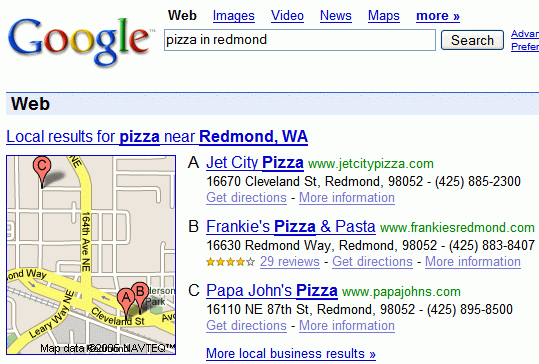
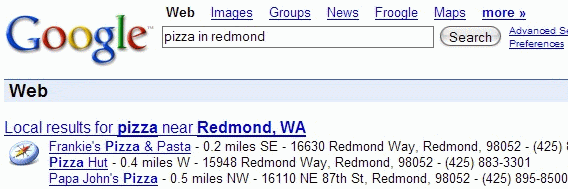
Google updated their local OneBox, by adding a static map and links where you can find more information about each business. This is the old OneBox:


... and this is the new one:


Google realized that not many people use Google Maps to find local businesses. Most people search on google.com, but standard web search results aren't suitable for these kinds of queries, because not every site is connected with a local business and because web pages don't contain structured data (address, company profile etc.)

Google also updated the Maps OneBox and started to include the addresses of local businesses in web search results.

Of course, most of these changes are available only for the US and a small list of other countries: Canada, UK, France, Germany, Italy, Spain.