An unofficial blog that watches Google's attempts to move your operating system online since 2005. Not affiliated with Google.

Send your tips to gostips@gmail.com.
Showing posts with label Picasa. Show all posts

December 27, 2013

Google+ Auto Backup for Desktop

The latest version of Picasa for Windows and Mac installs a separate utility called Google+ Auto Backup. It's a simple tool that lets you select the folders that you want to backup automatically and even has support for SD cards. Google+ Auto Backup works in the background, much like Google Music Manager and Google Drive for desktop.


The application uses the new Google Photos icon and, even though it's installed by Picasa, it doesn't have anything to do with Picasa, which has its own syncing feature.


Here's the installer file GPAutoBackup.msi in the Picasa folder:


The application has its own uninstall entry:


When you visit Google+, you'll see this message, which informs you that you can use the search box to find photos and videos from Auto Backup.


By default, Google uploads the original photos and they use your Google Drive storage space. You can enable photo resizing (standard size), so that the uploaded photos don't count against your Google Drive storage quota. Photos are resized so that the longest edge is 2048px or less.


"All photos uploaded through Google+ Auto Backup will default to private in Google+, so you can decide what actions to take once they are backed up to Google+. Once your photos have been uploaded, they will appear along with other Auto Backup photos. We'll arrange them by date in the Highlights section of Google+ Photos, and you can search #desktop in Photos Search to easily find all of the photos that you've backed up through your desktop." (from GooglePlus Helper)

To get Auto Backup for Desktop, you need to install Picasa. If you already have Picasa, make sure you've updated to the latest version (137.69). Go to the Help menu and "check for updates". The release notes include some other changes: new file size limits for uploads: 50 MB or 100 MP, "Edit in Creative Kit" function has been removed, updates to RAW support to include newer cameras.

{ Thanks, Daniel. }

August 23, 2010

Upload Picasa People Photos to Google Contacts

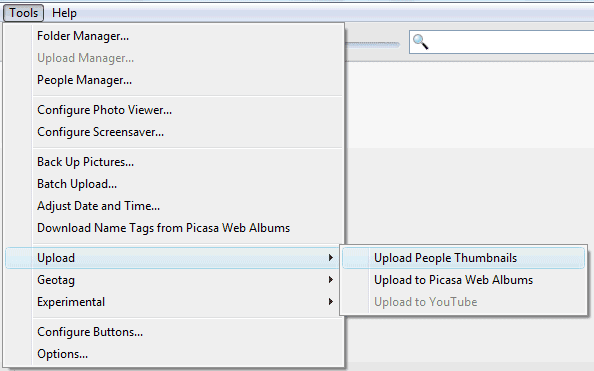
Picasa 3.8 makes it easier to upload pictures for your Google contacts. After scanning all the photos from your library and adding name tags to your photos, you can go to the Tools menu, select Upload and click on Upload People Thumbnails.


Picasa asks if "you want to upload and replace all the thumbnail photos from your People Albums to your Google Contacts". If you click on "Upload", Picasa saves the photos to Google Contacts and you can see them in Gmail or in any other application that synchronizes with Google Contacts (for example, Android's Contacts app or iPhone's Contacts app, if you use Google Sync).

If you don't want to upload photos for all your contacts, you can click on one of the people from Picasa's sidebar, right on a photo and select "Set as Google Contacts Thumbnail". You can also enable "Upload people album thumbnails to Google Contacts" from Tools/Options/Name Tags (or Picasa/Preferences/Name Tags on a Mac) to upload the new thumbnails you select in Picasa.

It's strange to see that Google didn't add this option to Picasa Web Albums and that the photos tagged in Picasa Web Albums aren't displayed in Google Contacts. Google could at least offer the option to pick one of the photos tagged in Picasa Web Albums when you add a picture to one of your contacts. Right now, you can only select a photo from your public albums.

August 18, 2010

Picasa 3.8 Released

Picasa 3.8 doesn't add too many features, but there are at least two reasons for updating to the latest version: Face Movie and batch upload to Picasa Web Albums.

Face Movie is a movie presentation centered around one person. "As the photos transition from one to another the subject's face stays aligned in one focus area, creating a unique viewing experience," explains Picasa's blog. Just select one of your contacts from Picasa's sidebar and click on the create Face Movie.


Picasa 3.8 makes it easy to upload multiple albums to Picasa Web and change the settings for the existing albums. You can delete multiple albums, change their visibility, save space by changing photo size or disable syncing. Go to the Tools menu and click on Batch Upload to access this feature.

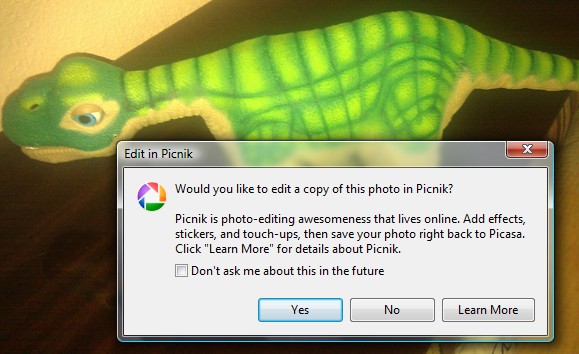
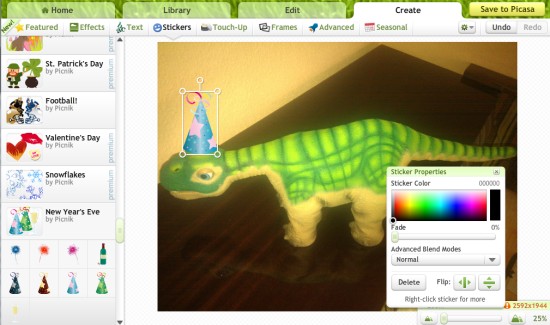
Google's photo manager also added a surprising feature: integration with Picnik, the online photo editor acquired by Google this year. Why would you use a slow and limited online service to edit photos stored on your computer, when you can use Picasa's image editing options? Picasa's help center explains: "Use Picnik's exclusive editing features to apply effects, stickers, and frames to your photo. You can also crop, and adjust the colors of your photos right in your browser. When you click on Edit in Picnik, your photo will be transferred online. Apply the desired effects then click Save to Picasa. You'll have to option to replace your original photo or create a new copy on your computer."

In Windows, Picasa uses an Internet Explorer object to display Picnik's Flash site. I had to click on two Internet Explorer script error messages before uploading a photo to Picnik.


Unfortunately, most Picnik stickers and touch-ups require upgrading to Picnik Premium. Why would Google charge users $25 a year for this service? I remember that Google made Blogger Pro, Picasa, Keyhole's Earth Viewer (now Google Earth), Urchin, Sketchup, FeedBurner Pro/MyBrand free after acquiring the products.

September 22, 2009

Picasa 3.5 Adds Face Recognition

If you liked the feature from Picasa Web Albums that detects the faces in your photos and clusters them, it's now available in Picasa 3.5. Face recognition works locally, without sending data to Google's servers.

For some reason, the feature is enabled by default and it starts to process your photos right after installing the software. It's pretty slow and the accuracy is far from perfect: you might see multiple clusters for the same person and different people addded to the same cluster.


If you sign in using a Google account, you can choose people from your contacts when you're asked to add names for each group of photos. There's also the option to download the name tags from Picasa Web Albums if some of your photos are stored online.

"As with Picasa Web Albums, your reward for trudging through your photos to add tags is better organization, which for a massive library of old, archived shots can be hugely helpful," thinks Josh Lowensohn, from CNet.

Another new feature in Picasa 3.5 is geotagging using Google Maps. Until now, you had to install Google Earth to add locations to your photos. The latest version of Picasa has a "places" sidebar that lets you drag photos to a map.


Three years ago, when Google acquired Neven Vision, a blog post mentioned the goal of the acquisition: improving the way you organize photos in Picasa. "It's not always easy to search through your personal photos, and it's certainly a lot harder than searching the web. Unless you take the time to label and organize all your pictures (and I'll freely admit that I don't), chances are it can be pretty hard to find that photo you just know is hidden somewhere deep inside your computer. We've been working to make Picasa (Google's free photo-organizing software) even better when it comes to searching for your own photos — to make finding them be as easy as finding stuff on the web. Luckily we've found some people who share this goal, and are excited that the Neven Vision team is now part of Google."

Update: For now, this is an English-only release, so it's not available if you set a different language for the Picasa page. Here are the direct download links for Picasa 3.5:

Windows: http://dl.google.com/picasa/picasa35-setup.exe
Mac: http://dl.google.com/photos/picasamac35.dmg

January 5, 2009

Picasa for Mac

Picasa borrowed a lot from Mac's elegance and simplicity, but it was only available for Windows (and emulated in Linux). Mac users can now finally install a native version of Picasa from picasa.google.com/mac/ and enjoy one of the most easier to use software for photo management.

From the press release:
Picasa for Mac makes it easy to manage large photo collections and helps users make professional-looking edits without any technical knowledge, including:

* A drag-and-drop photo collage tool that gives users control over layout and content
* A retouching brush to wipe out scratches and blemishes - and repair old photos
* A slideshow movie maker that uploads users photo montage videos to YouTube with a click
* Smart auto-cropping that guides users on how to zoom in on their subject
* And, auto red-eye removal.

Many of us take pictures so that we can show them to the people we care about. Picasa for Mac integrates seamlessly with Picasa Web Albums, Google's free photo-sharing site, which offers features like name tags - the ability for users to automatically organize and share their photos based on the faces in each picture.


If you have a Mac and you manage to install Picasa, tell what you think in the comments.

{ via Blogoscoped Forum and Tony }

September 2, 2008

Picasa Web Albums Adds People Tagging

CNet reports that Picasa Web Albums will add some interesting features today. After implementing face detection in the image search engine, Google adds face recognition in Picasa Web Albums to facilitate photo tagging.

"The problem with tagging is that it's a chore, so most people don't bother. But Picasa's name tag feature automates the process enough--and provides enough reason to use it--that I believe many users will take the tagging plunge. (...) The most impressive moments are when Picasa presents a large array of photos with the same face, and you can label them all with a single click," says Stephen Shankland from CNet.


The technology comes from the NevenVision acquisition and I'm sure we'll see more features that depend on image analysis in the future. Other new features in Picasa Web Albums: new views for exploring photos uploaded to Picasa Web Albums, Creative Commons licensing and an option to add photos by email.

Interestingly, the people tagging feature will not be available in Picasa 3, which will also be released today. The software will finally synchronize photos with Picasa Web Albums, but the synchronization is unidirectional. You'll be able to create videos from photo albums and export them to YouTube. There's also an improved collage maker that lets you control how pictures are arranged.


Picasa 3 and the updated Picasa Web Albums are set to be available today at 12 pm PDT.

Update: Picasa 3 can be downloaded from http://dl.google.com/picasa/picasa3-setup.exe (thanks, Anonymous!).

May 9, 2008

Picasa's Hello Discontinued


Hello, Picasa's obscure instant messenger, has been discontinued and will be completely shut down on May 15th. Hello's last major update was released in January 2005, six months after Picasa was acquired by Google.

According to its site, "Hello is a program that lets you connect directly with your friends to share your digital pictures. (...) With Hello, you just pick what pictures you want to show off, and click Send. That's it. Hello takes care of all the hard work. And you and your friends can download full resolution, print-quality pictures from each other, while you're doing more important things, like talking about your pictures. (...) With Hello's file sharing technology, [your friends] only have to download high quality versions of the [pictures] they really like. Everything else comes in at a smaller size, optimized for viewing on-screen."

"Hello enables users to instantly share images securely over a peer-to-peer network and chat about them. Hello currently has more than 250,000 users and can be used with or without Picasa, the company's flagship digital photo organizing software," mentioned Picasa in a press release from May 2004. It would be interesting to know the number of active users as of today, but it's probably much lower than 250,000.

The instant messenger was integrated with Picasa, so you could select the photos from Picasa and send them to Hello, but also view in Picasa the pictures you receive. Like Picasa, Hello was easy to use and shared the same clean interface. Despite its usefulness, Hello should have been a feature in a more powerful IM client, not a stand-alone application.


If you haven't tried Hello, you can still download the application from http://updates.picasa.com/hello/651/Hello651.exe. You and all your contacts need to have Picasa accounts. According to hello.com, you can still use the application one more week.

Here's Hello's goodbye:

"We originally embarked on a mission to make photo sharing easier and more fun with Hello. We plan to keep carrying that torch in new projects to come. We hope that you continue to enjoy the other sharing products Google offers including Picasa, Picasa Web Albums and Google Talk."

and here are some reactions:

"I live on Hello because it allows me as a designer to show my clients the screen I am working on real time. It also allows me to communicate with other designers who work for my business and mentor them through the design process, or get myself some mentoring!"

"i credit hello for leading to some very good friendships of mine all over the US, and i credit hello for my transition from crafter to artist. i do not want to lose this program."

"PLEASE reconsider the decision to shut down Hello. It is an invaluable tool for the digital scrapbook community, especially the designers. I can't imagine what I would do without the ease Hello provides to show off screen shots and get critique on my Designs."

"I use Hello daily in conversation and to share photos with family members out of state. It has also been very useful in learning and teaching applications by using real time screen shots. There just isn't anything else that compares that is so easy to use!"

"My mother who has no idea what IM even stands for, uses Hello everyday. We send her pictures of her grandkids, she shows us pictures she's taken, its awesome! She only uses it because it is simple and user friendly. IM programs like Google Talk, Yahoo, MSN or Goober are way too complex for her to figure out and I doubt she is the only one in this situation."

{ via Google Blogoscoped }

January 16, 2008

Google to Launch Picasa for Mac

TechCrunch found from a Google employee that we should expect to see a version of Picasa for Mac later this year. "I asked if Picasa for Mac was coming, and as luck would have it I managed to pick the Google employee with the least amount of media training and immediately put her on the spot. Her response: Picasa for Mac is under-development and will be launched later this year."

For now, Picasa only works in Windows and Linux, using WINE. There's also a Mac uploader for Picasa Web Albums that lets you upload photos from iPhoto.

Google is increasingly concerned with supporting other operating systems than Windows: a single Google software works only in Windows - Google Talk, even though there's a limited web version.

Software
Windows
Mac
Linux
Google Toolbar
yes
yes - Apr. 2006
yes - Apr. 2006
Google Desktop
yes
yes - Apr. 2007
yes - June 2007
Google Earth
yes
yes - Jan. 2006
yes - June 2006
SketchUp
yes
yes - June 2006
no
Picasa
yes
no
yes - May 2006
Google Talk
yes
no
no

December 8, 2007

Picasa 2.7 for Linux


Google has a preview release of Picasa 2.7 for Linux. The previous version launched last year didn't include the features from Picasa 2.5+ for Windows (like the Picasa Web integration), so this is a good opportunity to add these features to Linux. Here's what is new in Picasa 2.7 for Linux:
* Upload to Picasa Web Albums
Use the new "Web Album" button to post your best photos online to share with friends and family.

* Save edits to disk
Save edits, undo saves, and revert to the original file with ease. We've got batch saving too! Picasa will even match the jpeg quality of the original. Right-click on your saved files to try the new "locate original" feature.

* Folder hierarchy views
Browse through folders Explorer-style. Use the button at the top of your Albums List to try them out.

* Improvements to Import
Import into an existing folder. (...) We've made importing photos from your camera faster too.

* Better RAW support
Now you can work with RAW files from the Canon 30D, the Nikon D200, Adobe DNG files, and more.

* Many other enhancements
Larger thumbnails, better caption editing, ability to configure the row of buttons, special "Starred Photos" album, search by ISO and focal length.

The release still doesn't support videos, full-screen slideshows and it's still using WINE.

More about Picasa for Linux at Google Groups.

{ via Digg }

June 7, 2007

Picasa2Flickr - Upload Photos from Picasa to Flickr

One of the most important advantages of Picasa Web Albums compared to Flickr is that it's easy to upload photos and to download photo albums if you use Google's photo organizer, Picasa.

Picasa2Flickr is an open source plugin for Picasa that lets you upload photos to Flickr. You can just select some photos from your albums, click on "Send to Flickr" and a small dialog will let you enter some information about your photos: tags, privacy options, the name of a set.

The plugin uses Flickr's authentication API, so you'll enter your credentials in a browser, without passing them to the application.


{ Thank you, Andrew. }

December 8, 2006

Picasa Goes International

Picasa, Google's photo viewer and editor, and Picasa Web Albums are now localized in 18 languages and have more international support. Here's the list of languages: English-UK, French, Italian, German, Spanish, Traditional Chinese, Simplified Chinese, Japanese, Korean, Dutch, Brazilian Portuguese, Russian, Swedish, Finish, Danish, Norwegian, Polish, Turkish.

Picasa Web Albums lets you upgrade your storage even if you don't live in the US. Unfortunately, the checkout screens are in English and US dollars, but that should change.

September 14, 2006

Picasa 2.5 Out Of Beta


The new version of Picasa, that includes the ability to create web albums and geotag your photos is out of beta. Although Picasa's homepage doesn't mention anything about that, their release notes talk about Picasa 2.5 Build 32.91, September 12, 2006. The last beta version was Beta 3, Build 32.71.

So if you have Picasa 2 and the auto-update feature enabled, you'll have a nice surprise soon. For those who already have Picasa 2.5 Beta, it will be just a minor update.

In addition to the features already mentioned, here are the rest of the new features in Picasa 2.5:

* Nested Folder View. Now you can choose how to display folders in Picasa, whether they're nested or sorted by date.

* Larger thumbnails. The thumbnails are slightly larger, so images are clearer.

* New RAW features. Picasa supports more cameras and RAW formats (including the Canon 30D, Nikon D200, and DNG).

* Save edits to disk. When you edit photos in Picasa, you can choose to save those edits as you go, replacing the original photos with your newly edited versions.

* Screensaver. Show starred photos in a collage, or pan and zoom your Web Album photos. Choose between four presentation options to display your best shots.

{ Via Zmarties. }

Update: Download Picasa 2.5 Build 32.91.

August 18, 2006

Upload Pictures From Picasa To Flickr


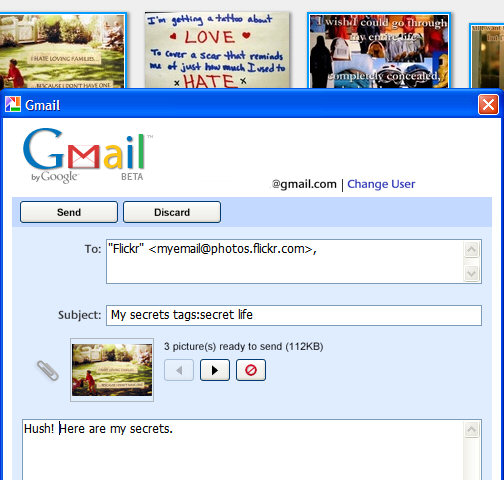
If you use Picasa to manage your photos, there is an easy way to upload some of them to Flickr. Picasa has "send photos by email", Flickr has "upload by email".

1. Go here, sign in to Flickr and copy the email address provided.
2. Open Picasa, select the pictures and click on the "Email" button from the bottom of the window.
3. In the subject type the title of the picture followed by the tags.
In the body, type the description of the photo.

Subject example:
Sunny Valley tags:trip july "lucy cradle"


As Picasa is integrated with Gmail, the best thing is to use the Gmail account. Next time you want to send photos, just type Flickr in the "To" field and the autocomplete function will help you find the email address where to send the pictures. Remember to keep it private.

This method has some limitations: if you send more than one photo, all the photos will have the same title, description and tags, so you'll have to edit them from the Web interface. Flickr says there's no limit for the number of photos sent by email, but don't send too many, especially if they are high-resolution photos.

{ Based on a post from Digital Media Minute. }

Related:
Picasa 2.5 review
Online image editor for Flickr

August 1, 2006

Picasa 2.5 Has Interesting Features


If you have the latest version of Picasa, namely Picasa 2.5 (available at picasa.google.com), you can find an interesting feature: search your photos by their color. You can type color:green, color:red and any other color from this list: blue, gray, yellow, orange, purple, pink, black and white (I know that black and white are not colors). It would be more useful if the photos were sorted by the predominance of the color, but you can sort them by date.

The filtering is applied as you type, so if you enter color:b, you'll see pictures that contain black spots and pictures that contain blue areas.

This type of search may be useful if you want to find a picture of someone wearing a red dress and the filenames aren't very descriptive.

Another new feature is showing duplicate files. Picasa shows only identical files, so you can delete the copies to save some space. As Picasa doesn't show the duplicate files one next to another, you can enter a keyword from their name in the search bar to show only one set of duplicates.


Picasa is integrated with Google Earth, so you can easily geotag photos (add geographical identification). Just navigate to the location depicted in the photo and press "Geotag". The photo will now have GPS latitude and longitude in the metadata. You can geotag more than one photo at a time. You can also export photos to Google Earth .kmz files, to share them with friends. Geotagging can make finding photos from a specific location an easy task.


Picasa also allows you to upload videos to Google Video. You don't have to visit the site or to use Google Video uploader. You can upload one video at a time.

All these features can be found in the Tools menu.

Related:
Picasa Web Albums
Preloard - online image editor
Use mobile phones for OCR