An unofficial blog that watches Google's attempts to move your operating system online since 2005. Not affiliated with Google.

Send your tips to gostips@gmail.com.
Showing posts with label Google Contacts. Show all posts

January 24, 2016

Import Contacts in the New Google Contacts

When the latest version of Google Contacts launched last year, many features were missing. It looks like one of these features is back: you can now import contacts without switching to the old UI.

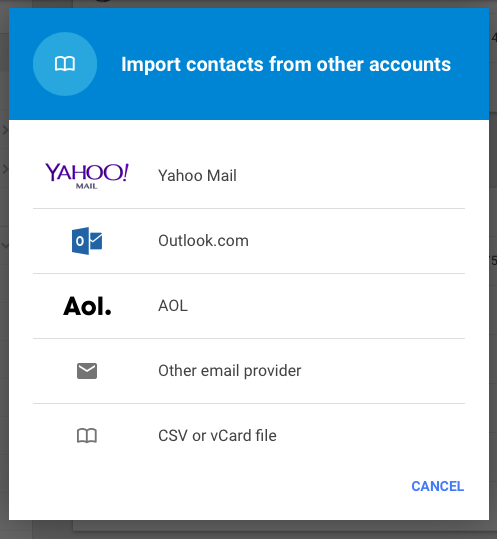
You can import contacts from Yahoo Mail, Outlook.com, AOL or from other email providers. If you want to import contacts from a CSV/vCard file, you'll still have to switch to the old interface.


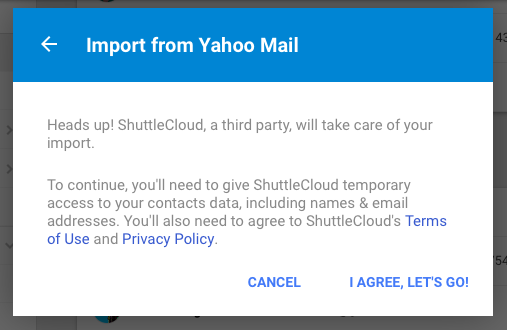
Google uses a third-party service called ShuttleCloud for importing contacts. "To continue, you'll need to give ShuttleCloud temporary access to your contacts data, including names and email addresses," informs Google.


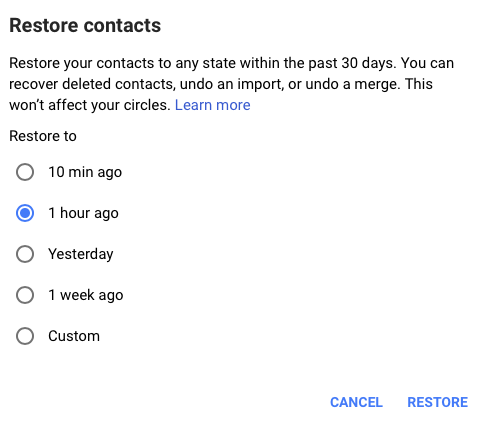
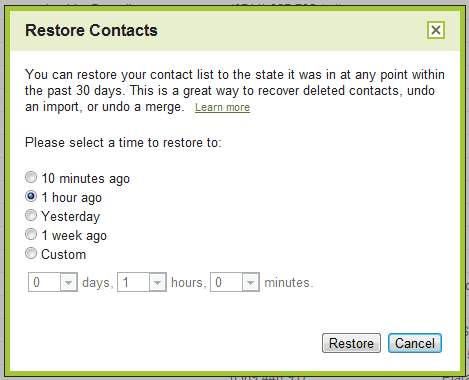
Another missing feature was restoring contacts. You can now "restore your contacts to any state within the past 30 days, recover deleted contacts, undo an import, or undo a merge."


Exporting contacts and printing contacts still require to go back to the old UI.

April 1, 2015

Google Contacts Preview and Gmail

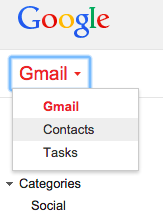
If you switched to the new Google Contacts interface and select Contacts from the Gmail dropdown, you'll no longer see the old Google Contacts. Google will open the Contacts preview in a new tab and not inside Gmail, which doesn't use Material Design yet.


You can switch back to the old Contacts by clicking "Leave the Contacts preview" in the "More" menu. Another option is to use this permalink for the old Google Contacts: https://mail.google.com/mail/#contacts or this keyboard shortcut: press g then c in Gmail (assuming that keyboard shortcuts are enabled).

March 4, 2015

Hide Google+ Circles in the New Google Contacts

If you're using the new Google Contacts UI, you probably noticed that Google shows both your contacts and the people from your Google+ circles in one place. The "all contacts" section now also shows Google+ contacts and there's no option to only show non-Google+ contacts.

Fortunately, there's a way to hide the people from your Google+ circles. Google+ has a feature called "your circles" which lets you select which circles you share with. For example, you can add the "Friends" and "Family" circles and quickly share your posts with your favorite circles without having to select them all the time.

"When you share posts, photos, profile data, and other things with 'Your circles,' you're sharing with all of your circles, except the ones you're just following (they're unchecked in this list)," explains Google.


The good news is that Google Contacts only includes the people from "your circles", so you can customize "your circles" and uncheck all of them. This way, the "all contacts" section will only include your contacts. The downside is that the "your circles" option from Google+ will no longer be useful, but you can always manually select your circles.

March 3, 2015

Google Tests New Contacts Interface

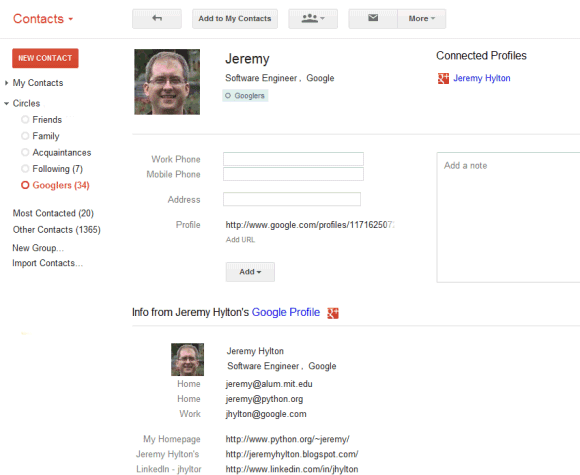
Google released a preview of the new Google Contacts interface. Powered by Material Design, the new Google Contacts improves some of the existing features: finding duplicates, Google Profile integration, while adding some new features: a list of recent messages, Hangouts sidebar, global search results from Google+. It also merges your contacts with your Google+ circles and no longer uses pagination.


"The new Google Contacts comes with a fresh look and feel, and conveniently pools together all your contacts, circles, and the people you talk to most in Gmail," informs Google. Starred contacts and frequently contacted people are placed at the top of the page, followed by your entire address book, which now includes your Google+ circles. You can customize "your circles" and exclude one or more Google+ circles.


Google Contacts now finds duplicates automatically and offers to merge all of them. You can dismiss some of the suggestions and better assess if they are actually duplicates.


When you click a contact, Google now opens a card overlay with a bigger picture and more information from the Google Profile page. Google also shows the most recent email conversations and meetings with that person.


The search feature now includes results from Google+. The first results are from your contact list ("personal results"), while the following results are from Google+ ("global results").


Some features aren't available yet in the new Google Contacts: importing/exporting contacts, restoring contacts, printing contacts, keyboard shortcuts. You can still find them in the old version of Google Contacts. For now, the new Google Contacts is not available for Google Apps users.

The new interface can be found at contacts.google.com/preview/all and it will be added to Gmail's contact manager over the next few weeks. You can also open Google Contacts and click "Try Contacts preview" in the left sidebar.

How to go back to the old interface? Expand the "more" section and click "Leave the Contacts preview".

{ Thanks, Daniel Sadavoy. }

June 15, 2014

Google Contacts Shortcut

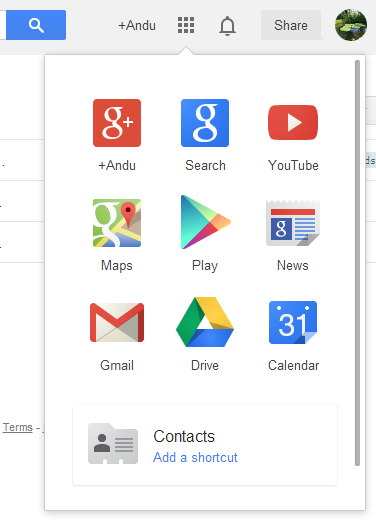
If you want to quickly open Gmail's address book, you can bookmark google.com/contacts or type the URL in the address bar. Another option is to add a shortcut to the standalone Google Contacts page in Google's app launcher:

1. go to google.com/contacts and sign in

2. click the app launcher icon

3. click "add a shortcut" next to the Contacts icon

4. you can move the icon using drag and drop


You can add similar shortcuts for other Google services: Google Keep, Google Sites, Google Groups, Google Play Music, Webmaster Tools, Patent Search, Google Voice.

January 15, 2014

Star Google Contacts

Google announced a new starring feature for contacts. Now you can star contacts and they'll be added to the Starred group.

"Just like how you can star important messages in your inbox, you can now star individuals in your Google Contacts list. (...) For those of you who use Android, your Starred contacts will stay in sync with your Android Favorites. Starring a contact on desktop will star that same person in your Android contacts, and vice-versa, so you can see and manage your contacts seamlessly wherever you may be."

Until now, Google used the "Starred in Android" group for favorite contacts, but this was more like a workaround. Now it's a native Gmail feature.


I don't see the new feature in the desktop Gmail interface, so this will probably be gradually added in the coming days.

{ Thanks, Matt Carney. }

December 5, 2013

The Old Google Contacts, No Longer Available

The old version of Google Contacts was available at www.google.com/contacts_v1, but now it redirects to the standard version. It was a much simpler site that worked better on a mobile phone or tablet and it had more accessibility features for screenreader users.


You can still use the basic HTML Google Contacts available at https://mail.google.com/mail/h/?v=cl.

{ Thanks, +Katty Geltmeyer. }

February 12, 2013

Mobile Google Contacts Alternative

For some reason, Google doesn't offer a mobile interface for Google Contacts. Sure, you can use the autocomplete feature from Gmail to find an email address or sync your contacts using CardDav or Exchange, but there's no mobile app for Google Contacts.

I've tried to use the standard desktop interface available at google.com/contacts, but it's slow and hard to use on a mobile phone. Fortunately, Google still offers the old version of the Google Contacts site at google.com/contacts_v1 and it works a lot better on a smartphone.


Update: There's another option - https://mail.google.com/mail/h/?v=cl (thanks, Alexandre).

February 13, 2012

Gmail's YouTube Group

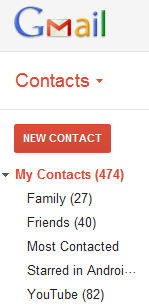
For some reason, Google added a YouTube contact group to many Gmail accounts. I currently have 82 contacts in the YouTube group and they have only one thing in common: they sent me or I sent them an email in 2006, 2007 or 2008. They don't have anything to do with YouTube and some of the email addresses couldn't be used to create Google accounts (for example, the Writely email address for importing documents).


The YouTube group can be renamed or deleted, but it's strange that it was automatically created. Gmail has some system groups for Google Latitude, Google Talk, Google Buzz, but they're hidden and can't be removed.

Do you see the YouTube group in your Gmail account?

{ Thanks, Katty and everyone who commented on Google+. }

December 8, 2011

Google Contacts Integrates With Google+

Gmail's contact manger started to include information from Google Profiles. You can also find your Google+ circles in the sidebar, below the list of groups.


By default, the data obtained from Google Profiles is displayed below the information you've entered, but you can combine them: go to a contact page, click the "More" dropdown and select "[Show external data] inline".

It's interesting to notice that the Google Profiles data is automatically added when you enter an email address associated with a profile. To remove this information, just delete the corresponding email address.

The latest features are also available at google.com/contacts, which has recently switched to the new Google Contacts interface, but you can find them in the old Gmail interface, as well.

{ Thanks, Scott, Filipe, Venkat, Yavuz, Shimmy, Zachary and Matt. }

July 30, 2011

Templates for Google Contacts

Gmail added a new feature that makes it easier to add a new contact: templates. If you click "More actions" when you create a contact or edit an existing one, you can select the business template to quickly add fields for the job title, company name, mobile phone and work phone.


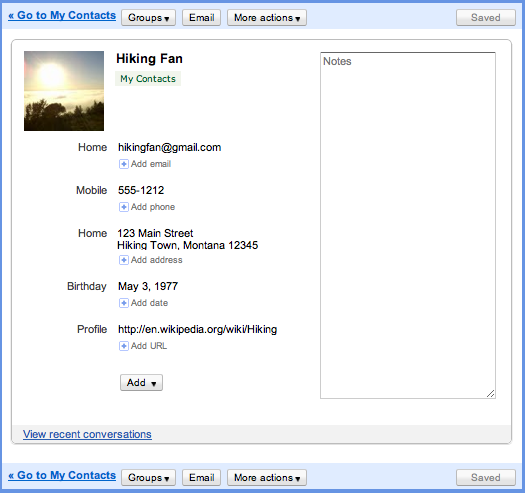
The default template is more generic:


Google Contacts lets you add or delete fields, but you can't delete the fields from a template. Hopefully, Google will allow users to create custom templates and import some of the data from Google Profiles.

{ Thanks, Herin. }

March 30, 2011

Future Gmail Option: Disable Auto-Adding Contacts

Google's video that introduces the new Gmail ads shows another option that's not yet available outside Google. In the near future you'll be able to disable a feature that's often useful and sometimes annoying: automatically creating contacts when you send a message.

At the moment, "email addresses are automatically added to your Contacts list each time you use the Reply, Reply to all, or Forward functions to send messages to addresses not previously stored in your Contacts list," according to Gmail's help center. Gmail also adds the email addresses used when you compose a message.

The new option will allow you to disable this feature, but Google's description is strange: "Create contacts (sets whether sending or receiving a message can create a new contact)." Right now, Gmail doesn't automatically create contacts when you receive new messages. You need to reply to the messages first.


Here's the video (you can fast forward to 1:14 min).


{ Thanks, François. }

December 17, 2010

Restore Google Contacts

One of the most annoying things about Google's contact manager is that it doesn't have a "trash" section. If you accidentally delete some of your contacts, it's impossible to retrieve them without a backup. This is a big problem if you use a buggy software that tries to sync your contacts, but manages to overwrite them.

Google tried to address this issue by adding a new option that lets you restore your contacts. You'll find it if you visit Google's contact manager and click on the "More actions" button. "You can restore your contact list to the state it was in at any point within the past 30 days. This is a great way to recover deleted contacts, undo an import, or undo a merge," explains Google.

While this is a very useful feature, Google's implementation doesn't help users who don't remember when they made a mistake. Google should have listed the most recent changes and allowed users to pick one of the revisions, like in Google Docs.


{ via Gmail blog }

November 9, 2010

Google Promotes Data Portability by Adding Restrictions to the Contacts API

Google found a strange way to show to the world that Facebook is a walled garden that traps your data: by blocking Facebook's access to the Google Contacts API. A Google spokesperson said that "users often aren't aware that once they have imported their contacts into sites like Facebook they are effectively trapped. We hope that reciprocity will be an important step towards creating a world of true data liberation—and that this move will encourage other websites to allow users to automate the export of their contacts as well."

Facebook users can still export their Gmail contacts and manually upload the file to Facebook, but Google Contacts API made this much easier. Facebook even found a direct URL that lets you export your contacts, so you don't have to visit Gmail.
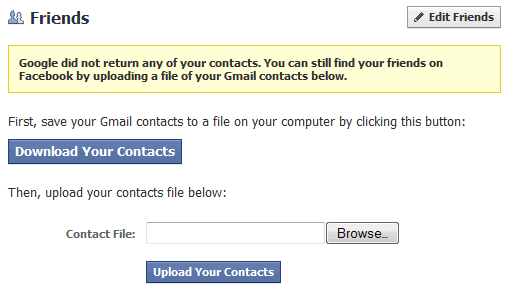

Google may have good intentions, but that's a terrible way to treat users. After all, it's their data and it should be their choice to use services like Facebook.

To show that Facebook is not the only target, Google Contacts API includes some new terms of use: "Google supports data portability. By accessing Content through the Contacts Data API or Portable Contacts API for use in your service or application, you are agreeing to enable your users to export their contacts data to other services or applications of their choice in a way that's substantially as fast and easy as exporting such data from Google Contacts, subject to applicable laws."

That's like trying to make the web faster by asking developers that use the Google Analytics tracking code to make their sites as fast as Google Analytics.

Update: Danny Sullivan quotes a Facebook engineer who says that "the most important principle for Facebook is that every person owns and controls her information. Each person owns her friends list, but not her friends' information. A person has no more right to mass export all of her friends' private email addresses than she does to mass export all of her friends' private photo albums".

But that's not always the case, since Facebook allows Yahoo and Microsoft to build services that import your Facebook friends, while Google can't get that data. Danny concludes that "Facebook simply doesn't want you to mass export them into Google — not unless, I suppose, it gets a business deal with Google. And if it doesn't want to do a deal, then those emails don't get to go. They aren't yours. They belong to Facebook, and can only be exported to the business partners that Facebook agrees with."

Update 2: Google redirects users that want to download their address book directly from Facebook to a page titled "Trap my data now":

"Hold on a second. Are you super sure you want to import your contact information for your friends into a service that won’t let you get it out? Here's the not-so-fine print. You have been directed to this page from a site that doesn't allow you to re-export your data to other services, essentially locking up your contact data about your friends. So once you import your data there, you won't be able to get it out. We think this is an important thing for you to know before you import your data there. Although we strongly disagree with this data protectionism, the choice is yours. Because, after all, you should have control over your data."

August 23, 2010

Upload Picasa People Photos to Google Contacts

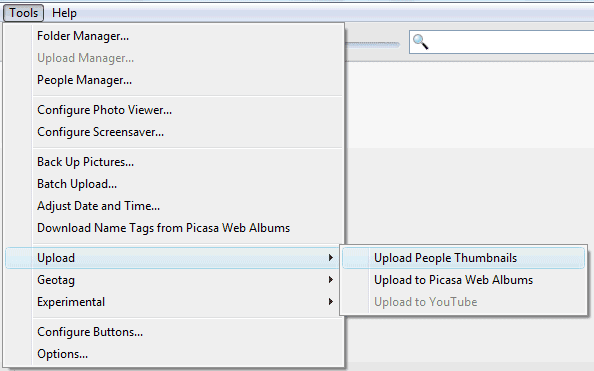
Picasa 3.8 makes it easier to upload pictures for your Google contacts. After scanning all the photos from your library and adding name tags to your photos, you can go to the Tools menu, select Upload and click on Upload People Thumbnails.


Picasa asks if "you want to upload and replace all the thumbnail photos from your People Albums to your Google Contacts". If you click on "Upload", Picasa saves the photos to Google Contacts and you can see them in Gmail or in any other application that synchronizes with Google Contacts (for example, Android's Contacts app or iPhone's Contacts app, if you use Google Sync).

If you don't want to upload photos for all your contacts, you can click on one of the people from Picasa's sidebar, right on a photo and select "Set as Google Contacts Thumbnail". You can also enable "Upload people album thumbnails to Google Contacts" from Tools/Options/Name Tags (or Picasa/Preferences/Name Tags on a Mac) to upload the new thumbnails you select in Picasa.

It's strange to see that Google didn't add this option to Picasa Web Albums and that the photos tagged in Picasa Web Albums aren't displayed in Google Contacts. Google could at least offer the option to pick one of the photos tagged in Picasa Web Albums when you add a picture to one of your contacts. Right now, you can only select a photo from your public albums.

August 16, 2010

Gmail's Hidden Groups

In a previous post, I mentioned a trick that lets you create a Gmail group for the people you follow in Google Buzz. The downside was that the group doesn't update when you follow other people in Google Buzz.

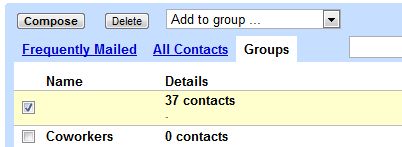
It turns out that Gmail already has a built-in group for Google Buzz contacts. The group doesn't have a name and it's not displayed in Gmail's new contact manager, but you can find it in the old version of Gmail: it's the only one without a name.


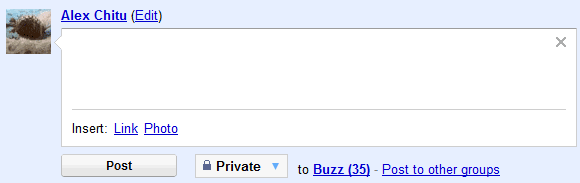
Since the group doesn't have a name and it's hidden in the interface, you can't use it to send email messages or to post private Buzz messages, but you can select all the contacts and add them to another group.


There's also a hidden group for Google Latitude friends, which includes the people that can see your location in Google Latitude.

Another group lists all your Gmail Chat/Google Talk friends. Some of these people were automatically added by Google if you didn't disable "Automatically allow people I communicate with often to chat with me and see when I'm online" in the settings.

For those who miss the "all contacts" group in the new contact manager, here's the built-in group that includes both the people you've manually added ("my contacts") and the people automatically added by Google ("other contacts").

August 15, 2010

Create a Google Buzz Group

Google's contact manager doesn't include built-in groups for Google Chat friends or for the people you follow in Google Buzz. Fortunately, you can easily create a group for the people you follow in Google Buzz using a clever trick found by Siegfried Hirsch:

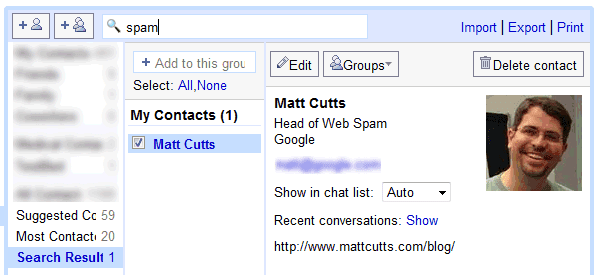
1. Go to Gmail's contact manager and search for http://www.google.com/profiles. Here's the URL for the search results.

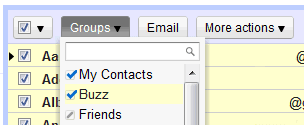
2. Select all the results, click on the "Groups" drop-down and then on the "Create new" option.

3. Create a new group called "Buzz".

This works because Google automatically adds each Google Buzz user you follow to your contacts list and also includes the address of the Google Profile. If you've manually removed Google Profile address or added Google Profile addresses to other contacts, the results won't accurately reflect your Google Buzz group. Obviously, the group won't update automatically when you follow/unfollow Google Buzz users.


Google could use a lot of information from other services to enrich Google Contacts: the photos you tag in Picasa Web Albums, information and links from Google Profiles, Google Latitude location, the most recent Google Buzz message, but that will probably happen when Google Me is released.

August 10, 2010

Gmail's Streamlined Interface and Better Contact Manager

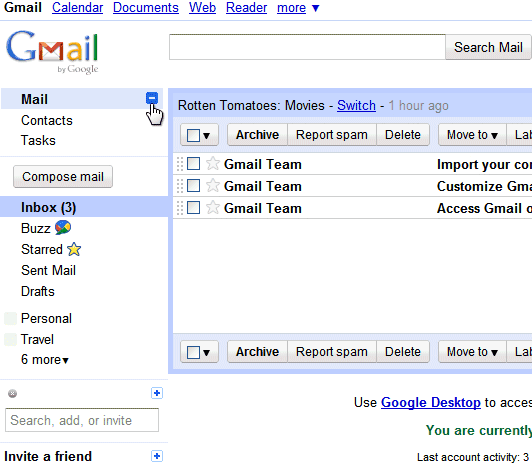
Google launched a slightly refreshed Gmail UI that hides unessential features and uses more screen estate to display your messages. Gmail's logo is smaller, the links to mail, contacts and contacts are grouped in a collapsible panel, while the options that let you select all messages, starred or unread messages are available in a drop-down.

"Overall, there's now a smaller header area that puts the first message in your inbox about 16 pixels higher on the screen than before," explains Google.


Gmail's contacts section has also been redesigned to better integrate with Gmail. The updated interface supports keyboard shortcuts, saves the changes automatically, adds structured name fields and lets you sort contacts by last name. The notes field is now really big, but I don't think it deserves so much attention.


These features will be rolled out today to all Gmail accounts. The new Gmail contact manager won't be available in Google Apps right now, but it will be released in the near future.

{ Thanks, Sterling. }

May 13, 2009

New Fields in Google Contacts

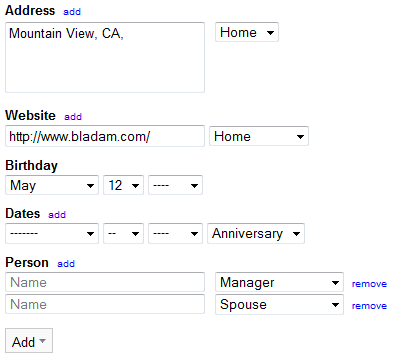
Google Contacts, which is now available at google.com/contacts, has some new fields: website, birthday, date (anniversary), related person (spouse, domestic partners, assistant) and even custom fields. Just click on the "add" button to see some of the other fields that can be used.

For some reason, I can see the changes in the standalone version of Google Contacts, but not yet in Gmail. The most obvious missing feature is the option to create events for birthdays in Google Calendar, but it will probably be added soon.


After years without significant updates, Google's contact manager has been constantly updated in the past year (better contact search, the option to merge duplicate entries, an API, sync options), but there's a lot of room for improvement. What's on your wishlist?

{ Thanks, Kevin. }

February 11, 2009

Better Search in Google Contacts

One of the most significant limitation of Google's contact manager was that most of the contact fields weren't searchable. This problem has been addressed and you can now search for any information included, from titles and companies, to locations and phone numbers.

"We've heard you loud and clear, and contact search now works much better: instead of just searching contact names and email addresses, it now includes phone numbers, notes fields, and mailing addresses as well. So, if you're visiting the Bay Area and looking for friends to catch up with, you could try typing "650" or "415" in the contact manager search box," suggests Gmail's blog.


Gmail should also include an advanced search option for contacts, so you can find more precisely the contacts that work for a certain company or the people who sent you more than 3 messages in the past month. Some of these searches could be saved and used to create dynamic groups.