An unofficial blog that watches Google's attempts to move your operating system online since 2005. Not affiliated with Google.

Send your tips to gostips@gmail.com.

July 8, 2007

Improving Google's Social Network

Google already has a social network (orkut), but it's only popular in Brazil and India, it doesn't have a Googley interface and it had a lot of security problems in the past. That's why last year Google sponsored a project at the Carnegie Mellon University's Human-Computer Interaction Institute whose initial goal was to "rethink and reinvent online social networking".


"Directed to help improve the online community orkut, the project's scope was not to simply redesign the interface. Our team considered how online social networking could bring greater value to users, especially for ages above twenty. After initial brainstorming and research, we chose to focus on the effects of a new model for online social networking: a unified social network that, as a service, provides social data to many other applications."

The network, titled Socialstream, is able to "draw content from a variety of sources. Socialstream would be based on a unified social network (USN), a single network that provides social data to other sites as a service. A service model allows many social networks to be linked together, letting them share both content and the nature of the relationships of the people who use them."

This core feature will allow you to have accounts on more social networks, but centralize the information about your contacts in a single place. This also assumes that other social networks have an API and don't act like walled gardens, which is not the case right now. Socialstream used data from blogging and photo-sharing sites like Blogger, Flickr and Picasa Web Albums.

"Socialstream emphasizes improving social connections by making it more efficient to communicate with, share with, and view the social content of all the people in a user's online social network. Socialstream provides a compelling user experience because it aggregates content across many different networks so a user has a single location to discover new content and communicate. The goal of Socialstream is to present social information in a way that ties it to the person who posted the information, and not the site from which it came."

Like with any feed reader, you'll be informed when there's new data for a contact. The site also includes a Google Talk-like sidebar with all your contacts. "The contact list is a structured method of viewing updates, so if a user is interested in a particular person they can navigate directly."

When you create new content, you can post it to Socialstream or to any other participating social network. "Socialstream lowers barriers to sharing with different levels of sharing. Posts can be marked as favorites, and users can read their friends' favorites as a way to keep up with them. 'Post about' supports the idea of post conversations and trackbacks. Posts can also be sent directly to a contact or commented on."


It will be interesting to see if this project ever becomes orkut 2.0, a unified social network that makes it easy for people to keep in touch, no matter if they use Blogger, Wordpress, LiveJournal, Twitter, Flickr, Picasa Web, YouTube, MySpace, Friendster, Facebook, Bebo or other social network.

July 7, 2007

Interclue - Clever Link Previews

Interclue is a Firefox extension that adds more information about a link when you hover over it. It's not that annoying as the famous Snap tooltip and it certainly provides much more information about the page. As you can see in the screenshot above, you need to hover over a link, and then over the site's favicon that appears next to the link. Interclue shows a preview of the page that includes most of the actual content, a thumbnail, information about the last update, the number of words, links, images, a tag cloud with the most popular del.icio.us tags. But the most impressive thing is that all this data loads almost instantly and it's actually useful, especially when you want to judge the quality of a search result (including if it returns a server error). The preview window can be resized and dragged around, but it disappears when you move your mouse unless you lock it.


When the link points to a file (for example, a PDF), Interclue shows its file size and the last modified date, as reported by the web server. This is useful if you don't have a fast Internet connection and you don't want to wait for an hour to download Adam Bosworth's speech about health. Fortunately, the file is quite small.


The previews are pretty clever: for example, the preview for a link to a YouTube video shows the actual video. The extension "tries to avoid doing any look-ahead operations on [links that produce side-effects] by avoiding links with certain keywords in their text and link (such as 'logout', 'delete', 'remove' and so on), and also by turning off Linkclues for internal links on secure sites, which are typically used for banking, ordering goods and services".

You'll find a lot of things you can change in the settings and also the options to disable the previews for certain domains. Overall, the extension takes a great concept from Cooliris and transforms into a brilliant tool.

Google File Search

Web pages are useful, but if you've ever wanted to find a specific file on the web, you noticed it's not very easy. Fortunately, search engines like Google could be used for this tricky task.

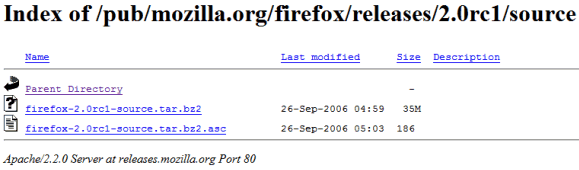
Sometimes people create a web site, put some files in a directory, but forget to add an index file. So they end up with an unprotected directory that lists all of its files and subdirectories, when directly accessed from a browser. If someone links to the directory or submits it to Google, it becomes available to anyone who performs a search.

Because these directory listings are built using similar templates (depending on the web server), you can add to your query the most distinctive traits:

* The title starts with "index of" -> add to the Google query: intitle:"index of"

* They typically contain these words: "parent directory", name, "last modified", size, description -> you can add to your query "parent directory", for example

* Since most sites use Apache servers, you could also add Apache, that appears in the footer of a listing for Apache web servers


To find the page from the screenshot, you could use a query like:
intitle:"index of" firefox 2.0 rc1 source

Of course, you could use this idea to find any kind of file from a PDF e-book to an MP3 podcast or song. Some of the files are shared by breaking a copyright law, so you must you use your judgment before downloading them.

But finding files using this technique is too complicated, you'll say. First you have to enter a very complicated query, then visit all these strange-looking web pages and perform a new search in the current page to actually find the file. Then there are so many dead links and disingenuous webmasters that try to trick you with fake pages.

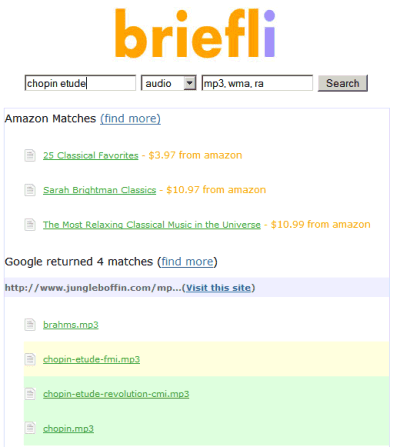
Some people with too much time on their hands built web apps that make it easy to search for files using Google. Briefli builds the query internally, loads the first results from Google and displays the links to the files on the same page. Moreover, the files that actually match your query are highlighted. To play the MP3s inline, you could add the del.icio.us bookmarklet to your browser and for Office files and PDFs, use Docufarm.


A site optimized for finding and playing MP3 files is mp3Salad. It lets you play all the MP3 files from a directory using a simple Flash player and even export the entire listing as a playlist.

The avalanche of file hosting sites brought a new to search for files: restrict the search results to one or more of these sites. Some examples of popular file hosting sites: esnips.com or megaupload.com. This custom search engine lets you restrict the search to 127 file hosting sites.

And then there are BitTorrent sites. Because they're so many, this custom search engine is useful to search across the most popular ones.

Google actually indexes some of these files, mostly Office documents, PDF files, text files. You can restrict a Google search to a file type by using the filetype: operator in your query (examples: bash linux filetype:pdf restrict the search for [bash linux] to PDF files). This way you can search inside these files and not only in a listing of filenames.

For files residing on your hard disk, a desktop search engine like Google Desktop (Windows/Mac/Linux), Windows Vista's search, Mac's Spotlight are great and should be used before searching on the web.

Maybe one day Google will come up with a nice file search engine that indexes unprotected directories, FTP servers, file hosting sites, torrent sites. But probably the legal challenges outweigh the advantages of a such a search engine (Yahoo has a music search engine, but only for China).

July 6, 2007

Guide for Migrating to Google Apps

Scott Hanselman has a "definitive guide" that will help you migrate from your existing mail solutions to Google Apps (Premier Edition). He moved his entire family (wife, parents, brothers, cousins, in-laws) to Google Apps, and there wasn't a single solution for everyone. Scott had to buy a software to migrate Microsoft Outlook calendars, email and contacts, and create AIM Mail accounts to move local archives to AIM's IMAP folders that can be imported using Gmail's migration tools (a feature of the Premier Edition of Google Apps).

The guide also offers a hack that lets you transfer your email from one Gmail account to another Gmail account (it should work for normal Gmail accounts too):
The solution is two-fold. First, in the original Gmail account, make sure you've enabled POP Email in Settings|Forwarding and POP and selected Enable POP for ALL MAIL.

Then, logout, and login to your destination account in Google for Apps and from Add an Email Account, enter in the Gmail username and the POP Server as 66.249.93.109. Also, note the non-standard port 995. Don't select "Leave a copy" because Gmail won't let you anyway. However, don't worry, your emails won't be deleted in the source.

The conclusion is that Google still doesn't offer enough tools to make the migration painless and without buying/using third-party solutions.

Google Code Search Updates

Google Code Search received a small update: Google indexes snippets from web pages and individual code files, not only repositories and source code archives. You can also submit links to archives, CVS or Subversion repositories to be included in Google's index.

The ranking algorithms now favor class and function definitions.


A good alternative to Google Code Search is Krugle (read about its history), which has a less comprehensive index and doesn't support regular expressions for queries, but compensates with a great AJAX interface, tabs that allow you to open more search results in the same page, syntax highlighting and an easy way to browse within a project directory. Krugle also has a search engine for tech articles, documentations and books and it powers SourceForge's search engine. One thing I especially like about Krugle is you can search on specific code features such as function calls, function definitions, class definitions and comments.

Another popular search engine for code is Koders, which offers very good enterprise solutions, like integration with IDEs and version control systems. The index is less comprehensive than for Krugle and Google Code Search, and it returns worse results than the other search engines, but, according to Alexa, Koders is more popular than Krugle.

It would be nice to have a source code search engine that has Google's index and powerful queries, combined with Krugle's elegant interface and its attention to details and the business-oriented features from Koders.


Visual Overview of a Wikipedia Article

WikiMindMap lets you visualize an Wikipedia article as a series of links to other articles. All the text is compressed to a list of keywords. For example, this Wikipedia page for Gmail...


...becomes this mind map...


According to Wikipedia, a mind map is "a diagram used to represent words, ideas, tasks or other items linked to and arranged radially around a central key word or idea. It is used to generate, visualize, structure and classify ideas, and as an aid in study, organization, problem solving, and decision making."

This tool is a good way to visualize a complex Wikipedia article, become familiar with the most important concepts and explore related topics.

Encyclopedic Google

After Google introduced the universal search and Ask.com launched a unified interface, many people wondered if the time of the ten blue links has passed. Google was actually more conservative than Ask.com and didn't alter the search results pages too much: not many queries return image results, videos, news, maps or books.

If you want more diversity in your search results, this Greasemonkey script replaces Google's ads with results from Image Search, Google Video, Wikipedia articles and definitions from Dictionary.com. There's no clever algorithm for the order of the panels, so you'll see them for every query that returns results.


It's up to you to decide if the slower-loading multimedia results are more useful than Google's sponsored links. An interesting idea for this script would be to take into account Google's recommendations for specialized search engines (for "Lars von Trier" Google recommends to try Google News). To install the script, you need Firefox and Greasemonkey.

July 5, 2007

AutoFilter for Google Spreadsheets

Spreadsheet applications have a feature that lets you filter the data from a sheet. AutoFilter displays only the rows that meet a criteria that you specify and hides the rest of the rows.

Google Spreadsheets doesn't have AutoFilter yet, but a Google intern built one using the API. You can view your own spreadsheets, but you must make them public before.

Besides restricting the rows to the ones that contain specific values, you can create custom filters by defining your own boolean expressions. It even works with natural language expressions like "value is 5 or value is greater than 10" or regular expressions like 12/*/2007 (any date from December 2007).

"The API gave me access to practically all my spreadsheet data, so I had the flexibility to do whatever I had in mind. Within a few hours, I had a pretty powerful little application that could filter using easy dropdowns on each column. But I wasn't done -- I wanted more control over filtering. I added an expression parser that understands fuzzy filters -- things like contains North or New -- just as well as it understands more precise (but intimidating) traditional expressions," explains Alex Komoroske, the author of the app.

Zoho vs Google Docs


While Google still works on completing its online office suite by adding a presentation app and integrating JotSpot, an Indian company called AdventNet already has one and it includes everything from word processing, spreadsheets, presentations, notebooks to wikis, online databases, project management. It's called Zoho and it keeps getting better every day.


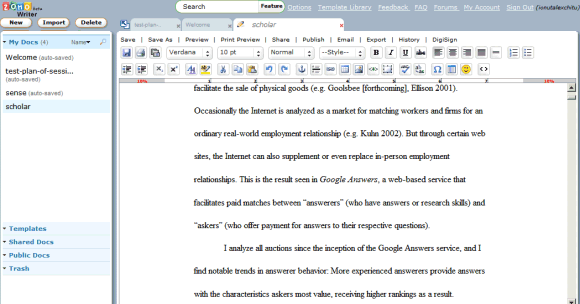
Zoho opted for a more familiar look, so most of their products are inspired from Microsoft Office. Unlike Google Docs & Spreadsheets that has a start page which lists all your files, Zoho uses a sidebar that shows the files created using the active application. Zoho's word processor has a tabbed interface, so you never have to leave the current page to switch to a new document. While many options work like in Google Docs, Zoho pushes the boundaries and lets you save templates and even share them in a public template library. It's also able to import bigger files than Google Docs: I managed to upload a 2.8 MB document and I couldn't find a precise number for the maximum size of a document. Unfortunately, the application is barely responsive when you edit a big document.

Zoho Writer lets you publicize a document, post it to a blog or collaborate with your contacts. But collaboration is Zoho Writer's weakest point because it doesn't happen in real-time and you don't see the changes made by your collaborators unless you refresh the page and that's not very cool.


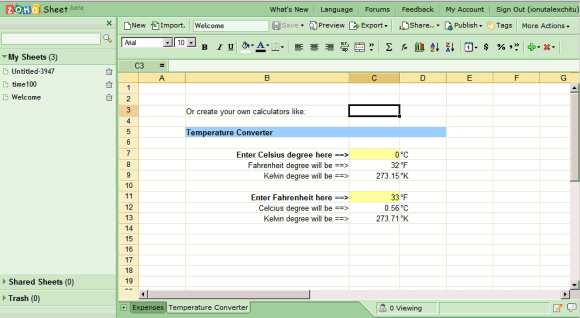
The integration between Zoho's apps is not very visible, so if you want to switch from Zoho Writer to Zoho Sheet, you'll have to type the URL in the address bar or use your bookmarks. Zoho Sheet doesn't have tabs, but it's much buggier than Zoho Writer. A simple spreadsheet that loaded just fine in Google Spreadsheets managed to make my browser completely unresponsive for minutes. I particularly like the way they handled formulas and how easy is to add new functions from the list. In Zoho Sheet, the collaboration is in real-time, but Zoho has a strange of handling conflicts that manages to produce different spreadsheets for each collaborator. And some of the copies are really broken.

The funny thing about Zoho Show, the presentation app from Zoho's suite, is that when you import a presentation, it recommends to make it read-only. In this case, this would be just a PPT viewer, like the one available in Gmail. Once you import your presentation, there's a magical link at the top of the window that lets you actually view, but you'll have to guess it. The application is very simple and doesn't go beyond inserting some text, shapes and arrows. The rendering of the presentation is worse than Gmail's and the slide show looks even worse.


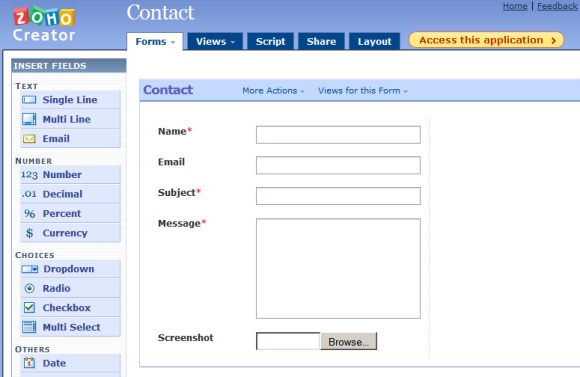
Zoho Creator is something that Google doesn't have and it actually works great. It's the online version of Microsoft Access and it lets you create and manage database applications. The nice thing about the app is that you can easily build forms that can be embedded in your site and populate your database. You can create contact forms or more complex things like a CRM application. There's a big list of templates, a simple way to build scripts for your forms, you have email notifications. The application only needs better reports, some SQL support and an API.

Speaking of which, Zoho has some APIs that enable other services to list your files hosted at Zoso, to import/export files and also to edit remote documents. There's nothing like Google Spreadsheets API that lets you interact with a spreadsheet more granularly, but Zoho's purpose was probably to make it easy to integrate with storage services that lack document editing features.

While Google Docs lacks many features already available in Zoho's office suite (and even entire apps) and the existing features are more limited, Google's applications are much more stable and work better if you share your files with other people. Zoho offers a lot of tools, including a plugin for Microsoft Office that lets you work on your files online and saves them to Zoho from Microsoft Word and Excel. Their integration with Microsoft products and the impressive size of the portfolio certainly makes Zoho a candidate for a Microsoft acquisition.

Zoho's future plans are to integrate their products and to provide a proper replacement for Microsoft Outlook: email, calendar, contacts and task management. Zoho Mail is not yet ready for prime time, but you can see a demo here.

Inside Google Earth

RealityPrime has an article about the technology behind Google Earth. The author is Avi Bar-Ze'ev, co-founder of Keyhole, the company that built Earthviewer, later renamed as Google Earth. This is only the first part of the article that deals with how the 3D Earth is drawn on your screen and, even if it requires some knowledge about 3D computer graphics, it's an interesting read nonetheless.
There are two principal differences between Google Maps and Earth that inform how things should ideally work under the hood. The first is the difference between fixed-view (often top-down) 2D & free-perspective 3D rendering. The second is between real-time and pre-rendered graphics. These two distinctions are fading away as the products improve and converge. But they highlight important differences, even today.

What both have in common is that they begin with traditional digital photography — lots of it — basically one giant high-resolution (or multi-resolution) picture of the Earth. How they differ is largely in how they render that data.