An unofficial blog that watches Google's attempts to move your operating system online since 2005. Not affiliated with Google.

Send your tips to gostips@gmail.com.

June 25, 2014

Gmail API

Gmail has a new API that allows developers to create apps that read or send messages. "The Gmail API gives you flexible, RESTful access to the user's inbox, with a natural interface to Threads, Messages, Labels, Drafts, and History. From the modern language of your choice, your app can use the API to add Gmail features like: read messages from Gmail, send email messages, modify the labels applied to messages and threads, search for specific messages and threads."

It's an alternative to IMAP, but it's more limited than IMAP, so it can't be used to create an email client. It's best suited for apps that send email programmatically, apps that index email, apps that monitor your inbox or any other Gmail label. It was created for services like Boomerang that schedule email to be sent later, mail checker extensions like Checker Plus for Gmail or CRM services like Insightly. The new Gmail API is faster than IMAP when retrieving a thread or performing a search, it provides fine-grained permissions and it lets you query change history to keep mail in sync.


Android Everywhere

In a few years, Android has become the dominant mobile OS. Still, Google has a lot of challenges ahead. Android is very popular when it comes to mobile phones, has started to become popular in the tablet space and that's about it. Google TV failed, the home automation project wasn't successful and Google bought Nest, wearables are still new, cars are uncharted territory.

Google's challenge was to replicate Android's success and make Android the OS that powers all of your smart devices. To do this, Google had to come up with a new design language that works well on any Android device from a smart watch to a smart TV. It's called Material Design and it's inspired by paper and ink, by surfaces and their tactile attributes, by light and movement. Material Design is Google's unified design language for mobile apps and web apps, so it's not limited to the next Android release.

"A single underlying design system organizes interaction and space. Each device reflects a different view of the same underlying system. Each view is tailored to the size and interaction appropriate for that device. Colors. iconography, hierarchy, and spatial relationship remain constant."


The next version of Android is only available as a developer preview called "Android L". Google will reveal the name when Android L will be released in a few months. So what's new in Android L? ART, the new Android runtime that brings improved performance, 64-bit support, better battery life (Project Volta) and a new battery saver mode, Bluetooth 4.1 support, Android Extension Pack with support for desktop-level graphics performance, lockscreen notifications, do not disturb, enterprise features based on Samsung Knox, color space correction and a lot more.


Android Wear has a SDK and it powers the first 3 Android smart watches: LG G Watch and Samsung Gear Live (available today on Google Play) and Moto 360. Android Wear uses a simple card-based interface, it integrates with other Android devices and allows you to see your notifications and to interact with the apps from another Android device (for example, play music on your phone). If you dismiss a notification on your watch, it will also be dismissed on your phone.


Android Auto allows you to integrate your Android phone with your car. "Android Auto was designed with safety in mind. With a simple and intuitive interface, integrated steering wheel controls, and powerful new voice actions, it's designed to minimize distraction so you can stay focused on the road." Connect your phone to your car and use the custom-tailored interfaces for apps like Google Maps, Play Music, Google Search and more.


Android Auto is coming later this year for new cars from automakers like Ford, Fiat, Honda, Mazda, Volkswagen, Audi, Renault, Opel, Chevrolet and more.

Android TV lets you run Android apps on your TV. It supports Google Cast, so it includes Chromecast functionality. Android TV should power smart TVs and set top boxes, just like Google TV. So what's different this time? Chromecast brought content providers on board, Android TV is easier to use and optimized for entertainment devices, not for computing devices.


In an interesting twist, Chromebooks will be able to run Android apps and integrate with Android devices. This addresses the lack of native apps for Chrome OS and brings the Google Play ecosystem to the desktop. I'm sure that this feature will also be added to Chrome for Windows, Mac and Linux.


Android has a huge user base: 1 billion active users. It makes sense for these users to buy products that work well with their existing devices. Unfortunately, cars and TVs are replaced less often than phones and tablets, their software is rarely updated and there are so many models that it's hard to test apps and provide a great experience. Disruptive products like Chromecast are better because they're cheaper, easier to update and improve.
Google Tests Site Info Cards for Mobile

Google Mobile Search experiments with adding the site info feature that shows information about sites from Wikipedia and the Open Directory. Google shows a three dot icon next to the snippet. Tap the icon and you can learn more about a site.


I used Chrome's mobile emulation feature and the cookie values from here to take these screenshots. For some reason, the experimental feature works only if you are not signed in to a Google account.

{ Thanks, Rubén. }

Google Domains

Google has a lot of services that help small businesses: from Google Apps to AdWords, Google Maps, Google+ and Google Analytics. When you get started with Google Apps, you need enter your domain address and you can either use an existing domain or buy a new one from a Google partner like GoDaddy or eNom.

Now Google tests a new service that allows you to buy domains directly from Google and manage your domains. For now, Google Domains is invite-only and you can request an invitation here.


"Every domain includes easy forwarding, branded email (you@your_company.com), simple management tools and other helpful features. Whether you're a rookie or a veteran, our website building providers offer everything you'll need to easily create a beautiful website. This is an optional service offered by Shopify, Squarespace, Weebly and Wix."

You don't have to pay extra for private registration, you can create up to 100 email aliases with your domain and have them forwarded to existing email accounts, you can forward your domain to a different domain, create up to 100 sub-domains, quickly integrate with Google Apps and Google App Engine, use domain endings like .guru and .photography and get phone and email support.

"Google Domains isn't fully-featured yet, but we're giving a small group of people the ability to buy and transfer domains through it and send feedback on their experience. (You currently need an invitation code to do so, sorry!) We want input on all the ways we can help make finding, buying, transferring and managing a domain a simple and transparent experience. We also want to make sure our customer support and infrastructure works flawlessly, and that we have the right additional services (like mobile website creation tools and hosting services from a range of providers, as well as domain management support)," informs Google.

{ Thanks, Herin. }

Huge Titles in Google Mobile Search

Google's mobile search interface has a new feature that makes titles bigger for search results that have sitelinks. For example, when searching for [amazon prime], the title of the top result is so big that it can't even be fully displayed, even if it doesn't have so many characters: "Amazon.com: Amazon Prime (One Year Membership)".


Here's the same search result, but for a slightly different query: [amazon prime membership].


I tested this for various navigational searches like [microsoft], [htc], [tesla], [stanford] in Google Search for Android, Chrome for Android and iOS and Safari for iOS.

{ Thanks, Lee. }

Tables in Google Knowledge Graph Cards

Google's Knowledge Graph cards sometimes include tables extracted from web pages. For example, when searching for [fl food stamp number], Google shows the phone number of the Supplemental Nutrition Assistance Program office from Florida. Google mentions that the page has "53 more rows and 2 more columns".


Here's the page used by Google to find the phone number:


Google also shows table snippets for regular search results and has an experimental table search engine.

June 20, 2014

Delete Google Drive Files From the Editor

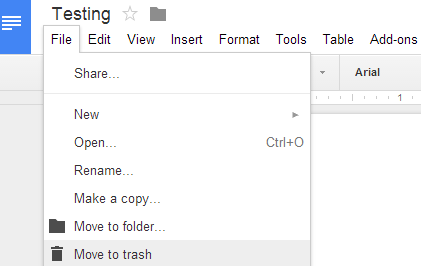
You can now delete Google Drive files without leaving the editor. Open a document, spreadsheet, form, presentation or drawing, go to the File menu and click "Move to trash".


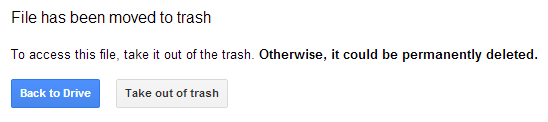
You'll see this dialog: "File has been moved to trash.  To access this file, take it out of the trash. Otherwise, it could be permanently deleted." Click "Back to Drive" to go back to the list of files or click "Take out of trash" to cancel file deletion. I think it would make more sense to automatically go back to the Google Drive list and to display a small message like: "Your document has been moved to trash. Undo," just like in Gmail.


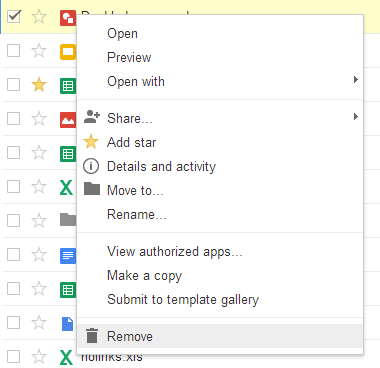
Google doesn't use consistent terminology. While the document editor uses "Move to trash" and "Move to folder", the file manager uses "Remove" and "Move to".


{ via +Google Drive }

June 18, 2014

Hangouts Integration in Google Search

Some of the phone numbers from Google's Knowledge Graph cards are now linked and open Google Hangouts. When you search for a local business, Google usually displays the phone number next to the address. Click the phone number and you can call directly from your browser using Google Hangouts, which opens in a pop-up window and informs you about the fees. Calls made to the U.S. and Canada are free.


For searches like [john radcliffe hospital phone number], Google shows a separate card that includes the phone number.


It's interesting to notice that not all phone numbers are clickable. Phone numbers from local search results or from ads don't have links. Another exception: customer service numbers.


{ via Search Engine Roundtable }

Chromecast Support for YouTube Live Streams

Chromecast is now even more useful: you can watch YouTube's live streams. This should work in YouTube's mobile apps and in Chrome for Android.

Here's a screenshot from YouTube's app for Android:


"With Chromecast available in 18 countries and YouTube live streams happening on the regular, we wanted to share one of our favorite ways to use Chromecast. Head to one of the live streams in the YouTube app, just press the cast button, then kick back and enjoy these live events from the comfort of your living room," informs Google.

Here are some live streams you can watch:

* ASP World Tour (surfing)
* Adidas Dugout live from Rio (football / soccer)
* Birds, puppies, cats and more streaming live @ The Pet Collective
* other live streams

Apparently, "YouTube Live streams cannot be viewed from Germany." Here's an explanation: "because of the German law (RStV), you must have a broadcast licence from the media authorities when you make a live stream that can reach more than 500 people at the same time. Not getting one would result in a fine of up to 500000€. "

June 17, 2014

Camera Search Links in Google+ Photos

Last year, I mentioned that you can search by camera in Google+ Photos. I tried searches like #canon, #iphone5s and they worked. Since then, Google added some search links to the photo viewer. When you open one of your photos, some of the EXIF values are linked: camera, camera make and lens.

Search for #canon and Google shows your photos taken with a Canon camera, as well as the photos from your circles. Search for #35mm and you'll get the photos taken with cameras that have 35mm lens.


The "date taken" value is also linked, but it doesn't send you to a list of search results. Instead, you can edit the date and change the time zone: