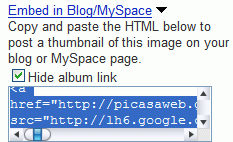
You'll notice a link similar to this one:
http://lh6.google.com/image/[username]/[id1]/[id2]/[id3]/s288/name.jpg
Google resizes your photo to 288 pixels width. But that's pretty small, I hear you saying. The nice thing is that you can change the width, but only to fixed values. Here's a list of numbers you can use to replace 288:
72, 144, 200, 320, 400, 512, 576, 640, 720, 800, 912, 1024, 1152, 1280, 1440, 1600.
If you want to place a direct link to a photo, you can use 1600, as this seems to be the biggest value.

Sorry I disagree. Picasa Web Albums is NOT "the best way to view a photo album online". Flickr is MUCH better than PWA and Flickr does everything you mentioned in this article AND more.
ReplyDeleteI am a big Google fan and I am not normally one to diss their products but I get the feeling that these days, they are doing more "catching up" with rivals than they are actually inventing something. PWA is a case in point. Flickr comes out and then Google rushes out PWA to compete. PWA needs a lot of work done to it but instead of delaying its launch to work on it some more, Google just slaps a "beta" label on it and gets it out there so they can claim to have a Flickr alternative!
I don't see PWA as a Flickr competitor, at least for now. Picasa Web Albums is mostly a way to share photos with your friends and family. There's no way to search public albums, find popular photos.
ReplyDeleteStrictly for albums, PWA is much much better. It's easy to go to the next photo or the previous photo by using a keyboard shortcut (arrows), it's easy to zoom on the same page (to see a larger photo, you need to go to different page in Flickr), you can download an entire album. Not to mention directly uploading photos from Picasa.
agree with alex..
ReplyDeletePicasa web is much better and easier than flickr... Even i had signed up @ Flickr when it was launched.. bu never used it.
So PWA has finally allowed image hotlinking ! This is going to be a reason to upgrade !
ReplyDeleteFlickr's community is the best so far in my opinion, but the new Y! Photos has unlimited storage and b/w.
I don't see PWA as a Flickr competitor,... - true, but I see PWA as a competitor for !Y Photos.
Moreover Flick'r capability to receive photos from mobile phones directly is a major advantage. I was hoping for YouTube to add a feature by which we would be able to stream mobile videos directly to YouTube - this way we can keep recording even if we have a 1GB MMC buffer space.
About the embedding... I've got problems with that. I tried to embed album from PWA to my Blogger blog but it seems to be malformed. The photo is misplaced with the frame. Does anybody have the same problem? My blog is osm8sis.blogspot.com.
ReplyDelete512 and 912 missing. :D
ReplyDeleteThanks, Haochi. I updated the list.
ReplyDeleteYou can get an original image by this url.
ReplyDeletehttp://lh6.google.com/image/[username]/[id1]/[id2]/[id3]/name.jpg
I dislike the fact that [username] is part of the link. That exposes to spammers what is typically a gmail account.
ReplyDeleteAnyone know of a way keep my username out of that link? Or remove it, as my gmail account name is currently exposed by going to picasaweb.google.com/[username], and anyone with a little programming could find an awful lot of account names that way.
You can change the username. Go to settings / Public Gallery URL / Change your URL.
ReplyDeleteI've been using this feature for a very long time. I don't know why this comes as a NEW feature to you and others here. I'm from Singapore though.
ReplyDeleteI tried and failed.
ReplyDeleteIt works only when I already have readed this pic in my catch;
or, I what I can see is only a [X]
144:


ReplyDelete200:
See? It works.
hmm, it does work, but only allow small-sizes-ones?
ReplyDelete(My pic is 800*600 and I try to post with /s640/ or /s512/ but...)
or, if it failure when there is a "." in my account (for example: King.Anderson)?
thank you
512x258 (resized from 656x330):

ReplyDeleteonly s288 works in references URLs. as direct URL typed in web-browser all 144x work well.
ReplyDeleteJust as a not the url won't always start lh6 it can have any other number too.
ReplyDeleteI found out that once a photo is uploaded onto PWA, it will never be deleted from server hard drive. When I deleted it from web album, it just disappeared from web album, but the URL to it still works. So funny and rediculus
ReplyDeleteThanks so much for pointing this out! I was frustrated by the lack of sizes until I read this. (I even tried 700 on a whim, and it didn't work.)
ReplyDeleteAndrew
I am so confused! I really like Picasa because you can download your pictures from facebook. However, getting the slideshow to work with blogger is like pulling teeth. The pictures show up way too small, and when you make them bigger, the picasa "box" cuts off half the picture... it sort of hard to explain. On blogger, you go to add a gadget, add a slideshow, picasa web album or whatever... then how do you make the slideshow bigger from there? ha ha am I even making sense!
ReplyDelete912 seems to stop working and all my old blog posts have broken links now. Any idea how to fix it easily without editing every blog post?!
ReplyDeletethis dont work for 1 day and more links. mb PWA use cache.
ReplyDeletedon't u ppl think that image embedding will result in low page rank
ReplyDeleteDoes this feature allow for specific album insertion in a page? I'm looking for a simple 'gallery' feature to add to a website for displaying a collection of photos that will change on a daily basis.
ReplyDeleteI created the embed link for my picture.
ReplyDeleteI send the link "IMAGE ONLY (No LINK)"it to my friends,
the link cam like this, (I used this picture to explain to you)
https://lh6.googleusercontent.com/-8Qf9xk2Dj6M/UM9VgQ5lw7I/AAAAAAAAAI0/kKrIrzbAF0Q/s800/HappyAnniversaryYvynTed.gif
Now I have deleted the picture from my album and from my google photos, but the link still works.
I don't want the picture to display. Can the picture be deleted from the link address?
plz help