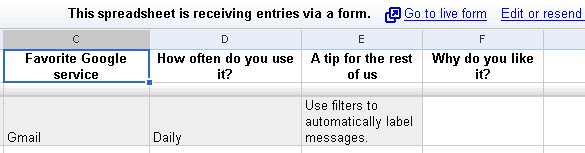
Google Spreadsheets has a new feature that lets you create a form to accept data. When you go to the Share tab, there's a new option to "invite people to fill out a form". The form is very simple and can be customized by changing the order of entries, their labels and the type of answers. It's also a nice way to get feedback people who wouldn't normally collaborate on a spreadsheet.
You can create forms from spreadsheets or using this URL. To keep track of your forms, add this gadget to iGoogle.
I created a form that lets you add your favorite Google service (the form has a public page that I embedded below) and here's the entire spreadsheet with all the answers.
Update. Here are the results of your votes:

Are you sure you re-publish the spreadsheet after any modification? check that in the publish tab.
ReplyDeleteThis kind of reminds me of LimitNone's new iBuild software thats allows you to create a database with forms that run as gadgets.
ReplyDeletehttp://www.limitnone.com/ibuild/
THIS is why I read this blog! I'd miss so much of what I've been wanting for ages - thanks to GoogleOS!
ReplyDeleteThis reminds me of a service from back in the bubble days called Zaplet. You could create forms and then send them via email. The results would live in your original email and refresh at regular intervals.
ReplyDeleteThis works a bit differently but it is very similar and a welcome addition to Google Docs functionality.
As the first comment mentioned, it looks like new entries are not getting published. It still only shows one line even after accepting additional submissions via the form.
ReplyDeleteI swear that I enabled the republishing option, but it was deactivated somehow.
ReplyDeleteCan you tell us how did you embedded the form in your blog and NOT the spreadsheet?...
ReplyDeleteThanks!
Did you post the HMTL Code of your form or is there a function?
ReplyDeleteThis feature is most welcome! Google is really doing handy stuffs.
ReplyDeleteTo niraj sanghvi: Google Spreadsheets are automatically published every 5 minutes. If you add a new item by filling out a form, it might be online after a few minutes.
Google should add the "Forms" button in Google Spreadsheet, otherwise it is tough to locate. Another great new feature from Google. They seem to introduce one new feature a day, when did Microsoft did that (Never) and that too for free.
ReplyDeleteFor those asking about embedding, I used an iframe and the link provided by Google (and also mentioned in the post). The iframe needed some tweaking because IE and Opera required a different width than Firefox (the textareas were bigger).
ReplyDeletevery very cool feature...
ReplyDeletenow, for some of us (like me..) who HAVE a blog, but HAVENTgot a single idea of what an iframe is, could you please help us with it? I have created a form, and I want to embed it in my blog! (blogger)
thanx
This is definitely nice. I was just thinking if someone had written a front end to get some data into google spreadsheets. And today, google makes it easy.
ReplyDeleteVery primitive, but functional. I hope we'll be able to make simple customizations eventually to how it looks.
An iframe is a HTML element that lets you embed a web page inside other page. I used this code:
ReplyDelete<iframe src="FORM_URL" width="635" height="880" frameborder="0" scrolling="no" style="margin-left:-15px;"></iframe>
but the width and height need to be adjusted depending on your form.
Can you use this to add and subtract from a database?
ReplyDeleteFor example if I had a Google doc for my inventory could I change the amount in inventory?
thanx for your quick reply.
ReplyDeleteI have tried doing this (while waiting for your answer), but the actual result is that what gets embedded is the Spreadsheet, NOT the form!!!
what am I doing wrong?
thanx
Do you know what's the big advantage of forms? You could gather data from people without forcing them to get a Google account and learn how to use Google Docs. It's also a good idea to email a form.
ReplyDelete@Bux-Mont Awards:
ReplyDeleteYou can only use it to add rows, but depending how you organize your spreadsheet the rows can be interpreted in different ways.
@alex:
ReplyDeleteUse the link displayed by Google at the top of the spreadsheet that says "Go to live form" (look at the screenshot from this post).
Is it possible for each response to have an email attached to it when I get the results?
ReplyDeletethanx!! it seems to be working now..
ReplyDeleteHow can I NOT see the OUTLINE oF the embedded form in my blog page? which part of the code to I have to change?
thanx
One more question...
ReplyDeleteI am Greek, and my blog is visited 100% by Greek people, as I write posts in Greek.
While I CAN create the form, filling all the information in Greek, when I embedd it on my blog, all I get is ??????????????? ??????? ???????? ....
why does it do this? how can I fix this??
thanx AGAIN
oh, just discovered something else too..
ReplyDeletethe iGoogle gadget has a problem? I HAD 3 forms in my Docs, and then I erased 2 of them...
but the list on the gadget still shows the 2 erased ones...
any ideas??
This is a wonderful feature! I just was starting to stress out about how I would make an RSVP form for my upcoming wedding and now I know how I will do it.
ReplyDeleteGoogle does need to fix it so you can easily get that iframe code so the form itself can be pasted into an existing web page. Also there should be a way to customize the text and colors of the form.
I don't think your rsvp is going to work because your spreadsheet will only show the time that someone responded - not their email so you have no way to know who responded... please tell me how you solved it, if you solved this problem, because I'm stuck!!
ReplyDeleteWhat about using Google Calendar to send your RSVP?
ReplyDelete--> How do I RSVP to an event?
There must be a way to have the email appear in the form since you entered the email in order to make the form available????
ReplyDeleteI anticipated this long back :) Do you think GSQL will be coming up soon? The mere fact of forms and spreadsheets reminds me of databases and other operations... Who knows one day, Google could come out with its own SQL backend-frontend combo...
ReplyDeleteIt's definitely a cool step forward, but not quite as powerful as I'd like yet. I tried creating an online poll using this method, with some success but it's not ready for prime-time yet.
ReplyDeleteAndy - what do you find missing?
ReplyDelete@Susane: I am able to accept RSVPs and get email addresses because one of the fields in my form asks for the email address. Just add a text field and call it "email address" and the people filling out the form will enter their address there.
ReplyDeleteSpeaking of the iframe, my remaining problem is that the blog page where the RSVP form is located is fairly narrow (~ 380 pixels across). The form for accepting long text blocks (like the one at the top of this page) is 500 pixels across. So the problem is that I can't see the right edge of my text entry box.
ReplyDeleteDo you know how I can force that large text box to resize to fit inside of the iframe? Or is there another way to do this?
The only thing I thought of is to turn on the scroll bars. It doesn't look great but it does let you see the whole box.
Don't use "paragraph text", stick to "text". Google should add more options for customization.
ReplyDeleteHas anyone else has problem with long forms? I've got one with 30 questions and it keeps screwing up the final 10. I keep fixing it and it keeps scrapping half of them and doubling the other ones. Weird...and annoying.
ReplyDeleteI created a form and sent it to myself, but I can't seem to submit my responses in the email itself. When I try, I get the following error message in my browser:
ReplyDelete"Something bad happened. Don't worry, though. The Spreadsheets Team has been notified and we'll get right on it."
My email client is Thunderbird, could that have something to do with it? Does my email client have to have a certain setting in order to submit forms data?
Thanks for any help,
I just tried submitting responses via the email using Outlook Express and Mac Mail, and both generated the same "Something bad happened" error.
ReplyDeleteI'd love to find out what the problem is.
-sometimes you just need to copy and paste the link in a new browser window and fill in the form that way
ReplyDeleteThis is so nice! could you please tell me how you do that trick of getting the number of mentions of a certain google product. It is hard to find info about spreadsheet tech...
ReplyDeleteI used the COUNTIF function in a formula:
ReplyDelete=COUNTIF(C2:C656;"Gmail")
I am wondering if I am doing this wrong or if I am just one of the first to find a bug. I find that the form turns out perfectly the first time I create it. When I go back and edit it and change the order of questions or add questions then the whole form gets jumbled!
ReplyDeleteThis video shows in detail what is happening:
temp/google-form-broken.swf
I submitted this problem to google today so I hope they let me know what is the matter. Do any of you know how to beat this bug?
ON the form jumbling.. is there any chance that you did a copy/paste and forgot to change the text? - that happened to me....
ReplyDeleteNo chance. I wish that were it though. If you look at the video you can see that the questions are all different but the published version has repeated questions. It's more than a jumble, it's a mess.
ReplyDeleteI am now trying to make a new form using the creator tools at Zoho Creator. So far so good! And much more powerful than what Google currently offers.
I did have the same problem with a form getting jumbled after editing it so I just made a new one. Does ZOHO have spreadsheets and forms too?
ReplyDeleteHaha that makes me happy that I am not alone with this scramble bug. Yes, Zoho Creator is their program to do web forms. You can watch some videos about it and try it out... all free.
ReplyDeletehttp://creator.zoho.com/
Susane: Did you find a way to have the email other than ask for it?
ReplyDeletenope - I added a column and asked the respondent to fill in his/her email
ReplyDeleteThere's an example of embedding a form into a web page and attaching it to a chart on the same page at this blog.
ReplyDeleteIs there any way to prevent the same individual from replying multiple times? I would like to use the forms feature for voting and evaluations, but the results could be skewed if the same person can post information to the spreadsheet multiple times. Thanks for your help.
ReplyDelete@Ben:
ReplyDeleteNo, this is another missing feature, but don't forget this was just the first release.
i love this new feature.. but it doesn'e as interactive as formsite.com huhu
ReplyDeleteIf I create a simple mileage log with a Google spreadsheet, is there a way to use JOTT.com to send date to that spreadsheet?
ReplyDeleteAs with so many things from Google, this is a really cool new feature that doesn't work properly for Google Apps users. Publishing a form from Google Apps forces people to log in to that Apps domain -- before even seeing the form. Which makes it pretty useless for a general-purpose Website...
ReplyDeletecan we only ask five questions?
ReplyDeleteThis is great BUT....
ReplyDeleteWhat about display forms also? I would love to be able to send out (or use myself) a form that shows the data the way I want, and hides the stuff I'm less interested in at that moment.
Is there a way to change the Submit button so that it displays different text? I am trying to use Google form for RSVP and would like the Submit button to read "RSVP". Any ideas? Pls e-mail me at aat0995@yahoo.com
ReplyDeleteI'd like some help with this - I'm having the same problem as CJ above: I'm sending out a questionnaire to users and they're just getting a 'log in to google account' screen.
ReplyDeleteThe intro page (http://googledocs.blogspot.com/2008/02/stop-sharing-spreadsheets-start.html) says: "They won't need to sign in, and they can respond directly from the email message or from an automatically generated web page"
What gives? Can I set it up so they don't have to log in?
Hi,
ReplyDeleteI want to use forms to create online worksheets for students e.g. questions + responses. The trouble is that the forms functionality seems very limited with respect to what I can put in the questions e.g. hyperlinks, images etc. I don't think its currently possible to use HTML, or have I missed something?
@atza you can copy the generated code and hack the css/html to your liking, granted you can host it on your own... a tutorial http://googlesystem.blogspot.com/2008/05/customize-google-docs-forms.html
ReplyDeleteHow can we post a live "analysis" (with the charts, etc from the forms analysis feature) somewhere? As in, on a Google Site? I can only see how to post the form, or the spreadsheet layout of the results, but not make the pie charts, etc. available for all to see on a webpage.
ReplyDeleteRegarding posting live charts: you have to create your own charts on your spreadsheet and then publish them. It's really easy and I just did a sample one.
ReplyDeleteHere's the survey:
http://spreadsheets.google.com/viewform?key=ps3JfW3aT3D-Pk9i6fRTRSg&hl=en
and here's the results including a sheet with a pie chart I created:
http://spreadsheets.google.com/pub?key=ps3JfW3aT3D-Pk9i6fRTRSg
Definitely Sweet! Wish Google didn put their copyright stuff on it.
ReplyDeleteR.
Cool handy stuffs I think!!
ReplyDeletei am using it currently to get some response for my project. theres a prob though...the database isnt gettin updated properly..i hav had to ask people to re submit at times which is a problem for them and me too! any help?
ReplyDeleteDid anyone tried to submit spreadsheet form withing from some application?
ReplyDeleteI would like ruby on rails app to be able to update spreadsheet. I am sending data to https://spreadsheets.google.com/formResponse?formkey=SOMEKEY using net/http lib, but spreadsheet is not updated.
is there an app to update a spreadsheet? I have created a directory and would like to enable members to update their profiles through a form. It would be ideal if I could send each member a unique url that would allow them to update just their profile.
ReplyDelete