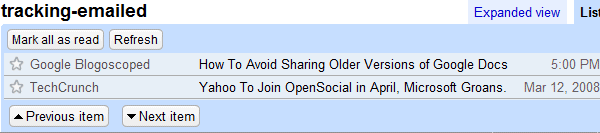
* All the posts you've emailed to your contacts:
http://www.google.com/reader/view/user/-/state/com.google/tracking-emailed
* All the posts you have marked as unread at some point (to keep a post unread, you need to uncheck "Mark as read" from the options bar; note that "Mark all as unread" will not maintain this state):
http://www.google.com/reader/view/user/-/state/com.google/tracking-kept-unread
* All the posts you have marked as unread and are still unread (Google Reader calls them "saved items"):
http://www.google.com/reader/view/user/-/state/com.google/kept-unread
* Did you click on a post's main link to go to the original location? You'll find it here:
http://www.google.com/reader/view/user/-/state/com.google/tracking-item-link-used
* Did you click on a link from a post's content? The post should be included in this list:
http://www.google.com/reader/view/user/-/state/com.google/tracking-body-link-used
* If you use the list view, you can find the list of posts you've actually read (or at least you have clicked on the title):
http://www.google.com/reader/view/user/-/state/com.google/read
* Are Google's recommended feeds interesting? Check the list of recommended feeds you've subscribed to:
http://www.google.com/reader/view/user/-/state/com.google/recommendations-subscribed
* Did you accidentally dismiss a recommended feed? You'll find it here:
http://www.google.com/reader/view/user/-/state/com.google/recommendations-dismissed


Very Nice. I'll have to add these links to a list of "API Links" for Google reader that I've compiled here
ReplyDeleteThanks
Wow, great find !
ReplyDeleteI wasn´t able to subscribe to these feeds though; but i found that once the links are tweaked a bit you can subscribe to them.
If you substite this part of your links:
user/-/state/com.google/tracking-kept-unread#stream/
...with this part:
feed/http://google.com/reader/atom
...the when you clivk the links the results atre the same; but you can subscribe to them now as well.
Cheers,
Peter
Or you can copy the feed's URL and paste it in the "Add subscription" box.
ReplyDelete...with the original links that didn´t work for me...
ReplyDeleteI see. These links work, but you need to replace "-" from the URL with your user ID. How to find this ID? Go to Google Reader and type in the address bar:
ReplyDeletejavascript:prompt("User ID", _USER_ID);void(0);
This is a good doc at this address : http://code.google.com/p/pyrfeed/wiki/GoogleReaderAPI
ReplyDeleteGreat post!
ReplyDeleteIt's a shame that the Reader doesn't integrate these informations in the UI, for example in the Trends page.
why the hell would they need these information ?
ReplyDeletei find myself intruded in my privacy.
Great job, now someone should share the GreaseMonkey script to automatically add buttons for that
ReplyDelete(I can't, my keyboard is broken ;)
isn't this article just a excerpt of the one Jean-Noël Anderruthy provides? ionut you should really add a link to the source.
ReplyDeleteThe source is Google Reader's JavaScript code, more exactly this file:
ReplyDeletehttp://www.google.com/reader/ui/3265599920-en-scroll.js?hl=en
I was trying to see if there's way to make Google Reader's reading list public and found a lot of other state values, including "skimmed" and those mentioned in the post.
Alex, This is one of the best posts by you ever! Keep up the good work! Thank you for the useful content.
ReplyDeleteThe one that lets you see what items you've clicked on has been incredibly useful at helping me find out what RSS feeds I don't get anything interesting from.
ReplyDeleteAlex,
ReplyDeleteHave you noticed the odd way that Reader treats these feeds?
I added them by adding my User ID in the URLs you provided, then pasting them in the Add subscription box.
When you look at the feeds, they are missing the Feed settings... drop down, as well as the new items and all items links.
If you view them by pasting the URL after the standard feed viewing URL (http://www.google.com/reader/view/#stream/feed%2F...), you'll get the "You are not subscribed..." message and the Subscribe link, even though you are subscribed.
Do you have any insight on what might be going on here?
Fascinating!
ReplyDeleteShel
Good thanks for info but not able to see contents in above links
ReplyDeleteI have copied and feed's URL and paste it in the "Add subscription" box. and it worked .thanks
ReplyDeleteWell some of the information needed is kind of intruding your privacy. isn't it?
ReplyDeleteThe original link sometimes doesn't work. to solve that problem you can use the process described by Peter in the initial posts. that really worked for me.. hope it works for you...
ReplyDeleteI wasn´t able to subscribe to these feeds though; but i found that once the links are tweaked a bit you can subscribe to them...
ReplyDeleteOr you can copy the feed's URL and paste it in the "Add subscription" box...
ReplyDeleteI have to agree with some people that are refering that some of the infos are intruding your privacy.
ReplyDeleteI dont think that any info over here is intruding any policy.
ReplyDeleteI have never been successful with all these feed things. don't know whats its purpose.
ReplyDeleteThanks for this great post.
ReplyDeleteI have add this post on my bookmarks websites so I can access it future.
Thats why I love Gmail!!
ReplyDeleteThanks Alex this one too is best as you have all other posts of yours. I love reading your posts and this one is awesome and great too.
ReplyDeletegreat feeds. Already subscribed :)
ReplyDeleteHello dear Google Reader afficionados and gurus,
ReplyDeleteis there a (Javascript) bookmark that will send the currently open webpage to my Google Reader "recommended pages"?
Currently I can easily recommend any article from subscribed feeds with Google Reader's built-in button. But to recommend _any_ URI implies many more clicks and is hidden in Reader's UI on the iPhone.
Thanks for your help.
The Feeds are very helpful, i had subscribed and forward to some colleagues.
ReplyDeleteSorry to dig up this old post, but I'm looking for a way to call the obfuscated Google Reader javascript commands... and am having trouble determining what actual function is called when the "Next Items" button is pressed or the spacebar is hit.
ReplyDeleteI've tried using Firebug as well as FireEvents to track it down, but it's just too well hidden. Any ideas? Something that I could type into the toolbar and make it run, like 'javascript:SH("entries-down", "click");void(0);'
Thanks in advance!
V.De(); --> next item
ReplyDeleteV.ig(); --> previous item
(I found the functions by looking at the code that deals with keyboard shortcuts and searched for "j" and "k".)
Nice Links. How did u find them?
ReplyDeleteI think it's really useful to give some of my colleagues and friends these links so they can subscribe to my readerlist.
Thanks for that!
Wow,thats a great feeds there iam so happy to find it Thanks for the information.
ReplyDeletegreat feeds. Already subscribed :) :)
ReplyDeletei want to add my village name in google maps.
ReplyDeleteAddress :-VILLAGE, KAUKTAPUR, POST. INJUA RAMPUR AMAULI THAKURAN KANPUR DEHAT,State :-UTTARPRADESH , Pin Code:- 209302