"Content you copy to the server clipboard is stored on Google's servers and remains there until 30 days have passed since you last took action on (for example, copied) a given content selection," informs a help center article.
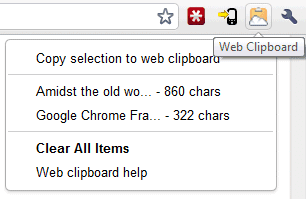
For some reason, the Web Clipboard from Google Docs doesn't show the items saved using the extension, but this is probably a bug. The extension doesn't support keyboard shortcuts, there's no contextual menu entry for copy or paste and you can't preview the text before pasting.
I still don't understand why Google Notebook was discontinued. It could've been a much better Web Clipboard.
{ via Blogoscoped Forum }

I'm much disappointed with the Google devs. They develop extensions/add-ons only for Chrome. :(
ReplyDeleteI miss the Google Notebook also, there were great extensions for it and we could easily clip it, now it is tedious.
ReplyDeleteI use notebook a lot; there is a chrome extension for it as well. It can definitely be improved with some minor adjustments.
ReplyDeletenotebook was better overall
ReplyDeleteIs the text sent via a secure connection?
ReplyDeleteSometimes Google does the dumbest things. Discontinuing Notebook being a case in point. Replacing it with something that doesn't work nearly as well, simply stupid.
ReplyDeleteNotebook is still an option for Firefox users. Here is a link to the add-on:Modified Google Notebook Extension http://goo.gl/KGsm
I never understood why Google stopped its Notebook function. OK, it was never going to compete with Evernote but it was a fast and light clipper that I used daily. To me it was the first of the screw ups from Google, followed by Wave, Buzz etc ...
ReplyDeleteNotebook was great.
ReplyDeleteGoogle.....
BRING BACK NOTEBOOK !!!!!!!
"I still don't understand why Google Notebook was discontinued. It could've been a much better Web Clipboard."
ReplyDeleteJust the question I asked myself as I read the first paragraph of this post. Amongst other things, I used Notebook to type in notes on my Symbian mobile phone and have them immediately accessible on my desktop - as a clipboard, in fact. It does not look like the "Web Clipboard" will allow such useful behaviour.
I'm with everyone else - Notebook was great!
ReplyDeleteNotebook was great! Why Google discontinued it?Trully, Google is acting like evil!
ReplyDeleteI agree that google notebook is awesome, but I still use it easily with https://chrome.google.com/extensions/detail/cnmdijdepmejoamhhpnikipghnkkkefj ... what does "discontinued" mean, in this case? The service is obviously still running...?
ReplyDeleteIt's no longer supported and no longer developed.
ReplyDeleteThis would be a great extension if it worked !
ReplyDeleteYes, Notebook was great. There's even a petition for it:
ReplyDeletehttp://www.petitiononline.com/gnoteb/petition.html
Notebook remains. New users not allowed. I use it regularly with two gmail accounts, and I love it!
ReplyDeleteI don't understand it either. Google Notebook was great service and integrated with Google Docs would be just perfect.
ReplyDelete+1 to the Google Notebook shutdown puzzlement. I use it all the time, it's great!
ReplyDeleteDude, thank you cause I agree about google notebook too! That was just the kind of app I've been missing in my life. I figured they would produce some sort of equivalent add on over in the GDocs team but its been quite a while since they canned notebook huh...I hope they can do better than a change extension!
ReplyDeleteIs there a way to paste an image from your clipboard into the body of your Gmail email? I got excited when I saw this post and thought that was what was being released.
ReplyDelete@Anonymous:
ReplyDeleteEnable the "Inserting images" feature from Gmail Labs to insert images into a message body. You can't paste images from the clipboard, but you can at least insert images from your computer.
2 years down the road, I still do not understand why Google Notebooks was closed. The way Google is I thought they would provide a similar interface but notes would be saved in Google Docs. That never happened.
ReplyDeleteThe other option was to make Google Notebook opensource and I'm sure the community would have maintained it.
It seems Web Clipboard might work (though not with all the functionalites Google Notebook had) and will give it a shot. Has anyone else tried it and what has been their experience?
Thank you for the great post.