Google Image Search has a new option that allows you to restrict the results to photos: just select "Return images that contain photo content" from the advanced search page.
A simple way to find photos would be to restrict the results to JPEG files, but a search for Gmail shows that many people use the JPEG format for logos and screenshots. If we use Google's image analysis technology, we'll find more photos related to Gmail, including the Gmail soap, Gmail Theater and Gmail's product manager Keith Coleman.
The other two content restrictions available in Google Image Search are for images that contain faces and for images that illustrate recent news articles. Microsoft's image search engine has more advanced options for refining your search: you can find photos, illustrations, faces and portraits.
"X-Ray Kid is the team that was recruited by Google to establish the visual style and aesthetic direction" for Lively, the 3D chat service launched in July. "It's been 2 years of work, dozens of original character designs, each with hundreds of unique animations, thousands of clothing variations and original sound content. In addition, we also produced numerous themed environments, hundreds of objects, animated room buddies, and the list goes on," explains the game development studio.
Kevin Hanna, creative director at X-Ray Kid, offers some insights on Lively's future in an interview for GamesIndustry.biz. Kevin says that there are lot of interesting features that will be added to Lively:
Some of my favourite stuff has yet to come out. There's a lot of different characters, and cute animals and stuff, but we didn't do anything really genre-pushing. I think with the next step we're going to be still within that style, but really pushing the different genres of known game types. (...) There is a longer term goal of opening up the API so the architecture of Lively could be used as an online games platform.
Google has already bought AdScape, a company that monetizes games by placing relevant advertising, and some speculated that Google intends to acquire Valve, the company that developed Half Life.
Google adjusted the interface for video results that are part of universal search. Until now, Google promoted two videos in the first 10 results if the query was strongly associated with videos, but they looked like standard results. The new interface separates the two results from Google Video and this is more in line with other types of OneBoxes (images, local business, news) that evolved into universal search results.
Another change is that the image results group has 4 images instead of only 3 and it can be displayed inside the list of search results, not just at the top or at the bottom. When the image results group shows up at the top of the page, the thumbnails are significantly larger.
Building an universal search engine that manages to rank web pages, images, videos, books, maps turned out to be a difficult task, so Google tries to do something easier: rank OneBoxes for different specialized search engines and display them in appropriate places. You can find a version of Google that doesn't include universal search results at searchmash.com.
Google Translate added 11 new languages: Catalan, Filipino, Hebrew, Indonesian, Latvian, Lithuanian, Serbian, Slovak, Slovenian, Ukrainian and Vietnamese. Google's machine translation service now supports 35 languages and you can use it to translate text between any combination of languages.
In most cases, Google uses English as an intermediary language, so when you translate a text from Indonesian to Vietnamese, Google translates the text to English and then it translates the result to Vietnamese. You'll get the best results when one of the languages is English, since Google needs a single translation.
"Most state-of-the-art, commercial machine-translation systems in use today have been developed using a rule-based approach, and require a lot of work to define vocabularies and grammars. Our system takes a different approach: we feed the computer billions of words of text, both monolingual text in the target language, and aligned text consisting of examples of human translations between the languages. We then apply statistical learning techniques to build a translation model," explains Google.
One of the advantages of this approach is scalability: if Google finds enough parallel text to create a good translation model for a language, it will be added to Google Translate. When Google licensed Systran's technology, Google Translate was only able to translate between English and French, German, Spanish, Italian and Portuguese, but this has changed when Google developed its own translation technology. Microsoft followed suit and Windows Live Translator switched from Systran to Microsoft's machine translation system.
As Microsoft notes, it's important to keep in mind that "automatic translation enables you to understand the gist of foreign language text, but is no substitute for a professional human translator if fluency is required," at least not yet.
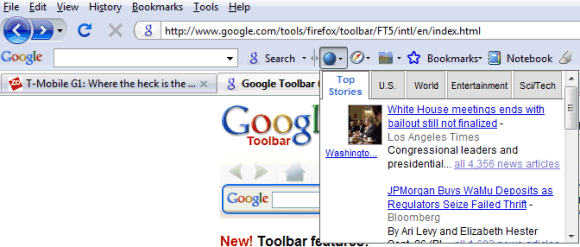
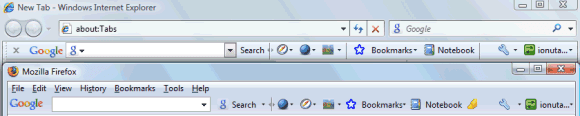
If you liked Google Toolbar 5 for Internet Explorer, but you didn't want to use Microsoft's browser, there's now a version for Firefox that includes similar features: support for Google gadgets, integration with Google Notebook, multiple profiles for AutoFill and synchronized settings.
The Firefox version doesn't include all the features that are available in Google Toolbar 5 for IE: there's no find bar, pop-up blocker, Browse by Name because Firefox already has these features. Customizable layouts, highlighting search terms, Word Find and Google Docs integration are the four Firefox-only features.
If you use Google Toolbar on multiple computers, enable synchronization to save AutoFill profiles, custom button and other settings to a Google account. Since bookmarks and notes are saved to the same Google account, you'll see the same Google Toolbar anywhere you go.
Dear valued user, You have reached the error page for the error page... You win!!
Sometimes even the error pages can't be displayed and you need to come up with a plan B. Gmail's meta-error page is simple, yet effective: Google can't always win.
This reminds me of a similar error message from Google Reader: "Oops! That wasn't supposed to happen".
"At Google, we host a large number of "tech talks". These talks cover a wide rage of Computer Science topics like research in machine learning and methods for ranking images based on text queries. I've enjoyed attending these tech talks, but as the number of attendees has grown over time, the question-and-answer part of the talks hasn't been able to scale," explains Taliver Heath.
The application turned out to be useful for other things, like the company's meetings, and Google decided to launch it publicly on the App Engine platform.
I created a list of suggestions for Google's services and anyone can add new suggestions or vote on the existing ideas. The most popular ideas are displayed at the top, but Google Moderator also lists random suggestions to make them more visible.
One of the most visible changes in Gmail 2.0 was the new contact manager with better search options and more flexible exporting. You might have noticed that the contacts list doesn't load instantly and that's because Gmail opens a separate web page in an iframe.
The page should be useful if you have a Google account that is not connected to a Gmail address and you would like to access your list of contacts from services like Google Docs or Google Reader.
Google Labs added a new experimental service: In Quotes, which compares what different politicians say about popular issues like health care, taxes, environment. The service uses a feature from Google News that detects quotes in news articles and a public API that offers programmatic access to the quotes.
"These quotations are a valuable resource for understanding where people in the news stand on various issues. Much of the published reporting about people is based on the interpretation of a journalist. Direct quotes, on the other hand, are concrete units of information that describe how newsmakers represent themselves. Google News compiles these quotations from online news stories and sorts them into browsable groups based on who is being quoted," informs the FAQ.
Automatically detecting quotes is not an easy task, so not all the quotes are correctly attributed. Google truncates long quotes because they're treated the same as search results snippets.
For now, Google selected a small number of political figures from the US, Canada, India and the UK, but it would be interesting to create a service that allows users to enter two or more names and then save the interesting quotes.
After less than a year since the initial Android announcement, T-Mobile USA launches today the first handset that uses Android's software stack: a smartphone built by HTC, which is known for manufacturing Windows Mobile portable devices.
T-Mobile G1 showcases some of the most advanced capabilities of Android, by including a touchscreen, QWERTY keyboard, accelerated 3D graphics, Wi-Fi and 3G support, GPS and accelerometer. The device won't have an impressive design and it won't be as easy to use as an iPhone, but it will certainly be able to run a lot of interesting applications.
Android's marketplace will accept any applications without a preliminary review, so that users decide whether they're useful. That means Angelo DiNardi's MailWrangler application won't be rejected because it duplicates the functionality from a built-in application. "Developers will be able to make their content available on an open service hosted by Google that features a feedback and rating system similar to YouTube. (...) Content can debut in the marketplace after only three simple steps: register as a merchant, upload and describe your content and publish it," explains Android's blog.
Even if the first device fails to impress, it will still be a success because Android pushes the boundaries further. "Consumers will see cheaper and more innovative mobile devices and services, which will inevitably feature more engaging, easier-to-use interfaces - as well as a rich portfolio of applications," envisions Open Handset Alliance's FAQ.
We will find more at 10:30 a.m. EDT, when T-Mobile and Google will announce the device in a press conference webcasted live.
Update. HTC has more information about the device:
Processor: Qualcomm MSM7201A, 528 MHz Size: 117.7 mm x 55.7 mm x 17.1 mm (4.60 in x 2.16 in x 0.62 in) Weight: 158 grams (5.57 ounces) Display: 3.2-inch TFT-LCD flat touch-sensitive screen with 320 x 480 (HVGA) resolution Camera: 3.2 megapixel color camera with fixed focus Battery: Rechargeable Lithium-ion battery, 1150 mAh Talk Time: 406 minutes Standby Time: 319 hours Memory: microSD memory card, 1 GB included Special features: Digital Compass, Motion Sensor
Update 2: CrunchGear informs that Amazon's MP3 music store will be preloaded on the device. "T-Mobile G1 users can search, download, buy and play music from Amazon MP3, which offers over 6 million DRM-free MP3 songs. (...) Downloading music from Amazon MP3 using the T-Mobile G1 requires a Wi-Fi connection but searching, browsing, listening to samples and buying MP3s can be done wherever customers are connected to the T-Mobile network."
Update 3. More details from T-Mobile's press release: three color options (white, brown and black); music player that supports MP3, M4A (iTunes AAC, DRM-free), AMR, WMA, MIDI, WAV, OGG Vorbis; pre-installed 1 GB Micro SD memory card; built-in instant messaging client with support for Google Talk, AOL, Windows Live Messenger and Yahoo! Messenger.
Update 4: The phone costs from $179.99 to $399.99, it's locked in the T-Mobile network and it requires a 2-year subscription and a data plan that costs $25 or $35, depending on the number of messages included. T-Mobile customers from the US can pre-order the phone starting from today, but the phone will be available in stores from October 22. T-Mobile promises to launch G1 in the UK one month later and in the first quarter of 2009, for the rest of Europe.
Update 5: The entire press conference showed a surprising lack of enthusiasm until Larry Page and Sergey Brin came on stage. There were very few interesting questions about the device: we found that G1 is targeted to consumers, it doesn't support Exchange and there's no way to buy it unlocked.
Update 6. T-Mobile G1 tour (the most exciting phone in the history of phones?):
Update 7. An overview of Google's services connected to G1: search, Google Maps, Gmail, Google Calendar, Google Talk, Contacts, YouTube. There's too much Google integration: the phone even has a Google logo on the back.
Update 8: android.com is now live and it shows an interesting video about running multiple applications in Android:
This playlist highlights some cool G1 features, including the not-yet-available-in-iPhone copy & paste.




 After less than a year since


