An unofficial blog that watches Google's attempts to move your operating system online since 2005. Not affiliated with Google.

Send your tips to gostips@gmail.com.

October 15, 2008

KallOut, Powerful Contextual Search

When you read an article, you often find concepts or names that aren't properly explained, but it's inconvenient to interrupt your reading and use a search engine to find more information. KallOut is a Windows application that addresses this problem: whether you read the document in a browser, a word processor or in a PDF reader, you can select some text and obtain some useful information in a mini-browser.

KallOut lists many search engines and reference sites from which you can choose, but it also suggests good options. For example, if you select "DMCA takedown", KallOut suggests an article from Wikipedia, for "Flickr" KallOut points to Flickr's homepage, while "NY" is linked to Google Maps and geotagged photos from Flickr.


The software displays search results, maps, videos, Wikipedia articles, definitions, translations - all without opening a new page. For now, KallOut supports Internet Explorer, Firefox, Microsoft Office 2003/2007, Adobe Reader, WordPad and Notepad.

Internet Explorer 8 introduced accelerators, a similar feature that already has a public API and an impressive gallery, but KallOut is not limited to Internet Explorer, it's easier to use and it requires less clicks.

October 14, 2008

Google Street View Expands Coverage in France

After including Tour de France's routes in Street View, Google expands the coverage for France, by adding Paris, Lyon, Marseille, Nice, Lille and Toulouse. The French blog Zorgloob links to a video prepared for the launch:


If you've never visited Paris, Street View is a great way to explore Champs-Élysées, Place de la Concorde, Basilique du Sacré-Cœuror or Jardin du Luxembourg.

Here's a "flipbook" created using still images from Paris:

How Many Times Have You Searched Google?

While it's difficult to estimate your number of searches, Google Web History shows the total number of searches performed when you were logged in. The service was launched in April 2005, but my account shows data from December 2005.

Google Web History is enabled by default when you create a Google account and it records your searches, the search results you click on and your browsing history, but the last feature is opt-in.


In 2003, Google tested a counter that displayed the number of searches, but that feature didn't go live. "The counter is displayed at the bottom of Google's home page, and shows both a numeric count and a color bar to represent the frequency of your searching. (...) Beyond being an interesting gimmick, what's the purpose of the counter? Though Google has removed the counter FAQ page, its answer to the question What do I win was the zen-like There is no winning. There is only self-awareness. The search is endless."

Who Links to Non-Existing Pages from Your Site?

Google Webmaster Tools is a valuable source of information if you have a website: Google lists crawl errors, popular searches that lead to your site, backlinks and SEO tips. Until now, Google listed the URLs from your site that returned the 404 (page not found) error, without mentioning how GoogleBot found those addresses. This has been fixed and you can find the list of pages that link to broken URLs from your site in the "Linked From" column of the "Diagnostics > Web crawl > Not found" report.


"If we report crawl errors for your website, you can use crawl error sources to quickly determine if the cause is from your site or someone else's. You'll have the information you need to contact them to get it fixed, and if needed, you can still put in place redirects on your own site to the appropriate URL," suggests Google Webmaster Central blog.

October 11, 2008

No More Annoying Frames in Google Video

Google has finally made the right decision and it removed that were created when you clicked on a result from Google Video. Instead of directly linking to the original site, Google used frames to show both the external site and a list of related videos from Google Video. This duplicated the functionality from video sites like YouTube, while making it difficult to navigate and to share a URL.

Here's the first version of the frame, from June 2007:


... and a screenshot from April 2008, when Google Video has been redesigned:


Google Image Search uses a similar frame, but it's more useful as it provides information about search results. If you don't like the frame from Google Image Search, you can use Greasemonkey scripts like Google Image Relinker or Google Image direct links to bypass it.

October 10, 2008

Embed a Part of a YouTube Video

If you want to embed a YouTube video that starts to become interesting somewhere in the middle, there's a simple way to skip the boring part. YouTube's embedded player has a parameter that lets you specify the number of seconds that should be skipped before starting to play the video. Here's how you should edit the code: append &start=[number of seconds from the start of the video] to both URLs.

<object width="425" height="344"><param name="movie" value="http://www.youtube.com/v/abcdefghijk&hl=en&fs=1&start=15"></param><param name="allowFullScreen" value="true"></param><embed src="http://www.youtube.com/v/abcdefghijk&hl=en&fs=1&start=15" type="application/x-shockwave-flash" allowfullscreen="true" width="425" height="344"></embed></object>

For example, the video below includes some excerpts from Google Chrome's launch, but I skipped to the last part, when Sergey Brin answers some interesting questions.


Unfortunately, YouTube doesn't provide an option to link to a part of the video, but you can still use the embedded player:
http://www.youtube.com/v/w8oPEJiCqi4&start=249&autoplay=1,
where the autoplay parameter is necessary to automatically start the video.

Since there's no end parameter, you can try Splicd, a site that uses YouTube's API to isolate a part of a video.

Related:
YouTube embedded player parameters

Advanced IMAP Settings for Gmail

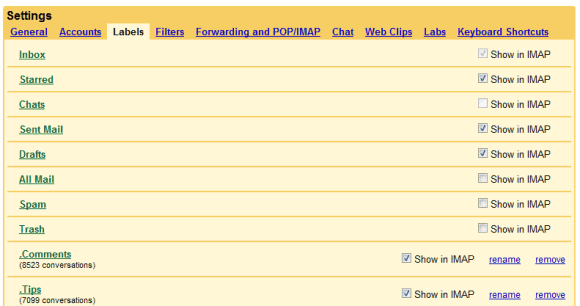
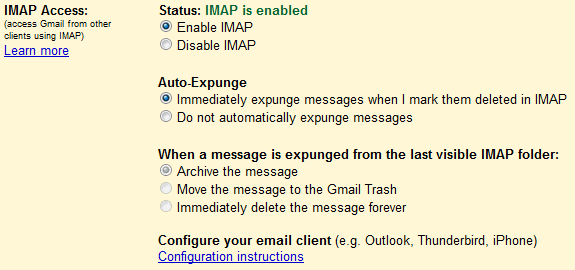
Gmail offers more options for IMAP through an experimental add-on from Gmail Labs: "Advanced IMAP Controls". After enabling the add-on, you'll find two categories of options:

* the Labels tab lets you control which labels show up in your email client, including built-in labels like Drafts, All Mail, Spam or Trash. If you have a lot of messages in your Gmail account, most email clients will perform poorly when processing the "[Gmail]/All Mail" folder, so you might hide it.


* the Forwarding and POP/IMAP tab lets you turn off auto-expunge. "The IMAP protocol allows messages to be marked for deletion, a sort of limbo state where a message is still present in the folder but slated to be deleted the next time the folder is expunged. In our standard IMAP implementation, when you mark a message as deleted, Gmail doesn't let it linger in that state -- it deletes (or auto-expunges) it from the folder right away. If you want the two-stage delete process, after you've enabled this Lab, just select 'Do not automatically expunge messages' under the 'Forwarding and POP/IMAP' tab in Settings," explains Gmail's blog.


If a message is removed from the inbox or from a custom IMAP folder, Gmail still keeps it in "All Mail". You can now change the default behavior and instruct Gmail to send the message to the trash or to delete the message forever.

October 9, 2008

Enhanced Snippets for Discussion Boards

Google has been experimenting with displaying additional information for discussion boards in the search results and now the experiments are live. Below the title, Google lists automatically generated data about forum threads: the number of posts, the number of authors and the date of the last post.

The additional information helps you decide if the search result is likely to be useful. If a thread has a single post or the last post is very old, you could ignore the result.


This new feature shows that Google is able to automatically classify web pages and to extract relevant information. Once Google starts to show data for other kinds of web pages, we can expect to see an option to restrict the search results to a certain category (forums, reviews, blogs, news articles).

Related:
Google detects the published date of a web page
Metadata for scientific papers in Google's search results

October 8, 2008

YouTube Links to Online Music Stores

YouTube started to add links to iTunes and Amazon MP3 for music videos from EMI Music and Universal Music. "Click-to-buy links are non-obtrusive retail links, placed on the watch page beneath the video with the other community features. Just as YouTube users can share, favorite, comment on, and respond to videos quickly and easily, now users can click-to-buy products -- like songs and video games -- related to the content they're watching on the site," announces Google Blog.

YouTube hopes to add this option for other types of videos and to offer an alternative way to monetize videos. "Our vision is to help partners across all industries -- from music, to film, to print, to TV -- offer useful and relevant products to a large, yet targeted audience, and generate additional revenue from their content on YouTube beyond the advertising we serve against their videos."

For now, the links are only available in the US, but they will be added internationally if this experiment turns out to be a success. YouTube shows ads only next to the videos uploaded or claimed by its partners, which account for 4% of the videos hosted by YouTube.

Machine Translation and Speech Recognition at Google

Google's technologies for automatic translation and speech recognition already have visible results: you can translate texts in 35 languages at translate.google.com or use voice to find a local business with GOOG-411, but Google intends to expand their use. You should be able to translate an email written in a foreign language or find answers to simple questions by voice.

Mike Cohen, who leads Google's speech technology efforts, and Franz Och, machine translation researcher, chat with Alfred Spector, VP of Research and Special Initiatives at Google, about two technologies that might seem unrelated to Google's core competency. Both statistical machine translation and speech recognition are search problems and Google's computer infrastructure can process large amounts of data that are needed to build language models. Another big advantage for Google is that it has popular services that generate a lot of useful data.

"When we first created GOOG-411, we had no speech data. Because we had so much query data here at Google (textual queries that people had typed to Google Maps), we could already train a pretty good language model. Now, obviously, text is a little different than speech and now that we've also trained on speech, we have better performance than we had back then, but even out of the box we could get good performance on that problem because we had so much textual data," says Mike Cohen.