An unofficial blog that watches Google's attempts to move your operating system online since 2005. Not affiliated with Google.

Send your tips to gostips@gmail.com.

September 14, 2010

Google Buzz Is Here to Stay

Many tech blogs say that Google Buzz is an unsuccessful project and Google will have to abandon it. Google Buzz is not an experimental service like Google Wave, it's an extremely important project for Google's future and it's a key component of Google's social strategy.

To see how important is Google Buzz for Google, consider that Buzz wasn't launched in Google Labs. It wasn't even launched as a standalone service: Google Buzz was integrated with Gmail, one of the most popular Google products. Google Buzz is also the only Google service that has a special icon and a special search command on Google's mobile site. In less than 7 months since Buzz's launch, the service already has a powerful API, it's integrated with Google Maps, Google Reader, Picasa Web Albums and it's constantly improving.

Google Buzz is actually the service planned in 2007 whose goal was to integrate Google's social applications and become the central place for sharing photos, documents, videos, news with your contacts. Google Buzz already streams some activities from Google Reader, Picasa Web Albums, Blogger, YouTube.

Google Photos blog reports that Google Buzz can now share private Picasa Web Albums:

"It used to be all or nothing when it came to sharing a new Picasa Web Album in Buzz. If you created a public album in Picasa Web Albums, it created a public Google Buzz post. That was great for when you wanted to share your photos broadly. But for those times when you wanted to share with a smaller circle — no Buzz. Now when you create a private album, the select people you choose to share your photo album with will see a notification in Google Buzz as well."


Google Buzz also added two other important features: muting posts by source, so you can hide someone's Twitter posts, Flickr photos or the posts from another source, and editing posts and comments from the mobile interface.

It should be clear that Google Buzz is here to stay, even as a feature of a future service.

September 13, 2010

YouTube Live Streaming

YouTube started to test a new platform for live streaming. "Starting at 8:00 a.m. PT, we will begin a limited trial of a new live streaming platform in conjunction with four of our partners: Howcast, Next New Networks, Rocketboom and Young Hollywood. This new platform integrates live streaming directly into YouTube channels; all broadcasters need is a webcam or external USB/FireWire camera."

YouTube says that live streaming is "a natural evolution to online video that adds an extra level of engagement", but this is also a feature that could make YouTube's integration with Google TV even more useful. YouTube wants to become the central hub for online video, so it now focuses on adding more premium content: live events, music videos, movies and TV shows, movie rentals.

Google Instant Promotional Message

Google shows a large promotional message below the list of search suggestions: "Love Google Instant? Make Google your Homepage." Since this feature is not yet available in your browser's search box or in Google Toolbar, it's a good opportunity for Google to promote its homepage.


Gary Price from ResourceShelf wonders if this is one of the larger promo ads ever seen in a drop down. I remember that Google displayed a similar message when Google Instant was launched: "Welcome to Google Instant. Feelings of euphoria and weightlessness are normal. Do not be alarmed."


I wouldn't be surprised to see that Google starts to show AdWords ads below the suggestions, a feature that has already been tested in Google Suggest.

{ thank you, Gary Price. }

September 11, 2010

Bloglines to Be Discontinued

Bloglines, one of the most popular web-based feed readers, will no longer be available after September 30th. InterActiveCorp, the company that acquired the service in 2005, also owns the search engine Ask.com.
When we originally acquired Bloglines in 2005, RSS was in its infancy. The concept of "push" versus "search" around information consumption had become very real, and we were bullish about the opportunity Bloglines presented for our users. 
 
Flash forward to 2010. The Internet has undergone a major evolution. The real-time information RSS was so astute at delivering (primarily, blog feeds) is now gained through conversations, and consuming this information has become a social experience. As Steve Gillmor pointed out in TechCrunch last year, being locked in an RSS reader makes less and less sense to people as Twitter and Facebook dominate real-time information flow. Today RSS is the enabling technology – the infrastructure, the delivery system. RSS is a means to an end, not a consumer experience in and of itself. As a result, RSS aggregator usage has slowed significantly, and Bloglines isn't the only service to feel the impact. The writing is on the wall.


Most Bloglines users will probably migrate to Google Reader, which is now the most popular web-based feed reader. Unfortunately, Google Reader is still a niche service and this won't change in the future, so Google will eventually discontinue it. Instead of subscribing to feeds, people prefer to subscribe to other people. Google Buzz, Google Me and other social services will use Google Reader's back-end, while offering a people-centric experience.

Here's the Google Trends chart for RSS:

Instant Search in Google Chrome

Google Chrome will add support for instant search, the feature released this week by Google. An early implementation is already available in Chrome Dev Channel and in Chrome Canary build. You can enable this feature by adding the following command-line flag to a Chrome shortcut: --enable-match-preview (in Windows, right-click on the shortcut, select "Properties" and append the flag to the "Target" value).

Chrome's flavor of instant search is quite surprising. As you type a query in Chrome's Omnibox, the browser shows a preview of Google's results for that query. This is suboptimal because it doesn't use Google's predictions, which speed up entering a query. Instead of displaying the results for [weather] when you type "w", Chrome only shows the results for [w].


When you select one of the suggestions from the address bar, Chrome previews the results for that query. If Chrome finds a web page that matches your query, it loads that page. For example, when I type "m" in the Omnibox, Chrome autocompletes my query as http://mail.google.com, since I frequently go to Gmail. If I type "n", Chrome loads Google News. It may be useful for frequently visited pages, but loading a page just because I type a letter in the address bar is a bit too much. This way, you may end up loading a lot of pages while typing a query and that may be distracting and may slow you down.


This feature works even if Google is not the default search engine. Hopefully, it will be considerably improved before the next Chrome release.

{ Thanks, PhistucK. }

September 10, 2010

Chrome Extension for Google Scribe

Google developed a Chrome extension for Google Scribe, the text completion service launched earlier this week. By default, Google Scribe is disabled, but you can enable it by pressing Ctrl+J. You can also press Ctrl+Shift+J to switch to the on-demand mode that shows suggestions only when you press Tab. If you find Google Scribe useful or you use the on-demand mode, there's an option to automatically activate the service for any text field.


The extension doesn't work well in Gmail if you use the editor's plain text mode or Scribe's on-demand mode. Another Google service that's not compatible with Scribe is Google Docs, which uses a custom text editor.

For other browsers, you can add the bookmarklet from this page. The main difference is that you have to enable Scribe by clicking on the bookmarklet.

On an unrelated note, the screenshot above shows some new Gmail features that are tested internally at Google: inserting Google Docs files, photos and maps.

{ Thanks, alexandrojv. }

September 9, 2010

Yahoo Developed an Instant Search Interface in 2005

Stephen Hood, a former Yahoo employee, says that Yahoo developed an interface similar to Google Instant 5 years ago. It was called LiveSearch and it was launched as an experimental interface for AllTheWeb.com.


Yahoo would not let us ship LiveSearch on yahoo.com or as a part of Yahoo's search engine. Instead we were only allowed to launch it on AllTheWeb, a smaller, lower-traffic search engine that Yahoo had acquired years earlier and largely left to atrophy. (...)

You have to remember that, at the time, Yahoo's search business was doing just well enough that there was very little institutional appetite for product risk. As a result, "big" or disruptive ideas were too often left to whither on the vine. By focusing on the local maximum, Yahoo unwittingly traded innovation for incremental optimization.

LiveSearch was thus relegated to a tiny test bucket of users who didn't actually use Yahoo's search product (or any modern search engine). Usage data from this flawed test was used to internally evaluate its success in comparison to the model it was actually trying to disrupt. Lacking high-level support for its larger vision and starved for resources, LiveSearch was understandably put out to pasture.

Here's an excerpt from Yahoo's blog post that announced LiveSearch:

"Livesearch has that uncanny knack of figuring out exactly what is on my mind. As soon as I start to type a query, Livesearch suggests the right query and shows me the results page before I even press a search button. For example, I wanted to look for 'mission impossible 3'. Just as I finished typing 'mission', Livesearch is already recommending 'mission impossible 3' as the search, and then instantaneously shows me the results page."

Stephen thinks that Google "still has the organizational courage to challenge its own preconceptions" and that's the reason why it can launch features like Google Instant, which change "a user interaction model that's been largely unchallenged for years".

When Google changes the interface of a product, many people say: "If it ain't broke, don't fix it!". Fortunately for Google, the company has never followed this principle. As Colin Powell said, "'If it ain't broke, don't fix it' is the slogan of the complacent, the arrogant or the scared. It's an excuse for inaction, a call to non-arms."

{ via Search Engine Land. Screenshot licensed as Creative Commons by Philipp Lenssen. }

Google Features No Longer Available in Instant Search

Google Instant Search is a very interesting experiment that could change the way you find information on the Web, but the new interface comes with a lot of unpleasant side effects.

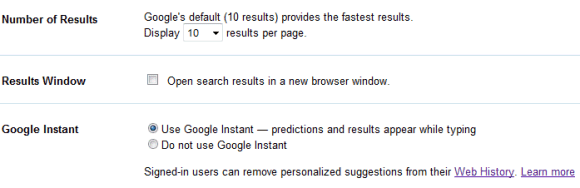
1. Google Suggest can no longer be disabled. Even if you disable Google Instant, suggestions will still be displayed.

2. You can no longer change the number of results. The interface would be less fluid if Google had to fetch 50 or 100 results every time you change your query.


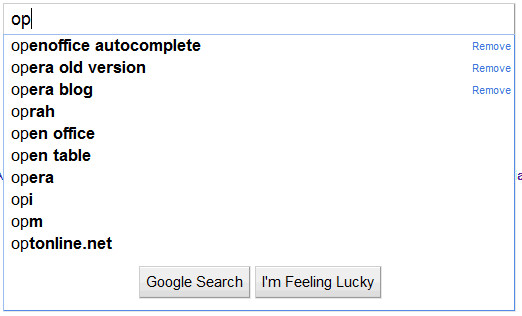
3. Google Suggest no longer shows previously typed searches from Google Web History. This was a great feature for repeated queries. Marissa Mayer said last year that "40% of searches on any given day are repeat searches for a user".


4. Google Suggest no longer shows 10 suggestions. Because of space constraints, Google only displays 4 suggestions, followed by your original query.

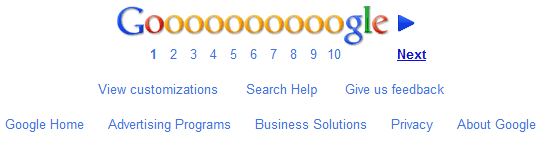
5. The fade-in animation has been removed. This feature used to hide the navigation bar and all the links from the homepage until you moved your mouse.

6. "Search within results" is no longer available. This feature has never been useful because it didn't actually search within results. It only allowed you to add new keywords to an existing query.

7. Google's search box is not displayed at the bottom of the page. As Amit Agarwal points out, you have to scroll to the top of the page to change the query.


8. No more Wonder Wheel. Google's visualization tool allowed you to explore related searches.

9. Google removed the virtual keyboard. This feature is no longer available at Google Russia and will probably removed from all localized interfaces in the future. "Our virtual keyboard allows you to enter the precise search terms you want, regardless of the language keys on your physical keyboard. It can be helpful for people who use one of the many non-Latin script-based languages that require special characters," explains Google.

All of these features are still available if you log out or you use Google SSL, the encrypted search interface.

Can you find other missing features?

{ Thanks, Tom. }

September 8, 2010

Google Instant Shortcuts

Google Instant Search, the feature that shows search results as you type, is now publicly available. According to a press site, "Google Instant is starting to roll-out to users on Google domains in the US, UK, France, Germany, Italy, Spain and Russia who use the latest browsers (Chrome versions 5 and later, Firefox version 3 and later, Safari version 5 for Mac and Internet Explorer version 8). Please note, users on domains other than Google.com and Google.ru can only access Google Instant if they are signed in to a Google Account."

If you don't see the new feature, go to Google's homepage, click on "Google.com in English" and log in to a Google account. If you still don't see it, try this URL: http://www.google.com/webhp?sclient=psy.

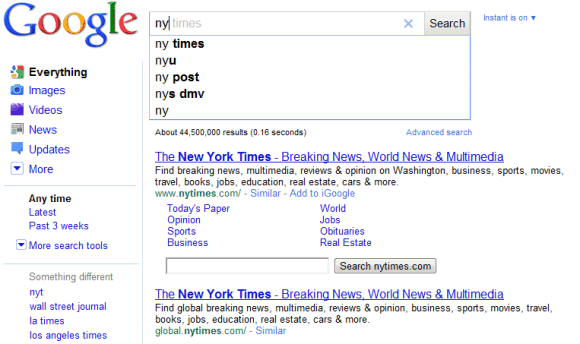
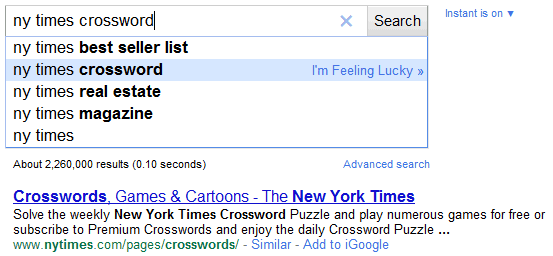
When you start to type a query, Google moves the search box to the top of the page and shows a list of 4 suggestions, followed by the search results for the first suggestion. That means you can just type "ny" and get the search results for [ny times] almost instantly. Google shows the predicted query in the search box, but the characters automatically added by Google are grayed out.


If you intend to type [ny times crossword], you can press Tab or use the right arrow to add "times" to your query and continue typing "crossword". Use the up/down arrows to pick a different suggestion and you'll notice that the results are displayed without having to press Enter.


The nice thing about the new interface is that you can use the "I'm feeling lucky" much more easily. For example, to visit the top search result for [ny times crossword], select the suggestion using the down arrow and perform "I'm feeling lucky" using the right arrow.

How to visit New York Times homepage using 4 keystrokes? ny Down Right. How to go to Yelp using 4 keystrokes? ye Down Right.

Another great thing about the new interface is that the search box always has focus. You never have to click on the search box to add a new word to your query.

If you don't like Google's suggestions, you can always ignore them and press Enter to find the results for the query that you've typed.

To sum up:
Tab/Right arrow = pick the first suggestion
Up/Down arrow = select another suggestion from the list
Right arrow while selecting a suggestion = I'm feeling lucky
Enter or Esc = ignore the suggestions and find the results for your query

Try Google Instant Search

Google will soon release a new interface that shows the results as you type a query. If you want to try the new feature before it's officially released, use this URL: http://www.google.com/webhp?sclient=psy.


My first impression: you can now get useful results after typing a few characters. Google has never been so fast.

To watch a webcast of Google's search event where streaming search will be launched, visit youtube.com/google.

Update: The feature is called Google Instant. "Feelings of euphoria and weightlessness are normal. Do not be alarmed."

"Google Instant is a new search enhancement that shows results as you type. We are pushing the limits of our technology and infrastructure to help you get better search results, faster. The most obvious change is that you get to the right content much faster than before because you don’t have to finish typing your full search term, or even press 'search.' Another shift is that seeing results as you type helps you formulate a better search term by providing instant feedback. You can now adapt your search on the fly until the results match exactly what you want. In time, we may wonder how search ever worked in any other way."


{ via Zorgloob and Jérôme. }