An unofficial blog that watches Google's attempts to move your operating system online since 2005. Not affiliated with Google.

Send your tips to gostips@gmail.com.

March 15, 2015

YouTube Global Search

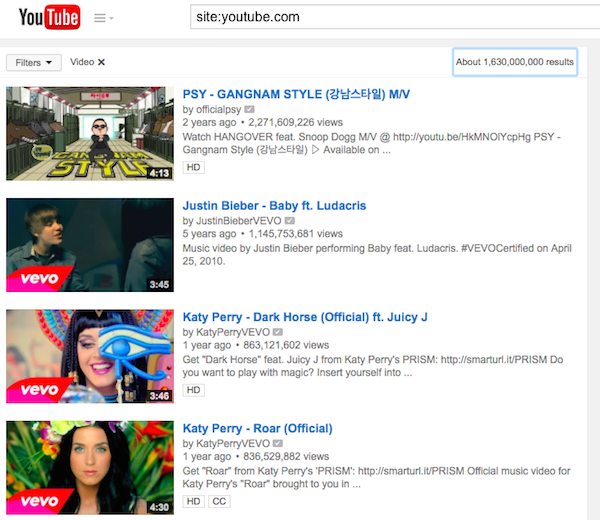
For some reason, when you search YouTube for [site:youtube.com], you're actually requesting a list of all the YouTube videos, playlists and channels. If you combine this query with YouTube's filters, you can obtain a lot of interesting results:

1. Most viewed videos of all time. Use these filters from the dropdown: type:video, sort by: view count.

To add a filter, click the Filters dropdown and select one of the filters from the 5 columns. You can add multiple filters, but you can only pick a single filter from a column. To remove a filter, click the "x" next to the filter. There's also an option that lets you "clear all filters".
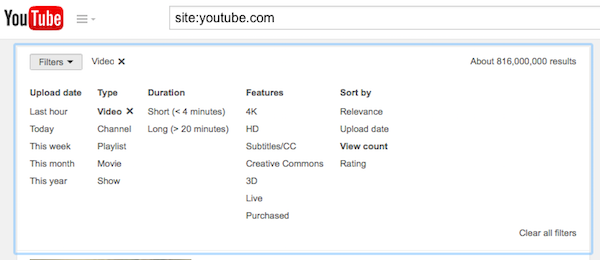

2. Most viewed videos uploaded in the past 30 days. Use these filters: type:video, upload date: this month, sort by: view count.

3. Most viewed videos uploaded in the past 12 months. Use these filters: type:video, upload date: this year, sort by: view count.

4. Most viewed videos uploaded in the past 24 hours. Use these filters: type:video, upload date: today, sort by: view count.

5. Most viewed HD videos of all time. Use these filters: type:video, features: HD, sort by: view count.

6. Most viewed 4K videos of all time. Use these filters: type:video, features: 4K, sort by: view count.

7. Most viewed 3D videos of all time. Use these filters: type:video, features: 3D, sort by: view count.

8. Most viewed playlist. Use these filters: type:playlist, sort by: view count.

9. Random videos with no dislikes. Enable these filters: type:video, sort by: rating.

10. Random popular videos. Enable these filters: type:video, sort by: relevance.

360-Degree YouTube Videos

YouTube added support for 360-degree spherical videos and they're impressive. "You could let viewers see the stage and the crowd of your concert, the sky and the ground as you wingsuit glide, or you could even have a choose-your-own-adventure video where people see a different story depending on where they look," suggests YouTube.

For now, 360-degree YouTube videos are only fully supported in Chrome for desktop and the YouTube app for Android. In Chrome you can use your mouse to drag the point of view, while in the Android app you can move your device around or manually change the point of view. If you watch these videos in other browsers or apps, you can see the entire panoramic images.

Here's a playlist with 360-degree videos:


If you want to upload your own photosphere-like panoramic videos, there's a help center article that offers more information. YouTube supports 5 cameras: Bublcam, Giroptic 360cam, IC Real Tech Allie, Kodak SP360, Ricoh Theta. For now, you need to run a script to insert metadata, but YouTube will try to make it easier to upload videos in the future.

Shared With Me, Back in Google Drive

Google Drive has recently changed the name of the "Incoming" section, which is now called "Shared with me", just like in the old Google Drive interface.

"With the launch of the new Drive UI last year, we renamed the 'Shared with me' section to 'Incoming' and tweaked the functionality a bit. We've since heard feedback from people using the new UI that they miss the 'Shared with me' functionality, so today, we're bringing it back," informs Google.


"Incoming" was shorter, but "shared with me" is easier to understand. It's more obvious that the section includes the files and folders that other people have shared with you.

YouTube Caches Videos

I noticed that my Nexus 5 uses a lot of storage for cache and I wanted to see which Android app caches so much data. It turns out that YouTube used 269MB for cache. I didn't use YouTube's offline feature for music videos, so it seemed strange to see that YouTube suddenly caches a lot of data.


It turns out that YouTube's mobile app for Android now caches the videos you watch. If you watch a video again, YouTube no longer has to download the same chunked files: it uses the cache. After watching a video, I switched to the airplane mode and I could play the video offline, even if it's not supported by YouTube Music Key.


Even YouTube's desktop site started to cache videos again. Since switching to adaptive streams (DASH) in the HTML5 player, YouTube downloaded videos every time you watched them, wasting a lot of bandwidth.

March 12, 2015

Google Inbox Links to Google Contacts

When Google Inbox launched, many people wondered why it doesn't have a contact manager. Now that Google Contacts has a new preview version powered by Material Design, Google Inbox's desktop site added a Contacts link to the sidebar. It only opens Google Contacts in a new tab, but it's still useful.


{ Thanks, Paolo Amoroso. }

The New Chromebook Pixel

Two years after introducing Chromebook Pixel, Google announces a hardware refresh. The new Chromebook Pixel is less expensive, more powerful and still cutting edge.


Google preserved what made the first Chromebook Pixel stand out: the high-resolution 12.85" IPS display with 3:2 aspect ratio, multi-touch and 400 nit brightness, the aluminum body and glass trackpad. The new Chromebook Pixel has Intel Broadwell dual-core CPUs (i5 5200U/i7 5500U), 8 or 16GB of RAM (depending on the version), 2 USB 3.0 Type-C ports that are also used for charging and external displays, 2 additional USB 3.0 standard ports, WiFi ac, Bluetooth 4.0, a new wide-angle camera lens and up to 12 hours of battery life. Other improvements: Pixel is now thinner and a little bit lighter (15.2 mm and 1.5 kg, down from 16.2 mm and 1.52 kg).

There are two Chromebook Pixel versions: the first one costs $999 (i5 Intel CPU/8GB RAM/32GB SSD) and the second one is called LS - "Ludicrous Speed" and costs $1299 (i7 Intel CPU/16GB RAM/64GB SSD), much like the original Pixel. Both versions are available in the new Google Store and you can only buy them if you're in the US. Google no longer offers an LTE version.


"For the new Pixel, we've joined forces with some of the biggest names in the industry to create a new standard for charging, called USB Type C. The Pixel is one of the first products to launch with this new standard, with more Chromebooks and Android devices following suit soon. Not only does Type-C enable multi-device charging, but it also allows high-speed data and display over the same connector and cable. It's small enough to work with smartphones, powerful enough to charge computers, and conveniently symmetrical (no more guessing which side is up!)," explains Google.

There are some optional adaptors and cables in the Google Store: USB Type-C to Standard-A adapter ($12.99), USB Type-C to DisplayPort cable ($39.99), USB Type-C to HDMI adapter ($39.99).


Apple's latest Macbook also uses USB Type-C, but it has a single port, it's thinner and lighter. Apple opted for a fanless design and used ultra low-power Core M CPUs, which are less powerful than the ULT CPUs from Chromebook Pixel and Macbook Air.

High-end Chromebooks won't sell that well, but Google has a high-quality laptop that can be used by its own employees and other early adopters. It's also a reference device for Chromebook OEMs.

Google Store

The Devices section from Google Play has moved to the new Google Store, "the new home for the latest products made with Google". You can buy Nexus phones and tablets, Chromebooks, Android Wear smartwatches, Chromecast and Nexus Player, Nest Thermostat and Nest Protect and a lot of accessories for Google products, including Google Glass.


"Need a hardware device? Think the Google Store. Need digital content to enjoy on your device? Think Google Play," explains Google. You can sign up for the Google Store newsletter to find the latest offers and updates.

"The Google Store is available on your phone, tablet, or laptop, and right now you'll get free shipping on everything (consider it our way of saying hello)," says Google.

Here's the error message that's displayed if Google Store is not available for you: "The Google Store isn't available here yet. We're working to bring it to more countries as soon as possible."


Why would Google move the hardware section from Google Play? I think there are many reasons: Google now sells a lot of hardware products and not all of them have something to do with Android, the Devices section wasn't even included in the Google Play Store app for Android. Another reason could be that Google plans to have its own offline stores and maybe release mobile apps for Google Store.

March 4, 2015

Google Hides Country Redirection Bypass Link

Search Engine Land reports that Google made it more difficult for non-US users to switch from their local Google site to Google.com.

Until now, you could switch to Google.com by clicking "use Google.com" at the bottom of the homepage. Google made a change and it now shows the "use Google.com" link only when you're redirected from Google.com to your country's Google site.


This way, most people will no longer see the "use Google.com" link. One workaround is to visit Google.com to see the link. Another option is to go to www.google.com/ncr, the same URL that used to the displayed by Google. "NCR" means "no country redirection", so the URL can be used to bypass Google's redirection.

Why would Google hide the link? Danny Sullivan suggests that the latest change could have something to do with the "Right To Be Forgotten" feature. "Google’s come under increasing pressure from both Canada and the EU to censor its results on Google.com in addition to censorship demands on country-specific versions."

I use Google.com because it has the latest features and it's more up-to-date.

Hide Google+ Circles in the New Google Contacts

If you're using the new Google Contacts UI, you probably noticed that Google shows both your contacts and the people from your Google+ circles in one place. The "all contacts" section now also shows Google+ contacts and there's no option to only show non-Google+ contacts.

Fortunately, there's a way to hide the people from your Google+ circles. Google+ has a feature called "your circles" which lets you select which circles you share with. For example, you can add the "Friends" and "Family" circles and quickly share your posts with your favorite circles without having to select them all the time.

"When you share posts, photos, profile data, and other things with 'Your circles,' you're sharing with all of your circles, except the ones you're just following (they're unchecked in this list)," explains Google.


The good news is that Google Contacts only includes the people from "your circles", so you can customize "your circles" and uncheck all of them. This way, the "all contacts" section will only include your contacts. The downside is that the "your circles" option from Google+ will no longer be useful, but you can always manually select your circles.

March 3, 2015

Google Tests New Contacts Interface

Google released a preview of the new Google Contacts interface. Powered by Material Design, the new Google Contacts improves some of the existing features: finding duplicates, Google Profile integration, while adding some new features: a list of recent messages, Hangouts sidebar, global search results from Google+. It also merges your contacts with your Google+ circles and no longer uses pagination.


"The new Google Contacts comes with a fresh look and feel, and conveniently pools together all your contacts, circles, and the people you talk to most in Gmail," informs Google. Starred contacts and frequently contacted people are placed at the top of the page, followed by your entire address book, which now includes your Google+ circles. You can customize "your circles" and exclude one or more Google+ circles.


Google Contacts now finds duplicates automatically and offers to merge all of them. You can dismiss some of the suggestions and better assess if they are actually duplicates.


When you click a contact, Google now opens a card overlay with a bigger picture and more information from the Google Profile page. Google also shows the most recent email conversations and meetings with that person.


The search feature now includes results from Google+. The first results are from your contact list ("personal results"), while the following results are from Google+ ("global results").


Some features aren't available yet in the new Google Contacts: importing/exporting contacts, restoring contacts, printing contacts, keyboard shortcuts. You can still find them in the old version of Google Contacts. For now, the new Google Contacts is not available for Google Apps users.

The new interface can be found at contacts.google.com/preview/all and it will be added to Gmail's contact manager over the next few weeks. You can also open Google Contacts and click "Try Contacts preview" in the left sidebar.

How to go back to the old interface? Expand the "more" section and click "Leave the Contacts preview".

{ Thanks, Daniel Sadavoy. }