In its never-ending quest to organize the world's information, Google started to digitize old editions from newspapers like Pittsburgh Post-Gazette, St. Petersburg Times, Today's News-Herald and make them available at Google News Archive.
"Today, we're launching an initiative to make more old newspapers accessible and searchable online by partnering with newspaper publishers to digitize millions of pages of news archives. This effort expands on the contributions of others who've already begun digitizing historical newspapers. In 2006, we started working with publications like the New York Times and the Washington Post to index existing digital archives and make them searchable via Google News Archive," explains Google Blog.
The newspapers digitized by Google are available for free in an interface similar to the one from Google Book Search. Unfortunately it's quite difficult to read articles, even though Google automatically detects headlines and centers the associated content.
Google Video started to display suggestions in the search box. The suggestions are identical to the ones used for YouTube probably because Google has a single platform for searching videos which is used by both YouTube and Google Video.
The number of suggestions is 5 and they can be disabled in the preferences page by selecting "Do not provide query suggestions in the search box".
So why use Google Video instead of finding videos on YouTube? Google Video indexes videos from hundreds of sites, many of the videos can be played without opening a new page and you can share them with your Gmail contacts.
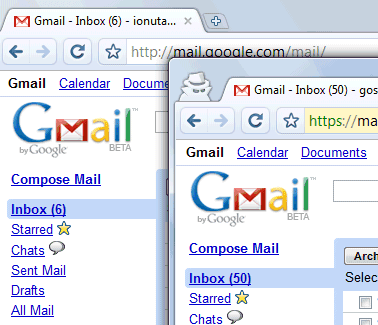
Google Chrome's incognito mode is less sophisticated than IE8's InPrivate browsing, but it has a feature that will be useful for those who have more than one Google account.
When you open a window in incognito mode (Ctrl+Shift+N), your cookies from the standard session are no longer available and you can easily log in to a new Google account.
Chrome's help center has more details about this feature. "Webpages that you open and files downloaded while you are incognito won't be logged in your browsing and download histories; all new cookies are deleted after you close the incognito window. You can browse normally and in incognito mode at the same time by using separate windows." Michael Jeffrey explains that "incognito mode is a window-level mode - all pages viewed within this window are not persisted to the user's history, and incognito pages use a temporary cookie store that is blank at the start of the incognito session".
When you close the incognito window, all the cookies are deleted so you need to log in again the next time you browse in incognito mode. This trick can be used for any other services that allow multiple accounts, but you can only use two accounts at the same time: one in a standard window and the other one in incognito mode.
Migrating FeedBurner to Google Accounts hasn't been a smooth process and the new FeedBurner doesn't look very promising. Last month, Google officially launched AdSense for Feeds and asked those who want to join the program to "burn" their feeds using FeedBurner. If you were already using FeedBurner, Google provided an email address where you could contact a Google employee to manually migrate your account (since then, the email address has been replaced by a form).
After a day or two, FeedBurner's new home at feedburner.google.com finally allowed you to log in. Some people found that the number of subscribers dropped to 0, but the most visible changes were the features which have been removed. The Googlified FeedBurner no longer includes web stats probably because of the overlap with Google Analytics, the feed stats history isn't available and you can no longer manage the list of email subscribers.
Another strange issue is that Google Blog Search stopped indexing this blog and many other blogs after migrating to the new FeedBurner. There are many other bugs related to this transition, but FeedBurner failed to acknowledge them.
Update. In about 2 weeks, Google has addressed some of the issues: * Blog Search indexes feeds * you can manage the list of email subscribers (there's even a new option to filter that list)
Blogger has recently released a feature that lets you publicly subscribe to other blogs. Google calls this "following" and you can only follow blogs powered by Blogger, at least for now.
"Do you have a favorite blog and want to let the author and readers know that you are a fan? Well now you can do that and more with the Blogger Following feature," explains the help center.
Bloggers can add a widget that lists the people who follow a blog. Visitors can follow a blog from the widget and see their subscriptions in Blogger's dashboard or in Google Reader.
In most feed readers, subscribing to a feed is an anonymous action and the only public information is the total number of subscribers. The new Blogger feature indirectly adds public subscriptions to Google Reader.
"The Followers gadget lets you surf the network of people who read and interact with blogs. Just click on any of the followers and you'll go to their profile. For now, that profile is just their Blogger profile page with the blogs they own... but down the road, we'll also be integrated with Friend Connect. Which will open up this network further, in a couple of ways: A non-Blogger site can add a Friend Connect gadget to show the people following it; and you can filter the followers of a blog to show only the friends you already have on your favorite social network. Which you can view as extending your social network out into the blogosphere, or as the blogosphere incorporating all social networks -- take your pick. Of course all of this is based on OpenSocial, so anyone will be able to add gadgets and talk the OpenSocial protocol to access, with user permission, all of this network data and do new and interesting things on top of it. This represents a natural evolution of the loosely joined, standards-based pieces that have always characterized blogging."
The "followers" feature is not yet available for all Blogger users, but you can enable it by following a blog. The address is:
http://www.blogger.com/follow-blog.g?blogID=<BLOGID> (e.g: follow Google OS).
Instead of building a social network like MyBlogLog, Google creates an application on top of other social networks. Incidentally, the application is first tested for blogger.com, but a future Google Reader API and the migration to OpenSocial/FriendConnect will make it look more interesting.
TechCrunch reports that Google Analytics included Chrome in the list of detected browsers. It's probably irrelevant that 8.64% of today's visits for this blog were from Google Chrome because a lot of users test the new browser to see if it's better than IE, Firefox, Safari or Opera.
(Find the report in : Visitors > Browser Capabilities > Browsers)
Two days ago, Google Analytics Blog admitted that the web analytics service intentionally concealed the identity of the new browser. "Because Google Chrome was not launched externally until today, we haven't yet changed Google Analytics to recognize it when you segment by browser within reports. However - this will change in the coming weeks (until then, the browser will show as Firefox)." The blog post has been edited and it no longer contains the reference to Firefox, but I can't help wondering if Google Analytics hides other things.
If you want to detect Google Chrome, this user-agent should be helpful:
Mozilla/5.0 (Windows; U; Windows NT 6.0; en-US) AppleWebKit/XX (KHTML, like Gecko) Chrome/YY Safari/XX
For now, most services don't detect Chrome, probably because Safari has a very similar user-agent:
Mozilla/5.0 (Windows; U; Windows NT 6.0; en-US) AppleWebKit/XX (KHTML, like Gecko) Version/ZZ Safari/YY
Here are some not-so-obvious things you can do in Google Chrome, the minimalistic browser launched on Tuesday.
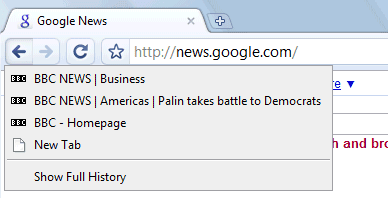
1. Show the list of recently visited pages from the current tab: right-click on the "Back" button. This also works for the "Forward" button.
2. Undo closing a tab: press Ctrl+Shift+T or open a new tab and check the "Recently closed tabs" section.
3. Focus on the default search option in the address bar: type ? before entering your query.
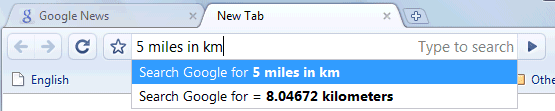
4. Perform simple calculations and unit conversions using Google Calculator by simply typing the expression in Google Chrome's address bar (or "omnibox"). To copy the answer, select the suggestion.
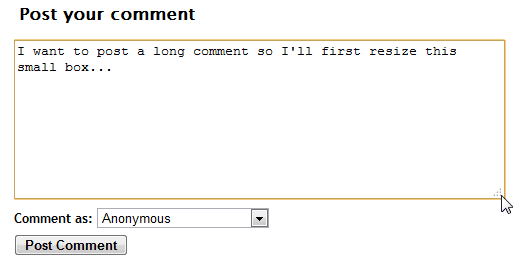
5. If you need more space in a textarea, resize it by dragging the lower right corner.
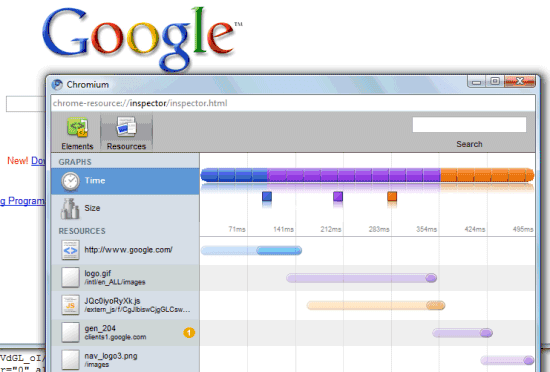
6. Monitor the resources used by a web page - right click inside the page, select "Inspect element", switch to the "Resources" tab and reload the web page. You'll see a list of images, scripts and objects loaded from the web page and you can sort them by size or by loading time.
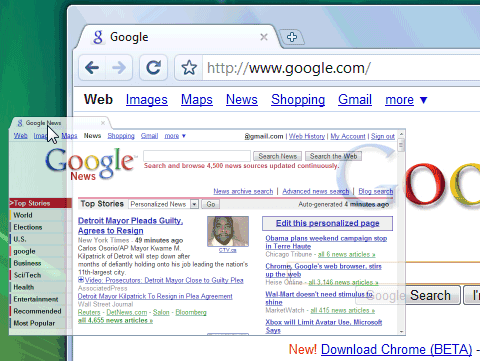
7. Detach a tab and open it in a new window - just drag the tab outside the active window. You can also add it back to the original window using drag and drop.
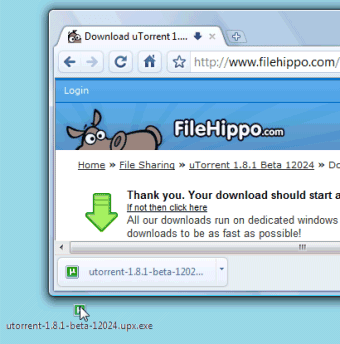
8. After downloading a file, you can copy it to the desktop or to any other folder by using drag and drop directly from Google Chrome.
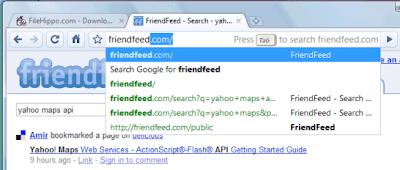
9. If the search engine of a site supports OpenSearch, you can add it to Google Chrome's search box by simply visiting the site and performing a search. The domain name automatically becomes a keyword and you should only type the first letters from the URL until you see "press Tab to search example.com". Then press Tab and type your query.
You can also manually add search engines, by right-clicking on the address bar and selecting "Edit search engines". Here's one example, where you can see that you need to find the URL for the search results page and replace the query with %s:
Name - Wikipedia Keyword - wiki (that's what you need to type in the address bar) URL - http://en.wikipedia.org/wiki/Special:Search?search=%s
You can also use the keywords for other kinds of services: for translating web pages, for bookmarking pages online or simply as aliases for web pages (omit "%s" from the URL).
Name - Google Translate (English) Keyword - trans URL - http://translate.google.com/translate?u=%s
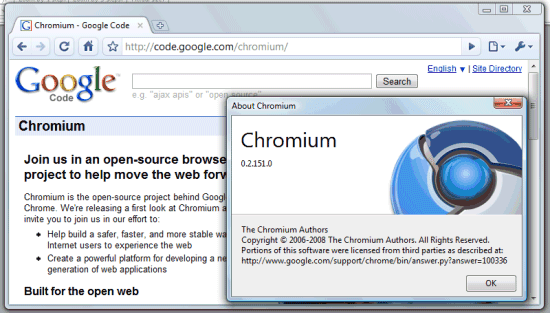
10. Do you want Google Chrome without Google's branding and with an open source license (BSD license)? Check Chromium, the open source project created for Google Chrome. You can install the latest snapshots for Windows or download the code and build it in Windows, Mac, Linux.
To install Chromium in Windows, go to the most recent directory from this page (it should be at the top) and download mini_installer.exe. Note that these snapshots could be less stable than the version available at google.com/chrome and you may need to manually update Chromium.
There's an easy way to upload photos to Picasa Web Albums if you don't want to install Picasa: send your photos by email to a secret address.
First you need visit the Settings page and check "Allow me to upload photos by email." The secret email address where you can send your photos has the following format: username.secretkey@picasaweb.com, where secretkey needs to be defined in the settings.
By default, Picasa Web uploads your photos to the built-in Drop Box albums, but it's a good idea to choose your destination by entering the name of an existing album in the subject of your email.
Make sure you don't share the secret email address with other people, like I did in the screenshot above. And if you do, just choose a different secret key for your address.
You can attach up to 20MB of photos in JPG, GIF and PNG formats, which is a pretty reasonable limitation. Since Picasa Web's mobile site still doesn't support uploading photos, the new option should be really useful when you want to share photos from a phone with email or MMS capabilities.
Like most other browsers, Google Chrome has some special pages that show information about memory usage, cached files, plug-ins and more. Here's a list of the most interesting about: pages available in Google Chrome (you can open them by dragging about:name to the address bar).
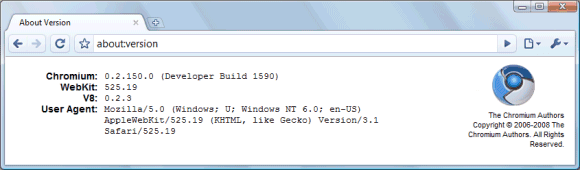
1. about:version - Google Chrome shows the version number the browser, WebKit and V8 (JavaScript engine). You can also find the user-agent used by Google Chrome:
Mozilla/5.0 (Windows; U; Windows NT 6.0; en-US) AppleWebKit/525.19 (KHTML, like Gecko) Version/3.1 Safari/525.19
2. about:plugins - the list of plug-ins that are available in Google Chrome: Shockwave Flash, RealPlayer etc.
3. about:cache - a list of all the web pages cached by Google Chrome. The browser doesn't have an option to limit the cache's size, so it's recommended to regularly empty the cache.
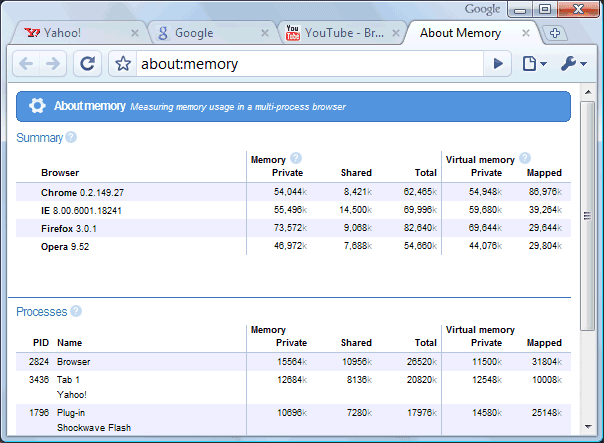
4. about:memory - this pages compares the memory used by all the active browsers and by Google Chrome's tabs.
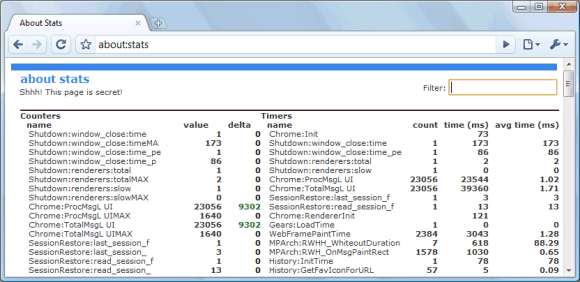
5. about:stats - a list of internal counters and timers that has a funny subtitle "Shhh! This page is secret!".
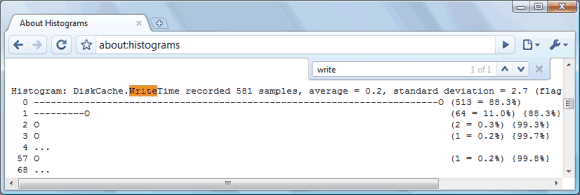
6. about:histograms - a list of histograms for Google Chrome's internal metrics.
7. about:dns - Google Chrome prefetches the DNS records for 10 frequently visited hostnames. This feature can be disabled in Options > Under the Hood by unchecking "Use DNS pre-fetching to improve page load performance".
8. about:network - this page could be used for I/O tracking and it's a partial replacement for the Live HTTP Headers extension. Click on "Start I/O tracking", open a web page in a new tab and you'll get a list of all the images, scripts and objects loaded from that web page.
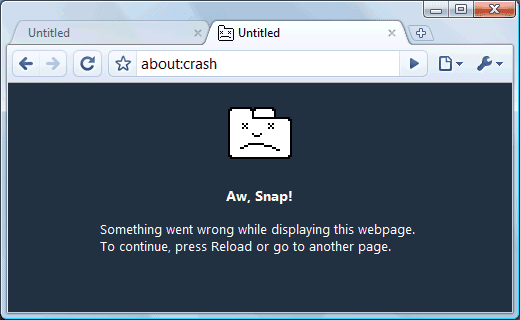
9. about:crash - crash the active tab. Google Chrome displays the "sad tab" image, followed by this message: "Something went wrong while displaying this webpage. To continue, press Reload or go to another page".
10. about:hang - type this in the address bar of a tab when there's already an active web page to hang the process (this means that the process no longer accepts any signal, but it's still running). The other tabs will continue to work and the active tab can be closed.
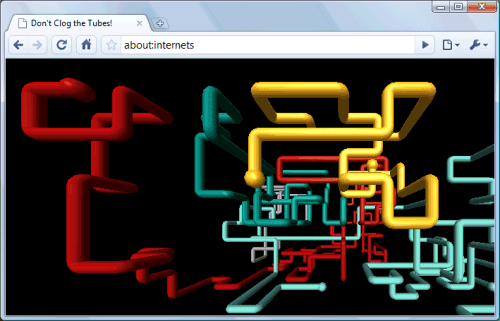
11. about:internets - this is an Easter egg that references two popular Internet memes: Internets and Series of tubes. Google Chrome embeds the 3D Pipes screensaver from Windows, so you'll see it only if you have the file sspipes.scr in C:\Windows\System32.
Google Chrome has been released and you can now finally try it. Developed in the past two years, the browser is barely noticeable after you open it. It loads faster than Internet Explorer and it has very few buttons and controls.
In fact, Chrome is an ironic name: Google wanted to create a browser that has a minimal chrome (that's how software developers name the menu and the toolbar of an application). The browser replicates the simplicity of Google's homepage that hides the complexity of the search engine.
Even if it's just a beta, Chrome already supports 43 languages and it automatically detects your language. To change the interface language, just click on the wrench button, click Options, select the "Minor tweaks" tab, click on "Change font and language settings", select the "Languages" tab and change Google Chrome language. That's a lot of clicking, but you won't change the UI language too often.
Google's browser merges the address bar and the search box in a single box that provides suggestions from the local history and from Google search. Google suggests queries and web pages that you are likely to visit, so in many cases you'll not even need to perform a search. Of course, you can change your search engine in the Options and Google provides two great alternatives: Yahoo and Live Search (OK, Live Search is not that great). But the great thing is that you don't need to choose a search engine: just browse the web search, visit your favorite sites and Google automatically detects search engines and saves them for you. Try this: go to amazon.com, search for the title of a book and then type amazon in Google's address box. You'll see an entry that allows you to search on amazon.com using Amazon's search engine. Click on the list item or press Tab to access the search engine.
Google automatically creates keywords for sites that have search engines: the automatically generated keyword for Amazon is amazon.com.
Let's say I want to download an application, like the fabulous Opera browser. Instead of being asked if I truly want to download the file, the location from my computer and other pesky details, Google Chrome just downloads it without opening any dialog. A small bar at the bottom of the window shows the progress and the greatest thing is that I can drag the file to any location directly from the browser. You should definitely try this if you install Chrome.
The browser has a modern JavaScript engine designed for improving the performance of complex applications like Gmail. But to make Gmail feel like a true applications, try this: click on the "New" button, select "Create application shortcuts" and a new chromeless window will open. You'll also create a desktop shortcut for Gmail. That's a feature of Google Gears, which is included in the browser.
In Wired's article about Chrome, the engineers that built the V8 JavaScript engine talk about its performance. "We just did some benchmark runs today, Bak says a couple of weeks before the launch. Indeed, V8 processes JavaScript 10 times faster than Firefox or Safari. And how does it compare in those same benchmarks to the market-share leader, Microsoft's IE 7? Fifty-six times faster."
Like Opera 9.5, Google Chrome fully indexes all the web pages you visit and you can find search results from your browsing history in the address bar. To bookmark a page, click on the star icon and you can choose a folder for your bookmark (that's right, folders in an application created by Google). The browsing history, the recently closed tabs and the most visited pages are used to automatically create a homepage. Try this when you install Chrome: create a new tab, resize the window and notice how the thumbnails adjust to the new size. And another tip: go to Options and select "On startup... restore the pages that were last open".
Developers shouldn't a miss menu created especially for them: Control > Developer. They'll find a JavaScript debugger for the new V8 engine, an element inspector that includes some great charts for monitoring the performance of a page and something truly innovative: a task manager for your tabs. Remember this shortcut: Shift+Esc to instantly open the task manager if one of the tabs slows down your browsing. As you probably know, in Chrome (almost) each tab runs in its own process, which can be killed without crashing the browser.
Those who want to find more about memory usage, including a comparison with other browsers that are currently opened, should click on "Stats for nerds" in the task manger or type about:memory in the address bar. Here's a comparison between Chrome 0.2, IE8 Beta 2, Opera 9.52 and Firefox 3.0.1 when only three web pages are loaded after a restart: google.com, yahoo.com and youtube.com.
Google Chrome borrowed many features from other browsers: Opera's speed dial used to show thumbnails of the most frequently visited pages, Safari's inline find feature, Internet Explorer's private browsing mode, Firefox's spell checker. Google hopes that other browsers will borrow features or even code from Chrome. Sergey Brin said that what Google truly wants is a diverse and vibrant ecosystem of browsers and Chrome is just another option.
Google's browser might never become popular, even if it's fast, stable and more secure than other browsers. The most important thing is that Google Chrome will certainly have an impact on the next versions of IE, Firefox, Opera, Safari. Even if you don't have a Gmail account and you use Yahoo Mail or Hotmail, you benefited indirectly from Gmail's breakthroughs. If Gmail is the invisible feature of Yahoo Mail and Hotmail, Google Chrome could be the signal that browsers need to become platforms for web applications.