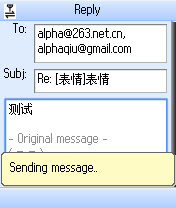
The mobile Gmail application for Google Apps that used to only work if you had a Blackberry is now available for all mobile phones. Just go to m.google.com/a on your mobile phone and download "Mail by Google". The application looks exactly like the recently released Gmail Mobile 1.5, except that it has a blue icon and supports Google Apps accounts. You'll also notice that you can login with standard Gmail accounts.
It's unclear why Google didn't add support for Google Apps in the standard Gmail application (available at gmail.com/app), but it may have something to do with Google's branding and the Gmail name.
{ Screenshot licensed as Creative Commons by alphagiu. }

Don't they support WAP Browser for google apps mail?
ReplyDeleteYes, you can go to the mobile interface at:
ReplyDeletehttp://mail.google.com/a/domainname.com/x/
but the mobile application is much better.
"Sorry, Mail by Google does not work on your Palm PalmOS5 device..." I guess us Treo owners will have to wait a while yet.
ReplyDeleteI don't have a list of supported mobile phones, but I suppose it should work on any phone that can run Java apps.
ReplyDeleteHere's the direct link to the JAR file:
ReplyDeletehttp://m.google.com/a/v1.5.0.1187/L1/MailByGoogle.jar
or:
http://tinyurl.com/yns3f7
It works great on my Nokia 6300 with a Google Apps account.
ReplyDeleteI'm wondering if all communications are automatically SSL encrypted. I can vaguely remember a previous application where you had to install a seperate SSL file or something like that.
When i refresh to see my new mails,it says my mobile doesn't have a related certificate to access it. It doesn't work at all in my nokia 6230 while it runs java applications.
ReplyDelete@Steven:
ReplyDeleteThere's an option for HTTPS connections. Check the settings.
@Ionut: I don't see an HTTPS option at settings. This is what I have:
ReplyDelete* Always keep me signed in
* Preload unread mail to open faster (uses more data)
* Ask for confirmation before archiving, deleting, etc.
* Use large fonts (restart app after saving)
* When I send mail, add "Sent from my mobile device" to the end of my messages
Why don't they make this easy? Doesn't work on my Sprint Touch!
ReplyDelete@Steven:
ReplyDeleteI also see "always use secure network connections (slower performance)".
@Ionut: I see, thanks for the info.
ReplyDeleteI'll keep an eye on these comments to see if other users are having the same problem.
They still don't support Palm Treo's
ReplyDeleteTreo users: Simply open your IMB Java client and choose install: http://tinyurl.com/yns3f7
ReplyDeleteWorks fine.
Mine works but the screen isn't aligned right. It looks like it doesn't fit properly...I'm using a palm treo 755. I installed it using the tinyurl address listed here.
ReplyDeleteHi there,
ReplyDeleteI am also using a 755 and it works fine. My son using a Centro and complains of the same thing. My carrier is Sprint.
I would like to know if using the mobile application keeps your email secure to/from the Google servers. In other words, is it equivalent to the web mail using
ReplyDeletehttp://mail.google.com/a/domainname.com/
or
https://mail.google.com/a/domainname.com/
SUPPORT TREO'S!!!!!!!!!!!!!!
ReplyDelete@steven:
ReplyDeleteI'm having the same options as you listed, also without the "always use secure network connections (slower performance)".
Otherwise it works like a charm on my Nokia 3110 Classic.
Cheers, HBE
Seriously! PLEASE don't leave us Treo owners in the cold! You know how s$#*ty Treo's browsers are. I feel like I'm perpetually trapped in Internet Explorer 4.
ReplyDeleteThanks!!
loving it. the 6300 setup like a dream. fast, good shortcuts and way better than having a Blackberry.
ReplyDelete:)
It works fine on my Treo680 with our Hosted Apps Account. You do need IBM Java installed as well BTW.
ReplyDelete--Nathaniel
On my Nokia 9300 using Tmobile, it creates a data connection and then gives an error saying, "You must have a data subscription to use this program." or something like that.
ReplyDeleteI have a tzones subscription and the web browser and native email program work fine on the phone.
I have a Sprint Treo 755p. Installed this version (Mail by Google v1.5.0) and the latest Gmail app (Gmail v1.5.0, after having 1.0.00
ReplyDeleteThe first time i installed it, it had the misalignment issues someone spoke of before, so i reverted to 1.0.0.
I decided to try it again using:
Mail by Google
http://tinyurl.com/yns3f7
Gmail
http://gmail.com/app/v1.5.0/L1/gmail-g.jar
Yes, they are two separate app's and I now have both running properly aligned on my Treo.
Also of note, you can use the touchscreen now for the menu's, instead of only being able to use the 4way nav button as in the past versions
It's not necessary to install both apps, the one for Google Apps works with Gmail accounts as well. To sign out, go to the settings and uncheck the option related to persistent logins.
ReplyDeleteOh, I agree. I was just noting that both versions worked on my palm device, since Google still doesn't support us users yet.
ReplyDeleteThe irony here is that Palm will no longer provide a link to IBM's JVM.
ReplyDelete<< For the past few years, Palm has provided a download of the IBM WebSphere Micro Environment Java Virtual Machine (JVM) to our customers, which allowed users to install and run Java applications and games on their devices.
As of Jan. 12, 2008, we will no longer be providing this as a downloadable application from our website. We will continue to support the JVM on our website, but will not be able to offer version upgrades or software downloads. >>
The site where you can still download JVM is http://www.palm.com/us/support/jvm/.
My W810 has some problem with mail by google. It shows"Your phone doesn't support end to end secure connections. In order to protect your data, mail by google for mobile cannot be used at this time"
ReplyDeleteAny one can help for this? THX!
Now that Palm doesn't support JVM downloads any more (as of Jan 12), does that mean I can't download the Gmail app on my phone? I have a 650 now and am about to upgrade to a 755.
ReplyDeleteJust downloaded the app for my E90.
ReplyDeleteI have two issues :
-- the menu functions are not aligned with the function keys on the Internal Screen
-- there is no way I can add an attachment to a mail I am composing.
If these two are addressed, I am sure it will be much better than it already is.
The recent gmail java apps for my Sony Ericsson w580i (1.5.x) are not signed so the phone prompts for all internet communication. This is quite annoying. Please sign the code so these Ericsson phones trust it.
ReplyDeleteAT&T apparently instructed HTC to build the latest ROM for the AT&T Tilt (v1.62) so that it blocks https for J2ME applications. This program works fine on AT&T Tilts with ROM v1.58, but gives a "Your phone doesn't support end-to-end connections" error with ROM v1.62.
ReplyDeleteIt works. I've documented the procedure here
ReplyDeleteCheers
Arched Eyebrow
CENTRO USERS: Got my Centro Fathers day. Gmail app 1.5.0 worked fine for my hosted domain on my Treo650. Installed on Centro, it started giving me messages that it didn't work for google apps. WTH? Got the 'Palm OS 5 device' when trying to intall directly from google. After all day of searching, found this blog. Either of Ionut's 'tinyurl' or direct version works. Keyboard options are kind of annoying, make sure you have the option key double pressed to use the numbers, and sometimes it stops working, just double press it again. I've got a javainstaller.prc for Palm that doesn't need hotsynced, installs exactly what your device needs for Java. I'll upload somewhere if anyone needs it. GOOD LUCK! Love my Centro!
ReplyDeleteI have ROM 1.57 and it gives the same error. If I go through the browser it works though. May just try getting it through POP3 or IMAP though.
ReplyDeleteAT&T apparently instructed HTC to build the latest ROM for the AT&T Tilt (v1.62) so that it blocks https for J2ME applications. This program works fine on AT&T Tilts with ROM v1.58, but gives a "Your phone doesn't support end-to-end connections" error with ROM v1.62.
I was able to download it and access it, but the middle button I should be able to actually open the message with brings up the "menu." Something's screwy here. Help, please.
ReplyDeleteI am facing problem with NOkia 6300. The message I am getting after starting the gmail application in my mobile is "This program required a working data connection. Please check your signal strength and connection settings and then restart the application". But I am able to access my gmail apps email through normal browsing like mail.google.com/a/example.com. Can somebody help?
ReplyDeleteI'm getting the same error trying to login to the mobile app....says something about needs working data connection. I'm using blackberry 8830
ReplyDelete