Unlike other webmail services, Gmail has never provided too many customization options and users had to rely on themes created for third-party extensions like Stylish, which usually slowed down Gmail and weren't resilient to code changes.

Gmail's help center provides an interesting tidbit about the new themes: "In some cases, you can also customize by location. Some themes change during the day, and we use the location information you provide to correctly time these changes with your local sunrise, sunset, and/or weather. If you select one of these themes, you'll see a Country/Region drop-down menu appear."
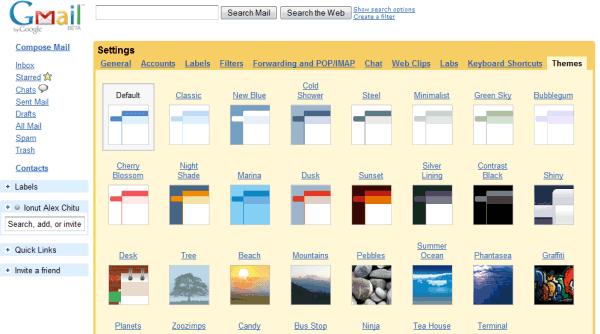
Gmail also adjusted the default theme, but you can always go back to the previous theme by selecting "Classic" in the settings page. I can't decide between Contrast Black, Cherry Blossom, Graffiti and Ninja. What's your favorite theme?
{ Thanks, Niranjan and Pascal . }

Im sorry, but I cant find where to enable themes. Can you tell me please?
ReplyDeleteStill me (Anonymous). I am from a non-English (US) country, but I use the English (US) language to have the latest features available, but I cant find where to enable themes, no tab called themes is in my settings :-/
ReplyDeleteYou need to wait until the new feature is enabled in your account. That should happen soon.
ReplyDeleteThis is awesome!
ReplyDeleteOk, thank you for a quick response :)
ReplyDeleteThe themes are beautiful!! I'm thrilled that I was one of the first to have them enabled.
ReplyDeletei'm waiting for it to be enabled. can't wait to experience the "changing with time" feather.
ReplyDeleteThe Gmail interface is also noticeably faster!
ReplyDeleteI'm still waiting...
ReplyDeleteWhat's the longest I will have to wait? Hours, days, or weeks?
it's been enabled on mine and i love it! i have ninjas hacking away at my email :D
ReplyDelete@Sean Leather: Yeah! I am noticing that too. I'm running IE8 Beta 2 and have notice that the Gmail is loading faster and haven't had to switch between the default IE8 Beta 2 mode and Compatibility.
ReplyDeleteI don't yet have the Themes tab can't wait for it!
I love the new themes :D
ReplyDeleteThey're awesome!! I'm so happy I have them :D
It just happened in front of my face. first the new look on a reload and then the theme tab in the settings appeared within a few minutes. Much nicer presentation and with the extended labs functions this is getting real neat. Thanks google, ur soo kewl ;-P
ReplyDeletestill i like the old fashion way ,though i enabled the theme by mistake now i don't know how to disable it ..does anybody know how to disable it..i tried the default..still not getting the old one(not the old version)..
ReplyDeletethanks
i think so far its only been put on some people's emails. ONe of my gmail accounts has the new theme tab (its hella cool) but the other one still does not.
ReplyDeleteits exciting buti have two ids.. its enebaled in one and not on other.. :) i guess i shud wait fot it to happen.. ne ways thanks.. keep up the gud work guys at google..
ReplyDeleteswwwweeeetttt is all I have to say. who design that ninja theme?
ReplyDeleteFinally a feature that I have wanted for a long time!
ReplyDeleteHow can I get the old one back?
ReplyDeleteThis is awesome. Hoe about some love for google apps users? How come the labs stuff and now themes are not available for google apps users!?
ReplyDeleteI want it, I want it !!!
ReplyDeletegrrrr... still not enabled
Is there documentation anywhere that indicates which themes change based on time or weather? I know about Tea House, but which others?
ReplyDeleteThanks
Hey Smart one go to settings then click themes
ReplyDeletestill disable to me this option
ReplyDeleteIt's just great!!!
ReplyDeleteArticles in Indonesian:
http://danigunawan.com/2008/11/20/fitur-baru-gmail/
Its awesome.. Makes gmail totally refreshed..
ReplyDeleteSo, does anybody knows when actually they(the themes) will be available?
ReplyDeleteMy account does not show "themes"! WHY??????
ReplyDeletesooory but my option for themes is not cumin
ReplyDelete?
Hi
ReplyDeleteI have few Years back Gmail Account in this themes tab is not there in settings. what should i do for enable that?????????
YOU HAVE TO WAIT!!!
ReplyDeleteNew google features are slowly rolled out to new users to work out bugs. It may show up in days or a couple of weeks for you. You just have to wait and be jealous of those who already have it
Good features coming out of google box now. I have got this feature enabled and right not playing around with themes. Same goes with Orkut also. Bot can be customized now.
ReplyDeleteGreat!!!!
How can I reset my location? I want to change the location I input for one of the themes but I don't know how to access that drop down box again.
ReplyDelete@Anonymous :
ReplyDeleteGo back to the settings page and you'll find an option below the themes.
"Your location is set to [London]. Change"
I have two accounts, one is enabled the other one is yet to. Why?
ReplyDeleteAm I the only person that thinks they're awful?
ReplyDeleteThe contrast is terrible on most of those themes - medium text on a light background - and there's loads of extra unnecessary visual noise.
I'm extremely disappointed there isn't an option to disable themes.
Also, the "older version" link doesn't remember your preferences.
<< I have two accounts, one is enabled the other one is yet to. Why? >>
ReplyDeleteBecause they're different accounts and the new feature is gradually added to random accounts.
<< I'm extremely disappointed there isn't an option to disable themes. >>
Just use the default theme. Can you disable themes in Firefox?
cudn't find it...plz help!
ReplyDeleteWhat sort of a roll-out of a product add on is this? Shambles
ReplyDeleteMy mates have it and I don't. I've been on gmail since that beginning and this is how you treat me?
I'll remember this.
Where's my themes?
ReplyDeletePhase in - ask my nuts.
Ridiculous.
@Anonymous
ReplyDeleteDon't lie, we know you don't have any mates. Wait like everyone else.
I still don't have new themes in my mail. Seems that not all has these features. SAD.
ReplyDeleteWhy do they need to "roll it out" in the first place? Just enable it when I log in. Google tech is really not up to par anymore. Google's doomed if they continue treating customers like this
ReplyDeleteAnuraag -
ReplyDeleteMy options for theme is not coming.
How long i have to wait ??
"We'll be rolling out themes to everyone over the next couple of days, so if you don't see them yet, check back soon." (Gmail Blog / November 19, 2008 12:21 PM PDT).
ReplyDeleteI've just got them.. blurgh... please get some better themes and make the classic theme actually look like the old Gmail which was perfect.
ReplyDeletehey its so so luvly i got all my themes,
ReplyDeleteNot really nice to enable it for some folks, but not others. Will leave us who have to listen to others go on about the themes over the next few days with a bad taste in out mouths.
ReplyDelete1. Is this a Gmail 2.0 only feature?
ReplyDelete2. I think they should allow users to create their own theme and use in Gmail.
Google is going to get us PWNed soon. Damn NWO.
ReplyDeletehey i have 2 gmail ids and one i use regularly i am not getting themes option in setting while the one which i dnt use regularly getting themes option .... any thing option to enable???
ReplyDeleteIf the rollout gets under your skin that badly, leave. Go on. Clearly Google has offended you *so* badly you can't bear to use their free, accessible, easy-to-use, POP-and-IMAP-compatible, slick, clean mail interface. After all, there's always Windows Live Mail, eh?
ReplyDeleteStill here?
Yeah, that's what I thought.
(And, for the record, it's not available under my account yet either. Now I know it's coming, I'm happy to wait. They'll have ironed out any emergent niggles by then. The whiners among you really could do with learning some patience.)
@liam the lemming
ReplyDeleteOh well aren't we superior, must be nice to wake up and feel so much better than everyone else, what with your giant brain and infinite patience and understanding, (and sarcasm).
i have 2 gmail accounts and new themes exist only in the first account..how is that possible??
ReplyDeleteI can't find the theme tab in the settings in my gmail:( I use the Norwigen language... can someone tell me how I can change the theme? and why it's not there in my settings.. I want it:(
ReplyDelete@tmtv
ReplyDeleteGoogle has only allowed it to some users, not all.
ok :'( but when can google allowed it to me and some other norwegen users then?
ReplyDeleteLiam the Lemming - the fooking cheek of you. I bet your're lying through your teeth and have them already.
ReplyDeleteGet off your high-horse.
Some people get it and others don't?
ReplyDeleteDiscrimination of the highest order.
Looks fantastic. It's active on my regular gmail account, but not on my Google Apps yet. I can't wait!
ReplyDeleteMy friend IM'd me this morning to tell me he had Ninjas in his gmail, and I thought he was nuts. :-)
'Tis awesome. =)
ReplyDeleteOne minor niggle- any chance of updating the UK "Google Mail" logo to fit in with the themes? The full-colour version doesn't go quite as well as the plain white "GMail" logo in the US versions of themes.
Awesome, awesome job, though.
I have the option and I absolutely love it. It takes GMAIL to another level! GMAIL IS THE BEST!
ReplyDeleteUnfortunately, it appears that those of us who are using GMail through Google Apps may be left out in the cold. According to an article from information week, it sounds like Google is not planning to bring themes to Google Apps users at all (although I'm personally hoping this is merely a delay in the roll-out to address corporate "standardization" concerns):
ReplyDelete"Google's enterprise customers, however, are allowed no such levity: Gmail themes are not available to Google Apps users, a Google spokesperson said."
Source: http://www.informationweek.com/news/internet/google/showArticle.jhtml?articleID=212100915&subSection=News
The article goes on to say that iGoogle has had themes for over a year, and since Google Apps Personalized Pages do not support themes, I'm expecting that GMail will very unfortunately follow the same page.
Personally, I find it disappointing that Google Apps customers (many of whom are actually *paying* for Google services) are being left out of features like these. I can understand that large Enterprise customers might not like it, but the option could very easily be added to turn it on or off in the Domain Settings control panel, or even enforce a single corporate-wide theme that is different from the standard one (to be fair, the logo and colours can be changed on Google Apps accounts, but this doesn't compare to being able to change the entire look and feel).
@Jesse:
ReplyDeleteWhere did you see in that InformationWeek article that Google Apps users won't get themes?
"Gmail themes are not available to Google Apps users, a Google spokesperson said." - that's the only factual sentence related to Google Apps from that article. Gmail themes are not available to Google Apps users for now, but that doesn't mean they won't be added.
Well, I used the word "may not be" and as I also mentioned I'm certainly *hoping* that it's merely a delayed roll-out to address other concerns, but the tone of that statement leaves room to assume that it's something Google is simply not planning to offer in the immediate future.
ReplyDeleteNormally, when Google has rolled out features that they are planning to deliver to Google Apps customers in a short time frame, we don't normally see statements that they're simply not available to Google Apps customers... It just takes time to actually see them show up.
I don't think it necessarily means that Google Apps users will *never* get themes, but it does seem to apply that it's going to be a ways off, rather than simply a matter of waiting for it to be rolled out across the Google environment (as it would be for most other recent features).
To be fair, there *are* issues to be addressed with properly rolling this out to Google Apps users, since Google Apps has traditionally offered other forms of customization, and I imagine that they would need to work around that as well as providing the necessary Domain Management controls for themes and corporate "branding" that some Enterprise Google customers would likely demand.
However, the fact that iGoogle's themes (and other advanced features) have yet to come to Google Apps doesn't bode well for seeing them in the GMail space.
Nice added features and my eyes are pleased!!! Crisp themes and nice touch of transparency on some. Great work GOOGLE!
ReplyDeleteWhy in the hell does everyone i know have the new features but i don't..... Google wouldn't have these people if it weren't for me spreading the word. This is crap. My girlfriend has it and she probably won't even see it for a month when she signs in next. I used mine every day!!!! I'll remember this gmail
ReplyDelete"Oh well aren't we superior, must be nice to wake up and feel so much better than everyone else, what with your giant brain and infinite patience and understanding, (and sarcasm)."
ReplyDeleteI never claimed to be superior. I'm just not particularly inclined to make a scene just because I'm not first in line.
"the fooking cheek of you. I bet your're lying through your teeth and have them already."
I'm using Gmail through Google Apps. If Jesse's prediction is right, I won't ever get themes. Call it poetic justice if it makes your day.
If that turns out to be the case, then so be it, but it's unlikely to provoke me into shouting about how "I'll remember this" or how Google's "not up to par" or cry discrimination. (Can an apparently random selection *be* discriminatory?)
https://mail.google.com/mail/?shva=1#settings/themes
ReplyDeleteTry that link. It activated themes for me :D
awesome feature.
ReplyDeleteI'm loving the Ninja theme right now :-)
It's looking so COOL!! I LOVE IT (the candy one!!!! :)
ReplyDeleteGreat work google!
I don't see the tab for Themes in my account. Do I need to do anything or download anything for it to appear?
ReplyDeleteto billbalo!
ReplyDeleteAs if you pay a cent to use GMAIL!
Love the themes - although stayed with default.
ReplyDeleteWhy did some themes disappeared? e.g. Graffiti.
ReplyDeleteCool! Is there going to be more themes?
ReplyDeletedumb thing isnt working on my account. :( i hope it goes soon....
ReplyDeleteI also still don't have any themes, and I sincerely feel deprived. I have been with Gmail since the beginning and I've spread the word to all my friends. If only there were a logical explanation for who gets the themes first and why, I would feel so much better. Not to blow things out of proportion, but you feel like the victim of a random and personal attack when all your friends are talking about their crazy themes (and many of them are people who YOU convinced to turn to Gmail), and you still don't have them, and don't know why. I would have expected better from Google.
ReplyDeleteI still don't have a themes tab in my settings. :(
ReplyDeleteI got 'em a few days ago. I have had this account since 2004 I wonder if they roll out based upon age of account? I use this account quite a bit. The themes look great. Nice work google.
ReplyDeleteto GeoJono:
ReplyDeletefrom my experience Beach changes over time, showing sunrise, or daylight or sunset; and Tree changes with the weather, if you set your country and city below. have fun and thanx for Tea House hint - I didn't know!
the themes are fantastic, thanx a lot!!! I especially like the ones that change with the weather or time and the retro notepad. mountains are great too, as well as ocean. just thanx again!
ReplyDeletei didn't have themes but i noticed when i relogged in a notice came up under the search bar like "try themes blablabla" also the link posted by someone above worked. i copy and pasted it in my address bar hit enter and since i was already logged into gmail brought up my settings page with themes on it. good luck everyone!
ReplyDeleteWhere is the weather theme? That changes with the weather?
ReplyDeleteSuzanne - the trees theme changes with the weather.
ReplyDeleteI LOOOOOOOOOOOOOOOOOOOOOOOOOVE the new themes! Finally!
ReplyDeleteGoogle Themes 2008 = Windows 95 Themes
ReplyDelete?
Classic look FTW.
ReplyDeleteLove the themes... Now when will be able to fully skin all Google-related websites. :)
ReplyDeleteGoogle rolled out “Themes” for Gmail today, causing everyone to scramble to see if they had access.
ReplyDeletehttp://www.iwebie.com/gmail-themes
GMAIL has OFFICIALLY become the love of my life!!! I've been using Gmail for a good 3 years now, and it was love at 1st sight! And even though back then when I opened my account it didn't have many features (and wasn't opened to the public in general, you had to be invited) it was still great, now it's like the CADILLAC/MUSTANG/FERRARI of email accounts!!! How could I ever change it??? I'M IN LOVE!!!!
ReplyDeleteEach time I go check my email I'm amazed by the beauty of those themes.... specially the graffiti one...
ReplyDeletethanks google
its Grate but it does not show me in IE and works grate in fire fox can please tell me why so........
ReplyDeleteWell im findin it real tough to navigate through options after applying the themes.
ReplyDeleteyeah my bf has the graffiti theme on his and i don't! what's up with that?
ReplyDeleteuh, has any of the people that do not have themes yet actually read the earlier postings?
ReplyDeleteYou have to WAIT for it to be enabled in your account.
I cant wait to see the themes in my inbox..can anyone please tell maximum how many days i will have to wait?
ReplyDeleteThe gmail themes was just enabled on my account today, and I'm so happy about it! I can't decide on what theme to use!! Really, I love gmail ^__^ However, I just have on question: why are some of the themes featured here on the blog not available on my account (like pebbles and graffiti)? Is this due to the roll-out or are some themes specific to an area/country?
ReplyDeletewill this be available for google apps for business email accounts?
ReplyDeleteI wanna go back to default theme after tried a little bit, the default theme which is simple that's what I like most, but it seems I can't go back, I mean go real back. I had chosen "default" and "classic", but they are more different from the really default & classic one, the background of buttons & more actions bar is too light, and the buttons, just like "delete", are too big. could you let me know how can I go backward? thank you.
ReplyDeleteThe default Gmail theme has been updated and even the classic theme looks slightly different. The only way to get the original theme is to click on "Older version" or bookmark https://mail.google.com/mail/?ui=1, but you'll lose some features (colored labels, audio/video chat, Gmail Labs).
ReplyDeleteThese are soooo cool! Love the weathered themes.
ReplyDeleteTo activate: You have to go to settings and click on the themes tab.
Gorgeous... I chose a new theme at home yesterday. But how come when I opened gmail to check my mail at work (same account) the old theme appears and no way to change it to new themes. It's the same account. Does it have to do with IP addresses and not about accounts as such ?
ReplyDelete@Ninadev:
ReplyDeleteWhat browser do you use at work?
To the people complaining or wondering why they don't have them yet - Google tends to roll out new features to accounts at random. The roll out is to prevent everyone from hitting the new feature all at the same time and taking the whole system down. If you didn't get it first this time, you might get the next new feature first.. it's random, because, you know, that's fair. You will have them soon enough, and in the meantime stop complaining about something you get for free like kindergartners who haven't had the lesson on patience yet.
ReplyDelete@Alex Chitu
ReplyDelete"What browser do you use at work?"
I use Internet Explorer, I don't know what version it is.
Hm, I still don't have even the emoticons or AIM accounts.. seems I don't have luck..
ReplyDeleteSame problem as Ninadev here. I could select themes when using internet explorer 7, but I am now on another computer with internet explorer 6 and no luck...
ReplyDeleteUsing Mozilla Firefox it works.
If you use IE6 without a required patch, you'll get the old version Gmail which doesn't support themes. Google worked hard to make the new Gmail work in IE6, so you should make some effort and install the latest updates for IE.
ReplyDeleteRelevant post: New Gmail code base now for IE6 too.
I have gone to my Settings and cannot find the Themes tab? When will it be activated in my account?
ReplyDeleteHi
ReplyDeleteGood announcement.
But i am yet to get it either through IE and Firefox.
Could you please let me know how could i start using this service.
Any error at my part which should be rectified.
Thanks
It works on my desktop. On my laptop it only works with firefox, but not ie. The theme is there, but no settings tab for it. Anyone know if it could be something with cookies, security or anitvirus? I deleted temporary files and no change.
ReplyDeletesorry plz am not getting theme option in my settings page..... can u help ...plzzzzzzzzzzzzzzzzzzzzzzzzzzzzzzz
ReplyDeleteThanks, i got themes using FireFox. Not in IE,
ReplyDeleteI liked this.. :-)
Love it so much!!!!
ReplyDeleteYou guys are so innovative and always a step ahead of others, this is the reason why i love using gmail over other free email accounts...
as a suggestion, please create even more themes and within each theme add even more varieties that change over time! thanx..
Nice! some of the themes don't play nice with the labs features, e.g. Right-side labels is squashed when using the ninja theme...
ReplyDeletesome are pretty especially candy
ReplyDeleteI thought the themes looked kinda ugly.. i don't know.. i liked gmail for its cleanliness.. so.. i went to the settings and chose "Classic".
ReplyDeleteBut now that I know not everybody have it, I do feel like i'm.. special :) ahh..
i do a special
ReplyDeletethere is no themes tab in my gmail settings page.........may i know whats the procedure to get it or wil it come automatically in my settings page?????
ReplyDeleteI don't understand something... when I open my account in a computer I can use the new features, but when I open the same account in a different computer that option is not available.
ReplyDeleteWhat should I do?
The tea house theme is by far the best. It's so peaceful to see the little fox going about his day.
ReplyDeleteWith some of the scenery themes, they should change according to the weather or time of day? Mine might change onces every 2 days. Is anyone else getting consistent weather or day changes?
ReplyDeleteNot all Google Apps users are Enterprise clients. Since we PAY for the privelege of GAFYD service, we ought to at least have the choice to turn themes on and off, and the rollout shouldn't be delayed.
ReplyDeleteThe other kick in the teeth is that, although Themes may not be being rolled out to Google Apps Gmail, there have obviously been some changes, because good the great "Gmail Redesigned" skin no longer works (and the timing is just too xcoincidental to the themes rollout announcement, which also mentioend other changes to the basic mail interface. So, if these changes were rolled out to GAFYT Gmail accounts, why not themes?
Hi how to change the gmail themes ? I already use candy themes, and want to change it.
ReplyDeleteThanks
I have been trying to post a theme, but can't because there is no theme settings for mine. How long will I have to wait before I get the theme settings.
ReplyDelete@ ditta.dara
ReplyDeleteGo Settings > Themes > Select any theme you like
"DESK" is my favorite, amazing :)
We need Thanksgiving and Christmas Themes!
ReplyDeleteI know go to themes from settings, but my settings doesn't have a theme tab, how do you get it.
ReplyDeleteplease help!! i have absoloutley no idea how to get a theme! i've tried EVEryTHING!! :(( plz help and tell me how to get one!
ReplyDeleteI just changed my theme (was playing with it, wanting to see them) but now I can't change it to another one... I press settings and themes isn't there anymore. Why??? I don't like the one I chose :(
ReplyDeleteTo all of you who havent got themes yet...if you are using Internet Explorer, check the version...I was able to view the themes for IE 7, but on my laptop with IE 6 I cant see it... So try UPDATING YOUR BROWSER to IE 7 or Firefox or mayb the IE6 patch might do the trick...
ReplyDeleteIn response: "Anonymous said on November 20, 2008 1:40 AM PDT:"
ReplyDeleteYES, the contrast between read and unread is terrible! The themes themselves are nice but the good ones are unusable due to the poor contrast. I hope they adjust that or at least let the user adjust it.
for gmail themes go to settings n select themes........
ReplyDelete<Kre8ive> To all of you who havent got themes yet...if you are using Internet Explorer, check the version...I was able to view the themes for IE 7, but on my laptop with IE 6 I cant see it... So try UPDATING YOUR BROWSER to IE 7 or Firefox or mayb the IE6 patch might do the trick...
ReplyDelete---
Something just occurred to me. Oh my.
If Google are using this as a means to convince people to move away from IE6... then I think I may just fall in love with Google all over again.
IE6 is an outdated browser released in 2001, before companies started to use Ajax. If you remember, Gmail has been launched in 2004, three years after IE6. When you use an outdated software, you shouldn't expect to be supported by new services.
ReplyDeleteLast year, Gmail released an important update, which only supported new browsers (IE7/Firefox 2+). Since then, the support has been extended to Safari 3, Chrome and IE6 (completely updated with all the patches released by Microsoft). You can still use the old version of Gmail in all the other browsers, but you'll miss new features like themes, video chat etc.
I don't like default login page now.. I switched to Classic, but login page is still with some mountains in background :( Is Google going MS way of "customizing" everything?
ReplyDeleteI don't have a setting tab on my settings page. Help!
ReplyDeletethey should hv a theme tab to make it easier to change the theme whenever we want
ReplyDeletecause the themes are cool!!
I think the themes are so cool.
ReplyDeleteon my friends computer they worked, but on mine, they WONT!
I am stupid and cannot wait...
ReplyDeleteSoy no perador...
ReplyDeletethere seems to be a problem with the 'terminal' theme. some of my mail with plain text just doesn't show, strange!!
ReplyDeleteI still didn't get the theme!!!:-/
ReplyDeleteI wish these themes weren't so hoggy on real estate, but most of them look good. SHINY is the one to which I have now committed... until more choices become available...
ReplyDeleteI have been waiting since last wed!!!
ReplyDeletenot cool!!!!
One computer has a theme & the same account in the other doesn't... shouldn't it be the same everywhere?
its so confusing!!!
ReplyDeleteThe themes tab isnt on the settings list.... :-(!!!!
ReplyDeleteYou fools need to activate the features in "Labs" first...
ReplyDeleteOMG!!! Firefox has the theme tab and IE6 doesnt!!!!
ReplyDeleteI just found it out!
ReplyDeleteHow do u do that?
ReplyDeleteactivate feature in "Labs"... how do u do that?
ReplyDeleteStep One: download and install Google Chrome Browser
ReplyDeleteStep Two: uninstall all other browsers
it does work...
ReplyDeletefor all those who are not able to enable the themes....
click on settings(near log out)
N then click on themes which is on the extreme right corner....
N there U are!!!!!!!!!
Njoy...
I installed google crome and it started to show me themes
ReplyDeleteI found the themes! But...!
ReplyDeleteIn the preview (http://2.bp.blogspot.com/_JE4qNpFW6Yk/SSSRNDDTP7I/AAAAAAAAAMU/LWtu9klI-Bo/s1600-h/skins_grid.png) there is a theme listed that I can not find!
See the top right image? That theme is not in my list...!
Where can I find it? Is it hidden? Is it a special feature? Does it mean there are more themes to come??
and what about the bottom middle one...?
ReplyDeletecan't find that one either!
I was able to get mine only when I upgraded my browsers. Download the newest versions of Internet Explorer or Mozilla.
ReplyDeleteI love the teahouse theme. I like watching the little fox go about his day doing things -- late at night there are little ghost foxies that come out too. ^^
ReplyDeleteBy the by, I'm using Google Chrome for browsing.
I have themes on my account on a computer, but not on another. How's that possible? It's the same account.
ReplyDeleteI couldn't find the themes...
ReplyDeleteCan u help me?
Well, I found it's great. But somehow, it doesn't work on some computer. Any special requirements necessary?
ReplyDeleteI didn't like my first choice, so how canI go back my old look?
ReplyDeleteLike A.K I love the teahouse theme. Although until now I hadn't realised the pictures changed. Obviously I can't stay glued to my email for 24 hours! Is there anywhere I can checkout what happens thruout its day in 30 seconds?!!!
ReplyDeleteIm sorry, but I cant find where to enable themes. Can you tell me please?
ReplyDeleteI LOVE GMAIL!!!
ReplyDeleteI have 26 themes instead of 30. And from the image in your post I can clearly see that I actually do miss a few themes. How come?
ReplyDeleteP.S. I'm from France
Gmail offers 31 themes: Default, Classic, New Blue, Cold Shower, Steel, Minimalist, Green Sky, Bubblegum, Cherry Blossom, Night Shade, Marina, Dusk, Sunset, Silver Lining, Contrast Black, Shiny, Desk, Tree, Beach, Mountains, Pebbles, Summer Ocean, Phantasea, Graffiti, Planets, Zoozimps, Candy, Bus Stop, Ninja, Tea House, Terminal. If you don't see some of the themes, refresh the page (Ctrl+F5).
ReplyDeleteIf you have the new version of Gmail *, you can change your theme in the settings.
* How to check if you have the new Gmail? Find a link at the top of the page title "Older version". If you don't have the new Gmail, you're probably using an old version of a browser. Install Firefox 3 [Win/Mac/Linux], Safari 3 [Mac/Win], Internet Explorer 7 [Win] or Chrome [Win].
i only get 26 themes
ReplyDeletewhy?
Ever since myspace , Google and Yahoo has followed thier lead with theme layouts. www.freepesos.com
ReplyDeleteI have the theme settings, only problem is it won't show the theme I set it on. Help
ReplyDeleteMe again, I tried it on safari browser and it works great! but still nothing for firefox/gmail.
ReplyDeleteHey nice themes.....checkout few screenshots here http://vinitsworld.blogspot.com/2008/11/gmail-themes-screenshots-and-gimp.html
ReplyDeleteLook at Gmail Dynamic Themes Preview page - http://tutanhamon.com.ua/technovodstvo/gmail_themes/ that contains all possible (I hope) decoration styles for dynamic themes and weather conditions description as a bonus.
ReplyDeleteHotmail got themes too. But Gmail has nicer and more themes.
ReplyDeleteDoes anyone else not have all the themes shown in the pictures above?
ReplyDeleteThanks
NO.., theme tab in my Gmail .. How can i enable that theme tab in my gmail
ReplyDeleteWhy in the hell does everyone i know have the new features but i don't..... Google wouldn't have these people if it weren't for me spreading the word. This is crap http://nevaavto.ru. My girlfriend has it and she probably won't even see it for a month when she signs in next. I used mine every day!!!! I'll remember this gmail
ReplyDeleteI am enjoying the Gmail themes right now :) Thanks Gmail for this.
ReplyDeleteI love it... mine has the tea party and it's so cool, it changes all the time. From sun up to sun down this nice fox is having a good time, even the ghosts are having their own tea party :) Thumbs up!
ReplyDeleteI see the themes tab in settings only if I open Gmail in Google chrome. I do not see the themes tab if open Gmail in Internet explorer. Nor, can I see the theme I set in Gmail in Google chrome.
ReplyDeleteI DON'T HAVE A THEMES!!!!! UGHA UGHA UGHA!!!!
ReplyDeleteFor those who don't have themes: do you use Internet Explorer 6? Then you have three options:
ReplyDelete(1) install all the updates for your browser from Windows Update
(2) upgrade your browser to the latest version: IE7
(3) install a better browser: Firefox, Chrome.
hey
ReplyDeleteso where are the mountains themes pictures from? I think I recognize one, which is looking down on Largo di Garda in Italy, right??
in my id ther s no themes in setting page? how do it?
ReplyDeleteI love the themes.....thank you google for making the internet a better place. Keep up with the good work.Bravo
ReplyDeleteKori from Kenya.
PS.....for guys looking for the themes go to your gmail settings and click on themes.
i love you gmail,,,,,,, its the best email i have ever use........ what ever you do ,,, its the best
ReplyDeleteI love the new themes! However, when I log in at home, the themes work. When I log in at work, I don't even have the option to select themes. Anyone have an answer for this?
ReplyDeleteThanks!
Finally! After i could manage igoogle i was expecting the same thing for gmail.
ReplyDeleteThanks!
Well, I've found it now. It's the browser version and the plugins problem...Got it!
ReplyDeleteNatural themes definitely the best...
I CANT FIND THE THEMES
ReplyDeleteCAN ANYONE HELP ME???!???
ReplyDeleteI STILL CAN'T FIND IT!!!!!!!!
i could not find the Themes Tab under Settings. pls help me to find .. Using Server 2003
ReplyDeleteWhat browser do you use? The operating system is not very important.
ReplyDeleteI cant find where to enable themes. Can you tell me please?
ReplyDelete#
I still don't have a themes tab under settings in either Firefox 3.0.4 or IE7.
ReplyDeletei could not find the Themes Tab under Settings, Pls help me
ReplyDeleteYou don't have "Tea Garden" as an option for yours! The tea garden has a little fox who keeps busy around the garden during the day. He works on the roof, cuts flowers, sweeps, etc. It's all static, there's no animation but it's really adorable.
ReplyDeleteI have one account. When I log in on one computer I can see and change my themes (very cool by the way). But on my work computer, I cannot see themes in my settings. I use XP here and Vista at home - but it's the same account....?
ReplyDelete