The most notable new feature is a bookmark manager that lets you find bookmarks, move them to a new folder or easily delete a large number of bookmarks. In the Tools drop-down, there are options to import bookmarks from a HTML file and to export bookmarks in a similar format.
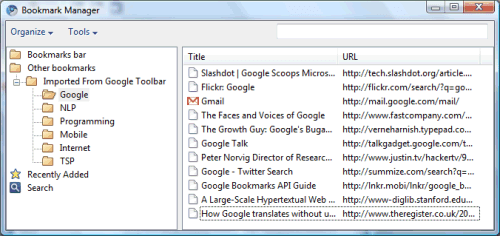
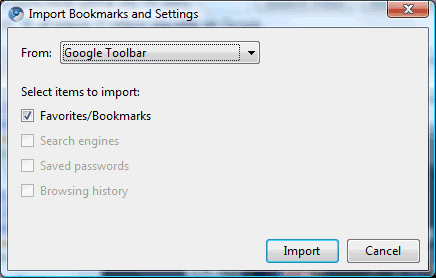
Another useful new feature is the option to import bookmarks from Google Bookmarks. The browser incorrectly mentions that the bookmarks are imported from Google Toolbar, since the toolbar doesn't even have to be installed. For now, the bookmarks aren't synchronized with Google Bookmarks.

This is great!.. it's one of the features that I've been wanting for a long time, especially given that I've made my default browser as Chrome.. of course the most needed feature is still the add-on support..
ReplyDeleteI hope they roll out a version of Chromium with this bookmark manager as Chrome's next update, soon..
ReplyDeleteLooks similar to firefox's bookmark manager...
ReplyDeleteWell, I am waiting when SRWare Iron will implement it (Iron is a clone of GC). I was pretty impressed by adblocking in Iron, and weak bookmarking system was one of the reasons why I still use Firefox.
ReplyDeleteOops... They are creating yet another useless monster from a handy simple system?
ReplyDeleteImport? They should just sync so that my bookmarks are everywhere I use Chrome.
ReplyDeletei love chrome, but untill noscript or similar funcionality is available i'll stick with firefox. so pleeease google, add this. i really can't wait for this to be added.
ReplyDeletei'll settle to wait for/let go all other add-ons of firefox but i won't browse the internet without noscript(or something similar).
I forgot to mention another feature that will be added soon: form autofill.
ReplyDeleteso i got used to using chrome as my main browser cause fx was having problems and i've loaded it with so many add-ons, it runs like treacle..anyways i tidied up my bookmarks in chrome one day which i had imported from fx but now i want to clear my fx bookmarks and import my new cleaned up chrome bookmarks to there. anyone have a hog's uncle clue how i can do that?
ReplyDeleteYes,this is one of the major feature where Chrome lack.
ReplyDeleteHey quick.. Look http://www.chromemarks.com
ReplyDeleteheh
try my altered google bookmarks bookmarklet. - have google bookmarks for chrome as "almost" a toolbar:
ReplyDeletehttp://orizens.com/wp/topics/google-bookmarks-bookmarklet/
sorry - this is the correct link:
ReplyDeletetry my altered google bookmarks bookmarklet. - have google bookmarks for chrome as "almost" a toolbar:
google bookmarks for chrome
Actually, looking at the bookmarks file for Chrome, looks like a strange format.
ReplyDeleteThey should just make an HTML file, and add attributes that Chrome will use, that is the easiest way. (this is the way that FF2 and under uses, not sure if FF3 changes the bookmarks file as well)
But in saying all this, other browsers will probably add an import option for Chrome sooner or later, if some haven't already.
Chrome uses SQLite for bookmark's storage, like Fx 3.x+ does. I wonder if the developers will run into similiar problems like Fx' devs ("Fsync" & Co) ... .
ReplyDeleteActually, Chromium now stores bookmarks in a JSON file.
ReplyDeleteI love Chrome for using Google Docs and Apps. When Chrome has all of the add-ons that Firefox has, I'll consider making Chrome my default browser. Still love Firefox, though.
ReplyDeleteGreat news, hoping it will be available very soon!
ReplyDeleteHow about RSS support?
ReplyDeleteSo glad. This was the #1 missing feature for me. Awesome!
ReplyDeleteThe next great thing would be to make it sync with Google Bookmarks. That would be incredible, rival Opera, and give your bookmarks service a reason to use it.
Hey, for those of you that are waiting for this on Google Chrome release, stop waiting. If you switch to the Dev releases, it gives you all these latest features, and in my experience it's bee just as (if not more) stable. Just download the EZ channel chooser here...
http://dev.chromium.org/getting-involved/dev-channel
Sheeesh...
ReplyDeleteGoogle Chrome is one heck of a fast, stable program...
But this feature should have been on board from the very start of the Beta. I think there are enough persons that web-surf from different computers and use a flash drive or a web service to have their bookmarks with them.
Yours,
L. Albano
it's
ReplyDeleteabout
time
rave
about
how
awesome
your
browser
will
be
and
then
SUCK
at
bookmarks
great plan!
When is this being released
ReplyDeleteThe new features are already available in the most recent dev build. To install it, subscribe to the dev channel.
ReplyDeleteI hesitate to use even upgraded versions of Chrome, since my last experience using it (first version) left my computer compromised; have they fixed the security issues beyond all doubt?
ReplyDeleteWhy doesn't it have a feature to synchronize it with google bookmarks ?
ReplyDeleteAdd Google Bookmarks to the list of Chrome search engines and you can then conveniently call up bookmarks in the address bar. When I want one of my Google Bookmarks, I type "gb <search term(s)>” Enter, and click the bookmark I was looking for. Examples and step by step directions for setting this up at here. Moving from a toolbar paradigm to a search paradigm to use Google bookmarks was a natural step for me.
ReplyDeletewell, I love Google chrome but hate the bookmark. It can import from IE but not sort as the way in IE. It can only be sorted by Alphabet..
ReplyDeleteHATE HATE HATE HATE the new tab page. HATE the recent bookmarks list. HATE the most visited list.
ReplyDeleteIf somebody else likes it, then fine. BUT GIVE ME THE OPTION TO TURN IT OFF!!!
Maybe i dreamt this, but i think that when i was first using chrome, it enabled me to label my bookmarks much like dig does. I saw the genius in that, enabling bookmark search sets. The current version just does the same categorizing bs by using folders that is in ie and firefox, limiting the scope of organization of my bookmarks. Also, it doesn't handle like a webpage but more like a folder list. To me that too has always sucked plenty. Folders are an unnecessary interpretation that exists because it once was the only way to organize. I really would want to see my bookmarks be part of different collections again. Labeling allows that.
ReplyDeleteI have been using Google Chrome since it was first released. But, I am not sure if I need to re-install or if it automatically updates. I tried to find out what version of Chrome I have, but it looks like that there is no way of finding the version.
ReplyDeleteAlso, Firefox allows me to drag a bookmarklet to the browser toolbar to easily update my FriendFeed account. But, again there is no way of doing this on Chrome. Could some one help with this please?
@Anon:
ReplyDeleteBoth affirmations are inaccurate:
(1) find Chrome's version by clicking on the wrench icon and selecting "About" (you can also type about:version in the address bar). Google Chrome updates silently in the background.
(2) you need to make the bookmarks bar visible first (click on the wrench and select "Always show bookmarks bar" or just type Ctrl+B).
I always wanted compatibility for the Del.icio.us bookmarklets as well as for other sharing services like Facebook. Are these on the way?
ReplyDeleteWhat do you mean by "compatibility"? The del.icio.us bookmarklet works just fine in Chrome. Enable the bookmark bar (Ctrl+B) and drag the link to Chrome's bar.
ReplyDeleteI love keyboard shortcuts and Chrome seems to have thrown them all away. With IE and every other program every option in the menus were available with a simple Alt press. I love being able to recall bookmarks by hitting Alt+A then a letter. That's all gone now. While I'm loving Chrome's many features, this lack of bookmark access is killing me.
ReplyDeleteHow to edit the URL which is stored already, i am not feeling it comfort
ReplyDeleteWithout expand/collapse all and sort functionality, this really doesn't help me much.
ReplyDeleteUntil Chrome won't be synchronized with Google Bookmark or get Google toolbar it won't be my preferred browser
ReplyDeleteChrome is so awesome, but it has the worst bookmark system I have ever seen in a browser, and I'm talking since way back in the Netscape Navigator era. My god, just trying to add a bookmark is troublesome.
ReplyDeleteI am not a coder. Currently, is there a way to export my Google bookmarks as an OPML? Google only exports as an html? My goal is to share some of my bookmarks on my WordPress blog page.
ReplyDeleteCan I convert an html file into opml?
Thanks
Yes, definitely the worst bookmark system I've seen thus far, and unfortunately, it just got worse with their new update. Arg. I like being able to simultaneously ctrl+click to launch my bookmarked link into a new tab, but now that doesn't work anymore. That's frustrating when you want to view multiple links in your bookmarks without having to backup every time. The more and more I use Google's software, the more I think they should stick to search.
ReplyDeleteAfter all this time, where is the "collapse all" function?
ReplyDeleteBookmark manager should appear collapsed by default!
How about having the bookmark folders collapsed by default. I LOATH having to collapse them to find what I am looking for.
ReplyDeleteThree years later, Chrome's bookmark handling is worse than ever. Did they do it half-assed because they were hoping to buy delicious and make some cloudy junk or something? This story needs an update.
ReplyDeletechrome bookmarks, still sucky after all these years
ReplyDeletei keep bookmarks in sync between firefox and chrome, then do all my bookmark organising in ff