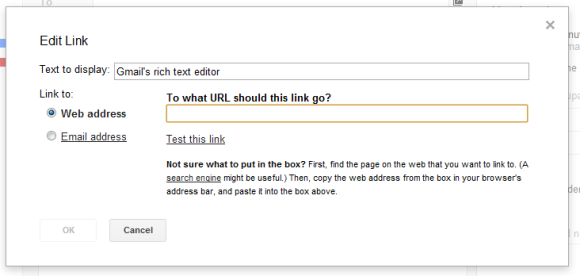
The same shortcut is also used in Outlook, Microsoft Word, Google Docs and other apps. "Just select any text, and then press the Ctrl and K keys at the same time. A dialogue box opens where you can type a link," informs the Microsoft Word blog.
I wonder why Google doesn't offer the option to use the top search result for the text you've selected or at least pick one of the top results from the "edit link" box.
{ Thanks, Cougar. }

Acutally I hate this feature, to be honest.
ReplyDeleteCtrl+K in Firefox is the search shortcut, and now always when I write a mail and want to look up something, I unintendedly fire up the link dialogue and have to use the mouse to get to the search box...
This! I came to say this!
DeleteIt sucks! Though you can get to the search box doing it once again but the "Edit link" box sits still there...
I second your complaint. It really drives me crazy, when Gmail overdrives shortcut used by Firefox.
DeleteSee if Ctrl-L (plus optionally a question mark) might be of any use: it should act the same as Ctrl-K used to.
DeleteCtrl-L is the address shortcut.
DeletePlease allow me to disable this! I use this shortcut constantly to get to the search box in Firefox.
DeleteI guess I'll just disable Gmail shortcuts all together. Add me to the 98%! ;)
Oh my God, finally someone said this... I can't stand this behavior either, but won't disable shortcuts in Gmail because I'm very used to them (and they work pretty well, except for that).
DeleteBut there's a way around this: TAB out of your message (onto the send button) and only then Ctrl+K. Do your search with Alt+Enter, when you're finished just close the tab with Ctrl+W and Shift+Tab back to your message!
Ctrl-K kills a line, to everybody in the GNU world. How could they do this to us? With no option to unassign it?
DeleteNow the effect is that it kills all input and navigates to another page, the current page thrown out from history.
Yep. This is horrible. It also pauses videos in youtube. I would rather not have any keyboard shortcuts than to have unconfigurable ones that override other standard and common shortcuts. The whole point of ctrl-k in the browser is to take focus out of the actual browser window.
DeleteI can't stand this behavior either, but won't disable shortcuts in Gmail because I'm very used to them (and they work pretty well, except for that).
DeleteBut there's a way around this: TAB out of your message (onto the send button) and only then Ctrl+K. Do your search with Alt+Enter, when you're finished just close the tab with Ctrl+W and Shift+Tab back to your message
Yah, I discovered CTRL-K as a hyperlink feature when I was half-consciously using old Emacs keyboard commands--once I start using CTRL I fall into Emacs mode--as is Gene Selkov. However, I'm perfectly happy with the new function and delighted about being able to add hyperlinks everywhere.
DeleteThanks to Google and especially Gmail team that developed this feature, i can breath now that i can use one more short key while using Gmail :)
ReplyDeleteYou should fix the link from ‘Less than 2%’ words. Now it’s http://googlesystem.blogspot.com/2012/01/www.webmonkey.com/2010/03/making-contact-with-mr-gmail/ — but should be http://www.webmonkey.com/2010/03/making-contact-with-mr-gmail/
ReplyDeleteFixed. Thanks.
ReplyDeleteYou’re welcome :)
DeleteFinally! When was this added to Gmail? I love the shortcut in Google Docs and kept filing a "bug" about it missing in Gmail.
ReplyDeleteThanks!
Today, it has become usual to add link to the explanation in the form of text while emailing it to someone and this shortcut is like it make this process very quick.
ReplyDeleteAwesome. I havent use Shortcut but now i would like to try all and all. Thanks.
ReplyDeleteI didn't even know they had keyboard shortcuts. Thought Google was a bit backward for that!
ReplyDeleteFabulous Key board shortcut. I always directly insert links into mail but now i know how to do it.
ReplyDeleteSorry, but nobody will use these except for those that already knew HTML.
ReplyDeleteI don't know this method to implement shortcut in gmail. This post provides me knowledge about this. Before this, I was directly insert links into mails!
ReplyDeleteYeah man ! same case with me as i totally unaware from this type of inserting links method but this will surely help me and definitely save some time as well so thnx for sharing this awesome post buddy :)
Deleteyeah same ! same hare so thanks for sharing this article man :)
Deletei would give it a try............
ReplyDeleteMmmm... another feature that I think I overlooked on my GMAIL.
ReplyDeleteWhen I paste a link into your SHITTY gmail it should appear instantly as a hyperlink. I shouldn't have to go through several more clicks to get the link to work you DUMB BASTARDS.
ReplyDeleteI am going to try this on my Gmail for sure and let us see how far I go with this. I had no idea if this is really possible.lol
ReplyDeleteThis looks like a great thing to make short hyperlinks
ReplyDeletethanks to google and gmail team for this wonderful shortcut, please lets have more short-cuts.
ReplyDeleteI shouldn't have to go through several more clicks to get the link to work you DUMB BASTARDS.
ReplyDeleteI always directly insert links into mail but now i know how to do it.
ReplyDeleteHelp!
ReplyDeleteI am using a mac and when I go to paste my URL in the web address box in the edit link window the paste option will not come up with the right click or using the ctrl v. What is going on? Paste will work every where else!!
I never thought about it.I will surely try gmail shortcuts.
ReplyDelete