An unofficial blog that watches Google's attempts to move your operating system online since 2005. Not affiliated with Google.

Send your tips to gostips@gmail.com.

April 8, 2007

Batch Upload Files to Google Docs

You'd think that Google considered Docs & Spreadsheets important enough to make it easy to import files. Or to export files. You can do that one file at a time, but it becomes tiresome if you have a lot of files.

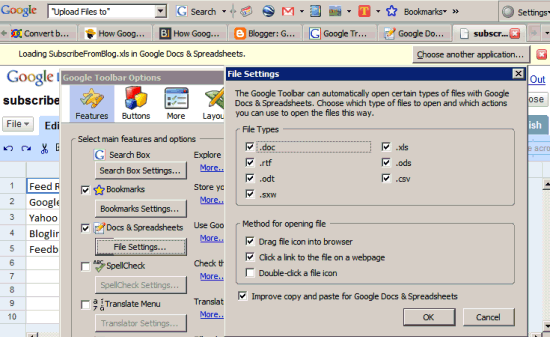
Fortunately, the latest version of Google Toolbar for Firefox has a feature that lets you drag and drop files to your browser and they are automatically uploaded to Google Docs. To upload more files at a time, go to Windows Explorer or other file manager, select your files and drag them in Firefox.

To activate the feature, to go to Google Docs & Spreadsheets after installing the toolbar. You'll get a prompt that asks you if you want to enable the feature. Alternatively, click on Settings / Options and enable "Docs & Spreadsheets".


Related:
Upload files using drag and drop in Firefox

Google, the Supercomputer

BusinessWeek had a nice collage titled "The many faces of Google" that illustrated 8 facets of Google: search engine, innovation machine, ad broker, media mogul, world's biggest computer, phone company, a provider of better Internet and an artificial intelligence system. While some of these perspectives are speculations or just future plans, it's interesting to see Google as a supercomputer you have limited access to.
Most people still think of Web sites such as Google as places to go. Wrong. That's the old media model. In reality, every click is a command for some computer somewhere in the world. (...) Indeed, CEO Eric Schmidt says that Google essentially is a huge, distributed supercomputer "doing all sorts of things over a fiber-optic network that eventually are services available to end-users." Before long, Googling will mean not just searching for something, but getting ALMOST anything done online.

The New York Times estimated last year that the Googleplex and its server farms contain 450,000 servers. "The rate at which the Google computing system has grown is as remarkable as its size. In March 2001, when the company was serving about 70 million Web pages daily, it had 8,000 computers, according to a Microsoft researcher granted anonymity to talk about a detailed tour he was given at one of Google's Silicon Valley computing centers. By 2003 the number had grown to 100,000."

April 7, 2007

Personalized Google Video Search

Google continues its effort to personalize search results, this time with Google Video. After adding a page of recommended videos, now the search results can be personalized. For an ambiguous query like "grid", the top results were:


After tailoring the results to my interests (using my previous queries, ratings, videos watched), there's a big change. In-grid's music videos are no longer in the top results (the two videos were moved to #6 and #7). Meanwhile, the video "Grid-based Integrated Bioinformatics Systems for High Throughput" was moved from #7 to #1, "iClaustron: Open Source Grid Cluster Storage Controller" was moved from #11 to #2, "Pioneering the Laptop: Engineering the GRiD Compass" was moved from #29 to #3 and "Warren Miller's OFF THE GRID" (the only video from the top 5 that is not about computers) was downgraded from #1 to #4.

April 6, 2007

Your Notebooks Are Available from Google Search

If you use Google Notebook, you'll find a new link at the top of search results pages: "My notebooks". There are two possible situations:

* you have the extension/plug-in. In this case, it's the same as if you clicked on "Open Notebook".

* you don't have the extension/plug-in and Google emulates the interface. You can copy search results in the notebook by clicking "Note this" next to the snippet, manage your notebooks or type some text in a new note.

Google Voice Local Search


Finally a new service at Google Labs: some people were really worried that Google's innovation went down the stairs.

Google Voice Local Search lets you search for local businesses from any phone and for free. If you're in the US, call 1-800-GOOG-411 and say what you want to find. Here are some of the features:

* You can find a business listing by category. Just say "pizza," for example.
* You can send the listing details to your mobile phone via SMS.
* The service is fully automated, so it doesn't rely on human operators.
* It connects you directly to the business, free of charge.

In the US, 411 is the phone number for local directory assistance, but it's pretty expensive (more than $1). 1-800-FREE-411 is a free service that uses speech recognition to process your request and ads to monetize it.

Google tested several years ago Google Voice Search, a service that let you search Google by voice, but it's not available anymore. There's also Google SMS: send an SMS to 466453 with your query and get business listings.

If you're in the US, which 411 is better: 1-800-FREE-411 or 1-800-GOOG-411?

Update: This service has been around for a while (it was known as 520-Find). A post from October 2006 gives some interesting overview of Google 411:
Call 1 877 466 4411 (1 877 GOOG 411) and try your luck with two voices that I've come to think of as Mr. Google Smooth and Mr. Google Hawking. They won't tell you who they are, but they seem to be the voices of Google Local Search. (...)

If you call, nothing announces that you've reached Google, but a slightly arch and apparently human Mr. Smooth informs you your call might be recorded and then asks for a city and state. Mr. Hawking then cuts in, slow, methodical, and synthetic, to repeat your query. All good? Mr. Smooth then asks for a business type or name. He does all the traffic direction--the prompting for commands, the suggestions of ways you can interact, the questions. Mr. Hawking just gets to read back your queries and read out the searches.

Actual search results described below the fold, but just some general remarks: the voice recognition is pretty good, even with some "foreign" words, but not all English words.
JotSpot to Open Again Soon?


After being acquired by Google, JotSpot was pretty low-profile. Now there's a new JotSpot help center hosted at Google.com and a new JotSpot group. From the help files:

"Now that Google has acquired JotSpot, all accounts are free. In addition, all accounts have been upgraded to unlimited users and unlimited pages."

Reading some questions from the help center gives you the impression that there's no integration between JotSpot's wikis and Google's products. There also funny texts like:

"Yes, JotSpot does support Apple Mac computers. For the most part, JotSpot will work with Safari. Because we do not test with Safari, JotSpot does not officially support it."

{ Thanks, Óscar Silván. }

Stellarium - Look at the Sky

Stellarium is a free software that renders the sky from a configurable position. The application, available for Windows, Mac and Linux, creates an immersive environment thanks to the 3D full-screen rendering and the realistic photos. Stellarium lets you see stars, constellations, planets, nebulas and is a great way to learn their names. You can search the name of a planet or star and the application even auto-completes it for you.

You're the master of time, so you can make it run slower, faster or even stop it; you're the master of space, so you can change the position to anywhere you want; you can also control the events by running or recording scripts that simulate eclipses or other astronomical events.

It's very refreshing to use it as a virtual telescope that teaches you to look at the sky and to understand more from its mystery.


Related:
Celestia, space simulator
Google Earth, as seen by a Googler

April 5, 2007

New Look for Google Ads

Maybe to combat ad blindness or maybe because the new formats are more attractive, Google decided to change some of the ads from Google search results and the content network.

Here are the changes:

* The ads displayed at the top of search results pages for highly competitive keywords have a background (#FFF9DD), instead of a blue background. The new background is so subtle that is almost white and many users might confuse them with the actual search results.

To prevent accidental clicks, "users now need to click on the link in the top line of an ad in order to be taken to an advertiser's site," according to AdWords blog. Until now, you could click anywhere in the ad box, including the blank spaces.


* AdSense ads change the famous "Ads by Gooooogle" branding from a text into an image that contains Google's logo. "After extensive testing and research, we've found that the new formats are not only visually appealing to users, but they also perform even better for publishers and advertisers," explains Leslie Chiang.

April 4, 2007

Create Personalized Google Maps

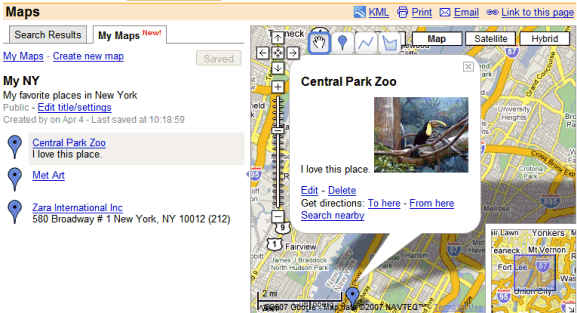
Google launched My Maps, a new feature in Google Maps that lets you mark some places on the map and annotate them. Essentially, it's an easy way to create a KML file from Google Maps (until now, the feature was available in Google Earth). To create a map:

* Select one or more places from the map.
* Draw lines and polygons to highlight paths and areas.
* Add descriptions by typing HTML code or using a rich text editor.
* More in this user guide.

Each map will have its own permalink (like this map of Googleplex) and can be exported as KML to see it in Google Earth. Google wants to create a big directory of maps, so if you decide to make your map public, anyone can find it in the search results. The alternative is to make it unlisted, which means the address won't be included in search results, but it will be accessible to anyone who knows it (much like in Picasa Web).


You can find maps created by other people if you search for a local business and click on "see user-created content" at the bottom of the search results. This acts as a search engine for KML files available on the web, so you'll find a lot of KML files from bbs.keyhole.com (Google Earth Community), where you could host your KMLs and get some feedback.

This new feature (available for a long time in Windows Live Maps or in some Google Maps mashups) is also a good way to share more than one place with a single link. You can add placemarks manually or from the search results.

Google China's Unfiltered Related Searches

When it finds the most relevant sites to your query, Google also tries to filter adult sites, especially for general queries. There's a good reason for that: unless your query is explicit, you may not want to see adult sites in search results. Google also filters explicit words from Google Suggest or from related searches.

But not if you use Google China. Here are the related searches for girl at google.com:


If you search for girl at Google China and scroll down to the bottom you'll see different related searches:


Crack at google.com:


Suggestions for the query crack (Google China):


And here's something more language-independent:


So the question would be: why is it acceptable to show these queries in China and not at google.com?