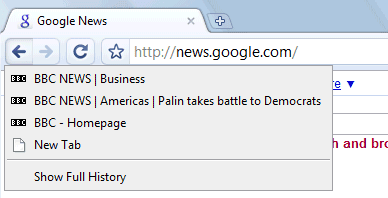
1. Show the list of recently visited pages from the current tab: right-click on the "Back" button. This also works for the "Forward" button.
2. Undo closing a tab: press Ctrl+Shift+T or open a new tab and check the "Recently closed tabs" section.
3. Focus on the default search option in the address bar: type ? before entering your query.
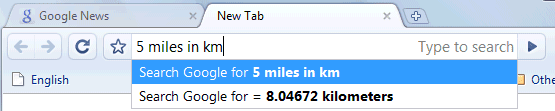
4. Perform simple calculations and unit conversions using Google Calculator by simply typing the expression in Google Chrome's address bar (or "omnibox"). To copy the answer, select the suggestion.
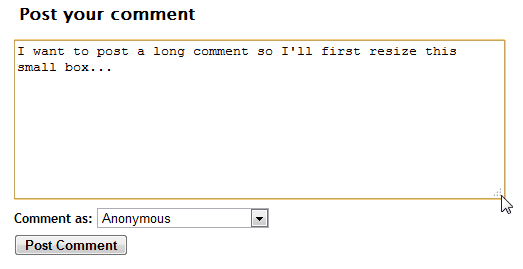
5. If you need more space in a textarea, resize it by dragging the lower right corner.
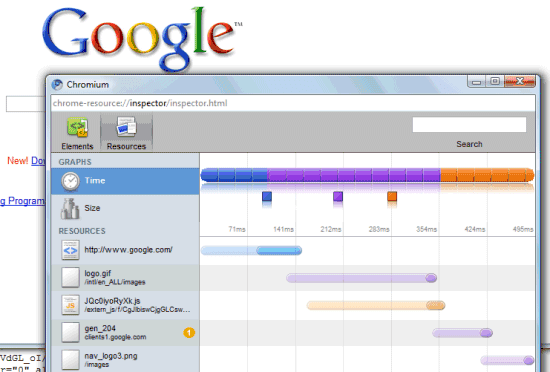
6. Monitor the resources used by a web page - right click inside the page, select "Inspect element", switch to the "Resources" tab and reload the web page. You'll see a list of images, scripts and objects loaded from the web page and you can sort them by size or by loading time.
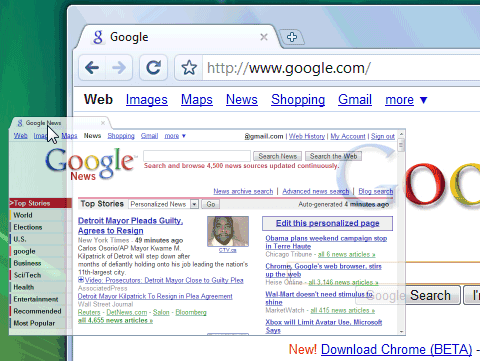
7. Detach a tab and open it in a new window - just drag the tab outside the active window. You can also add it back to the original window using drag and drop.
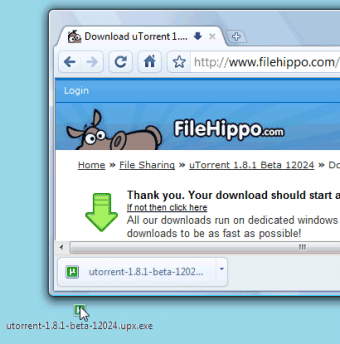
8. After downloading a file, you can copy it to the desktop or to any other folder by using drag and drop directly from Google Chrome.
9. If the search engine of a site supports OpenSearch, you can add it to Google Chrome's search box by simply visiting the site and performing a search. The domain name automatically becomes a keyword and you should only type the first letters from the URL until you see "press Tab to search example.com". Then press Tab and type your query.
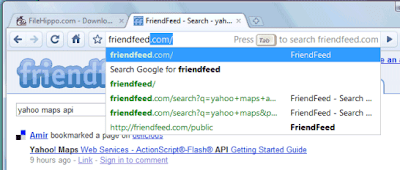
You can also manually add search engines, by right-clicking on the address bar and selecting "Edit search engines". Here's one example, where you can see that you need to find the URL for the search results page and replace the query with %s:
Name - Wikipedia
Keyword - wiki (that's what you need to type in the address bar)
URL - http://en.wikipedia.org/wiki/Special:Search?search=%s
You can also use the keywords for other kinds of services: for translating web pages, for bookmarking pages online or simply as aliases for web pages (omit "%s" from the URL).
Name - Google Translate (English)
Keyword - trans
URL - http://translate.google.com/translate?u=%s
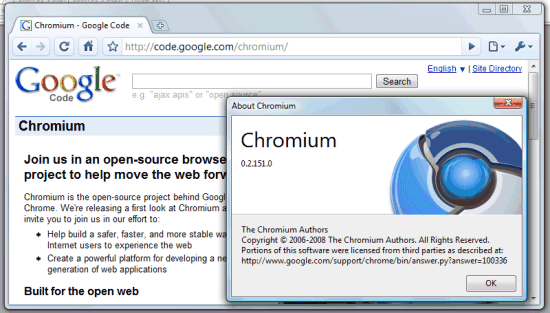
10. Do you want Google Chrome without Google's branding and with an open source license (BSD license)? Check Chromium, the open source project created for Google Chrome. You can install the latest snapshots for Windows or download the code and build it in Windows, Mac, Linux.
To install Chromium in Windows, go to the most recent directory from this page (it should be at the top) and download mini_installer.exe. Note that these snapshots could be less stable than the version available at google.com/chrome and you may need to manually update Chromium.

Please, please, please integrate google bookmarks. Pretty please.
ReplyDeletereally nice tips
ReplyDeleteI tried Chrome yesterday on parallels on a Mac (works fine). But one thing I noticed missing that was annoying (small as it might seem) was the Find in Page did not recognize links. ie, you see a link and then use find to highlight it from keyboard....but no way to open the highlighted link from the keyboard. Unless I missed it somewhere (didn't find a mention in the keyboard shortcuts in the help section). Anyway, seems like such an obvious thing that perhaps Google just hasn't put the feature in yet. For comparison, in Firefox or Opera if you do a Find in Page and highlight a link, you just press Enter to open the link. It's not a big deal, but after you get used to doing that, it's tough to go without it.
ReplyDeleteWith google bookmarks and RSS reader would be perfect.
ReplyDeleteInteresting problem:
ReplyDeleteI have a Intranet site which I mirror on a private site outside the company (password protected).
Display of the mirrored site works fine but the same page on the Intranet site displays only part of the page. When I View Source, it doesn't seem to have loaded the entire page.
The mirrored site is standard shared host on an MS server. The Intranet site is on virtual server.
The HTML pages seem to display okay, but ASP pages have a problem. In theory, the code presented to Chrome by the server should be vanilla HTML, but maybe Chrome is trying to look upstream and choking on something? Making server requests which respond differently in a Virtual environment?
yeah.. we just need our bookmarks integrated!
ReplyDelete#9 looks like a great feature, but I can't get it to work on an intranet application.
ReplyDeleteBOOKMARKS!!!
ReplyDeleteNOTEBOOK!!!
11. To crash Google Chrome, type "about:%" in Google Chrome's address bar (or "omnibox").
ReplyDelete@Nisse:
ReplyDeleteThis has been fixed in version 0.2.151.0.
Does it mean that I get to test and see more updates/features/bugs by installing the latest version of Chromium?
ReplyDelete0.2.151.0. at the moment.
Well, here's one new feature:
ReplyDeleteChromium reads RSS feeds normally now. :)
Jus'a Bookmarks "Button" & Full Screen/Auto-Hide Would Do It For Me...
ReplyDeletehttp://dev.chromium.org/developers/how-tos/build-instructions-linux
ReplyDeleteIf you look there you'll see that you can't actually build a Linux executable yet.
If you do a Control+K it forces the ? search request ... instead of going to the search box as you did in Firefox.
ReplyDeletePLEASE....
ReplyDeletegoogle toolbar!
google bookmarks and autofill!
otherwise great!
pre-built Linux version (.dep and .rpm)? Please?
ReplyDeleteHow do you send a page link?
ReplyDeleteHow to safely update Chrome ? Do I have to uninstall previous version? I use a french version. Is the Us version more up to date ? (as usual with Google). T.I.A
ReplyDeleteGood features, i m waiting for newer version of google chrome
ReplyDeleteWhich Java should I download, I cannot get the radar loop to work on www.noaa.com without locking up my system?
ReplyDeleteOne nice thing about Google Chrome is copy & paste web pages to the email (thunderbird) and it copy the links of the web page too!
ReplyDeleteYou can also do item #2 without the omnibar field having the focus by pressing CTRL+K
ReplyDeleteToday was testing with custom applications on Chromes..... It seems it doesn't support. This could be a important point for organization to migrate to Chrome from IE.... Googe has to address this issues to open it orgs... as Organization has most customized packaged solutions or custom solutions...
ReplyDeletehow does one istall crome for another (non-admin) user from the administrator log in in Win XP....?
ReplyDeleteI am trying Google chrome browser recently but it seems doesn't support classic asp web page. if Anyone has idea about this problem, please tell me?
ReplyDeleteHow can I get rid of the annnoying recent bookmark blue box ?
ReplyDeletegoogle reader is "THE" RSS reader.
ReplyDeletewho needs full screen when maximized it uses 3 times less space than ie, and possible 4 times less than firefox (with extensions, toolbars).
ReplyDeleteYou can use delicious or google bookmarks by dragging a bookmarklet to the Chrome bookmarks bar. For delicious get it here: del.icio.us/help/buttons, for Google bookmarks get it here: http://www.google.com/support/chrome/bin/answer.py?answer=100215&topic=14680
ReplyDeleteThere is also an rss bookmarklet floating around.
For adblocking an alternative to firefox adblock plugin is the mvps.org hosts file or privoxy. http://www.fritscher.ch/blog/2008/09/03/google-chrome-adblock-with-privoxy/
One more vote for the friggin Google toolbar. Or just at least provide us a way to integrate the other Google services into the browser. IMO, this should have already been in this version. Overall, I am still using Chrome everyday and LOVING it! Thanks for another win, Google!
ReplyDeletei want to translate french web pages at push of button, send urls to a friend and use roboform
ReplyDelete#1 also works by clicking and holding on the Back button.
ReplyDeleteChrome also decodes encoded URLs pasted in the Omni or whatever it's called. That can come in handy.
ReplyDeleteI was just happy it was more responsive than IE! All these little features are a real bonus.
I wish Chrome would support such little cool extensions like QuickJist summarizer. Chrome lacks extensibility, but I would be happy if it was directly compatible with existing Mozilla or IE extensions.
ReplyDeleteHow to disable java scripts ?
ReplyDeleteHow to disable JavaScript in Chrome? Launch Chrome from Start/Run with the parameter -disable-javascript. For example, in Vista:
ReplyDeleteC:\Users\%username%\AppData\Local\Google\Chrome\Application\chrome.exe -disable-javascript
In Windows XP:
"C:\Documents and Settings\%username%\Local Settings\Application Data\Google\Chrome" -disable-javascript
Other parameters:
-disable-images
-disable-java
-disable-plugins
-disable-popup-blocking
-start-maximized
Hey, thanks for that javascript trick, just what I was looking for - and I looked quite a bit. Cheers.
ReplyDeleteAny idea what Google Chrome is doing on my hard drive when I have it open (and idle)? I get lots of HD activity when nothing is apparantely going on. Just curious...
ReplyDeleteI just installed Chrome and imported my bookmarks. Only perhaps 10% of them actually got imported. I've tried several times with the same results. Any ideas?
ReplyDelete@Eric:
ReplyDeleteIt probably downloads the list of definitions for Safe Browsing (anti-malware and anti-phishing). You can disable this feature in the Options dialog.
I can't find my imported bookmarks!!!
ReplyDeleteAny idea what Google Chrome did with my imported bookmarks??
ReplyDeletecan't find them!!
My wife and I both downloaded chrome, her computer is xp and mine vista premium. On Pogo.com we are unable to play the game. It says we need a java plugin, directs us to the java page to download, we download and install (already have latest java), close and reopen browser and receive the same result (java plugin) Any help would be appreciated.
ReplyDeleteRegarding the Java issue, check this page.
ReplyDeleteAUTOFILL>>>
ReplyDelete..have yet to see a better version of chrome.
ReplyDeleteI do wish Chrome would incorporate the blue, dark blue, and gray logo instead of the Pokemon ball logo.
ReplyDeleteGoogle Notebook Bookmarklet:
ReplyDeletehttp://www.google.com/googlenotebook/bookmarklet.html
Google Bookmarks:
http://www.google.com/support/chrome/bin/answer.py?answer=100215&topic=14680
Google Reader Bookmarklet:
Google Reader > Settings > Products
Here's what I really miss: in IE one can save bookmarks in the 'root'-bookmarks. When typing that name in the address-bar it sees this name as a shortcut and so you can jump very easily to the site you of your choice.
ReplyDeleteI.e.: I want to save the Beatles' biography which is on www.sing365.com/music/lyric.nsf/ Therefor I save this bookmark as 'beatles' in IE. Next time when I type beatles in the address-bar of IE it suggests this bookmark. When I hit the enter-button it goes directly to the sing365-site.
Because FireFox lacks this superb trick I've always refused to use FireFox. So it would be great if Chrome would introduce this possibility too.
Mark Coutinho
@Mark:
ReplyDeleteYou should learn more about other browsers. Firefox lets you define "keywords" for bookmarks that can be used in the address bar. Too bad that Firefox 3 made this option incredibly difficult to find: you need to go to "Organize bookmarks", select the bookmark and click on the "More" button. Then you can enter a keyword for the bookmark.
Probably this feature is not very useful now that Firefox 3 indexes your bookmarks and the recently visited sites, so you can just type some letters from the title. More about AwesomeBar.
Google Chrome also has a way to define "keywords" by adding search engines (I explained this in the post) and it also suggests sites from your browsing history in the address bar.
Can anyone verify this copy/paste problem. Open a gmail message in Chrome and copy some content. Then try to paste it into a Dreamweaver (CS3) page, design view. I could paste it into the code, but strangely the design view accepted nothing.
ReplyDeleteSo far I have failed to work out how to 'send a page' to a third party, hightlight the text I was searching for, organise my bookmarks and get it to automatically open a new tab for each search. I currently use Avant and would miss all these options.
ReplyDeleteFab and fast. Love the kill tab option.
ReplyDeletePlease let's have autofill back!
Before I made Chrome my default browser, it played videos - now it doesn't. Buglet?
I am also having the pogo.com issue with java, I have install the latest version even the beta version and get the same plug in not detected error. Wonder if google will fix this.
ReplyDeleteI have this issue with the videos, I have chrome installed on 3 different laptops. All primary browser and 3 play videos and one doesnt. something in the setting i suspect.
ReplyDeleteCan I still have my delicious tag button?
ReplyDeleteWhere is the AUTOFILL?
ReplyDeleteit looks really good but I need to google toolbar before I can start using it
ReplyDeleteBookmark is soooo 90s guys... I use to have hundreds of bookmarks and I forgot most of them. When I need something there is no way I could have remember that I have bookmarked that thing somewhere.
ReplyDeleteUse delicious, or as Google Chrome is trying to tell you.. forget bookmark management.. let chrome index those bookmarks for you.. when one day you need it just type a keyword and let Chrome do its thing.
Who neatly arrange their emails in folders nowdays? I dont! When (if) I need the emails, I search!
May be great if integrated translator stuff.
ReplyDeletesome thing like:
"nihon in english ="
in the adress bar, and you have something like
"search google for = Japan"
The only things I want added are add-ons/plugins like Firefox (with the auto-update feature), with the most 'important' add-ons being AdBlock Plus and FlashBlock.
ReplyDeleteAuto-updating of Chrome. I had to visit the About dialog to find out a new version was available...
If a full-screen mode could be added that'd be cool, but not absolutely necessary.
google chrome is sooooo cool. thanks!
ReplyDeletehow can i add RSS feeds to it ??
ReplyDeleteYou must include google bookmark in Chrome. It can be accessed from anywhere!!PLSSSSSSSSSSSSSSSSSSSSSSSSSSSSS
ReplyDeleteA very small sized google toolbar integration would solve most of the problems... Gmail - Calendar - Bookmarks - etc. Integrated in the toolbar??
ReplyDeleteChrome is fast make ik more google account friendly!!
I woke up this morning wondering if Chrome would allow 2 gmail accounts to be open in two tabs?
ReplyDeleteSince each Tab is an independent session but no joy it just closes the other instance :-(
Autofill is badly needed
ReplyDeletenumbers 4 and 9 arent chrome specific..
ReplyDeleteanyways, @steeleweed: since the browser receives processed code from the server, it sounds as though there may be some javascript within the served code thats broken in non-trident and/or non-(true) gecko browsers?
oh yeah.. does anyone know how to stop it from indexing while its open? im annoyed that it didnt ask.
i have probs with viewing facebook on chrome. don't know if that's your prob or theirs.
ReplyDeleteTo Anonymous at September 8, 2008 3:45 AM PDT, about 2 Gmail accounts:
ReplyDeleteYou can open a new incognito window (Ctrl-Shift-N), and open the second gmail account there.
Where is the "HOME" button?
ReplyDeleteFor the Home button,
ReplyDeleteClick the Wrench/Options and you'll see a check box.
How do you TURN OFF the download bar?
ReplyDeleteIt's annoying.
No, the logo is definitely the Simon game from the 80s.....
ReplyDeletedoes anyone know how to manually add search boxes to the new tab page? i only have the search my history box. i would like a google box and youtube and all other thigngs.
ReplyDeleteI tried Chrome (fantastic job!) on Mac (Prallel) and works pretty fine:
ReplyDeletehttp://vimeo.com/1696366/l:transcoded_email
Looking forward to see the native Mac app!
On my website, my javascript bookmark routine does not work in Chrome. Have seen no fixes anywhere on this.
ReplyDeleterosdi, like 90% of the posters here??
ReplyDeleteMaybe it's cause you had hundreds of bookmarks NOT neatly organized into folders that you couldn't find anything. What do you think labels are for?
What's "delicious" besides bookmarks? (and extra things I don't need...)
I've been waiting for Google to officially make a condescending statement pretty much like that before I stop using their services entirely.
Until then, second the bookmarks request. (not that it makes difference here) I don't think they need to add "Google Toolbar" though, because they can incorporate most of it's features into the browser as standard. :-)
How does one allow popups in Chrome.
ReplyDeletealtough Chrome "is designed to run web applications better", I noticed so far, that the opposite is true.
ReplyDeleteI feel Chrome is FAR faster than any other browser I've ever used. I don't feel it's worth getting upset with what they don't have in the browser this early in their launch. They provided the most important features: SPEED & Bookmarks. All the other fun additions will come soon :)
ReplyDeletePlease can someone tell if you think of any idea of how to make a book mark in the crome bookmark bar that when cliked wil send you directly to an application shortcut?
ReplyDeletethank you very much!
Trufa,
ReplyDeleteDon't think that is possible yet, but I already posted a similar request for an Application Shortcuts menu:
http://groups.google.com/group/google-chrome-help-suggestions/browse_thread/thread/cd6113fba494509b/54b3374c3dc985f0
Google Help group: http://groups.google.com/group/google-chrome-help
I suppose the extensions we're used to on FF will come, but I am dying for the the lost ability to right click on a word and get answer.com. Any workarounds?
ReplyDeleteGood job mimicking Opera, with custom search engines, drag-n-drop tabs, and so on. Not quite convinced yet! Will keep an eye on newer versions though.
ReplyDeleteHi Friends.
ReplyDeletei have created a bookmarklet for Google Bookmarks to show the actual page of bookmarks in a popup window. Then, you can search for any bookmark and just drag and drop the link to the main window in chrome. chrome will open it in a new tab.. (similar to the concept of delicious sidebar in firefox...)
get it Here:
Google Bookmarks page bookmarklet
Wonderful Job, Google! C'est la perfecto!
ReplyDeleteHowever, the ONLY thing that keeps me to IE is that IE can SAVE BOOKMARKS IN THE HARDDRIVE! Yes, yes, i know, saving bookmarks online is all the rage these days, however it will be nice to have the option to save it on your local harddrive.....
God knows how early i would have dumped IE if only Firefox or Opera or Safari can let me have THE option...I really hope Google incoperates this into Chrome.........
And something else besides the bookmark....
ReplyDeleteChrome seems to have problem with videos, as the processor usage shoots up to 100% whenever I youtube, compared to about 80%-90% on IE...
And the download part, Chrome manages VERY WELL with small files, but faces a big problem when facing files of 30MB or 50MB. Those kind of files I usually leave them to my bt engine to take care of, but it seems Chrome does not support plug-ins?(I'm using Thunder)
Hope Google looks into these ASAP
btw, i'm using a single core pentium & the network's not so great here in the southern hemisphere, so don't flame ;)
Uchiha Itachi...
ReplyDeleteAll your Firefox bookmarks can be saved to the hard drive in a single HTML file from the Bookmark Organizer. Also, you can save individual bookmarks by dragging and dropping the icon from the address bar to the desired location.
@Eric
ReplyDeleteYou are not crazy. It does the same thing to me. I keep running Process Explorer to try and get some idea of what is going on. No downloads, no pages loading, nothing, but there goes my hard drive chattering away like I'm copying the whole thing. Don't like that at all. Still searching for an answer.
I'll echo the hard drive comments... it's actually really annoying, because occasionally it locks up my computer when I have other applications that are also hard-disk intensive or use a lot of virtual memory (which is frequently the case).
ReplyDeleteI don't notice the violent hard drive thrashing after unchecking "Enable phishing and malware protection" under Options/Under the Hood/Security. Apparently Chrome continuously downloads the database of blocked pages when you have it enabled.
ReplyDelete@Uchiha Itachi...
From the bug reports I've read, the problems with Flash & video are known by Google and will probably be fixed soon. (We can hope anyway...)
According to a Chrome engineer...
ReplyDelete"The SafeBrowsing feature (anti-malware, anti-phishing) periodically updates its
blacklists from Google servers every 30 minutes or so. The data is stored in the file "Safe Browsing", which will get to about 50 MB in size."
I should add that Google Desktop and Firefox 3 have a similar feature that uses the same Safe Browsing API. Until they improve the implementation, I disabled the feature in Google Desktop, Firefox and Chrome.
You need to download a release candidate (RC) of JAVA that is not quite for general release. It works with Chrome and Pogo.com I have used it at that web site.
ReplyDeletejava 6 update 10 will work.
http://java.sun.com/javase/downloads/ea/6u10/6u10rcDownload.jsp#6u10JREs
Java™ Platform, Standard Edition 6u10 RC Releases
FANTASTIC group of tips. Love them, love CHROME. really amazing browser.
ReplyDeleteAlan: copy and paste into Dreamweaver design view doesn't work for me either - really weird
ReplyDeleteIf you want to copy an imagine url chrome as made it a whole lot easier that's for sure I am a fan of this browser already you can check my full review @ http://www.asksincere.blogspot.com will be up by tomorrow
ReplyDeleteThe embedded players on archive.org's live music archive don't work. Chrome is not playing nicely with the javascript or vice versa.
ReplyDeletehttp://www.archive.org/details/bts2008-07-06.bts2008-07-06.flac16
Please fix the scrolling issue; scrolling down with my mouse scroll wheel is too fast; scrolling up doesn't happen at all.
ReplyDeleteI'm also experiencing the hard drive thrashing by Chrome. As soon as I close Chrome the thrashing stops. Unfortunately I'll won't be using Chrome until there is a fix for that issue. I like it otherwise.
ReplyDeletehttp://chromeguru.info
ReplyDeleteUnofficial Google Chrome Community & Support
First Google Chrome Dedicated Themebase!
Google is master.
ReplyDeleteNot to copy everyone else, but yeah, Chrome needs Google Bookmarks/Google Toolbar. It's almost workable with a couple of addon buttons but will be significantly better with built-in Google Bookmark support.
ReplyDeleteChrome is created with any features which the other internet browser not apply yet. Really, this is a new breaktrough of Google to serve us with new innovation and facilities
ReplyDeleteChrome is Brilliant. Sometimes i experience problems on facebook( going through pictures, often after 2 pix it stops working) AUTOFILL yeah thats needed.. closing a tab which had some video content in it makes Chrome freeze for like 4/5 seconds ... download bar annoying.. on the homepage the 'recently visited' is annoying .. plugins needed (Stumble) .. i know that this is still beta but hey you want comments you got comments!! apart from that this browser rules.. Cheers Google
ReplyDeletei can't get the bookmarks to sort so that my folders are bunched up and then the rest of the individual links follow.
ReplyDeleteI can't get the browser to open to the new tabs and need to do this manually.
i've tried to install Adobe Flash but have failed to do it. it just will not install.
i don't want the new tab to show the thumbnails of my previous site but to show my home page. what the reason of having a home page???
i want the incognito chrome to open a home page as well instead of their message.
any chance of changing colours of the browser or play around with the background? Google how do i get updates?
oh and one more think, it would be great to have the refresh page when I right click on the page. much faster than searching for the refresh at the top
ReplyDelete@Andy: really? Which Google Chrome features are not applied by any other web browser?
ReplyDeleteWe whant google bookmarks!!! Searched the net for how to integrate them... never thaught a Google product wouldn't integrate one of the biggest features of web surfing!!!
ReplyDeletehi there.
ReplyDeleteplease check my altered bookmarklet of google bookmarks which will show google bookmarks page in a pop up window
Google Bookmarks Page bookmarklet
I'm a fan of Fox Marks in FireFox, but without something similar in Chrome, the value of Chrome as a universally used Browser is diminished.
ReplyDeleteI'd like to see Chrome support a similar backup service for bookmarks as Fox Marks.
google chrome very carmy............
ReplyDeleteI find in some text input boxes, it cuts off a few letters and the beginning of new lines. Sometimes they appear after a few seconds, other times I have to move the mouse, or highlight the text to make it appear for me. This sites text input boxes are working fine though.
ReplyDeleteAlso, I would love for any new tabs that you open be the current page. Like if I hold CNTRL and click a link, I would like that page to automatically be what Im looking at. A few more options in the options dialog are needed.
And of course, Addons.
One more thing. Could anyone please explain the focus thing used in the omnibar? A ? in front of searches?.... I'm lost on that, seems to do the same thing as when I dont add a ?. Thanks.
Just support the requests to add Autofill to Chrome .... please.
ReplyDeleteAutofill and pr it is impossible without pr
ReplyDeletewww.bajamexicorealestate.info
As Anonymous said on September 18, 2008 12:20 PM PDT, some text boxes respond *very* slow to input. Example for this: http://www.korgforums.com/forum/phpBB2/
ReplyDeleteAnd yes, Chrome does stall for a little while when it's dealing with video/flash content.
Couldn't care less about bookmarks etc - the search bar is quite omniscient. Which is why I would love the ability to get rid of the recent bookmarks box in the new tab.
how do you sort the bookmarks in the "other bookmarks tab"-Anyone?
ReplyDeletehow about the chrome's themes? can we change it?
ReplyDeleteI agree about Autofill. It's a pain in the neck not having it. If I could install the Google toolbar it would solve a lot of the little problems I have.
ReplyDeleteIt would be nice to be able to delete history sites individually instead of a whole day at a time. Deleting whole days destroys my most visited page.
its quick ,but more features should b added
ReplyDeletePLEASE, PLEASE, PLEASE, give us autofill, google toolbar and a send option to e-mail pages from a web site. PLEASE PLEASE PLEASE PLEASE
ReplyDeleteI enjoy most of the features of Chrome but one problem is with opening PDF files. It practically speaking freezes the computer. I also have problems with sleep and hibernate on my PC. Last, I would like auto fill
ReplyDeleteGoogle are you listening to us or what?????????
ReplyDeleteGood hints at given and good ideas. If more can be added about about: feature, it would be great.
ReplyDeletei want to enable popups in chrome... how can i do it?
ReplyDeleteI need pop ups on certain pages . . . really need it - anyone have an idea on how to accomplish this?
ReplyDeleteI got to this page trying to get a clue as to what Chrome is doing to my hard-drives! I still like Google, but I will never trust any software that does funny things with my hardware, not to mention it sounds like you have a virus.
ReplyDeleteI'd prefer that it would remember where I did my last download.
Otherwise, it's probably going to be a winner.
Several people here want the Google tool bar. When you add it, please leave me a way to turn it off. (Or better, Delete it.)
ReplyDeleteI went to a secure site that opens a log in pop up. Needless to say, I could not get in. Chrome squashed my log in box.
Full screen would be nice (Like F11 in IE.). I use it all the time.
How do I turn OFF the suggested pages in the "Omni Box". I generaly know where I want to go; and If I don't I'll ask. I'm sure this is a handy feature for some, but for me it's an annoyance. A way to disable it would be nice.
What's with all the hard drive activity?
An integrated user help would be nice I like documentation I don't have to go online for.
Opening videos and flash to full screen with one click would be nice.
I know you want to keep this simple, but more control over the browser in the options box like IE, FF, and Opera would be nice.
The Help file would not add to the resource drain... Other than that, adding all of the features everyone wants without eating up resources is a challenge. Keep it Small, Keep It Fast, uncluttered, and gi'me all my bells and whistles.
Good Luck.. (Smee)
I'm having the same problem someone mentioned above: opening PDF files practically freezes up the browser. They open, but might take minutes rather than seconds, which is too long. Hopefully a fix is forthcoming?
ReplyDeleteI mis integration with google products like toolbar, bookmarks and notebook. I would like a general password to acces the stored passwords.
ReplyDeleteThanks you so much for these useful tips.
ReplyDeleteYou can find a French translation and more tips here : http://www.advertrips.com/2008/09/28/best-tips-and-addons-chrome-by-google/
Great tips on the hidden gems in Chrome. Bookmarks are great, let's make them better.
ReplyDeleteNeeds an RSS subscriber.
ReplyDeleteGoogle chrome is great!
ReplyDeleteBut, recently there is a problem with Firefox for me... that is, "Google search results, gmail and orkut won't get loaded at all!" Its the same in case of IE and Opera also. But everything works fine with Crome.... Any idea about it?
Useless without Google Notebook add in.
ReplyDeletehi.
ReplyDeleteyou may found my bookmarklet usefull. it points out to google bookmarks which has a link to google notebook as well.
http://orizens.com/wp/topics/google-bookmarks-bookmarklet/
I think it's great,but it would be greater if I could open a popup when required, like a sign in or something. My biggest annoyance is that some google popups (gmail eg) aren't allowed, and based n the number of requests, I suspect I am not alone.
ReplyDeleteApart from that, I'm pleased with it.
I do not like how the links and bookmarks feature is set up-- It would be helpful to have an option to access the links folder through the 'other bookmarks' link- or just have an icon near the homepage to access favorites- I do not like having the alphabetical links displayed under the url just to have access to all my bookmarks--
ReplyDeleteI hope that made sense...
I don't know if Google can make Chrome (a sports car) perform like IE, Firefox, & Opera (a Mack truck )without losing much of its biggest asset,which is speed. However, a few of the suggested extras would be nice. (Autofill, Foxytunes, Stumble). I guess I could live with a version that performed like a Chrysler Hemi.
ReplyDeleteGoogle bookmarks
ReplyDeleteGoogle Toolbar desperately needed or else it's back to Firefox...
how can i use the book marks....
ReplyDeleteWhen closing a window, I see no warning is given when there are multiple tabs involved. Is it there?
ReplyDeleteMay times, I close the window, not realizing there are some tabs that I dont want to. (IE has that feature - though I hate to say!)
I echo Daemon, "My biggest annoyance is that some google popups (gmail eg) aren't allowed, and based n the number of requests, I suspect I am not alone."
ReplyDeleteI need popups enabled on sites like pandora.com and can't find a solution. Please help!
I need popups sometimes as google sees legitimate sites as popups I'm sometimes forced to go back to explorer and start what I was doing all over again. I don't want a browser that does some things but not other. Is there away (asked several times here) one can allow popups?
ReplyDeleteChrome minimizes pop-up windows at the bottom of the page, so you can easily make them visible.
ReplyDelete"Chrome minimizes pop-up windows at the bottom of the page, so you can easily make them visible."
ReplyDeleteThis isn't the optimal solution for many of us with many sites.
For example at school I have to log into the system in a browser, then a pop up window comes up that keeps me logged in until I close it. The problem is the window redirects in less than 5 seconds so if I'm not quick, I miss the pop up because the window has redirected.
It would be much better if we could allow some sites to just have legitimate popups.
new update out 0.3.154.9 but still hasn't fixed most issues... autofill pleaseeeeeeeeeeeeee, bookmarks pleaseeeeeeeeeeeeeee, pop-up control pleeeeeeeeaseeeeeeeeeee
ReplyDeleteHi all,
ReplyDeleteI don't have the HDD thrashing problem even with two sessions of the chrome running and NFSMW Paused in background. It is silent.
how i stop google chrom to download things to me i dont want google chrom download things to me i want that my DAP will download thing to me please help me
ReplyDeleteHave you tried just using Internet Explorer so there is no confusion for you?
ReplyDeletehmmm... but i want to use google chrom....
ReplyDeletePlease please please add Drag & Drop Links & Search. I am tired of using Maxthon and want to switch to Chrome, but I cannot give up the ease of highlighting something and dragging it and having it automatically go to a search engine (or just dragging a link and have it automatically open in a new tab). Please??
ReplyDeleteThe big drawback is still no autofill
ReplyDeleteI really like Google Chrome.
ReplyDeleteI would like to make the program my default home page.
What is the address?
Thank you for your help
When you hear your hard drive thrashing, go to options/under the hood and un-check "enable phishing and malware protection." Now check it. Uncheck it. Check. Un-check.
ReplyDeleteYeah, that was it.
-JavaJ
How do you turn bookmarks bar always on by default?
ReplyDeleteHow to stop that annoying administrator pop-up every time Chrome is open?
ReplyDeleteToo many problems with Chrome.
ReplyDeleteCan't log into banking sites.
It doesn't look like javascript is fully functional yet. A page like http://travelcompass.org/trains.htm would show up perfect on any other browsers, but Chrome.
Still can't add to favorite with javascript yet.
Is there any way to delete Recent Bookmarks from the list?
ReplyDeleteHi(Salut) Ionut,
ReplyDeleteI am still curious if the launch of Chrome was something "unintentional". I wrote a little piece of article about this, which is called Google’s Chrome, a coincidence?.
I also kept a log on how Chrome evolved from search engines point of view.
Cheers,
TraiaN
I hesitate to use even upgraded versions of Chrome, since my last experience using it (first version) left my computer compromised; have they fixed the security issues beyond all doubt?
ReplyDelete"fixed the security issues beyond all doubt?"
ReplyDeleteya, right. And Windows is 100% immune to viruses now didn't you hear?
i have a tip for the makers of google chrome:
ReplyDelete-make it so that you can use your anti virus/spam scanner in browser
p.s. what is the e-mail adress of google, if you want to give advice
I think the chrome bookmarks work much better than ie. I don't want a google toolbar, but I do want to send links by email and autofill. Other than that, it's the best browser I've used so far
ReplyDeleteI got the same problem as Adrian. ( http://googlesystem.blogspot.com/2008/09/google-chrome-tips.html#c175321082393507232 )
ReplyDeleteBecause i'm working on a website with a CSS and html with javascript etc... it's annoying to have to scroll tot he code i need to find :(
Anyone knows any fix for this?
How do use fullscreen?
ReplyDeleteHow do use fullscreen?
ReplyDeleteJust double click the top window bar will full screen the program window. Full screen takes out toolbars in IE and Moz, and since Chrome doesn't have any toolbars, there isn't much to reduce to get full screen. Hope it helps.
Please give us personalizable quick search (wikipedia, imdb, amazon...) as firefox do and, above all autofill!!!!
ReplyDeleteApart from that, it's a really great tool! thanks!
Your browser sucks without autofill, and you don't even freaking support your own toolbar application in any form. Are you actually a company or just a bunch of hippies who hate Microsoft and help the commies suppress free speech outside the US? I'm about over Google at this point...
ReplyDeleteAs a long time user of just about everything Google, and as an instructor/educator in Apps, it appears to me the Chrome is built around the more finely developed user, such as myself, for example. If the autofill feature is important, use Mozilla. For online apps, no thanks, I will stick with Chrome. Just for a heads-up, Autofill is a pain when dictating to a web page.
ReplyDeleteHow does Chrome not support RSS feeds? Also Ctrl-F to find words on a page would be nice too. Spent 10 minutes reading through this page looking for someone who may know how to integrate RSS feeds into Chrome.
ReplyDeleteWhy do you need RSS in a browser designed to run "on-net" with apps? Surely you could run a desktop RSS client for that if it's so important.
ReplyDeleteAll modern browser include feed discovery and feed preview (IE7, Firefox 2, Opera 9.5, Safari 3) and these basic features will be added to Chrome in the next months. I don't think Chrome will include a feed reader, it will merely make it easier to use services like Google Reader, Netvibes, Bloglines or desktop feed readers.
ReplyDeleteIf you use Google Reader, go to Settings/Goodies/Subscribe as you surf and drag the subscribe bookmarklet to Chrome's bookmarks bar (Ctrl+B to make it visible).
Google Chrome is a wonderful product. I'm mostly happy with it. Few things:
ReplyDelete1) Would be nice if it was capable of incorporating Real's video download as I download vids and tear 'em up and remake some.
2) Would be WONDERFUL if they would read this, and make it possible for us to make -every- tab pull up like we wanted (in my case the about:blank screen) as opposed to automatically showing "Most Visited", "Recent Bookmarks", and your "Recently Closed" tabs.
3) Would also be nice if they made it possible to pull up the "Incognito" w/out having to start chrome normally. Just click a shortcut to incognito and boom - much faster.
I just cut off Google desktop and the chattering of my hard drive STOPPED.I really DO like Google Chrome and hope they fix the antiphishing protector or whatever is causing my hard drive to work-work-work with no rest.
ReplyDeleteThanks for the tips, everyone. Hopefully Google will listen to some and accommodate our several basic wants.
Johnny
Also a tip for Ebayers like myself- Google Chrome causes issues when you are filling in text descriptions describing your items for sale on Ebay. It doesn't load all of Ebay's features like allowing you to resize, align or use colred text in your auction descriptions.
ReplyDeleteWhen I am setting up new auctions (or trying to do relists or "edit your item description" I open an Internet Explorer window and go onto Ebay and can do it. For VIEEWING Ebay Google Chrome works great. For filling in things and changing auction text try switching to Internet Explorer, tried and true.
Hopefully Google will fix this VERY IMPORTANT ISSUE FOR EBAYERS GALORE! I've read a number of others' comments on other sites who experienced the same problem on Ebay using Chrome. I know they can fix this in the future!!!Thanks, Google!
one major thing is missing....u cant just scroll fast across the page by pressing the scroll wheel on the mouse...soo annoying...im new to chrome so i might be still dumb at it...
ReplyDeleteand another thing...can i define mouse gestures in chrome like in opera?
Hey all,
ReplyDeleteLiking Google Chrome in general - good work so far!
Am stuck running a PIII 600mhz HP Omnibook with 256Mb Ram and Chrome is sooooo much faster than IE7!
I do miss:
1) Mouse Gestures (ala Opera and IE7 Pro)
2) Saving tab groups in one easy step - sometimes you need to restart after a windows update (or close a dozen pages to save resources momentarily) - I just don't like creating bookmarks for these and just want to shove a quick shortcut onto my desktop temporarily. Not a big fan of bookmarks, 90% of the time they are so old I forgot why I created them!
3) Control over the anti-phishing downloads - scheduling would be great! Once every X Hours/Days/Weeks would be cool.
Someone pls correct me if I'm wrong but Google has stopped allowing downloads from the build.chromium.org site. I've tested this in different weeks, with different web browsers and from different internet providers.
ReplyDeleteThe downloads always get disconnectedearly on.
@Anonymous:
ReplyDeleteUse a download manager like Free Download Manager (Windows) or wget (Linux).
is very good and fast. but would be great to have an option that shows all tabbed pages in small boxes on an index page as in IE. Also Alto Fill!! and Send To!
ReplyDeleteI haven't seen an answer about allowing pop ups on specific pages. This is necessary for me to enter bill pay for one of my financial sites. Please let me know what I should be doing.
ReplyDeleteChomps on hard drive
ReplyDeleteI echo Daemon, Doug, etc., "My biggest annoyance is that some google popups aren't allowed, and based on the number of requests, I suspect I am not alone." -- I use an application that shows pop-ups and they are blocked, and I have to click there at the bottom, and then allow it. I would like to have the ability to select which pop-up I allow.
ReplyDeleteSame thing here, PopUp white-list is a must.
ReplyDeleteYes, have a pop up filter built to it.
ReplyDeleteI like the Inspect Element feature. I do not, however, like how I can't access any of my Google Bookmarks, easily. Currently, how I'm doing is is if I want to use Chrome, and I find a page I want to bookmark, I then need to copy the address, open firefox, past the address and then bookmark it. Please Please make Google cool stuff work together in harmony! Thanks
ReplyDeleteHow I can't access any of my Google Bookmarks, easily. Currently, how I'm doing is is if I want to use Chrome, and I find a page I want to bookmark
ReplyDeleteOkayies. I was just wondering if Google Chrome had something like Mozilla Firefox. The bit where you close Firefox and it comes up with "Save and quit" And then when you come back on Firefox it comes up with the Tabs/Pages they had before =D
ReplyDeleteI know Chrome is all about minimalism, but I miss my addons! I want to be notified when I have new (G)mail, and I want to be able to Tweet from my browser while I do other things (a la TwitterFox).
ReplyDeletehow can i disable a certain plugin as Shockwave Flash? i can't find the "manage plugins/addins" window.
ReplyDeleteso about the allow popups . . . no seriously, what the hell Google??
ReplyDeleteI did find if you just click the hell out of a link, it will pop it up in another tab, and I do mean click the hell out of it, as fast as you can, as much as you can until tendinitis is just about to set in. For instance, I like to look at the lyrics on Pandora songs I am listening to, but whats that?? yes, that's right, the link is designated a popup because of how it was coded. I just "click the hell" out of it and eventually I guess I manage to get past the popup blocker or something, and it eventually comes up. Thanks google, there are some really cool things about chrome, but this not one of them. It appears Google Gears would have a way to add "trusted site". There is even a an apply button that is grayed out, as if something could possibly be done in this dialogue box that would require you to "apply" it. Not so. I will revert to firefox for the time being.
ReplyDeleteAUTOFILL
ReplyDeleteEveryone who is crying for autofill will never get it. This is because autofill is no longer useful in chrome. Just type your text in the omnibar to find what you are looking for. Autofill in the omnibar would ruin its utility.
BOOKMARKS
Please, stop complaining about your bookmarks. No one should be using any browser based system for bookmarks any longer. Please switch everything to del.ici.ous - if you don't know what it is, look it up. Delicious is the solution to all of your bookmarking problems - weather you have a few dozen or a few hundred bookmarks, this system is far far superior to everything else on the market. It relies on a system of tags, instead of folders which are an antiquated system which is nearly impossible to manage. Would it be possible to create a system such as Mozilla's Ubiquity for bookmarking? This is an even better alternative to delicious, many of us feel.
SPEED/TABS
I generally run chrome with between 20 and 40 tabs open simultaneously in one window on Windows Vista 32-bit with no problems. Everything runs smoothly and much faster startup, new tabs, everything is faster than IE, even on my dual core processor there is a significant difference.
PDFs
Google Chrome does NOT support opening PDFs from the web in a browser tab. This is terribly annoying for anyone who is in science or engineering, and needs to always read pdfs on the fly without dloading them. Please solve this problem ASAP. Forces me to use multiple browsers.
I like Chrome a lot. Two things that bug me:
ReplyDelete1) I miss some of the options from the Google toolbar of all things. Such as search within a site (I know that that can be done in the address bar, but the button was nice).
2) It would be nice to have some control over helper applications, and how they work. I personally dislike windows media player opening in the Chrome window. I prefer it to launch on its own.
Is there any way of scrolling through your history using just the mouse? In firefox I can just click the little downwards arrow on the extreme right of the address bar and scroll through my history without touching the keyboard. Is there any way of doing that in chrome?
ReplyDeleteSometimes when I'm on the net and doing something else at the same time I want to be able to browse using just the mouse!
the lack of fast PDF loading is a big problem; definitely share the feelings of M Engel on 4/1
ReplyDeletefirefox is always better in my openion with lots of powerfull extensions. if you want faster browser apple safari is the best as of now, Google chrome is also better when compare to IE. but still google chrome need to go long way to catch firefox. Intresting this is firefox project is supported by google mainly.
ReplyDeletePleeeeeaaaaaaaaaaase integrate google bookmarks!!!
ReplyDelete