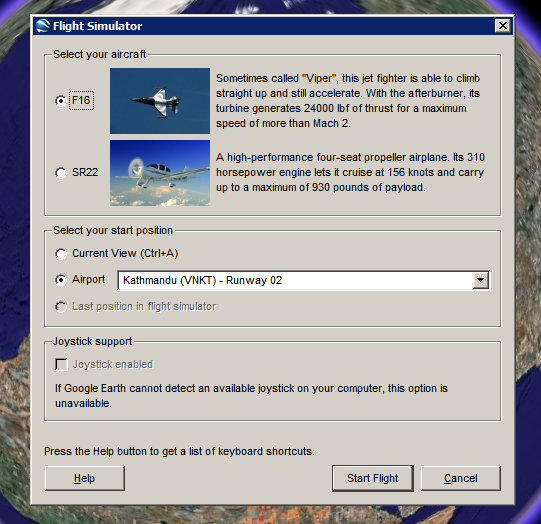
How to see this feature. Make sure you have Google Earth 4.2. Open the application, click on the globe and then press Ctrl+Alt+A. You should see this dialog that lets you choose one of the two aircrafts (F16 "Viper" and SR22) and an airport.
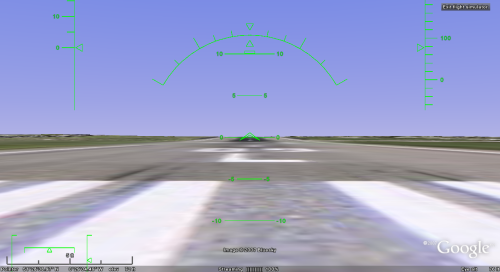
Here's the initial view from London Heathrow Airport:
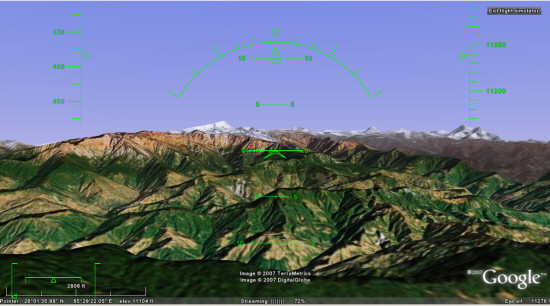
... and here's a nice view from Kathmandu:
To fly, you need to read this list of keyboard shortcuts, but you can also use a mouse or a joystick. "To disable or enable mouse controls, left click (single click on a Mac). Once mouse controls are active, the pointer shape changes to a cross on your screen."
Marco Gallotta, who found this feature, has some tricks: "Moving on though, you can get a quick start by holding Page Up for a few seconds to increase to maximum thrust (thrust meter is the left bar of the lower-left meters). Once you've accelerated to a sufficient velocity use the arrow keys to take-off. The keys are in reverse as one would expect with any flight simulator, so use the down arrow to take-off. When you've gained enough altitude then stabalise the aircraft to a straight flight path. It can be rather tricky to get the hang of as the controls are quite sensitive."
This easter egg could become a standard feature in the next versions of Google Earth and it will bring even more fun to the application.

Awesome!!!!
ReplyDeleteThis is awesome indeed. If only it could load terrain a little quicker (perhaps cache more of it) and also if it could tell me where I'm flying over.
ReplyDeleteI have waited for this moment for a long time, it's great :-)
ReplyDeleteCheck out this YouTube video on the Google Earth Flight Sim:
ReplyDeletehttp://www.youtube.com/watch?v=O7z6Yxs69rQ
very cool.
ReplyDelete>...if it could tell me where I'm flying over.
ReplyDeletetry ctrl+m, displays a subwindow in upper left corner, but on my pc ends with error which I ascribe to my burned chipset
anybody succeeds a safe landing?
ReplyDeleteIs this a Windows-only feature? I have Google Earth 4.2.0180.1134 (beta) for Linux, but following the instructions for activating the simulator has no effect.
ReplyDeleteI can't get it to work
ReplyDeleteThe flight simulator is very good :-)
ReplyDeleteOne small flaw, when taking off from London Heathrow, it has you facing East on the north runway, which, due to an old agreement to not take off over Cranford, NEVER happens ! You can take off on the north runway facing West, or the south runway in either direction.
This hardly an "Easter Egg". It's on the menu. Easter Eggs are little things that are hidden and only available by s series of keystrokes. Being on the menu disqualifies this one as an Easter Egg.
ReplyDeleteYes it does work with Linux, but it is slow to launch, Keep trying and be patient.
Sorry, Mike, but you're wrong. The flight simulator appears in the menu only after you find it (that is, after you press Ctrl+Alt+A). The documentation is not linked from any Google page and there's no reference to this feature in the changelog. So it's a hidden feature, an Easter Egg, or whatever you like to call it.
ReplyDeleteYou can also use common sense: if this feature was in the menu, why nobody found it until yesterday (Google Earth 4.2 was launched last week)?
ReplyDeleteI think Google should try to partner with some simulator masters like:
ReplyDeletehttp://www.x-plane.com/
and http://www.shatters.net/celestia/
If they don't want ending like this:
http://www.ioxenford.com/iOXENFORD/iOXENFORD/Entries/2007/8/31_Russia_Moon_Base_by_2025.html
I haven't installed Google Earth since I reformatted!
ReplyDelete*goes to http://earth.google.com/*
A Google search turned out the right way of starting the simulator from Linux. In the suggested keystroke sequence "Ctrl + Alt + A", the "Alt" key is not the one labeled "Alt [Mac apple symbol] [Mac Command symbol]", but the one with "[Windows Start symbol] alt option".
ReplyDeleteJames: The keyboard layout must be set to English. Try it!
ReplyDeleteI have the latest Google Earth but Ctrl+Alt+A dies nothing. Can anyone help?
ReplyDeletegenial!!! :D
ReplyDeleteif it's not working, make sure you have to right version of Google Earth and try Ctrl + Windows Key + A
ReplyDeleteOn the latest Google Earth for Windows, you just need to press Ctrl-A as opposed to Ctrl-Alt-A
ReplyDeleteInteresting. Ctrl+A opens the flight simulator from the current position and doesn't show the initial dialog. So Ctrl+A has a different effect.
ReplyDeleteDo you need to click on the Earth before the keystrokes?
ReplyDeleteI think it looks cool
ReplyDeleteI cant get the plain to move lol.
ReplyDeleteI spelt plane wrong lol
ReplyDeletewell, for better navigation i used google earth to get me a direction from my current view to some target.
ReplyDeletenow, i started the flight simulator and google earth still shows my last waypoints.
now i can follow the streets and don't get lost somewhere ;-)
to slow down after landig, the breaks might help ;-)
and my third landig with the F16 worked fine :-)
i just slowed down, increased height to ~100, pulled the flaps to 100% and lowered the gears...
that's it ;)
Thanks, Ctrl-A works well.
ReplyDeleteControls are too sensitive.
ReplyDeleteI'm running Ubuntu 7.04 and the latest version of Google Earth from the google website and it works fine. Just make sure you click on the globe once before using the hotkey to bring up the simulator.
ReplyDeleteI can't get this to work, latest version, Vista. Tried ctrl-A, ctrl-win-A, ctrl-alt-A, nothing seems to work. Changed keyboard layour to US (from UK), did nothing. Any ideas? Is it essential that it's the first thing you do when you open it?
ReplyDeletefor the mac: command-A.
ReplyDeleteThis is excellent, but... How about an "easy flight" mode for those of us who just want to fly around and enjoy the experience without worrying about ailerons and about crashing?
ReplyDeleteYou've got a review from someone who knows a bit about a plane. I'd bet he'd offer a suggestion or two if you emailed him...
ReplyDeleteThis is extremely cool. Now, how long until we get the chance to fly a space shuttle or an X-Wing around in Sky? ;)
ReplyDeleteThis is ginormous cool!
ReplyDeleteJon said:
ReplyDelete"This is excellent, but... How about an "easy flight" mode for those of us who just want to fly around and enjoy the experience without worrying about ailerons and about crashing?"
Hey, you already had that. Just use google earth as usual :D
I just tried to download the Linux client today and when you go to Help>About Google Earth it shows version 4.0.2735, a build from January 2007. Maybe they offered version 4.2 for Linux and pulled it because it had bugs?
ReplyDeleteYo he sido de unos años para aca, un entusiasta del FS, tanto que he desarrolllado mi negocio en base al flight publicando un portal para publicidad de industria turistica. Hasta ahora no puedo entregar resultados en virtud de razones economicas, ya que he tenido que emprender esta empresa absolutamente solo, de manera que llevo tres años trabajando en ello pero me encuentro cerca de ver la luz,la idea de google es genial Sabia que algun dia lo harian,cuantas negocios y empresas querran aparecer en los escenarios de GE (por pago) estos tipos de google estan en todo.
ReplyDeleteFelicidadez google si necesitan algunos tips,estoy para servirles (Ja).
Google is unbelievable! WOW! Finally competition is on the way for the buggy Microsoft Flight Simulator X! Google well done for taking it one step further...i thought Google earth could only ever be used as a flight sim aid, but this is fantastic :) Cant wait for a full blown flight sim from Google with better graphics and more reliable than anything Microsoft have made!
ReplyDeleteOne question: Did any of you got audio from the FSimulator?
ReplyDeleteI don't get any audio, buy maybe it is because it doesn't have any...
David:
I just downloaded version 4.2.0180.1134 (beta) for linux and it is the one I am using.
(Pings away a tear) YES Finally. A proper flight simulation in Google Earth. I hope this is the start of something awesome. But...
ReplyDeleteI would prefer it if Google would leave Flight simulation to those who know how to do that best (XPlane, JSBSim, FLightGear)
Instead Google please give us a decent COM API so we can write applications that make use of Google Earth. I mean your current API doesn't even allow me to set the bank angle for the camera. How about image overlays to the display? (To build aircraft instruments on).
Not to mention other world wide online trading game ideas I have that involve real-time ship simulation and Sponsored Freight.
Gimme a good API and I give you applications.
Very cool! Good start,but both planes were a bit hard to control.I used my joystick that I use for FS9. Win XP Pro w/all updates,P4,2.27 GHz,1GB RAM,NVIDIA GForce 4 MX 4000.
ReplyDeleteGood idea though!
Why it dosen't work on linux? :(
ReplyDeleteInteresting. I have years of experience from Microsofts flightsim, both flying and creating both aircraft and scenery. Google FS is a great idea, but a lot to be developed like panels, aircraft, views etc. Controls too sensitive, but I managed to land safely on Meigs though. Great fun.
ReplyDeletedon't work, on mac osx(10.4.10) when I do control +alt+ A
ReplyDeleteInteresting Tool ! Makes a lot of fun to fly with the Google Sim. It would be good to know if there is some more things planned from Google Side for the Flightsim (like other Planes, more View Options etc). I fly more than 10 Years on the Microsoft Simulator but this is always a nice possibility for a quick round trip or sightseeing flight beside the normal flight simualtor Fs2004 or fsx.
ReplyDeleteGreat Idea !
When CTRL+ALT+A doesn't work, you may try CTRL + win logo + A. It worked for me.
ReplyDeleteum...how do you switch to outside veiw?
ReplyDeleteor is there none?
ReplyDeletecan you download new planes?
ReplyDeleteI'm 11, but know more than anyone aboat fs2004, and X
ReplyDeleteTry to work with Microsoft Flight Simulator so they could use your map for simulator.
ReplyDeleteAlso please add helicopter.
My Joystick wont work, I have a Saitek ST290Pro
ReplyDeletehaha linux and "work."
ReplyDeleteha ha "Mac" and "Compatible"
ReplyDeleteworks ok here with ctrl/window key/A.
ReplyDeletecontrols bit too sensitive. landed ok at heathrow. throttle seems to have a mind of its own though!
I think there's something available at http://www.fsplanet.com/
ReplyDeleteControl + Alt + A ?
ReplyDeleteNo, just start the flight simulator from the Menu :
Extra + Flight simulator
It's as simple as that
Maybe you have a special version of Google Earth: there's no Extra menu and the Flight Simulator shows up in the menu only after you press the magical keyboard shortcut the first time.
ReplyDeleteBoom!
ReplyDeleteEverytime I start it, either ctrl-a or through the menu, G-earth crashes to desktop, sometime saying it's sorry but most often saying nothing.
This is in XP.
for mac
ReplyDeleteload google earth
click on the earth
command + A
works a dream..... unlike my flying skills
FYI: Did y'all see this page?
ReplyDeletehttp://earth.google.com/intl/en/userguide/v4/flightsim/index.html
This was pointed out via another forum (Airliners.net) posting...
Doesn't work for me =[
ReplyDeleteYou can improve the control sensitivity problem. Go to c:Program Files/Google/Google Earth/res/flightsim.
ReplyDeleteFor mouse control, open flightsim.ini in Notepad, and alter the mouse sensitivities from 0.7 to a lower figure. Save, and restart the flightsim.
For joystick,open the controller folder, open your joystick file in Notepad, and edit the axes paragraph to reduce the 1.0 value against DA and DE to lower values. Save, exit Google Earth, restart it and try the result. You should find the stick will no longer move the HUD pointer for that axis to full scale - problem solved! If the app doesn't have your joystick on file, try it with the generic file - may work?
Tried CTRL+ALT+A for ages and it didn't work!
ReplyDeleteThen tried CTRL+Windows Key+A. Then it kicked in!
Using GE V4.2.0181.2634
I agree, this isn't quite like Microsoft Flight Sim - it's MUCH BETTER!! Fly over Switzerland - the whole country is in high resolution and the scenery is awesome!!
ReplyDeletelots of people have been saying they cant get it to work but i found that if you do ctrl + A it worked for me :-P
ReplyDeletei think this is great and good for people with not so good computers because it doesnt really jump of freeze like my new flight sim X!!!
With mouse is manouvering too easy. After click poiter will be change to cross...
ReplyDeleteI have many success flights & landings with F-16 :-)
great flight sim ive flown on fs9(usually online via www.vatsim.net) and find it great fun but i think ill stick to fs9 :)
ReplyDeleteFor those having trouble bringing up the Flight Simulator on Google Earth,
ReplyDeleteselect "Tools", "Options", "Navigation", place check mark in "Flight Control(Ctl-G) box then try again.
SUPERB!! But, why no sound??
ReplyDeleteA Milestone to remember in computing.
ReplyDeleteURBAN MYTH,KINGS NEW CLOTHES CALL IT WHAT YOU LIKE IT DOES NOT WORK CTRL+ALT+A DOES NOTHING AT ALL DOWN LOADED LATEST VERSION ON 3 MACHINES ALL XP PRO SP2 IT DOES NOT DO ANYTHING
ReplyDeletehow do i get it in 3d because the buildings aint 3d for me
ReplyDeleteHere's a free Mobile Flight Simulator game for Nokia and Sony Ericsson Java J2ME mobile devices.
ReplyDeleteAs a military pilot, this is just what I need. No, not hone my skills, but sit around the office flying Earth Sim instead of doing work... Pretty easy compared to the real thing, but fun to pass the time anyway.
ReplyDeleteCheers to Google once again!
amazing after weeks of failed attempts the ctrl + command ..once I had clicked on the globe?? I think!
ReplyDeletetook off from LHR but crashed in chertsey so the controls are freaky ..now I know what BIG tookers are :)
Took off from LHR in F16 and climbed to 45000 ft and then set the plane on a westward trajectory, got it nice and level and straight and left it flying.
ReplyDeleteI'm currently just off the coast of the US will make landfall somewhere in north carolina I think, I've been checking my latitude and longitude by hovering mouse over a spot and using mapquest to find where I am.
I like to think of myself as the first virtual Charles Lindbergh (I know he went the other way).
Great fun!
I'm going to go up and over the pole next, no fuel restrictions here.
im 11 and dont know if u can put up a arrow that shows u the nearest airport so u could land there.
ReplyDeletewhat does ctrl+m do
im using a macbook and my page up and down keys are on the arrow keys. i cannot get the plane to start moving. got any tips?
ReplyDeleteit's awesome but i stink at landing
ReplyDeleteGoogle earth should have ADS, take them off the tv allready! ugh!.
ReplyDeleteI'd like a space simulator to work with the Google Sky feature!
ReplyDeletethis is pretty cool.
ReplyDeletecan somebody please help me cos i got a pc and it isnt working. help me please!?!
ReplyDeleteoNCE AND FOR ALL GUYS. tHIS WILL ONLY WORK after YOU HAVE CLICKED THE GLOBE ON STARTUP, THEN HOLD CTRL + WINDOWS KEY + A.
ReplyDeletetHERE... hAVE FUN!
it's rubbish and near uncontrollable. There is no info on how to activate the joystick, mine is a Logitech force feedback wingman, how do I activate it.Maybe if I can get it loaded the flight may have some chance of being OK.
ReplyDeleteMeanwhile i'm going back to my Microsoft flight sim.
Rossi
When you are in mid - air how do u make it go faster?
ReplyDeleteUsing the Microsoft mouse
ReplyDeleteI cant get mine to work...:(
ReplyDeleteI do Ctrl+Alt+A but nothing happens:(
on google earth sim only 2 planes come on put more like space shuttle ,airbus or other plane please thanks. from.john
ReplyDeleteWhenever i press ctrl-alt-A nothing comes up and i have version 4.2. Is it maybe because i am using windows vista when all the pictures are taken in windows 98?
ReplyDeleteThe option is now available in the Tools menu, but the shortcut is still Ctrl+Alt+A. The screenshots are from Windows XP, not Windows 98.
ReplyDeletehey! not bad.
ReplyDeleteit dont work
ReplyDeleteI just bought a Logitech Force 3D joystick. Thanks to this page I learnt about the joystick configuration file in order to reduce sensitivity (I could have found it myself). The earth starts to spin like crazy when I start Google Earth in non Flight simulator mode. Even just tilting the joystick has enormous influence.
ReplyDeleteAnother problem is that throttle an z axis control are swapped: In order to control throttle I have to twist the joystick about the z axis and for using the rudder I have to use the throttle slider. The same happens with the free shooting game GL-117, so I wonder who doesn't stick to conventions. In this program you can configure the controls in the GUI. I'm going to try to change the definitions in the axes part.
On Mac you can find these files by opening the Google Earth program with "show package contents" (or however it is in English) in the context menu. Contents/Resources/flightsim/controller/
Hmm, the joystick config file logitech_force_3d.ini is there, and with the instructions in generic.ini I found out how to swap the axes of throttle and rudder, but editing doesn't seem to change anything on GE 4.2.198.2451 on Mac OS X 10.4.11
ReplyDeleteI have a Logitech Force 3D Pro, whose name should match the mentioned file. In the instructions they say that matching is based on regexp, but they use only "*" instead of ".*". But even editing generic.ini doesn't change anything.
Anybody any idea?
Jens
i tried ctrl+alt+A...didnt work...then tried ctrl+A...worked!! DONT need to press alt! try it!
ReplyDeleteI tried this on the school computer and it jsut says Error, Bad Flight Simulation when i press Start Flying.
ReplyDeleteI updated Google Earth and now the program will finish starting up. The tip window appears and loads to about 45% then the computer bogs down and program is non-responsive.
ReplyDeleteReverting back to an older version did not help.
Any suggestions?
I had to do CTRL+A also, but now it works fine. I use the mouse to steer, and that works great also. Just click on the screen to toggle. I would like sound, but it looks cool.
ReplyDeleteWas going fine until I crashed into Kensington Gardens, oddly enough right next to where peter pan landed... ctrl + windows key + a is what worked for me
ReplyDeletehow do i download dis thing?
ReplyDeleteafter ages ive perfected landing
ReplyDeleteIVE LANDED
ReplyDeleteIVE LANDED
WAHOOOOOOOOOOOOOOOOO
Es muy buenisimo, mi casa no creo que se ve en el FSX, pero este FS si, pero no tiene sonido, solo 2 aviones, ni helicoptero, ni panel y lo mas importante COMO SE PONE PARA VER EL AVION DESDE AFURA?
ReplyDeleteLove the flight sim, oh sure I can't land and often crash into my home but at least I get another life!
ReplyDeleteFlying with GE-FS F-16 looks nice but that HUD looks like something out of a comic book. So I went and changed a little here and there. Looks a lot more like an F16 now! I cant get the compass to show heading every 10 degrees. Can anyone help??
ReplyDeleteCopy this into generic.ini (C:\Program Files\Google\Google Earth\res\flightsim\hud):
% Generic Head Up Display Config
AirSpeedX = -0.4
AirSpeedFactor = 0.194384 % 1/kt
AirSpeedY0 = -0.2
AirSpeedY1 = 0.1
AirSpeedRange = 16
AirSpeedDV = 1
AirSpeedSmallInLarge = 5
AirSpeedLargeX0 = -0.05
AirSpeedLargeX1 = 0
AirSpeedSmallX0 = -0.03
AirSpeedSmallX1 = 0
AirSpeedValueX = -0.06
AirSpeedValueTextFlags = [left middle]
AirSpeedPointerX = 0.005
AirSpeedPointerAngle = 3.14159265
AirSpeedPointerLength = 0.015
AltitudeX = 0.4
AltitudeFactor = 0.0328084 % 1/ft
AltitudeY0 = -0.2
AltitudeY1 = 0.1
AltitudeRange = 16
AltitudeDV = 1
AltitudeSmallInLarge = 5
AltitudeLargeX0 = 0
AltitudeLargeX1 = 0.05
AltitudeSmallX0 = 0
AltitudeSmallX1 = 0.03
AltitudeValueX = 0.06
AltitudeValueTextFlags = [right middle]
AltitudePointerX = -0.005
AltitudePointerAngle = 0
AltitudePointerLength = 0.015
VerticalSpeedFactor = 196.85 % min/ft
VerticalSpeedRound = 10.0
VerticalSpeedX = 0.4
VerticalSpeedY = -0.25
VerticalSpeedTextParams = [center middle]
VelocityMark =
[
-.01 .00 .00 .01
.01 .00 .00 .01
-.01 .00 .00 -.01
.01 .00 .00 -.01
-.03 .00 -.01 .00
.01 .00 .03 .00
.00 .02 .00 .01
]
VelocityMinSpeed = 0
CompassSmallInLarge = 2
CompassLargeInHuge = 3
CompassTextParams = [center bottom]
CompassSmallY0 = -0.310
CompassSmallY1 = -0.295
CompassLargeY0 = -0.325
CompassLargeY1 = -0.295
CompassHugeY0 = -0.330
CompassHugeY1 = -0.295
CompassTextY = -0.331
CompassRange = 20
CompassX0 = -0.15
CompassX1 = 0.15
RollScaleHalfAngle = 60
RollScaleR = 0.2
RollScaleCenterX = 0
RollScaleCenterY = 0
RollScaleLarge = [30 60]
RollScaleSmall = [10 20 45]
RollScaleLargeR0 = 0
RollScaleLargeR1 = 0.025
RollScaleSmallR0 = 0
RollScaleSmallR1 = 0.0125
RollScaleTextR = 0.07
RollScaleTextParams = [center bottom]
RollScaleSegments = 10
RollScalePointerR = 0.005
RollScalePointerL = 0.02
SkidIndicatorMark =
[
-.01 .005 .01 .005
.01 .005 .01 -.005
.01 -.005 -.01 -.005
-.01 -.005 -.01 .005
]
SkidIndicatorY = 0.17
SkidIndicatorX0 = -0.1
SkidIndicatorX1 = 0.1
SkidIndicatorMin = -2.5
SkidIndicatorMax = 2.5
PlaneMark =
[
-.01 .04 .01 .04
.00 .05 -.00 .03
]
PitchLadderDV = 5
PitchLadderSmallInLarge = 2
PitchLadderSmallMark =
[
-0.08 0.0 -0.04 0.0
0.08 0.0 0.04 0.0
]
PitchLadderLargeMark =
[
-0.13 0.0 -0.04 0.0
0.13 0.0 0.04 0.0
]
PitchLadderY0 = -0.35
PitchLadderY1 = 0.35
PitchLadderXOffset = 0
PitchLadderLetterOffset = 7000
HUDColor = 65280
StallColor = 255
StallX = 0.7
StallY = -0.65
StallText = STALL
StallMinSpeed = 6
StallTextParams = [center bottom]
GearX = -0.85
GearY = -0.65
GearText = GEAR
GearTextParams = [center bottom]
FlapsX = -0.7
FlapsY = -0.65
FlapsText = FLAPS
FlapsTextParams = [center bottom]
HUDLineWidth = 1.3
HUDLineSmooth = true
ThrottleIndicatorX = -0.95
ThrottleIndicatorY0 = -0.8
ThrottleIndicatorY1 = -0.8
ThrottleIndicatorWidth = 0.00
ElevatorIndicatorX = -0.7
ElevatorIndicatorY0 = -0.5
ElevatorIndicatorY1 = -0.5
ElevatorIndicatorWidth = -0.0
AileronIndicatorY = -0.5
AileronIndicatorX0 = -0.8
AileronIndicatorX1 = -0.8
AileronIndicatorWidth = 0.0
RudderIndicatorY = -0.6
RudderIndicatorX0 = -0.8
RudderIndicatorX1 = -0.8
RudderIndicatorWidth = 0.0
hi, i did every thing you said but it didn't work
ReplyDeletedownloaded the latest Google earth 4.2.0205
click on the glob and pressed Ctrl+Alt+A
and then nothing
what should i do??
Very cool Easter Egg :) Click on the globe and just press Ctrl-A (Windows). Esc to exit the sim.
ReplyDeleteAwesome I agree. I hope in the future the game will include a combat feature.
ReplyDeleteI dont have nine lives! Where is the auto pilot!
ReplyDeleteBrilliant - runs much faster than Microsoft Flight Simulator X and has more detail. Like James said - if only it could load terrain quicker and tell me where i am (perhaps with a small birds-eye map) then it would be faultless!
ReplyDeleteI tryed to change the air plane setings so there were more like a space shuttle but it wont let me save it any ideas?
ReplyDeleteThis is a great find and look I found this Easter Egg a day early! Just wish I could hear the engines! Nice job Marco Gallotta!
ReplyDeleteI find the controls good. It's just people try to control it like an FPS. Just be gentle with the controls. How do you get it so the plane can fly like a space shuttle.
ReplyDeleteI also think combat features would be good. Maybe a new aircraft which is extremely fast and can fly a lot higher.
it works how fantastic thanks for this u guys and yes it is an easter egg cos its hidden
ReplyDeleteNow it's no longer an easter egg since there's an option in Google Earth's menu, but in August 2007 the option didn't appear until you pressed Ctrl+Alt+A, an undocumented shortcut.
ReplyDeleteYou can go in and change the plane files to create different types of craft.
ReplyDeletetry it with a joystik! its class! i play it at school! can u get more planes?
ReplyDeletetry it with a joystik! its class! i play it at school! can u get more planes?
ReplyDeletehow do u play this game and download it? plz plz tell. thank you!
ReplyDeletejust download it from my butthole! =]
ReplyDeletehey guys anyone managed a safe alnding at half a mac? i have lol...
ReplyDeleteive landed safely loads of times....
try it it fun....
wat i wana really ask is, can you add more planes or "items" suchs as a rocket taking off like a plane ;)/ jet :D
I hope they include combat features or new aircraft in the next version of google earth.
ReplyDeleteI did what Joost said to see what it did but how do u change it back cos i dont like it. Also if you go to C:\Program Files\Google\Google Earth\res\flightsim\aircraft and click on f16 then change the 'power plant' bit from 120e7 or whatever it is to 500e7
ReplyDeleteby the by 'it' i mean the HUD for the f16
ReplyDeletehas any 1 thort of changing the plane files to make a craft like that looks like Iron Man?
ReplyDeleteHas anyone found the afterburner (if there really is one) for the F16 yet to reach the 'advertised' speed of "more than Mach 2"?
ReplyDeleteIt seems to me the only way of getting anywhere near that speed is to put the F16 into a nose-dive at full thrust from 60,000 ft.
Wowee! I have a CH flight yoke I use with ms flight sim and it works great with this, just wish it had SOUND tho.
ReplyDeleteHOW DO YOU USE THIS AFTERBURNER?!?!?!?!
ReplyDeleteNo sound : (
ReplyDeletewow..!
ReplyDeletei can land pretty well
ReplyDeleteI discovered this two years ago but one problem...
ReplyDeletehow do you turn this off as I've been flying all this time and I really got to pee bad!
Стивен любит поесть за десять тысяч двойных больших ПДК в одной минуты
ReplyDeleteон любит совать их в его задницу
pretty cool but it would be nicer with an outside ans cockpit view
ReplyDeletefor mac you have to press command-alt-a
ReplyDeletei still think microsoft flight simulator offers a better play.
ReplyDeleteAwewsome, Try Landing at Samedan Airport Near st Moritz Europes Highest Airport, Flying Through the Valleys is Fantastic
ReplyDeleteIt's no Microsoft Flight Simulator but, for a free program, is pretty sweet. A number of key features are missing from the jet (afterburner, weapons, ect.) but the quality is generally good. As for geographic location, you can determine the longitude and latitude of whatever point that your nose is facing (is displayed at the bootom of the screen). Happy flying everyone!
ReplyDeleteno freakin way dude this is way to sweet
ReplyDeleteHow Do you use the afterburner ???? :(
ReplyDeleteFun, especially the speed involved with the F-16. The physics aren't very good though as the controls seem overly sensitive and don't respond well in the faster F-16. I am using a Saitek Evo joystick with it.
ReplyDeleteGOOD (I HAVE DONE A SAFE LANDING)
ReplyDeleteI have a harddrive that is 4 yrs old and it has the new google earth but i cant get to the flight simulator
ReplyDeleteit ain't an easter egg
ReplyDeleteNow it's not an easter egg, but this post is from August 2007: that's 18 months ago. At that time, the feature couldn't be launched from the menu and nobody knew about it.
ReplyDeleteawesomme cant get any better
ReplyDeleteThis is fun! you can do it on mars using the 5.0 version. Now you can fly off Olympus Mons or the ice caps!
ReplyDeleteTry landing the F16 on catalina island ca. Now that's fun
ReplyDeleteyay, someone else has been to catalina ^_^ Love that place......darn the afterburners, maybe they can add that, or maybe i can change it....
ReplyDeleteits pretty cool, but i can't land (how do you land?), there's no sound, and i cant fly strieght. how do i no where i am in the sky???
ReplyDeleteit looks really cool and i want to trie it some time. maby it will help me see if i want to be a pilot
ReplyDeleteThis is very fun but it needs wayyyyyyyyyyyyyy more airport selections and planes. Still im not complaining. I can wait or modify;I just dont want to get stuck in legal stuff...
ReplyDeleteThis is awsome. Ya get to fly anywhere ya want. The only thing wrong is that the F-16 doesn't have aftrburn. But hey cant complain. It needs othr planes flying around like Qantas ETC
ReplyDeletei didnt do any of the key stokes in order to get into flight simulator all i did was click tools and saw enter flight simulator sooooooo......
ReplyDeleteI got it all started up but it wont throttle up so i cant go anywhere
ReplyDeleteHow realistic is the google flight simulator as it relates to actually piloting a plane?
ReplyDeleteI'm curious only because it seems to come extremely natrual and easy. Even taking off and landing. I'm only using a mouse for most of the controls but it seems as though the actual mechanical controls would make it much easier to "feel" what is going on. Or, is google just faking me out? Thank's to any pilots out there who have tried the one on google!
Everyone has to check out this great project:
ReplyDeleteGEFS Realistic Game (Planes-Helicopter)
It's time to make the Google Earth Flight Simulator more & more fun... as they're adding more features to this soon.
anyone know how to get a GPS or something to tell me where I am and how close I am to getting where I want to go?
ReplyDeleteI have succed a safe landing every time even on top of a mountian
ReplyDeleteyou can even land on water and fly under water when you start over the middle of the atlantic!
ReplyDeleteit is the moast idiot flyght simulator, i can't see any landscape the only thing that i see is a black screen with some lines
ReplyDeleteMy mark for this flyght simulator is...2. Am i right?
ReplyDeletethere is a way to get some aircraft engine sound on your joystick until google earth puts some in.
ReplyDeleteDC
VICTORIOUS LANDING ON ALCATRAZ BIOOOTCH 1 thing though on the 4 man small plane how do u speed up in mid flight?
ReplyDeletehow can i eject the seat? lol!!!
ReplyDeleteThere are a lot of queries about the afterburner, well, there isn't any promise there is one, only a general description of the capabilities of a REAL F-16. There's nothing saying or promising that an afterburner function is installed in the program.
ReplyDeleteYou can simulate an afterburner take-off, though, by doing what pilots do in real life, holding the brakes while throttling-up, then releasing at maximum power. By leaving the runway fast and LOW, then 'pulling back' hard on the stick, you'll have the equivalent of an afterburner-assisted take-off. Increasing speed is difficult when in level flight, and will require a descent to a lower altitude if you're already at maximum power settings. A lower altitude is always required for Mach speeds, you'll never have that capability at the really-high altitudes. I've done a little better than Mach 1.8, but in a full-throttle dive, straight down, and playing with the controls. It might be wise to remember, also, that the speed stated in the info box is also referring to the REAL aircraft, like it's afterburner feature. (Keep in mind that Mach 1 is achieved at just over 600 on the HUD air-speed indicator.)
Someone also mentioned the controls being too sensitive, which is normal even in real life. The faster you go, the touchier the controls will be, simply do to the increased forces working on them. The SR22 is touchy, anyway, due to it's simulated lightweight handling differential.
There's a lot of room left for the imagination in this program, too. Sometimes I just 'imagine' I'm flying a commercial heavy like a 747, which, naturally, doesn't climb and turn like a fighter... or use a HUD. So, I simply adjust my speed and handling accordingly, within the limitations of a similar real-life aircraft. For example, a 747 doesn't leave the runway at 300 knots, and immediately do a hard 90-degree roll! Or, I'll fly at faster than 747 speeds, but under those of fighter aircraft, and imagine I'm in a Concorde! So, there's really no need for 'extra' aircraft, in my view.
Good luck, and don't crash... too often!
this is cool
ReplyDeletemy friend crashed her into a horrible national icon brilliant
they need some faster jets, then I'd be happy
ReplyDeleteANDERS- Truly nice to see the real landscape. Since MS has closed its simulator department, somebody will have to merge these two somehow by having Google hire up those guys or buy one of the other great sim companies to finish up but it only needs 2 changes now anyway. The heads up display should have second normal horizon option,and a little less control sensitivity, and a IR head position tie in (I like those but..)HAPPY
ReplyDeletemy comments were just edited out? I mentioned MS just layed off most of its sim staff? Anyway, have an optional normal horizon indicator and make the control sensitivity adjustable or have a second lower setting(less code!) happy happy otherwise!
ReplyDeleteWill someone PLEASE find out how to work the after burners on the f16.PLEASE.
ReplyDeleteI have hit 1000 knots in a straight even flight. Has anyone ever beten that?
ReplyDeleteIts A Simple To Control I've Even Landed It Twice
ReplyDeletei hit 1200 knots in a straight even flight
ReplyDeletethat sucks only two aircraft boreeeeeeeeeeeeeeeeeeeeeeeeeeeing
ReplyDeletehow do you download planes
ReplyDeleteHmm... on a mac keyboard, the page up/page down buttons don't exist. How do I take off? The 9 button sometimes works...
ReplyDeletegeeee....GOOGLE is unbelievable now..for the new features and many more...
ReplyDeletei think this is great!!! goodjob google ,i been playing this for 2 days str8 now..its addicting ive flown all over the world..love it!!can not wait till google adds more features..but i can not complain..hey its free..so anything thats free is for meeeeee..happy flying ppl have fun
ReplyDeletehow do i get more planes pls tell me people?
ReplyDeletei can land it at any runway :-)
ReplyDeleteso cooool! i am having fun like never before! google is ever growing and ever expanding!
ReplyDeleteHave you ever thought of flying a plane at the comfort of your own home?
Do you want to experience flying a plane but too afraid to fly a real one?
To find out how, test your flying skill at: http://www.myfreeflightsimulatorgames.com
Here's another easter egg: go to Mars or the moon and select an airport. You will go to where the airport would be on Earth!
ReplyDeleteThe slightest move makes the plane erratic until I get a *hull stress damage* and that's it.
ReplyDeleteIt sucks I cannot play it but Google will likely be the antichrist during the New World Order anyways so I shouldn't be mad.
how do you engage the afterburners? I've been looking everywhere and still no answer! Help please.
ReplyDeleteExcellent blog, Congrats to the Web Master, nice colors and text.
ReplyDeleteThanks for sharing your knowledge. god bless you.
Cherry Marmalade Recipe
Geetings from Venezuela.