An unofficial blog that watches Google's attempts to move your operating system online since 2005. Not affiliated with Google.

Send your tips to gostips@gmail.com.

August 6, 2007

The Walkability of a Place

How walkable is your neighborhood? WalkScore tries to evaluate this by locating nearby stores, restaurants, schools, parks, movie theaters and calculating the distance to these locations.

"Picture a walkable neighborhood. You lose weight each time you walk to the grocery store. You stroll home from last call without waiting for a cab. You spend less money on your car—or you don't own a car. When you shop, you support your local economy. You talk to your neighbors."


WalkScore uses Google Maps API, so you can check your area only if Google Maps includes businesses from that region. The score is just an estimation and doesn't take into account issues like climate or crime risk. Nunovo thinks that "the walkability of a place shouldn't be based on whether there are businesses from Google's directory within a mile. Rather, walkability is determined by qualitative factors like the width of pavements, traffic noise, trees and views that combine to give a place pleasurable and interesting qualities." Even the site admits that "you should use the Web 3.0 app called going outside and investigating the world for yourself".

The site might be useful if you want to buy a house, to find a quiet neighborhood or to get a listing of the most important local businesses near you.

August 5, 2007

Searching for Multiple Perspectives

Douglas Merrill, CIO at Google, thinks that "search is the oxygen for the information economy". But it's pretty difficult to find different opinions about a subject and obtain a balanced answer when not everyone gets to tell his story. Google helped small publishers to write their own versions of the truth by launching a contextual advertising network with almost no barriers to entry.

As Eric Schmidt said in a Financial Times article last year, "the democratisation of information has empowered us all as individuals. We no longer have to take what business, the media or indeed politicians say at face value. Where once people waited to be told what the news was, they can now decide what news matters to them, and increasing numbers are actually commenting on events themselves – creating blogs every second of every day."

Search engines don't find the truth, they reflect the most prominent opinions, so it's still difficult to discover unpopular ideas or inconvenient facts. But at least they're more likely to exist on the web.

Finding different opinions about a subject helps you come up with other creative ideas and to innovate. Douglas Merrill explains in an internal Google presentation that his company encourages the exchanges of ideas between people with diverse personalities, tries to find and protect the innovative ideas. The best ideas aren't obvious and imply taking risks. It would be nice if Google applies their expertise in finding innovative ideas to the web and starts to uncover "hidden jems".

Here's "Innovation at Google", a 50 minute presentation that will definitely not bore you.


{ Thank you, TomHTML. }

August 4, 2007

10 Ways to Look at Feeds

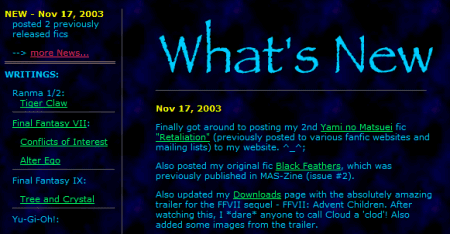
Feed Readers have many forms: most of them are independent applications, others are just plug-ins and, in some cases, reading feeds is just a feature. Feeds are a natural evolution of newsletters and of the "what's new" section of a site. Instead of writing a changelog for your site as a static page, you could write it in a feed so that people can subscribe to it and get the latest updates.

Feeds are usually associated with blogs and news sites, but they can be used for many other purposes like delivering search results (Yahoo Search, Google Blog Search), software updates or personalized content. Feed readers treat feeds in many ways:

1. Email messages
Mail clients like Outlook, Thunderbird, Opera M2, but also Yahoo Mail Beta, treat feed items like email messages. The association makes sense if you want to replace newsletters with feeds, but if you subscribe to a lot of feeds, you might spend more time reading them than in a separate feed reader. It's also impractical to treat feeds like emails because you can't comment by replying to the post.

2. Instant messages
There are applications like Google Desktop, Anothr for Google Talk that notify you when your favorite feeds are updated. The problem with these updates is that they become annoying, especially if they are very frequent. Instant alerts are useful for breaking news or for really interesting events, not for every new post. Particls tries to solve this problem.

3. Bookmarks
When you subscribe to a feed, you also bookmark it so you can find it later. Firefox lets you subscribe to feeds using live bookmarks: instead of going to the site, you see a list of the most recent headlines. A similar concept was introduced in Google Toolbar: custom buttons. "You can add buttons to your Toolbar that will let you visit and search your favorite websites and keep up with interesting feeds." This concept works for news sites and if you have a small number of subscriptions.

4. Portals / start pages
Most services that offer personalized homepages let you subscribe to feeds: iGoogle, Netvibes, My Yahoo and others. The advantage is that you can easily have an overview of what's new for the things that are important to you. But you can't add too many feeds to a start page or it will become cluttered.

5. Newspapers
Sage, a Firefox extension, uses stylesheets to create virtual newspapers. The effect is impressive and, in many cases, the rendering from Sage looks much better than the site itself. GreatNews also has a nice newspaper view.

6. Social filters
Read feeds filtered by experts, friends, your community or recommended by an application. Google Reader lets you share your favorite posts and someone can subscribe to your feed of shared items: you become a filter in your area of expertise. Yoono provides recommendations from other users with similar interests.

7. River (of news)
All the feeds are merged in a big feed sorted chronologically. You'll read the most recent posts first, you don't have to switch from a feed to another feed, the news will be diverse. "Instead of having to hunt for new stories by clicking on the titles of feeds, you just view the page of new stuff and scroll through it. It's like sitting on the bank of a river, watching the boats go by. If you miss one, no big deal. You can even make the river flow backward by moving the scollbar up," explained Dave Winer. Google Reader has a "river of news" view, available if you go to All Items.

8. Clusters
Connect the related posts into a conversation. There's an experimental widget from Yahoo, Sharpreader that "detects and shows connections between items if they have the same link, if one item links to another, if two items both link to the same external webpage", but there's no feed reader that offers real clustering.

9. Multimedia downloads
Subscribe to podcasts in iTunes, Miro and get all the future episodes automatically. Some BitTorrent clients (uTorrent) also support RSS feeds - the concept is called broadcatching.

10. Radars
"A newsradar is a stream of news items covering a very specific topic. A newsradar is usually created by aggregating together news feeds from a multitude of different sources covering the specific topic selected and adding to the resulting mix content items found through the use of so-called search feeds." Well, you could just use some clever search feeds from Google Blog Search or Technorati.

How do you look at your feeds and how did you choose a feed reader?

Blogroll Powered by Google Reader

Update (November 7): Google Reader implemented the feature described in this post.

Bloglines has a feature that lets you automatically create a blogroll from the feeds you've subscribed to. This way, you don't have to maintain your blogroll because it's permanently in sync with your subscriptions. "On many blogs, there are lists of links to other blogs. These lists are called blogrolls. You can incorporate your Bloglines subscriptions into your blog, as a blogroll, by including a small piece of HTML that loads a script from Bloglines."

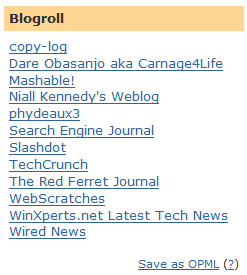
Many people want the same feature in Google Reader, but don't know it's already available, albeit not in a transparent way. Because you don't want to include in a blogroll all your subscriptions, you could share a folder (in Google Reader, a feed can be placed in multiple folders). So how to convert all the subscriptions from a folder to a nice list that can be added to a blog?

1. You need to add all the blogs you want to share to a folder. This can be easily done from the settings: select the blogs, click on "more actions" and add them to that folder (Google Reader calls it a tag, but you should ignore that).

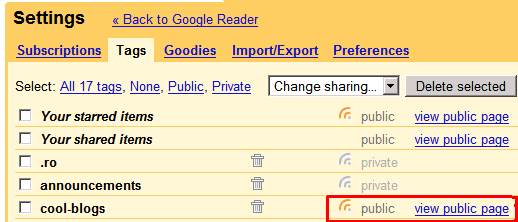
2. To make your subscriptions visible outside your account, the folder should become public. Go to the Tags tab from the settings and click on the small broadcasting icon next to your folder. The icon should become orange and the word "private" should be replaced by "public". In the screenshot below, cool-blogs is a public folder.


3. Copy the link for "view public page". It should look like this:
http://www.google.com/reader/shared/user/[NUMBER]/label/[FOLDERNAME]

Then enter the link below and click on "Build".


4. Copy the code in your blog's template. In Blogger, you could paste the code in a new HTML/JavaScript element.


I've also included an option to save the blogroll as an OPML file that can be easily imported in most feed readers.

Related:
Customize Google Reader's clips

August 3, 2007

Differences Between Google and Yahoo

I stumbled upon a very interesting question at Yahoo Answers and, surprisingly, the answers were quite thought-provoking. The question was: "What is the difference between Yahoo and Google?" and here are some of my favorite answers (slightly edited):

ThisNickIsTaken: "Google has a philosophy of keeping things simple so that people who are technically challenged can use it without getting confused, Also that simple things are fast.. Yahoo believes in feature rich application.. their products are more customizable and complex."

Gags: "It's a difficult one to answer since both companies are positioned very very differently; on face value, Yahoo looks hip and colorful, whereas Google looks simple and elegant; (...) Google is more thoughtful and strategic, Yahoo is flamboyant and more reactive; Google concentrates on value added solutions rather than presentation and Yahoo concentrates on superb presentation followed by value creation."

Ravelin101: "Yahoo has tons of media and ADS (loads slower). Google search is better (faster) only text ads. I started with Yahoo since I've known it first: Mail, Photos (now Flickr), Geocities but since Google's introduction, I've been moving things to Google Mail, Photos (Picasa), Googlepages."

So Google is strongly associated with simplicity, usefulness, pages that load fast (in one word: text), while Yahoo is connected with rich interfaces, complex designs, pages that load slowly (in one word: multimedia). Gags even called Yahoo flamboyant, which means "elaborately and heavily ornamented". It will be interesting to see if the acquisitions of YouTube and DoubleClick will change people's perception about Google.

Related:
Defining Google collaboratively

August 2, 2007

Sticky Google Search Results

Another day, another Google experiment. Mike Grehan noticed an interesting option at the bottom of a search results page: "Know a better page for [your query]? Suggest one!". After you add a page, it will appear at the top of search results for that query. Obviously, only for you.

"Yes, you get to input the URL of a favourite page on the query subject, click the button and, of course, you're taken to your Google account to log in to your personalized search."


This might be an interesting way of bookmarking web pages: associating a query with one or more pages. Google already personalizes the results by looking at your search history and your bookmarks. Maybe Google will also use this data to improve the quality of the search results.

{ via Search Engine Land }

Change or Delete Your Homepage in Page Creator

Google Page Creator, the free tool that lets you build simple web pages without knowing HTML, has received a small update.

Until today, the only thing you couldn't delete from a web page was the homepage, but now you can delete it too. To delete an entire site, you can select all the pages and remove them. Unfortunately, you'll have to delete the uploaded files one at a time or hide the site in the settings. But even if you delete everything from the web site, there's no way to delete the site itself.

Another improvement is that any page can become a homepage, so you can have multiple potential homepages. To change the homepage, go to the settings and select one of the pages you've created from the Homepage option.


It would be nice to see more features in Google Page Creator that could make it a part of Google Docs: collaborative editing, site search, folders, custom templates.

Google's Grandiose Plans in the Mobile Space

Wall Street Journal has an article about Google's plans to win the battle for mobile advertising (find how to read this article for free).
The company, which has made billions of dollars in Web advertising on computers, is courting wireless operators to carry handsets customized to Google products, including its search engine, email and a new mobile Web browser, say people familiar with the plans. It wants to capture a big chunk of the fast-growing market for ads on cellphones. (...)

The long-rumored Google phones are still in the planning stages, and wouldn't be available to consumers until next year at the earliest, say people familiar with the idea. (...) The Google phone project goes far beyond Google's existing deals to include its search engine or applications such as Maps on select handsets (...).

[Google] is drafting specifications for phones that can display all of Google's mobile applications at their best, and it is developing new software to run on them. The company is conducting much of the development work at a facility in Boston, and is working on a sophisticated new Web browser for cellphones.

Google has a lot of deals with cell phone manufacturers and carriers, while most of the services have a mobile version. But it's much easier to improve the user experience when you control the software (mobile browser) and the hardware (the actual phone). It's unclear whether the mobile phones will also have Google's logo.
The specifications Google has laid out for devices suggest that manufacturers include cameras for photo and video, and built-in Wi-Fi technology to access the Web at hot spots such as airports, coffee shops and hotels. It also is recommending that the phones be designed to work on carriers' fastest networks, known as 3G, to ensure that Web pages can be downloaded quickly. Google suggests the phones could include Global Positioning System technology that identifies where people are.

People who have seen Google's prototype devices say they aren't as revolutionary as the iPhone. One was likened to a slim Nokia Corp. phone with a keyboard that slides out. Another phone format presented by Google looked more like a Treo or a BlackBerry. It's not clear which manufacturers might build Google wireless devices, though people familiar with the project say LG Electronics Co. of South Korea is one company that has held talks with Google.

Google has recently expressed the intention to bid in the upcoming auction of spectrum in the 700 MHz bands for the US if the Federal Communications Commission (FCC) imposes some conditions to the winning bidders: users should be able to use any application, services, devices and third parties should be able to buy wireless services and to interconnect in a wireless network. FCC only agreed to the conditions for the users and Google is yet to decide if it will bid. "None of us like how the current system locks you into wireless service plans that limit the kind of phone or PDA you can use, prevent you from downloading and using the software of your choice, and charge you hefty termination fees if you try to get out."

Hopefully Google's phones will have the same openness and will allow you to change your search provider, your browser or your email client. If they're successful and Google finds a clever way to port the ads to the mobile space, the phone and the additional services might be heavily subsidized.

August 1, 2007

Google Maps Adds Support for the hCard Microformat

Microformats "are simple conventions for embedding semantics in HTML". Microformats let you publish contact cards, events, addresses using a standard so that any software that implements the standard understands them. If publishers used microformats for contact cards and your browser could parse them, it would be easy to save that information and export it to another application.

Unfortunately, not many web sites use them (the most important sites that use them are owned by Yahoo: Flickr, Upcoming, Yahoo Local) and browsers need special plug-ins to understand them. But things are about to change since Firefox 3 will handle microformats natively and Google Maps started to support microformats for local search results. "Why should you care about some invisible changes to our HTML? By marking up our results with the hCard microformat, your browser can easily recognize the address and contact information in the page, and help you transfer it to an addressbook or phone more easily." Google Maps API supports this microformat as well, but developers have to change a few lines of code.

To export the results from Google Maps, you should install the Operator Firefox extension. For other browsers minus Internet Explorer, try this hCard bookmarklet. (If you know a cross-browser bookmarklet or an hCard parser that works in IE, post the URL in the comments.) These tools convert hCard to vCard, a file format that can be imported into many applications, like Outlook or the built-in Address Book from Windows and Mac. In fact, hCard is just an HTML representation of the vCard format that can be obtained by simply adding some standard class names.
<div class="vcard">
<span class="adr">
<span class="fn n">Googleplex<br />
<span class="street-address">1300 Amphitheatre Parkway</span><br />
<span class="locality">Mountain View</span>,
<abbr class="region" title="California">CA</abbr>
<span class="postal-code">94043</span>
</span>
</div>


Google could add support for microformats in its popular toolbar, which already tries to detect addresses and link them to Google Maps. Besides, if more people use microformats, Google has to do less guesswork to extract useful information and to make it searchable.

Jeremy Keith writes: "This is a huge leap in the number of published hCards on the Web. It would be interesting to get exact numbers but I'd guess that the amount of places returned in Google Maps searches runs into the millions. The beautiful thing about all this is that I suspect the change was trivially easy: just adding a few extra class names into a template."

Google Tests New Local Ads Formats

AccuraCast reports that Google tests a new format for local AdWords ads that includes the expandable Maps Plus Box. When you click on the link, Google displays the address of the business, a static map and an option to get directions. This is very similar to what you see next to search results associated with local businesses (e.g.: NY spa).


According to Google, this is a limited test and may not be launched globally. Google has always been reluctant to treat local ads different than the standard ads: even Google Maps used to display ads that sent you to a web page. But things have changed and the ads from Google Maps are placed on the map, the same as the standard results.


Google has also updated the Maps API so that developers can monetize their mashups. "At Developer Day in May, we previewed GAdsManager, a class that would place contextual ad markers for local businesses in a special layer on your map and help you monetize it. We've now released the ads layer with the addition of GAdsManager in Maps API v2.85, and it's ready for early testers."

It's hard to say if integrating an ad into a medium improves the user experience or makes it easier to confuse it with the real content. Google's search results pages contain mostly text, so the targeted text ads are more appropriate than banners, but as Google starts to include more images, videos, expandable boxes in the main results, the ads might become richer and more interactive.