An unofficial blog that watches Google's attempts to move your operating system online since 2005. Not affiliated with Google.

Send your tips to gostips@gmail.com.

June 5, 2008

Richer Local Search Results in Google Maps

Google Maps shows enhanced local search results. Compared to the previous format, Google Maps lets you find more information about the local businesses without having to click on each result. You can see a thumbnail, an excerpt from the most recent review and a link that encourages to post your own review. This format was already used in the text view, but probably few people noticed it.


Excerpts from reviews are included in local search OneBoxes as well, but Google chooses different reviews. Judging from these changes, I think businesses will start to upload images to the Local Business Center and will encourage their customers to post reviews to Google Maps or other sites.

Google Talk Adds Invisible Status

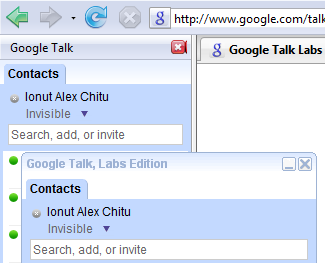
Some Google applications need a lot of time to add even the most basic features. Gmail Chat added the invisible status in February and now this feature is also available in the Google Talk gadget and in Google Talk Labs Edition. Don't ask about the classic Google Talk client, which was last updated in January 2007.


In a previous post, many people argued that it's not wise to add the invisible status because the instant messaging becomes less useful as more people become "invisible". "It's like one-way spying. If you're going to be online to see if your friends are online, at least have the respect to show other people that you're online. What happens if both you and your friend want to talk to each other, but are both on invisible? You'll never discover that you're online," commented Jyvyn.

One solution for this problem could be to show different statuses, depending on your contacts. "What would be most helpful would be some sort of 'group block' or 'group invisible'. I have a number of work contacts that use g-chat so I need to be on and available, but often I am interrupted by friends wanting to chat and I have to ignore them or interrupt my work to explain I can't talk. If I could add all my work contacts to a group, and show my status to them as online, while showing everyone else away, invisible, or even offline - now that would be useful," said nauthiz693.

Integrating Gmail's contact groups with Google Talk is an obvious next step, but this might require many months of coding. After all, adding the invisible status is probably the second most notable feature added by Google Talk this year, after the chatback badges.

{ Thanks, Carlos. }

No More Video Plus Boxes in Google's Results

Google used to have a feature that allowed you to watch videos from YouTube and Google Video inside the search results. Launched in May 2007, the video plus box was a quick way to play videos without having to load the entire page of a video hosting site. For some reason, Google only limited the plus box to its own video sites (YouTube and Google Video), while showing thumbnails and metadata for other sites.


Yahoo Search added a similar feature in October for YouTube, Metacafe and Yahoo Video, but now the plus box is nowhere to be found in Google's results:


Instead of making the feature available for other video sites, Google decided to remove it altogether. Hopefully there's a better explanation than increasing the number of page views for YouTube and Google Video, as Google usually puts the user first.

June 4, 2008

iGoogle Tooltips for Reading Feeds

When hovering over a feed gadget, iGoogle displays the content of each post in a tooltip so you can read it without having to visit the web page or to expand the post. Since Google uses the title attribute, tooltips don't preserve the original formatting, may be truncated and they also have issues with special characters.

iGoogle tooltip in Internet Explorer 7

Other personalized homepages like Netvibes and My Yahoo show a snippet from the post in a custom overlay and open a reader to display the full content. Loading multiple instances of the Google Reader gadget for different folders is a good alternative for iGoogle's feed modules, especially if you subscribe to many feeds.

{ Thanks, Stephen. }

YouTube Annotations

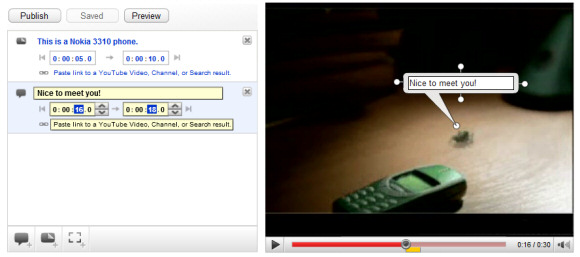
YouTube added a new feature for video creators: annotations. "Video Annotations are a new way for you to add interactive commentary to your videos. Use them to add background information about the video, create stories with multiple possibilities (viewers click to choose the next scene) or link to related YouTube videos, channels, or search results from within a video."


You can add annotations by going to the list of uploaded videos and clicking on "Edit annotations" or by visiting one of your videos while you are logged in. There are three types of annotations that can be added while playing the video: speech bubbles, notes and spotlights, as you can see in the screenshot above.


Here's a live example of interactivity that can be added to a YouTube video (also notice the updated embeddable player that looks the same as the player from YouTube's site). The following short video:


can be transformed into a much more engaging content with clickable annotations that point to other videos. For now, only video creators can add annotations, but it would be nice to allow any user to comment on a specific moment from a video (a la Viddler) or to add funny speech bubbles.

{ Thanks, Dan. }

June 3, 2008

Google Upgrades Site Search for Businesses

One thing that's great about Google is that its paid services are constantly updated with new features, but users don't have to pay more. For example, when it was launched in February 2007, Google Apps Premier Edition didn't include Google Sites, a presentation app, message recovery, email migration and Gmail accounts had 10 GB of storage. For the same $50/user/year, Google Apps Premier Edition offers a lot more features, so the incremental cost of significantly upgrading a product is very low.

Google Site Search, a service previously known as Custom Search Business Edition, falls in the same category. Google offers a hosted alternative for small businesses that want a powerful site search, but don't need all the features offered by Google's expensive search appliances, which are mostly useful for intranet search. Google Site Search is based on the Custom Search platform, but is fully customizable through XML feeds, includes support and doesn't have ads (they're actually optional).


One of the major problems with Google Custom Search was that it used the same index as Google's web search engine, so the site search was just a restriction of Google's web search results. Google realized that people were unhappy with these limitations and decided to create a separate Custom Search index. "We're now maintaining a CSE-specific index in addition to the Google.com index for enhancing the performance of search on your site. If you submit a Sitemap, it's likely that we will crawl those pages and include them in the additional index we build."

The most important new feature offered by Google Site Search is an enhanced indexing, but Google is quick to mention that this doesn't affect Google's main index. "Any additional pages in the Google Site Search index aren't included in Google's index and won't impact a site's behavior in the Google search results."

The other 3 additions to Google Site Search offer simple ways to influence search results. You can upload a dictionary of synonymous to improve Google's query expansion, it's also possible to give more weight to recent web pages or to pages from a specific section.

Unlike many of its competitors, Google Site Search still can't index password-protected pages and it doesn't let you decide how often to index your site's pages, but the price is hard to beat: starting from $100/year for 5,000 documents.

If you don't need support or advanced customization, Google Custom Search is still free. There's also a competition for winning a subscription to Site Search and Google T-Shirts: the only condition is to submit the address of a site that doesn't have search features (quickly remove the search box!).

Explore Places Using Panoramio Look Around

Panoramio, a Spanish photo hosting service acquired by Google to enhance Google Earth and Google Maps, added an interesting feature called "look around". In areas with a high density of images, you can interactively move from one image to another one. "The most interesting places to look around are squares, towers or any location where people took photo in many different directions. Having many overlapped photos means that you can move very far away from the starting point, almost like a real walk," explains Eduardo Manchón, from Panoramio. "Photos of details get embedded inside wide perspectives and allow a nice zoom-in effect. [It] depends very much on the place, but around 10-20 photos should be enough to get the look around."


Frank Taylor, from the unofficial Google Earth Blog, compares "look around" with Microsoft PhotoSynth, an interesting technology that reconstructs three-dimensional spaces from large collections of photos. Panoramio's feature is less impressive and can't recreate 3D spaces that let you seamlessly move between different perspectives, but I wouldn't be surprised if Google integrates it with Street View and Google Earth.

The list of places you can explore using the new feature includes: the top of Empire State in New York, the last floor of Eiffel Tower, the Red Square of Moscow, Brandenburg gate in Berlin and Taj Mahal. Just click on "look around" below the photo and move your mouse inside the new image to choose the next perspective.

June 2, 2008

Google Shows Real-Time Stock Data


Starting from today, Google shows real-time price data for all NASDAQ stocks, informs Google Finance Blog. Google partnered with CNBC, Wall Street Journal, Xignite and managed to convince NASDAQ that providing free access to real-time stock data is the right thing to do. "With universal access to the Internet and the real-time nature of the web, investors need real time data, and now they don't have to pay for it," said Adena Friedman, Executive Vice President at NASDAQ.

Until today, the information was delayed at least 15 minutes and you had to subscribe to financial sites like Bloomberg to get real-time data. "It's important to have up-to-date market data. It's equally important that that data stay up to date. Consequently, we're enabling the streaming of quotes across Google Finance. Prices will update automatically, once per second, to reflect current market conditions," mentions Google.

The real-time data is available at Google Finance (not yet in the charts), in the financial OneBox, but also at CNBC.com, WSJ.com, MarketWatch.com and Barrons.com. Google Finance shows stock prices in the title, so you can open Google Finance in a new window and minimize it to see the latest updates in the status bar.


Meanwhile, Yahoo partnered with a third-party to show real-time data for all important US stocks, not just for NASDAQ stocks, in Yahoo Finance. "Why did Google choose to work with NASDAQ instead of BATS, the third-party share-exchange that is providing Yahoo's (YHOO) free quotes? From what we hear, because Google, et al, don't think BATS's information is accurate enough," comments Silicon Alley Insider.

June 1, 2008

Cool Features in Firefox 3

If you decide to upgrade from Firefox 2 to the first release candidate of Firefox 3, you'll notice an improved performance, less memory leaks, a revamped interface and some very interesting new features:

* select discontinuous text - press Ctrl while selecting different blocks of text, like you can do in Microsoft Office
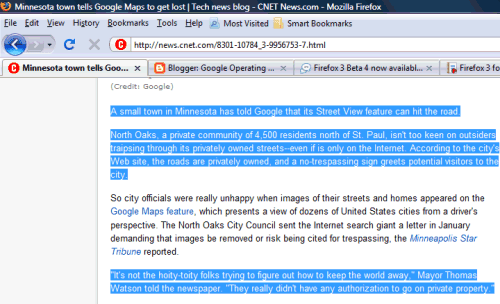

* I've always liked about Notepad2 that you can select a text and open the Find dialog to search for your selection. Firefox 3 brings this feature to improve its already powerful find-in-page.

Tip: Select some text and press Ctrl+G to find the next occurrence of that text.

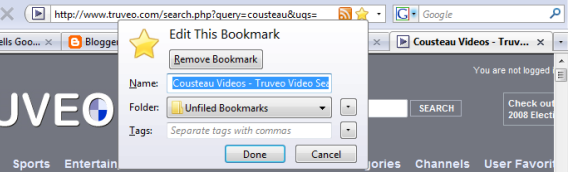
* Google Toolbar 4 for IE made bookmarking a very easy task: just press on the star button to bookmark a web page and press again if you want to add tags or edit the title. The latest version of Google's plugin complicated the feature a little bit, but Firefox 3 borrowed the initial concept and changed the way you bookmark web pages. Furthermore, you can now associate tags to bookmarks and find the most visited bookmarks.

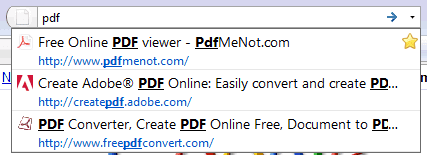
* the address bar auto-completes URLs and page titles, while trying to prioritize web pages visited frequently and recently. "Dubbed the AwesomeBar, it lets you use the URL field of your browser to do a keyword search of your history and bookmarks. No longer do you have to know the domain of the page you're looking for — the AwesomeBar will match what you’re typing (even multiple words!) against the URLs, page titles, and tags in your bookmarks and history, returning results sorted by frecency (an algorithm combining frequency + recency). Not only that, but the drop-list results show you the page's favicon, the full title, the URL, and whether you have bookmarked and/or tagged the page in a richly formatted two-line display."

* disable plugins from the Add-ons dialog. That means you can now disable Flash or the Windows Media Player plugin directly from Firefox, without having to install extensions like FlashBlock.

* if the current web page uses OpenSearch to point to a search engine, Firefox shows a blue circle next to the search box. You can add the search engine to your list using only two clicks.

* you can add web applications as handlers for protocols like mailto. That means you can open all the mail links in Gmail without installing an extension if you follow these instructions. Hopefully, in the next version of Firefox you'll be able to also open other kinds of links in web applications (for example, open PDF files in PDFMeNot).

* set permissions for individual web sites: for example, you can disable images or cookies in some web sites you don't trust. Opera offers more fine-grained options in "edit site preferences", but you may still find useful the limited permissions from Firefox (Tools > Page Info > Permissions tab).

* another feature already available in Opera, full-page zoom, has been included in Firefox 3 to allow the scaling of images and other objects. To revert to the zooming feature from Firefox 2, enable View > Zoom > Zoom text only.

Even if Mozilla didn't release the final version, Firefox 3 RC1 is an almost-final version and could safely replace Firefox 2. There's also an unofficial portable version you can use before installing the application. While not all the extensions have been updated to include support for Firefox 3, you can easily disable the compatibility checking.

All in all, Firefox 3 added some cool features, but it didn't ignore fundamental issues like performance or a better back-end for web history and bookmarks. The new interface and the sometimes-not-so-awesome bar are two of the things that still have rough edges.

Google Invests in a Better Web

Google I/O's keynote, titled "Client, Connectivity, and the Cloud", discussed the latest Google developer-orientated initiatives and their significance. Vic Gundotra, vice-president at Google, explained that Google wants to make it easier to develop web applications by transforming browsers into powerful clients and by making "the cloud" more accessible.

Gears is an open source plug-in that adds offline storage, a local database, asynchronous threads, and other features which could be used to create web applications that are closer to their native counterparts.

In the fragmented mobile space, Google bets on Android, an open mobile platform that includes a powerful browser and APIs that enable developers to create applications which take advantage of the connectivity.

Google App Engine lets you build web applications without having to worry about infrastructure, setting up servers and databases. Anyone can create a web application for free and pay for more resources, once the applications becomes popular.

Google APIs could be used to enhance web applications by integrating them with Google's services: you can get data from Google's apps or from the content indexed by Google.

Web Toolkit lets you use Java to create the front end for AJAX applications and translates your code into optimized JavaScript.

OpenSocial is an effort to make the web more social by providing a standard for creating social web applications.

Most of Google's solutions are open source software (Gears, Web Toolkit, Android) and steps toward creating standards (Gears, OpenSocial) that should move the web forward. Google says that its only incentive for building these tools is that enabling the development of more web applications brings more Internet users and, indirectly, more Google revenue. Some of that revenue is invested in other initiatives that fuel Internet's growth and the cycle continues.


Here's the full 90-minute keynote. Don't miss the cool Android demo at min. 26.