An unofficial blog that watches Google's attempts to move your operating system online since 2005. Not affiliated with Google.

Send your tips to gostips@gmail.com.

August 18, 2008

More About Android and HTC Dream

Five months after the last released version, Google and the Open Handset Alliance publicly launched Android 0.9 SDK beta.

"Back in November, we made some SDK builds available that we referred to as early look SDKs. The goal was to give developers insight into the platform as early on as possible, and to get some initial feedback. Since then, we've been working with our Open Handset Alliance partners to incorporate much of that feedback, and finish the first devices. Since those devices are shipping in the fourth quarter, the platform is now converging on a final Android 1.0 version," explains Dan Morrill.

The release notes include a lot of changes: a new Home screen, context menus, two removed APIs (Bluetooth and GTalkService), but the good news is that the next versions will not have major changes.

The first mobile phone that will run Android, HTC Dream, has been approved by FCC and is on target for a launch until the end of the year. New York Times speculates that T-Mobile will be the first carrier to offer HTC Dream in October.

A video posted last week on YouTube claimed to show the smart phone, which looks anything but impressive:


TmoNews has some specifications of the upcoming phone: touch screen, full Qwerty keyboard, 3G/Wifi, 3MP camera with no flash, easy access to Google applications. "We have confirmed that the Android device will be available for current T-mobile customers online, for pre-sales, on September 17th. The Pre-sale will last for one week, with the device being delivered on October 13th, which happens to be the national public launch of the device."

Of course, it's good to keep in mind that Dream is just one of the mobile phones that will use Android and users primarily buy the device for its design and features, not for the operating system.

Update: some new specs (528Mhz Qualcomm 7201 processor, trackball, 1GB MicroSD card, POP/IMAP/SMTP, AIM/MSN/YAHOO/GTALK messaging, Google Calendar sync, Google Streetview with built-in compass, 3.17″ screen with HVGA, 5.6 oz weight).

A Directory of Google Reader Shared Pages?

Google promotes on the homepage a site called "Power Readers in Politics", which lists the Google Reader shared pages for US political journalists and the campaigns of Barack Obama and John McCain.

"You can read what they read, and see what's on their minds as they share and discuss news. Each participant has created a reading list with a feed you can subscribe to in Reader (or any other feed reader), and is also publishing shared items," says Google Reader blog.

While the ad from Google's homepage is misleading ("read what Barack Obama and John McCain are reading with Google Reader"), the idea of grouping related Google Reader shared pages could be expanded. Users could choose if they want to add their shared pages to a directory categorized based on the items that are usually shared. Google Reader could show the number of subscribers for each shared page and might even recommend shared pages related to your current subscriptions.

Sites like ReadBurner and RSSmeme let you discover people that share interesting things, but I feel that Google Reader could greatly improve this process. Shared pages act like a filter: instead of subscribing to tens of blogs about the US elections, you can subscribe to 3-4 shared pages that summarize the most interesting news and debates.


Update: Here's my shared items page and the corresponding feed. I mostly use it share blog posts about Google or technology in general, but it would be great if Google Reader added the option to separate the page in sections.

Knol's Advanced Search

Knol has recently added a search toolkit that lets you build advanced queries, a feature that wasn't available at launch. Many of the options from Google web search can be used in Knol: phrase search, negative terms, OR search. You can also restrict the search to titles, summaries, authors, reviews, recent knols. Google offers three options for ordering the results: by relevance, by creation date, by last modified date and an interesting "reverse sort".


The advanced search option should be a good way to discover knols related to a topic, but it fails to properly rank the knols. In a search for [Google Reader], the top result is a page copied from Google Reader's help center that has a higher rating than the second result, which is more relevant. If you don't use the advanced search, Knol shows less but better results.

A search for [the] returns 29315 results (507 edited in the past 24 hours), which should be close to the total number of knols, but many of them include content that already exists on the web, aren't very detailed or well-formatted. You can still find some good knols, but the signal-to-noise ration seems to be low. The knols that receive some attention are those that are featured on the homepage, but Google only features 5 hand-picked knols daily.

August 17, 2008

Google Calendar Agenda in Gmail

GmailAgenda is a Greasemonkey script that shows your Google Calendar agenda as a sidebar in Gmail. The script uses Google Calendar's embedded view and it includes an option to add events to the main calendar. The sidebar can't be minimized, so it remains visible even when you don't need it.


An alternative way to keep an eye on the Google Calendar agenda is to add the iGoogle gadget in the sidebar, as explained in this post. The advantages are that you don't need the Greasemonkey extension, the sidebar is visible even when you don't visit Gmail and it can be closed.

Automate File Upload in Google Docs

Google Docs has an option to upload files from web addresses, but it's not very convenient if you want to load many documents or you want to add a link for uploading a document. Here's the direct link that can be used to open a document from the web in Google Docs:

http://docs.google.com/?action=updoc&formsubmitted=true&uploadURL=DOCUMENTURL

This works for documents (.doc/.txt/.html/.rtf/.odt), spreadsheets (.xls/.csv/.ods), presentations (.ppt) and PDF files.

In Windows, you can easily create a batch file that automates the upload of multiple files to Google Docs, assuming that the browser is open and you are already logged in to a Google Account. For example, the following text can be copied in Notepad and saved as a .bat file. After executing the .bat, the two PDF files will upload to Google Docs in separate Firefox tabs.

start /d "%PROGRAMFILES%\Mozilla Firefox" firefox "http://docs.google.com/?action=updoc&formsubmitted=true&uploadURL=http://www.fireworksafety.com/pdfs/FireworkSafetyTest.pdf"

start /d "%PROGRAMFILES%\Mozilla Firefox" firefox "http://docs.google.com/?action=updoc&formsubmitted=true&uploadURL=www.fs.fed.us/fire/safety/wct/2002/brochure_2002.pdf"

A similar option is available in Google Toolbar for Firefox, which lets you open documents from the web in Google Docs.

August 16, 2008

Export Files from Google Page Creator

Update: the exporting tool is no longer available, now that Google Page Creator no longer exists.

You probably heard that Google intends to close Google Page Creator and migrate the users to Google Sites, a service that seems to be targeted to a different audience and that lacks many features available in Page Creator. Google Sites will add some of the missing features by the time Google closes Page Creator, but those who want to move to a different service or maybe to buy a domain can already export the files.

Requirement #1. There are three kinds of files that are trapped inside Page Creator: uploaded files and web pages created using the editor which can be public or unpublished. The following exporting tool can only work for uploaded files and the public web pages. If you have pages that are unpublished and you want to export them, click on "Publish all changes" in the sidebar. You can undo this action later.

Requirement #2. Another prerequisite for the exporting tool is a software that downloads all the files linked from a page. For Internet Explorer, try the excellent download manager FlashGet (I use the classic version). For Firefox, there's an extension called DownThemAll that has some of the features from FlashGet. In both cases, you'll have to restart the browser before continuing. As usually, Opera users don't need third-party software for advanced features: there's a sidebar panel that shows all the links from a page.

How to export the files.

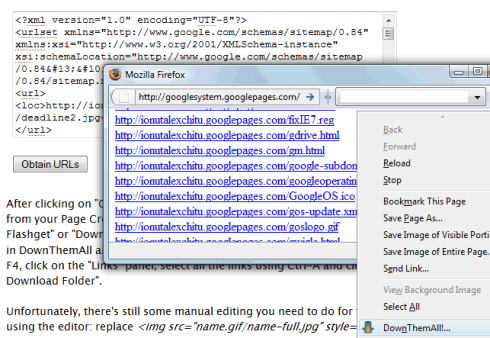
All sites from Google Page Creator have a sitemap that lists all the public files from a site: it's available at SITENAME.googlepages.com/sitemap.xml. Just go to your site's homepage and add /sitemap.xml in the address bar. To copy the content of the XML file in the box below, you could right-click, select "view source" and copy the code (for Firefox, Opera) or open the file http://SITENAME.googlepages.com/sitemap.xml in Notepad.

After clicking on "Obtain URLs", you should see a pop-up window that lists all the files from your Page Creator site. Right-click inside the page and select "Download all by Flashget" or "DownThemAll!", depending on your browser. Make sure to check "All files" in DownThemAll and to choose a folder where the files will be copied. In Opera, press F4, click on the "Links" panel, select all the links using Ctrl-A and click on "Save to Download Folder".


Unfortunately, there's still some manual editing you need to do for the pages created using the editor: replace <img src="name.gif/name-full.jpg" style="border: 0pt none ;"> and similar code with <img src="name.gif" style="border: 0pt none ;">.

Two free alternatives to Page Creator are Weebly and Synthasite. Wall Street Journal has an article that explains how to buy a domain and host a site without paying too much.

{ Inspired by Peter Dawson. }

August 15, 2008

Google Launches AdSense for Feeds

I noticed a new option in my AdSense account: AdSense for feeds, a program that displays contextual and placement-targeted ads in FeedBurner feeds. FeedBurner announced in May that AdSense for Feeds will be available to a small number of publishers and now it seems that everyone can use it.

FeedBurner has recently closed FAN, its advertising network. "No new applications for FAN publishers are being accepted and we expect the broad variety of options provided through AdSense (including the new AdSense for Feeds product, powered with FeedBurner feeds) will give publishers valuable new revenue-earning potential," says a FeedBurner/Google employee.

The new AdSense for Feeds option lets you create a new ad unit that has a format automatically selected from 468x60 and 300x250. "Generally, the 300x250 size will display when there's more content and when your feed is being viewed in a device with a larger display," explains Google. You can choose if you want image ads, the ad frequency, the position (top or bottom of the post), the colors and a channel that tracks the ad performance.


For the moment, there's no connection between your AdSense account and the FeedBurner account, so Google automatically adds the FeedBurner service to your AdSense account. Unfortunately, your feeds are still connected to the old FeedBurner account and you need to migrate them first. The migration process is manual: just send an email at adsense-support-aff@google.com and mention your FeedBurner username and the AdSense account email address.


From AdSense, you can easily burn a new feed by entering the address of your blog and selecting some tracking options. The feeds can be managed at the new FeedBurner site, but there's no visible change other than the integration with Google Accounts and the new URLs for feeds: http://feedproxy.google.com/NAME.


Here's an ad from a feed of a FeedBurner/Google employee:


I doubt that these ads are an effective way to monetize feeds, since people use feed readers to get timely updates from a lot of sites and spend less time for each item. Besides, feed readers are mostly used by tech-savvy readers that are less likely to click on ads.

At some point, I may experiment with some infrequent ads in Google Operating System's feed and I'll post my findings.

Resources:
AdSense for Feeds Help Center - you should read the tips
Migrating an existing FeedBurner account
The new FeedBurner homepage

August 13, 2008

Google Search Results Show Metadata for Scientific Papers

Google started to integrate in the search results information about the scientific papers included in Google Scholar. Below the snippet, Google lists the authors, the number of citations and links to related articles and other versions available online. The integration is not perfect and the search results look cluttered, but it's yet another class of results that have richer snippets.

Here's the top search result for buddy tree (a data structure):


... and the same result at Google Scholar:


Google also shows additional information next to videos, books, web pages that include addresses and tests displaying metadata for forums and extracting specialized information from web pages. While Yahoo tries to convince webmasters to make structured data explicitly available, Google has a more practical approach and uses what's already available to enhance search results.

{ via Blogoscoped Forum }

Plot Feeds in Google Finance

Google Finance has a very cool new feature that lets you plot the items from a feed on a stock chart. For example, you may want to find more information about Google's stock and see how it correlates with the latest news about Google. In addition to the articles from Google News, there's a new tab with blog posts and another one that lets you view the posts from a feed. You can choose from the examples offered by Google, enter the URL of a feed or type some keywords related to the feed you want to find.

For Google, you may select New York Times feed offered as an example, search for [Google blog] or enter the address of this blog: googlesystem.blogspot.com. Google Finance lets you filter the posts from the selected feed using the "search within items" option. There's even an interesting trick that lets you plot some custom events on the chart. "Google Spreadsheets can be treated as RSS feeds and plotted on a chart. Just make sure your document contains a date column and some basic formatting, and that it's published to the web." Here's an example of spreadsheet plotted in Google Finance.


If you want to obtain a permalink for your custom chart, click on "Link to chart" and copy the address. Unfortunately, you can't save a list of feeds or connect them with certain companies.

{ Thank you, Alexis K. }

August 12, 2008

Photo Albums in Google Docs

Google Docs will expand beyond documents. After adding support for storing PDFs, Google Docs will provide ways to create photo albums. It's not very clear if you'll be able to access the photos stored in Picasa Web Albums or create different photo albums, but GDrive is certainly here and its name is Google Docs.

The first screenshot has been created using information from Google's code, which already includes an icon of the photo section. The other screenshots show an empty list of photo albums and a new image search feature.


I suspect Google Docs will become the place where you can upload, share and manage any kinds of files. It's also likely that all the files that are uploaded to other Google services will be accessible in Google Docs in much the same way as the photos uploaded to Blogger blogs can be found in Picasa Web Albums.

Update: Radu noticed that if you go to docs.google.com/#photos and type the first letters from the titles of your Picasa Web Albums, Google shows the full titles as suggestions. It seems that it only works for public albums.