An unofficial blog that watches Google's attempts to move your operating system online since 2005. Not affiliated with Google.

Send your tips to gostips@gmail.com.

September 2, 2008

Picasa Web Albums Adds People Tagging

CNet reports that Picasa Web Albums will add some interesting features today. After implementing face detection in the image search engine, Google adds face recognition in Picasa Web Albums to facilitate photo tagging.

"The problem with tagging is that it's a chore, so most people don't bother. But Picasa's name tag feature automates the process enough--and provides enough reason to use it--that I believe many users will take the tagging plunge. (...) The most impressive moments are when Picasa presents a large array of photos with the same face, and you can label them all with a single click," says Stephen Shankland from CNet.


The technology comes from the NevenVision acquisition and I'm sure we'll see more features that depend on image analysis in the future. Other new features in Picasa Web Albums: new views for exploring photos uploaded to Picasa Web Albums, Creative Commons licensing and an option to add photos by email.

Interestingly, the people tagging feature will not be available in Picasa 3, which will also be released today. The software will finally synchronize photos with Picasa Web Albums, but the synchronization is unidirectional. You'll be able to create videos from photo albums and export them to YouTube. There's also an improved collage maker that lets you control how pictures are arranged.


Picasa 3 and the updated Picasa Web Albums are set to be available today at 12 pm PDT.

Update: Picasa 3 can be downloaded from http://dl.google.com/picasa/picasa3-setup.exe (thanks, Anonymous!).

September 1, 2008

Google OS Is Actually a Browser: Google Chrome

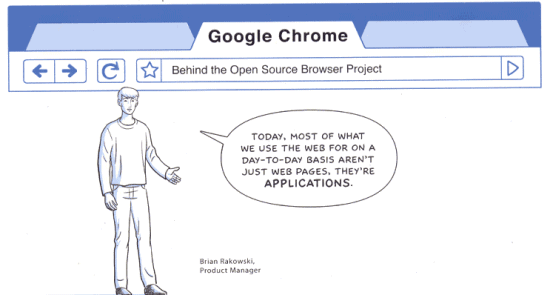
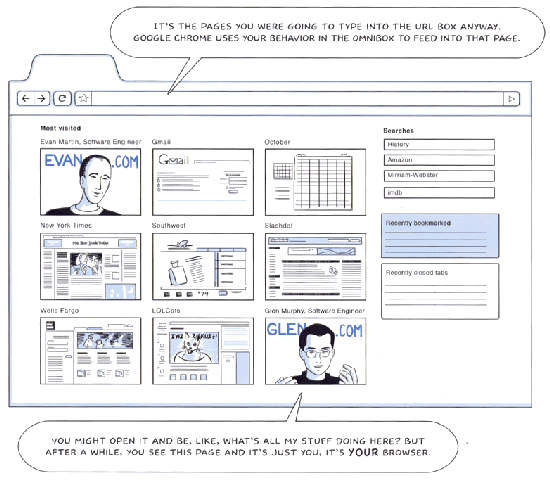
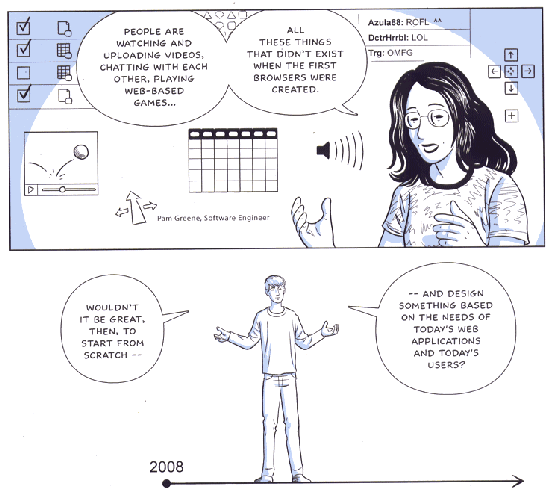
Google Blogoscoped posts an interesting comic book (update: a better version) created by Scott McCloud that illustrates the features of Google Chrome, an open source browser based on WebKit. As usually, all the rumors related to Google are true and "Google Browser" is no exception.


Google Chrome has been built in a time when browsers no longer render mostly web pages, but full-blown web applications. That's why browsers need to be more powerful, more stable and more secure. One of the problems of the existing browsers is that a web page can lock the browser and there's no way to isolate that tab and close it. Google Chrome uses a new process for each tab. "We're applying the same isolation you find in modern operating systems," says Arnaud Weber. Each process is sandboxed to prevent malware from affecting your computer.

The new browser has a JavaScript virtual machine built by the V8 team from Denmark that generates code dynamically and has a better garbage collector.

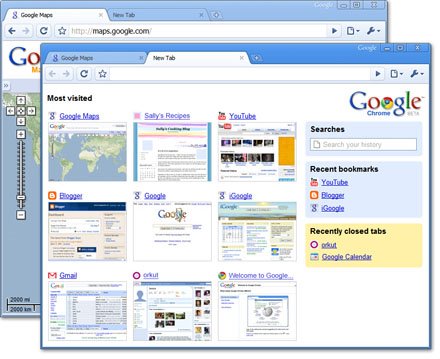
Google Chrome's UI is inspired by Opera: tabs are displayed above the address bar, the address bar combines previously typed URLs with search results and suggestions and there's a homepage that includes frequently visited sites, recently closed tabs, bookmarks and searches.


Web applications can be opened in chromeless windows, without menus and toolbars, much like in Mozilla Prism. The browser will also include Gears, a set of APIs already available for IE, Firefox and Safari.

Some people will say that Google wants to compete with Microsoft's Internet Explorer or Mozilla's Firefox, but I think there's something more important about the new offering: an open source browser that is prepared for running applications and that diminishes the role of existing operating systems. The browser won't become very popular, but the ideas behind it will influence the next versions of Internet Explorer, Firefox, Opera, Safari.


The browser is not yet available for downloading, but the launch seems imminent.

{ Images licensed as Creative Commons by Google. You can read the entire comic book at google.com/googlebooks/chrome. }

Update: Google announces that a Windows version of the browser will be launched tomorrow. "We realized that the web had evolved from mainly simple text pages to rich, interactive applications and that we needed to completely rethink the browser. What we really needed was not just a browser, but also a modern platform for web pages and applications, and that's what we set out to build. (...) By keeping each tab in an isolated sandbox, we were able to prevent one tab from crashing another and provide improved protection from rogue sites. We improved speed and responsiveness across the board. We also built a more powerful JavaScript engine, V8, to power the next generation of web applications that aren't even possible in today's browsers."


Update 2: Google Chrome has been released and it already supports 43 languages.

August 30, 2008

Internet Explorer 8 Beta 2 - IE Looks Good Again

Microsoft has recently released Internet Explorer 8 Beta 2, an impressive update for a software that stagnated in the past years. Internet Explorer 8 looks more elegant and easier to use, while adding many of the missing features.

"The brand-new implementation of Standards mode in Internet Explorer 8 offers the best viewing experience of web pages created according to the latest web standards." That means many of the web pages that include code custom tailored for IE won't look very good, so you need to enable a compatibility view (for some reason, intranet sites are rendered in the compatibility mode by default). A post from March has more information about Microsoft's decision to apply the standards mode by default.

IE brings CSS improvements, support for data URIs, AJAX enhancements and support for DOM storage. There's a new tool for developers that includes a DOM inspector, a JavaScript profiler, a color picker and ruler, options to outline objects, disable CSS and validate web pages.

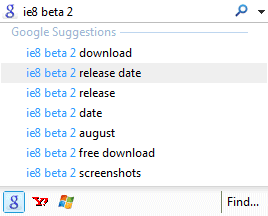
IE8 adds support for suggestions in the search box and this is not restricted to Live Search. Microsoft lists many search providers that can be added: Google, Yahoo, Wikipedia and others. The new interface makes it easy to switch between search providers by clicking on the icons displayed at the bottom.

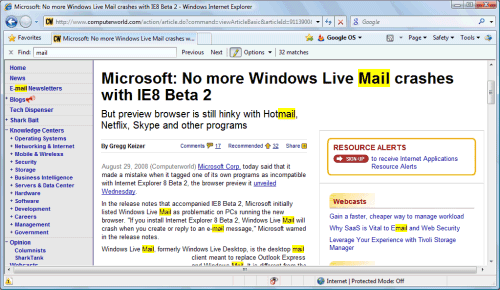
Another feature that should have been added to IE7 is inline search: now you can search inside a page from an elegant bar similar to the one from Safari.

Notepad wasn't the best software for viewing the source code of a page, so IE8 includes a simple text viewer with syntax highlighting. Too bad that you can't view the source code for selections.

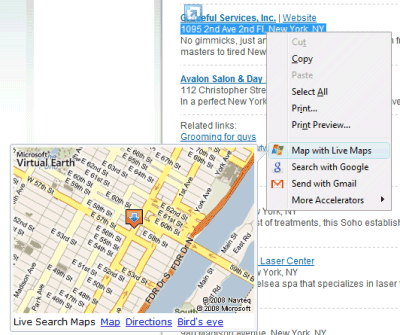
A great feature from Google Toolbar allowed you to select some text from a web page and send it to Blogger, Gmail or other services. Microsoft added this feature and calls it "accelerator". "Tired of cutting and pasting information from one website to another for everyday tasks? Now there's a better way. Accelerators give you ready access to the online services you use everyday—from any page you visit."

Firefox's microsummaries didn't become popular even if they solved an interesting problem: subscribing to frequently updated information like stock quotes or weather reports. IE's web slices, based on the hAtom microformat, are more visually appealing, but I couldn't find any interesting example in the gallery. Internet Explorer lets you add to the favorites bar heterogeneous subscriptions: bookmarks, feeds and web slices, even though the subscription process is not uniform. Like Firefox 3, the latest version of IE adds one-click bookmarking, visually represented by a star icon.
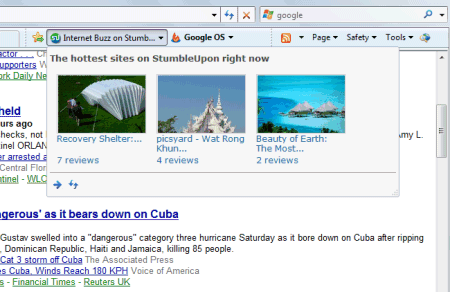

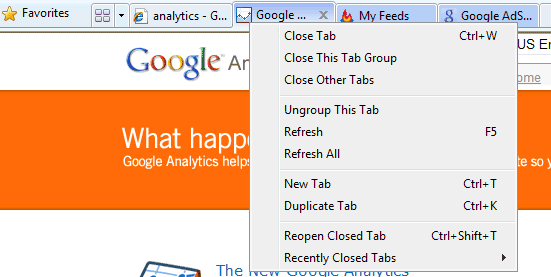
The bookmarks placed in a folder are treated as a group: the advantage is that all the bookmarks can be opened with one click, the tabs have a new color and there's also an option to close the entire group. IE8 automatically creates groups from links opened in new tabs. It's easy to duplicate a tab and its history, to reopen recently closed tabs and to reopen the last browsing session.

IE8 includes a security feature that will be rarely used for non-adult sites: private browsing. "InPrivate Browsing in Internet Explorer 8 helps prevent your browsing history, temporary Internet files, form data, cookies, and usernames and passwords from being retained by the browser, leaving no evidence of your browsing or search history." To use it, you need to click on Safety > InPrivate Browsing, which opens a new window where you can browse privately. To permanently use private browsing, edit IE's shortcut and append -private in the target field (you could also type iexplore -private in the Run dialog or Vista's search box).
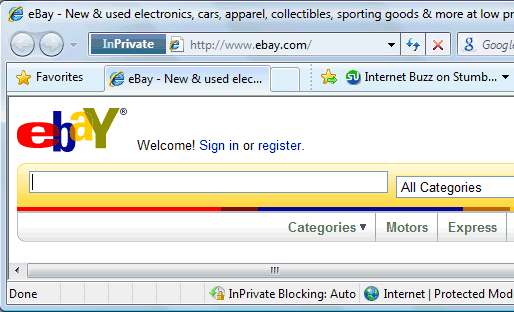

The InPrivate mode automatically blocks third-party content from popular services. "Because InPrivate Blocking is designed to watch for and block only third-party content that appears with a high frequency across sites you visit, no content is blocked until such levels are detected, nor is any such content blocked which is served directly by the site you are visiting." You can manually add sites that should be blocked or subscribe to lists available online. Even if some people might think that it's an ad blocker in disguise, InPrivate Browsing removes many useful features and this makes it impractical for regular browsing.

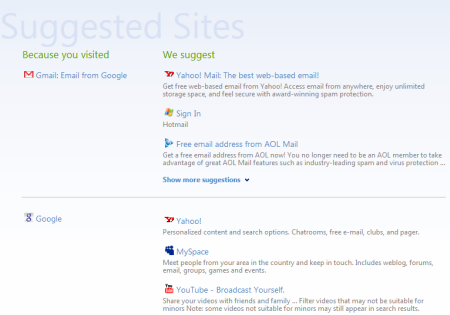
Microsoft included a low-profile web service called "Suggested Sites" that uses your browsing history to recommend related sites. Unlike Google Web History, the service is not tied to an account.

Overall, this is a highly recommended update for IE7, even though you'll find some sites aren't displayed properly. Google Maps finally works well and some Google services like Gmail have minor interface problems. IE looks good again and I'll probably use it more often.

Related:
What's new in IE8 for developers?
Download IE 8 Beta 2 - Windows XP SP2+, Vista, 2003 Server.

August 29, 2008

Something You Can't Find Using Google

Google Profiles, the public pages that include information about Google users, continue to add new questions. Some of the recent additions: "where I grew up", "where I live now", "places I've lived", "current company", "companies I've worked for", "current school", "schools I've attended", "my superpower".

There's even a metaphorical field "something I can't find using Google". What would you write if you were to answer that question in your Google profile?


Note: for now, only 118 profiles are indexed by Google.

August 28, 2008

More Flexible Notifications in Google Calendar

Last week, I received a message from Guy: "I LOVE Google Calendar! But... I wish I could set a reminder for a month in advance, instead of a measly 2 weeks. That is the only thing holding Calendar back from being truly awesome!"

Thankfully for Guy, Google Calendar's event reminders are even more customizable: now you can choose any period of time between 5 minutes and 4 weeks. This works not only for the default notifications settings, but also for individual events. As usually, you can choose to receive notifications by SMS, email and as Google Calendar pop-ups.

The default notifications are via email (10 minutes before each event) and pop-ups (5 minutes before each event), but you may need more time.


Tip: to change the notifications settings for a calendar, click on the small arrow next to the calendar's name and select "Notifications".

{ via Gmail Blog }

Add Captions to YouTube Videos

YouTube added support for closed captioning, a feature that was already available at Google Video. If you edit one of your videos, you can click on the "Captions and subtitles" section and upload a captions file.

"Captions and subtitles make videos accessible to a wider audience by allowing folks who can not otherwise understand the audio track to follow along, especially those who are hard-of-hearing or speak other languages. Captions are in the same language as the video's audio track. Subtitles are in a different language," explains YouTube's help center.

For now, YouTube supports two formats: SubViewer (*.SUB) and SubRip (*.SRT). "To add several captions to a video, simply upload multiple files. If you want to include foreign subtitles in multiple languages, upload a separate file for each language. There are over 120 languages to choose from and you can add any title you want for each caption. If a video includes captions, you can activate them by clicking the menu button located on the bottom right of the video player."

YouTube Blog mentions some examples of videos that already use captions: a clip from Top Gear, a Japanese animation and a Physics lecture from MIT.


To turn off captions or select a different language, mouse over the small arrow button. You can either click on the "CC" option to deactivate the caption or select one of the other languages, if they are available. Embedded videos won't show the captions, at least for now.

Last month, Google showed a demo of a speech-to-text technology that automatically captions videos, but this doesn't work well for any kind of video. Even if the captions are provided by users or they are automatically generated, they will improve the quality of search results.

August 27, 2008

Mobile Gmail 2.0 for BlackBerry

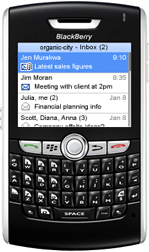
Gmail's mobile client for BlackBerry has been updated and you can now download version 2.0.5 at http://m.google.com/mail. One of the most important changes is that you can add the credentials for multiple accounts and switch between them without entering the password. There's also support for Google Apps accounts, which previously required a separate application.

Users from the PinStack forums report that the application lets you copy-paste text when composing messages, it saves more than one draft message and there's a new option to preload the archived messages.

Gmail's help center mentions that "the Gmail application will run in the background, periodically checking for new email. This uses data. If you do not want Gmail to run in the background, you must explicitly quit the program by going to Menu > Exit Gmail".

August 26, 2008

YouTube Toolbar for Playlists

YouTube shows a small toolbar at the bottom of the page that lets you manage the videos from a playlist, more like the controls from a media player. The toolbar has options for pausing and muting the active video, buttons for playing the next video from the playlist and for automatically playing videos. All of these options were already available in the sidebar, but the new toolbar makes them more visible and it follows you in any YouTube page.


The excellent music sites The Hype Machine and thesixtyone have similar toolbars, but I'm not sure if the concept works well for videos. I can only see the new feature in Firefox, so I assume this is yet another experimental feature.

Gears for Safari

Google posted a link to a beta version of Gears for Safari: http://dl.google.com/gears/current/gears-osx-opt.dmg. The minimum system requirements are: Safari 3.1.1 on Tiger 10.4.11 or Leopard 10.5.3, although Gears is likely to support other WebKit-based browsers in the future.

"This is BETA, it is not an official release, it might break your browser. Chances are it will break your browser. Please proceed with caution," warns Jeremy Moskovich from Google.

If you find bugs, post them at Google Code. The list of issues includes interesting details about the upcoming offline version of Gmail:

"After viewing Install offline access for Google.com Mail, I click Next and the installer window disappears. Is it telling me that initialization is not needed? Hard to say. It appears that I now have an Offline settings tab, so I guess it is initialized."

Hint, hint! If you install Gears for Safari, it would be nice to post some screenshots in the comments. You could use Gears to enable offline access for Google Docs, Google Reader or to speed up the admin interface for WordPress.


{ via Golem. Screenshot from Thomas Stromberg. }

August 25, 2008

Google Suggest, Enabled by Default

As anticipated, Google Suggest will be finally available at google.com. "Today we're excited because Google Suggest will be graduating from Labs and available by default on the Google.com homepage. Over the next week, we'll be rolling this out so that more and more of you will start seeing a list of query suggestions when you start typing into the search box," says Jennifer Liu from Google.

Launched in 2004 as part of the Labs, Google Suggest is an innovative feature that auto-completes a query using a dynamic list of popular queries. "As you type into the search box, Google Suggest guesses what you're typing and offers suggestions in real time. This is similar to Google's Did you mean? feature that offers alternative spellings for your query after you search, except that it works in real time. For example, if you type bass, Google Suggest might offer a list of refinements that include bass fishing or bass guitar. Similarly, if you type in only part of a word, like prog, Google Suggest might offer you refinements like programming, programming languages, progesterone, or progressive. You can choose one by scrolling up or down the list with the arrow keys or mouse."


The feature has been added to many Google services: Google Toolbar, YouTube, Google homepages for high-end mobile phones and for languages that use a non-Latin alphabet. Firefox users already have Google Suggest in the search box.


Other search engines tested similar features. After Ask.com introduced search suggestions last year, Yahoo refined the idea and launched the best interface for suggestions: Search Assist. Unlike Google Suggest, Yahoo's interface is more subtle and it's not limited to prefix-based suggestions.


Google Blog suggests three reasons why auto-complete can be useful: it helps you formulate queries, the feature shows alternative spellings for your query and it saves keystrokes. Despite the advantages, some users will find it annoying because it disables the auto-complete feature from their browsers and it might interfere with their typing. To permanently disable Google Suggest, click on "Do not provide query suggestions in the search box" at the bottom of Google's preferences page or use these advanced tips.