An unofficial blog that watches Google's attempts to move your operating system online since 2005. Not affiliated with Google.

Send your tips to gostips@gmail.com.

October 24, 2008

Search from YouTube's Player

At the end of a video, YouTube's embedded player displays a list of related videos. If they're not very relevant or you have a specific video in mind that you want to see, use the new search box and type a query. To see more results, click on the right arrow.

Unfortunately, you can't go back to the list of results after selecting a video and the related videos displayed at the bottom aren't updated, but this is yet another step towards a more interactive player.


Here's a video where you can see the new feature in action (wait until the video ends or click on the up arrow button and select the only option that's available):


In other YouTube news, the homepage is more customizable: you can select how many videos are displayed in each module and change the layout to list view or grid. There are two new modules that show statistical information about your uploaded videos: Insight Map and Insight Chart.

{ Thanks, Phil. }

Android Market Fees

Last month, Google said that Android Market is a key component for all mobile phones that run Android. "We made a strategic decision not to revenue share with the developers. We will basically pass through any revenue to the carrier or the developer."

Android Market is now live, but developers can't upload their applications until next Monday. For now, developers can only upload free apps and they're required to pay $25 before registering. "We charge this fee to encourage higher quality products on the market (e.g. less spammy products)," explains Google.

From next year, developers will be able to distribute paid applications. Google opted for a similar revenue sharing model like Apple (70/30), except that 30% of the revenue will go to carriers. "Developers will get 70% of the revenue from each purchase; the remaining amount goes to carriers and billing settlement fees — Google does not take a percentage. We believe this revenue model creates a fair and positive experience for users, developers, and carriers," notes Eric Chu.

Although applications are one of the most exciting things about Android-powered mobile phones, Google didn't manage to provide an auto-update mechanism for applications and you can only install applications on the phone's internal memory.

October 23, 2008

Gmail Emoticons :-)

Here's a Gmail feature I wouldn't have noticed without a post from Gmail's blog: emoticons. If you use the rich-text mode when composing messages, you can now include small images that reflect your intentions.

"The black and white days of text-based emails have had their day. Following the evolutionary path blazed by colored labels, we present, in all their technicolor glory, emoticons in your mail," says Darren Lewis from Google.


Google also added a new set of emoticons in Gmail Chat and it's strange to see that you can add much more emoticons in an email than in an IM conversation.

Gmail Mobile App 2.0

Google released version 2.0 of Gmail's mobile application for Java-enabled phones. The new version has been initially released for Blackberry phones, but you can now use it on any phone that supports Java.

What's great about Gmail Mobile 2.0? It works offline: you can preload messages from the inbox and from all your labels to read them when you are offline. You can also compose messages when you don't have an Internet connection and Gmail sends them when you are online.

The application notifies you when there is new mail in the inbox, so you don't have to constantly click on Refresh. It's now possible to save the credentials for more than one Gmail account and switch between the accounts directly from the menu. What's more, Gmail Mobile 2.0 supports Google Apps accounts, which previously required a separate application.

Some cool things to try:
* scroll using the left or the right key of your phone
* the updated interface for contacts which has more powerful search

To install the new version, go to m.google.com/mail from your mobile phone's browser. From what I noticed, this version is less responsive than Gmail Mobile 1.5 and it uses more data.

October 22, 2008

G1 Promoted on Google's Homepage

Is this the first time when Google promotes on the homepage a gadget? Some users from the US spotted an interesting line below Google's search box: "New! G1 is available now. Learn about the phone."


The landing page links to t-mobileg1.com and features Google's homepage on Android's WebKit-based browser and a Street View image from New York.


G1 is more than just the first Android-powered phone, it's a true Google phone. It comes preloaded with everything that's necessary to enjoy Google's services on a mobile phone: it's easy to search on the web using Google, YouTube and Google Maps are ubiquitous, your contacts, emails and calendar events are synchronized to a Google account.

Ten years after making the web searchable, Google brings the web into your pocket. A web that's more personal and more relevant to your life.

Related:
G1 launch event in San Francisco

Gmail Autoresponder

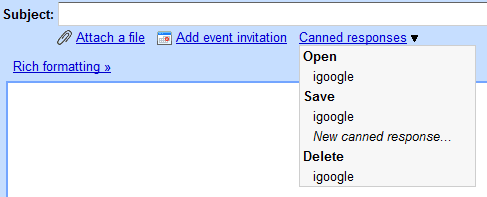
If you've ever sent an email to Google's support addresses, most likely you received an automatic reply vaguely related to your message. Using a new feature from Gmail Labs, you can create your own canned messages and use them as automatic replies.

"If you're sick of typing out the same reply every time someone emails you with a common question, now you can compose your reply once and save the message text with the "Canned responses" button. Later, you can open that same message and send it again and again," explains Chad Perry.

After enabling "Canned Responses" in the settings page for Gmail Labs, you'll see a new drop-down when composing a message. The "canned responses" option can be used to save a new message or to load an existing autoreply. It's interesting that Gmail saves the messages as hidden drafts: you can find them if you search for label:drafts, but they're not visible in the Drafts view.


The best thing about the new feature is that Gmail added a new action for filters: "send canned response". If you receive many messages about the same issue and you have a standard response, create a filter that includes some relevant keywords and select an existing canned response. This should come in handy if iGoogle users continue to ask how to go back to the previous version of Google's personalized homepage.


{ Thanks, {roody}. }

October 21, 2008

Android Is Now Open Source

One day before T-Mobile G1 goes on sale and one year after the first Android announcement, Google open sources Android.

Android is not the first open source mobile OS, but it claims to be "the first free, open source, and fully customizable mobile platform. Android offers a full stack: an operating system, middleware, and key mobile applications. It also contains a rich set of APIs that allows third-party developers to develop great applications."

The source has about 2.1GB, but you need to use Linux or Mac if you want to build it. Alternatively, you can inspect the code online.

Android comes with a list of applications that provide basic features: a phone application, a web browser, a media player, but all of them can be replaced. Even if T-Mobile G1 has a lot of strange limitations, like the requirement to have a Gmail account or the limit of maximum 5 additional email accounts, it's important to remember that G1 is the first, but not the only Android phone and these issues could be solved by third-party applications and future mobile phones.


{ Image licensed as Creative Commons by jugglerpm. }

October 17, 2008

Google Chrome to Add Greasemonkey Support

A recent build of Chromium, the open source project behind Google Chrome, added support for user scripts. For now, the support is limited: Chromium reads the scripts from the hard-coded directory c:\scripts and it ignores the @include metadata which restricts scripts to one or more web addresses. To enable Greasemonkey support, you need to use the flag: --enable-greasemonkey, for example by appending it to the target of a shortcut.

I tested the Greasemonkey support with the old script Linkifier, which turns text URLs and email addresses into links.


The new feature has been contributed by Aaron Boodman, the creator of the Greasemonkey extension for Firefox, who happens to work at Google.

In September, Google's Sundar Pichai said that Chrome will have an API for extensions. "We don't have that in the beta today, but we definitely plan an extension API. It is one of the things we will get to next." It seems that Google Chrome will provide native support for Greasemonkey scripts before releasing the API.

Tips:
* to get early access to developer-oriented Google Chrome builds, subscribe to the Dev Channel and read the release notes.
* the latest Chromium snapshots are available at the BuildBot site, but they don't support Google's auto-updater and they're less stable than the official releases. You only need to download the file chrome-win32.zip from the most recent folder.

Footnotes in Google Docs

Google Docs added footnotes, a feature that would've been useful for those who write academic papers or books if it were implemented properly. You can insert a footnote by clicking on the Insert menu and selecting Footnote.

"Footnotes appear on-screen in the document margin and at the bottom of the page when printed. You'll be able to see how the footnotes will appear when printed by selecting Print (Ctrl+P) or Download file as... PDF from the File menu. There will also be a footnote marker within the actual document designated by a pound sign (#). You can drag and drop a footnote anywhere you'd like in the document by simply clicking on this pound sign and dragging," notes Google's help page.


Google did a good job at integrating footnotes in the interface, but they should be displayed at the bottom of the page and they should be numbered. Unfortunately, Google Docs still doesn't support pagination.

Another compatibility issue is that word processors will display footnotes as endnotes, at the end of your document.

October 16, 2008

The New iGoogle, Publicly Launched

After months of painful testing, the new version of iGoogle has been launched for everyone in the US. iGoogle 2.0 moves the tabs to the left, brings a persistent Google Chat widget and it adds a canvas view that allows gadgets to become full-fledged applications.

"Canvas view allows developers to deliver richer content, games, and UI to users on iGoogle as well as the opportunity to monetize," explains Google. Not all the gadgets take advantage of the canvas view, but this page highlights some gadgets that can be maximized and the list includes: Google Reader, Google Calendar, Gmail, weather, Wall Street Journal and regular feeds. For example, the new Gmail gadget lets you read your messages and send replies directly from iGoogle, but it lacks some features that would've made it a good replacement for the full-featured Gmail: links and attachments are stripped from messages.

Google has been testing the new version of iGoogle for the past three months on a small sample of users and many of them complained about the new navigation interface.


"We're very excited about these changes because it makes iGoogle a more useful homepage and a better platform for developers. And this is just the beginning: expect to see more canvas gadgets created by developers and more new features on iGoogle soon. Not in the U.S.? Don't worry. We'll also be rolling out this updated version in other countries very soon," mentions Google's blog.

The next big thing for iGoogle is the support for OpenSocial that will make Google's personalized homepage more social.

Update: For those who don't have the new iGoogle yet, go to the settings page, change the language to English (US) and then go to this URL: http://www.google.com/ig/v2invite.

If you have the new version, but you prefer the previous interface, go to the settings page and select English (UK) from the list of languages. Please note that this is just a temporary fix.


{ Thanks, Pascal, Samuel, Chrissz and everyone who commented. }