An unofficial blog that watches Google's attempts to move your operating system online since 2005. Not affiliated with Google.

Send your tips to gostips@gmail.com.

June 23, 2009

A Retro Plastic Box

Keith Coleman, Gmail's product manager, points to a product that can be bought from eBay: a full version of Microsoft Office Outlook 2007. If you think it's not very interesting, read the description:
It's brand new and never been opened. My boss bought it right before I moved the whole company over to Google Apps.

We never looked back, but here's your opportunity to live it up, 90's style, with this great, retro piece of Microsoft 2007 software.

Unique features include:

* Lengthy key you have to register with a company!
* Real, plastic disks known as "CD's".
* Huge files saved ON YOUR COMPUTER!
* The thrill of wondering if you've backed up your data recently after your on-site hard drive dies.
* Appeased paranoia that your contacts will never be extracted by an international organization bent on stealing your identity and submitting LOL cats to all your business contacts.

Throw off the Web2.0 zeitgeist, and know that your entire business can fit in a single plastic box that can easily be left under a train seat.

As a bonus, your software will be Platform Dependent, meaning it will only run on "Windows" (not included).

While mocking Microsoft Office is endearing, many businesses still need to use it and the transition to Google Apps is not always easy. That's probably the reason why Google started to offer a tool that synchronizes Google Apps with Outlook. "You get the cost savings, security and reliability of Google Apps, while employees can use the interface they prefer for email, contacts and calendar. Google Apps Sync for Microsoft Outlook is a plug-in for Outlook 2003 or 2007 that lets you keep using your familiar Outlook interface after switching from Microsoft Exchange Server to Google Apps."
June 22, 2009

Chrome Tests an Updated New Tab Page

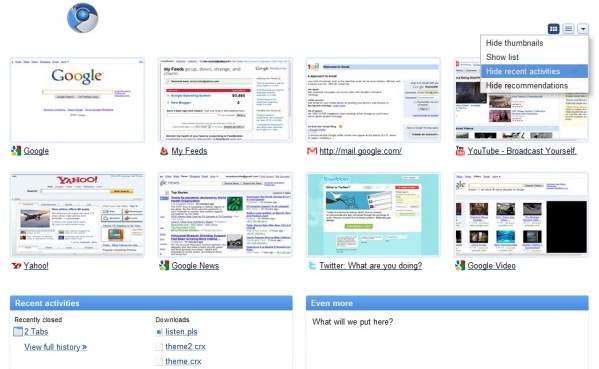
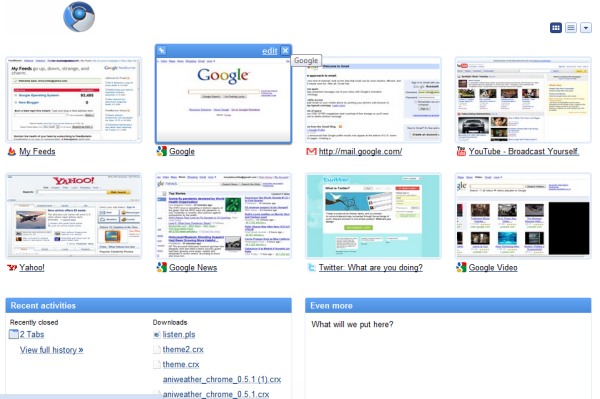
Chromium, the open source version of Google Chrome, includes a more customizable new tab page. You can easily pin, remove and reorder thumbnails without having to enter in the edit mode. Pinned items are always displayed in the new tab page, which now shows only 8 thumbnails, even if they're no longer frequently visited.

The list of search engines and the recent bookmarks have been removed and there's a new section of recent activities that includes recently-closed tabs and recent downloads. Another new section is called "recommendations", but it's still a work in progress.

You can hide the thumbnails, hide the list of recent activities and the recommendations if you don't find them useful.


The updated tab page is not yet ready to be released, but you can enable it if you have a recent Chromium build (Windows, Mac, Linux) by editing the desktop shortcut and adding the following flag in the target field:

--new-new-tab-page

June 19, 2009

Authors Are More Visible in Google News

Google started to display author names in Google News, so you can easily find the articles written by your favorite journalists. If you click on the author's name, you'll find his most recent articles and you can subscribe to a feed or get alerts by email.


Another recent feature is the addition of links to Wikipedia articles that offer some helpful context. "Currently, we’re showing a small number of users links to Wikipedia topic pages that serve as a reference on current events," explained a Google spokesperson.

Gay Google

Caleb Eggensperger noticed that Google shows a multicolored bar above the search results when you search for [gay], [lesbian] and other related terms. Google's colorful bar is not accidental: at the end of June, there are many gay pride celebrations around the world.


"Googlers care deeply about creating a workplace that affords equal treatment for all our staff, and while we do it regardless of any accolades we think our efforts might bring, recognition from outside organizations does mean a lot to us. (...) It's particularly exciting given that this is a time of rapid growth for our population of gay, lesbian, bisexual and transgender employees (whose group name is, naturally, Gayglers) around the world," mentioned a blog post from 2007.


{ Image licensed as Creative Commons by Clay Caviness. More photos from the 2007 NYC Pride Parade. }

June 18, 2009

Google Translate for Persian

Google has always released services that are useful to better understand major events: new imagery that shows the impact of Hurricane Katrina, special search engines for last year's earthquake in China, search trends for 9/11.

Google Translate included an early version of a translation system for Persian, in response to the recent events from Iran. "We feel that launching Persian is particularly important now, given ongoing events in Iran. Like YouTube and other services, Google Translate is one more tool that Persian speakers can use to communicate directly to the world, and vice versa — increasing everyone's access to information," says Franz Och, from Google.

The translation tool can also be used to read articles from Iranian sites, but the quality is less than adequate. For example, here's the translation of the latest 50 Twitter messages tagged #Iran and written in Persian (Farsi).


Blogger Starts to Show Ads

Blogger started to display a block of contextual ads after publishing blog posts. Until now, Google's blogging platform didn't include ads and it was only monetized by making it easy for publishers to use AdSense ads.


It seems that Blogger followed the advice of Evan Williams, the co-founder of Pyra Labs, Blogger's parent company: "Put Ads in the App Interface: For example, the published landing page alone must get millions of views a day. And it's the perfect point for someone to go elsewhere. See if you can target it off what they wrote about. No one will mind (much). And strengthening your revenue story will strengthen your position in the company."

A New Interface for Google Books

Google's book search engine has a new interface that adds many missing features. The sidebar has been moved to the left, you can now embed a book by click on "Link" and selecting the embedding code, there's a new thumbnail view for pages and the table of contents can be accessed as a drop-down.


The search option that restricts the results to a book has been improved: Google sorts the results by relevance and it's easier to navigate betweeen the search results. "Now, for public domain and partner books, we've made it easier to see exactly where your search term appears within the book by showing you more context around the term, including an image from the part of the page on which it appears. You can click on those images to navigate directly to the pages inside the book," explains Google.

June 17, 2009

YouTube Adds the Wonder Wheel

YouTube added the "wonder wheel" visualization tool for exploring related searches interactively. The feature has been launched last month for Google search and it's now available in a different context.

Type a general term in YouTube's search box, click on "Search" and then click on "Wonder wheel" to find some suggestions. As you click on the suggestions, YouTube shows the search results next to the wheel and it lets you go back to the initial search terms.

"The Wonder wheel visually presents connections between related searches and your search term as an interactive diagram. Click the different nodes in the diagram to see how searches can branch out," explains Google.


While the idea seems interesting, I didn't find the "wonder wheel" very useful. It only works for some searches and the suggestions aren't diverse enough.

A Browser Is a Search Engine

Apparently, many people don't know what's a browser and they think it's the same thing as a search engine. I've recently quoted some posts from Google Chrome's help forum which were strange: users didn't like Chrome and they thought that the old search engine was better. "I want the old Google search engine, not Google Chrome. How do I go back to regular old Google? I want to change my default search engine from Chrome to Google."

Scott Suiter, a former Google intern, asked 50 passersby from New York what is a browser and the responses were almost unanimous: a browser is a search engine. Some even said that their browser is Google.


According to Wikipedia, "a web browser is a software application for retrieving, presenting, and traversing information resources on the World Wide Web." But search engines are the applications that help you find web pages and they're so important that they became synonymous with web browsers. It's an involuntary synecdoche, a figure of speech in which a part of an object is used to refer to the entire object.

{ via Andy Baio }

June 16, 2009

Set Gmail as Default Email Client in Firefox

Last year, Firefox 3 added the option to associate protocols with web applications. A common way to link to mail addresses is using the mailto: protocol, so you'll often find links like security@google.com.

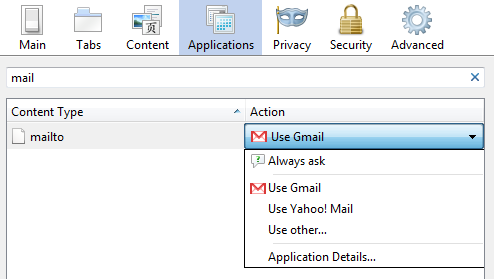
When Firefox 3 was released, Yahoo Mail was the only webmail service that could be selected directly and the instructions for adding Gmail were complicated. Gmail has been added to the list of mail applications and it's easy to set it as the default email client in Firefox and open all the mailto: links in Gmail, without installing extensions:

* For Firefox 4+, click the Firefox drop-down menu and select Options > Options. For Firefox 3.0-3.6, go to Tools > Options.
* select the Applications tab
* search for mail
* select Use Gmail from the list of actions associated with the mailto protocol
* click OK to save the settings.


If you want to set Gmail as the default mail client for your computer and not just for Firefox, install Google Talk, Gmail Notifier for Windows or Google Notifier for Mac.