An unofficial blog that watches Google's attempts to move your operating system online since 2005. Not affiliated with Google.

Send your tips to gostips@gmail.com.

May 10, 2011

Google Music Streaming

Wall Street Journal reports that Google will unveil a music streaming service at the Google I/O developer conference.

"Users of the service are expected to be able to listen to songs they have uploaded to the service in a so-called streaming mode but won't be able to download the files themselves. That limit appears to be a bid by Google to hinder the service from being used to spread pirated music. (...) The service is unlikely to be tied to an online music store like Amazon MP3, which gives users the option of adding new songs to their music locker at the time they buy them."

If you go to http://music.google.com/music/, you'll get an error message: "We're sorry. Music Beta is currently only available in the United States," but you'll at least see Google Music's logo, borrowed from a new version of the Android music app.


Update: As Google's blog informs, "Music Beta by Google [is] a new service that lets you upload your personal music collection to the cloud for streaming to your computer and Android devices. With the new service, your music and playlists are automatically kept in sync, so if you create a new playlist on your phone, it's instantly available on your computer or tablet. You can use a feature called Instant Mix to create a playlist of songs that go well together. You can even listen to music when you're offline: we automatically store your most recently played music on your Android device and you can choose to make specific albums or playlists available when you're not connected. The service is launching in beta today to U.S. users and is available by invitation." While it's in beta, the new service is available for free. To upload your music, you can use a Windows/Mac application called Media Manager. There's also a new version of the Android music app that has a new interface and integrates with the Google Music service.


{ Thanks, Scott. }

Google Image Search Clustering

Google Image Search added a new feature that lets you group images by subject. Instead of showing images related to different topics in a single view, Google's image search engine finds the most relevant related searches and shows the top results for each category. For example, when you search for [dog], Google shows the results for [german shepherd], [golden retriever], [great dane], [pug dog], [boxer dog], [rottweiler dog], [border collie] and more. Unfortunately, the clusters for [cat] aren't that great: [funny cats], [cute cats], [cats and kittens], [fat cat], [lol cats].


"Sorting gives you a new way to start your search by exploring categories visually. If you need a particular image, like a picture of coffee for a presentation, sorting can help you hone in on exactly what you're looking for. Searching for broad topics sorted by subject, like the 1940s or Sydney, allows you to explore and learn visually," explains Google.

You only need to select "images" from the Google sidebar and click "sort by subject". By default, Google still sorts the results by relevance.

May 9, 2011

Google Calendar Adds Event Colors

Google Calendar still doesn't offer support for labels, but you can now pick a color for each event. By default, each event inherits the calendar's color, but you can change it by clicking the event and using the small drop-down displayed next to the event's title.

"Color Coded Events lets you assign specific colors to certain events: put pink on your daughter's soccer practice or make your lunch dates red. It's a great way to stay organized, keep track of recurring events, and add a little flair to your calendar. Color coding is private to you and anybody who can edit your calendar," explains Google.


If you want even more options, go to Google Calendar Labs and enable "Event flair" to be able to add icons to your events.

{ Thanks, Brahm. }

May 8, 2011

Google's Humans.txt File

Google has a robots.txt file that lists all paths that can't be crawled by Web spiders, but there's also a humans.txt file which tries to show that Google is not all about bots and algorithms.


"Google is built by a large team of engineers, designers, researchers, robots, and others in many different sites across the globe. It is updated continuously, and built with more tools and technologies than we can shake a stick at. If you'd like to help us out, see google.com/jobs."

Google's Tim Bray linked to this text file and the Google Jobs Twitter account made it more popular.

YouTube's robots.txt file has recently added a humorous comment: "Created in the distant future (the year 2000) after the robotic uprising of the mid 90's which wiped out all humans."

{ via Blogoscoped Forum }

May 7, 2011

Google Talk and AIM to Become Interoperable

When you log in to your AIM account in Gmail, you get a message from AOL that links to this page.


In the next few days, Google and AOL are working together to change the way you connect to AIM buddies within Gmail. After this change, Gmail and AIM users can talk directly to each other without having to log into both services (you will no longer be able to log into AIM within Gmail's "Chat" section).

It's nice to know that AIM and Gmail Chat (Google Talk) will finally become interoperable and the Gmail integration will no longer be necessary. Back in 2005, Google and AOL announced that "Google Talk users and AIM users will be able to communicate with one another" and two years later Gmail Chat integrated with AIM, but they didn't become interoperable.

{ Thanks, Josh. }

Google Tests a New Search Interface

Many users noticed a new interface for Google's search results pages that tries to better separate results. There's a lot of space between the results, but that's not useful when you try to find the best answer for your query.


Huffington Post notices that "the new design looks less cluttered. Rows of text are spaced farther apart and text colors are more muted than previous versions." TechCrunch calls the new interface "ugly" and less useful because "it actually gives you much less information on the screen. This will require users to do more scrolling and paging through results to find what they're looking for."

Links are no longer underlined and one of the experiments uses dotted lines to separate results.


Fortunately. the new interface is still an experiment.

{ Thanks, John, Silviu, James, Ken, Steve and Josh. }

May 4, 2011

Google's New Snippets for News Sites

After changing the snippets for Twitter accounts, Google now displays the latest headlines in the snippets for news sites. Search for [washington post], [nytimes], [le monde], [gazzetta dello sport] and you'll find the latest news from the snippets.


Probably the best way to try the new feature is to search for [news] and check the new snippets.


It's likely that the headlines are obtained from Google News, but not all the sites included in Google News have the new snippets.

Google Chrome's Emotional Ad

Google Chrome's ads have always been great, but this one is probably the only Google ad that could make you cry. It's a story about a father that emails his daughter photos and videos with her happy moments as she grows up. He uses Google services like Gmail, Picasa Web and YouTube, but the ad is not only about Chrome or Google: "the web is what you make of it".


Following the footsteps of Apple's FaceTime ads and Google's Search Stories, "Dear Sophie" could strike a chord with Google users and show how profound is Google's impact on your life.

A More Obvious Sign Out Link

When Google launched the new compact menus in the navigation bar, many users wondered why it's so difficult to sign out. The "sign out" link was buried in one of the menus and it wasn't obvious how to find it. Now the link is also displayed next to the Account menu, where users expected to see it.


Even if it's not used that frequently, the familiar "sign out" link is displayed by most web applications and hiding it or burying it in a menu could frustrate users. Facebook is one of the services that places the "logout" link in a menu, so it's not impossible to convince users to accept this change.

May 2, 2011

Google Chrome Tests Multiple Profiles

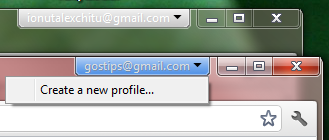
As previously promised, Google started to test multiple profiles for Google Chrome. It's a Chrome OS feature that's now available in Chrome's Canary builds and Chromium. Just enter about:flags in the address bar, enable "Multiple profiles" and click "Relaunch browser" at the bottom of the page.


The new feature associates each window with a profile and lets you sync some of the settings with a Google account. Until now, you could create new profiles manually, but you had to use special shortcuts for each profile (Chrome has briefly added support for multiple profiles in the interface back in 2009, but it was quickly dropped). This feature is now available in the interface, even though it's more limited and you can only identify profiles using Google accounts.

"The multiple profiles feature will allow the user to associate a profile with a specific set of browser windows, rather than with an entire running instance of Chrome. Allowing different windows to run as different Chrome identities means that a user can have different open windows associated with different Google accounts, and correspondingly different sets of preferences, apps, bookmarks, and so on -- all those elements which are bound to a specific user's identity. Having multiple profiles in the Chrome browser also makes it easy to browse with separate identities without having to log in as separate users at the operating system level," explains a Google Chrome design document.