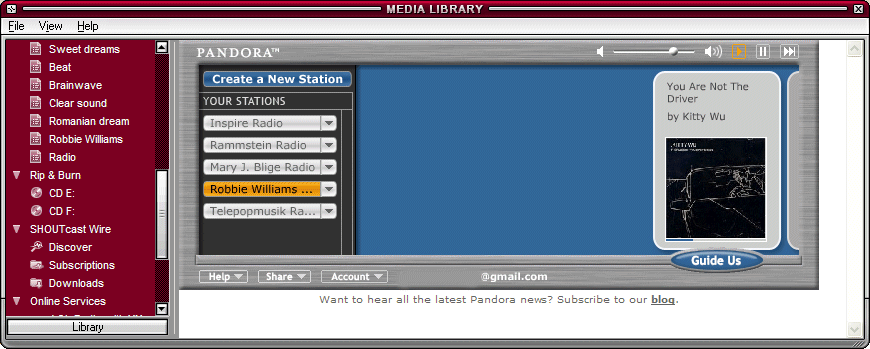
Close Winamp, then open this file in Notepad:
C:\Program Files\Winamp\Plugins\ml\ml_online.ini
(change the location if you've installed Winamp elsewhere).
Replace this line
ElementID11=-1
with
ElementID11=11000
ElementIcon11=11007
ElementSubbed11=1
ElementName11=Pandora
ElementURL11=http://www.pandora.com?cmd=mini
ElementID12=-1
In fact, you should find the last line that contains ElementID[number]=-1, replace it with the code above, where instead of 11 you write [number].
Save the file, then right-click on it in Explorer, select Properties and check "Read-only" in the Attributes section.
When you open Winamp again, go to Media Library/Online Services/Pandora. If you don't have a Pandora account, you should make one. You can close Media Library and still listen to the radio.

too bad you cant use the winamp play/pause/next controls
ReplyDeleteGreat hack. However it doesn't seem be using Winamp's sound output module, so it doesn't go through the DSP nor can it be used with visualizations.
ReplyDeletecouldn't find that ml_online.ini file...... =/
ReplyDeletehelp me here plz!!
awesome tip! Thanks!
ReplyDeletegreat idea man, thanks for sharing.
ReplyDeletehad a lil trouble with it but it resolved itself after carrying out these steps:
* uninstall winamp.
* install (make sure its the newest version)
* open winamp
*open media library and maximise the "online sevices" section
* now do all the stuff said in the post and it works
Thanks a lot, what a great tip. I really hate listing to music in a browser.
ReplyDeleteIf you can't find the file mentioned look in C:\Documents and Settings\USERNAME\Application Data\Winamp\Plugins\ml (of course replace USERNAME with your username). I still cound't make it work though. It said to enable Activex controls which are enabled. Oh well...
ReplyDeleteit also works if you just reinstall without uninstalling first.
ReplyDeleteGAAH! 56%+ steady CPU usage on my 850-MHz Duron. and it's using more RAM than Firefox! never mind, I'll stick with the popup. :(
My ml_online.ini file does not contain the line “ElementID7=-1″. I have tried adding the other lines but to no avail. Anyone got any ideas?
ReplyDeleteThanks
Try finding the last line that says
ReplyDeleteElementIDn=-1, where n is a number.
If you can't find one, download the latest version of Winamp (Winamp 2.21) from winamp.com.
anyone know a similar hack to use pandora in itunes?
ReplyDeleteNice tip! Thanks! So much better to have this inside Winamp instead of an IE window. Thanks!!!
ReplyDelete> Great hack. However it doesn't seem be using Winamp's sound output module, so it doesn't go through the DSP nor can it be used with visualizations.
ReplyDeleteAll it's really doing is up the Pandora mini-mode tuner SWF in an IE window (winamp's minibrowser). That's why it doesn't output through winamp.
(now, if one were to decompile the flash and figure out the data format, they could build a true plugin for winamp.*that* would be a nice hack. might violate terms of service, though.)
Help! It doesn't work for me and I've done everything recommended here. I reopen Winamp and Pandora just isn't there.
ReplyDeletei had the problem, that winamp always changed tle line "ElementID7=7000" back to "ElementID7=-1". I activated the write protection for the file.
ReplyDeleteI have the same problem as mimz :( i changed the ini file but the online services section is still greyed out. anyone got a fix?
ReplyDeleteI think I'm close because its in my media library, but for some reason when I click on it nothing shows up. Anybody else encounter this?
ReplyDeleteHey, Pandora.com just moved the mini player to another location and the hack doesn't work anymore. I tried to change the URL you gave to http://www.pandora.com?cmd=mini, this is the new location but nothing happens.
ReplyDeleteI hope it's OK now. Thanks for the tip.
ReplyDeleteNice Find man much beter than running it in firefox Thanx. for future versions this does work instead of replaceing the Id=10<-1 replace Id=7 Line and itll work
ReplyDeleteHello,
ReplyDeletei did everything described in the article but it doesn´t work. where in the media library (i can see the link!!) can i login with my pandora account or how can i navigate and define the music i want to listen to in pandora? i just see the link in the playlist section of the media library!
please give me a hint.
thx in advance!
Gizmo
You'll see an option in the "Online services" section. It's just like you do on Pandora's site.
ReplyDeleteIt seems like there`s a problem with displaying what song is beeing played, have anyone found a hack on that? I mean, if it works on winamp, msn would also show it.
ReplyDeletecool, BUT there is no ElementID10=-1, its JUST NOT THERE!!! help...
ReplyDeleteIt seems like there`s a problem with displaying what song is beeing played, have anyone found a hack on that? I mean, if it works on winamp, msn would also show it.
ReplyDeleteIt doesn't go through Winamp, it goes through the minibrowser, like Freeman explains.
Also, I've got 5.24 and ml_online is a DLL file, not INI. :/
Look here:
ReplyDeleteC:\Program Files\Winamp\Plugins\ml\ml_online.ini
http://i10.tinypic.com/4bhhes8.jpg
ReplyDeleteYou probably have a separate settings folder for each user on your computer.
ReplyDeleteGo to this folder and try to find the file there. Start/Run and type this:
%APPDATA%\Winamp
Oh, so awesome. Thanks.
ReplyDeleteDoing that kind of technical work (changing those notepad entries) is way over my head. I keep opening up that file C:\Program Files\Winamp\Plugins\ml\ml_online.ini
ReplyDeleteand replaced first the 10 then the 7 and Pandora will eventually come up in Microsoft IExplorer (I normally use Firefox)because in Winamp it says
"New Location We're sorry, the minimized pandora player has moved. Please update your bookmark to http://www.pandora.com?cmd=mini"
Could someone please post an updated step by step solution to this for the latest Winamp?(I have version 5.32) I've spent many fruitless hours on this. I just hope to see the song titles in my taskbar! Thanks
I updated the post for the latest version of Winamp, which seems to overwrite that file often. Please tell me if it works for you.
ReplyDeleteThanks I tried and tried without luck so far. First I replaced the ElementID11=-1 with what you suggest, then I tried replace the last number i could see 12 with this:
ReplyDeleteElementID12=12000
ElementIcon12=12007
ElementSubbed12=1
ElementName12=Pandora
ElementURL12=http://www.pandora.com?cmd=mini
ElementID13=-1
but now no mention of Pandora at all in Winamp? Thanks for the help.
Make that file read-only. It's important. Here's my ml_online.ini. You can overwrite yours.
ReplyDeleteGreat tip! Thanks. I have a special interest in this as I have created a Wrapper Application for Pandora that runs Pandora in your system tray. Right-clicking on the tray icon will give you all the controls such as Pause/Play/Next/Vote etc
ReplyDeleteCheck it out here : Pandoras Box
Daniel.
Thanks for the last 2 replies.Actually I tried that "Pandoras Box" which I had tried without success before and it seems to be working now. I haven't tried changing the Winamp file because I don't want to mess with it until I have to. Much thanks for the quick replies too!
ReplyDeleteI got this to work with no problem but I just wish there was a way to scroll around in the window because I can't see all of the page unless I enlarge the media library way bigger than I normally run it, anybody have any idea how I can include a couple scroll bars on the top and side
ReplyDeleteOr even better how I can get rid of some of the white space around it, mine doesn't look anything like the one on this page it's got white space all around it
ReplyDeleteThe advantage of doing this is that one needn't have a browser open? Is there something else? I always want info on the artists, etc. and usually have browsers open so perhaps this is not for me. Does StreamRipper work well with this setup, and perhaps that is the advantage?
ReplyDeleteNo, StreamRipper doesn't seem to work with it.
ReplyDeleteto work with the new versions of winamp you have to add a new line, the GUID line, I have something like this in my file.
ReplyDeleteElementID10=11000
ElementIcon10=11007
ElementSubbed10=1
ElementName10=Pandora
ElementURL10=http://www.pandora.com?cmd=mini
ElementGUID10={00000000-0000-0000-0000-000000000000}
great, thanks.
ReplyDeleteI still need to find a way to add scroll bars to this, when I do it half the mini-browser is filled up by an add so I can't see all of pandora player
ReplyDeleteI tried everything to get this to work by changing the 11 and 12 value, the changed the 10... the way that worked for me using winamp 5.35 and firefox 2.0.0.4 was to change the 7 value lines only, I pasted the code above in place of all the '7' values and change the code pasted from the '11' value to '7' and it worked like a charm. in fact here's what I pasted maybe the whole file would help, I know I was looking for one: (BTW, if you can't find you ml_online.ini file you can change the file type from txt to all files and it's there
ReplyDelete[ml_online_config]
maxbandwidth=350
minbandwidth=1
uid=WA-599812B1BC944BAD8AB394C4F76B6E1A
SerialNumber=22
ElementID1=10000
ElementIcon1=11008
ElementSubbed1=1
ElementName1=Winamp Remote
ElementURL1=http://www.orb.com/winamp/index.html
ElementID2=10100
ElementIcon2=11001
ElementSubbed2=1
ElementName2=Shoutcast Radio
ElementURL2=http://www.winamp.com/bin/om/sc/
ElementID3=10200
ElementIcon3=11002
ElementSubbed3=1
ElementName3=Shoutcast TV
ElementURL3=http://www.winamp.com/bin/om/tv/
ElementID4=10300
ElementIcon4=11003
ElementSubbed4=1
ElementName4=Winamp Music
ElementURL4=http://www.winamp.com/bin/om/wav/
ElementID5=10400
ElementIcon5=11000
ElementSubbed5=1
ElementName5=AOL Videos
ElementURL5=http://www.winamp.com/bin/om/av/
ElementID6=10500
ElementIcon6=11000
ElementSubbed6=1
ElementName6=AOL Radio with XM
ElementURL6=http://www.winamp.com/bin/om/xm/
ElementID7=11000
ElementIcon7=11007
ElementSubbed7=1
ElementName7=Pandora
ElementURL7=http://www.pandora.com?cmd=mini
ElementID8=-1
ElementID8=10800
ElementIcon8=11004
ElementSubbed8=1
ElementName8=SingingFish Search
ElementURL8=http://www.winamp.com/bin/om/sf/
ElementID9=10900
ElementIcon9=11007
ElementSubbed9=1
ElementName9=In2TV
ElementURL9=http://www.winamp.com/bin/om/in2/
ElementID10=-1
ElementIcon10=11007
ElementSubbed10=1
ElementName10=Pandora
ElementURL10=http://www.pandora.com?cmd=mini
ElementGUID10={00000000-0000-0000-0000-000000000000}
ElementIcon10=11007
ElementSubbed10=1
ElementName10=Google
ElementURL10=http://www.google.com
ElementID11=-1
ElementIcon11=11007
ElementSubbed11=1
ElementName11=Pandora
ElementURL11=http://www.pandora.com?cmd=mini
ElementID12=-1
ElementIcon12=11007
ElementSubbed12=1
ElementName12=Pandora
ElementURL12=http://www.pandora.com?cmd=mini
ElementGUID12={00000000-0000-0000-0000-000000000000}
avmaxbandwidth=300
ElementGUID1={00000000-0000-0000-0000-000000000000}
ElementGUID2={00000000-0000-0000-0000-000000000000}
ElementGUID3={00000000-0000-0000-0000-000000000000}
ElementGUID4={00000000-0000-0000-0000-000000000000}
ElementGUID5={00000000-0000-0000-0000-000000000000}
ElementGUID6={00000000-0000-0000-0000-000000000000}
ElementGUID7={00000000-0000-0000-0000-000000000000}
ElementGUID8={00000000-0000-0000-0000-000000000000}
ElementGUID9={00000000-0000-0000-0000-000000000000}
I guess this doesn't work with Vista (Winamp Ver. 5.35)
ReplyDeleteI tried this addition because pandora does not play through all my speakers via firefox while winamp does. I was attempting to get pandora to play through winamp's output to correct this problem.
ReplyDeleteAll this addition does is create a browsing window in the winamp supplied browser and does not actually play through winamp's outputs whether it be sound or text display.
can someone update this it seems to be obsolete now...
ReplyDeleteJust updated to a newer version and noticed it didn't load Pandora. I delete the contents of the file and let winamp regen it. Only had 7 elements so added Pandora as the 8th (instead of 11th). Now it works. By far the best plug-in for winamp.
ReplyDeleteFor Winamp 5.52
ReplyDeleteUse this path
C:\Documents and Settings\"USER NAME"\Application Data\Winamp\Plugins\ml
ian's comment above worked for me. However I'm stuck with same problem many mention -- it just plays in the browser tab not through winamp's sound output. Anyone figure out a way to get Pandora to play through all speakers like Winamp does?
ReplyDelete@SpE:
ReplyDeleteThat's obviously impossible. You're only viewing a page that has nothing to do with Winamp and its audio system.
This comment has been removed by the author.
ReplyDeleteRight, this method. That's why I'm asking if there's another way ;-) For example, it might be possible to write a Firefox Add-on that pushes sound to all speakers. The issue I'm trying to solve is I'd like to listen to Pandora and have it play through all surround speakers, rather than just 2.
ReplyDeletegreat little hack. had to set mine to:
ReplyDeleteElementID7=11000
ElementIcon7=11007
ElementSubbed7=1
ElementName7=Pandora
ElementURL7=http://www.pandora.com?cmd=mini
ElementID8=-1
thanks!
So all it really does is open Pandora in Wimamp's browser... Hm, that was a bit misleading...
ReplyDeleteWhy not just use OpenPandora (http://openpandora.googlepages.com/)? Nice slim client with notify for last.fm among others. Putting this in WinAMP is just like opening a browser window...
ReplyDeleteOpenPandora is great - I love it!
ReplyDeleteThis works.. it took me a while to figure out what everyone was talking about. Also, make sure you're not using winamp while you do this!
ReplyDeleteIf you told Winamp to use separate settings for each Windows 2000/xp/vista user then you're going to find this ml_online.ini file in:
C:\Program Files\Winamp\Plugins\ml \ml_online.ini
Next, pandora.com decided to change the URL from:
http://www.pandora.com/?cmd=tunermini
to:
http://www.pandora.com?cmd=mini
After I made those two adjustments it was working perfectly! Thanks www.shupe.ca :)
Saved mine under both:
ReplyDeleteC:\Program Files\Winamp\Plugins\ml\ml_online.ini
C:\Documents and Settings\"USER NAME"\Application Data\Winamp\Plugins\ml
as:
[ml_online_config]
SerialNumber=29
ElementID1=10100
ElementIcon1=11001
ElementSubbed1=1
ElementName1=SHOUTcast Radio
ElementURL1=http://client.winamp.com/om/sc/
ElementID2=10200
ElementIcon2=11002
ElementSubbed2=1
ElementName2=SHOUTcast TV
ElementURL2=http://client.winamp.com/om/tv/
ElementID3=11000
ElementIcon3=11007
ElementSubbed3=1
ElementName3=Pandora
ElementURL11=http://www.pandora.com?cmd=mini
ElementID4=-1
maxbandwidth=350
minbandwidth=1
uid=WA-948CDBCE5F944F648C3BB1AE52A410E0
ElementGUID1={00000000-0000-0000-0000-000000000000}
ElementGUID2={00000000-0000-0000-0000-000000000000}
ElementGUID3={00000000-0000-0000-0000-000000000000}
Wanted to remove the AOL crap as well, which is why I replaced Pandora there. Set both files as "Read-Only" launched Winamp and does not display. Either way I do it as described here or this way the Pandora option does not display...
Any help?
Worked perfectly, the file is in the application data. But works perfectly thanks alot
ReplyDeleteYou have to change the pandora one to..
ReplyDeleteElementURL11=http://www.pandora.com?cmd=mini to
ElementURL3=http://www.pandora.com?cmd=mini change all the elementURL to whatever number comes after the last one u have
what's the point? you're just using winamp as a browser... it's not extracting any data that can then be synced with GoogleTalk...
ReplyDeleteso what IS the point?
thanks. it is nice to know how to do this...
kind of a waste. what's the difference loading it in WinAmp vs. your browser? This doesn't actually use the Winamp application at all!
ReplyDeleteMake something that works with the actual application, controls, visualizations... otherwise this is pretty much useless.
for winamp 5.552 there is another step you need to take:
ReplyDelete1. open %appdata%\Winamp\plugins\ml\omServices
2. create a new .ini file
3. copy & paste the following into the file:
[OnlineService]
id=0000011000
name=Pandora
url=http://www.pandora.com?cmd=mini
icon=11007
subscribed=1
legacy=1
version=1
4.save the file as "omService_{0000011000}.ini" without quotes
and thats it!
-mattmotaa
I actually found a great windows app on http://www.pandorasbanana.com/. This thing is awesome. Allows you to minimize pandora radio to your system tray with unlimited play and has a bunch of other cool features. My favorite is the option to startup with windows while minimized to your tray. I sound like a commercial Go internet radio!!
ReplyDeleteI got Winamp 5.552, and adding the online service following motaaaaaaaaaaa's instructions worked great. However, when I click on Pandora in Winamp, it start loading the page, and then gives me an error message (The URL could not be parsed).
ReplyDeleteAny ideas anyone?
To the person who gave the Pandora's Banana link:
ReplyDeleteDownload link is broken.
ok look everyone calm down. really have you read about winamp have you checked with them? oh my god its simple.
ReplyDeletehttp://forums.winamp.com/showthread.php?s=&threadid=64973
i was listening to pandora. winamp was open. i pressed Ctrl-L
typed in "linein://" and hit Open (no quotes).
Alt+D and i was done.
@Hotep Hatt
ReplyDeleteI tried that and it didn't work. Can you explain a little more?
@ Hotep Hatt
ReplyDeleteI tried that as well, and it didn't work. When I try the old way, I can get the pandora to show up under online services, and I click it to see the pandora page, but when the blue loading bar hits 100% I get an error that says the URL could not be parsed. Has anyone found a solution to that?
ok ok this might seem like a simple task but it isn't. Im running windows 7 64-bit and the file path is def not correct this is the path you need to go to ( C:\Documents and Settings\USERNAME\Application Data\Winamp\Plugins\ml ) in that directory u'll find ml_online.ini
ReplyDeleteIn the file you'll see the elements are in numerical order, the last element should look something like this
ElementID9=-1
maxbandwidth=350
minbandwidth=1
just above that line hit enter and paste this in so it would look like this.
ElementID11=11000
ElementIcon11=11007
ElementSubbed11=1
ElementName11=Pandora
ElementURL11=http://www.pandora.com?cmd=mini
ElementID12=-1
ElementID9=-1
maxbandwidth=350
minbandwidth=1
now put the elements in order so it looks like this, obviously the element b4 7 was 6
ElementID7=11000
ElementIcon7=11007
ElementSubbed7=1
ElementName7=Pandora
ElementURL7=http://www.pandora.com?cmd=mini
ElementID8=-1
ElementID9=-1
maxbandwidth=350
minbandwidth=1
now lastly there is one more thing you have to do. this is how it looked for me.
ElementGUID1={00000000-0000-0000-0000-000000000000}
ElementGUID2={00000000-0000-0000-0000-000000000000}
ElementGUID3={00000000-0000-0000-0000-000000000000}
ElementGUID4={00000000-0000-0000-0000-000000000000}
ElementGUID5={00000000-0000-0000-0000-000000000000}
ElementGUID6={00000000-0000-0000-0000-000000000000}
now add one more line in just under the last ElementGUID you have so it would look like this
ElementGUID1={00000000-0000-0000-0000-000000000000}
ElementGUID2={00000000-0000-0000-0000-000000000000}
ElementGUID3={00000000-0000-0000-0000-000000000000}
ElementGUID4={00000000-0000-0000-0000-000000000000}
ElementGUID5={00000000-0000-0000-0000-000000000000}
ElementGUID6={00000000-0000-0000-0000-000000000000}
ElementGUID7={00000000-0000-0000-0000-000000000000}
and your done.
Sweet HOLY CRAP! ARE YOU SERIOUS?
ReplyDeleteI apologize for yelling.
Does... does this mean Pandora can run through DFX out of WinAmp now?
I can have an EQUALIZER with Pandora‽
WOOOOOOOOOOOHOOOOOOOOOOOOOOOOOOOOOOOOOOOOOOOOOOOOOOOOOOOOOOOOO!
I'm gonna go science something.
Windows 7, 64-bit
ReplyDeleteMy ml_online.ini file looks like this:
[ml_online_config]
maxbandwidth=350
minbandwidth=1
saveLastViewRadio=Yes
defResultPerPageRadio=10
resultPerPageRadio=10
RecentlyPlydStationId=
minBWRadio=1
maxBWRadio=2000
saveLastViewTv=Yes
defResultPerPageTv=10
resultPerPageTv=10
osAdultFilter=0
[Navigation]
order=10100;10200;10500;11004;221836;222078;11000
And my online services are listed separately in a folder called oMservices. This is what one of the files looks like:
[OnlineService]
id=11000
name=AOL Radio
url=http://client.winamp.com/om/xm/
flags=0x00000001
version=1
generation=1
I have tried to edit this information, and get the same results as users above have mentioned, about the URL unable to be parsed.
Any ideas?
Guys this was posted originally in 2006. Many things have changed since in both applications. I would not expect it to still work without utilizing the old versions of both.
ReplyDeleteYes this is not the case as chad say's. They are .dll files now, so don't waste your time if that's all you want winamp for.
ReplyDeleteCan we get a new update?
ReplyDeletefirst of all sorry on my bad english
ReplyDeletein new version just go to omServices and you wil find something like omService_{0000222150}.ini
that is linked with order=10100;10200 in ml_online.ini
u can add some number if u want
than paste this
[OnlineService]
id=222150
name=Pandora Radio
url=http://www.pandora.com?cmd=mini
icon=11007
flags=0x00000001
version=1
generation=2
watch out on the id number..have to be same as last few number in file name...than save file and go to the properties, and put that ini file read-only
just a small modification, the id number has to be different.
ReplyDelete[OnlineService]
id=2221511
name=Pandora Radio
url=http://www.pandora.com?cmd=mini
icon=11007
flags=0x00000001
version=1
generation=2
also to get to the ini file go to start> run and type %appdata% and hit ok then go to winamp directory. You will see the ml omservice folder
ReplyDeleteI open up the ml_online file and i find
ReplyDelete[Setup]
[ml_online_config]
maxbandwidth=350
minbandwidth=1
osAdultFilter=0
[Navigation]
order=10100;221836;222078;222150;222151;222427;222509;222542
from there i dont know how to add pandora to the list
help pleas!!! my ml_online.ini looks like
ReplyDelete[ml_online_config]
maxbandwidth=350
minbandwidth=1
nowplayingurl=
radio_upd_freq=2