Google Maps shows real-time information about traffic for many US cities (like
Kansas City,
New York). To see this, switch to the map or hybrid mode and click on the new
traffic tab. Google Maps will add a layer that colors the roads in green, yellow, red, or gray. The colors represent how fast the traffic is moving:
* Green: more than 50 miles per hour
* Yellow: 25 - 50 miles per hour
* Red: less than 25 miles per hour
* Gray: no data available
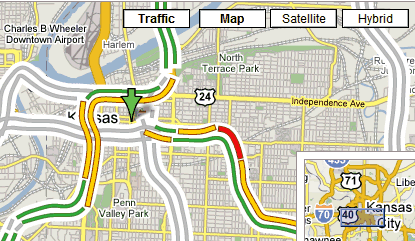
Until now, this feature was available only in the
mobile client of Google Maps.

What a strange (and I'd say "poor") implementation in the interface. The "Traffic" button is actually a toggle that you can toggle on/off on any of the other 3 views. Yet they used a button that looks exactly like the other 3.
ReplyDeleteI use this feature a lot on my mobile, but it'd be easier to use if the traffic layer didn't hide the street and highway names.
ReplyDeleteGreat!
ReplyDeleteI've linked you here
Do you know if (and when) google is going to extend this feature to Europe?!
I use it all the time too. I agree with the traffic layer hiding the street/fwy names. -Annoying.
ReplyDeleteI wish it tells me where the accidents are...
Google is one more step towards the perfect free mapping service. I blogged about Google Maps before and this is one of the most useful feature for users.
ReplyDeletehttp://gspy.blogspot.com/2007/02/why-is-google-maps-special.html
However, I have to admit that the interface is really not that user friendly. If Google can think of a better integration between the traffic data and the existing mapping information, it definitely will change the world again after is famous search function.
I also would like traffic conditions to affect drive times that it gives.
ReplyDeleteYahoo Maps has had this feature for years now. Whats the big deal?
ReplyDeleteHave there been any changes since the release for mobile devices?
ReplyDeleteDoesn't Yahoo! Maps already have a feature like this?
ReplyDeleteYeah I don't get what the big deal is. Yahoo and Live have had this feature for ages. Complete with incidents information and all... Make something more creative please...
ReplyDeleteI think Yahoo chose the best way to present traffic data (Mountain View in Yahoo Maps).
ReplyDeleteThey show small circles along the roads so you can see the street names, have details about incidents and "Live traffic" is actually a checkbox, so it doesn't look confusing like in Google Maps.
Like Microsoft, Yahoo shows details about the colors and the time when the data was updated.
Another cool thing about Yahoo Maps is that it updates the URL, so you don't have to copy the location using different options from the interface.
Thank you..for this info
ReplyDeleteThey also have a limited deployment for Austin, TX. I take the bus most days, but it is still a handy feature. It will be nice when they expand the monitoring a bit more (it looks to be quite spotty at the moment).
ReplyDeleteYou can zoom out to see the coverage.
ReplyDeleteThis is great! I am sorry but yahoo is very web 1.0 and gross.
ReplyDeleteI would like to know how fresh the data is. Is there a way to show that?
Also I agree, I want to see the road names with out turning off traffic.
Bravo! Another service done better.
If you have looked into solar energy as a method for heating your home, panels are usually the first things that come up.
ReplyDeleteThere are, however, other unique methods.
The Solar Heating Aspect You Have Never Heard of Before
The power of the sun is immense. The energy in one day of sunlight is more than the world needs. The problem, of course,
is how does one harness this power. Solar panels represent the obvious solution, but they have their downside. First,
they can be expensive depending upon your energy needs. Second, they do not exactly blend in with the rest of your home.
Passive solar heating represents a panel free method of harnessing the inherent energy found in the sun for heating
purposes. If you come out from a store and open the door of your car in the summer, you understand the concept of passive
solar heating. A wide variety of material absorbs sunlight and radiates the energy back into the air in the form of heat.
Passive solar heating for a home works the same way as the process which overheats your car in the parking lot.
I usually delete spam comments, but I liked the comment above.
ReplyDeleteIt shows up in Satellite view too.
ReplyDeleteGoogle Mapping Blog said on February 28, 2007 7:33 AM:
ReplyDeleteGreat!
I've linked you here
Do you know if (and when) google is going to extend this feature to Europe?!
for the state of NRW in Germany, you can check out: http://www.autobahn.nrw.de/olsim3_1/ruhrgebiet.html
"Yahoo has had this for ages"
ReplyDeleteBut yahoo is like add/junk/crap I dont want to see central.
Google is so clean and not busy... plain text ads and what-not.
Go Google! Awesome stuff.
Great feature. When will it be available for other countries such as Europe?
ReplyDeleteEurope is not a country. Google does not even have data for the entire US, so it may take some time.
ReplyDeleteNow if only the data was correct. Compare Google maps in San Diego,CA with http://dot.ca.gov/sdtraffic Just because maps have color does not mean the data is good.
ReplyDeletehow real time is this?
ReplyDeleteGreat feature. But...
ReplyDeleteShould I have google account to use it, or not?
No, you don't need a Google Account. The only purpose of an account is to save personal settings and data. The information about traffic is the same for everyone.
ReplyDeleteto: Ionut Alex Chitu
ReplyDeleteThanks for so quick response :)
How do they get this information? Are they tracking individual vehicles?
ReplyDeleteYes, it's good feature for others countries, but not for traffic on Ukrainian Roads :)
ReplyDeleteIt seems that they get traffic data from crowdsourcing of people who use mobile phones that provide location back to Google.
ReplyDeleteSee the Google post at: http://googleblog.blogspot.com/2009/08/bright-side-of-sitting-in-traffic.html
Really a Great work by google....
ReplyDeleteewnery time google comes with something different...
But how can we add traffic data using google API
ReplyDeleteIs there a way to see this data over time to get a sense of trends in traffic?
ReplyDeleteyes i am too interested in finding out the trend in traffic over a period in time, not sure if there is a way to find out
ReplyDelete