Google's plans for using personalization to improve search results could face some difficulties. Google already uses your queries, the results you click on, your bookmarks, but this isn't enough to build a comprehensive profile. People don't search too many times and, most often, they click on the top search results.
So I think the next step in Google's efforts to tailor the search results to your preferences is to expand the search history into something more complex: the web history. Browsing web pages is an important part of your online activity and there are already applications like Google Desktop that monitor and index the visited web pages.
Google Web History is a reality starting today. This replaces the previous search history service that was limited only to queries and search results. If you want to add the web pages you visit, you need to have Google Toolbar with the PageRank feature activated and to enable web history here. It's just the regular toolbar, but you'll have to explicitly allow Google to use the PageRank feature to record all the visited web pages and associate them with your Google Account.
The listing mixes visited web pages with Google searches, as you can see in the screenshot below:
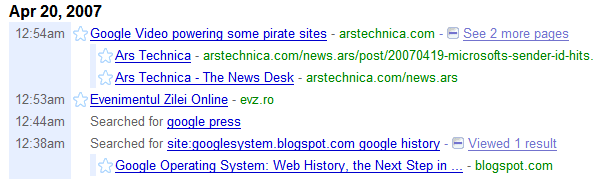
"You know that great web site you saw online and now can't find? From now on, you can. With Web History, you can view and search across the full text of the pages you've visited, including Google searches, web pages, images, videos and news stories."
Besides keeping track of all the web pages you visit and making them searchable online, Google Web History is used to improve the personalized search results.
"Web History uses the information from your web history or other information you provide us to improve your Google search experience, such as improving the quality of your search results and providing recommendations."
Google says they encrypt all the data and you're the only one who can access it (they even ask your password multiple times during a session). Web history is a feature implemented in most modern browsers, but the storage is limited and the history is usually deleted after a small number of days. Google's new feature lets you store your entire web history online (and that sounds pretty scary).
Of course, you can pause the service at any time and even delete the entire web history, but the big question is: do you trust Google enough to send it all your online activity?
Related:
Personalized Google
MyLifeBits - Making your life searchable

Unless you have something to hide, I think this is useful. It's pretty handy when you are away from yr home computer and want to tap into your home activity. When checking out the history and trends in my account...I noticed that there are three search terms that are perpetually being searched in the background, meaning that no results page appears but it logs as a search in my history. I have no idea why this happens and cannot find a way to correct it. Any other similar experiences/solutions? Cheers.
ReplyDeleteNot to be critical of Google or anything, haha, but finally! Finally, an exciting feature with a lot of meaning behind it that will is both innovative and practical.
ReplyDeleteFor some reason, using this feature makes me more anxious to experience the rumored "Platypus" GDrive project. I can't wait!
Oh. I forgot to say... GOOD JOB! You predicted a new feature/service before Google released it based on your investigative work. Excellent.
ReplyDeleteIt's pretty obvious to use good search results rather than plain queries for users' preferences. Using the entire web history may be too aggressive, and sometimes not user controllable. I'd rather use something similar to google reader, which I can "star" good results that suit my preference.
ReplyDeleteAlso, it's not I have "something to hide", I just don't like the feeling of being spied for every activity online, even its kept for my personal use (for now).
People who have privacy issues may not sign up for it, or disable it. It's not as if google is forcing you to use this function.
ReplyDelete没有必要
ReplyDeleteI do have something to hide. I do and say illegal stuff all the time. I think I will be using Google's Web History, anyway. Why? Because the illegal things that I do will never warrant someone to search my web history (assuming that they (whomever they are) even knew which account to search), and I trust Google for many justifiable, rational, and objective reasons.
ReplyDeleteOn the other hand, will I really gain something from Web History? I already save ANYTHING and EVERYTHING of interest directly into my Google Notebook.
Alex - Great job predicting Google's next move... That, or Google should be paying you for your idea! You should make a site "CanGooglePayMe.com" and fly out to Cali to sit in their lobby.
Creepy development and amazing that the users are so uncritical of a corporation gathering all that info about them.
ReplyDeleteAn ex Google user
Some tips in case you decide to try this:
ReplyDelete* You need Google Toolbar (available for IE and Firefox only). Even if you have it, visit this page http://google.com/history/welcome and click on the first button that says: "Enable web history" or something similar. If you don't have Google Toolbar, you'll install a version of the toolbar that has the PageRank feature activated.
* How to temporarily pause it?
If you want to deactivate the recording of your web history, you can disable PageRank in your toolbar's options. To deactivate your web history and your search history, go to google.com/history and click on the Pause link in the left sidebar.
* How to deactivate the web history but keep the search history and the PageRank feature?
Visit http://google.com/history/welcome and click on "limit web history to searches".
* How to get rid of Web History and all of the data?
Go to this page (available in your account's settings).
* How to export all your web history?
You can export it as a feed. Here's the URL: http://www.google.com/history/lookup?q=&output=rss&num=1000 (the num parameter controls the number of items included in the feed).
While I understand that they use the old PageRank feature to gather the data, it's inexcusable to not mention anything about web history in the toolbar. After all, there's no connection between PageRank and the web history (except for the internal way of gathering the URLs).
ReplyDeleteNice. Except.. it doesnt work for me. It logs all the searches just like it did before, but none of the visited pages :(
ReplyDeleteIonut Alex Chitu, nice summary. When you wrote that prescient article last month, I sent it around to a few people at the Googleplex. :)
ReplyDeleteIn the comments, you said "While I understand that they use the old PageRank feature to gather the data, it's inexcusable to not mention anything about web history in the toolbar." I believe that even if you have the Toolbar+PageRank, you'll still have to opt-in. In Danny's write-up at http://searchengineland.com/070419-181618.php
he said "Google Toolbar User With PageRank: Come to Google, and you'll be prompted to sign-up for Web History if you aren't already enrolled. You won't need to have PageRank switched on because you're already that way!"
Is it just me or dose google not log visits to google pages (gmail, docs) only visits to other pages
ReplyDeleteFunny, really, that even after the name change from Froogle to Web Product Search (yawn), Google's still referring to the old name in the left-hand menu of their new Web History product :)
ReplyDeleteYes, Matt, you have to explicitly opt-in to web history. But once you do that, the toolbar doesn't mention anything about the service, so you can't find out from the toolbar if the visited pages are recorded and associated with your Google account. Maybe you'll forget about it in a month, and the toolbar doesn't provide any information about the status of the service (disabled, enabled, paused) or an option to change it.
ReplyDeleteThere's another, easier way to disable web history: use the Stealther Addon to temporarily disable cookies...
ReplyDeleteGoogle web history - and how to turn it off
"People who have privacy issues may not sign up for it, or disable it. It's not as if google is forcing you to use this function."
ReplyDeleteFor those who keep the Toolbar PageRank function turn on, all this activity gets tracked whether you use Web History or not. It is misleading for Google to say you can delete activity, since it merely removes it from the user's interface, and not from Google's servers
The URLs sent to Google if you have Toolbar+PageRank, but you didn't activate Web History, aren't associated with your account.
ReplyDelete"Except for information sent through Toolbar for use with a separate Account-based service such as Gmail, we do not associate any of the information that Toolbar sends with other personal information about you." (#)
<< Consider a future device for individual use, which is a sort of mechanized private file and library. It needs a name, and, to coin one at random, "memex" will do. A memex is a device in which an individual stores all his books, records, and communications, and which is mechanized so that it may be consulted with exceeding speed and flexibility. It is an enlarged intimate supplement to his memory. >>
ReplyDeleteAs We May Think by Vannevar Bush
is this actually "new"? To me, it looks like just a re-name and a re-design...I've been using Google Bookmarks and Google Music Trends for a while, and it has always stored my web history...just FINALLY they are integrating it within the toolbar (I had to download some small executable, to activate the new Web History feature...).
ReplyDeleteBut yes, it is very slick :)
<< Is this actually "new"? >>
ReplyDeletePartially. It's Google Search History that can now record your web history. Until this change, Google could only record your queries and the search results you clicked on.
I would like to see this Google Web History made usable on the Opera Browser.
ReplyDeleteI understand that if there isn't a Google Toolbar for opera, a way to get this feature on opera is for the API to be released.
Google, or to whomever can help, help make Google Web History available on Opera!
One click and I lost control. I am now "paused" and cannot rem ove items...at least it doesnt look like i t. I want to remove items from history prior to the pause. If I do not, embarrasing notations show up on the screen. Please let me fix this problem!!!
ReplyDeleteKen Wilson el.ken@verizon.net
Well, that certainly was no help. Wonder what I have to do to ger swome?
ReplyDeleteThis is not a Google support site and you shouldn't expect instant answers.
ReplyDeleteTo remove items from Web History, do a search for the items you want to remove (you may want to sort them by date), click on "Remove items", select the queries/web pages you want to remove and click on "Remove". It shouldn't matter if you've paused the service.
More about Web History in Google's help center
You can use Google Web History with Opera with a little UserJS.
ReplyDeleteI wrote on my blog how to do it.
http://my.opera.com/edvakf/blog/2008/01/05/you-canuse-google-web-history-with-opera
That userscript sounds neat! Better yet, I "THINK" this even is working with my FirefoxPortable install ;) I just installed it and am seeing stuff getting logged!
ReplyDeleteKinda cool.....I'm slowly moving away from the Google Toolbar, it was cool while it lasted, Send to > SMS and Gmail, Google Web History and the search box were what kept me using it.....but now all that stuff is nearly integrated to the browser either via userscript, or a bookmarklet.
I would expect to easily download my complete Web History from Google for personal use. Why isn't this option available?
ReplyDeleteI "give" my data to Google so I would expect at least being able to download it.
Anyone knows if this is possible at all?
If not, could you please publish a post on this? :)
If Google is pushing forward the Open Social API, I would expect them to be coherent and also release this data.
How does one delete history from the 'pages', 'videos' sections contained within the 'Interesting Items' category of the 'Web History'?
ReplyDeleteThere does not appear to be any information available at Google regarding this matter.
Most of the Web History appears to successfully delete, except for those particular categories.
I've deleted my web history and switched off the web history feature. (as described at the link below)
ReplyDeletehttp://www.google.com/support/accounts/bin/answer.py?hl=en&answer=54067
However, when I reactivate Google Web History,
my Web History "TRENDS" link still shows some of my history.
How do I also delete the information revealed in the Google Web History "TRENDS" screen?
Annonymous said back on April 20, 2007 that this is a creepy development. The fact that the trends screen has no easily visible tool for deletion is actually extremely creepy. Not annonymous. Please email me if you agree or disagree. steve74245@gmail.com
ReplyDeleteOne click and I lost control. I am now "paused" and cannot rem ove items...at least it doesnt look like i t.It is misleading for Google to say you can delete activity, since it merely removes it from the user's interface, and not from Google's servers
ReplyDeleteI do have something to hide. I do and say illegal stuff all the time. I think I will be using Google's Web History, anyway.It is misleading for Google to say you can delete activity, since it merely removes it from the user's interface, and not from Google's servers
ReplyDeleteWeb history is a feature implemented in most modern browsers, but the storage of my comp is too small
ReplyDeleteanother reason for me to leave Google
ReplyDeletestart from my email, then another Google services, till the search engine..
thanks, but I don't like it. I want my privacy.
How can tell if someone is reading and broken into my gmail?
ReplyDeletewell i guess what, my porn history and searches for hot babes and celeb nude pics and hacking DBs and networks and shit like that all evil is in hands of google then. fuck it man. even i do delete the fuck my entire history, i can't be sure whether google really keeps a fucking copy of it all...coz come to think, they must have a fucking mechanism, to store automatically the backup of someone's entire history in case the user decides to delete them, coz they are suspecting the user wants to do that because he's afraid something in his history shouldn't go public or in the hands of fuckheads like cia or fbi. so well, google as well maybe genuinely not interested in all oh this, but i know very well fuckheads like fbi and cia will be just grinding their heads in the google's ass to just get a piece of the catch they get worldwide from their users. because it can include intel on terrorists and psychopaths and aholes with evil filled in mind,and so the govt can fuckin track them down, have valubale intel to fuck em up, or just use any goddamn good-for-nothing invaluable citizien who is but innnocent, as a pawn in foregin political diplomacy in terrorism or shit....while we scratch our buttcheeks to redness more then that could appear on our faces when we see how easily anyone could get busted or tracked down or well, just get fucked up by the big fishes in the world political and beaurocratic.
ReplyDeleteok that was enough shit coming out after watching body of lies... but this is a possibility... so we gotta be on alert.... i mean am just a 19 yr old kid but it scares me that i may be so much public already
some times google web history makes some problems.. i mean at the time of searching the keywords which related to my site, google pick my site name to top, actually my site found around 24th page in searches. anyway webhistory is a best program from the side of google. thanks
ReplyDeleteHow do I enable my google web history recording after it was disabled. I did select the 'enable web history', but it won't work/record. Also if the web history function was deleted, can a person re-install/activate it. Can anyone please help?
ReplyDeleteOkay. I enabled the web history to track my web pages along with searches, but cannot disable it without pausing. What I mean is, when I go to google.com/history/welcome , and click limit web history to searches, Google still tracks my web pages. The only way I know how to limit the web history to only searches again is through the "Remove all web history" method. However, I don't want to remove all of my web history. I just want the search limit to work, without having to go that far. Help?
ReplyDelete@Jeremy:
ReplyDeleteYou're right, this feature no longer works and you need to pause Web History to disable tracking. Of course, you can also uninstall Google Toolbar or the Web History extension.
I am wondering the same thing as what anonymous posted on november 15 2011..."How do I enable my google web history recording after it was disabled. I did select the 'enable web history', but it won't work/record. Also if the web history function was deleted, can a person re-install/activate it. Can anyone please help?"...can anyone help?
ReplyDeleteEvery times google web history makes some problems.. i mean at the time of searching the keywords which related to my site, google pick my site name to the top position in search, in actual, my site found around 12th page in search. anyway web history is a best program from google. thanks a lot for that.
ReplyDelete