To import bookmarks or to easily manage them, you need Google Toolbar. Hopefully, Google will improve the way bookmarks are displayed, integrate the tool with Google Notebook and Google Reader and let you share your links.
Until then, Google Bookmarks is a cool way to bias Google's search results towards your favorite sites...

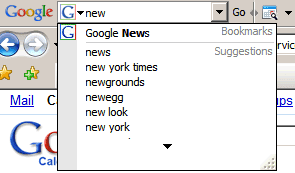
... to view related sites by clicking on the label displayed after the snippet or to see your bookmarks in Google Toolbar's suggestions:

I still want to be able to merge these with 'Google Browser Sync'd bookmarks. As much as I love the browser sync, it doesn't let me access the bookmarks from an alternate machine.
ReplyDeleteI just want to be able to import my del.icio.us accounts into google easily.
ReplyDeletedel.icio.us -> google bookmarks
ReplyDeleteDel.icio.us is owned by Yahoo. I don't see them selling it to Google any time soon.
ReplyDeleteI would very much love Google Bookmarks to have sub-labels. Now I'm using Firefox bookmark tool-bar for easier access and better organization. For backing up, I use FoxMarks which allows me to access my bookmarks online too.
ReplyDeleteJustin, two Firefox extensions, GMarks, and Google Bookmarks Button, both support 'sub-labels' in Google Bookmarks...although Google does not support them itself
ReplyDeleteI'd also love to see access to my Google Browser Sync'd bookmarks from my iGoogle homepage.
ReplyDeleteSeems like it would be a one day project for someone at google to create a gadget that would give access to the bookmarks.
Thank You: Ionut Alex Chitu
ReplyDeleteYour link to transfer my bookmarks from delicious to Igoogle worked wonders. I have searched for the last week on how to transfer in other ways, & yours by far is the best. Thank You
I just want to transfer my bookmarks form one account to another.... :-(
ReplyDeleteso HOW can I "export your favorite links as a bookmarks.html that can be imported natively in most browsers." as your blog entry says. It maybe possible, but its not obvious.
ReplyDeleteWhat's not obvious? The file GoogleBookmarks.html is linked, you can download it and then import it in your browser. Depending on what browser you use, the instructions are different, but a Google search should be enough to find them.
ReplyDeleteE.g.: import GoogleBookmarks.html in Internet Explorer 7:
* Click the Add to Favorites button Add favorites, and then click Import and Export.
* The Import/Export Wizard will open up. Click Next.
* Under Choose an action to perform, select Import Favorites. Click Next.
* Under Import from a File or Address, select Browse.
* Find and select your bookmarks file (e.g. GoogleBookmarks.html) and then click Next.
* Select the folder where you would like to place the imported favorites. Click Next and then Finish.
E.g.: import GoogleBookmarks.html in Firefox 3:
* Select the Bookmarks menu, and then click on Organize Bookmarks.
* Click on Import and Backup, select Import HTML, and then "From an HTML file".
* Find and select your bookmarks file (e.g. GoogleBookmarks.html) and then click Open.
worked for me!
ReplyDeleteI think there should be a way to import .html files into google bookmarks. This would immediately allow me to start relying on google bookmarks as my primary bookmarking service.
ReplyDelete