The list of search engines and the recent bookmarks have been removed and there's a new section of recent activities that includes recently-closed tabs and recent downloads. Another new section is called "recommendations", but it's still a work in progress.
You can hide the thumbnails, hide the list of recent activities and the recommendations if you don't find them useful.
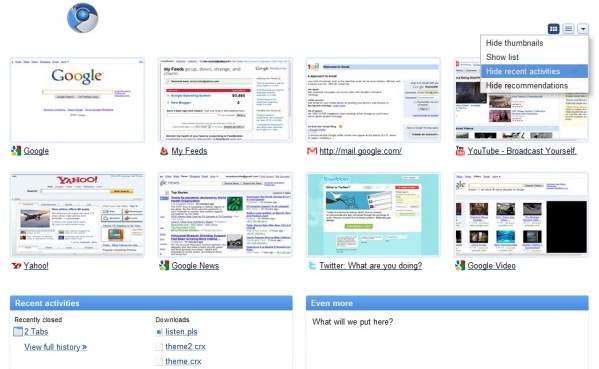
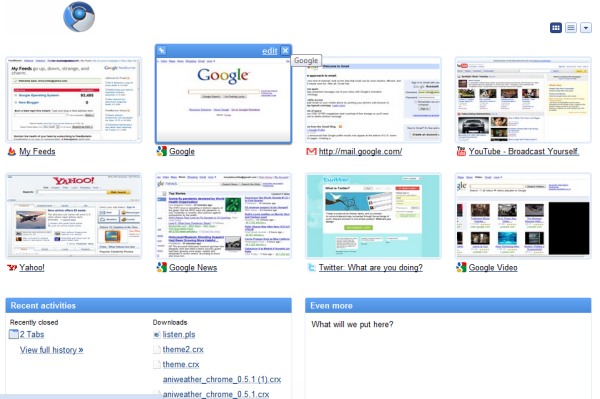
The updated tab page is not yet ready to be released, but you can enable it if you have a recent Chromium build (Windows, Mac, Linux) by editing the desktop shortcut and adding the following flag in the target field:
--new-new-tab-page

thats very useful and makes the new tab page definitely worthy of being the home page if it wasn't already :D
ReplyDeletelgtm :D
ReplyDeleteI like the concept of the about:tab Firefox experimental add-on from Mozilla Labs. Is fetching and showing in the new tab page the latest feeds from the sites you access more often, shows "search in google" for the clipboard content, and quick search boxes for the sites you use more often too, in the context of the "Frequently Visited Sites".
ReplyDeleteIt doesn't have thumbnails, so it loads fast, and is useful. I wish Chromium would take some ideas from it.
The "recommendations" part sound great, but let's see how it works! Would that be similar to the "Interesting items" in Google Web History?
ok...how do i make this work? Do i only have to add that "--new-new-tab-page" in the target field? If yes, where exactly should i add it? After the .exe,or...?
ReplyDeleteJust found out that this was for Chromium and not for Chrome!
ReplyDeleteSorry!
@Anon1: You should read this, http://bit.ly/4nz8LC, but instead of --enable-extensions, use --new-new-tab-page flag.
ReplyDelete@Anon2: The developers of Google Chrome used Chromium for experimentation, changes and updates. Making a web browser is ain't easy, before it takes to public, it passes into Chromium, then to Chrome (dev), Chrome (beta) then to stable. But likewise, let's wait for this coming in the later stages like Chrome's dev and beta.
I'll miss the recent search boxes. I thought that feature was really handy.
ReplyDeletewhat i would like to see:
ReplyDelete1. display the old search boxes in the new tab page and way to hide them as well like with the drop down menu. the ability to add custom search fields there. currently there is no way to edit which fields are included and a paste a search for those fields as well.
2. have a google search for the terms in clipboard.
I think it is very interesting how the modern browser is integrating/replacing what were previously web services, like netvibes for a custom start page and stumbleupon for recommendations, I know that Chrome's start page is no where neer as customizable as either of these but it is much more accesible to the average user.
ReplyDeleteThe one feature I really want is the abbility to do a site search on my bookmarks instead of having to add them as search engines.
have the folks at Googleplex looked at the experience from http://www.newtabking.com (New tab king Firefox add-on)?
ReplyDeleteI'd advise they take a look at how a new tab should help you get into more than 8 top destinations.
--shelly
Is there away to have more than 8 thumbnails?
ReplyDeleteNo, there's no option to edit the number of thumbnails. Opera 10's speed dial lets you choose between 4, 9, 12, 16, 20 or 25 thumbnails.
ReplyDeleteyeah, just like opera, 4,9,12, 1.... etc...
ReplyDeletebecause there is a lot of space wasted
Hey How to do this....
ReplyDeleteI like it :)
ReplyDeleteChrome Rocksssssssssssss..................
ReplyDeleteSorry for that:
ReplyDeleteChrome can protect saved passwords with a password?
Chrome doesn't support master passwords and I don't think they're very useful. Here's what Peter Kasting, from Google, says:
ReplyDelete"Working as intended. There has been much internal debate about this issue in the past which I will not reiterate here, except to summarize. Master passwords as implemented in other browsers provide more of an illusion of security than actual security. They also inconvenience users. Chrome uses the Windows crypto routines to encrypt local passwords, giving you some protection against remote data theft; for local data theft a master password wouldn't help."
I agree about the wasted space in the new tab page. The Chromium logo causes a fairly big white banner of nothing at the top. It should not even be in there; it belongs in the About page.
ReplyDeleteI never bookmarked anything but this stupid list of recent bookmarks appears - in fact it's just recent history. I want to remove this feature but it seems that I can't unless I am an advanced Linux programmer or something........agh.
ReplyDeleteThere is no longer a thumbnail restore option, so they're gone forever. :(
ReplyDeleteReally miss the search engines from the old tab page. Tried it for awhile without them, but reverted to the old style with the --old-new-tab-page option.
ReplyDeleteYou should be able to edit the thumbnails just like you're able to edit the bookmark bar!
ReplyDeleteTo be able to put some kind of optional news feed (from New York Times as an example) would be great!!
the old new tab page with 9 thumbnails and different search boxes was better.
ReplyDeleteIt made it quicker to open a new tab and search for something on youtube or wikipedia for instance
HATE the new tab look. Who thought a list view was cool? Dumb and ugly. They wasted their development efforts on that???
ReplyDeleteWe have 20+ inch monitors available throughout the industry and they limit us to a 4 x 2 format? Why? the 3 x 3 was easier on the eyes for sure. Please consider QUICKLY adding in options to allow 3 x 3, 4 x 2, 4 x 4 so we can effectively use our monitor space. Only have 8 is too limiting for most of us.
Going from 9 to 8 thumbnails is definitely a step backwards... What could possibly be the reason why chrome sets the thumbnail limit so low?!
ReplyDeleteRemoving the most commonly used search engines boxes is a step backwards... What could possibly be the reason why the new-new-tab-page removes these?! Search engine wars anyone? This debacle gives the clearest reason as to why it's such a bad idea to use an internet browser created by an internet search engine company.
ReplyDelete@monkeymook:
ReplyDeleteApparently, very few people used that feature and it was redundant: the Omnibox lets you use your favorite search engines. Google doesn't need to prevent you from using other search engines: it's already the leading search engine and people use it because it's better than other search engines.
Still, there was a useful list of your most recently bookmarked pages which are now buried on the bottom of the list. And 8 thumbnails can't be better than 9. Bring back the old page or at least make it customizable so the people that use these options can do it.
ReplyDeleteI just updated from some 2.x version to version 5.x - and I really really really miss that most used search engines on the new tab feature. Give it back or at least write an extension...
ReplyDeleteMy New Tab page shows the words
ReplyDeleteNew Tab
Galleries2.maturead
Am IT illiterate, can't even play the video(?) which I suspect is porno.
I wanna remove it, spent over an hour but can't find the way to do it.
Any help any one? Txs.