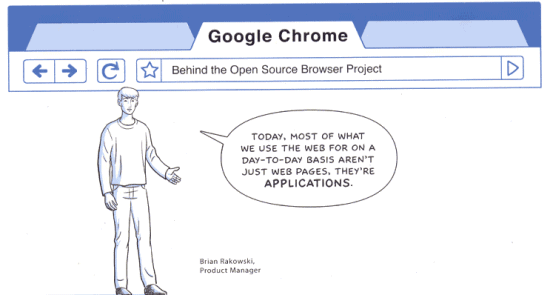
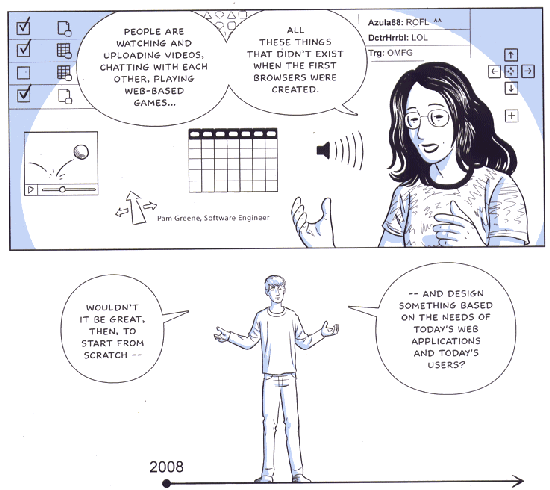
Google Chrome has been built in a time when browsers no longer render mostly web pages, but full-blown web applications. That's why browsers need to be more powerful, more stable and more secure. One of the problems of the existing browsers is that a web page can lock the browser and there's no way to isolate that tab and close it. Google Chrome uses a new process for each tab. "We're applying the same isolation you find in modern operating systems," says Arnaud Weber. Each process is sandboxed to prevent malware from affecting your computer.
The new browser has a JavaScript virtual machine built by the V8 team from Denmark that generates code dynamically and has a better garbage collector.
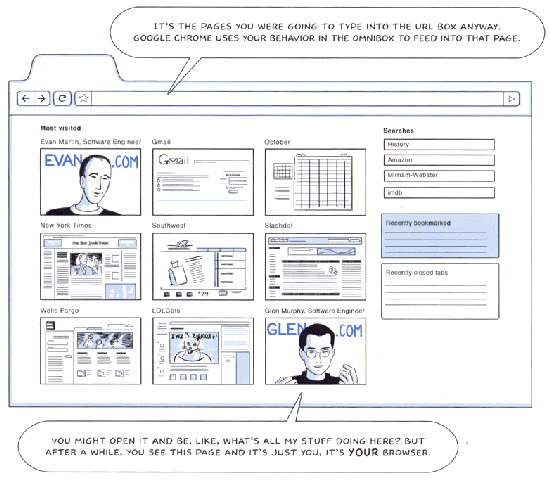
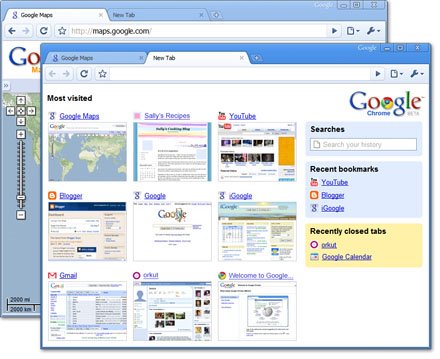
Google Chrome's UI is inspired by Opera: tabs are displayed above the address bar, the address bar combines previously typed URLs with search results and suggestions and there's a homepage that includes frequently visited sites, recently closed tabs, bookmarks and searches.
Web applications can be opened in chromeless windows, without menus and toolbars, much like in Mozilla Prism. The browser will also include Gears, a set of APIs already available for IE, Firefox and Safari.
Some people will say that Google wants to compete with Microsoft's Internet Explorer or Mozilla's Firefox, but I think there's something more important about the new offering: an open source browser that is prepared for running applications and that diminishes the role of existing operating systems. The browser won't become very popular, but the ideas behind it will influence the next versions of Internet Explorer, Firefox, Opera, Safari.
The browser is not yet available for downloading, but the launch seems imminent.
{ Images licensed as Creative Commons by Google. You can read the entire comic book at google.com/googlebooks/chrome. }
Update: Google announces that a Windows version of the browser will be launched tomorrow. "We realized that the web had evolved from mainly simple text pages to rich, interactive applications and that we needed to completely rethink the browser. What we really needed was not just a browser, but also a modern platform for web pages and applications, and that's what we set out to build. (...) By keeping each tab in an isolated sandbox, we were able to prevent one tab from crashing another and provide improved protection from rogue sites. We improved speed and responsiveness across the board. We also built a more powerful JavaScript engine, V8, to power the next generation of web applications that aren't even possible in today's browsers."
Update 2: Google Chrome has been released and it already supports 43 languages.

Hope they do something like this
ReplyDeleteHell yes! Open source cross-platform browser coming from Google... will definitely use it!
ReplyDeleteWhy all the new javascript engines?
ReplyDeleteSquirrelFish, SpiderMonkey (with optional TraceMonkey), Tamarin, and now another?
>"The browser won't become very popular"
ReplyDeleteCan U elaborate why?
IF it comes to pass, this is AWESOME!!
ReplyDeleteSign me up NOW
Finally! (and I like the comic too)
ReplyDeleteYes, everything is going to the browser. Imagine what this means for the future. Forget about Linux, Windows, OS X. As long as it supports a browser then it should work. An Open Source solution which will can be supported and used by anyone. Yo, Wall Street, start paying attention!
ReplyDeleteDamn, just after my rant yesterday on creating my own browser, Google go and do this.
ReplyDelete</3
Seriously though, i can't wait to see this.
Maybe i could even chat with some of the Googlers and see how they feel about some ideas i had, if anyone can introduce new ideas to the web, it is Google.
Very interesting comic. Both in terms on content and in terms of how to launch a new product. Although it's quite a let down that there is nothing to test yet ;-)
ReplyDeleteIt's likely that Google Chrome will be available on Wednesday at:
ReplyDeletehttp://www.google.com/chrome
http://code.google.com/p/chrome/
Those pages return some strange error codes ("Not Found. Error 404", "Forbidden. Your client does not have permission to get URL /p/chrome/ from this server.").
I personally can't wait until Google comes up with their own OS and browser so I can DUMP MICROSOFT once and for all.
ReplyDeleteAlso, I am awaiting the day their Google Grand Central is released so I can dump ATT.
And I am also awaiting the day their GPhone/Android is released so I can dump my cell phone carrier.
And I am also awaiting the day their Google Apps becomes universal and an integral part of their OS so I can dump Microsoft and Adobe.
If I can't afford to pay monthly fees for each of the above services I am sure Google will offer a free "consumer" version which might require me to view a certain amount of their advertising products, or to allow them to provide access to their advertisers to some of my personal information and browsing history. This is a good trade-out for folks who cannot currently afford to pay $200 for a Microsoft OS PLUS another couple of hundred for their Office products, plus another $1200 a year for home and cell phone service.
With Google, all I will need to have is a Gphone (and or a laptop computer hooked up to it via Bluetooth) to access ALL the above services. Gee, the Gphone is looking better all the time. In one fell swoop I can dump Microsoft, Adobe, ATT, and Verizon, and do all my stuff on my Gphone for about half of what I am paying now EACH YEAR, or LESS. Nice!
Webkit is the base of Safari. Taking into consideration that Safari 4 is the first (beta) browser to obtain 100% on Acid3... I guess Google Chrome will be a speedy and highly compatible browser too, but unless they try to make add-ons available, I doubt that it'll get much of a market share.
ReplyDeleteGoogle's primary benefit from releasing a browser is that it cements standards compliance as the only way to release web apps. Google's inability (for years!) to search inside Flash sites really hurt them, and hurt search generally. If Silverlight or AIR took over for the next generation of apps, they'd be in even a worse place, since Microsoft or Adobe could try to take over from AdSense as an advertising portal to the web. Sites written using open standards can be Searched, Indexed and Advertised by anyone.
ReplyDeleteTo be a really interesting new browser it should be possible to run it without installing by invoking it from another browser.
ReplyDeleteThis may seem redundant use of browsers, but a browser-in-browser approach would mean Google would only have to develop web applications for such a 'virtual browser', instead for the flock of browsers and browser versions it now has to develop for.
Perhaps this would mean a 'Virtual Chrome' browser (yes I know, this sound cyberpunk) would have to use other plugin platforms like Flash or ActiveX or something better(?) to create their browser in but it would mean a giant leap forward for web development.
Chrome as 'just' another desktop bound browser will only make development for web apps like Google Docs harder than it already is. Which is a bad move.
Isn't that what microsoft did, make their browser work well to suit their applications and force it on everybody. Hmm, Evil potential factor +1. Not to say I wont prefer it and it will likely be good but do 'G' really need to make a browser? Another one...?
ReplyDeleteCan't wait to this new browser, that too from Google!
ReplyDeleteGoogle Chrome's user agent string is:
ReplyDeleteMozilla/5.0 (Windows; U; Windows NT 5.1; en-US) AppleWebKit/525.13 (KHTML, like Gecko) Chrome/0.X.Y.Z Safari/525.13.
Some web pages were briefly available at gears.google.com/chrome. I saved them in a notebook.
ReplyDeleteSo the 1st of September is the new April's fool day?
ReplyDelete"I personally can't wait until Google comes up with their own OS and browser so I can DUMP MICROSOFT once and for all."
ReplyDeleteDoesn't that kinda make a Googlesoft tho?
Hell no! Another browser to add to the testing pipeline! :-P
ReplyDeletemhh..stealing ideas .... from opera.. apple.. linux... looks like google is going to be the next "microsoft" .. at least in not having own ideas, but to use ideas of other to use it in their market presence. and make money with it. (windows 98 = apple 88 for example) ; )even "opensource" does not do anything good about it. as long as its not "really" free as linux..and bound to a company i would be really carefull about it. despite whatever this "google chrome hype" means..
ReplyDeleteThat's the world of business Anonymous!
ReplyDeleteThe consumer doesn't give a rat's!!
They just want a product, that will do everything that they're told they will need!
I am actually waiting for the release. The chrome really sounds a great browser with everything around it.
ReplyDeleteAnd there is another platform we webdevelopers have to develop on. Hope this time the standards come close to w3 ;)
ReplyDeleteTo any Google employee that may be reading
ReplyDeletePlease make a Linux based operating system!!
You already have Google Geras, Android and now a browser that seems to be very cool! And you sponsor Google Summer of Code for years. You are totally ready to make an OS that will take the world by storm.
I know what you could do next: start your own country!
ReplyDeleteRegarding the "yet another browser to support" comments, Google says that "if you've tested your website with Safari 3.1 then your site should already work well on Google Chrome." Google Chrome uses the WebKit framework, the same as Safari, Nokia S60 browser, Safari Mobile for iPhone, Android's browser.
ReplyDeleteFirefox still rocks
ReplyDeleteIts very interesting that Google has decided to take on a project like this. They obviously have such an interest in how people access the web, it was only a matter of time before they took things into their own hands. It is going to be very interesting to see how this pans out.
ReplyDeleteGoogle Chrome browser Screenshots
http://www.tonesall.com/computers-internet/google-chrome-screenshots.html
All I want to know is how is this going help Google abuse my privacy. Will it not allow me to turn off cookies (like Google Apps) or talk to the Google Death Star without letting me know?
ReplyDeleteIf this was anyone else making this I would be happy and I am sure that the technolgy and direction is right, but from Google? Got to make you think twice before using it as your main browser.
Here is Chrome's privacy policy. As you probably know, an open source project can't hide mischievous features because anyone can inspect the code.
ReplyDeleteGoogle Chrome Privacy Notice
September 3, 2008
The Google Privacy Policy describes how we treat personal information when you use Google's products and services, including information provided when you use Google Chrome. In addition, the following describes our privacy practices that are specific to Google Chrome. Google will notify you of any material changes to this policy, and you will always have the option to use the browser in a way that does not send any personal information to Google or to discontinue using it.
Information Google receives when you use Google Chrome
You do not need to provide any personally identifying information in order to download and use Google Chrome. When you download Google Chrome or use it to contact Google’s servers, Google receives only standard log information including your machine’s IP address and one or more cookies. You can configure Google Chrome to not send cookies to Google or other sites as explained here.
In addition, some Google Chrome features send limited additional information to Google:
* When you type URLs or queries in the address bar, the letters you type are sent to Google so the Suggest feature can automatically recommend terms or URLs you may be looking for. If you choose to share usage statistics with Google and you accept a suggested query or URL, Google Chrome will send that information to Google as well. You can disable this feature as explained here.
* If you navigate to a URL that does not exist, Google Chrome may send the URL to Google so we can help you find the URL you were looking for. You can disable this feature as explained here.
* Google Chrome's SafeBrowsing feature periodically contacts Google's servers to download the most recent list of known phishing and malware sites. In addition, when you visit a site that we think could be a phishing or malware site, your browser will send Google a hashed, partial copy of the site's URL so that we can send more information about the risky URL. Google cannot determine the real URL you are visiting from this information. More information about how this works is here.
* Your copy of Google Chrome includes one or more unique application numbers. These numbers and information about your installation of the browser (e.g., version number, language) will be sent to Google when you first install and use it and when Google Chrome automatically checks for updates. If you choose to send usage statistics and crash reports to Google, the browser will send us this information along with a unique application number as well. Crash reports can contain information from files, applications and services that were running at the time of a malfunction. We use crash reports to diagnose and try to fix any problems with the browser.
* You may choose Google as your search engine using Google Chrome, and you may also use Google Chrome to access other Google services such as Gmail. The Privacy Policies of Gmail or other services apply when you access them, no matter which browser you use. Using Google Chrome to connect to Google services will not cause Google to receive any special or additional personally identifying information about you.
Information website operators receive when you visit a site using Google Chrome
Sites that you visit using Google Chrome will automatically receive standard log information similar to that received by Google. These sites may also set their own cookies on your machine. You can restrict cookies by setting your preferences in the Google Chrome Options menu. If you use Google Chrome in incognito mode, it will not transmit any pre-existing cookies to sites that you visit. Sites may deposit new cookies on your machine while you are in incognito mode, however. These cookies will be temporarily stored and transmitted to sites while you remain in incognito mode. They will be deleted when you close the browser or return to normal browsing mode.
Information stored on your computer when you use Google Chrome
Google Chrome records useful information about your browsing history on your own computer. This includes:
* Basic browsing history information: the URLs of pages that you visit, a cache file of text from those pages, and a list of some IP addresses linked from pages that you visit.
* Snapshots of most pages you visit (except for secure pages with “https” web addresses, such as some bank pages)
* Cookies deposited on your machine by websites you visit
* A record of downloads you have made from websites
You can delete all or portions of this history at any time as explained in the FAQ.
You can also limit the information Google Chrome saves on your computer by using incognito mode. In this mode, the browser will not store basic browsing history information such as URLs, cached page text, or IP addresses of pages linked from the websites you visit. It will also not store snapshots of pages that you visit or keep a record of your downloads. (This information could still be stored elsewhere on your computer, though.) New cookies received in incognito mode will not be saved after you close your browser or return to normal browsing mode. You can see when you are in incognito mode because the incognito icon appears in the top left corner of your browser; in some cases the border of your browser window may also change color.
When you make changes to your browser configuration, such as by bookmarking a web page or changing your settings, this information is also saved. These changes are not affected by incognito mode.
You can choose to have Google Chrome save your passwords for specific websites. Stored passwords can be reviewed in the Minor Tweaks tab of the Options dialog box.
Uses
Information that Google receives when you use Google Chrome is processed in order to operate and improve Google Chrome and other Google services. Information that other website operators receive is subject to the privacy polices of those websites. Google Chrome stores information on your machine in order to improve the browser’s performance and provide you with features, such the option to review snapshots from pages you have visited.
Regarding the "yet another browser to support" comments:
ReplyDeleteyeah it uses webkit... But they completely rewritten the javascript engine (V8).
So what new features would be there... and old features wouldnt be there...
Can you tell more about the Big Brother that's behind it ?
ReplyDeleteAnother stuff, what we have to optimize for :(
ReplyDeleteIsn't this what Netscape tried to do 10 years ago? Sticking everything into one app (so it replaces an OS) ended up in bloatware then, why shouldn't it now?
ReplyDeleteComputers have more processing power these days so we can afford to have bloatware... Back in Netscape's hype computers were just coming out of the dinosaur era.
ReplyDeleteWhere is it located? Still not out yet?
ReplyDeleteDownload links anyone?
ReplyDeletesorry but Google Browser looks ..... Crap!! There are much better browsers out their like IE8 (Hate to Say it) maybe thats why their is no offical google homepage.
ReplyDeleteIt's 5am in Mountain View so you need to wait a little bit. The download page for Chrome has been briefly available at:
ReplyDeletehttp://gears.google.com/chrome, but the download links didn't work.
umm... it's Tuesday.
ReplyDeleteThanks Google!
ReplyDeleteAs I have thought for the past 3-4 years, Google is going to be the next Microsoft (if it already isn't). I look forward to new innovations like this and the already available docs, calendar, etc.
ReplyDeleteI just hope they don't get fat and sloppy like MS over time, but that will remain to be seen.
Yes, WE CAN wait...
ReplyDeleteHihi. Danmark got really big on page 13 of the comic. They occupied no less than Germany, the Netherlands, Belgium, Luxemburg, Switzerland, parts of Austria and, ahem, Hungary and Slovakia. Maybe they did that with that virtual machine...
ReplyDeleteThat danish empire is a running gag over here.
Featurewise it looks very much like a cut-down version of Opera based Safire's engine.
ReplyDeleteJavascript8 is the real interesting thing here.
"Crap!! There are much better browsers out their like IE8 (Hate to Say it) "
How is that better then anything? Microsoft dosnt even support SVG, and they want DRM on fonts.
IE8 is looking worse then anything out today.
Another browser for us web developers to test on, brilliant :( I suppose as long as it's fully compliant it will be alright.
ReplyDelete"One of the problems of the existing browsers is that a web page can lock the browser and there's no way to isolate that tab and close it. "
ReplyDeleteI think IE8 has the option to close one tab which has crashed too, not having to close the whole window.
IE8 and Loosely-Coupled IE: "Essentially, LCIE is a collection of internal architecture changes to Internet Explorer that improve the reliability, performance, and scalability of the browser. It also paves the way for future improvements in other areas, including security and usability. To do this, we've isolated the browser frame and its tabs and changed them to use asynchronous communication between components."
ReplyDeleteFrom what I understand, IE8 uses separate processes for the UI frame and tabs, but not for each tab.
OK, I'm getting impatient now. Wasn't the talk supposed to start 1/2 an hour ago?
ReplyDeleteTo experiment, I installed Mozilla's Prism. Works fine but noted an oddity. I have Google News filters set up to Gmail me when certain words make the news. I thus get several emails a day on a particular subject. When I click the links within the Gmails, some open in full FF browser window and some open within the Prism window.
ReplyDeleteWeird, eh?
View Source on the Gmail page doesn't help resolve the mystery, since the linking is actually done via AJAX.
If you want to watch the announcement, visit this page at 11 AM PDT (that should be in 23 minutes).
ReplyDeleteGoogle will never be the next microsoft, just because the programmers at google are a pack of retards.
ReplyDelete(Some notes from the announcement)
ReplyDelete1. Intro:
- the name is ironic - the browser minimizes chrome
- simple user interface
- "invisible" browser
- goal: the browser should stay out of focus
- why webkit? fast, simple codebase, used in android
- multi-process arhitecture
- sandboxed tabs
- V8 - faster JS engine
- available for 43 languages, 122 countries
- open source project: chromium
2. UI:
- Chrome = modern platform for web pages and applications
- streamlined UI
2.1 Tabs
- tab=primary element of the browser
- you can drag tabs out of the window
- it's easy to close multiple tabs
2.2 Omnibox
- the address bar includes a search box = omnibox
- goal: type 2-3 characters to get to the desired destination
- Chrome detects search engines from web pages and includes them in the address bar (e.g.: Amazon search)
2.3 New tab page
- it shows 9 sites you frequently use, recent bookmarks, recently closed tabs
- it's the default homepage
2.4 Incongnito window
- private browsing
- like IE8's InPrivate mode
2.5 Download manager
- minimized in the status bar
- files can dragged to the desktop
2.6 Web apps
- the apps want to break free
- "create applications" option lets you create desktop shortcuts
- apps open in new special windows with no navigation
Ionut,
ReplyDeleteJust thinking, your post could just as accurately be titled: "Google Browser is Actually an OS". Whether Adobe ever fully adopts JavaScript and Gears, or sticks with AIR, is irrelevant - Windows is gone either way.
The Gears site is back up. "Accept and Install" still doesn't do anything.
ReplyDeletehttp://gears.google.com/chrome
BBC news say that Google Chrome browser is available now.
ReplyDeletewhen i can download it??????? And Where??
ReplyDeleteIt's all there! :)
ReplyDeletedon't go!
ReplyDeleteThere's a EULA there now - http://gears.google.com/chrome/eula.html?hl=en - but nothing seems to happen once you agree to it. There's also a help section at http://www.google.com/support/chrome/?hl=en
ReplyDeleteIts available at http://www.google.com/chrome
ReplyDeleteDownload !! ;-))
ReplyDeleteFirst post using Chrome?
ReplyDelete(More notes)
ReplyDelete3. Security
- multi-process architecture
- more stability
- better performance (parallel execution)
- task manager for tabs: memory, CPU
- plug-ins use a separate process
- "sad plug-in" interface
4. JavaScript engine
- V8 (open source)
- designed for the future
- hidden classes - create common structures that improve performance
- native compiler, not an interpreter
- inline caching
- fast memory allocation
- designed to be scalable
why doesn't the accept and install button work? :(
ReplyDeleteThe download isn't working. Anyone else with Vista got it to download and install yet?
ReplyDeleteI'm using wide-screen so everything looks very small. I found out how to enlarge the font-types but it only enlarges the button-fonts and not the regular texts. Anyone figured this out?
ReplyDeleteOh, and I don't wanna press ctrl++ for every web-page I open so that's not a solution. :(
Install it from here:
ReplyDeletehttp://tools.google.com/chrome/?hl=en-US
(More notes)
ReplyDeleteQ&A:
- No support for extensions, but an API is planned.
- Developer tools? Web inspector, V8 debugger.
- Plans for distribution? No plans.
- Why not collaborate with Mozilla instead of competing with them? Google will continue to contribute to the open source community. The goal was to create something different.
- Sergey Brin hopes that big chuncks of Chrome will be included in the next version of Firefox.
- Development time: around 2 years.
- Direct financial benefit? People tend to use Google more, having a browser allows Google to have better web apps.
- Google wants a diverse and vibrant browser ecosystem. More substantial choices.
- Why should people use it? Faster, more stable.
- 7 MB download
I'm in. Already downloaded and installed with the french version as you can see here : http://thomasmarteau.blogspot.com/2008/09/un-message-despoir.html
ReplyDeleteThe GMail application is so impressive.
Great job. I hope I can play more this week.
Ionut, are you gonna put a special section like tricks and tips for Google Chrome ?
Comment posted via Google Chrome
My feedback is that the interface is minimalistic and the rendering engine is very fast.
ReplyDelete(Font size can be changed in Options > Minor tweaks > Change font and language settings.)
Error when opening Chrome and when trying to load any pages :(
ReplyDeleteNot sure if it's just me, but I want this to work!
chrome.exe - application error
the application failed to initialize properly (0xc0000005). click on ok to terminate the application.
ill make the switch, im sick of this firefox hoging up the ram and taking forever to load
ReplyDeletei don't know what people are complaining about this is a good quality web browser
ReplyDeleteI have installed 4 times now with the same application error.
ReplyDeleteWhat the hell is wrong with my system?
It feels like a new car ;-)
ReplyDeletethere's no shortcut to close a tab?
ReplyDeleteShortcut to close a tab: Ctrl+W (like in Firefox and other browsers).
ReplyDeleteGoogle Chrome is available for download from http://www.google.com/chrome/
ReplyDeleteBut you will get access only to 474KB online crappy installer.
Download complete offline installer from http://rapidshare.com/files/142129854/chrome_installer.exe
Waiting eagerly. I guess this is the best thing that will happen to net and a giant leap forward in ease of operation. Loved the comic. WAY TO GO GOOGLE!! Can't find the site to download it though. would someone post the link.
ReplyDelete@ jdmartindale
ReplyDeletei have the same exact problem as you
App won't start. "Chrome.exe...failed to initialize..."
ReplyDeleteThis is awful!
I have the same problem of 0xc0000005.
ReplyDeleteI'm going to try the local install. My current assumption is that too many people are installing the program at the same time, and I'm missing something in the download which causes this problem. I will post again after I attempt the rapid share download.
ReplyDeleteSame error for me
ReplyDeletechrome.exe - application error
the application failed to initialize properly (0xc0000005). click on ok to terminate the application.
Windows XP 32bit SP2
Still same issue with downloaded install. I'm running XP 32 bit SP3. This is beyond annoying now... Going to try it on Vista system.
ReplyDeleteI have the same problem. Can't download it! But I am excited to make the switch. I use Firefox and Safari now...
ReplyDeleteInternet Explorer is pathetic...
And here I was thinking that Google was perfect. I have tried every Google program when it first launched and never had any issues that the rest of the world complained about. My Gmail has always been available, gtalk has always worked, but now I see they are mortal to some degree. Lets hope this issue is fixed in the coming seconds!!!
ReplyDeleteI am also getting the same error "The application failed to initialize properly (0xc0000005). click on ok to terminate the application."
ReplyDeleteI am getting the 0xc0000005 error as well, hope i get some info on it soon
ReplyDeleteI keep getting error 4 when i try to install Chrome. How can I get rid of it?
ReplyDeleteSame error for me
ReplyDeletechrome.exe - application error
the application failed to initialize properly (0xc0000005).
Same "Application failed to initialize" here too on an Vista Ultimate sp1 computer. :(
ReplyDeleteSame problem. Three of us a work having the same issue.
ReplyDelete0x80040508 - failed to download. EPIC FAIL.
ReplyDeleteSame problem 0xc0000005 ...
ReplyDeleteCongrats Google !!
Nice job QA team !!
Check the Chrome group:
ReplyDeletehttp://groups.google.com/group/google-chrome-help.
"App won't start. 'Chrome.exe...failed to initialize...'"
ReplyDeleteSame here. Installed, uninstalled, installed, rebooted, give up.
Same problem as everyone else....so I guess it's not just me, but an issue with the actual browser, sad!!!
ReplyDeleteLooks like Symanted Endpoint is the problem (at least for me anyway).
ReplyDeleteMore info here http://bit.ly/2c65hZ
er, SYMANTEC Endpoint, that is
ReplyDeleteSame here. Symantec Endpoint is blocking chrome exe
ReplyDeleteError when opening Chrome and when trying to load any pages :(
ReplyDeleteNot sure if it's just me, but I want this to work!
chrome.exe - application error
the application failed to initialize properly (0xc0000005). click on ok to terminate the application.
same error
Hope mouse gestures get implemented soon, i feel handicapped without them.
ReplyDeleteAnother annoyance: how do i download a different language of the browser?? The download page decides on its own that my IP will tell it what language i prefer.
I've indicated my language preferences in my browser settings. Those are sent in the HTTP headers, then why is this page not following standards and reading language preferences instead of making faulty guesses?
Still one more annoyance: text fields have no border by default, they merge with the background and one has difficulties finding places to type into.
I'd like to see some kind of Google Bookmarks integration with Google Chrome.
ReplyDeleteI don't want to recreate all my bookmarks under my Google account locally, and that would be ridiculous especially at this era of the Internet.
Same error for me
ReplyDeletechrome.exe - application error
the application failed to initialize properly (0xc0000005).
Well I installed Chrome on my Vista machine and it runs flawlessly. Must be something wrong with my XP machine. If anyone has any suggestions I'm open, but until then I'm going to hack away.
ReplyDeletesame error not sure if any resolution has been identified yet, please share in case if anyone does find a solution for this.....
ReplyDeleteNot working for me ... i get an application error when i try to open it
ReplyDeleteSymantec Endpoint Protection was the issue on my system with XP. To fix I modified the install and told SEP not to check programs. I know this causes a security hole, but at least we know the current fix and can let Google know the issue. There must be something in SEP or Chrome that causes SEP not to recognize Chrome as a program trying to access the internet. Or it would have a pop up asking if I wanted to allow access.
ReplyDeleteIt turns out that actually the installation program determines what language of the browser to install based on Windows regional settings, so it's not the download page's fault. Stupid i am.
ReplyDeleteAnyway, i prefer being asked for that sort of things. And there's no choice for language even in the browser's preferences.
*temporarily switched regional settings*
yeah yeah come on google...wait a sec..what diff does another browser make? Its not like they have found life on pluto.
ReplyDeleteI too am getting the same Application Error message. I want to try this browser...
ReplyDeleteI get the same error: the application failed to initialize properly (0xc0000005). click on ok to terminate the application.
ReplyDeleteGoogle, please provide solution asap.
Windows XP/Lenovo ThinkPad
@jdmartindale
ReplyDeleteCould you be a little more specific on how to bypass the SEP protection? I'm quite illiterate when it comes to this kind of things. Thanks in advance.
Found the problem with SEP:
ReplyDelete9/2/2008 2:33:47 PM
15
Block
Production
Unauthorized NT call rejected by protection driver.
System
Built-in rule
6160
chrome.exe
FuncID=74H, RetAddr=18005CH
To resolve hte problem you need to disable Application and Device Control from SEP.
ReplyDelete----
In "Add/Remove Programs", find
Symantec and select "Change" then "Modify."
Uncheck "Application and Device Control"
----
Whenever I open some pages, it says they can't load, even though on firefox the same exact page works fine. I can't even do a google search. It's weird because google will open fine, but the search won't, and some work and some don't.
ReplyDeleteThe error:
Error 2 (net::ERR_FAILED): Unknown error
It bothers me because I really want to try this out. Anyone else have this problem?
"To resolve hte problem you need to disable Application and Device Control from SEP."
ReplyDeleteYea, not doin this. Hopefully Google will fix this soon.
Anonymous said on September 2, 2008 2:46 PM PDT:
ReplyDeleteTo resolve hte problem you need to disable Application and Device Control from SEP.
----
In "Add/Remove Programs", find
Symantec and select "Change" then "Modify."
Uncheck "Application and Device Control"
----
That's what I had to do. And it does cause a security hole. To finish the solution you must restart your computer, otherwise Symantec hasn't actually disabled the feature.
Just noticed something about Chrome at least in Vista. If you misspell a word it lets you know the word is misspelled, but it provides no options for the correct spelling.
Anyone else notice this?
@jdmartindale:
ReplyDeleteRight-click to see the spell-checking suggestions.
Well I figured out why I can't download it yet.. It's not available for Mac yet!
ReplyDeleteStandards? who standards?
ReplyDeleteI've downloaded but won't start up. Anyone else having this problem?
ReplyDelete"an open source browser that is prepared for running applications and that diminishes the role of existing operating systems", what a powerful concept. I can't wait to use it tonight.
ReplyDeleteChrome.exe is conflicting with sysplant driver of Symantec Endpoint Protection.As a workaround uninstall Chrome--go to control pannel-click change next to Symantec Endpoint Protection--select Modify --and uninstall Application and Device Control and then reinstal Chrome and it will work. and if you have managed SEP client then just creat a exception in SEPM for application and device control.
ReplyDeleteSame issue here, won't start - running Symantec End Point. Add me to the list.
ReplyDeleteWon't start but I'm not running SEP.
ReplyDeletechrome.exe - Application Error
ReplyDeleteThe application failed to initialize properly (0xc0000005). Click OK to terminate the application
I am also running Symantec Endpoint Protection
on the following system:
OS: Windows Vista Home Premium SP1
System:
Manufacturer: Toshiba
Model: Satelite A205
Processor: Intel(R) Core(TM)2 Duo CPU T5450 @1.66GHz
Memory: 2GB
System type: 32-bit Operating system
ok the right click worked on my xp machine, but on my vista machine it did not work???? very strange. But thanks Alex, I appreciate it, you caused me to look again.
ReplyDeleteOk, so no Chrome for me. I don't have Admin control to change my SEP.
ReplyDeleteI hope Google fixes this ASAP. *sighs*
Breaking News
ReplyDeleteTo fix the issue, install Chromantec Endpoint Protection, a replacement for Symantec Endpiont Protection from Google. In fact, to ensure a better user experience, install Gwindows, the latest OS from Google.
Nice to see a browser that runs straight from the BIOS. Errr that BIOS is really Windows underneath AAAAHHH!!!!
ReplyDeletesad day - appilcation failed to init
ReplyDeletewon't run anything. I thought maybe the java engine needed updating but that did not fix it. Crashes on start - waiting for next version.
Everyone.. you can use modify your shortcut as a temp fix. See this Note...
ReplyDeletehttp://code.google.com/p/chromium/issues/detail?id=38
Excellent.....
ReplyDeleteChrome is very cool!
ReplyDeleteHere's what I get in Hotmail:
ReplyDelete"Upgrade your web browser
We recommend that you upgrade your web browser so you can get the most out of Windows Live Hotmail. Upgrading should only take a few minutes. To get started, choose one of the browsers below:
Microsoft Internet Explorer
Mozilla Firefox
Apple Safari
If you don’t want to upgrade right now you can still continue to Windows Live Hotmail, but some parts of it may not work and it may not be displayed properly."
Try this:
ReplyDeletehttp://code.google.com/p/chromium/issues/detail?id=38
"You can try running Google Chrome with --no-sandbox (you need to edit the properties
of the shortcut you use to launch it).
It looks like a conflict between some DLL injection or hooking that Symantec is doing
(probably to monitor the app in the name of security) and the sandbox."
I am not running SEP and I get this. Win XP SP3, running Zone Alarm Security Suite and Zone Alarm Forcefield, tried installing and running with both shut down - still won't run any pages, giving hte "application failed to initialize" error others reported.
ReplyDeleteBut on my wife's much-older laptop, also WinXP SP3 running the same security apps, it installed and ran fine without needing to close down the security spps, so it isn't Zone Alarm.
I don't even know where to begin troubleshooting this. Mozilla Firefox and MSIE both install and run fine. I guess, I'll have to wait a few weeks for Google to iron out the kinks and try again.
Just in case you need a link to the full installer:
ReplyDeletehttp://cache.pack.google.com/chrome/install/149.27/chrome_installer.exe (7.3 MB)
The downside is that it won't auto-update.
same error
ReplyDeletechrome.exe - application error. I understand is a beta, but come on.
mm.. so the problem is Symantec. :( like always
ReplyDeleteIts Cool :) ain't FF, is Chrome :)
ReplyDeletealready use, its fast :)
ReplyDeleteHello,
ReplyDeleteNice post, by the way if you want to have more information about Google Chrome Easter Eggs, Secrets and the funny Google Chrome Crasher.... just check this post >> http://hostintruder.wordpress.com/2008/09/03/google-chrome-superpower-browser/
You will have a detail description of Google Chrome.
Bye.
Google chrome needa an addon that allows you to right click on word docs, pdfs, spreadsheets etc and send them directly to google docs.
ReplyDeleteAlso a sign in button on google docs to allow you to sign into your google account on any computer via google chrome.
And a start menu in the browser giving you access to google docs and spreadsheet, gmail, google calendar, blogger, picasa, Igoogle and more.
Hi,
ReplyDeleteI installed Chrome but wasn't convinced so unistalled it but now no links from emails work and I get an error splashscreen stating Application does not exist even though the URL address is correct. Anyone know a possible fix or the cause?
hi
ReplyDeleteim gettin the samw application error.im usin windows service pac 2.my pc works fine wid it bt i cant use it on my laptop.can some1 advice.thanks
Buzzword does not work with Chrome.
ReplyDeleteGodaddy email does not work with Chrome.
Is there a list of applications that will work with Chrome?
does typing this ":%" (w/o the quote) at the address bar crash your chrome?mine does!
ReplyDeleteWnanney - Hi - Google does not like Adobe on my machine. Every time i try to down load a manual that is larger than 1 meg - mt machine freezes. Does not happen with any other browser.
ReplyDeletesafari really does suck, it is a horrible browser. acid3 test or not. if this google offering is based on safari, noooo thanks.
ReplyDeleteI am really upset with google...i was downloading some 345 mb of data and accidently closed the browser and voila...the downloads are all gone...if the folks are mountain view dont know any better, mozilla warns users that the exit will terminate all downloads...just to remind the absent minded ones like me...so from now on the downloads are all back to mozzila and nothing on chrome..guys fix the bug... :(
ReplyDeleteChrome seems to be really fast : 6 times faster than IE and a lil faster than Firefox 3.0 after we've done some tests on our application (http://www.taskwriter.com). See the graphs: http://www.taskwriter.com/blog/how-good-chrome-really-is.
ReplyDeleteVery convenient and effective. It is pleasant to work. Works quickly.
ReplyDeleteI am glad to use it. The novelty has pleased.
ReplyDeleteIt is very good news! Browser adjustment (menu Options) does not represent anything difficult. Interface Chrome is simplified to a limit and does not abound with properties and options.
ReplyDeleteThanx...
ReplyDeleteHere is some google chrome skins
Speaking of a Google OS, have you tried "gOS 3 Gadgets"?
ReplyDeleteThis isn't really Google's OS (I think it's based on Ubuntu Linux), but it's free and uses a lot of Google stuff. Has a clean and simple eye-candy type of interface. I couldn't get it to install on VMware Workstation 5.5, but it worked great on a spare PC that I had laying around. Here's the link:
http://thinkgos.com/gos.php
I tried it and it works great. It's being bundled with some Everex PCs like the gBook and the gPC:
http://thinkgos.com/hardware.php
I'll take opera anyday.
ReplyDeleteOpera doen't page through all of your PC files and report the contents back to their HQ, nor does it copy everything you browse back to google. I'd rather not have the prying eyes of a corporation who only cares about money and not the consumer at all in my computer. Thanks anyways.
Google should make there own operating system to compete with Windows and OS X but mainly Windows
ReplyDeletegood i have google chrome
ReplyDeletei tend to think the browser will become an Os simply becuase you can do almost anything web based now.At some point someone will put it together.MS stated this years ago.
ReplyDeleteSolution:
ReplyDeleteEnter system register by regeit.exe
In row HKEY_LOCAL_MACHINE\SYSTEM\CurrentControlSet\Services\SysPlant
Change Start DWORD parameter from 0 to 4
reboot
Google Chrome is GooD!
ReplyDeleteTired of having decisions made by commercial interests.... did anyone ASK the users, or were we TOLD what was coming?
ReplyDeleteI am liked Chrome!
ReplyDeleteTake A look at GOS google has no official involvment but they have their hand in it
ReplyDeleteim using both mozilla as well as chrome .i think mozilla to be much better than chrome
ReplyDeletenice post .i think mozilla is the best
ReplyDeleteIm using Chrome - its cool browser!
ReplyDeleteGoogle Browser And OS ?? [LOL]
ReplyDeleteI like Google Chrome...Works well for me. Wish it had Add-ons such as mouse gestures...etc
ReplyDeleteChrome is good. Mozilla is the best one for me.
ReplyDeleteIt appears that Chrome actually runs better than Firefox, but I wouldn't switch from Firefox until I was able to have all my extensions that I can't live without out now. I think that the huge community behind Firefox is what really makes it great, but I hope that Chrome and Firefox take from each other so both go on to become even better browsers.
ReplyDeleteOne area that Chrome will probably be much better at is performance on mobile devices, since it seems much faster than any other browser already.
So let's take the next step in this reasoning. Here is the first point or two:
ReplyDeleteGoogle Gears integrated and it comes with the browser. That is very important.
Next, a JavaScript engine that renders AJAX fast, so Google knows that it's heavily relied upon web application cleint side code gets executed quickly and with out errors.
IE still does not compile and run AJAX properly or quickly but Firefox has gotten better with the latest release.
Now take a leap in thinking here. Google is releasing most of the social features that I have been predicting all over Google properties at a very rapid pace.
Google Friend Connect is the front end, then you can take your social friends with you to any of the 50 Google applications / sites that already dominate the web we use today.
In Gmail.
Checkout my latest YouTube release showing how YouTube is now a social bookmarking site.
Wrong. The Google OS is actually Android.
ReplyDeleteI like Google Chrome...Works well for me. Wish it had Add-ons such as mouse gestures...etc Chrome is very cool!
ReplyDeleteThe fact that the system is being taken away from us and shoved online. I worked long and hard to build my systems and manage them to the way I like them to be. I will not be transformed to web-application seeking clicking user. I always cherished the fact I can bring the Internet to me rather than being carried out to the online service by some trinket. Everyone is hooking us to their systems rather than hooking their services to our systems. I am boycotting the online apps. They should be redundant systems to locally placed programs, not the whole center of attraction.
ReplyDeleteThis sounds like the Unix system is back all over again. I don't want to be one with the system. noooooooooooo
ReplyDeleteBeing one with UNIX ain't so bad. You'll be able to play nethack again!
ReplyDeletehttp://googleblog.blogspot.com/2009/07/introducing-google-chrome-os.html
ReplyDeleteI guess you got this one wrong, huh?
ReplyDeleteThink maybe you should look into what you're talking about?
To be fair, this was from last year... but still.
Looks like another Mac copy to me, but then isn't that exactly what M$ have been doing for 20 years ???
ReplyDeleteOne guy says on here he wanted to dump M$ once and for all- so this OS is good news !
where have you been mate ?????? With Linux and MAc OS what more can you want ?
Or are you blind and SO focused on M$ you cannot see beyond ??
Sorry folks, but there have been alternatives out there ( some for free,) for YEARS.
This is just one more to add, to dumping crappy Windoze.
I have mixed feeling about a browser and Googles heavy advertising and information collecting policies.
But I support anything that competes with Windoze.
However, I don't see this replacing my Mac or my Linux machines anytime soon.
As for portability : - Who needs a mini computer when you can have it all in an iPhone ?
Will it be free?
ReplyDeleteIt will need to be free or very low cost... most of all it will need basic apps (office; or Open Office) and the coup de gra the capability to run other programs even though it was meant for another OS
ReplyDeleteSo one day we will be with PCless having only monitor & KBD. And everybody will be outsourcing everything (hardware+software) to GOOGLE. Fantastic idea!!!!
ReplyDeleteSurprise, surprise! There really is a Google Chrome OS which will be released this 2009. It will already be installed in netbooks and can run any Open Source apps. They're gonna kill Windows definitely!
ReplyDeleteI dont think it will kill Microsoft but it will put a dent in thier market share. I read the first comments and then the bottom. Like they did release all of the stuff and Chrome is amazing that is the only browser i use. It is so fast and it really freezes like Internet explorer. I cant wait for chrome os to come out if it is anything like chrome browser it will exceed MAc and Microsoft by miles.
ReplyDeleteAmazing news
ReplyDeleteGoogle to launch Chrome OS
yay more ways for google to learn everything about us
ReplyDeleteand for those who think chrome OS is not gonna be good can follow the same above,,, ha ha ha..!
ReplyDeleteProbably u should checkout the CHROME OS logo.
ReplyDeletehttp://www.taranfx.com/blog/?p=1355
agreed to this one:
ReplyDelete>>>>>>>>>>>>>>>>>>>>>>>>>>>>>>>>>>>>>>>>>>>>>>
Anonymous said on June 20, 2009 1:46 AM PDT:
The fact that the system is being taken away from us and shoved online. I worked long and hard to build my systems and manage them to the way I like them to be. I will not be transformed to web-application seeking clicking user. I always cherished the fact I can bring the Internet to me rather than being carried out to the online service by some trinket. Everyone is hooking us to their systems rather than hooking their services to our systems. I am boycotting the online apps. They should be redundant systems to locally placed programs, not the whole center of attraction.
<<<<<<<<<<<<<<<<<<<<<<<<<<<<<<<<<<<<<<<<<<<<<
Quick question about Google Chrome OS, will it support Audio programs & Music software? (ie Ableton Live, Reaktor, Kore, or any program from Native Instruments, Reason, Pro Tools, Cubase, to name a few.) If it (Google Chrome OS) can run the mentioned commercial audio apps, there will be LOTS of PC muscians that will leave Microsoft in droves.
ReplyDeleteGoogle is always great! We look forward to the OS
ReplyDeletedear google, i love your products but i hate how you explain everything through cartoons. can't you just bullet-point it for us adults who don't have a 3 year old's attention span?
ReplyDelete